
Jack was the default Android build toolchain for Android 6.0 - 8.1, used to compile Java source into Android dex bytecode as shown in Figure 1:
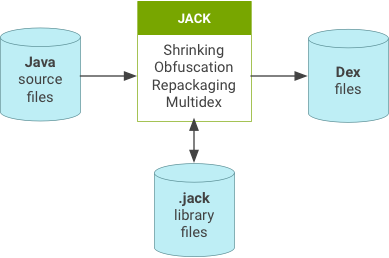
Figure 1. Jack overview.
The .jack file format contains the pre-compiled dex code for the library,
allowing for faster compilation (pre-dex).
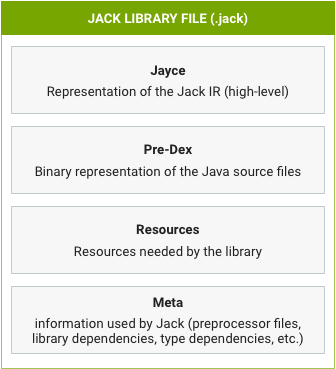
Figure 2. Jack library file contents.
Jill tool
The Jill tool translates existing .jar libraries into the new .jack library
format, as shown in Figure 3:
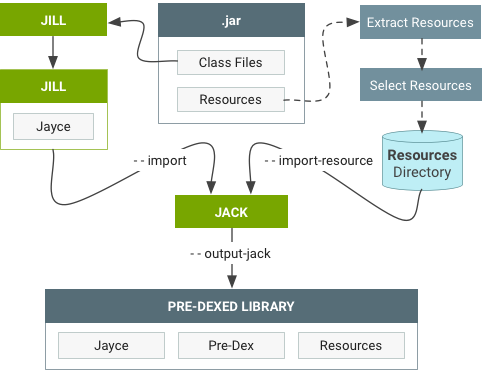
Figure 3. Workflow to import an existing .jar library.
Jack compilation server
The first time Jack is used, it launches a local Jack compilation server on your computer. This server:
- Brings an intrinsic speedup because it avoids launching a new host JRE JVM, loading Jack code, initializing Jack, and warming up the JIT at each compilation. It also provides very good compilation times during small compilations (for example, in incremental mode).
- Is a short-term solution to control the number of parallel Jack compilations. The server avoids overloading your computer (memory or disk issue) because it limits the number of parallel compilations.
The Jack server shuts itself down after an idle time without any compilation. It
uses two TCP ports on the localhost interface and isn't available externally.
All parameters (such as number of parallel compilations, timeout, and port
numbers) can be modified by editing the $HOME/.jack file.
$HOME/.jack file
The $HOME/.jack file contains the following settings for Jack server variables
in a full bash syntax:
SERVER=trueenables the server feature of Jack.SERVER_PORT_SERVICE=8072sets the TCP port number of the server for compilation purposes.SERVER_PORT_ADMIN=8073sets the TCP port number of the server for admin purposes.SERVER_COUNT=1is unused.SERVER_NB_COMPILE=4sets the maximum number of allowed parallel compilations.SERVER_TIMEOUT=60sets the number of idle seconds the server must wait without any compilation before shutting itself down.SERVER_LOG=${SERVER_LOG:=$SERVER_DIR/jack-$SERVER_PORT_SERVICE.log}sets the file where server logs are written. By default, this variable can be overloaded by an environment variable.JACK_VM_COMMAND=${JACK_VM_COMMAND:=java}sets the default command used to launch a JVM on the host. By default, this variable can be overloaded by environment variable.
Troubleshoot Jack compilations
| Problem | Action |
|---|---|
| Your computer becomes unresponsive during compilation or you experience Jack compilations failing on Out of memory error | Reduce the number of simultaneous Jack
compilations by editing $HOME/.jack and changing
SERVER_NB_COMPILE to a lower value. |
| Compilations are failing on Cannot launch background server | The most likely cause is TCP ports are already used on your computer. Change
ports by editing $HOME/.jack (SERVER_PORT_SERVICE and
SERVER_PORT_ADMIN variables). To unblock the situation, disable the
Jack compilation server by editing $HOME/.jack and changing
SERVER to false. Unfortunately this significantly slows down
your compilation and may force you to launch make -j with load
control (option -l of make). |
| Compilation gets stuck without any progress | To unblock the situation, kill the Jack background server using
jack-admin kill-server) then remove the temporary directories
contained in jack-$USER of your temporary directory
(/tmp or $TMPDIR). |
Find the Jack log
If you ran a make command with a dist target, the Jack log is located at
$ANDROID_BUILD_TOP/out/dist/logs/jack-server.log. Otherwise, you can find the
log by running jack-admin server-log. In case of reproducible Jack failures,
you can get a more detailed log by setting the following variable:
export ANDROID_JACK_EXTRA_ARGS="--verbose debug --sanity-checks on -D sched.runner=single-threaded"
Use standard makefile commands to compile the tree (or your project) and attach standard output and error. To remove detailed build logs, run:
unset ANDROID_JACK_EXTRA_ARGS
Jack limitations
By default, the Jack server can be used by only one user on a computer. To
support additional users, select different port numbers for each user and adjust
SERVER_NB_COMPILE accordingly. You can also disable the Jack server by setting
SERVER=false in $HOME/.jack. CTS compilation is slow due to current
vm-tests-tf integration. Bytecode manipulation tools (such as JaCoCo) aren't
supported.
Use Jack
Jack supports Java programming language 1.7 and integrates the additional features described in this section. Use standard makefile commands to compile the tree or your project.
Pre-dex
When generating a Jack library file, the .dex of the library is generated and
stored inside the .jack library file as a pre-dex. When compiling, Jack reuses
the pre-dex from each library. All libraries are pre-dexed.
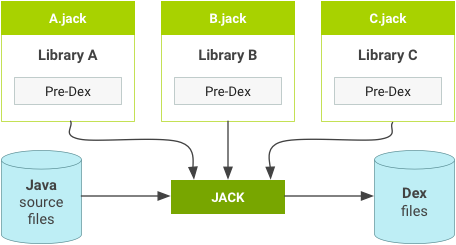
Figure 4. Jack libraries with pre-dex.
Jack doesn't reuse the library pre-dex if shrinking, obfuscation, or repackaging is used in the compilation.
Incremental compilation
Incremental compilation means that only the components touched since the last compilation (and their dependencies) are recompiled. Incremental compilation can be significantly faster than a full compilation when changes are limited to a set of components.
Incremental compilation is disabled by default (and is automatically deactivated
when shrinking, obfuscation, repackaging, or multi-dex legacy is enabled). To
enable incremental builds, add the following line to the Android.mk file of
the project that you want to build incrementally:
LOCAL_JACK_ENABLED := incremental
Shrinking and obfuscation
Jack uses ProGuard configuration files to enable shrinking and obfuscation. Common options include the following:
@-include-basedirectory-injars-outjars(only 1 output jar supported)-libraryjars-keep-keepclassmembers-keepclasseswithmembers-keepnames-keepclassmembernames-keepclasseswithmembernames-printseeds
Shrinking options include the following:
-dontshrink
Obfuscation options include the following:
-dontobfuscate-printmapping-applymapping-obfuscationdictionary-classobfuscationdictionary-packageobfuscationdictionary-useuniqueclassmembernames-dontusemixedcaseclassnames-keeppackagenames-flattenpackagehierarchy-repackageclasses-keepattributes-adaptclassstrings
Ignored options include the following:
-dontoptimize(Jack doesn't optimize)-dontpreverify(Jack doesn't preverify)-skipnonpubliclibraryclasses-dontskipnonpubliclibraryclasses-dontskipnonpubliclibraryclassmembers-keepdirectories-target-forceprocessing-printusage-whyareyoukeeping-optimizations-optimizationpasses-assumenosideeffects-allowaccessmodification-mergeinterfacesaggressively-overloadaggressively-microedition-verbose-dontnote-dontwarn-ignorewarnings-printconfiguration-dump
Repackaging
Jack uses jarjar configuration files to do repackaging. While Jack is compatible
with rule rule types, it isn't compatible with zap or keep rule types.
Multidex support
Jack offers built-in and legacy multidex support. Because dex files are limited to 65K methods, apps with over 65K methods must be split into multiple dex files. For more information, see Enable multidex for apps with over 64K methods.