

Android 9 از پیادهسازی انواع مختلف برشهای نمایشگر در دستگاهها پشتیبانی میکند. برشهای نمایشگر به شما امکان میدهد تجربههای فراگیر و لبهبهلبه ایجاد کنید و درعینحال فضای کافی برای حسگرهای مهم در جلوی دستگاهها فراهم کنید.
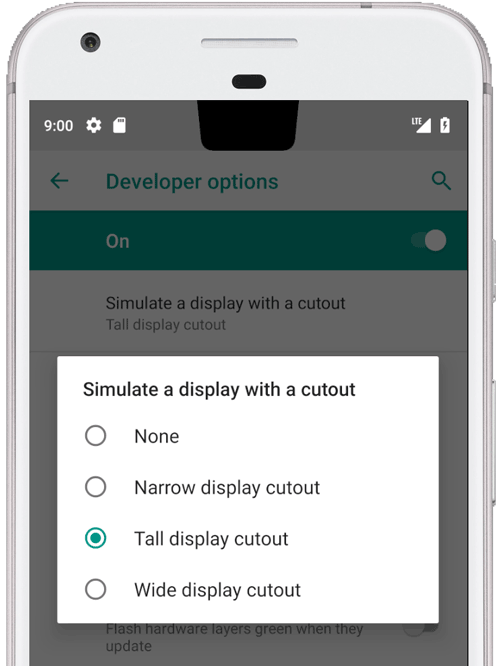
شکل ۱. برش نمایشگر بالا وسط
Android 9 از انواع برشهای زیر پشتیبانی میکند:
- مرکز بالا: برش در مرکز لبه بالا
- بالا غیرمتمرکز: بریدگی ممکن است در گوشه یا کمی دور از مرکز باشد
- پایین: برش در پایین
- دوگانه: یک برش در بالا و یک برش در پایین
مثالها و منبع
کد مدیر پنجره زیر در
PhoneWindowManager.java
نشان میدهد که قابهای نمایش چگونه وقتی
LAYOUT_IN_DISPLAY_CUTOUT_MODE_ALWAYS تنظیم نشده است در ناحیه امن درج میشوند.
// Ensure that windows with a DEFAULT or NEVER display cutout mode are laid out in
// the cutout safe zone.
if (cutoutMode != LAYOUT_IN_DISPLAY_CUTOUT_MODE_ALWAYS) {
    final Rect displayCutoutSafeExceptMaybeBars = mTmpDisplayCutoutSafeExceptMaybeBarsRect;
    displayCutoutSafeExceptMaybeBars.set(displayFrames.mDisplayCutoutSafe);
    if (layoutInScreen && layoutInsetDecor && !requestedFullscreen
            && cutoutMode == LAYOUT_IN_DISPLAY_CUTOUT_MODE_DEFAULT) {
        // At the top we have the status bar, so apps that are
        // LAYOUT_IN_SCREEN | LAYOUT_INSET_DECOR but not FULLSCREEN
        // already expect that there's an inset there and we don't need to exclude
        // the window from that area.
        displayCutoutSafeExceptMaybeBars.top = Integer.MIN_VALUE;
    }
    if (layoutInScreen && layoutInsetDecor && !requestedHideNavigation
            && cutoutMode == LAYOUT_IN_DISPLAY_CUTOUT_MODE_DEFAULT) {
        // Same for the navigation bar.
        switch (mNavigationBarPosition) {
            case NAV_BAR_BOTTOM:
                displayCutoutSafeExceptMaybeBars.bottom = Integer.MAX_VALUE;
                break;
            case NAV_BAR_RIGHT:
                displayCutoutSafeExceptMaybeBars.right = Integer.MAX_VALUE;
                break;
            case NAV_BAR_LEFT:
                displayCutoutSafeExceptMaybeBars.left = Integer.MIN_VALUE;
                break;
        }
    }
    if (type == TYPE_INPUT_METHOD && mNavigationBarPosition == NAV_BAR_BOTTOM) {
        // The IME can always extend under the bottom cutout if the navbar is there.
        displayCutoutSafeExceptMaybeBars.bottom = Integer.MAX_VALUE;
    }
    // Windows that are attached to a parent and laid out in said parent already avoid
    // the cutout according to that parent and don't need to be further constrained.
    // Floating IN_SCREEN windows get what they ask for and lay out in the full screen.
    // They will later be cropped or shifted using the displayFrame in WindowState,
    // which prevents overlap with the DisplayCutout.
    if (!attachedInParent && !floatingInScreenWindow) {
        mTmpRect.set(pf);
        pf.intersectUnchecked(displayCutoutSafeExceptMaybeBars);
        parentFrameWasClippedByDisplayCutout |= !mTmpRect.equals(pf);
    }
    // Make sure that NO_LIMITS windows clipped to the display don't extend under the
    // cutout.
    df.intersectUnchecked(displayCutoutSafeExceptMaybeBars);
}
SystemUI در ناحیه بریدگی ارائه میشود و باید تعیین کند کجا میتواند ترسیم کند. PhoneStatusBarView.java نمونهای از نمایشی ارائه میدهد که تعیین میکند برش نمایشگر کجا است، اندازه آن چقدر است، و آیا فروبرد از نوار پیمایش از ناحیه برش اجتناب میکند یا نه.
با ملغی کردن onApplyWindowInsets()، نما میتواند تعیین کند برش در کجا قرار دارد
و چیدمان خود را براساس آن بهروز کند.
@Override
    public WindowInsets onApplyWindowInsets(WindowInsets insets) {
        if (updateOrientationAndCutout(mLastOrientation)) {
            updateLayoutForCutout();
            requestLayout();
        }
        return super.onApplyWindowInsets(insets);
    }
این روشها نحوه مدیریت برشها در نوار وضعیت را در همه موارد شرح میدهند (یعنی مرکز بالا، بالای غیرمرکز، پایین، و برشهای دوگانه در همه چرخشها).
الزامات
برای اطمینان از اینکه برنامهها تحتتأثیر منفی برشها قرار نمیگیرند، باید مطمئن شوید که:
- نوار وضعیت حداقل تا ارتفاع برش در حالت عمودی گسترش مییابد
- ناحیه برش باید در حالتهای تمامصفحه و افقی دارای قاببندی باشد
دستگاهتان میتواند حداکثر یک بریدگی در هر لبه کوتاه (بالا و پایین) داشته باشد.
برای اطلاعات بیشتر، به CDD مراجعه کنید.
پیادهسازی
برای پیادهسازی برشهای نمایشگر در دستگاهتان، باید مقادیر زیر را برای «میانای کاربری سیستم» پیکربندی کنید.
| مقدار | شرح |
|---|---|
quick_qs_offset_height
|
حاشیه بالا را برای پانل تنظیمات فوری تعریف میکند. ساعت و باتری در فضای بالای پانل نمایش داده میشود. در values-land، روی |
quick_qs_total_height
|
ارتفاع کل پانل تنظیمات فوری-سریع (پانل تنظیمات فوری جمعشده) وقتی کشوی اعلانات ازهم باز شده است، ازجمله فضای بالای پانل حاوی ساعت.
Because of the way quick settings is laid out, the total height of the
quick-quick settings panel (including the offset) must be known statically,
so this value must be adjusted by the same delta
|
status_bar_height_portrait
|
ارتفاع پیشفرض نوار وضعیت از دیدگاه چارچوب. در اکثر دستگاهها، این مقدار بهطور پیشفرض روی ۲۴dp تنظیم میشود. وقتی برش وجود دارد، این مقدار را روی ارتفاع برش تنظیم کنید. درصورت تمایل، میتواند بهصورت اختیاری بلندتر از برش باشد. |
status_bar_height_landscape
|
ارتفاع نوار وضعیت در حالت افقی. برشها فقط در لبههای کوتاه دستگاه پشتیبانی میشوند، بنابراین این مقدار همیشه ارتفاع نوار وضعیت بدون تغییر خواهد بود. در دستگاهی که بریدگی ندارد، این معادل
|
config_mainBuiltInDisplayCutout
|
مسیری که شکل بریدگی را تعریف میکند. این رشتهای است که توسط
|
config_fillMainBuiltinDisplayCutout
|
مقدار بولی که تعیین میکند آیا مسیر برش (تعریفشده در بالا) در نرمافزار ترسیم شود یا نه. میتواند برای شبیهسازی برش یا برای پر کردن برش فیزیکی بهمنظور دستیابی به ضدعلیگرایی استفاده شود. اگر درست باشد، |
برای تعریفهای پیشفرض، این فایلهای dimens را ببینید:
نمونه رونهاد برای برش شبیهسازیشده:
<resources xmlns:xliff="urn:oasis:names:tc:xliff:document:1.2">

    <!-- The bounding path of the cutout region of the main built-in display.
         Must either be empty if there is no cutout region, or a string that is parsable by
         {@link android.util.PathParser}.

         The path is assumed to be specified in display coordinates with pixel units and in
         the display's native orientation, with the origin of the coordinate system at the
         center top of the display.

         To facilitate writing device-independent emulation overlays, the marker `@dp` can be
         appended after the path string to interpret coordinates in dp instead of px units.
         Note that a physical cutout should be configured in pixels for the best results.
         -->
    <string translatable="false" name="config_mainBuiltInDisplayCutout">
        M 0,0
        L -48, 0
        L -44.3940446283, 36.0595537175
        C -43.5582133885, 44.4178661152 -39.6, 48.0 -31.2, 48.0
        L 31.2, 48.0
        C 39.6, 48.0 43.5582133885, 44.4178661152 44.3940446283, 36.0595537175
        L 48, 0
        Z
        @dp
    </string>

    <!-- Whether the display cutout region of the main built-in display should be forced to
         black in software (to avoid aliasing or emulate a cutout that is not physically existent).
     -->
    <bool name="config_fillMainBuiltInDisplayCutout">true</bool>

    <!-- Height of the status bar -->
    <dimen name="status_bar_height_portrait">48dp</dimen>
    <dimen name="status_bar_height_landscape">28dp</dimen>
    <!-- Height of area above QQS where battery/time go (equal to status bar height if > 48dp) -->
    <dimen name="quick_qs_offset_height">48dp</dimen>
    <!-- Total height of QQS (quick_qs_offset_height + 128) -->
    <dimen name="quick_qs_total_height">176dp</dimen>

</resources>
اعتبارسنجی
برای اعتبارسنجی پیادهسازی برشهای نمایشگر، آزمایشهای CTS را در tests/framework/base/windowmanager/src/android/server/wm اجرا کنید.