
The page provides a comprehensive setup guide and index for Android large screen app compatibility configuration overlays.
Display
This section lists all configuration settings that affect display-level configuration.
| Name | Location | Type | Default |
|---|---|---|---|
ignoreOrientationRequest |
display_settings.xml |
config | falsetrue for large screens (>= 600dp) |
| Description Enables free user rotation of fixed-orientation activities on the specified display. Example:
          <display-settings>
              <config identifier="0" />
              <display
                  name="<display's uniqueId>"
                  ignoreOrientationRequest="true"/>
          </display-settings>
Use case or context The display ignores the requested orientation of all apps, and the app is letterboxed. Used on all large-screen devices and Android Automotive OS. This is the default for all large-screen devices with smallestScreenWidthDp >= 600dp
in Android 16 and higher. |
|||
config_letterboxIsDisplayRotationImmersiveAppCompatPolicyEnabled |
frameworks/base/core/res/res/values/config.xml |
Bool |
false |
| Description Enables rotation compatibility policy for immersive apps that prevents auto rotation into nonoptimal screen orientation while in fullscreen. This is necessary because immersive apps, such as games, often aren't optimized for all orientations and can have a poor UX when rotated. Additionally, some games rely on sensors for the gameplay, so users can trigger such rotations accidentally when auto rotation is on. Applies only if ignoreOrientationRequest is enabled.Use case or context Locks rotation for immersive apps. |
|||
Aspect ratio
This section lists all configuration settings that affect activity-level window configuration for aspect ratio.
| Name | Location | Type | Default |
|---|---|---|---|
config_fixedOrientationLetterboxAspectRatio |
frameworks/base/core/res/res/values/config.xml |
Float |
0.0 |
| Description Configures the aspect ratio of letterboxing for fixed orientation. Values less than or equal to 1.0
are ignored. Use case or context Configures the device default aspect ratio that works for most letterboxed apps. Usually closer to a square aspect ratio. |
|||
config_letterboxIsSplitScreenAspectRatioForUnresizableAppsEnabled |
frameworks/base/core/res/res/values/config.xml |
Bool |
false |
| Description Configures whether to use split-screen aspect ratio as a default aspect ratio for nonresizable apps. Use case or context Most nonresizable apps expect a portrait candybar phone layout. |
|||
config_letterboxIsDisplayAspectRatioForFixedOrientationLetterboxEnabled |
frameworks/base/core/res/res/values/config.xml |
Bool |
false |
| Description Configures whether to use display aspect ratio as a default aspect ratio for all letterboxed apps. Use case or context A configuration to programmatically use display aspect ratio instead of configuring a float value. |
|||
Camera
This section lists all configuration settings that affect apps upon callback of
onCameraOpened. These settings can affect display, activity, and camera
configuration.
| Name | Location | Type | Default |
|---|---|---|---|
config_isWindowManagerCameraCompatTreatmentEnabled |
frameworks/base/core/res/res/values/config.xml |
Bool |
false |
| Description Enables camera compatibility treatment for issues caused by orientation mismatch between camera buffers and an app window. This includes force rotation of fixed-orientation activities connected to the camera in fullscreen and showing a tooltip in split screen. Force rotate treatment can be disabled by the per-app override: OVERRIDE_CAMERA_COMPAT_DISABLE_FORCE_ROTATION.Use case or context Fixes rotated camera previews by force rotating the display to match the app's requested orientation. |
|||
config_isWindowManagerCameraCompatSplitScreenAspectRatioEnabled |
frameworks/base/core/res/res/values/config.xml |
Bool |
false |
| Description Configures whether an activity uses split-screen aspect ratio when camera compatibility treatment is enabled and the activity is connected to the camera in fullscreen. Use case or context Fixes stretched camera previews by letterboxing the activity to a candybar-like aspect ratio. Usually used together with force rotate treatment enabled ( config_isWindowManagerCameraCompatTreatmentEnabled and camera.enable_landscape_to_portrait) on landscape devices to fix stretched camera compatibility issues by simulating portrait candybar-like aspect ratio for the activity. |
|||
camera.enable_landscape_to_portrait |
System property | Bool |
false |
| Description Gates the OVERRIDE_CAMERA_LANDSCAPE_TO_PORTRAIT treatment.Forces camera output to be cropped and rotated by 90 degrees on cameras with landscape natural orientation to simulate portrait natural orientation. Reported camera sensor orientation is portrait for all landscape cameras on the device. Many apps don't handle this situation and display stretched images otherwise. Use case or context Enables the camera HAL rotate and crop treatment. For more information about the treatment, see Rotate, crop, scale. Add the following to your mk file at build time: PRODUCT_PROPERTY_OVERRIDES += camera.enable_landscape_to_portrait=trueThis treatment requires the device to support SCALER_ROTATE_AND_CROP in HAL. See CameraCharacteristics#SCALER_AVAILABLE_ROTATE_AND_CROP_MODES.For guidance on HAL-specific implementation for SCALER_ROTATE_AND_CROP, see metadata_definitions.xml. |
|||
config_isCameraCompatSimulateRequestedOrientationTreatmentEnabled |
frameworks/base/core/res/res/values/config.xml |
Bool |
true |
| Description Indicates whether camera compatibility treatment, which simulates an app's requested orientation, is enabled. The purpose of the treatment is to mitigate issues caused by an orientation mismatch between the camera buffer and the app window. This includes letterboxing fixed-orientation activities connected to the camera, cropping the camera buffer (rotate-and-crop), and sandboxing display rotation to match the app's expected orientation. Use case or context Simulate requested orientation for camera activities in:
In Android 17 and higher, this setting disables the force rotate treatment from config_isWindowManagerCameraCompatTreatmentEnabled
and unifies the policies for display rotation sandboxing, letterboxing, and camera
rotate-and-crop for fixed-orientation camera apps. |
|||
config_isCameraCompatSimReqOrientationLandscapeTreatmentEnabled |
frameworks/base/core/res/res/values/config.xml |
Bool |
false |
| Description Indicates whether camera compatibility treatment that simulates an app's requested orientation is enabled for landscape cameras. The purpose of the treatment is to mitigate issues caused by apps hardcoding portrait camera sensors. The treatment includes letterboxing fixed-orientation activities connected to the camera, cropping the camera buffer (rotate-and-crop), orienting the sensor to portrait, and sandboxing the display rotation to match the app's expected orientation. Use case or context In Android 17 and higher, this treatment is the same as the simulate requested orientation treatment for config_isCameraCompatSimulateRequestedOrientationTreatmentEnabled
but for devices with landscape-oriented cameras. |
|||
Background and UI
This section lists all configuration settings applied to the surface of the letterbox layer for UI customization, or on the activity level.
| Name | Location | Type | Default |
|---|---|---|---|
config_letterboxActivityCornersRadius |
frameworks/base/core/res/res/values/config.xml |
Integer |
0 |
| Description Configures the corner radius for an activity presented in letterbox mode. Values less than 0 enable rounded corners with a radius equal to the minimum between device
bottom corner radii. A default value of 0 turns off rounded corners logic
in AppCompatLetterboxPolicy.Use case or context Usually configured to match the physical device's rounded corners. |
|||
config_letterboxIsEnabledForTranslucentActivities |
frameworks/base/core/res/res/values/config.xml |
Bool |
false |
| Description Configures whether specific behavior for translucent activities letterboxing is enabled. Use case or context Enables translucent activities or modals to be letterboxed and constrained within the letterboxed activity configuration. The policy applies in TransparentPolicy. |
|||
config_isCompatFakeFocusEnabled |
frameworks/base/core/res/res/values/config.xml |
Bool |
false |
| Description Configures whether sending compatibility fake focus for split screen resumed activities is enabled. This is necessary because some game engines wait to get focus before drawing the app's content, which isn't provided by default in multi-window modes. Use case or context A legacy flag to apply compatibility treatment for Unity game engines for apps that become black after entering split-screen mode and are drawn only after the user taps and focuses the app. |
|||
config_letterboxBackgroundType |
frameworks/base/core/res/res/values/config.xml |
Integer |
0 |
| Description Configures the corner appearance of the letterbox background:
Use case or context This feature isn't launched due to existing performance issues. OEMs can create their own implementation of this feature, but AOSP won't handle any bugs. |
|||
config_letterboxBackgroundColor |
frameworks/base/core/res/res/values/config.xml |
Color |
@color/system_neutral1_1000 |
| Description Configures the color of the letterbox background if one of the following conditions is true:
Use case or context This feature isn't launched due to existing performance issues. OEMs can create their own implementation of this feature, but AOSP won't handle any bugs. |
|||
config_letterboxBackgroundWallpaperBlurRadius |
frameworks/base/core/res/res/values/config.xml |
Dimen |
38dp |
| Description Configures the blur radius for Option 3 in
R.integer.config_letterboxBackgroundType. Values less than 0 are ignored,
and 0 is used.Use case or context This feature isn't launched due to existing performance issues. OEMs can create their own implementation of this feature, but AOSP won't handle any bugs. |
|||
config_letterboxBackgroundWallpaperDarkScrimAlpha |
frameworks/base/core/res/res/values/config.xml |
Float |
0.54 |
| Description Configures the alpha of a black translucent scrim shown over the wallpaper letterbox background when Option 3 is selected for
R.integer.config_letterboxBackgroundType.
Values less than 0 or greater than or equal to 1 are ignored, and 0.0 (transparent) is used
instead.Use case or context This feature isn't launched due to existing performance issues. OEMs can create their own implementation of this feature, but AOSP won't handle any bugs. |
|||
config_enableSelfKillRecoveryBetweenInternalDisplays |
frameworks/base/core/res/res/values/config.xml |
Bool |
false |
| Description When true,
display moves between internal displays aren't exempt from the
self-kill recovery logic.Use case or context In Android 17 and higher, the self-kill recovery process is enabled only for display moves involving external monitors. However, the process is also effective on foldables with different densities on their inner and outer displays. This configuration enables the process for those devices. |
|||
Reachability and positioning
This section lists all configuration settings applied to activity-level window configuration for accessibility.
| Name | Location | Type | Default |
|---|---|---|---|
config_letterboxIsHorizontalReachabilityEnabled |
frameworks/base/core/res/res/values/config.xml |
Bool |
false |
| Description Configures whether horizontal reachability repositioning is enabled for letterboxed apps in full-screen windowing mode. Use case or context Repositions a portrait app to the left or right for easier access. |
|||
config_letterboxHorizontalPositionMultiplier |
frameworks/base/core/res/res/values/config.xml |
Float |
0.5 |
| Description Configures the horizontal position of the center of the letterboxed app window. 0 corresponds to the left side of the screen, and 1 corresponds to the right side.
If the given value is less than 0 or greater than 1, it's ignored. For non-book posture,
the central position (0.5) is used. For book posture, the left position (0.0) is
used.Use case or context Defaults to the center for a portrait letterboxed app. |
|||
config_letterboxIsVerticalReachabilityEnabled |
frameworks/base/core/res/res/values/config.xml |
Bool |
false |
| Description Configures whether vertical reachability repositioning is enabled for letterboxed apps in full-screen windowing mode. Use case or context Repositions a landscape app to the top or bottom for easier access. |
|||
config_letterboxVerticalPositionMultiplier |
frameworks/base/core/res/res/values/config.xml |
Float |
0.0 |
| Description Configures the vertical position of the center of the letterboxed app window. The value 0 corresponds to the upper side of the screen, and 1 corresponds to the lower
side.If the given value is less than 0 or greater than 1, it's ignored. For non-tabletop
mode, the central position (0.5) is used. For tabletop posture, the top position (0.0) is
used.Use case or context Configured to the center in large-screen devices for a landscape letterboxed app. |
|||
config_letterboxIsAutomaticReachabilityInBookModeEnabled |
frameworks/base/core/res/res/values/config.xml |
Bool |
false |
| Description Configures whether book posture automatic horizontal reachability positioning is enabled for letterboxed apps in full-screen windowing mode. Use case or context Lets a portrait letterboxed app move between left and right when a foldable device is in book posture. |
|||
config_letterboxBookModePositionMultiplier |
frameworks/base/core/res/res/values/config.xml |
Float |
0.0 |
| Description Configures the horizontal position of the center of the letterboxed app window when in book posture. 0 corresponds to the left side of the screen, and 1 corresponds to the right side.
If the given value is less than 0 or greater than 1, it's ignored, and the left position
(0.0) is used.Use case or context A multiplier for how much the app's position moves when repositioned in book posture. |
|||
config_letterboxDefaultPositionForBookModeReachability |
frameworks/base/core/res/res/values/config.xml |
Integer |
0 |
| Description Configures the default horizontal position of the letterboxed app window when reachability is enabled and an app is fullscreen in landscape device orientation and in book posture. When reachability is enabled, the position can change between left, center, and right:
0 (left) is
assumed.Use case or context The default position where the app is placed in book mode. |
|||
config_letterboxTabletopModePositionMultiplier |
frameworks/base/core/res/res/values/config.xml |
Float |
0.0 |
| Description Configures the vertical position of the center of the letterboxed app window when in tabletop posture. The value 0 corresponds to the upper side of the screen, and 1 corresponds to the lower
side. If the given value is less than 0 or greater than 1, it's ignored, and the top position
0.0 is used.Use case or context A multiplier for how much the app's position moves in a foldable device when in tabletop posture. |
|||
config_letterboxDefaultPositionForTabletopModeReachability |
frameworks/base/core/res/res/values/config.xml |
Integer |
0 |
| Description Configures the default vertical position of the letterboxed app window when reachability is enabled and an app is fullscreen in portrait device orientation and in tabletop posture. When reachability is enabled, the position can change between top, center, and bottom. This configuration defines the default one:
0 (top) is
assumed.Use case or context The default position where the app is placed in tabletop mode. |
|||
Settings
This section lists all configuration settings for customizing and enabling user aspect ratio settings in Settings > Apps > Aspect ratio.
| Name | Location | Type | Default |
|---|---|---|---|
config_appCompatUserAppAspectRatioSettingsIsEnabled |
frameworks/base/core/res/res/values/config.xml |
Bool |
false |
| Description Configures whether per-app user aspect ratio override settings are enabled. Use case or context Enables the aspect ratio settings feature in Settings > Apps > Aspect ratio. |
|||
config_appCompatUserAppAspectRatioFullscreenIsEnabled |
frameworks/base/core/res/res/values/config.xml |
Bool |
false |
| Description Configures whether the per-app fullscreen override option is enabled in user aspect ratio settings. Use case or context Enables the Full screen option in the user aspect ratio settings feature. This setting ignores an app's nonresizeability, aspect ratio, and orientation restrictions. |
|||
config_userAspectRatioOverrideEntries |
packages/apps/Settings/res/values/config.xml |
string-array |
All options are enabled by default. |
| Description Configures the app aspect ratio settings screen and user aspect ratio override options. Must be the same length and order as config_userAspectRatioOverrideValues.If changed, also update the Backup & Restore logic for choosing the closest value in UserAspectRatioBackupManager.java.Use case or context Mappings for the strings displayed in Settings. |
|||
config_userAspectRatioOverrideValues |
packages/apps/Settings/res/values/config.xml |
integer-array |
All AOSP strings are used by default. |
| Description Configures the app aspect ratio settings screen and user aspect ratio override options. Must be the same length and order as config_userAspectRatioOverrideEntries. The values must
correspond to PackageManager.UserMinAspectRatio.If changed, also update the Backup & Restore logic for choosing the closest value in UserAspectRatioBackupManager.java.Use case or context Mappings for the options to the backend PackageManager.UserMinAspectRatio:
|
|||
| Static light-themed drawables | packages/apps/Settings/res/drawable/ic_app_aspect_ratio_<option>.xml |
vector |
Landscape foldable-sized assets |
| Description Configures the available drawables:
Use case or context Light-themed static images under each option in Settings > App info > Aspect ratio. |
|||
| Static dark-themed drawables | packages/apps/Settings/res/drawable-night/ic_app_aspect_ratio_<option>.xml |
vector |
Landscape foldable-sized assets |
| Description Configures the available drawables:
Use case or context Dark-themed static images under each option in Settings > App info > Aspect ratio. |
|||
Dynamic drawableuser_aspect_ratio_education.json |
packages/apps/Settings/res/raw/user_aspect_ratio_education.json |
JSON | Landscape foldable-sized dynamic asset |
| Description Configures a Lottie illustration in UserAspectRatioAppsPageProvider.Use case or context An animation under the app list: Settings > Apps > Aspect ratio. |
|||
Education
This section lists all configuration settings for educating users on app compatibility features.
| Name | Location | Type | Default |
|---|---|---|---|
config_letterboxIsEducationEnabled |
frameworks/base/core/res/res/values/config.xml |
Bool |
false |
| Description Configures whether letterbox education is enabled for letterboxed fullscreen apps. Use case or context See figure 1 for a use case of letterbox education for fullscreen apps. |
|||
config_letterboxIsRestartDialogEnabled |
frameworks/base/libs/WindowManager/Shell/res/values/config.xml |
Bool |
false |
| Description Configures whether the extended restart dialog is enabled. Use case or context See figure 2 for a use case of extended restart dialog. |
|||
config_letterboxIsReachabilityEducationEnabled |
frameworks/base/libs/WindowManager/Shell/res/values/config.xml |
Bool |
false |
| Description Configures whether additional education about reachability is enabled. Use case or context See figure 3 for a use case of reachability education. |
|||
config_isSizeCompatRestartButtonEnabled |
frameworks/base/libs/WindowManager/Shell/res/values/config.xml |
Bool |
true |
| Description Configures whether the size compatibility restart button is enabled. Use case or context A restart button to restart configuration for nonresizable apps after window size changes, for example, when entering split-screen or rotating the display. See figure 4 for a use case of size compatibility restart button. |
|||
config_letterboxRestartButtonHideTolerance |
frameworks/base/libs/WindowManager/Shell/res/values/config.xml |
Integer |
100 |
| Description Configures the minimum tolerance of the percentage of activity bounds within its task to hide the size compatibility restart button. Values lower than 0 or higher
than 100 are ignored.100 is the default value where the activity must fit exactly within
the task to allow the size compatibility restart button to be hidden. The value 0 means
the size compatibility restart button is always hidden.Use case or context Used in close-to-square devices to hide the restart button when nonresizable apps are rotated by the user, but restarting the app won't drastically improve the UI. |
|||
The following images show use cases for the education overlay:
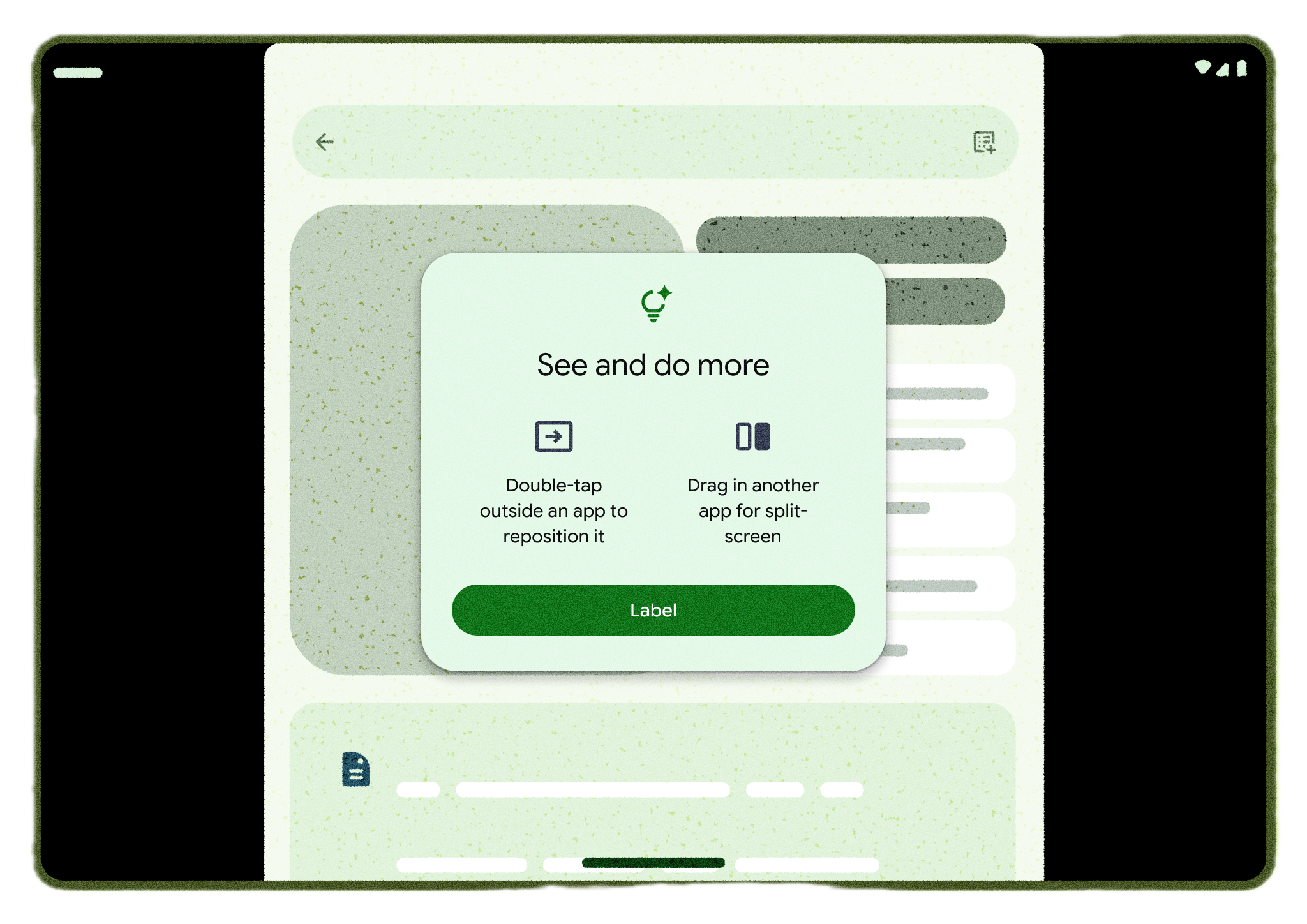
Figure 1. Letterbox education for fullscreen apps
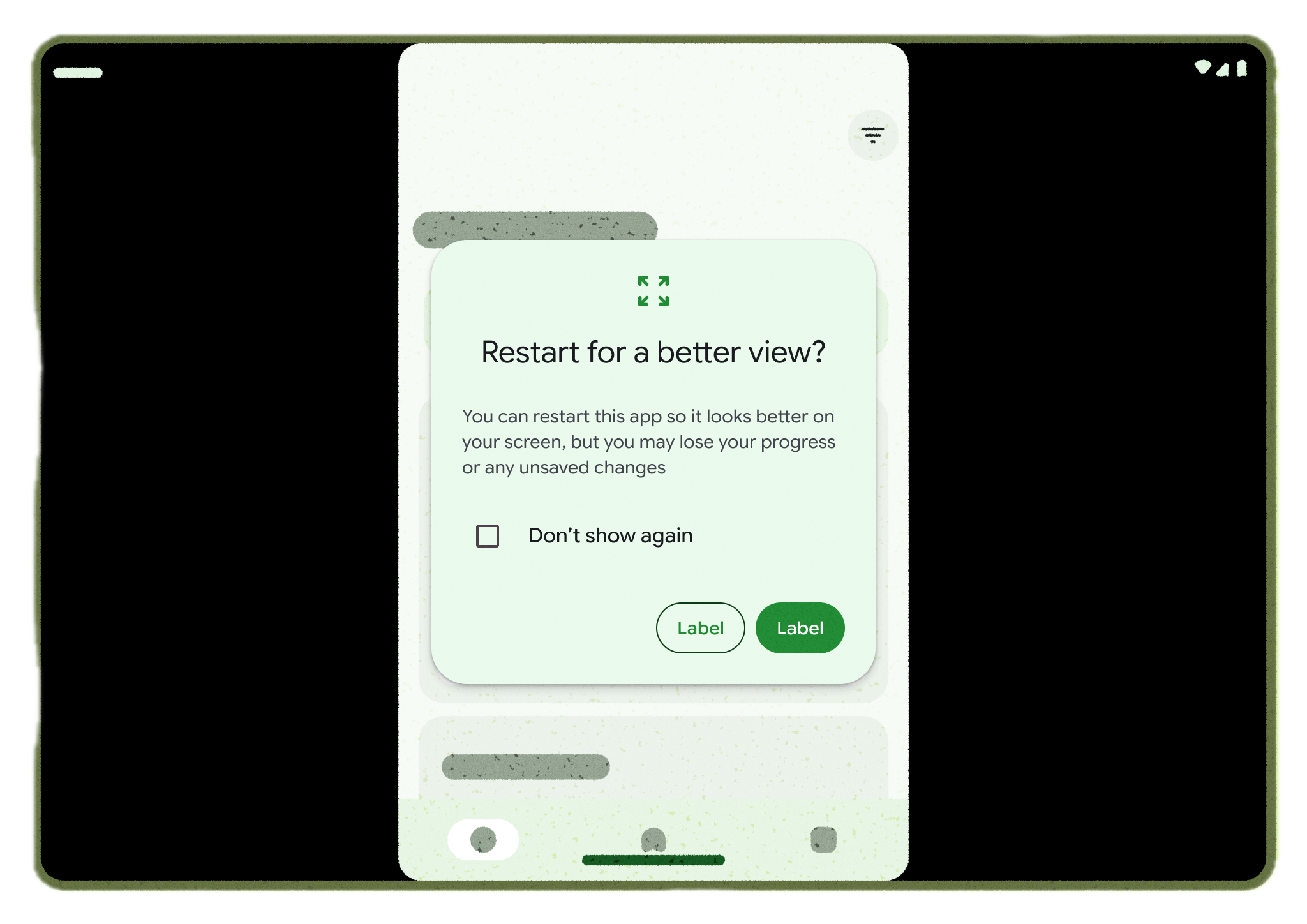
Figure 2. Extended restart dialog
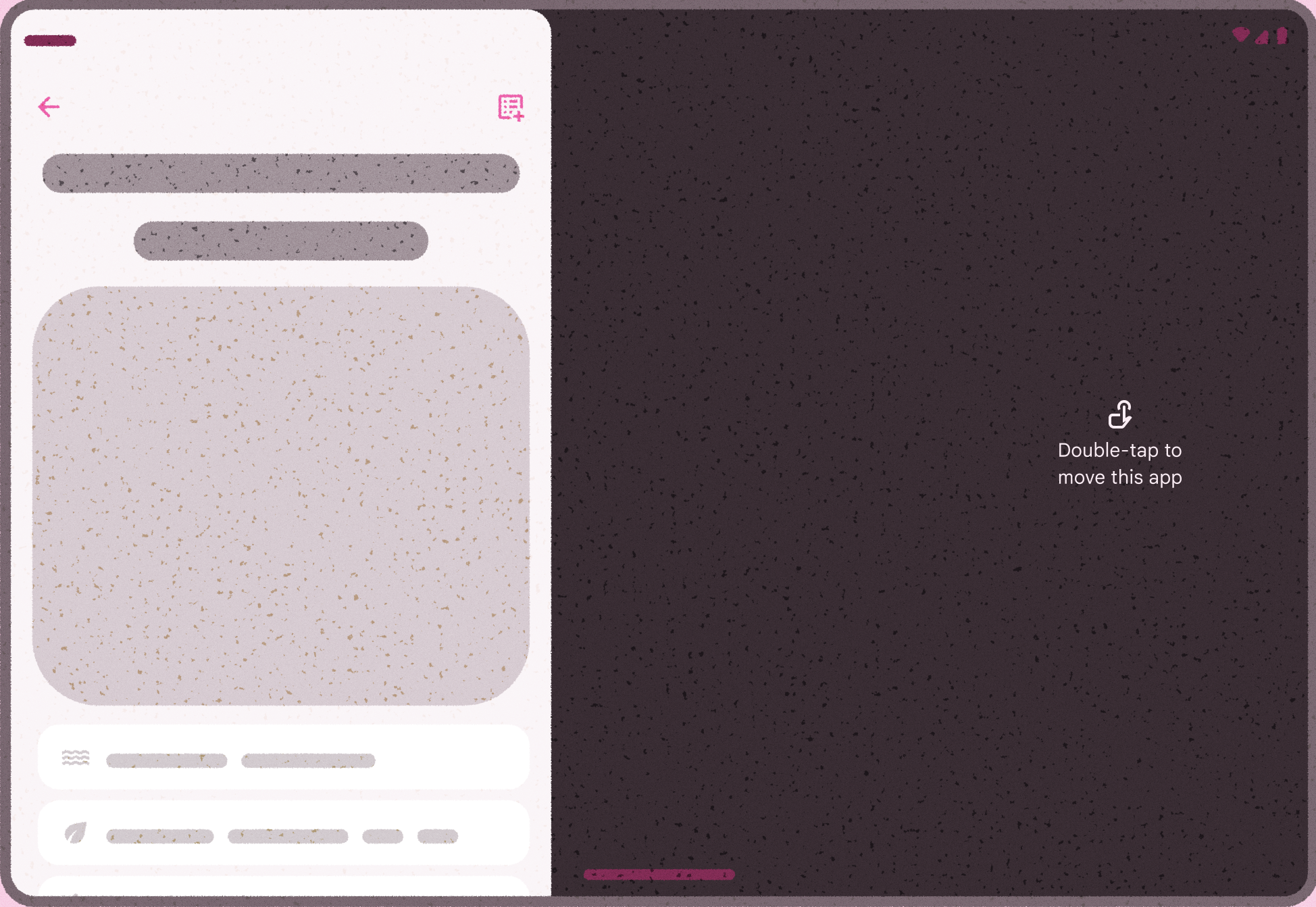
Figure 3. Reachability education.
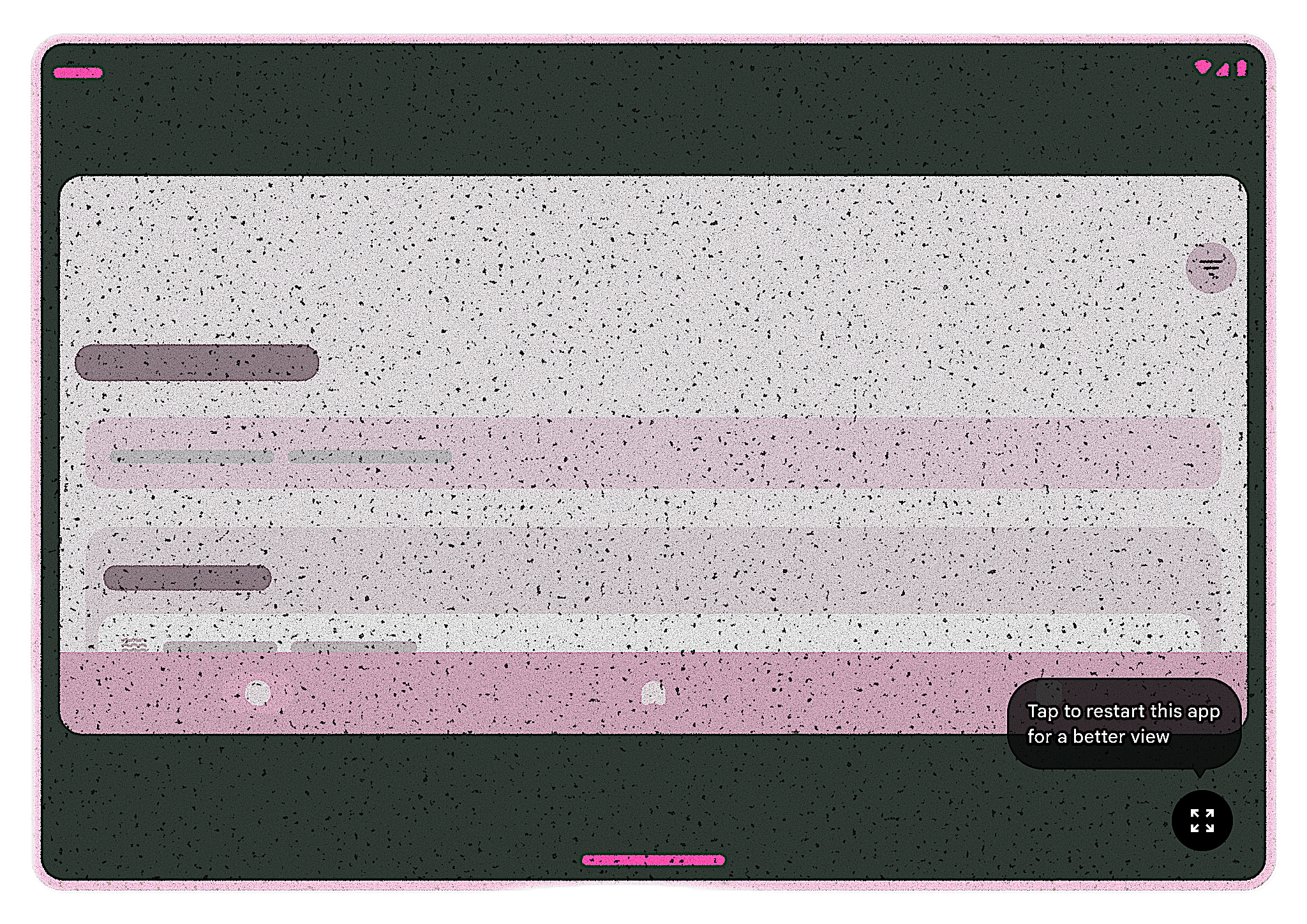
Figure 4. Size compatibility restart button.