
The cluster UI has traditionally been placed behind the steering wheel in a separate display. OEMs gradually combine the cluster and the IVI into a single display. This combined UI is the DriverUI.
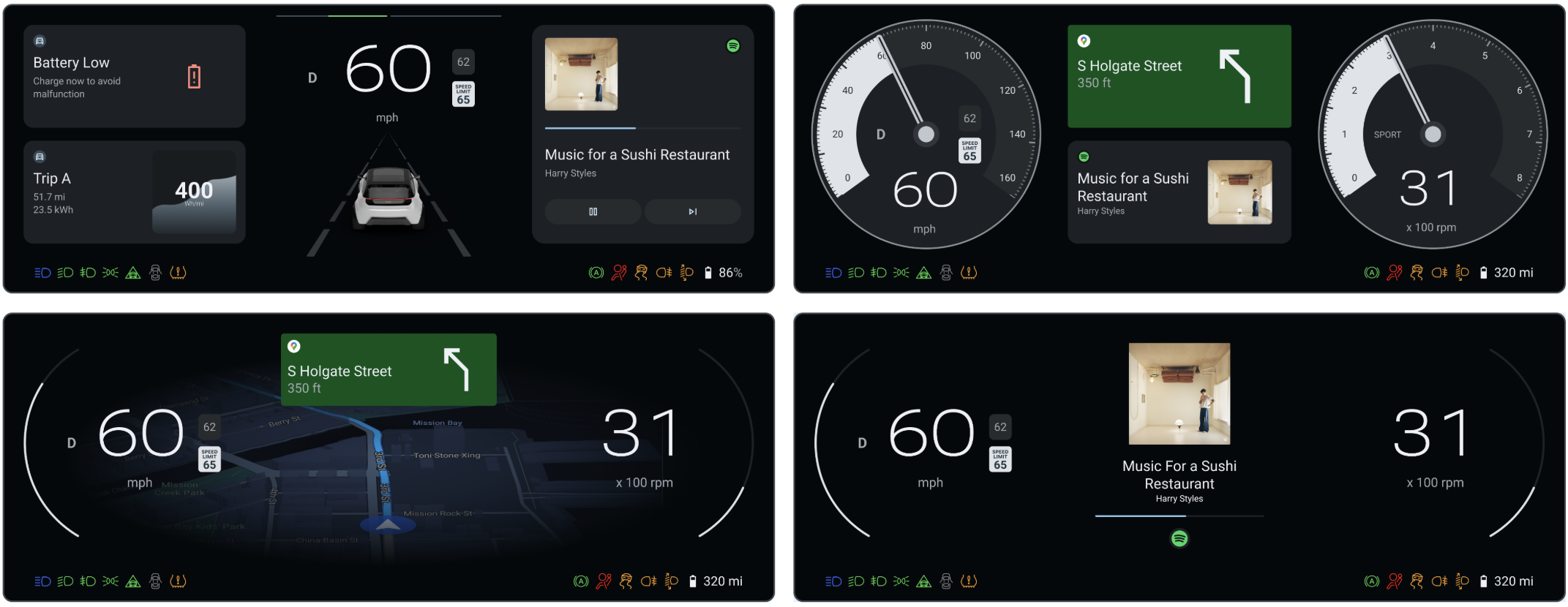
Figure 1. DriverUI.
The DriverUI is an Android system app that renders an entire instrument cluster display, excluding safety relevant or regulatory elements rendered by the high availability renderer (HAR). The DriverUI displays information related to media playback, telephone calls, maps, navigation, and more, and implements Automotive Design for Compose.
DriverUI as the default cluster activity
DriverUI runs as a privileged cluster app in Android and AAOS starts it automatically.
AAOS uses the ClusterHomeManager class, also referred to as
Cluster2, to build instrument clusters. This class specifies the
configuration needed to identify an instrument cluster implementation and how
AAOS interacts with it. Google provides reference implementations of Cluster2
APIs.
Platforms
You can build and run Display Safety on SDV. The software defined vehicle (SDV) platform:
- Requires two guest VMs.
- Runs HAR in SDV Media (also known as the rapid boot VM) in a guest VM.
- Runs DriverUI in another guest SDV IVI VM.
- Runs Safety Monitor on SDV Media VM.
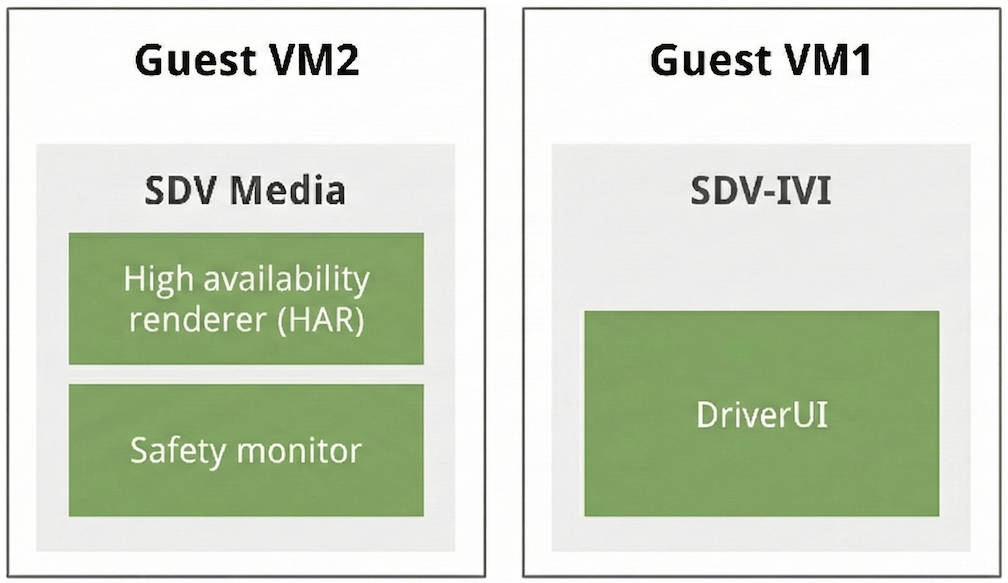
Figure 2. SDV platform architecture.
Blend HAR and DriverUI output
The HAR and the DriverUI use separate displays to render their UI. The two outputs are composite and appear as one image to the DriverUI.
To achieve this, the HAR controls the transparency of the areas in which Android output appears based on heartbeat messages from the DriverUI. When the DriverUI isn't available, the HAR detects the lack of heartbeats and renders DriverUI areas opaque and displays placeholders. When the heartbeats are received, the placeholders are removed and the DriverUI areas are set to be transparent.
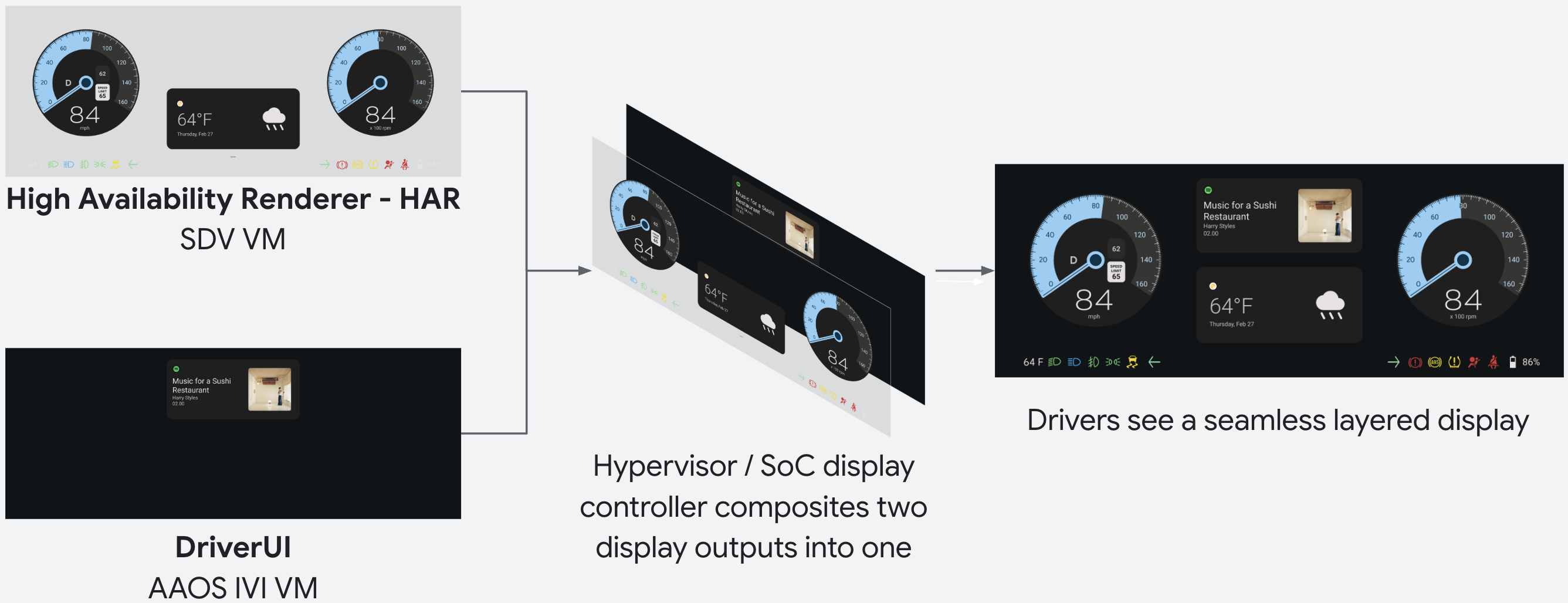
Figure 3. HAR and DriverUI composition.
Troubleshoot alpha composition and punch-through
Because the HAR is safety critical, its hardware display plane sits on top of the Android IVI display plane. When you build or debug custom views or external OpenGL ES surfaces in the HAR, verify how alpha values are set:
- Missing DriverUI output under the HAR plane: While the HAR receives
valid
HeartbeatRequestmessages from the DriverUI, the HAR must clear the DriverUI viewport region to transparent (alpha = 0.0) so the underlying Android cluster UI shows through. If a custom HAR layer or background draws opaque pixels (alpha = 1.0) over the DriverUI area, it blocks the Android output underneath. - Unintended transparent holes in custom 3D or OpenGL surfaces: When you
render an external OpenGL ES or 3D surface into a HAR node (such as a
custom 3D gauge or scene that writes
RGBpixels with an unused alpha byte left at0x00), explicitly set the alpha channel of opaque pixels to0xFF(alpha = 1.0). Leaving the alpha byte at0x00causes the compositor to treat those pixels as transparent (alpha = 0.0) and punches a hole straight through the HAR layer to the underlying Android IVI plane. - Cross-VM display diagnostics: Because the HAR (
sdv_media_har_cf) and Android IVI (sdv_ivi_cf_ds) run in separate guest VMs, runningadb shell dumpsys SurfaceFlingeron the Android IVI VM inspects only the Android layers and has no visibility into the overlying HAR plane.
DriverUI and HAR communication
The DriverUI and HAR communicate with each other using remote procedure calls (RPCs). The heartbeat message is an example of data sent over the RPC channel and consists of a timestamp as one of its fields.
gRPC is used for RPCs. On SDV, SDV comms provides the SDV Gateway Client to discover and establish a channel from the DriverUI to the HAR. The gRPC service defines a protocol buffer file:
// Heartbeat.
rpc Heartbeat(HeartbeatRequest) returns (HeartbeatResponse) {}

// Document switched in the DriverUI.
rpc DocumentSwitched(DocumentSwitchedRequest) returns (DocumentSwitchedResponse) {}

// Document updated in the DriverUI. Unary RPC.
rpc DocumentUpdated(DocumentUpdatedRequest) returns (DocumentUpdatedResponse) {}

// Document updated in the DriverUI. Requests are streamed with each request
// containing a part of the document and the entire document is assembled from these
// chunks by the server.
rpc DocumentUpdatedStreaming(stream DocumentUpdatedRequest) returns (DocumentUpdatedResponse) {}

/// Request for HAR to change design tokens.
rpc DesignTokenUpdate(DesignTokenUpdateRequest) returns (DesignTokenUpdateResponse) {}

// Request to change the current locale used in HAR.
rpc LocaleUpdate(LocaleUpdateRequest) returns (LocaleUpdateResponse) {}

// Requests to swap a certain variant at a Figma node.
rpc ChangeVariant(ChangeVariantRequest) returns (ChangeVariantResponse) {}

// Requests to change the container (display/root node) configuration (dpi, size) in HAR.
rpc ChangeContainerConfiguration(ChangeContainerConfigurationRequest) returns (ChangeContainerConfigurationResponse) {}
The request and response details are in the Display Safety source at
packages/apps/Car/DriverUI/proto/driverui.proto in the ub-automotive source
code repository.
On the SDV platform, SDV comms provides the SDV Gateway Client to discover and establish a gRPC channel from the DriverUI to the HAR.
Executing these commands using the IVI terminal send communication to SDV Media, triggering theme updates across the entire cluster.
adb shell cmd car_service inject-key -d 1 9 # Purple Theme
adb shell cmd car_service inject-key -d 1 8 # Blue Theme
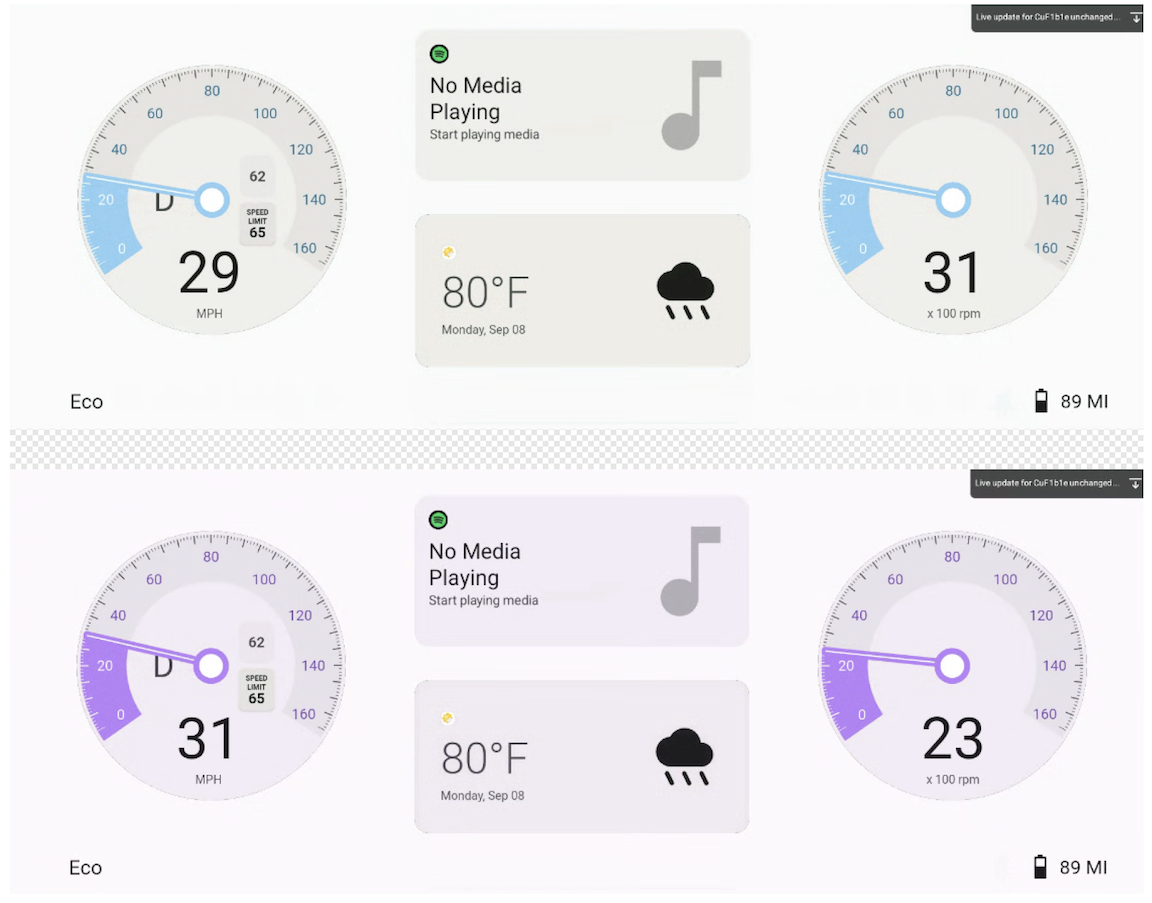
Figure 4. RPC communication to change both DriverUI and HAR theme.
Display Media, Maps, and Telephony information on cluster
Through communication with the IVI, the DriverUI can display information for Media, Maps, and Telephony within the reference cluster. Although Media serves as the default state in the reference implementation, the display updates based on active services according to the following priority:
- Maps
- Telephony
- Media
The system automatically prioritizes showing Maps navigation or active Telephony services over the default Media state.
The various DriverUI display states are illustrated in the following figure:
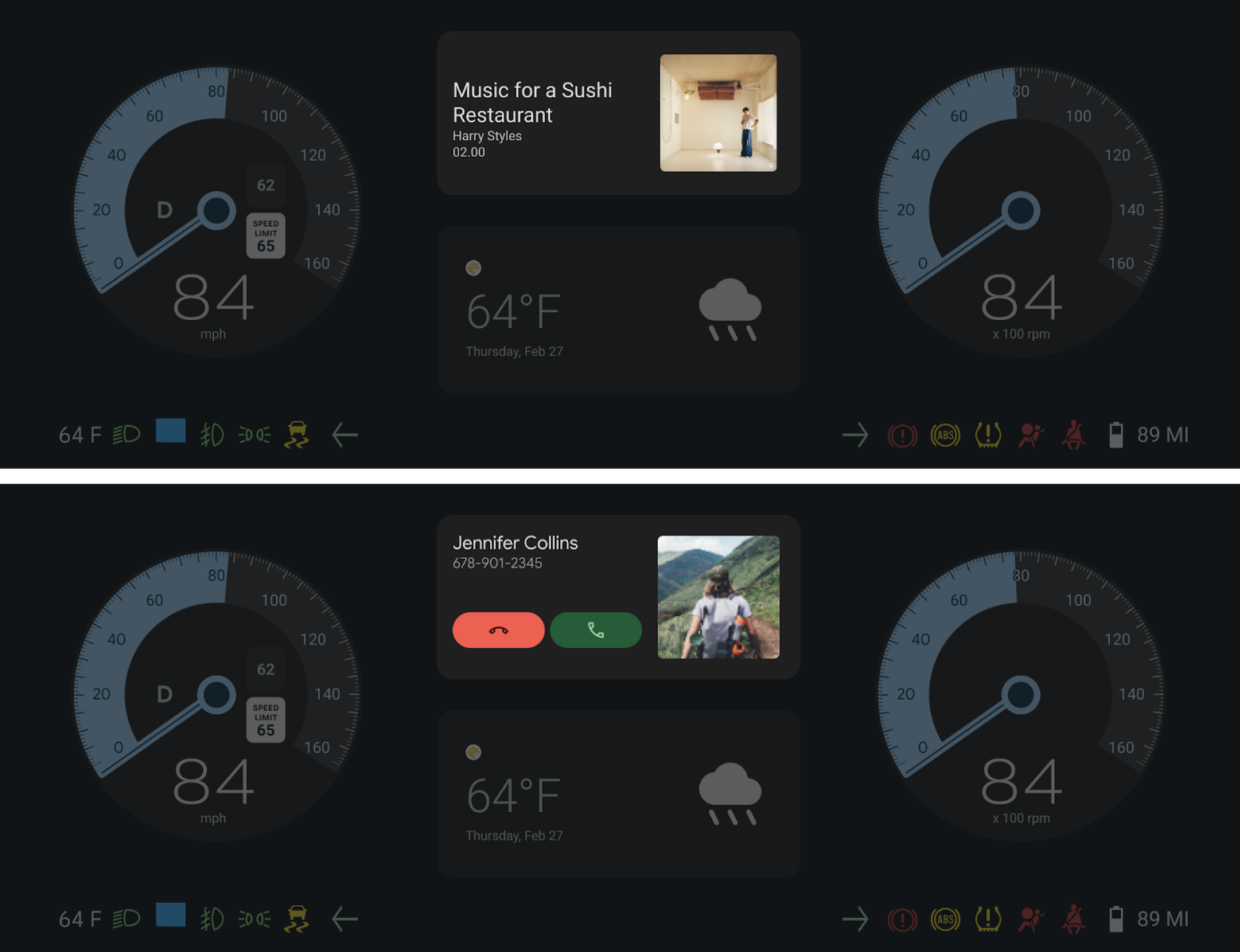
Figure 5. DriverUI showcasing Media and Telephony section in full cluster.
Automotive Design for Compose integration
The DriverUI implements Automotive Design for Compose to allow designs (Figma) to showcase and iterate upon directly within the Android app. This integration bridges the gap between design and development by enabling the rendering of design documents in the runtime environment.
Access design assets
Sample Figma documents for the DriverUI are part of the codebase. To access and modify these designs:
- Launch DriverUI with the local Automotive Design for Compose DCF design file
from
packages/apps/Car/DriverUI/src/main/assets/figma/*.dcf. - Locate the
packages/apps/Car/DriverUI/src/main/assets/DriverUI.figasset file. - Import this file into Figma to view the source designs or make changes.
Automotive Design for Compose version
- Gradle uses the Automotive Design for Compose version specified for
designcomposeinpackages/apps/Car/libs/aaos-apps-gradle-project/gradle/libs.versions.toml. - Automotive Design for Compose releases are available on the releases page.
Live update configuration
Automotive Design for Compose supports live updates in development mode, allowing changes made in Figma to be instantly rendered in DriverUI. This facilitates rapid testing and faster design iteration cycles.
Run the following command to set the Figma token for DriverUI:
adb shell am startservice \
  -n "com.android.car.driverui/com.android.designcompose.ApiKeyService" \
  -a setApiKey \
  -e ApiKey $FIGMA_ACCESS_TOKEN \
  --user 0
Dual VM design document synchronization
In a dual VM setup, design updates must propagate across boundaries to keep consistency.
- DriverUI fetches the latest Figma design document and transmits to the HAR using the gRPC communication channels detailed on this page.
- As a result, the full cluster updates with the latest Figma design iterations, keeping both VMs in sync with the design source.
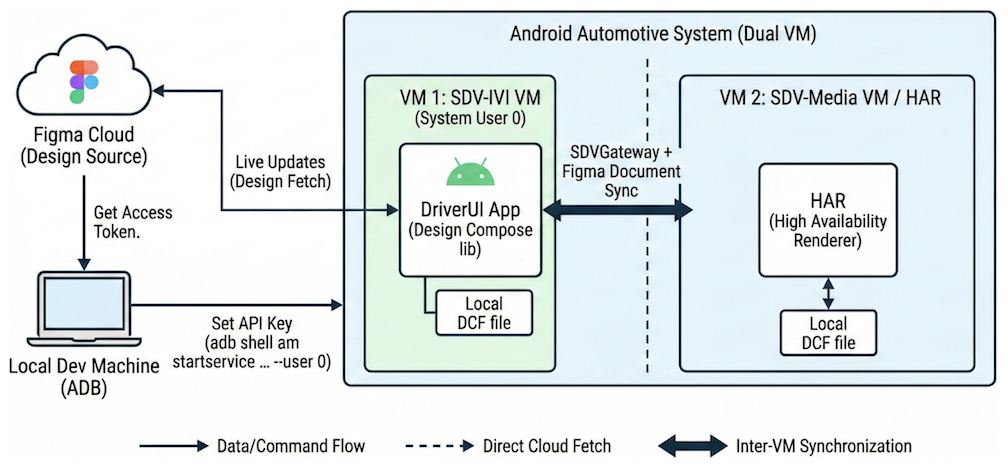
Figure 6. Live update of design document from Figma to DriverUI and HAR.
Secure the gRPC channel
gRPC has SSL and TLS integration and promotes the use of SSL and TLS to authenticate the server and to encrypt all data exchanged between the client and the server. Optional mechanisms are available for clients to provide certificates for mutual authentication. For more information on gRPC authentication, see Authentication.