
SDV Boot Mode defines how the SDV Service Discovery agent in an SDV VM behaves when attempting to connect to other Service Discovery agents (running in other SDV VMs) to establish a secure mesh. This is similar to the existing device state concept from Android Verified Boot.
SDV Boot Mode is used when provisioning or updating the Vehicle VM Trust
Store (VVM Trust Store, also referred to as vvmtruststore).
SDV Secure Mesh behavior
The Service Discovery mesh is in one of the following states depending on boot
values it receives: Normal, Warning, or Fatal.
In production vehicles delivered to customers, the SDV Secure Mesh must be in
the Normal state. The mesh requires diagnostics intervention to switch from a
Normal to Warning state. In a production environment (for example, not
development or debugging), the Warning state takes place only during
provisioning.
Fatal is a fundamental failure, similar to a system_ext image failing
signature verification in the Android bootloader. If the SDV Secure Mesh
transitions from Normal to Fatal solely due to an over-the-air (OTA) update,
the update is considered bad and the mesh falls back to the original Normal
version.
The following sections describe the states in more detail.
Normal
- System boot is
SECUREfrom Service Discovery's perspective. - Service Discovery connects only with peers that securely booted. A securely booted peer implies that the SDV Secure Mesh is also secure.
Warning
- System boot might have been compromised as some verifications are disabled.
- Service Discovery connects only with peers that share the exact same set of disabled verifications, ensuring that all peers in the SDV Secure Mesh share identical security properties.
- The success of a peer boot can't be verified due to local failures or disabled features.
- Outside of a development environment or situation, this has the following
implications:
- User data must not be available. That is, it must neither be transmitted nor affected by communication over the SDV Secure Mesh.
- Only services needed for provisioning flows should be available when the mesh is in this state.
Fatal
- A critical error during the system boot stages.
- There's at least one fundamental failure or error that prevents the Service Discovery agent from establishing a mesh. Local services can't talk to remote services.
- System boot is
UNSECUREfrom Service Discovery's perspective.
SDV Boot Mode
SDV Boot Mode has two possible values: LOCKED and UNLOCKED. For Service
Discovery mesh establishment, LOCKED indicates that verification errors are
fatal, and UNLOCKED means they aren't.
| Condition | SDV Boot Mode | |
|---|---|---|
UNLOCKED |
LOCKED |
|
| Local VVM Trust Store empty | Warning | Fatal |
| Local DICE chain missing | Fatal | Fatal |
| Local DICE chain verification failure | Warning | Fatal |
| Local SDV and AVB mode match | See table in Local SDV and AVB mode match | |
| Remote device mode value comparison | See table in Remote device mode value comparison | |
Remote uds_pubs match failure |
Warning | Fatal |
| Remote DICE chain verification failure (using DICE policies) | Warning | Fatal |
| Remote authentication handshake failure | Fatal | Fatal |
Local SDV and AVB Mode match
The following table shows how AVB mode and SDV Boot Mode affect the SDV Secure Mesh behavior. The colors are as defined in the Android-specific integration section of the AVB documentation.
| AVB Mode x SDV Boot Mode | SDV Boot Mode | ||
|---|---|---|---|
UNLOCKED |
LOCKED |
||
AVB LOCKED |
Green | Warning | Normal |
| Yellow | Fatal | Fatal | |
AVB UNLOCKED |
Orange | Warning | Fatal |
Device mode value
In a DICE chain, every CDI certificate has a mode value. This value describes the security state of that layer based on its configuration input. To express the security stance of all software on the device, the SDV specification defines a Device Mode value. This value derives from the mode value of all CDI stages in the DICE chains relevant to a given SDV VM (that is, Android HLOS and Secure World) and uses the following enumeration:
enum DeviceMode {
  NotConfigured = 0,
  Recovery = 1,
  Debug = 2,
  Normal = 3,
}
Algorithm
The algorithm to calculate the Device Mode Value is as follows:
- Specify
deviceModeasDeviceMode::Normal. - Specify
diceChainListas the list of DICE chains relevant to an SDV VM. - For each
diceChainindiceChainList:- Specify
cdiListas the list of CDI certificates indiceChain: - For each
cdiCertincdiList:- Specify
cdiDeviceModeas theDeviceModecorresponding tocdiCert.mode. - Set
deviceModetomin(deviceMode, cdiDeviceMode).
- Specify
- Specify
- Return
deviceMode.
Remote device mode value comparison
A Service Discovery agent connects only with other agents that have the same Device Mode Value.
The Device Mode value ensures that a mesh can't have members with different security properties. The resulting mesh has a uniform security stance between all of its members.
| Device Mode value | Remote | ||||
|---|---|---|---|---|---|
| Not configured | Debug | Recovery | Normal | ||
| Local | Not configured | Fatal | Fatal | Fatal | Fatal |
| Debug | Fatal | Warning | Fatal | Fatal | |
| Recovery | Fatal | Fatal | Warning | Fatal | |
| Normal | Fatal | Fatal | Fatal | Normal | |
Factory provisioning flow
This is the provisioning flow at the vehicle assembly line, where public key
infrastructure is assumed to not be available. This flow depends on a 32-byte
value stored in one-time-programmable (OTP) memory called Vehicle VM (VVM)
Factory Trust or vvmfactorytrust. When set, this value is passed
to the kernel as a parameter named androidboot.sdv.vvmfactorytrust.
All VMs in an ECU must have the same SDV Boot Mode and VVM Factory Trust.
Initial state
All ECUs are initially SDV Boot Mode in UNLOCKED mode, with blank
VVM Factory Trust and Vehicle VM Trust Store, other than any uds_certs
present on the vvmtruststore. Figure 1 depicts an example where there are
three SDV VMs (VM-A, VM-B, and VM-C) distributed in two separate ECUs (ECU-0 and
ECU-1):

Figure 1. Factory provisioning, initial state.
Step 1: Run sdv_provisioning_tool
Boot up all VMs from all ECUs.
On each VM, run sdv_provisioning_tool.
- The tool communicates with the local Service Discovery agent and waits for
it to signal that the SDV Secure Mesh is complete, and the agent has written
the list of UDS public keys to
/vvmtruststore/uds_pubs. - When this occurs, the tool gets the hash of the just-written
/vvmtruststore/uds_pubsand outputs it.
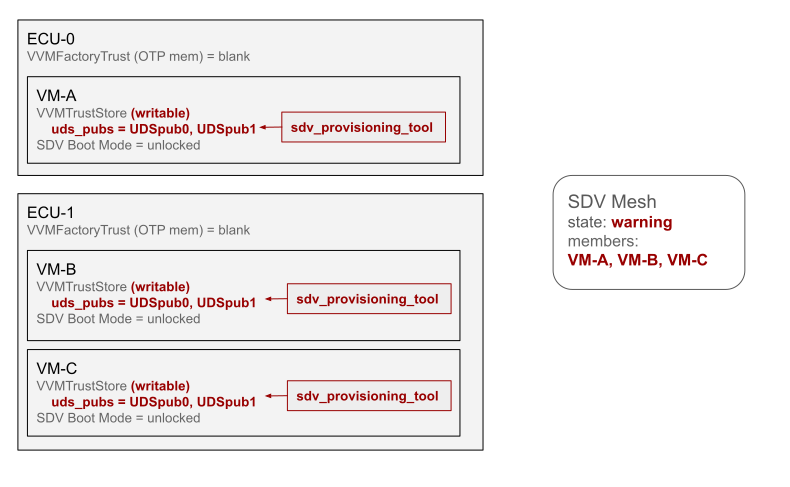
Figure 2. Factory provisioning, step 1.
Step 2: Write VVM Factory Trust
On one VM of each ECU:
- Write the hash of
/vvmtruststore/uds_pubsthat was output bysdv_provisioning_toolin the previous step into VVM Factory Trust. How this writing is performed is OEM or vendor specific and out of scope of this specification.

Figure 3. Factory provisioning, step 2.
Step 3: Reboot in SDV Boot Mode locked
Reboot all VMs in all ECUs in SDV Boot Mode in LOCKED mode.
The Service Discovery agent trusts VMs in ECUs with the UDS public keys listed
in uds_pubs because the hash of this file matches VVM Factory Trust.
Because the ECUs were provisioned together, they're permanently bound together and can effectively be considered as a single piece of hardware from a DICE chain verification perspective.

Figure 4. Factory provisioning, step 3.
Parts replacement flow
This is the provisioning flow at an authorized car repair workshop or garage, where a faulty ECU has to be replaced with a new, unprovisioned one.
This flow depends on UDS certificates issued either directly by the root
authority stated in vvmconfig or indirectly, through some chain of
intermediate authorities.
Initial state
All VMs are already factory provisioned and are running in SDV Boot Mode in
LOCKED mode.
Figure 5 depicts an example where ECU-0 is malfunctioning and needs to be replaced:

Figure 5. Parts replacement, initial state.
Step 1: Install the new ECU
Install the new ECU, which is in a blank, unprovisioned state.
In Figure 6, when ECU-2 (the replacement ECU) is powered up, there are two
disjoint SDV Secure Meshes: one in Warning state and another in Normal
state. Both SDV Secure Meshes are incomplete.

Figure 6. Parts replacement, step 1.
Step 2: Reboot in SDV Boot Mode unlocked
Reboot all VMs of all ECUs in SDV Boot Mode in UNLOCKED mode.
In Figure 7, VM-B and VM-C join the Warning SDV Secure Mesh, which is
complete.

Figure 7. Parts replacement, step 2.
Step 3: Run sdv_provisioning_tool
On each VM, run sdv_provisioning_tool.
The tool communicates with the local Service Discovery agent and waits for it to
signal that the SDV Secure Mesh is complete, and the agent has written the list
of UDS public keys to /vvmtruststore/uds_pubs.
When this occurs, the tool gets the hash of the just-written
/vvmtruststore/uds_pubs and outputs it, but this hash isn't used in this flow.
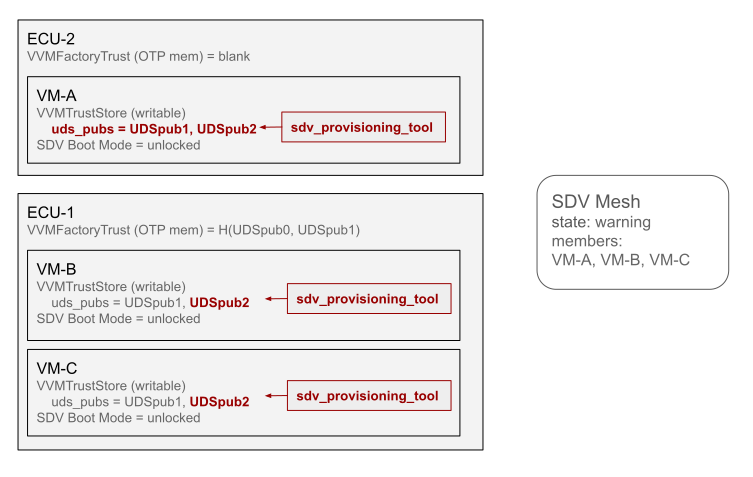
Figure 8. Parts replacement, step 3.
Step 4: Install UDS certificates
- Extract
/vvmtruststore/uds_pubsfrom an arbitrary SDV VM. It doesn't matter which one because it's the same for all VMs in the same SDV Secure Mesh. - Retrieve provisioning certificates for all the UDS public keys listed in
that
/vvmtruststore/uds_pubs.- This step usually involves sending the extracted UDS public keys (or the
/vvmtruststore/uds_pubsfile) to a remote provisioning server. The server either retrieves pre-existing certificates or generates new ones by checking the received public keys against a database of known UDS public keys built during ECU manufacturing.
- This step usually involves sending the extracted UDS public keys (or the
- Write the
/vvmtruststore/uds_certsof each SDV VM.

Figure 9. Parts replacement, step 4.
Step 5: Reboot in SDV Boot Mode locked
Reboot all VMs in SDV Boot Mode in LOCKED mode.
If the SDV Secure Mesh is incomplete, go back to Step 2.

Figure 10. Parts replacement, step 5.