
The Vehicle Mode and Power Management (VPM) agent helps the vehicle control the Software Defined Vehicle (SDV) ecosystem power system.
The VPM agent facilitates communication of vehicle and power modes to various software components, including SDV agents and service bundles within SDV.
The VPM agent enables SDV components to keep track of the vehicle's current state, such as its operational mode (for example, parked or driving) and power status (for example, on, suspend, or power off). The vehicle state is the same across all vehicle software; however, the power state is unique to every SDV VM in the vehicle.
The VPM agent signals the SDV system platform to start specific power modes. This capability optimizes power consumption and decreases boot time in case of a resume, and helps ensure the efficient operation of the SDV's diverse software components.
This page describes the key requirements, constraints, and dependencies associated with the VPM agent. It explains the expected functionality and integration guidelines for the VPM agent to original equipment manufacturers (OEMs) and other SDV developers.
Architecture
Figure 1 illustrates the power management architecture:

Figure 1. Power management architecture.
The VPM agent receives power mode commands (such as shutdown and suspend) from the OEM's power management service.
The VPM agent forwards these commands to the appropriate SDV agents and waits for the agents to execute them. This coordinated approach helps ensure a smooth and safe transition between power modes, minimizing the risk of data loss or system instability.
After all SDV agents complete their power transitions, the VPM agent notifies the OEM, enabling the OEM systems to proceed with any necessary actions (for example, moving on to the next state or shutting down). Power transitions are blocking; the transition occurs only when all SDV agents execute the transition within an OEM-defined timeout.
The state machine for power management is shown in the following diagram:
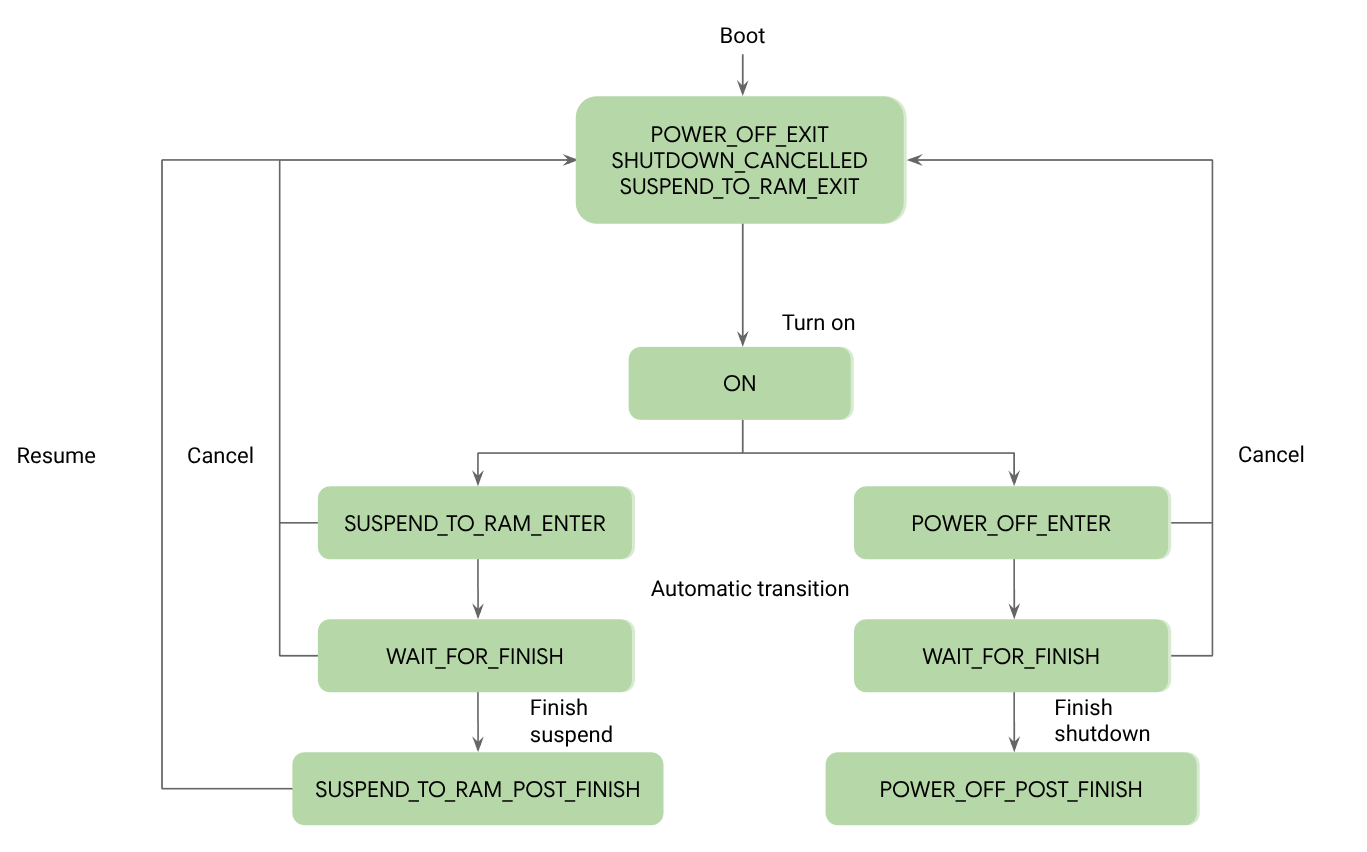
Figure 2. Power management state machine.
The VPM agent works with the orchestration and lifecycle management system to notify SDV service bundles of any power mode updates. This lets the service bundles handle power transitions and avoid disruptions to their operation. See Handle suspend and resume for details on using power management states with service bundles and handling SDV communication.
Power states
The allowed states for power management in SDV are as follows:
| State | Explanation |
|---|---|
REPORT_UNSPECIFIED |
The default value if no report is specified. |
POWER_OFF_EXIT |
The VM is booting from a cold boot. SDV agents start with init.rc. |
SUSPEND_TO_RAM_EXIT |
The VM is resuming from suspend to RAM. SDV agents resume from RAM and get a notification about the power update if they subscribed to power state notifications. |
ON |
The VM is running normally. |
POWER_OFF_ENTER |
The VM is preparing for power off. OEM apps that can be cleaned up early should be cleaned up in this state. OEM apps can still rely on SDV agents running at this stage. SDV agents shouldn't suspend or power off at this stage because OEM apps might still need to communicate with them. |
SUSPEND_TO_RAM_ENTER |
The VM is preparing for suspend to RAM. OEM apps that can be cleaned up early should be cleaned up in this state. OEM apps can still rely on SDV agents running at this stage. SDV agents shouldn't suspend or power off at this stage because OEM apps might still need to communicate with them. |
WAIT_FOR_FINISH |
The VM has finished the initial cleanup and is waiting for the signal from the OEM to complete or cancel a power off or suspend. |
SHUTDOWN_CANCELLED |
The OEM has requested a cancellation for shutdown preparation. This request can occur no later than WAIT_FOR_FINISH. OEM apps are requested by the lifecycle manager to undo the suspend or power off preparation. |
POWER_OFF_POST_FINISH |
Following the FINISH_SHUTDOWN request from the OEM, the VM is
finishing the final cleanup and powering off the underlying platform. SDV agents should clean up before power off. |
SUSPEND_TO_RAM_POST_FINISH |
The VM is about to suspend to RAM and suspend the underlying platform to RAM. OEM apps shouldn't rely on SDV agents at this point because they are also suspended. SDV agents should perform their cleanups before suspension. |
Receive updates on vehicle state
The VPM agent receives updates on the current vehicle modes from the OEM's vehicle control service bundle.
The agent then forwards this information to the relevant SDV components through the standardized SDV communication stack. This informs all SDV components of the vehicle's operational state so that they can adapt their behavior accordingly.
To receive updates about vehicle states, use the following VSIDL configuration in your service bundle:
package: "com.sdv.google.vpm.vehicle.client.subscriber"

service_bundle {
    name: "VehicleStateSubscriber"
    //Subscriber to the vehicle state updates.
    subscriber {
        message: "com.sdv.google.vpm.vehicle.VehicleStateChange"
    }
}
The vehicle modes and transitions are non-blocking and are asynchronous. Unlike power transitions, no state machine is enforced.
The allowed states for a vehicle in SDV are as follows:
| State | Explanation |
|---|---|
VEHICLE_STATE_UNSPECIFIED |
The default value for vehicle states if no state is specified. |
LOW_POWER |
The car is off from a user perspective, but the PCU can still detect that the car is on. |
SOFTWARE_UPDATE |
Software updates are in progress on some or all parts of the vehicle. These are non-SDV-related software updates. |
PARK |
Few ECUs are supplied for this specific activity without customer presence. |
LIFE_ON_BOARD |
Comfort ECUs, such as seat heaters, clusters, and central panels, are supplied and usable, or customer activity is detected, such as opening a door or unlocking a car. |
VEHICLE_ON |
Engine ECUs are supplied, the engine is operational, and driving isn't possible. |
TRACTION_ON |
Engine ECUs are supplied, the engine is operational, and driving is possible. |
Control vehicle and power management with the VPM agent
Use the following VSIDL definitions to implement a service bundle that controls the power state machine in SDV:
package: "com.sdv.google.vpm.client"

service_bundle {
    name: "VpmSystemClient"

    //Client for VPM system interface.
    client {
        service: "com.sdv.google.vpm.VpmSystemService"
    }

    //Server to VPM notification interface.
    server {
        service: "com.sdv.google.vpm.client.PowerNotificationService"
    }
}
After the bundle is implemented and ACLs are added to the VPM agent, the bundle can send RPC requests to the VPM agent and receive power state notifications on the defined server.