

소프트웨어 정의 차량 (SDV) 플랫폼의 구성 및 보정 서비스 (ConCal)는 차량 사양, 국가 규정, 고객 주문 기능에 따라 SDV 서비스를 구성하는 기능을 제공합니다. 이 서비스는 SDV 플랫폼의 기본 빌딩 블록으로, OEM이 여러 소스 (예: 공장, 서비스 센터, 클라우드)에서 재구성을 사용 설정하고 구성하여 여러 차량 간에 동일한 서비스 코드를 재사용할 수 있습니다.
SDV 플랫폼은 특정 차량의 서비스 번들 구성 및 보정을 위한 서비스 지향 API를 제공합니다. 이 인터페이스를 사용하여 OEM은 OEM별 구성 및 보정 로직을 구현할 수 있습니다.
구성 및 보정 서비스에는 다음 프로세스가 포함됩니다.
구성: 차량의 기본 속성과 동작을 정의하며 차량 위치, 사용자가 주문한 옵션, 국가 규정과 같은 여러 요인에 따라 달라질 수 있습니다. 구성요소가 상호작용하는 방식을 설정하고 소프트웨어 변형, 네트워크 연결, 초기 작동 매개변수와 같은 차량의 전반적인 기능에 영향을 미치는 소프트웨어 설정을 지정합니다.
보정: 사전 구성된 범위 내에서 시스템 매개변수를 미세 조정합니다. 예를 들어 보정은 센서 및 액추에이터 정확도를 조정하고, 배출 제어를 위해 엔진 성능을 최적화하며, 운전성 및 안전 시스템 응답을 개선합니다. 구성에서는 차량이 작동하는 기본 프레임워크를 설정하고, 캘리브레이션에서는 해당 프레임워크 내에서 차량의 동작을 최적화합니다. 둘 다 차량이 배출 규정을 준수하고, 성능을 극대화하고, 안전을 강화하고, 시간이 지남에 따라 발생하는 마모를 보상할 수 있도록 하는 데 중요합니다.
표준 SDV 전체 ConCal API를 제공하여 SDV 서비스 번들의 구현을 간소화하고, 다양한 OEM의 다양한 차량에서 실행되도록 구성 및 보정 기능을 다시 구현할 필요가 없습니다.
아키텍처
각 서비스 번들은 하나 이상의 구성 아티팩트를 소유할 수 있습니다.
구성 아티팩트
구성 아티팩트 (구성)는 하나 이상의 구성 매개변수와 해당 값으로 구성됩니다. 구성에는 필드에 중첩된 protobuf 메시지 (struct), 맵, 배열, int, float, bool, 바이트 또는 문자열 매개변수가 포함될 수 있는 서비스별 protobuf 메시지가 있습니다.
// Example of a configuration message.
message SampleServiceBundleConfig
{
 bool bool_parameter = 1;
 int64 int_parameter = 2;
 float float_parameter = 3;
 string str_parameter = 4;
 repeated string list_parameter = 5;
 map<string, int32> map_parameter = 6;
 SomeNestedMessage nested_parameter = 7;
 SomeComplexMessage complex_parameter = 8;
 some.nested.package.SomeNestedMessage nested_package = 9;
 bytes bytes_parameter = 10;
}
구성 식별자
각 구성에는 고유한 식별자가 있습니다. 이 식별자는 서비스 번들 소유자의 정규화된 인스턴스 이름과 구성 이름으로 구성됩니다. 구성 이름은 사람이 읽을 수 있어야 하고, 서비스 번들마다 고유해야 하며, 서비스 번들 이름 지정 규칙에 정의된 이름 지정 표준(예: shared, private, diagnostics, calibration)을 따라야 합니다.
제한사항:
- 인스턴스 이름은 문자로 시작해야 합니다.
- 모든 문자는 소문자 영숫자 또는 하이픈이어야 합니다.
- 이름의 하이픈은 두 번 이상 연속으로 표시되지 않아야 합니다.
- 구성 이름은 하이픈으로 끝나면 안 됩니다.
- 구성 이름은 48자(영문 기준) 이하여야 합니다.
- 구성 이름은 동일한 서비스 번들의 동일한 VM에서 고유해야 합니다.
26Q2 이전에는 구성 ID가 다음과 같이 정의됩니다.
// Unique identifier for the config.
message ConfigId {
  // The FQIN of the service bundle that owns the configuration.
  com.sdv.google.sd_common.ServiceFqin service_fqin = 1;

  // The name of the config.
  string config_name = 2;
}
부팅 시 구성 소유자는 구성의 스키마와 기본값만 알고 있습니다. 현재 차량에 맞게 서비스 번들 동작을 맞춤설정하려면 소유 서비스 번들이 스키마와 함께 기본 구성을 등록해야 합니다.
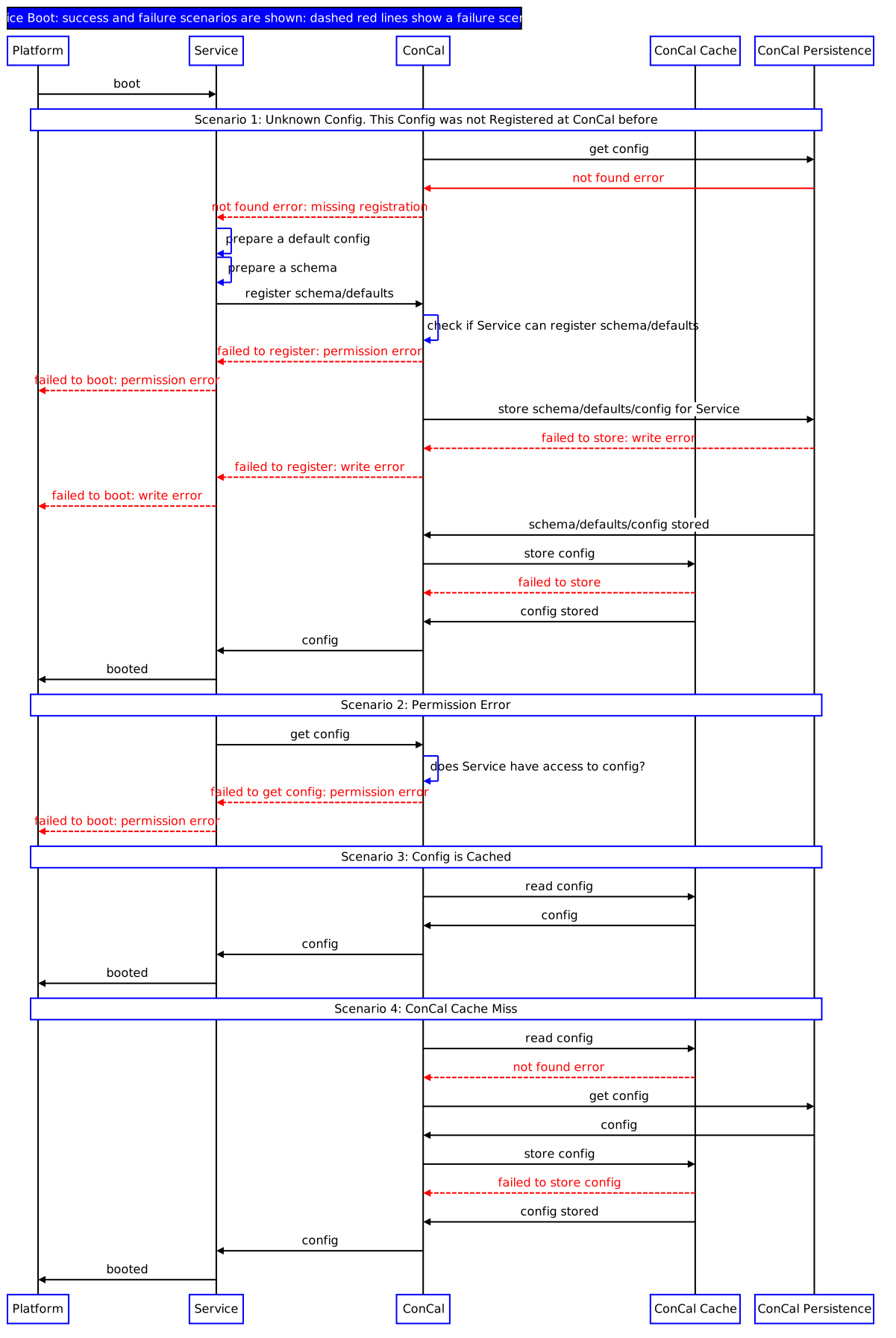
그림 1. 기본 구성 등록 및 맞춤 구성 검색
이를 통해 OEM은 서비스 번들을 한 번 구현하고 여러 차량에서 실행할 수 있습니다.
배포
ConCal은 SDV 플랫폼에서 하나 이상의 서버 인스턴스를 유지할 수 있습니다. 서비스 번들은 가장 가까운 ConCal 서버를 검색하고 사용해야 합니다. 예를 들어 ConCal이 ECU당 하나씩 배포되는 경우 서비스 번들은 동일한 ECU에서 실행되는 ConCal 인스턴스에 액세스할 수 있어야 합니다. 이렇게 하면 서비스 번들이 적시에 구성을 가져올 수 있습니다. ConCal 인스턴스에 요청된 구성이 없는 경우 (다른 ConCal의 책임 영역에 속함) 연락을 받은 ConCal 서버는 소유 ConCal 인스턴스에 요청하고 서비스 번들로 리디렉션합니다.
구성 맞춤설정
서로 다른 차량에서 동일한 소프트웨어를 재사용할 수 있다는 점은 SDV의 주요 이점 중 하나입니다. 소프트웨어는 한 번 개발된 후 여러 차량에서 재사용되며, 차량 사양에 따라 소프트웨어의 동작을 조정할 수 있습니다. 이는 구성 재정의를 사용하여 차량 속성을 기반으로 서비스 구성을 계산하는 ConCal의 주요 목적입니다.
ConfigOverride는 특정 차량에 맞게 구성을 조정하는 방법을 설명하는 protobuf 메시지입니다. 이는 재정의 ID(이를 제공하는 항목에 의해 고유하게 정의됨), 구성 식별자, ConfigOverrideKeyValuePair 목록으로 구성됩니다. ConfigOverride는 업데이트 프로세스 중에만, OEM에서 모델링한 허용된 서비스에 의해서만 제공될 수 있습니다. 두 구조의 protobuf 정의는 아래에 제공됩니다.
// Key-value pair to update configuration.
message ConfigOverrideKeyValue {
  string key = 1;

  oneof value {
    string value_txtproto = 2;
    .google.protobuf.Any value_any = 3;
  }
}

// A collection of changes for a specific configuration which should be atomically applied.
message ConfigOverride {
  string override_id = 1;

  ConfigId config_id = 2;

  repeated ConfigOverrideKeyValue pairs = 3;
}
ConfigOverride는 다음 작업을 지원합니다.
새 값 할당: 마지막 값이 지원 중단되고 매개변수에 새 값이 할당됩니다. 예를 들어 단순 필드 (int, string, float, bool, bytes)에 새 값을 할당하거나 맵, 목록, 구조체 또는 전체 구성과 같은 복잡한 필드를 다시 작성합니다.
값 삭제 또는 정리: 이 작업은 메시지, 반복 필드, 맵, 단수 필드, 구성 자체를 비롯한 모든 유형에 제공됩니다. 이 작업은 완전한 필드나 메시지에서 실행할 수 있습니다. 즉, 맵의 특정 키와 반복 필드의 개별 요소 삭제는 지원되지 않습니다.
지도에 새 값을 추가합니다.
맵에 있는 기존 키의 값을 다시 씁니다. 키가 없는 경우 맵에 새 값을 추가하는 방식으로 이 작업을 실행할 수도 있습니다.
ConCal을 사용하여 서비스 번들 구성
이 장에서는 런타임에 구성을 가져오는 서비스 번들을 개발하는 방법을 설명합니다. 구성 가능한 번들 관점에서 검색된 구성이 기본 공장 설정인지 아니면 ConCal 재정의 및 보정 프로세스를 사용하여 후속 수정인지 완전히 불투명합니다.
문서의 기반이 되는 샘플은 system/software_defined_vehicle/samples/concal/src/concal_client에서 확인할 수 있습니다.
자세한 내용은 서비스 번들 개발을 참고하세요.
서비스 번들에서 소유한 구성 유형 선언
서비스 번들은 가져오는 구성의 유형을 소유합니다. 이를 통해 구성 가능한 번들을 지속된 구성 데이터와 독립적으로 업데이트할 수 있습니다.
구성 유형을 선언하는 protobuf 파일 (
.proto확장자 사용)을 작성합니다.syntax = "proto3"; package android.sdv.demo.config; message RearViewCamera { string model = 1; uint64 horizontal_resolution = 2; uint64 vertical_resolution = 3; float x_axis_field_of_view = 4; float y_axis_field_of_view = 5; bool is_rgb = 6; }구성 유형 검색을 허용하는 런타임 라이브러리를 생성하는 빌드 타겟을 만듭니다.
Android.bp파일에서 다음을 실행합니다.rust_protobuf { name: "libsdvtestconcal_proto_rust", crate_name: "sdvtestconcal_proto_rust", protos: [ "rear_view_camera.proto", ], proto_flags: [ "-I external/protobuf/src", "-I .", ], source_stem: "sdvtestconcal_proto_rust", vendor_available: true, product_available: true, min_sdk_version: "35", }
번들의 ConCal RPC 미들웨어 코드 생성
서비스 번들에 VSIDL 선언을 추가합니다.
package: "com.sdv.oem.sample.concal"

service_bundle {
  name: "SampleOemConCalClientServiceBundle"
  client {
    service: "com.sdv.google.concal.ConCalRegistrationService"
  }
}
이는 번들이 ConCal 구성 등록 및 검색 서비스의 클라이언트임을 선언합니다. 번들의 RPC 클라이언트 바인딩을 생성하는 데 VSIDLC를 사용하는 개요는 VSIDL 및 미들웨어 개요를 참고하세요.
RPC 구성 검색을 위한 미들웨어 초기화
런타임에 ConCal RPC 호출에 필요한 미들웨어 구성요소를 초기화합니다. 이 예에서는 번들이 시작될 때 비동기적으로 초기화합니다.
pub struct ExampleConcalBundle {
    context: ContextRef,
    runtime: Option<Runtime>,
}

sdv::lifecycle::register_service_bundle!(ExampleConcalBundle);

impl ServiceBundle for ExampleConcalBundle {
    fn new(context: ContextRef) -> ExampleConcalBundle {
        info!("Creating {}.", context.get_self_fqin());

        ExampleConcalBundle { context, runtime: None }
    }

    fn on_start(&mut self) {
        let fqin = self.context.get_self_fqin();
        info!("Starting {}.", fqin);

        let runtime = Builder::new_multi_thread()
            .worker_threads(4)
            .thread_name("tokio-pool")
            .enable_all()
            .build()
            .unwrap();
        let context = self.context;
        runtime.spawn(async move {
            let registration_client = setup_register_config_rpc(context).await;
            /* main SB logic here */
        });
        self.runtime = Some(runtime);
    }

async fn setup_register_config_rpc(context: ContextRef) -> RegistrationClient {
    let sdv_comms = SdvComms { context };
    let sd = ServiceDiscoveryManager::new(context);
    let unit_name_args = UnitNameDiscoveryArgs::new_builder()
        .set_sdv_package_name("com.sdv.oem.sample.concal")
        .set_service_bundle_name("SampleOemConCalServiceBundle")
        .set_service_unit_name(RegistrationClient::DEFAULT_UNIT_NAME)
        .build()
        .unwrap();

    let mut unit_name_stream =
        sd.subscribe_service_unit_change_by_name(&unit_name_args).await.unwrap();

    // wait until RPC servers are registered, if server is not a custom agent
    while let Some(event) = unit_name_stream.next().await {
        if let ServiceUnitChangeEvent::Registered(sud) = event {
            let service_identity = sud.get_service_bundle_identity();
            let fqin = service_identity.get_fqin();
            if fqin.get_sdv_package_name() == "com.sdv.oem.sample.concal"
                && fqin.get_service_bundle_name() == "SampleOemConCalServiceBundle"
                && fqin.get_service_instance_name() == "default"
            {
                break;
            }
        }
    }

    let service_bundle =
        SampleOemConCalClientServiceBundle::new(Arc::new(sdv_comms)).await.unwrap();
    service_bundle
        .create_rpc_client::<RegistrationClient>(
            UnitName::builder()
                .package_name("com.sdv.oem.sample.concal")
                .bundle_name("SampleOemConCalServiceBundle")
                .service_unit_name(RegistrationClient::DEFAULT_UNIT_NAME)
                .build()
                .unwrap(),
            ClientOptions::default(),
        )
        .await
        .expect("Failed to create an RPC client")
}
각 항목의 의미는 다음과 같습니다.
on_start에서는 tokio 런타임을 만들고 tokio 작업을 생성합니다. 이 작업은 번들 기본 로직을 진행하기 전에setup_register_rpc를 호출합니다.setup_register_rpc는 미들웨어 RPC 바인딩을 설정합니다. 이 예시에서는 ConCal 기능이 에이전트에 의해 구현된다고 가정하지 않습니다. 번들이 시작된 후에만 서버를 사용할 수 있습니다. 따라서 예시 코드는 서비스 디스커버리 API를 사용하여 RPC 서버가 등록될 때까지 기다립니다.
구성 초기화
ID, 구성 스키마, 기본 팩토리 구성 값을 ConCal 서버에 제공하여 구성 아티팩트를 등록합니다.
등록이 처음 호출되면 기본값이 유지됩니다. 후속 번들 시작 시 등록이 호출되면 적용된 ConCal 재정의 (있는 경우)가 있는 지속된 기본값이 검색됩니다.
아티팩트가 이미 등록되었는지와 관계없이 ConCal 등록 구성 호출은 실패하지 않습니다.
impl ServiceBundle for ExampleConcalBundle{
/* ... */
fn on_start(&mut self) {
/* ... */
runtime.spawn(async move {
let registration_client = setup_register_config_rpc(context).await;
sample_concal_main(fqin, registration_client).await
});
self.runtime = Some(runtime);
}
}
async fn sample_concal_main(
fqin: ServiceFqin,
registration_client: RegistrationClient,
) -> sdv::status::SdvResult<()> {
let config = get_rear_view_camera_factory_config();
let config_id = get_config_id(&fqin);
register_config(®istration_client, &config_id, &config).await;
/* ... */
}
fn get_rear_view_camera_factory_config() -> RearViewCamera {
RearViewCamera {
model: String::from("model 1"),
horizontal_resolution: 720,
vertical_resolution: 720,
x_axis_field_of_view: 70.0,
y_axis_field_of_view: 70.0,
is_rgb: false,
..Default::default()
}
}
fn get_config_id(fqin: &ServiceFqin) -> ConfigId {
ConfigId {
config_name: "config".to_string(),
service_fqin: MessageField::some(ProtoFqin {
vm_name: fqin.get_sdv_vm_name().to_string(),
package_name: fqin.get_sdv_package_name().to_string(),
service_name: fqin.get_service_bundle_name().to_string(),
instance_name: fqin.get_service_instance_name().to_string(),
..Default::default()
}),
..Default::default()
}
}
async fn register_config(
client: &RegistrationClient,
config_id: &ConfigId,
config: &RearViewCamera,
) {
let config_fd = FileDescriptorSet {
file: vec![RearViewCamera::descriptor().file_descriptor_proto().clone()],
..Default::default()
};
let config = Any::pack(config).expect("Failed to pack config");
let config_metadata = ConfigMetadata {
descriptor_set: MessageField::some(config_fd),
default_config: MessageField::some(config.clone()),
..Default::default()
};
client
.RegisterConfigMetadata(&RegisterConfigMetadataRequest {
config_id: MessageField::some(config_id.clone()),
metadata: MessageField::some(config_metadata),
config_version: String::from("1.0"),
..Default::default()
})
.await
.expect(
"RegisterConfigMetadata should not fail, even if configuration was registered before",
);
}
각 항목의 의미는 다음과 같습니다.
- RPC 바인딩을 가져온 후
on_start에서 생성된 태스크는 비즈니스 로직을 진행하여sample_concal_main를 호출합니다. sample_concal_main는 구성 아티팩트를 등록하는 것으로 시작합니다. 로직은register_config에 포함되어 있습니다.- 구성을 등록하려면 번들이 프로토콜 버퍼 유형, ID, 기본값을 지정해야 합니다.
config_fd은 구성 유형입니다. 구성 유형을 소유한 번들은 번들에서 예상하는 스키마가 항상 검색되도록 합니다(APEX 업데이트 후 포함).- ID는 ConCal 서버의 내부 지속성 로직에서 식별자로 사용됩니다.
- 기본값은
get_rear_view_camera_factory_config에서 생성됩니다. 이전에 지속된 값이 없는 경우 기본값은 ConCal 서버에서 지속된 값입니다. 이는 시스템이 공장 구성을 지정할 수 있는 방법 중 하나를 나타냅니다. 다른 설정도 가능합니다.
구성 가져오기
등록 후 구성을 가져옵니다. 이전에 구성이 등록되었으므로 이 호출은 성공합니다.
async fn sample_concal_main(
fqin: ServiceFqin,
registration_client: RegistrationClient,
update_client: UpdateClient,
) -> sdv::status::SdvResult<()> {
let config = get_rear_view_camera_factory_config();
let config_id = get_config_id(&fqin);
register_config(®istration_client, &config_id, &config).await;
let config = get_config(®istration_client, &config_id).await;
info!("Retrieved configuration:\n{config:#?}");
// Onwards, use configuration in bundle's main business logic
/* ... */
}
async fn get_config(client: &RegistrationClient, config_id: &ConfigId) -> RearViewCamera {
let bytes = client
.GetConfig(&GetConfigRequest {
config_id: MessageField::some(config_id.clone()),
..Default::default()
})
.await
.expect("Get config does not fail, as config was registered before")
.config;
RearViewCamera::parse_from_bytes(&bytes).expect("parse_from_bytes failed")
}
각 항목의 의미는 다음과 같습니다.
이전과 동일한 번들에서 구성을 등록했으므로
GetConfigRequest호출은 성공합니다. 설정을 사용하면 서비스 번들이 팩토리 구성과 재정의된 구성을 모두 불투명하게 처리할 수 있습니다. 서비스 번들 비즈니스 로직은 변경되지 않습니다.GetConfigRequest호출은 원시 바이트를 반환합니다.get_config함수는 이를 예상되는 구성 유형으로 파싱합니다.