

Orchestrator は、各仮想マシン(VM)で実行されるローカル SDV エージェントであり、サービス バンドルを作成、開始、停止、破棄するタイミングを制御するメカニズムを提供します。これは、オーケストレーション構成で行われます。この構成では、サービス バンドル インスタンスに対してアクションが実行されるタイミングと方法を決定する一連のルールを定義します。これらのルールは、車両、電源、カスタムモードに基づいています。
Orchestrator は、構成 APEX または VM ごとの構成で構成できます。この分散構成システムにより、各サービス バンドルの一部をサービス バンドル レジストリを通じて個別に更新できます。
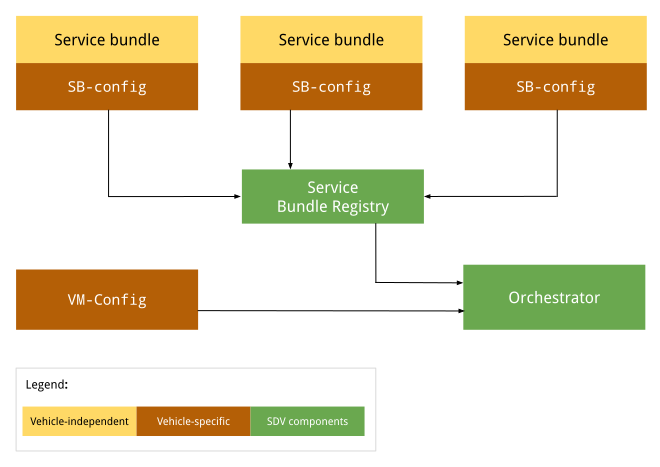
図 1. オーケストレーターの構成図。
車両に依存しない構成は、OEM や車両によって変更されません。構成は、各 OEM のすべての車両で同じままです。車両固有の構成は、OEM ごとに異なる車両で異なる場合があります。ただし、特定の OEM が製造するすべての車両で構成が同じになることもあります。
構成 APEX
実行時に、オーケストレーターはサービス バンドル レジストリにアクセスして、各サービス バンドルの SDV オーケストレーションを取得し、各構成を読み込んで解析します。詳細については、オーケストレーション メタデータをご覧ください。
VM ごとの構成
オーケストレーターが起動すると、VM 構成(存在する場合)を読み込んで解析します。この構成ファイルの絶対パスは、システム プロパティ persist.sdv.orchestrator_config_path と ro.boot.sdv.orchestrator_config_path で指定します。
システムは、次の階層に基づいて、起動時に VM 構成ファイルのパスを決定します。
システムは
persist.sdv.orchestrator_config_pathプロパティをチェックします。値がある場合は、そのパスが使用されます。この値は、再起動後も保持されるか、実行時に設定されます。persist.sdv.orchestrator_config_pathが空の場合、システムはro.boot.sdv.orchestrator_config_pathプロパティをチェックします。ro.boot.sdvプロパティに値がある場合、そのパスは永続プロパティにコピーされ、現在の起動と今後のすべての起動で使用されます(オーバーライドされない限り)。
persist.sdv.orchestrator_config_path
persist.sdv.orchestrator_config_path は、SDV オーケストレーター エージェントが構成ファイルのパスを取得するために使用する主要なプロパティです。これは永続プロパティであり、その値はデバイスの再起動後も保存されます。実行時に値を変更できます。これは、テストや特定のシナリオ(エンドツーエンド テストなど)で役立ちます。
値は、実行時に setprop コマンドを使用して設定できます。また、ビルド時に makefile(拡張子 .mk)またはリソース スクリプト ファイル(拡張子 .rc)を使用して設定することもできます。
実行時にプロパティを設定する
実行時にプロパティを設定すると、再起動後も値が保存されるため、テストや一時的な変更を行う場合に便利です。
adb root
adb shell setprop persist.sdv.orchestrator_config_path {$path_to_file}.textproto
ビルド時にプロパティを設定する
このプロパティをデバイスのビルド構成の一部として設定するには、プロダクトまたはボードの makefile に行を追加します。これは、新しいデバイス イメージのデフォルト値を設定する場合に最適です。
# Add this line to a product's or device's .mk file
PRODUCT_PROPERTY_OVERRIDES += persist.sdv.orchestrator_config_path={$path_to_file}.textproto
このプロパティは、リソース スクリプト ファイル内で設定することもできます。
# Add this line to an .rc file
on {$property}
    setprop persist.sdv.orchestrator_config_path {$path_to_file}.textproto
ro.boot.sdv.orchestrator_config_path
ro.boot.sdv.orchestrator_config_path は、persist.sdv.orchestrator_config_path プロパティの初期値を提供するために使用される、起動時の読み取り専用プロパティです。システムの起動時に persist.sdv.orchestrator_config_path が空の場合、ro.boot.sdv.orchestrator_config_path の値がコピーされます。persist.sdv.orchestrator_config_path が設定されると、以降の起動時にこのプロパティで上書きされることはありません。
ro.boot.sdv.orchestrator_config_path は、bootconfig またはカーネル コマンドラインを使用して設定できます。
ファイル形式
新しい構成を実行時に読み込めるように、オーケストレーション構成を .textproto 形式(構造化テキストなど)で定義します。
構成構文
このセクションでは、構成の構文について説明します。
サービス バンドル
各サービス バンドルは、Orchestrator 内でバンドルを識別し、バンドル インスタンスのライフサイクルを処理するために使用されるサービス バンドル構成で定義する必要があります。サービス バンドル構成では、次のものが定義されます。
InstanceToGroupMappingを使用すると、サービス バンドルのインスタンスをグループに含めて、同じサービス バンドルのインスタンス間の依存関係を確立できます。InstancesStatesは、サービス バンドル インスタンスのさまざまな状態を定義します。InstancesStateConfigurationは、条件がtrueと評価された場合にサービス バンドル インスタンスが設定される状態(InstancesStatesから)を定義します。ServiceBundleConfigには、特定のサービス バンドルとそのインスタンスに関する情報が含まれています。バンドルに対応するInstanceToGroupMappingとInstancesStateConfigurationが含まれます。CustomModesは、バンドルが公開できるカスタムモードのリストを定義します。CustomModesは、承認されていないバンドルがカスタムモードの値を変更するのを防ぐために使用されます。このフィールドは省略可能です。サービス バンドルがカスタムモードに公開されない場合があるためです。詳しくは、カスタムモードをご覧ください。
必須のバンドル構成
バンドル構成では、少なくとも次の属性が提供されます。
service_bundle_config {
    package_name: "package_name"
    service_bundle_name: "service_bundle_name"

    instance: "instance_1"
    instance: "instance_n"
}
この宣言では、次の FQIN を持つ n サービス バンドル インスタンスを定義します。
vm_name.package_name.service_bundle_name.instance_1
…
vm_name.package_name.service_bundle_name.instance_n
VM 名が構成で明示的に宣言されていません。構成は VM ごとに定義されるため、VM 名は常に構成ファイルのデプロイ先となる VM の名前であり、オーケストレーション エージェントにはすでに認識されています。
インスタンスの構成
サービス バンドル インスタンスを宣言しても効果はありません。Orchestrator によって実行されるインスタンスを構成する必要があります。たとえば、インスタンスが実行される条件(VM または車両の状態)を Orchestrator に通知する必要があります。インスタンスを構成するには、構成状態を次の方法で定義する必要があります。
conditionは、評価される VM または車両の状態の式です。instances_statesは、条件がtrueと評価された場合に適用されるインスタンスごとの状態のセットです。
詳細については、条件をご覧ください。
service_bundle_config {
    package_name: "oem.package"
    service_bundle_name: "OemApplication"

    instance: "adaptive_light"
    instance: "reserve_light"

    state {
        condition {
            power_state: "ON"
        }

        instances_states {
            started: "adaptive_light"
            created: "reserve_light"
        }
    }
}
インスタンスとグループのマッピング
サービス グループにサービス インスタンスを含めることで、サービス インスタンスを構成することもできます。サービス バンドル構成レベルで、インスタンスをグループに追加できます。その後、VM 構成レベルでグループを構成できます。詳細については、次のセクションとサービス バンドルをご覧ください。
service_bundle_config {
    package_name: "oem.package"
    service_bundle_name: "OemApplication"

    instance: "fog_front_light"
    instance: "fog_rear_light"
    instance: "turn_signal_light"
    instance: "light_flasher_display"

    # Declare that fog_light contains fog_front_light and fog_rear_light.
    group_mapping {
        group: "fog_light"
        instance: "fog_front_light"
        instance: "fog_rear_light"
    }

    # Declare that flasher_light contains turn_signal_light and light_flasher_display.
    group_mapping {
        group: "flasher_light"
        instance: "turn_signal_light"
        instance: "light_flasher_display"
    }
}
Proto スキーマ
proto スキーマのサンプルを次に示します。
// Service bundle configuration.
//
// Defines service bundle data, its instances and configuration for instances
// states depending on the state of the system
message ServiceBundleConfig {
  // Required. Name of the service bundle.
  string service_bundle_name = 1;

  // Required. Package name of the service bundle.
  string package_name = 2;

  // Required. Service instances.
  repeated string instance = 3;

  // Configuration for instances states depending on the state of the system.
  repeated InstancesStateConfiguration state = 4;

  // Mapping of groups to their member service instances.
  repeated InstanceToGroupMapping group_mapping = 5;

  // Custom modes that this service bundle is allowed to set.
  repeated string custom_mode = 6;

  // Defines the retry policies for specific instances.
  // If multiple mappings target the same instance, the one with the highest `max_retries`
  // value takes precedence. This applies across all configuration files.
  repeated InstanceToRetryMapping retry_mapping = 7;
}

// Mapping of instances to their retry configuration.
message InstanceToRetryMapping {
  // Required.
  //
  // Name of the instances for which the given retry configuration is applied.
  repeated string instance = 1;

  // Required.
  //
  // The configuration that defines the restart and retry strategy for the instances.
  RetryConfiguration retry_config = 2;

  // Configuration for retry and restart.
  // This configuration is applied after a failure on a transition or after the bundle instance
  // has crashed. Upon a successful operation, the retry counter are reset to max_retries. This
  // configuration can be applied to any service bundle, not only the monitored ones. If the
  // configuration is not provided or none of the optional fields are filled, the default behavior
  // stated is applied (the value from `ro.boot.sdv.orchestrator.recovery.max_retries`
  // or zero if not set).
  message RetryConfiguration {
    // The number of times a retry/restart operation can be performed.
    // Defines the number of times the Orchestrator retries a transition
    // after a transient failure or after a bundle crash notification.
    // This applies to creating, starting and destroying operations.
    // The retry count resets to max_retries after a successful operation.
    // If not set, the default configured value in the
    // `ro.boot.sdv.orchestrator.recovery.max_retries` is used, or-if not set-
    // it fallbacks to zero.
    optional uint32 max_retries = 1;
  }
}

// Mapping of groups to their member service instances.
message InstanceToGroupMapping {
  // Required. Names of groups to which members are added.
  //
  // Group behavior is defined in VM configuration.
  repeated string group = 1;

  // Required. Names of instances to be included in the groups.
  //
  // Can reference only instance defined in the same config file.
  repeated string instance = 2;
}

// Describes the state the service instances should be in after the state is executed.
//
// If there is no valid configuration for the instance in the specific system state, such instance is transitioned to the "destroyed" state.
//
// For the GroupsStates definition to be useful, at least one item should be present in any of the fields.
message InstancesStates {
  // Names of the instances that must be in a "created" state.
  repeated string created = 1;

  // Names of the instances that must be in a "started" state, overrides "created" state.
  repeated string started = 2;

  // Names of the instances that must not run, overrides all other states.
  repeated string destroyed = 3;
}

// Configuration for instances states depending on the state of the system.
message InstancesStateConfiguration {
  // Condition for the system state under which the related instances states should be executed by Orchestrator.
  //
  // If omitted, the related instances states are always executed.
  Condition condition = 1;

  // Required. States of service bundle instances to be executed by Orchestrator if the condition is true.
  InstancesStates instances_states = 2;
}
VM レベルの構成
VM 構成では、グループ マッピングとグループの構成を定義できます。これは、VM レベルでサービス バンドル間の依存関係をモデル化するために使用され、複数のサービス バンドルの状態を同時に変更する柔軟性を提供します。グループのすべてのインスタンスが指定された状態になります。
オーケストレーターは、状態変更が実行される順序を保証しません。Orchestrator は、各インスタンスを指定された状態に昇格させます。
グループは、構成部分のいずれかで group 名を使用することで暗黙的に宣言されます。たとえば、インスタンスとグループのマッピング、グループとグループのマッピング、グループ構成の状態などです。
グループ間のマッピング
グループには他のグループを含めることができます。group_1 に subgroup_2 が含まれていることを宣言することで、subgroup_2 のすべてのサービス インスタンスを group_1 に効果的に追加します。
次に例を示します。
# Declare that body contains fog_light and flasher_light.
group_mapping {
    group: "body"
    subgroup: "fog_light"
    subgroup: "flasher_light"
}
グループを構成する
グループを宣言しても効果はありません。オーケストレーターで実行するには、グループを構成する必要があります。たとえば、グループが実行される VM または車両の条件や状態をオーケストレーターに通知する必要があります。
グループは、サービス インスタンスと同様に、構成状態を使用して構成できます。構文で instances_states の代わりに groups_states を使用する点のみが異なります。
state {
    condition {
        power_state: "ON"
    }

    groups_states {
        started: "Body"
        started: "Adas"
    }
}
Proto スキーマ
proto スキーマの例を次に示します。
// VM configuration.
//
// Defines group-to-group mappings and configuration for groups
// states depending on the state of the system.
//
// Configurations of service bundles can also be defined in VM configuration (as well as in a separate configuration file).
message VmConfig {
  // Group to member groups mapping.
  repeated GroupToGroupMapping group_mapping = 1;

  // Configuration of group states.
  repeated GroupsStateConfiguration state = 2;

  // Required. We also allow to configure individual service bundles in the VM config, to simplify development and migration from the monolithic configuration.
  repeated ServiceBundleConfig service_bundle_config = 3;
}

// Mapping of groups to their member groups.
message GroupToGroupMapping {
  // Required. Names of groups to which members are added.
  repeated string group = 1;

  // Required. Names of member groups to be included in the groups.
  repeated string subgroup = 2;
}

// Describes the state the service instance groups should be in after the state is executed.
//
// If group configuration is valid in a specific system state, the configured state is applied to
// all group members. After that, the normal service instance configuration rules still apply:
// - "destroyed" > "started" > "created" precedence
// - not configured means the instance should be moved to the default state
//
// For the GroupsStates definition to be useful, at least one item should be present in any of the fields.
message GroupsStates {
  // Names of the groups that must be in a "created" state.
  repeated string created = 1;

  // Names of the groups that must be in a "started" state, overrides "created" state.
  repeated string started = 2;

  // Names of the groups that must not run, overrides all other states.
  repeated string destroyed = 3;
}

// Configuration for group states depending on the state of the system.
message GroupsStateConfiguration {
  // Condition for the system state under which the related group states should be executed by  Orchestrator.
  //
  // If omitted, the related groups states are always executed.
  Condition condition = 1;

  // Required. States of service bundle groups to be executed by Orchestrator if the condition  is true.
  GroupsStates groups_states = 2;
}
構成の状態
構成状態(状態)は、サービス インスタンスまたはグループが起動、停止、破棄されるタイミングを定義し、conditions と instances_states(バンドル構成)および groups_states(VM 構成)で構成されます。
条件
条件を使用すると、モデルにブール条件を指定できます。この条件が true と評価されると、定義されたインスタンスの状態が適用されます。条件には次の特徴があります。
電源、車両、カスタムモードなどのサポートされているシグナルに基づく、任意の複雑なブール式(
and式またはnot式で形成)。(省略可)条件のない構成状態は常にアクティブです。つまり、
trueに評価されます。
インスタンスの状態とグループの状態
instances_states と groups_states には次の特徴があります。
状態が
activeであることを前提として、オーケストレーション エージェントが特定のインスタンスまたはグループに適用するために必要な状態を指定します。グループに状態を適用すると、グループ内の各サービス バンドル インスタンスに状態が適用されます。インスタンスがこの状態になる順序は決まっていません。
サポートされている状態は次のとおりです。
Service::on_startの後にstartedが呼び出されます。createdService::newが呼び出された後、Service::on_startが呼び出される前に実行されました。または
Service::on_stopが呼び出された後、Service::dropが呼び出される前。
Service::dropの呼び出し後にdestroyedを呼び出します。
ルールセット
構成の状態は、条件に応じてアクティブまたは非アクティブになります。複数の状態を同時にアクティブにできます。オーケストレーション エージェントがシグナル更新を受信すると、サービス バンドルのライフサイクルを変更する前に、すべての構成状態が評価されます。サービス インスタンスの状態は、次のルールに従って評価されます。
アクティブな状態がサービス インスタンスに適用されない場合、サービス インスタンスは破棄されます。
1 つ以上のアクティブな状態が適用される場合、次の優先順位が適用されます。
destroyedは絶対的な優先度を持ちます。startedはcreatedよりも優先されます。
Proto スキーマ
proto スキーマの例を次に示します。
// A root boolean condition.
message Condition {
  // Required.
  oneof root {
    // VPM power state condition.
    string power_state = 1;
    // VPM vehicle state condition.
    string vehicle_state = 2;
    // Custom mode state condition.
    CustomState custom_state = 3;
    // Negation of a nested condition.
    Condition not = 4;
    // Logical 'and' between conditions grouped in expression.
    Expression and = 5;
    // Logical 'or' between conditions grouped in expression.
    Expression or = 6;
  }
}

// Representation of Custom state condition.
//
// Custom mode(s) are defined by the OEM and are not standardized by the platform, in contrast with
// VPM modes (i.e. power and vehicle mode).
message CustomState {
  // Custom mode being checked.
  string mode = 1;
  // State of the custom mode.
  string state = 2;
}

// A set of conditions united under an 'and' or 'or' expression.
//
// Evaluation type ('and' or 'or') depends on the field in [Condition]/[Expression], where the
// expression is being used.
//
// At least one value in at least one of the fields is required.
message Expression {
  // VPM power state condition.
  repeated string power_state = 1;
  // VPM vehicle state condition.
  repeated string vehicle_state = 2;
  // Custom mode state condition.
  repeated CustomState custom_state = 3;
  // Negation of a nested condition.
  repeated Condition not = 4;
  // Logical 'and' between conditions grouped in expression.
  repeated Expression and = 5;
  // Logical 'or' between conditions grouped in expression.
  repeated Expression or = 6;
}
クラッシュ復旧と再起動の戦略
Orchestrator は、サービス バンドルのクラッシュとライフサイクル遷移の失敗を処理するための堅牢なメカニズムを提供します。Orchestrator はサービスの状態を包括的に把握し、モードの切り替えを管理するため、再起動と再試行の戦略を実行するのに最も適したコンポーネントです。Lifecycle Manager(LM)は、バインダ終了通知を介してサービス バンドルのクラッシュを Orchestrator に報告します。LM への不要な Binder 呼び出しを回避するため、Orchestrator は各バンドルの最後の状態(成功したかどうか)をキャッシュに保存し、最後に認識された状態がリクエストされた新しい状態と同じ場合は、トランジションを再適用しません。
再試行の構成
retry_mapping を使用して、Orchestrator 構成でインスタンスごとに再起動と再試行の戦略を定義できます。構成で max_retries が設定されていない場合、デフォルト値は ro.boot.sdv.orchestrator.recovery.max_retries システム プロパティから取得されます。このプロパティが設定されていない場合、値は 0 にフォールバックします。
max_retries: 一時的な障害またはバンドル クラッシュ通知の後に、オーケストレーターがトランジションを再試行する回数を定義します。再試行カウンタは、オペレーションが成功した後、または新しいモードが処理されたときに、max_retriesの値にリセットされます。複数のマッピングが同じインスタンスをターゲットにしている場合は、max_retriesが最も高いマッピングが優先されます。
構成のサンプル
service_bundle_config {
  package_name: "oem.package"
  service_bundle_name: "OemApplication"
  instance: "fog_front_light"
  instance: "fog_rear_light"

  # Defines the restart configuration mapping for specific instances.
  retry_mapping {
    instance: "fog_front_light"
    instance: "fog_rear_light"
    retry_config {
      max_retries: 3
    }
  }
}
復旧動作
Orchestrator の再起動と再試行のロジックは、いくつかの障害シナリオを適切に管理します。
- 通常のオペレーションのクラッシュ: サービス バンドルが実行中にクラッシュした場合、Orchestrator は再起動戦略を適用し、残りの再試行回数に基づいてバンドルを最後にリクエストされた状態に戻そうとします。
- モード切り替え中のクラッシュ: 新しいモードを適用中にバンドルがクラッシュした場合、再起動リクエストはキューに登録され、後で処理されます。リクエストが処理されると、オーケストレーターはインスタンスの最後の状態を確認し、インスタンスが最後にリクエストされた状態(最後のモード遷移から)でない場合にのみ再起動を適用します。
- 復元中の新しいモード: バンドルが再起動中(または再起動するインスタンスのキュー内)に、新しいモードに移行するリクエストを Orchestrator が受信すると、進行中の復元がキャンセルされます。新しいモードの移行が引き継がれ、新しいターゲット状態の新しい試行セットを許可するように再試行カウンタがリセットされます。
オーケストレーターは、Lifecycle Manager から返されたさまざまなエラータイプを区別して、再試行戦略を決定します。
- 一時的なエラー(
SERVICE_NOT_FOUND、OPERATION_FAILED、INTERNAL_ERROR): オーケストレーターは、特別なクリーンアップ アクションを実行せずにオペレーションを再試行します。 - 永続的なエラー(
VALUE_CORRUPTED、INVALID_ARGUMENT): オーケストレーターは、サービス バンドルが破損状態にある可能性があると想定し、クリーンな再起動を保証するために、オペレーションを再試行する前にサービス インスタンスを強制終了しようとします。 - 永続エラー(
PERMISSION_DENIED): オペレーションは再試行されず、バンドルは回復不能な状態と見なされます。
Lifecycle Manager がクラッシュすると、すべてのサービス バンドル プロセスが失われます。実際の状態が不明なため、Orchestrator は各インスタンスを無効にし、残りの再試行回数で再起動戦略を適用して、各インスタンスを最後にリクエストされた状態にします。
繰り返しクラッシュまたは失敗するバンドルの無限の復元ループを防ぐため、再試行カウンタは、ライフサイクル オペレーションが成功した後、または新しいモード遷移がリクエストされた場合にのみ max_retries にリセットされます。連続した失敗(移行の失敗に続いてクラッシュが発生するなど)によりバンドルの再試行が使い果たされた場合、再試行カウンタがリセットされるまで再起動されません。
ヘルス モニターへの状態レポート
オーケストレーターは、ヘルスモニター(HM)が登録する内部 Binder インターフェースを公開し、すべてのサービス バンドルの状態に関する継続的な更新を受信できるようにします。このインターフェースを通じて、オーケストレーターは次の両方を積極的に報告します。
- ライフサイクル状態: 現在の構成とアクティブ モード(開始、作成、破棄など)に基づくインスタンスの意図した状態。
- 復元状態: 目的のライフサイクル状態に達したステータス。インスタンスが動作中か、失敗後に現在再試行中か、すべての再試行を使い果たした後に復元に失敗したかを示します。
この情報は、ハートビート モニタリングに登録されていないインスタンスを含め、すべてのインスタンスについて報告されます。HM はこの情報を使用して、VM の状態をレポートする API を実装します。詳しくは、健康状態のモニタリングをご覧ください。
例
このセクションでは、条件付きで状態を構成する例を示します。
基本サービスのサンプル
- 条件がないため、常にアクティブです。
- 単一のサービス インスタンスを開始します。
state {
  # Note: This state has no condition, hence its actions are valid throughout the lifetime of the program
  instances_states { started: "ServiceBundleName" }
}
HVAC アプリのサンプル
条件:
custom_state != occupancy.OCCUPANCY_EMPTY || custom_state == preheat.PREHEAT_ONの場合にアクティブ。複数の HVAC 関連のサービス インスタンスを
startedとして宣言します。
state {
  condition {
    or {
      # I.e. when the vehicle is occupied (for example, by _DRIVER / _NON_DRIVER / _PET)
      not {
        custom_state {
          mode: "occupancy"
          state: "OCCUPANCY_EMPTY"
        }
      }
      custom_state {
        mode: "preheat"
        state: "PREHEAT_ON"
      }
    }
  }

  # HVAC-related services
  instances_states {
    started: "HvacTemperatureCommand"
    started: "TempSensorDriverZone"
    started: "TempSensorPassengerZone"
    started: "RefrigerantLoop"
  }
}
省電力モードのサンプル
条件:
custom_state == system_power.SYSTEM_POWER_LOW && custom_state == range_ext.RANGE_EXT_ONの場合にアクティブ。この状態は、省電力状態と見なすことができます。
HVAC 関連のサービス インスタンスを
destroyedとして宣言します。この例では、
SYSTEM_POWER_LOWモードとRANGE_EXT_ONモードがアクティブな場合、HVAC アプリはRefrigerantLoopサービス インスタンスなしで実行されます。state { condition { and { custom_state { mode: "system_power" state: "SYSTEM_POWER_LOW" } custom_state { mode: "range_ext" state: "RANGE_EXT_ON" } } } # Disable services with high power consumption instances_states { destroyed: "RefrigerantLoop" } }
オンボード サンプルのライフサイクル
条件:
power_state == ON && vehicle_state == LIFE_ON_BOARDの場合、アクティブ。この状態は、「車内に人がいて、車の電源が入っている」と見なすことができます。
温度センサーが動作中であることを宣言します。
車内に人がいる場合、安全上の理由から温度などの項目がモニタリングされます。
state {
  condition {
    and {
      power_state: "ON"
      vehicle_state: "LIFE_ON_BOARD"
    }
  }

  # Temperature monitoring services
  instances_states {
    started: "TempSensorDriverZone"
    started: "TempSensorPassengerZone"
  }
}
例
このセクションでは、次のものを含む完全な例を示します。
2 つのインスタンスを含むサービス バンドルを導入するサービス バンドルレベルの proto 構成。各インスタンスはグループの一部です。
モードに基づいてグループを操作するロジックを導入する VM レベルの proto 構成
サービス バンドルレベルの構成
# proto-file: //system/software_defined_vehicle/orchestration/distributed_config/src/protos/service_bundle_config.proto
# proto-message: ServiceBundleConfig

package_name: "oem.package"
service_bundle_name: "OemApplication"
instance: "fog_front_light"
instance: "fog_rear_light"
instance: "turn_signal_light"
custom_mode: "FOG"
custom_mode: "TURN"

group_mapping {
    group: "fog_light"
    instance: "fog_front_light"
    instance: "fog_rear_light"
}

group_mapping {
    group: "flasher_light"
    instance: "turn_signal_light"
}

state {
    condition {
        power_state: "ON"
    }

    instances_states {
        created: "turn_signal_light"
        destroyed: "fog_front_light"
        destroyed: "fog_rear_light"
    }
}
VM レベルの構成
# proto-file: //system/software_defined_vehicle/orchestration/distributed_config/src/protos/vm_config.proto
# proto-message: VmConfig

group_mapping {
    group: "lights"
    subgroup: "fog_light"
    subgroup: "flasher_light"
}

state {
    condition {
        custom_state {
            mode: "FOG"
            state: "ON"
        }
    }
    groups_states {
        started: "fog_light"
    }
}

state {
    condition {
        custom_state {
            mode: "TURN"
            state: "RIGHT"
        }
    }
    groups_states {
        started: "flasher_light"
    }
}

state {
    condition {
        vehicle_state: "SUSPEND_TO_RAM_ENTER"
    }
    groups_states {
        created: "lights"
    }
}
バンドル管理の並列処理を構成する
ro.boot.sdv.max_bundles_management_threads システム プロパティは、サービス バンドル ライフサイクル オペレーション中のパフォーマンスとリソース消費を制御するための重要なチューニング パラメータです。サービス バンドル トランザクションの最大並列処理レベルを定義し、次の 2 つのコアサービスに直接影響します。
オーケストレーション エンジン: このサービスは、プロパティを読み取って、オーケストレーターがライフサイクル マネージャーに対して同時に行うことができる呼び出しの数(
startService、stopServiceなど)を決定します。これは、起動時やモード切り替え時のパフォーマンスにとって重要です。このとき、多くのバンドルが同時に状態を変化させる可能性があります。Lifecycle Manager: このサービスは、プロパティの値を使用して、すべての受信リクエストを処理する Binder スレッド プールのサイズを計算します。これにより、LM に Orchestrator からの同時リクエストを処理するのに十分なスレッドが確保されます。
このプロパティが設定されていない場合、両方のサービスはデフォルトで 12 の値になります。
構成方法
デバイスの BoardConfig.mk ファイルでプロパティを設定するには、BOARD_BOOTCONFIG 変数に追加します。これにより、デバイスの起動時に毎回値が適用されます。
BOARD_BOOTCONFIG += \
    androidboot.sdv.max_bundles_management_threads=8
デバイスの値を変更するには、適切な BoardConfig.mk ファイルでこの行を変更して、再ビルドします。
起動時間の最適化
ro.sdv.orchestrator.state.ready は、起動時のパフォーマンス最適化戦略の一部である write-once ブール値プロパティです。これは、オーケストレーション エージェントが初期化を完了し、サービス バンドルのライフサイクルの管理を開始する準備ができていることを示します。主な目的は、他の SDV エージェントの起動シーケンスを制御することで、Orchestrator とそのマネージド サービス バンドルの起動を優先することです。
- 設定者: オーケストレーション エージェント。
- タイミング: 起動シーケンス中に 1 回。
- 使用方法: このプロパティは、ほとんどの SDV エージェント(Updates Manager、VSIDL プロバイダ、Health Monitor、Service Discovery、Data Tunnel、RPC、VPM、Telemetry)の起動シーケンスを制御するために init システムによって使用されます。Orchestrator を早期に起動し、他のエージェントがこのプロパティを待機することで、システムは、Orchestrator がシステム リソースを競合することなくサービス バンドルを起動するという重要なタスクを開始できるようにします。
パフォーマンス
システム起動時にすべてのエージェントを同時に起動すると、リソースの競合が発生し、起動プロセス全体が遅くなる可能性があります。この問題を軽減するため、システム プロパティを使用して順次起動順序が適用されます。
- サービス バンドル レジストリ: すべてのサービス バンドル メタデータを読み込むために最初に開始されます。
- Lifecycle Manager と Orchestrator: これらのコア エージェントは、レジストリの準備が整うとすぐに起動します。この早期開始は、Orchestrator が構成の評価を開始し、サービス バンドルの開始準備を直ちに行うことができるため、非常に重要です。
- その他の SDV エージェント: オーケストレーターの準備が整ってから開始します。
この制御されたシーケンスにより、オーケストレーターはシステム リソースを使用してサービス バンドルをできるだけ早く開始する優先度を持ち、システム起動がより高速で、より確定的で、より効率的になります。
Orchestrator によって消費されるモード
オーケストレーション エージェントは、VPM によって送信される車両モードと電源モードへのアクティブなサブスクリプションを維持します。オーケストレーターと車両および電源管理(VPM)システム間の最初の接続が確立されると、オーケストレーターは次のブール値システム プロパティを true に設定します。
sdv.orchestrator.bootup.power_mode.readysdv.orchestrator.bootup.vehicle_mode.ready
構成ファイルを参照して、オーケストレーション エージェントは、受信したモードの現在の値に基づいて、実行状態にする必要があるサービス バンドルのセットを動的に計算します。オーケストレーターはライフサイクル マネージャーと通信し、サービス バンドルの実際の状態を計算されたターゲット状態に合わせるために、さまざまなコマンドを発行します。
車両と電源の状態
車両モードと電源管理(VPM)エージェントにより、SDV コンポーネントは、動作モード(駐車中、走行中など)や電源ステータス(オン、一時停止など)といった車両の現在の状態を認識できます。オーケストレーターはこれらの値を評価し、オーケストレーターの構成に基づいて実行するサービス バンドルを定義します。詳しくは、車両と電源の管理をご覧ください。
カスタムモード
車両モードの数が多いため、すべての車両モードをモデル化することはできません。各 OEM のニーズは異なり、車両モードを標準化してもすべての OEM のユースケースに対応することはできません。そのため、カスタムモードと呼ばれる OEM 固有のモードをサポートしています。これらのモードは、既存の車両モードとパワーモードを拡張するものではありません。代わりに、新しいモードを定義する方法を提供します。
機能:
グローバル スコープ: カスタムモードはグローバルであり、Orchestrator によって管理されるすべての VM に均一に適用されます。
構成: 各カスタムモード変更は、次の 2 つの要素で構成されます。
名前: カスタムモードを表すために OEM が選択した一意の識別子。
値: カスタムモードの現在の状態。値が設定されていない場合は
UNDEFINEDになります。
Orchestrator ロール: Orchestrator はカスタムモード値のパッシブ レシーバーとして機能します。
サービス バンドルロール: 各サービス バンドルは複数のカスタムモードを所有し、任意のモードに新しい値を公開できます。複数のサービス バンドルが同じカスタムモードを所有できます。つまり、カスタムモードはさまざまなソースから新しい値を受け取ることができます。
検証の責任: OEM は、有効な状態遷移を保証する責任を負います。Orchestrator は新しい値をすべて受け入れます。
推定される特性:
推定数: 電源モードと車両モードは、ほとんどのサービス バンドルのライフサイクルを管理し、カスタムモードは補完的な役割を果たします。カスタムモードの数は数十程度で、数百にはならないと予想されます。
推定所要時間: モードは定期的に送信されません。代わりに、モードはイベント駆動型であり、ドアを開ける、駐車シーケンスを開始する、充電サイクルを開始するなどの特定のアクションや、OEM が定義した重要性の高いその他の同様のイベントによってトリガーされます。
カスタムモードの設計により、特定のモードを柔軟に定義して管理できます。また、オーケストレーターは基盤となるステート マシン ロジックに依存しません。
サポートされているモード
サービス バンドルが所有するカスタムモードにのみ公開されるようにするには、各サービス バンドルが、サービス バンドル レジストリを含むローカル VM で利用可能な Orchestrator 構成内で、所有するカスタムモードのリストを明示的に宣言する必要があります。宣言されていないカスタムモードへの公開の試行は破棄されます。
サービス バンドルが公開(所有)できるカスタムモードを宣言するために、service_bundle_config proto スキーマは次のように拡張されています。
// Service bundle configuration.
//
// Defines service bundle metadata, its instances, and configuration for instances
// lifecycle states depending on the state of the vehicle.
message ServiceBundleConfig {
      [...]

    // The list of custom modes that this service bundle publishes.
    repeated string custom_mode = 5;
}
モードに基づいてバンドルを構成する
既存の Orchestrator proto 構成(Condition コンポーネント)は、カスタムモードに基づくサービス バンドルの操作をサポートしています。
message Condition {
  oneof root {
    string power_state = 1;
    string vehicle_state = 2;
    CustomState custom_state = 3;
    Condition not = 4;
    Expression and = 5;
    Expression or = 6;
  }
}

message CustomState {
  // Custom mode being checked.
  string mode = 1;
  // State of the custom mode.
  string state = 2;
}
Proto のサンプル
次の例は、TURN と FOG の状態に基づいて開始されるようにサービス バンドルのインスタンスを構成する方法を示しています。
service_bundle_config {
package_name: "oem.package"
service_bundle_name: "OemApplication"
instance: "flasher_light"
// Service bundle is allowed to set values for the TURN mode
custom_mode: "TURN"
// Service bundle is allowed to set values for the FOG mode
custom_mode: "FOG"

state {
    condition {
        custom_state {
            mode: "TURN"
            state: "LEFT"
        }
    }
    instances_states {
        started: "flasher_light"
    }
}

state {
    condition {
        custom_state {
            mode: "FOG"
            state: "ON"
        }
    }
    // Group assumed to be defined containing all FOG lights instances.
    groups_states {
        started: "fog_lights"
    }
}

}
新しいカスタムモードを設定する
新しいカスタムモード値を設定するプロセスは、サービス バンドルから始まります。サービス バンドルは、同じ VM で実行されているローカル オーケストレーターに目的の値を伝えます。次に、Orchestrator は、.textproto で定義された構成を参照して、サービス バンドルに指定されたカスタムモードに公開するために必要な権限があることを確認し、値を他の VM に伝播するかどうかを判断します。伝播されると、各オーケストレーターは構成を確認して、状態を変更する必要があるサービス バンドルのリストを見つけます。
RPC
各 VM で実行されている各 Orchestrator は、新しいカスタムモード値をリッスンする RPC サーバーを作成します。カスタムモードを更新する各サービス バンドルは、サーバーへの RPC クライアントを作成する必要があります。ACL が適用され、承認されていないバンドルがサーバーに接続できないようになっています。
RPC を介して新しい値を設定するための proto 定義は、次の例のようになります。
syntax = "proto3";

import "google/protobuf/timestamp.proto";

package com.sdv.google.Orchestrator;

// Representation of the request used by service bundles to update a custom mode.
// Service bundles are permitted to update only the custom modes specifically designated
// for them within the Orchestrator configuration.
message SetCustomStateRequest {
  // Required.
  // The name of the custom mode.
  // The mode string can not be longer than 56 characters and can only contain
  // letters, numbers, dashes, dots and underscores: [a-zA-Z0-9_-.].
  // No other special character nor spaces should be present in the mode.
  string mode = 1;

  // Required.
  // The new value for the custom mode.
  // The value string can not be longer than 56 characters and can only contain
  // letters, numbers, dashes, dots and underscores: [a-zA-Z0-9_-.].
  // No other special character nor spaces should be present in the value.
  string value = 2;

  // Required.
  // The timestamp in which the new custom mode value was set. This is used to
  // prevent race conditions whenever different service bundles in different
  // VMs want to set a new value for the same custom mode.
  // We use this timestamp to order the requests and we promise eventual
  // consistency: while temporary inconsistencies may occur, the system will
  // eventually converges to the correct state.
  .google.protobuf.Timestamp timestamp = 3;
}

// Representation of the set custom state response.
message SetCustomStateResponse {}

// Orchestrator interface for service bundles that update the value of a
// custom mode.
// When a new value is received, it is propagated to Orchestrators running on
// other VMs.
service CustomStateService {
  // Updates the value for the custom mode.
  // Returns the error:
  // - PermissionDenied: the service is not authorized to update the custom mode.
  // - InvalidArgument: the provided mode and/or value are not valid.
  rpc SetCustomState(SetCustomStateRequest) returns (SetCustomStateResponse) {};
}
電源移行のキャンセル
Orchestrator は、SHUTDOWN_CANCELLED 電源モード(VPM から Orchestrator に送信)を介して、進行中の電源移行をキャンセルできます。
次の Orchestrator 構成を例に考えてみましょう。
state {
    condition {
        power_state: "SUSPEND_TO_RAM_ENTER"
    }
    instances_states {
        started: "instance-1"
        started: "instance-2"
        started: "instance-3"
    }
}
SHUTDOWN_CANCELLED モードが受信されると、2 つの主なシナリオによってオーケストレーターの動作が決まります。どちらの場合も、SHUTDOWN_CANCELLED 電源モードがキューの末尾に追加されます。キューに登録された要素が消費されると、SHUTDOWN_CANCELLED が実行されます。
シナリオ 1: 現在の進行中のモードがパワーモードである場合
オーケストレーターが電源モードの更新を実行している場合、進行中のモードのキャンセルがリクエストされます。Lifecycle Manager は進行中の移行のキャンセルを本質的にサポートしていませんが、Orchestrator は新しいサービス バンドル リクエストが開始されていないことを確認します。
例: 前の例の構成の instance-1 が SHUTDOWN_CANCELLED モードを受信したときに起動中の場合、instance-1 は起動を完了します。ただし、instance-2 と instance-3 は開始状態への移行に進みません。
シナリオ 2: 処理キューに電源モードが存在する
オーケストレーターが非電源モードの更新を処理しているときに、実行されるモードのキューに電源リクエストがある場合、電源移行はキューから削除されます。これにより、実行が防止されます。
例: 前の例の構成を使用している場合、オーケストレーターが電源関連以外の更新(車両の更新など)を処理していて、SUSPEND_TO_RAM_ENTER がキューにあるときに SHUTDOWN_CANCELLED を受信すると、インスタンス(instance-1、instance-2、instance-3)は起動されません。
実装例
ミドルウェア生成コードを使用して RPC サーバーのクライアントを作成するクライアントのカタログは、次の例のようになります。
# proto-file: //system/software_defined_vehicle/vsidl/language/src/protos/sdv/vsidl/v1/syntax.proto
# proto-message: VsidlEntry

package: "package_name"

service_bundle {
    name: "service_bundle_name"

    client {
        service: "com.android.sdv.orchestrator.CustomStateService"
    }
}
コードを生成するときは、Orchestrator カタログに依存関係を追加する必要があります。
--dependency-catalog-path orchestration/engine/stable/vsidl/*
新しい値を送信するクライアント コードは次のようになります。
let fqin = ServiceFqin::builder()
        .sdv_vm_name("vm_name")
        .sdv_package_name("package_name")
        .service_bundle_name("service_bundle_name")
        .service_instance_name("instance_name")
        .build()
        .unwrap();
let context_ref = ContextRef::create(fqin);
let comms = Arc::new(SdvComms { context: context_ref });
// service_bundle_name is the bundle generated with middleware code that defines
// the RPC client to "com.android.sdv.orchestrator.CustomStateService".
let client = service_bundle_name::new(comms).await.unwrap();
let rpc_client = client
        .create_rpc_client::<Client>(
            UnitName::builder()
                .vm_name(comms.context.get_self_fqin().get_sdv_vm_name())
                .package_name("com.android.sdv.orchestrator")
                .bundle_name("OrchestratorServiceBundle")
                .service_unit_name(Client::DEFAULT_UNIT_NAME)
                .build()
                .unwrap(),
            ClientOptions::default(),
        )
        .await;
let client = Arc::new(rpc_client.unwrap());
let request = SetCustomStateRequest {
mode: custom_mode_name,
value: custom_mode_value,
timestamp: MessageField::some(Timestamp::now()),
..Default::default()
};
let result = client.SetCustomState(&request).await;
// Process result
デバッグツール
Orchestrator エージェントは dumpsys ツールをサポートしています。実行中の SDV インスタンスで次のコマンドを実行して、呼び出すことができます。
adb shell dumpsys com.google.sdv.ISdvAgent/orch
このツールを使用して、Orchestrator エージェントの内部状態をデバッグして分析します。次のように表示されます。
- Current Modes State(現在のモードの状態): アクティブな車両モード、電源モード、カスタムモードを確認します。
- カスタム モード パブリッシャー: カスタム モードを公開できるサービス(およびどのモードに公開できるか)を特定します。
- サービスごとの必須状態: 事前定義された条件と現在のモードに基づいて、各サービス バンドルの状態を学習します。これにより、サービスが想定どおりの状態になっていない理由を診断できます。
- 自動適用モードのステータス: 進行中の自動適用モード、または進行中の自動適用モードがない場合は最後に適用された自動適用モードの状況を把握できます。
- モード適用キュー: 適用待ちのモードを表示します。
次に例を示します。
AGENT NAME: SDV Agent dump - Orchestrator
AGENT FQIN: instance1:com.android.sdv.orchestrator.OrchestratorServiceBundle/default
AGENT STATE: See orchestrator state below.
----------------
----------------
INTERNAL STATE REPORTERS:

*NAME: Configuration state
*REPORT:
Active modes:
MODE                          VALUE                         TIMESTAMP (scs, ns)
Power                         POWER_OFF_EXIT                -
Vehicle                       VEHICLE_ON                    -
Custom("CHARGING")            ON                            1750757590 (scs) 466507459 (ns)
Custom("TIRE_PRESSURE")       front-left                    1750757570 (scs) 554522995 (ns)

Modes allowed to publish by bundle (FQIN: modes):
com.android.sdv.sample.orchestration/CustomModeControlBundle: CHARGING, TIRE_PRESSURE

Requested state for instances:
STATE          FQIN
Started        com.android.sdv.sample.orchestration/CustomModeControlBundle/always-started-instance
Started        com.android.sdv.sample.orchestration/OrchestratedServiceBundle/my-instance
Started        com.sdv.oem.sample.diagnostics/DiagnosticsSampleWithDataItem/instance
Started        com.sdv.oem.sample.diagnostics/DiagnosticsSampleWithEvent/instance
Started        com.sdv.oem.user_preferences/UserPreferencesServiceBundle/default
----------------
*NAME: Engine state
*REPORT:
Last mode enforced was Custom("CHARGING") with value "ON"

Next modes to process: []
----------------
Orchestrator によって管理される個々のサービス バンドルについて詳しくは、Lifecycle Manager の既存の dumpsys を次のように使用します。
dumpsys google.sdv.lifecycle.ILifecycleManager/default
これにより、各サービスのライフサイクル状態に関する詳細情報が提供されます。Orchestrator dumpsys の出力と Lifecycle Manager の出力を組み合わせることで、VM 内のサービス バンドルのライフサイクルの全体像を把握できます。