

ATrace는 외부 크레이트 tracing_android_trace를 사용하여 HAR의 성능 추적을 실행합니다.
HAR 추적 사용 설정
참조 harry-app의 성능 추적을 사용 설정하려면 Cargo 기능 harry-app-platform-specific/tracing-android을 사용 설정하세요.
# crates/reference/harry-app/Cargo.toml

harry-sdv = ["harry-app-platform-specific/tracing-android", ...]
HAR에 맞춤 트레이스 추가
    let custom_trace = tracing::info_span!("custom_trace_span").entered()
    // code here will be traced
    drop(custom_trace)
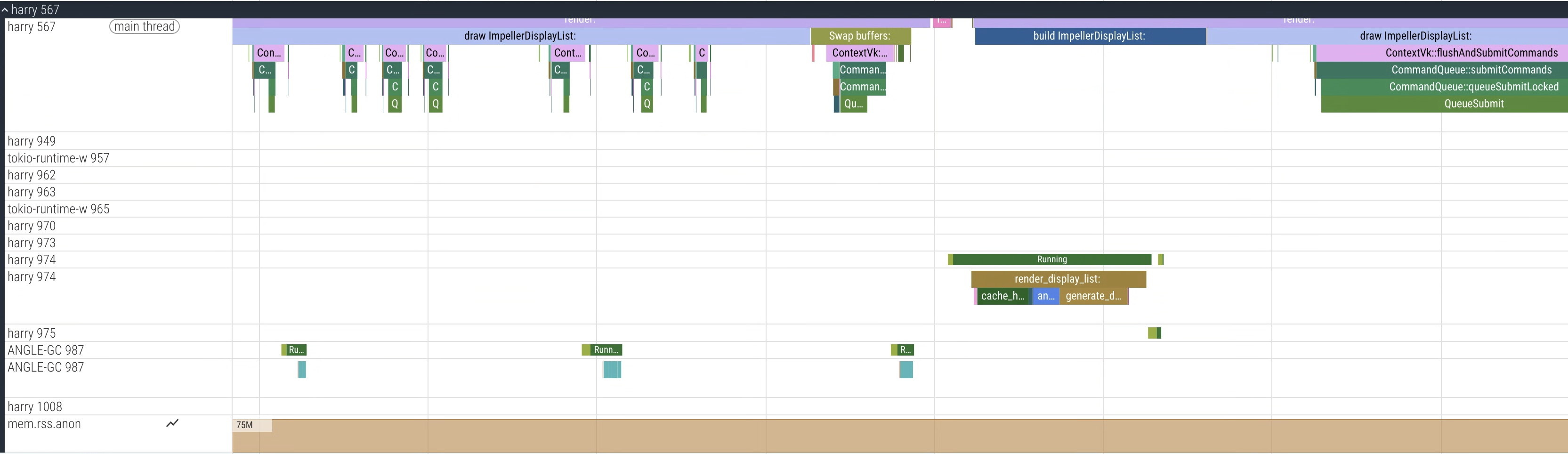
그림 1. harry 프로세스 (HAR)의 샘플 트레이스를 보여주는 Perfetto UI
DriverUI 성능 추적
DriverUI는 Android 시스템 추적을 사용하므로 추가 구성이 필요하지 않습니다.
DriverUI에 맞춤 트레이스 추가
개발자 가이드를 사용하여 Kotlin 코드에 맞춤 이벤트를 추가할 수 있습니다.
트레이스 수집
AAOS에서 트레이스를 수집하려면 Torq를 사용하는 것이 좋습니다.
Torq 사용
Torq는 AAOS 및 SDV에서 성능 트레이스를 수집하는 CLI 도구입니다.
Torq 저장소를 클론합니다.
저장소의 안내에 따라 빌드한 후 실행합니다.
export ANDROID_SERIAL=<your_device_serial>
# Collect a 7 second trace
torq -d 7000
두 VM에서 통합 성능 트레이스 수집
디스플레이 안전은 두 VM에서 실행되므로 두 VM에서 동시에 트레이스를 수집하면 문제를 식별하는 데 도움이 됩니다.
- Torq는 Perfetto의
traced_relay를 통해 통합 트레이스를 지원합니다. - 통합 트레이스를 캡처하려면 먼저 두 VM의 cid를 식별합니다.
# Get the cid for SDV Media VM. For example: 3
adb -s <sdv_media_vm_serial> shell getprop ro.sdv.vsock_local_cid

# Get the cid for SDV IVI VM. For example: 4
adb -s <sdv_ivi_vm_serial> shell getprop ro.sdv.vsock_local_cid
이 예시에서는 SDV-Media VM (cid=3)을 릴레이로 사용합니다.
# Configure your VMs for unified tracing
torq vm configure --primary <sdv_ivi_vm_serial> --primary-cid 4 --secondary <sdv_media_vm_serial>
# Collect a 7 second trace from the SDV IVI VM, it will now collect a unified trace
torq --serial <sdv_ivi_vm_serial> -d 7000
예를 들면 다음과 같습니다.

그림 2. 두 VM의 프로세스(harry(HAR) 및 com.android.car.driverui(DriverUI))가 모두 포함된 샘플 통합 트레이스를 보여주는 Perfetto UI
부팅 트레이스 수집
부팅 성능 분석을 위해 부팅 트레이스를 수집하려면 몇 가지 플래그를 사용 설정해야 합니다.
부팅 트레이스의 SDV 관련 지속성 플래그 설정
export ANDROID_SERIAL=<your_device_serial>
adb root
adb shell setprop persist.debug.sdv.boottrace 1
adb shell setprop persist.debug.perfetto.boottrace 1
커널 cmdline 매개변수
androidboot.fastboot.boottrace=enabled설정
# For Cuttlefish, set when creating CVD
cvd create -extra_kernel_cmdline=androidboot.fastboot.boottrace=enabled
record_android_trace 사용
다음 단계를 따르세요.
# Set your adb device serial
export ANDROID_SERIAL=<your_device_serial>
# Run record_android_trace from the Android repo
cd /<your_repo_path>
build/envsetup.sh

$ANDROID_BUILD_TOP/external/perfetto/tools/record_android_trace --config $ANDROID_BUILD_TOP/system/software_defined_vehicle/core_services/samples/tracing/config/trace_cfg.pbtx