

상태 모니터 (HM)는 각 가상 머신(VM)에서 실행되어 서비스 번들의 상태를 추적하고, VM의 상태를 확인하고, 주기적으로 VM 상태 보고서를 생성하는 SDV 에이전트입니다.
OEM 정의 서비스 번들은 HM에서 보고한 다양한 건강 신호를 수신 대기하고 데이터를 기반으로 복구 작업을 실행해야 합니다. 예를 들어 서비스 번들이 비정상 종료되는 SDV 인스턴스는 다시 시작하거나 업데이트해야 할 수 있습니다.
다음 항목을 추적하도록 HM 에이전트를 구성할 수 있습니다.
- 활성 하트비트를 모니터링하여 주기적인 작업을 실행하는 항목의 활성 상태를 확인합니다. 이 모니터링은 서비스 번들 인스턴스와 맞춤 OEM 에이전트 모두에 대해 구성할 수 있습니다.
- 서비스 번들 인스턴스의 복구 상태입니다. 비정상 종료 시 자동으로 다시 시작되도록 서비스 번들을 구성할 수 있습니다. HM은 이 복구 프로세스를 모니터링하는 신호를 제공합니다.
- 커뮤니케이션 QoS
- SDV 및 OEM 맞춤 에이전트의 활성 상태
참고로 프로토 정의를 포함한 전체 VSIDL 카탈로그는 //system/software_defined_vehicle/health_monitor/catalog/health_monitor.vsidl에서 확인할 수 있습니다.
용어
이 페이지에서는 다음 용어가 사용됩니다.
HM 하위 시스템 작업
HM 기능을 사용하려면 OEM 구현이 다음을 충족해야 합니다.
- HM 시스템 구성에 자세히 설명된 대로 구성 파일을 제공하여 상태 모니터링 시스템을 구성합니다.
- OEM 정의 HM 리스너 서비스 번들을 사용하여 HM 출력을 수신하고 적절한 조치를 취합니다.
- 상태 구성에 따라 신호를 적극적으로 게시하는 서비스 번들을 개발합니다. 이 게시를 통해 HM은 자신의 건강 상태를 평가할 수 있습니다. 자세한 내용은 서비스 번들 개발 가이드를 참고하세요.
HM 시스템 구성
HM 관련 구성은 다음 구성 유형 중 하나에 있습니다.
- VM별 전역 상태 구성
- 서비스별 번들 상태 구성으로, 번들의 모든 인스턴스의 상태 매개변수를 정의합니다.
VM별 상태 구성
런타임에 HM 에이전트는 VM 전체 상태 구성을 예상합니다. 이는 //system/software_defined_vehicle/health_monitor/catalog/health_monitoring_config.proto에 정의된 VMHealth 유형의 textproto 파일(.textproto 확장자)입니다.
VM 상태 구성은 부팅 시간 시스템 속성 androidboot.sdv.health_monitor.config_path를 사용하여 지정된 경로에 있어야 합니다.
또는 persist.sdv.health_monitor.config_path 시스템 속성을 맞춤 경로로 설정하여 런타임에 동적으로 구성할 수 있습니다. persist.* 설정이 androidboot.* 설정보다 우선합니다. 새 구성을 적용하려면 기기를 재부팅해야 합니다.
VM 상태 구성에서는 다음을 설정할 수 있습니다.
period_ms를 통한 VM 상태 보고서의 주기입니다. 이를 설정하는 것은 상태 위반이 감지되었다는 신호를 더 빠르게 보내는 것과 HM 하위 시스템 성능 간의 절충입니다. 100ms를 권장합니다.비정상 종료 모니터링 대상 에이전트 (에이전트 비정상 종료 모니터링 참고)
구성 파일 예시는 //system/software_defined_vehicle/health_monitor/src/prod_configs/에 있습니다. 다음은 구성 파일의 예입니다.
period_ms: 100
monitored_agent {
  agent_name: "sdv_dt_agent"
  binder_interface_name: "google.sdv.data_tunnel.IAgentService/default"
}
monitored_agent {
  agent_name: "sdv_rpc_agent"
  binder_interface_name: "google.sdv.rpc.IRpcAgent/default"
}
이 예에서는 SDV DT 및 RPC 에이전트가 비정상 종료 모니터링을 위해 구성되고 VM 상태 보고서가 100ms마다 게시되도록 구성됩니다.
서비스 번들별 구성
서비스 번들 인스턴스의 상태 모니터링은 선택사항입니다. 선택하려면 서비스 번들의 APEX에 상태 구성 파일을 저장하고 sdv_service_bundles_manifest.textproto의 sdv_service_bundle_metadata에 있는 health_config_path 필드에서 경로를 정의합니다. 서비스 번들 매니페스트에 대한 자세한 내용은 서비스 번들 메타데이터를 참고하세요.
상태 구성 파일은 다음 유형의 textproto 파일입니다.
message ServiceBundleHealthConfiguration {
  // Required: An empty ServiceBundleHealthConfiguration is equivalent to no
   // implicit health monitoring or QoS monitoring configured.
  //
  // Key should contain the instance name that the `InstanceConfiguration` applies to.
  map<string, InstanceConfiguration> instance_config = 1;
}
각 인스턴스에 대해 활성 상태 하트비트 구성과 QoS 구성을 모두 지정할 수 있습니다.
// Service bundle *instance* configuration.
message InstanceConfiguration {
  // Optional.
  //
  // Instance health monitoring configuration. Monitors instance
  // general health. Well suited for bundles executing periodic tasks.
  optional HealthConfiguration health_config = 1;

  // Optional.
   //
   // Map defining the QoS monitoring profile of the instance.
   // The key (string) is the topic name of the specific QoS heartbeat
   // publication. Choose a meaningful topic name for
   // expressive HM reporting.
   //
   // Only one publisher should publish on this topic. The HM
   // agent ignores all publishers except the first one registered
   // by the service bundle instance configured for QoS monitoring.
   map<string, QosMonitoringConfiguration> qos_config = 2;
}
기능별 구성에 대한 자세한 내용은 활성 상태 하트비트 모니터링 및 QoS 모니터링을 참고하세요.
HM 출력 듣기
주기적 보고서 또는 RPC API를 통해 HM을 들을 수 있습니다.
VM 상태 보고서
상태 모니터링은 모니터링된 엔티티의 상태에 관한 간결한 정보를 제공하는 고빈도 주기적 VM 상태 보고서를 생성합니다.
VmHealth의 유형 문법은 //system/software_defined_vehicle/health_monitor/catalog/health_topic.proto에 정의되어 있습니다.
message VmHealth {
  // Required.
  // Describes if all monitored service bundles are healthy and report heartbeats on time.
  bool all_monitored_service_bundles_healthy = 1;

  // Required.
  // Describes if all service bundles which should be running on the VM are alive.
  bool all_service_bundles_alive = 2;

  // Required.
  // Indicates if QoS requirements for all service bundles which should be running
  // on the VM are satisfied.
  bool qos_violations_detected = 3;
}
OEM 정의 HM 리스너 서비스 번들은 VMHealth 보고를 수신 대기하고 전체 시스템 아키텍처에 따라 적절한 조치를 취해야 합니다.
가능한 조치는 다음과 같습니다.
- VM에서 진단 루틴을 실행합니다.
- VM을 다시 시작합니다.
- 원인을 파악하기 위해 원격 분석 캠페인을 실행합니다.
- 시스템이 오작동하는 경우 시스템을 업데이트하거나 업데이트를 중지합니다.
HM RPC API
VM 상태 보고서는 빈도와 전송 속도에 최적화된 게시물로, 시스템의 상태에 관한 광범위한 정보를 제공합니다.
HM RPC API를 사용하면 HM 리스너가 건강 위반 소스에 관한 세부정보를 가져올 수 있습니다. 인터페이스는 //system/software_defined_vehicle/health_monitor/catalog/health_monitor_service.proto에 정의되어 있습니다.
편의를 위해 인터페이스를 여기에 재현했습니다.
// RPC Interface of the VM Health Monitor Agent for querying details about the current VM
// health.
//
// An OEM-defined service bundle typically monitors the overall health of the SDV instance by listening to
// high-frequency `VMHealth` publication. If violations are detected, this RPC interface can
// be used to retrieve detailed information about the malfunctioning component.
service HealthMonitorService {
  // Returns the list of running SDV service bundles that were created or started
  // by the orchestrator on this VM.
  rpc ListAllServiceBundles(ListAllServiceBundlesRequest) returns (ListAllServiceBundlesResponse) {}

  // Returns the list of crashed SDV service bundles.
  rpc ListCrashingServiceBundles(ListCrashingServiceBundlesRequest)
      returns (ListCrashingServiceBundlesResponse) {}

  // Returns the list of recovering SDV service bundles.
  rpc ListRecoveringServiceBundles(ListRecoveringServiceBundlesRequest)
      returns (ListRecoveringServiceBundlesResponse) {}

  // Returns the list of monitored SDV service bundles, which registered for reporting
  // aliveness heartbeats but failed to report heartbeats on time.
  rpc ListUnhealthyMonitoredServiceBundles(ListUnhealthyMonitoredServiceBundlesRequest)
      returns (ListUnhealthyMonitoredServiceBundlesResponse) {}

  // Returns a list of QoS monitoring violations detected.
  // Provides a snapshot of the current system state.
  rpc ListQosViolations(ListQosViolationsRequest)
      returns (ListQosViolationsResponse) {}
}
기능에 대한 자세한 설명
이 섹션에서는 HM의 다양한 측면을 자세히 설명합니다.
활성 상태 하트비트 모니터링
서비스 번들 인스턴스에 활성 모니터링이 구성된 경우 HM은 인스턴스가 비즈니스 로직이 올바르게 작동함을 증명하기 위해 주기적인 하트비트를 게시할 것으로 예상합니다. 이 모니터링은 주기적인 작업을 실행하는 서비스 번들 인스턴스에 가장 적합합니다. 또한 비동기 런타임을 사용하는 번들은 활성 상태 모니터링을 사용하여 스레드 풀이 소진되지 않았음을 증명할 수 있습니다.
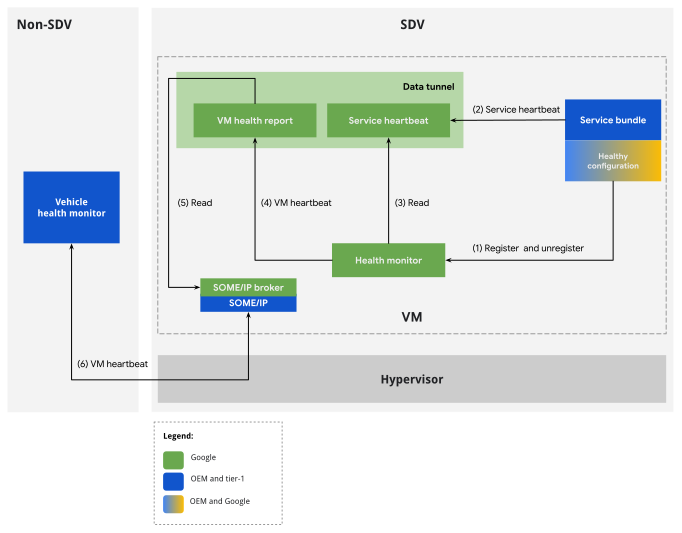
그림 1. HM 활성 모니터링 흐름
구성
서비스 번들 인스턴스에서 활성 상태 HB를 사용 설정하려면 번들 구성의 health_config 필드에 HealthConfiguration 인스턴스를 추가합니다.
활성 상태 하트비트 구성은 서비스의 주기적 하트비트 신호를 평가하기 위한 기준을 설정하는 미리 결정된 매개변수 집합을 정의합니다. 서비스 하트비트의 특성이 이러한 매개변수에서 벗어나면 하트비트가 지연된 것으로 분류되고 해당 서비스 번들이 비정상으로 분류되어 최적이 아닌 작동 상태를 나타낼 수 있습니다.
서비스 번들은 상태 구성에 따라 정시에 하트비트를 보고할 때 정상으로 간주됩니다. 비정상 종료 또는 높은 시스템 부하가 발생하면 하트비트가 누락되거나 지연되어 서비스 번들이 비정상으로 표시될 수 있습니다. 이 경우 VmHealth 보고서에 위반사항이 표시됩니다.
서비스 번들 개발자는 해당 APEX 메타데이터에 서비스 번들의 상태 구성을 정의해야 합니다. 상태 구성은 다음 기준을 정의합니다.
서비스 시작과 첫 번째 하트비트 감지 사이에 허용되는 최대 초기 지연 시간입니다.
SDV 서비스 번들이 비즈니스 로직을 실행하는 기간으로, 서비스 하트비트 게시 주기와 일치합니다.
HM이 서비스 번들을 비정상으로 간주하기 전에 누락되어야 하는 기간 수입니다.
실행 시간은 서비스 하트비트를 게시하기 전에 SDV 서비스 번들이 비즈니스 로직을 실행하는 데 필요한 시간입니다.
서비스 번들은 서비스 하트비트가 지연되면 상태 위반을 생성합니다. 상태 관찰 시간에 따라 두 가지 경우가 있습니다.
케이스 1: 초기 하트비트가 수신되지 않았습니다. 서비스 번들 시작과 관찰 시간 사이에 허용된 초기 지연 시간보다 더 많은 시간이 경과하면 서비스 번들이 비정상으로 간주됩니다.
케이스 2: 하트비트가 이미 수신되었습니다. 마지막 하트비트와 관찰 시간 사이에 기준점이 경과한 경우 서비스 번들은 비정상으로 간주됩니다. 이 기준점은 보고 기간 (기간 수 곱하기)과 작업 기간의 합계로 계산됩니다.
상태 구성 형식은 //system/software_defined_vehicle/health_monitor/catalog/health_config.proto에 정의되어 있습니다.
package com.android.sdv.health;

// Service Bundle's configuration for health monitoring.
message HealthConfiguration {
  // Required.
  // Initial delay in milliseconds is the time between the service starts and its first heartbeat.
  optional uint64 initial_delay_ms = 2;

  // Required.
  // Period of reporting a heartbeat in milliseconds which corresponds to the periodicity of
  // executing a business logic by the SDV service. This value should be larger than 0.
  optional uint64 period_ms = 3;

  // Required.
  // The number of periods missing a heartbeat before the Health Monitor should consider the
  // service as unhealthy. This value should be larger than 0.
  optional uint64 num_periods = 4;

  // Required.
  // Duration of the business logic the SDV service bundle executes in milliseconds.
  optional uint64 task_duration_ms = 5;
}
런타임 고려사항
이 섹션에서는 활성 상태 하트비트를 게시하고 모니터링을 위해 올바르게 등록하는 방법을 안내합니다.
활성 상태 하트비트 게시
서비스 번들 인스턴스는 타임스탬프가 포함된 서비스 하트비트 메시지를 생성합니다. 일반적으로 기본 비즈니스 로직이 실행된 직후에 메시지를 생성합니다. 서비스 하트비트는 서비스 번들이 활성 상태임을 나타냅니다.
모니터링할 번들 인스턴스 객체는 libhealth_api 라이브러리에서 사용할 수 있는 ServiceHeartbeat 유형의 게시자를 만들어야 합니다.
 message ServiceHeartbeat {
   // Required.
   // The timestamp.
   .google.protobuf.Timestamp timestamp = 1;
 }
게시 주제를 임의로 선택합니다. HM 에이전트는 메시지 유형별 검색을 사용하여 게시를 감지합니다.
해당 서비스 번들 매니페스트에 연결된 상태 구성을 통해 활성 상태 모니터링을 구성할 때 HM 에이전트는 인스턴스가 on_start 루틴을 완료하는 즉시 HB가 게시될 것으로 예상합니다. 시스템 시작을 차단하지 않도록 on_start를 짧게 유지하는 것이 좋습니다. 따라서 on_start에서 시작된 비동기 작업에서 하트비트를 게시하세요.
번들 개발자는 initial_delay_ms 구성 항목을 사용하여 첫 번째 하트비트가 예상되는 시간을 맞춤설정할 수 있습니다.
번들 인스턴스는 중지될 때까지 하트비트를 계속 게시해야 합니다. 인스턴스의 on_stop 루틴이 완료되면 인스턴스가 중지된 것으로 간주됩니다.
특수 사용 사례: 하트비트 모니터링에 명시적으로 등록
on_start와 on_stop 사이에 하트비트가 예상되는 활성 상태 하트비트 모니터링에 설명된 동작을 암시적 활성 상태 모니터링이라고 합니다. 이 방법은 번들의 비즈니스 로직을 간소화하고 번들이 항상 모니터링되도록 하므로 이 기능을 사용하는 것이 좋습니다.
하지만 기본 모니터링 기간이 제한 사항인 사용 사례도 있을 수 있습니다.
- 서비스 번들 인스턴스에는
start및stop이벤트와 연결되지 않은 시간 간격으로 주기적인 비즈니스 로직이 포함되어 있습니다. 활성 상태 모니터링은 이 맞춤 기간에만 필요할 수 있습니다. - HM은 일시중지 및 재개 기간 동안 HB를 정확하게 추적합니다. 따라서 번들은
on_stop이후에도 계속 모니터링되기를 원할 수 있습니다. - 맞춤 OEM 에이전트는 서비스 번들로 구현되지 않을 수 있습니다. 따라서 암시적 활성 상태 모니터링의 이점을 누릴 수 없습니다. 하지만 활성 상태 모니터링이 필요할 수 있습니다.
이러한 경우 HM을 사용하면 활성 상태 모니터링에 대한 암시적 등록을 우회하고 명시적 등록을 사용할 수 있습니다. 명시적 등록을 사용하려면 번들 인스턴스가 번들의 매니페스트에 특정 인스턴스의 HealthConfiguration 유형 항목을 포함하지 않아 암시적 등록을 선택 해제해야 합니다. 그런 다음 런타임에 번들 인스턴스는 //system/software_defined_vehicle/health_monitor/catalog/health_monitor_registration_service.proto에 정의된 RPC API를 사용하여 모니터링에서 수동으로 등록 및 등록 해제해야 합니다. 등록 RPC 호출이 성공하면 즉시 게시된 하트비트가 예상됩니다.
예시 구현은 //system/software_defined_vehicle/samples/health/stable/health_monitored_service_bundle/를 참고하세요.
QoS 모니터링
서비스 품질 (QoS)은 커뮤니케이션을 측정한 것입니다. HM은 전송된 메시지가 전송되는 데 너무 많은 시간이 걸리는지 또는 주기적 통신의 경우 선택한 빈도로 메시지가 수신되지 않는지 모니터링합니다.
SDV는 여러 가지 Pub/Sub 및 RPC 통신을 제공합니다. 공통점은 모든 통신 스키마에 하나 이상의 리스너가 포함된다는 것입니다. HM이 통신을 모니터링하려면 이 리스닝 서비스 번들 인스턴스가 관심 있는 메시지를 수신할 때마다 특수 QoS 하트비트를 게시해야 합니다.
구성
통신의 QoS 모니터링을 사용 설정하려면 먼저 QoS 하트비트를 게시할 통신 리스너를 식별합니다. 그런 다음 식별된 서비스 번들 인스턴스의 경우 qos_config 필드의 QosMonitoringConfiguration 매핑에 하나 이상의 주제를 추가합니다. 자세한 내용은 서비스별 번들 구성을 참고하세요.
topic은 HM이 런타임에 QoS HB를 예상하는 게시 주제를 정의하는 문자열입니다. 수신 번들 인스턴스는 여러 통신에 참여할 수 있으며 여러 주제에 관해 QoS HB를 보고할 수 있습니다.
주제는 설명적이어야 합니다. 런타임에 QoS 위반이 감지되면 HM 리스너 서비스 번들에 다시 보고되기 때문입니다.
QosMonitoringConfiguration 유형은 //system/software_defined_vehicle/health_monitor/catalog/health_config.proto에 정의되어 있습니다.
message QosMonitoringConfiguration {
  // Optional - If absent, heartbeat frequency monitoring is disabled for this SB.
  //
  // The maximum allowable interval between consecutive heartbeats (in milliseconds).
  // A QoS frequency violation is triggered if the time elapsed between
  // two heartbeats exceeds this threshold.
  optional uint64 qos_period_threshold_ms = 1;

  // Optional - If absent, heartbeat latency monitoring is disabled for this SB.
  //
  // The maximum allowable interval between data publication and data processing timestamps (in milliseconds).
  // A QoS latency violation is triggered if the time elapsed between
  // data publication and data processing timestamps exceeds this threshold.
  optional uint64 qos_latency_threshold_ms = 2;
}
기본 사용 사례의 경우 두 유형의 QoS 모니터링을 모두 적용합니다. 30의 qos_latency_threshold_ms은 일반 시스템 부하에서 VM 내 Pub/Sub 통신에 적합합니다.
런타임 고려사항
활성 상태 HB 모니터링과 마찬가지로 통신 수신 대기 번들은 하트비트 유형을 게시해야 합니다. 이 경우 비즈니스 로직 실행이 끝날 때가 아니라 관심 있는 메시지를 수신할 때마다 QoS HB가 게시되어야 합니다.
QoS HB는 //system/software_defined_vehicle/health_monitor/catalog/qos_heartbeat.proto에 정의된 QosHeartbeat 유형입니다.
message QosHeartbeat {
  option (.sdv.vsidl.v1.publication) = {
    message_count: 2
    model: SINGLE_PUB
  };
  // Required.
  // Current timestamp at heartbeat transmission. The heartbeat should be sent
  // immediately after the listener receives the related QoS-monitored message.
  .google.protobuf.Timestamp timestamp = 1;

  // Required.
  // Timestamp corresponding to the creation time of the underlying data. This
  // implies that, in addition to the data of interest, the monitored message includes
  // a data creation timestamp field. The listener is responsible for routing this
  // timestamp to the QosHeartbeat upon receiving a QoS-monitored message.
  .google.protobuf.Timestamp data_timestamp = 2;
}
QoS HB 게시를 등록하고 등록 해제하는 시간은 정확한 모니터링에 매우 중요합니다. HM은 이 두 이벤트 사이에 QoS HB를 예상합니다. 메시지 리스닝 번들은 모니터링된 통신이 SDV 통신 스택에 등록될 때 QoS HB 게시를 등록해야 합니다. HM은 가용성 API를 사용하여 이를 실행할 수 있습니다. 자세한 내용은 서비스 가용성 확인을 참고하세요.
서비스 번들 복구 모니터링
서비스 번들 인스턴스 복구는 조정 에이전트 구성 파일의 일부로 구성됩니다. 이 주제에 대한 자세한 내용은 서비스 번들을 참고하세요. HM 하위 시스템은 복구 프로세스를 수동적으로 관찰합니다. 번들 인스턴스 복구 실패가 감지되면 위반이 VMHealth 보고서에 추가됩니다. 나머지 HM 모니터링 기능과 달리 복구 모니터링은 필수이며 구성할 수 없습니다.
복구용으로 구성되지 않은 서비스 번들 인스턴스의 비정상 종료는 첫 번째 비정상 종료 시 상태 위반을 생성합니다.
서비스 번들 인스턴스 복구는 하트비트 활성 모니터링과 통합되도록 설계되었습니다. 번들이 복구 중인 것으로 감지되면 HM 시스템은 하트비트를 평가할 때 더 관대해집니다. 실제로 이 관대함은 서비스 번들이 비정상 종료되는 경우 추가 모니터링 등록 해제 또는 등록 단계를 수행할 필요가 없음을 의미합니다.
에이전트 비정상 종료 모니터링
HM은 바인더 linkToDeath 메커니즘을 사용하여 SDV 에이전트의 잠재적 비정상 종료를 감지합니다.
VM 상태 구성 (SDV별 인스턴스 (VM) 구성 참고)의 일부로 비정상 종료 모니터링을 구성할 수 있습니다. 특히 monitored_agent 반복 필드를 구성할 수 있습니다. 이 필드에는 BinderServiceAgent 유형의 항목이 포함되어야 합니다.
message BinderServiceAgent {
  // agent_names must be unique across configuration
  // used for HM internal agent identification, and naming entries in HM dumpsys report
  string agent_name = 1;

  // Binder interface name/identifier, e.g: "google.sdv.data_tunnel.IAgentService/default"
  // HM Agent should have appropriate permissions to find the binder interface
  // see also `sdv_crash_monitored_service` selinux attribute
  string binder_interface_name = 2;
}
에이전트가 바인더 인터페이스를 노출하는 경우 맞춤 에이전트도 모니터링할 수 있습니다. 맞춤 에이전트를 모니터링하려면 적절한 바인더 인터페이스를 수신하는 HM SELinux 권한을 부여하세요.
시스템 속성 ro.boot.sdv.health_monitor.agent_startup_timeout_sec는 HM이 시작된 후 HM이 에이전트가 바인더 인터페이스를 등록할 때까지 기다리는 시간을 재정의할 수 있습니다. 맞춤 에이전트가 필요하지 않은 한 기본값인 3초가 적절합니다.
서비스 번들 개발자 가이드
이 섹션에서는 이전 섹션의 이론적 처리와 달리 서비스 번들에서 HM 기능을 사용하는 방법에 관한 단계별 가이드를 제공합니다. 이 가이드의 기반이 되는 최신 참조 샘플은 qos_monitoring 샘플입니다. 실제 환경에서 사용하려면 샘플의 //system/software_defined_vehicle/samples/health/stable/qos_monitoring/README를 따르세요.
서비스 번들에 활성 상태 하트비트 모니터링 추가
이 방법은 서비스 번들의 상태 모니터링을 사용 설정하는 가장 직접적인 방법입니다.
health_configuration.textproto이라는 파일에서 번들 인스턴스에 대해ServiceBundleHealthConfiguration인스턴스를 정의합니다.# health_bundle_configuration.textproto instance_config { key: "instance1" value: { health_config { initial_delay_ms: 1000 period_ms: 500 num_periods: 2 task_duration_ms: 200 } # qos_config entries irrelevant for this dev guide qos_config { ... } } }서비스 번들 APEX에 구성 파일을 추가합니다.
Android.bp에서:apex { name: "com.android.sdv.sample.oem.health.qos_monitoring", // ... prebuilts: [ // ... "com.android.sdv.sample.oem.health.qos_monitoring.health_config", ], } prebuilt_etc { name: "com.android.sdv.sample.oem.health.qos_monitoring.health_config", src: "health_configuration.textproto", filename: "health.textproto", // ... // Reduce prebuilt visibility to avoid adding it in another APEX. visibility: ["//system/software_defined_vehicle/samples/health/qos_monitoring/apex"], }APEX에 상태 구성을 저장하고 매니페스트에서
health_config_path를 설정합니다.# sdv_service_bundles_manifest.textproto sdv_service_bundle_metadata { ... health_config_path: "etc/config/health_configuration.textproto" }VSIDL 정의에서 번들이
com.android.sdv.health.ServiceHeartbeat를 게시하는지 확인합니다.sdv_service_bundle { name: "SampleBundle" publisher { message: "com.android.sdv.health.ServiceHeartbeat" topic: "arbitrary-topic" capacity: 2 } }번들이 HB를 게시할 수 있도록 번들에 SDV 권한을 추가합니다.
publisher { type: "com.android.sdv.health.ServiceHeartbeat" }on_start부터 코드에서 주기적으로 서비스 하트비트를 게시합니다.// ... fn on_start(&mut self) { // ... runtime.spawn(business_logic(self.context)) } async fn business_logic(context: ContextRef) -> SdvResult<()>{ // register HB publication let mw_comms = SdvComms { context }; let aliveness_hb_pub = create_publisher::<PublisherDescriptor<ServiceHeartbeat>>( &mw_comms, PublisherDescriptors::<ServiceHeartbeat>::ARBITRARY_TOPIC, ) .await?; loop{ // do business logic // ... // publish hb aliveness_hb_pub.publish(&ServiceHeartbeat { timestamp: MessageField(Some(Box::new(now.into()))), ..Default::default() })?; } }
특수 사용 사례: 명시적 등록
번들이 맞춤 수명 주기에 HB 모니터링이 필요한 더 특별한 사용 사례 (예: 표준 STARTED 상태보다 일찍 시작하거나 늦게 종료되는 모니터링)의 경우 명시적 등록 방법을 사용할 수 있습니다.
VSIDL 정의에서
com.android.sdv.health.HealthMonitorRegistrationService클라이언트를 추가합니다.sdv_service_bundle { # ... client { service: "com.android.sdv.health.HealthMonitorRegistrationService" channel: "com-android-sdv-health-health-monitor-registration-service" } }활성 상태 HB 등록 RPC를 사용하기 위한 SDV 권한 추가
  # ...
  client {
    service: "com.android.sdv.health.HealthMonitorRegistrationService"
    channel: "com-android-sdv-health-health-monitor-registration-service"
  }
RPC를 통해 HM에 등록합니다(예:
on_start또는new).let rpc_client = Self::new_client(comms).await?; let _ = rpc_client .RegisterConfiguration(&RegisterConfigurationRequest { config: Some(HealthConfiguration{ initial_delay_ms: 100, period_ms: 200, num_periods: 3, task_duration_ms: 40, special_fields: protobuf::SpecialFields::default(), }).into(), ..Default::default() }) .await .unwrap();HB를 게시합니다.
더 이상 필요하지 않은 경우 모니터링에서 등록 취소합니다.
let _ = rpc_client
  .UnregisterConfiguration(&UnregisterConfigurationRequest { ..Default::default() })
  .await
  .unwrap();
통신에 QoS 모니터링 추가
서비스 번들 인스턴스가 VSIDL 카탈로그에서
fog-light-status라는 주제의 구독자인지 확인합니다.subscriber { message: "QosMonitoredFogLightStatus" topic: "left-fog-light-status" }메시지 형식은 다음과 같습니다.
package com.android.sdv.sample.oem.health.qos_monitoring; import "google/protobuf/timestamp.proto"; message QosMonitoredFogLightStatus { // arbitrary fields related to business logic int32 status = 1; // A QoS-monitored message must include a timestamp field .google.protobuf.Timestamp timestamp = 2; }QoS 모니터링이 포함된
health_configuration.textproto파일에서 번들 인스턴스의ServiceBundleHealthConfiguration인스턴스를 정의합니다.# health_bundle_configuration.textproto instance_config { key: "instance1" value: { # aliveness HB monitoring config irrelevant for this dev guide health_config { ... } qos_config { key: "qos-hb-right-fog-light-status" value { qos_period_threshold_ms: 100 qos_latency_threshold_ms: 50 } } } }key필드에서 선택한 주제는 QoS HB가 이 주제에 게시되어fog-light-status이라는 주제를 모니터링할 수 있음을 보여줍니다.서비스 번들 APEX에 구성 파일을 추가합니다.
Android.bp에서:apex { name: "com.android.sdv.sample.oem.health.qos_monitoring", // ... prebuilts: [ // ... "com.android.sdv.sample.oem.health.qos_monitoring.health_config", ], } prebuilt_etc { name: "com.android.sdv.sample.oem.health.qos_monitoring.health_config", src: "health_configuration.textproto", filename: "health.textproto", // ... // Reduce prebuilt visibility to avoid adding it in another APEX. visibility: ["//system/software_defined_vehicle/samples/health/qos_monitoring/apex"], }상태 구성을 APEX에 저장하고 매니페스트에서
health_config_path를 설정합니다.# sdv_service_bundles_manifest.textproto sdv_service_bundle_metadata { ... health_config_path: "etc/config/health_configuration.textproto" }VSIDL 정의에서 번들이
com.android.sdv.health.QosHeartbeat게시자인지 확인합니다.sdv_service_bundle { name: "SampleBundle" publisher { message: "com.android.sdv.health.QosHeartbeat" topic: "qos-hb-right-fog-light-status" capacity: 2 } }번들이 QoS HB를 게시할 수 있도록 번들에 SDV 권한을 추가합니다.
publisher { message: "com.android.sdv.health.QosHeartbeat" topic: "qos-hb-right-fog-light-status" }모니터링된 통신이 등록된 경우에만 QoS HB 게시를 등록합니다.
libsdv_mw_clientlib에서 사용 가능 여부 API를 사용합니다.// Wait for monitored communication to be available let comms = SdvComms{context}; let registration_stream = create_registration_event_stream( &comms, SubscriberDescriptors::<QosMonitoredFogLightStatus>::LEFT_FOG_LIGHT_STATUS, ).await?; let mut registration_stream = Box::pin(registration_stream.filter(|e|e==Availability::Available)); registration_stream.next().await; // only when available, create QoS HB publication: let qos_hb_pub = create_publisher( &comms, PublisherDescriptors::<QosHeartbeat>::QOS_HB_LEFT_FOG_LIGHT_STATUS, ).await?; // ...메시지를 수신할 때마다 QoS HB를 게시합니다.
// ... use tap::Pipe; fn flatten_mw<T: Send>( s: impl Stream<Item = SdvResult<Vec<T>>> + Send + Unpin, ) -> impl Stream<Item = SdvResult<T>> + Send + Unpin { s.flat_map(|v| match v { Ok(v) => v.into_iter().map(Ok).pipe(stream::iter).left_stream(), Err(err) => Err(err).pipe(future::ready).pipe(stream::once).right_stream(), }) } { // ... let data_stream = create_observer( &comms, SubscriberDescriptors::<QosMonitoredFogLightStatus>::LEFT_FOG_LIGHT_STATUS, SubscribeOptions::default() ) .pipe(flatten_mw) .await?; while let Some(data) = data_stream.next().await { // publish QoS HB. Note how data.timestamp is used to populate the field qos_hb_pub.publish( &QosHeartbeat { timestamp: SystemTime::now(), data_timestamp: data.timestamp, ..Default::default() } ) // use data // ... } }QoS 모니터링을 중지하려면 게시자 객체를 삭제하세요.
// ...
drop(qos_hb_pub);
상태 모니터링 디버그
디버그 및 시스템 개요 목적으로 dumpsys 도구를 사용하여 VM 상태 모니터링 상태를 모니터링합니다.
adb shell dumpsys com.google.sdv.ISdvAgent/hm
보고서에는 VM 상태 보고 구성, 번들 구성, 모니터링 상태가 자세히 나와 있습니다. 다음은 이러한 보고서의 샘플입니다.
AGENT NAME: SDV Agent dump - Health Monitor
AGENT FQIN: instance1:com.android.sdv.health.HealthMonitorServiceBundle/instance1
AGENT STATE: Started
----------------
----------------
INTERNAL STATE REPORTERS:

*NAME: VM health report period:
*REPORT:
100----------------
*NAME: Recovery monitor manager
*REPORT:

HEARTBEAT MONITORING:
NO ACTIVE MONITORS

QOS MONITORING:
NO ACTIVE MONITORS
RECOVERY MONITORING:
a. Agent monitoring:
MONITOR 0:
ID: Agent: sdv_vsidl_provider_agent
linked_binder: com.google.sdv.ISdvAgent/vsidl_provider
alive: true

MONITOR 1:
ID: Agent: sdv_someip_broker
linked_binder: com.google.sdv.ISdvAgent/someip_broker
alive: false

b. SB monitoring:
MONITOR 0:
ID: FQIN: instance1:com.android.sdv.test.orchestrator.OrchSampleInitialPowerState/sample-initial-power-state
Recovery State: Normal
Lifecycle State: Started
Health Status: Healthy
MONITOR 1:
ID: FQIN: instance1:com.android.sdv.sample.apex.provider.Provider/sample-provider-v1
Recovery State: Normal
Lifecycle State: Started
Health Status: Healthy
MONITOR 2:
ID: FQIN: instance1:com.sdv.google.display_safety.HarSdvVehicleDataPublisher/instance-1
Recovery State: Normal
Lifecycle State: Started
Health Status: Healthy
----------------
*NAME: Health monitor
*REPORT:
CURR TIMESTAMP(ns): 1775543863756836167
INTERNAL STATE:
background_thread running: true
should_run: true

----------------