

오케스트레이터는 각 가상 머신 (VM)에서 실행되는 로컬 SDV 에이전트로, 서비스 번들을 생성, 시작, 중지 또는 소멸해야 하는 시기를 제어하는 메커니즘을 제공합니다. 이는 서비스 번들 인스턴스에서 작업이 실행되는 시점과 방식을 결정하는 규칙 집합을 정의하는 오케스트레이션 구성을 통해 이루어집니다. 이러한 규칙은 차량, 전원, 맞춤 모드를 기반으로 합니다.
구성 APEX에서 또는 VM별 구성을 통해 오케스트레이터를 구성할 수 있습니다. 이 분산 구성 시스템을 사용하면 서비스 번들 레지스트리를 통해 각 서비스 번들의 일부를 독립적으로 업데이트할 수 있습니다.
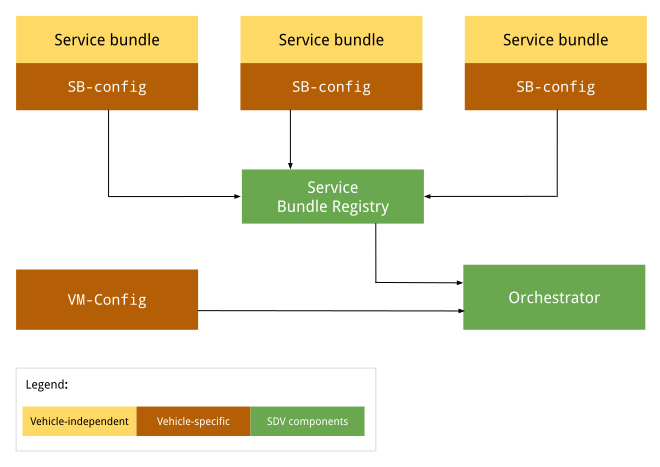
그림 1. 오케스트레이터 구성 다이어그램
차량 독립 구성은 OEM이나 차량에 따라 변경되지 않습니다. 구성의 경우 각 OEM의 모든 차량에서 동일하게 유지됩니다. 차량별 구성은 OEM마다 다른 차량에서 다를 수 있지만 특정 OEM에서 만든 모든 차량의 구성은 동일할 수 있습니다.
구성 APEX
런타임에 오케스트레이터는 서비스 번들 레지스트리로 이동하여 각 서비스 번들의 SDV 오케스트레이션을 가져와 각 구성을 로드하고 파싱합니다. 자세한 내용은 오케스트레이션 메타데이터를 참고하세요.
VM별 구성
오케스트레이터가 시작되면 VM 구성을 로드하고 파싱합니다 (있는 경우). 이 구성 파일의 절대 경로는 시스템 속성 persist.sdv.orchestrator_config_path 및 ro.boot.sdv.orchestrator_config_path을 통해 지정됩니다.
시스템은 다음 계층 구조에 따라 부팅 시 VM 구성 파일 경로를 결정합니다.
시스템에서
persist.sdv.orchestrator_config_path속성을 확인합니다. 값이 있으면 해당 경로가 사용됩니다. 이 값은 재부팅 시 유지되거나 런타임에 설정됩니다.persist.sdv.orchestrator_config_path가 비어 있으면 시스템에서ro.boot.sdv.orchestrator_config_path속성을 확인합니다.ro.boot.sdv속성에 값이 있으면 해당 경로가 지속 속성에 복사되고 현재 부팅과 모든 향후 부팅에 사용됩니다 (재정의되지 않는 한).
persist.sdv.orchestrator_config_path
persist.sdv.orchestrator_config_path는 SDV 오케스트레이터 에이전트가 구성 파일의 경로를 가져오는 데 사용하는 기본 속성입니다. 이는 지속적인 속성으로, 값이 기기 재부팅 시 저장됩니다. 런타임에 값을 변경할 수 있으며 이는 테스트 또는 특정 시나리오(예: 엔드 투 엔드 테스트)에 유용합니다.
setprop 명령어를 사용하여 런타임에 값을 설정할 수 있고, 메이크파일(확장자 .mk) 또는 리소스 스크립트 파일(확장자 .rc)을 사용하여 빌드 시간에 값을 설정할 수 있습니다.
런타임에 속성 설정
런타임에 속성을 설정하는 것은 재부팅 시 값이 저장되므로 테스트하거나 임시 변경하는 데 유용합니다.
adb root
adb shell setprop persist.sdv.orchestrator_config_path {$path_to_file}.textproto
빌드 시간에 속성 설정
이 속성을 기기 빌드 구성의 일부로 설정하려면 제품 또는 보드의 makefile에 줄을 추가하세요. 이는 새 기기 이미지의 기본값을 설정하는 데 적합합니다.
# Add this line to a product's or device's .mk file
PRODUCT_PROPERTY_OVERRIDES += persist.sdv.orchestrator_config_path={$path_to_file}.textproto
리소스 스크립트 파일 내에서 이 속성을 설정할 수도 있습니다.
# Add this line to an .rc file
on {$property}
    setprop persist.sdv.orchestrator_config_path {$path_to_file}.textproto
ro.boot.sdv.orchestrator_config_path
ro.boot.sdv.orchestrator_config_path는 persist.sdv.orchestrator_config_path 속성의 초기 값을 제공하는 데 사용되는 부팅 시간 읽기 전용 속성입니다. 시스템이 부팅될 때 persist.sdv.orchestrator_config_path가 비어 있으면 ro.boot.sdv.orchestrator_config_path 값이 여기에 복사됩니다. persist.sdv.orchestrator_config_path가 설정되면 이후 부팅에서 이 속성으로 덮어쓰지 않습니다.
bootconfig 또는 커널 cmdline을 사용하여 ro.boot.sdv.orchestrator_config_path를 설정할 수 있습니다.
파일 형식
런타임에 새 구성을 로드할 수 있도록 .textproto 형식 (예: 구조화된 텍스트)으로 오케스트레이션 구성을 정의합니다.
구성 문법
이 섹션에서는 구성 문법을 설명합니다.
서비스 번들
각 서비스 번들은 오케스트레이터 내에서 번들을 식별하고 번들 인스턴스의 수명 주기를 처리하는 데 사용되는 서비스 번들 구성으로 정의해야 합니다. 서비스 번들 구성은 다음을 정의합니다.
InstanceToGroupMapping를 사용하면 그룹에 서비스 번들의 인스턴스를 포함하여 동일한 서비스 번들의 인스턴스 간에 종속성을 설정할 수 있습니다.InstancesStates은 서비스 번들 인스턴스의 여러 상태를 정의합니다.InstancesStateConfiguration는 조건이true로 평가되는 경우 서비스 번들 인스턴스가 설정되어야 하는 상태 (InstancesStates에서)를 정의합니다.ServiceBundleConfig에는 특정 서비스 번들 및 해당 인스턴스에 관한 정보가 포함됩니다. 번들의 경우 각각InstanceToGroupMapping및InstancesStateConfiguration이 포함됩니다.CustomModes는 번들이 게시할 수 있는 맞춤 모드 목록을 정의합니다.CustomModes는 승인되지 않은 번들이 맞춤 모드의 값을 수정하는 것을 방지하는 데 사용됩니다. 서비스 번들이 맞춤 모드로 게시되지 않을 수 있으므로 이 필드는 선택사항입니다. 자세한 내용은 맞춤 모드를 참고하세요.
필수 번들 구성
최소한 번들 구성은 다음 속성을 제공합니다.
service_bundle_config {
    package_name: "package_name"
    service_bundle_name: "service_bundle_name"

    instance: "instance_1"
    instance: "instance_n"
}
이 선언은 다음 FQIN을 사용하여 n 서비스 번들 인스턴스를 정의합니다.
vm_name.package_name.service_bundle_name.instance_1
…
vm_name.package_name.service_bundle_name.instance_n
VM 이름이 구성에 명시적으로 선언되지 않았습니다. 구성 파일은 VM별로 정의되므로 VM 이름은 항상 구성 파일이 배포되는 VM의 이름이며 오케스트레이션 에이전트가 이미 알고 있습니다.
인스턴스 구성
서비스 번들 인스턴스를 선언해도 효과가 없습니다. 오케스트레이터에서 실행하려면 인스턴스를 구성해야 합니다. 예를 들어 오케스트레이터는 인스턴스가 실행되어야 하는 조건 (또는 VM이나 차량의 상태)을 알아야 합니다. 인스턴스를 구성하려면 다음을 통해 구성 상태를 정의해야 합니다.
condition은 평가해야 하는 VM 또는 차량 상태에 관한 표현식입니다.instances_states는 조건이true로 평가되는 경우 적용해야 하는 인스턴스별 상태 집합입니다.
자세한 내용은 조건을 참고하세요.
service_bundle_config {
    package_name: "oem.package"
    service_bundle_name: "OemApplication"

    instance: "adaptive_light"
    instance: "reserve_light"

    state {
        condition {
            power_state: "ON"
        }

        instances_states {
            started: "adaptive_light"
            created: "reserve_light"
        }
    }
}
인스턴스-그룹 매핑
서비스 그룹에 포함하여 서비스 인스턴스를 구성할 수도 있습니다. 서비스 번들 구성 수준에서 그룹에 인스턴스를 추가할 수 있습니다. 그런 다음 VM 구성 수준에서 그룹을 구성할 수 있습니다. 자세한 내용은 다음 섹션과 서비스 번들을 참고하세요.
service_bundle_config {
    package_name: "oem.package"
    service_bundle_name: "OemApplication"

    instance: "fog_front_light"
    instance: "fog_rear_light"
    instance: "turn_signal_light"
    instance: "light_flasher_display"

    # Declare that fog_light contains fog_front_light and fog_rear_light.
    group_mapping {
        group: "fog_light"
        instance: "fog_front_light"
        instance: "fog_rear_light"
    }

    # Declare that flasher_light contains turn_signal_light and light_flasher_display.
    group_mapping {
        group: "flasher_light"
        instance: "turn_signal_light"
        instance: "light_flasher_display"
    }
}
Proto 스키마
다음은 프로토 스키마 샘플입니다.
// Service bundle configuration.
//
// Defines service bundle data, its instances and configuration for instances
// states depending on the state of the system
message ServiceBundleConfig {
  // Required. Name of the service bundle.
  string service_bundle_name = 1;

  // Required. Package name of the service bundle.
  string package_name = 2;

  // Required. Service instances.
  repeated string instance = 3;

  // Configuration for instances states depending on the state of the system.
  repeated InstancesStateConfiguration state = 4;

  // Mapping of groups to their member service instances.
  repeated InstanceToGroupMapping group_mapping = 5;

  // Custom modes that this service bundle is allowed to set.
  repeated string custom_mode = 6;

  // Defines the retry policies for specific instances.
  // If multiple mappings target the same instance, the one with the highest `max_retries`
  // value takes precedence. This applies across all configuration files.
  repeated InstanceToRetryMapping retry_mapping = 7;
}

// Mapping of instances to their retry configuration.
message InstanceToRetryMapping {
  // Required.
  //
  // Name of the instances for which the given retry configuration is applied.
  repeated string instance = 1;

  // Required.
  //
  // The configuration that defines the restart and retry strategy for the instances.
  RetryConfiguration retry_config = 2;

  // Configuration for retry and restart.
  // This configuration is applied after a failure on a transition or after the bundle instance
  // has crashed. Upon a successful operation, the retry counter are reset to max_retries. This
  // configuration can be applied to any service bundle, not only the monitored ones. If the
  // configuration is not provided or none of the optional fields are filled, the default behavior
  // stated is applied (the value from `ro.boot.sdv.orchestrator.recovery.max_retries`
  // or zero if not set).
  message RetryConfiguration {
    // The number of times a retry/restart operation can be performed.
    // Defines the number of times the Orchestrator retries a transition
    // after a transient failure or after a bundle crash notification.
    // This applies to creating, starting and destroying operations.
    // The retry count resets to max_retries after a successful operation.
    // If not set, the default configured value in the
    // `ro.boot.sdv.orchestrator.recovery.max_retries` is used, or-if not set-
    // it fallbacks to zero.
    optional uint32 max_retries = 1;
  }
}

// Mapping of groups to their member service instances.
message InstanceToGroupMapping {
  // Required. Names of groups to which members are added.
  //
  // Group behavior is defined in VM configuration.
  repeated string group = 1;

  // Required. Names of instances to be included in the groups.
  //
  // Can reference only instance defined in the same config file.
  repeated string instance = 2;
}

// Describes the state the service instances should be in after the state is executed.
//
// If there is no valid configuration for the instance in the specific system state, such instance is transitioned to the "destroyed" state.
//
// For the GroupsStates definition to be useful, at least one item should be present in any of the fields.
message InstancesStates {
  // Names of the instances that must be in a "created" state.
  repeated string created = 1;

  // Names of the instances that must be in a "started" state, overrides "created" state.
  repeated string started = 2;

  // Names of the instances that must not run, overrides all other states.
  repeated string destroyed = 3;
}

// Configuration for instances states depending on the state of the system.
message InstancesStateConfiguration {
  // Condition for the system state under which the related instances states should be executed by Orchestrator.
  //
  // If omitted, the related instances states are always executed.
  Condition condition = 1;

  // Required. States of service bundle instances to be executed by Orchestrator if the condition is true.
  InstancesStates instances_states = 2;
}
VM 수준 구성
VM 구성을 사용하면 그룹 매핑과 그룹 구성을 정의할 수 있습니다. VM 수준에서 서비스 번들 간의 종속 항목을 모델링하는 데 사용되므로 여러 서비스 번들의 상태를 동시에 수정할 수 있는 유연성을 제공합니다. 그룹의 모든 인스턴스가 지정된 상태로 전환됩니다.
오케스트레이터는 상태 변경이 실행되는 순서를 보장하지 않습니다. 오케스트레이터는 각 인스턴스를 지정된 상태로 승격합니다.
그룹은 구성 부분에서 group 이름을 사용하여 암시적으로 선언됩니다. 예를 들어 인스턴스-그룹 매핑, 그룹-그룹 매핑, 그룹 구성 상태가 있습니다.
그룹 간 매핑
그룹에는 다른 그룹이 포함될 수 있습니다. group_1에 subgroup_2가 포함되어 있다고 선언하면 subgroup_2의 모든 서비스 인스턴스가 group_1에 효과적으로 추가됩니다.
예를 들면 다음과 같습니다.
# Declare that body contains fog_light and flasher_light.
group_mapping {
    group: "body"
    subgroup: "fog_light"
    subgroup: "flasher_light"
}
그룹 구성
그룹을 선언해도 효과가 없습니다. 오케스트레이터에서 실행하려면 그룹을 구성해야 합니다. 예를 들어 오케스트레이터는 그룹이 실행되어야 하는 VM 또는 차량의 조건이나 상태를 알려야 합니다.
구성 상태를 사용하여 서비스 인스턴스와 유사한 방식으로 그룹을 구성할 수 있습니다. 유일한 차이점은 구문에서 instances_states 대신 groups_states를 사용한다는 것입니다.
state {
    condition {
        power_state: "ON"
    }

    groups_states {
        started: "Body"
        started: "Adas"
    }
}
Proto 스키마
다음은 샘플 proto 스키마입니다.
// VM configuration.
//
// Defines group-to-group mappings and configuration for groups
// states depending on the state of the system.
//
// Configurations of service bundles can also be defined in VM configuration (as well as in a separate configuration file).
message VmConfig {
  // Group to member groups mapping.
  repeated GroupToGroupMapping group_mapping = 1;

  // Configuration of group states.
  repeated GroupsStateConfiguration state = 2;

  // Required. We also allow to configure individual service bundles in the VM config, to simplify development and migration from the monolithic configuration.
  repeated ServiceBundleConfig service_bundle_config = 3;
}

// Mapping of groups to their member groups.
message GroupToGroupMapping {
  // Required. Names of groups to which members are added.
  repeated string group = 1;

  // Required. Names of member groups to be included in the groups.
  repeated string subgroup = 2;
}

// Describes the state the service instance groups should be in after the state is executed.
//
// If group configuration is valid in a specific system state, the configured state is applied to
// all group members. After that, the normal service instance configuration rules still apply:
// - "destroyed" > "started" > "created" precedence
// - not configured means the instance should be moved to the default state
//
// For the GroupsStates definition to be useful, at least one item should be present in any of the fields.
message GroupsStates {
  // Names of the groups that must be in a "created" state.
  repeated string created = 1;

  // Names of the groups that must be in a "started" state, overrides "created" state.
  repeated string started = 2;

  // Names of the groups that must not run, overrides all other states.
  repeated string destroyed = 3;
}

// Configuration for group states depending on the state of the system.
message GroupsStateConfiguration {
  // Condition for the system state under which the related group states should be executed by  Orchestrator.
  //
  // If omitted, the related groups states are always executed.
  Condition condition = 1;

  // Required. States of service bundle groups to be executed by Orchestrator if the condition  is true.
  GroupsStates groups_states = 2;
}
구성 상태
구성 상태는 서비스 인스턴스 또는 그룹이 시작, 중지 또는 소멸되는 시점을 정의하며 conditions 및 instances_states(번들 구성)과 groups_states(VM 구성)로 구성됩니다.
조건
조건을 사용하면 모델이 불리언 조건을 가질 수 있으며, 이 조건이 true로 평가되면 정의된 인스턴스 상태가 적용됩니다. 조건에는 다음과 같은 특징이 있습니다.
전원, 차량, 맞춤 모드와 같은 지원되는 신호를 기반으로 하는 임의로 복잡한 불리언 표현식 (
and또는not표현식으로 형성됨)입니다.(선택사항) 조건이 없는 구성 상태는 항상 활성 상태이므로
true로 평가됩니다.
인스턴스 상태 및 그룹 상태
instances_states 및 groups_states에는 다음과 같은 특징이 있습니다.
상태가
active인 경우 오케스트레이션 에이전트가 지정된 인스턴스 또는 그룹에 적용해야 하는 상태를 지정합니다.그룹에 상태를 적용하면 그룹의 각 서비스 번들 인스턴스에 상태가 적용됩니다. 인스턴스가 상태로 전환되는 순서는 적용되지 않습니다.
지원되는 주는 다음과 같습니다.
Service::on_start가 호출된 후startedcreatedService::new가 호출된 후,Service::on_start이 호출되기 전또는
Service::on_stop가 호출된 후,Service::drop이 호출되기 전
Service::drop가 호출된 후destroyed가 호출됩니다.
규칙 세트
구성 상태는 조건에 따라 활성 또는 비활성일 수 있습니다. 여러 상태가 언제든지 활성화될 수 있습니다. 오케스트레이션 에이전트가 신호 업데이트를 수신하면 서비스 번들의 수명 주기를 수정하기 전에 모든 구성 상태가 평가됩니다. 서비스 인스턴스 상태는 다음 규칙에 따라 평가됩니다.
활성 상태 중 none이 서비스 인스턴스에 적용되면 인스턴스가 소멸됩니다.
하나 이상의 활성 상태가 적용되는 경우 다음 우선순위가 적용됩니다.
destroyed가 절대적으로 우선합니다.started가created보다 우선합니다.
Proto 스키마
다음은 샘플 proto 스키마입니다.
// A root boolean condition.
message Condition {
  // Required.
  oneof root {
    // VPM power state condition.
    string power_state = 1;
    // VPM vehicle state condition.
    string vehicle_state = 2;
    // Custom mode state condition.
    CustomState custom_state = 3;
    // Negation of a nested condition.
    Condition not = 4;
    // Logical 'and' between conditions grouped in expression.
    Expression and = 5;
    // Logical 'or' between conditions grouped in expression.
    Expression or = 6;
  }
}

// Representation of Custom state condition.
//
// Custom mode(s) are defined by the OEM and are not standardized by the platform, in contrast with
// VPM modes (i.e. power and vehicle mode).
message CustomState {
  // Custom mode being checked.
  string mode = 1;
  // State of the custom mode.
  string state = 2;
}

// A set of conditions united under an 'and' or 'or' expression.
//
// Evaluation type ('and' or 'or') depends on the field in [Condition]/[Expression], where the
// expression is being used.
//
// At least one value in at least one of the fields is required.
message Expression {
  // VPM power state condition.
  repeated string power_state = 1;
  // VPM vehicle state condition.
  repeated string vehicle_state = 2;
  // Custom mode state condition.
  repeated CustomState custom_state = 3;
  // Negation of a nested condition.
  repeated Condition not = 4;
  // Logical 'and' between conditions grouped in expression.
  repeated Expression and = 5;
  // Logical 'or' between conditions grouped in expression.
  repeated Expression or = 6;
}
비정상 종료 복구 및 다시 시작 전략
오케스트레이터는 서비스 번들 비정상 종료 및 수명 주기 전환 실패를 처리하는 강력한 메커니즘을 제공합니다. 오케스트레이터는 서비스 상태를 전체적으로 파악하고 모드 전환을 관리하므로 다시 시작 및 재시도 전략을 실행하는 데 가장 적합한 구성요소입니다. Lifecycle Manager (LM)는 바인더 종료 알림을 통해 오케스트레이터에 서비스 번들 비정상 종료를 보고합니다. LM에 대한 불필요한 바인더 호출을 방지하기 위해 오케스트레이터는 각 번들의 마지막 상태 (성공 여부)를 캐시하고 마지막으로 알려진 상태가 새로 요청된 상태와 동일한 경우 전환을 다시 적용하지 않습니다.
재시도 구성
retry_mapping를 사용하여 오케스트레이터 구성에서 인스턴스별로 다시 시작 및 재시도 전략을 정의할 수 있습니다. 구성에서 max_retries이 설정되지 않은 경우 기본값은 ro.boot.sdv.orchestrator.recovery.max_retries 시스템 속성에서 가져옵니다. 이 속성이 설정되지 않으면 값은 0으로 대체됩니다.
max_retries: 일시적인 실패 또는 번들 비정상 종료 알림 후 오케스트레이터가 전환을 다시 시도하는 횟수를 정의합니다. 재시도 카운터는 작업이 성공하거나 새 모드가 처리된 후max_retries값으로 재설정됩니다. 여러 매핑이 동일한 인스턴스를 타겟팅하는 경우max_retries이 가장 높은 매핑이 우선합니다.
구성 샘플
service_bundle_config {
  package_name: "oem.package"
  service_bundle_name: "OemApplication"
  instance: "fog_front_light"
  instance: "fog_rear_light"

  # Defines the restart configuration mapping for specific instances.
  retry_mapping {
    instance: "fog_front_light"
    instance: "fog_rear_light"
    retry_config {
      max_retries: 3
    }
  }
}
복구 동작
오케스트레이터의 다시 시작 및 재시도 로직은 다음과 같은 여러 장애 시나리오를 원활하게 관리합니다.
- 정상 작동 중 비정상 종료: 서비스 번들이 실행 중에 비정상 종료되면 오케스트레이터는 다시 시작 전략을 적용하고 남은 재시도에 따라 번들을 마지막으로 요청된 상태로 되돌리려고 시도합니다.
- 모드 전환 중 비정상 종료: 새 모드를 적용하는 동안 번들이 비정상 종료된 경우 다시 시작 요청이 대기열에 추가되고 나중에 처리됩니다. 요청이 처리되면 오케스트레이터는 인스턴스의 마지막 상태를 확인하고 인스턴스가 마지막 요청된 상태 (마지막 모드 전환에서)가 아닌 경우에만 다시 시작을 적용합니다.
- 복구 중 새 모드: 번들이 다시 시작되는 동안 (또는 다시 시작할 인스턴스 대기열에 있는 동안) 오케스트레이터가 새 모드로 전환하라는 요청을 받으면 진행 중인 복구를 취소합니다. 새 모드 전환이 시작되고 새 타겟 상태에 대한 새로운 시도 집합을 허용하도록 재시도 카운터가 재설정됩니다.
오케스트레이터는 재시도 전략을 결정하기 위해 Lifecycle Manager에서 반환된 다양한 오류 유형을 구분합니다.
- 일시적인 오류 (
SERVICE_NOT_FOUND,OPERATION_FAILED,INTERNAL_ERROR): 오케스트레이터는 특별한 정리 작업을 수행하지 않고 작업을 다시 시도합니다. - 영구 오류 (
VALUE_CORRUPTED,INVALID_ARGUMENT): 오케스트레이터는 서비스 번들이 손상된 상태일 수 있다고 가정하고 작업을 다시 시도하기 전에 서비스 인스턴스를 종료하여 깨끗한 재시작을 보장하려고 합니다. - 영구 오류 (
PERMISSION_DENIED): 작업이 재시도되지 않으며 번들이 복구할 수 없는 상태로 간주됩니다.
Lifecycle Manager가 비정상 종료되면 모든 서비스 번들 프로세스가 손실됩니다. 실제 상태를 알 수 없으므로 오케스트레이터는 각 인스턴스를 무효화하고 남은 재시도로 다시 시작 전략을 적용하여 각 인스턴스를 마지막으로 요청된 상태로 가져옵니다.
반복적으로 비정상 종료되거나 실패하는 번들의 무한 복구 루프를 방지하기 위해 재시도 카운터는 수명 주기 작업이 성공한 후 또는 새 모드 전환이 요청된 경우에만 max_retries로 재설정됩니다. 연속된 실패 (예: 전환 실패 후 비정상 종료)로 인해 번들의 재시도가 소진되면 재시도 카운터가 재설정될 때까지 다시 시작되지 않습니다.
상태를 상태 모니터에 보고
오케스트레이터는 상태 모니터(HM)가 등록하는 내부 바인더 인터페이스를 노출하여 모든 서비스 번들의 상태에 관한 지속적인 업데이트를 수신할 수 있도록 합니다. 이 인터페이스를 통해 조정자는 다음을 모두 적극적으로 보고합니다.
- 수명 주기 상태: 현재 구성 및 활성 모드에 기반한 인스턴스의 의도된 상태입니다 (예: 시작됨, 생성됨, 삭제됨).
- 복구 상태: 의도한 수명 주기 상태에 도달한 상태입니다. 인스턴스가 작동 중인지, 현재 실패 후 재시도 중인지, 모든 재시도를 소진한 후 복구에 실패했는지 나타냅니다.
이 정보는 하트비트 모니터링을 위해 등록되지 않은 인스턴스를 포함한 모든 인스턴스에 대해 보고됩니다. HM은 이 정보를 사용하여 VM 상태를 보고하는 API를 구현합니다. 자세한 내용은 건강 모니터링을 참고하세요.
예
이 섹션에서는 조건을 사용하여 상태를 구성하는 예를 보여줍니다.
기본 서비스 샘플
- 조건이 없으므로 항상 활성 상태입니다.
- 단일 서비스 인스턴스를 시작합니다.
state {
  # Note: This state has no condition, hence its actions are valid throughout the lifetime of the program
  instances_states { started: "ServiceBundleName" }
}
HVAC 앱 샘플
조건:
custom_state != occupancy.OCCUPANCY_EMPTY ||
custom_state == preheat.PREHEAT_ON
일 때 활성 상태입니다.여러 HVAC 관련 서비스 인스턴스를
started로 선언합니다.
state {
  condition {
    or {
      # I.e. when the vehicle is occupied (for example, by _DRIVER / _NON_DRIVER / _PET)
      not {
        custom_state {
          mode: "occupancy"
          state: "OCCUPANCY_EMPTY"
        }
      }
      custom_state {
        mode: "preheat"
        state: "PREHEAT_ON"
      }
    }
  }

  # HVAC-related services
  instances_states {
    started: "HvacTemperatureCommand"
    started: "TempSensorDriverZone"
    started: "TempSensorPassengerZone"
    started: "RefrigerantLoop"
  }
}
절전 모드 샘플
조건:
custom_state == system_power.SYSTEM_POWER_LOW &&
custom_state == range_ext.RANGE_EXT_ON
일 때 활성 상태입니다.이 상태는 절전 상태로 볼 수 있습니다.
하나의 HVAC 관련 서비스 인스턴스를
destroyed로 선언합니다.이 예시에서
SYSTEM_POWER_LOW및RANGE_EXT_ON모드가 활성 상태이면 HVAC 앱이RefrigerantLoop서비스 인스턴스 없이 실행됩니다.state { condition { and { custom_state { mode: "system_power" state: "SYSTEM_POWER_LOW" } custom_state { mode: "range_ext" state: "RANGE_EXT_ON" } } } # Disable services with high power consumption instances_states { destroyed: "RefrigerantLoop" } }
온보드 샘플
조건:
power_state == ON && vehicle_state == LIFE_ON_BOARD인 경우 활성이 상태는 누군가 자동차에 있고 자동차에 전원이 공급되는 상태로 볼 수 있습니다.
온도 센서가 실행 중인 것으로 선언합니다.
누군가 자동차에 탑승하면 안전상의 이유로 온도와 같은 항목이 모니터링됩니다.
state {
  condition {
    and {
      power_state: "ON"
      vehicle_state: "LIFE_ON_BOARD"
    }
  }

  # Temperature monitoring services
  instances_states {
    started: "TempSensorDriverZone"
    started: "TempSensorPassengerZone"
  }
}
예
이 섹션에서는 다음을 포함하는 전체 예시를 보여줍니다.
각각 그룹의 일부인 두 인스턴스가 있는 서비스 번들을 도입하는 서비스 번들 수준 프로토 구성
모드에 따라 그룹과 상호작용하는 로직을 도입하는 VM 수준 프로토 구성
서비스 번들 수준 구성
# proto-file: //system/software_defined_vehicle/orchestration/distributed_config/src/protos/service_bundle_config.proto
# proto-message: ServiceBundleConfig

package_name: "oem.package"
service_bundle_name: "OemApplication"
instance: "fog_front_light"
instance: "fog_rear_light"
instance: "turn_signal_light"
custom_mode: "FOG"
custom_mode: "TURN"

group_mapping {
    group: "fog_light"
    instance: "fog_front_light"
    instance: "fog_rear_light"
}

group_mapping {
    group: "flasher_light"
    instance: "turn_signal_light"
}

state {
    condition {
        power_state: "ON"
    }

    instances_states {
        created: "turn_signal_light"
        destroyed: "fog_front_light"
        destroyed: "fog_rear_light"
    }
}
VM 수준 구성
# proto-file: //system/software_defined_vehicle/orchestration/distributed_config/src/protos/vm_config.proto
# proto-message: VmConfig

group_mapping {
    group: "lights"
    subgroup: "fog_light"
    subgroup: "flasher_light"
}

state {
    condition {
        custom_state {
            mode: "FOG"
            state: "ON"
        }
    }
    groups_states {
        started: "fog_light"
    }
}

state {
    condition {
        custom_state {
            mode: "TURN"
            state: "RIGHT"
        }
    }
    groups_states {
        started: "flasher_light"
    }
}

state {
    condition {
        vehicle_state: "SUSPEND_TO_RAM_ENTER"
    }
    groups_states {
        created: "lights"
    }
}
번들 관리 병렬 처리 구성
ro.boot.sdv.max_bundles_management_threads 시스템 속성은 서비스 번들 수명 주기 작업 중 성능과 리소스 소비를 제어하는 핵심 조정 매개변수입니다. 서비스 번들 거래의 최대 동시 로드 수준을 정의하며 다음 두 가지 핵심 서비스에 직접적인 영향을 미칩니다.
조정 엔진: 이 서비스는 속성을 읽어 오케스트레이터가 수명 주기 관리자에 대해 동시에 호출할 수 있는 횟수 (예:
startService,stopService)를 확인합니다. 이는 여러 번들이 동시에 상태를 변경할 수 있는 부팅 및 모드 전환 중 성능에 중요합니다.수명 주기 관리자: 이 서비스는 속성 값을 사용하여 모든 수신 요청을 처리하는 바인더 스레드 풀의 크기를 계산합니다. 이렇게 하면 LM에 오케스트레이터의 동시 요청을 처리할 스레드가 충분히 있습니다.
이 속성이 설정되지 않으면 두 서비스 모두 기본값은 12입니다.
구성 방법
BOARD_BOOTCONFIG 변수에 추가하여 기기의 BoardConfig.mk 파일에서 속성을 설정할 수 있습니다. 이렇게 하면 기기가 부팅될 때마다 값이 적용됩니다.
BOARD_BOOTCONFIG += \
    androidboot.sdv.max_bundles_management_threads=8
기기의 값을 변경하려면 적절한 BoardConfig.mk 파일에서 이 줄을 수정하고 다시 빌드하세요.
부팅 시간 최적화
ro.sdv.orchestrator.state.ready은 부팅 시간 성능 최적화 전략의 일부인 write-once 불리언 속성입니다. 오케스트레이션 에이전트가 초기화를 완료했으며 서비스 번들의 수명 주기를 관리할 준비가 되었음을 나타냅니다. 기본 목적은 다른 SDV 에이전트의 시작 시퀀스를 제어하여 오케스트레이터와 관리 서비스 번들의 시작에 우선순위를 두는 것입니다.
- 설정 주체: 조정 에이전트
- 시기: 부팅 시퀀스 중 한 번
- 사용: 이 속성은 init 시스템이 대부분의 SDV 에이전트 (업데이트 관리자, VSIDL 제공자, 상태 모니터, 서비스 검색, 데이터 터널, RPC, VPM, 원격 분석)의 시작 시퀀스를 제어하는 데 사용됩니다. 조정자를 일찍 시작하고 다른 에이전트가 이 속성을 기다리도록 함으로써 시스템은 조정자가 시스템 리소스 경쟁 없이 서비스 번들을 시작하는 중요한 작업을 시작할 수 있도록 합니다.
성능
시스템 부팅 중에 모든 에이전트를 동시에 시작하면 리소스 경합이 발생하여 전체 부팅 프로세스가 느려질 수 있습니다. 이 문제를 완화하기 위해 시스템 속성을 사용하여 순차적 시작 순서가 적용됩니다.
- 서비스 번들 레지스트리: 모든 서비스 번들 메타데이터를 로드하기 위해 먼저 시작됩니다.
- 수명 주기 관리자 및 오케스트레이터: 이러한 핵심 에이전트는 레지스트리가 준비되는 즉시 시작됩니다. 이러한 조기 시작은 오케스트레이터가 구성을 평가하고 서비스 번들을 즉시 시작할 준비를 할 수 있으므로 중요합니다.
- 기타 SDV 에이전트: 오케스트레이터가 준비된 후에만 시작합니다.
이 제어된 시퀀스를 통해 오케스트레이터는 시스템 리소스를 우선적으로 사용하여 가능한 한 빨리 서비스 번들을 시작할 수 있으므로 시스템 시작이 더 빠르고 결정적이며 효율적입니다.
오케스트레이터에서 사용하는 모드
조정 에이전트는 VPM에서 전송한 차량 및 전원 모드에 대한 활성 구독을 유지합니다. 오케스트레이터와 차량 및 전원 관리 (VPM) 시스템 간의 초기 연결이 설정되면 오케스트레이터는 다음 불리언 시스템 속성을 true로 설정합니다.
sdv.orchestrator.bootup.power_mode.readysdv.orchestrator.bootup.vehicle_mode.ready
구성 파일을 참조로 사용하여 오케스트레이션 에이전트는 수신된 모드의 현재 값을 기반으로 실행 상태에 있어야 하는 서비스 번들 집합을 동적으로 계산합니다. 그런 다음 오케스트레이터는 수명 주기 관리자와 통신하여 서비스 번들의 실제 상태를 계산된 타겟 상태와 일치시키기 위해 다양한 명령어를 실행합니다.
차량 및 전원 상태
차량 모드 및 전원 관리 (VPM) 에이전트를 사용하면 SDV 구성요소가 작동 모드(예: 주차 또는 운전) 및 전원 상태 (예: 켜짐 및 일시중지)와 같은 차량의 현재 상태를 알 수 있습니다. 오케스트레이터는 이러한 값을 평가하여 오케스트레이터 구성에 따라 실행해야 하는 서비스 번들을 정의합니다. 자세한 내용은 차량 및 전원 관리를 참고하세요.
맞춤 모드
차량 모드가 너무 많아 모든 모드를 모델링할 수는 없습니다. OEM마다 요구사항이 다르며 차량 모드를 표준화해도 모든 OEM 사용 사례를 해결할 수는 없습니다. 따라서 맞춤 모드라고 하는 OEM별 모드를 지원합니다. 이러한 모드는 기존 차량 및 전원 모드를 확장하지 않습니다. 대신 새 모드를 정의하는 방법을 제공합니다.
기능:
전역 범위: 맞춤 모드는 전역적이며 오케스트레이터에서 관리하는 모든 VM에 균일하게 적용됩니다.
구성: 각 맞춤 모드 변경사항은 다음 두 요소로 구성됩니다.
이름: 맞춤 모드를 나타내기 위해 OEM이 선택한 고유 식별자입니다.
값: 맞춤 모드의 현재 상태입니다. 값이 설정되지 않은 경우
UNDEFINED일 수 있습니다.
오케스트레이터 역할: 오케스트레이터는 맞춤 모드 값의 수동 수신기 역할을 합니다.
서비스 번들 역할: 각 서비스 번들은 여러 맞춤 모드를 소유할 수 있으며, 어느 모드에나 새 값을 게시할 수 있습니다. 여러 서비스 번들이 동일한 맞춤 모드를 소유할 수 있습니다. 즉, 맞춤 모드는 다양한 소스에서 새 값을 수신할 수 있습니다.
검증 책임: OEM은 유효한 상태 전환을 보장할 책임이 있습니다. 오케스트레이터는 새 값을 허용합니다.
예상 특성:
예상 개수: 전원 및 차량 모드는 대부분의 서비스 번들의 수명 주기를 관리하며 맞춤 모드는 보조적인 역할을 합니다. 맞춤 모드의 크기는 수백 개가 아닌 수십 개일 것으로 예상됩니다.
예상 시간: 모드는 주기적으로 전송되지 않습니다. 대신 모드는 문을 열거나 주차 시퀀스를 시작하거나 충전 주기를 시작하는 등 OEM 정의 중요도의 기타 유사한 이벤트와 같은 특정 작업에 의해 트리거되는 이벤트 기반입니다.
맞춤 모드 설계는 오케스트레이터가 기본 상태 머신 로직에 구애받지 않도록 하면서 특정 모드를 정의하고 관리할 수 있는 유연성을 제공합니다.
지원되는 모드
서비스 번들이 소유한 맞춤 모드에만 게시되도록 하려면 각 서비스 번들이 서비스 번들 레지스트리와 함께 로컬 VM에서 사용할 수 있는 오케스트레이터 구성 내에 소유한 맞춤 모드 목록을 명시적으로 선언해야 합니다. 선언되지 않은 맞춤 모드로 게시하려는 시도는 삭제됩니다.
서비스 번들이 게시할 수 있는 (따라서 소유하는) 맞춤 모드를 선언하기 위해 service_bundle_config 프로토 스키마가 다음과 같이 확장됩니다.
// Service bundle configuration.
//
// Defines service bundle metadata, its instances, and configuration for instances
// lifecycle states depending on the state of the vehicle.
message ServiceBundleConfig {
      [...]

    // The list of custom modes that this service bundle publishes.
    repeated string custom_mode = 5;
}
모드에 따라 번들 구성
기존 오케스트레이터 프로토 구성 (Condition 구성요소)은 맞춤 모드를 기반으로 서비스 번들의 조작을 지원합니다.
message Condition {
  oneof root {
    string power_state = 1;
    string vehicle_state = 2;
    CustomState custom_state = 3;
    Condition not = 4;
    Expression and = 5;
    Expression or = 6;
  }
}

message CustomState {
  // Custom mode being checked.
  string mode = 1;
  // State of the custom mode.
  string state = 2;
}
Proto 샘플
다음 예시에서는 TURN 및 FOG 상태에 따라 시작되도록 서비스 번들의 인스턴스를 구성하는 방법을 보여줍니다.
service_bundle_config {
package_name: "oem.package"
service_bundle_name: "OemApplication"
instance: "flasher_light"
// Service bundle is allowed to set values for the TURN mode
custom_mode: "TURN"
// Service bundle is allowed to set values for the FOG mode
custom_mode: "FOG"

state {
    condition {
        custom_state {
            mode: "TURN"
            state: "LEFT"
        }
    }
    instances_states {
        started: "flasher_light"
    }
}

state {
    condition {
        custom_state {
            mode: "FOG"
            state: "ON"
        }
    }
    // Group assumed to be defined containing all FOG lights instances.
    groups_states {
        started: "fog_lights"
    }
}

}
새 맞춤 모드 설정
새 맞춤 모드 값을 설정하는 프로세스는 원하는 값을 동일한 VM에서 실행되는 로컬 오케스트레이터에 전달하는 서비스 번들로 시작됩니다. 그런 다음 오케스트레이터는 서비스 번들에 지정된 맞춤 모드로 게시하는 데 필요한 권한이 있는지 확인합니다. .textproto에 정의된 구성을 참조하여 값을 다른 VM에 전파해야 하는지 확인합니다. 전파되면 각 오케스트레이터는 구성을 검토하여 상태를 변경해야 하는 서비스 번들 목록을 찾습니다.
RPC
각 VM에서 실행되는 각 오케스트레이터는 새 맞춤 모드 값을 수신하는 RPC 서버를 만듭니다. 맞춤 모드를 업데이트하려는 각 서비스 번들은 서버에 대한 RPC 클라이언트를 만들어야 합니다. 승인되지 않은 번들이 서버에 연결되지 않도록 ACL이 적용됩니다.
RPC를 통해 새 값을 설정하는 프로토 정의는 다음 예와 같습니다.
syntax = "proto3";

import "google/protobuf/timestamp.proto";

package com.sdv.google.Orchestrator;

// Representation of the request used by service bundles to update a custom mode.
// Service bundles are permitted to update only the custom modes specifically designated
// for them within the Orchestrator configuration.
message SetCustomStateRequest {
  // Required.
  // The name of the custom mode.
  // The mode string can not be longer than 56 characters and can only contain
  // letters, numbers, dashes, dots and underscores: [a-zA-Z0-9_-.].
  // No other special character nor spaces should be present in the mode.
  string mode = 1;

  // Required.
  // The new value for the custom mode.
  // The value string can not be longer than 56 characters and can only contain
  // letters, numbers, dashes, dots and underscores: [a-zA-Z0-9_-.].
  // No other special character nor spaces should be present in the value.
  string value = 2;

  // Required.
  // The timestamp in which the new custom mode value was set. This is used to
  // prevent race conditions whenever different service bundles in different
  // VMs want to set a new value for the same custom mode.
  // We use this timestamp to order the requests and we promise eventual
  // consistency: while temporary inconsistencies may occur, the system will
  // eventually converges to the correct state.
  .google.protobuf.Timestamp timestamp = 3;
}

// Representation of the set custom state response.
message SetCustomStateResponse {}

// Orchestrator interface for service bundles that update the value of a
// custom mode.
// When a new value is received, it is propagated to Orchestrators running on
// other VMs.
service CustomStateService {
  // Updates the value for the custom mode.
  // Returns the error:
  // - PermissionDenied: the service is not authorized to update the custom mode.
  // - InvalidArgument: the provided mode and/or value are not valid.
  rpc SetCustomState(SetCustomStateRequest) returns (SetCustomStateResponse) {};
}
전원 전환 취소
조정자는 SHUTDOWN_CANCELLED 전원 모드 (VPM에서 조정자로 전송)를 통해 진행 중인 전원 전환을 취소할 수 있습니다.
다음 Orchestrator 구성을 예로 들어 보겠습니다.
state {
    condition {
        power_state: "SUSPEND_TO_RAM_ENTER"
    }
    instances_states {
        started: "instance-1"
        started: "instance-2"
        started: "instance-3"
    }
}
SHUTDOWN_CANCELLED 모드가 수신되면 두 가지 기본 시나리오에 따라 오케스트레이터의 동작이 결정됩니다. 두 경우 모두 SHUTDOWN_CANCELLED 전원 모드가 대기열 끝에 추가됩니다. 그런 다음 대기열에 추가된 요소가 사용된 후에 SHUTDOWN_CANCELLED가 실행됩니다.
시나리오 1: 현재 진행 중인 모드가 전원 모드임
오케스트레이터가 전원 모드 업데이트를 실행하는 경우 진행 중인 모드의 취소가 요청됩니다. Lifecycle Manager는 진행 중인 전환 취소를 기본적으로 지원하지 않지만 Orchestrator는 새 서비스 번들 요청이 시작되지 않았는지 확인합니다.
예: 이전 예의 구성에서 SHUTDOWN_CANCELLED 모드가 수신될 때 instance-1가 시작되는 과정에 있으면 instance-1는 시작을 완료합니다. 하지만 instance-2 및 instance-3은 시작 상태로 전환되지 않습니다.
시나리오 2: 처리 대기열에 전원 모드가 있음
오케스트레이터가 전원 모드 이외의 업데이트를 처리하고 실행할 모드 대기열에 전원 요청이 있는 경우 전원 전환이 대기열에서 삭제됩니다. 이렇게 하면 실행이 방지됩니다.
예: 이전 예의 구성을 사용하여 오케스트레이터가 전원 관련이 아닌 업데이트 (예: 차량 업데이트)를 처리하고 SUSPEND_TO_RAM_ENTER가 대기열에 있는 경우 SHUTDOWN_CANCELLED를 수신하면 인스턴스 (instance-1, instance-2, instance-3)가 시작되지 않습니다.
구현 샘플
미들웨어 생성 코드를 사용하여 RPC 서버의 클라이언트를 만들려는 클라이언트의 카탈로그는 다음 예와 같을 수 있습니다.
# proto-file: //system/software_defined_vehicle/vsidl/language/src/protos/sdv/vsidl/v1/syntax.proto
# proto-message: VsidlEntry

package: "package_name"

service_bundle {
    name: "service_bundle_name"

    client {
        service: "com.android.sdv.orchestrator.CustomStateService"
    }
}
코드를 생성할 때는 오케스트레이터 카탈로그에 종속 항목을 추가해야 합니다.
--dependency-catalog-path orchestration/engine/stable/vsidl/*
새 값을 전송하는 클라이언트 코드는 다음과 같습니다.
let fqin = ServiceFqin::builder()
        .sdv_vm_name("vm_name")
        .sdv_package_name("package_name")
        .service_bundle_name("service_bundle_name")
        .service_instance_name("instance_name")
        .build()
        .unwrap();
let context_ref = ContextRef::create(fqin);
let comms = Arc::new(SdvComms { context: context_ref });
// service_bundle_name is the bundle generated with middleware code that defines
// the RPC client to "com.android.sdv.orchestrator.CustomStateService".
let client = service_bundle_name::new(comms).await.unwrap();
let rpc_client = client
        .create_rpc_client::<Client>(
            UnitName::builder()
                .vm_name(comms.context.get_self_fqin().get_sdv_vm_name())
                .package_name("com.android.sdv.orchestrator")
                .bundle_name("OrchestratorServiceBundle")
                .service_unit_name(Client::DEFAULT_UNIT_NAME)
                .build()
                .unwrap(),
            ClientOptions::default(),
        )
        .await;
let client = Arc::new(rpc_client.unwrap());
let request = SetCustomStateRequest {
mode: custom_mode_name,
value: custom_mode_value,
timestamp: MessageField::some(Timestamp::now()),
..Default::default()
};
let result = client.SetCustomState(&request).await;
// Process result
디버깅 도구
오케스트레이터 에이전트는 dumpsys 도구를 지원합니다. 실행 중인 SDV 인스턴스에서 다음 명령어를 실행하여 호출할 수 있습니다.
adb shell dumpsys com.google.sdv.ISdvAgent/orch
이 도구를 사용하여 오케스트레이터 에이전트의 내부 상태를 디버그하고 파악할 수 있습니다. 이렇게 하면 다음이 표시됩니다.
- 현재 모드 상태: 활성 차량, 전원, 맞춤 모드를 확인할 수 있습니다.
- 맞춤 모드 게시자: 맞춤 모드를 게시할 수 있는 서비스(및 게시할 수 있는 모드)를 식별합니다.
- 서비스별 필수 상태: 사전 정의된 조건과 현재 모드에 따라 각 서비스 번들의 상태를 알아봅니다. 이를 통해 서비스가 예상 상태가 아닌 이유를 진단할 수 있습니다.
- 모드 시행 상태: 진행 중인 시행 모드 또는 진행 중인 모드가 없는 경우 마지막으로 시행된 모드를 명확하게 파악합니다.
- 모드 시행 대기열: 시행 대기 중인 모드를 확인합니다.
예를 들면 다음과 같습니다.
AGENT NAME: SDV Agent dump - Orchestrator
AGENT FQIN: instance1:com.android.sdv.orchestrator.OrchestratorServiceBundle/default
AGENT STATE: See orchestrator state below.
----------------
----------------
INTERNAL STATE REPORTERS:

*NAME: Configuration state
*REPORT:
Active modes:
MODE                          VALUE                         TIMESTAMP (scs, ns)
Power                         POWER_OFF_EXIT                -
Vehicle                       VEHICLE_ON                    -
Custom("CHARGING")            ON                            1750757590 (scs) 466507459 (ns)
Custom("TIRE_PRESSURE")       front-left                    1750757570 (scs) 554522995 (ns)

Modes allowed to publish by bundle (FQIN: modes):
com.android.sdv.sample.orchestration/CustomModeControlBundle: CHARGING, TIRE_PRESSURE

Requested state for instances:
STATE          FQIN
Started        com.android.sdv.sample.orchestration/CustomModeControlBundle/always-started-instance
Started        com.android.sdv.sample.orchestration/OrchestratedServiceBundle/my-instance
Started        com.sdv.oem.sample.diagnostics/DiagnosticsSampleWithDataItem/instance
Started        com.sdv.oem.sample.diagnostics/DiagnosticsSampleWithEvent/instance
Started        com.sdv.oem.user_preferences/UserPreferencesServiceBundle/default
----------------
*NAME: Engine state
*REPORT:
Last mode enforced was Custom("CHARGING") with value "ON"

Next modes to process: []
----------------
오케스트레이터에서 관리하는 개별 서비스 번들에 관해 자세히 알아보려면 수명 주기 관리자의 기존 dumpsys를 다음과 같이 사용하세요.
dumpsys google.sdv.lifecycle.ILifecycleManager/default
이렇게 하면 각 서비스의 수명 주기 상태에 관한 자세한 정보를 확인할 수 있습니다. 오케스트레이터 dumpsys 출력을 수명 주기 관리자의 출력과 결합하면 VM의 서비스 번들 수명 주기를 완전히 파악할 수 있습니다.