

La puerta de enlace de vehículos definidos por software (SDV) en los sistemas de infoentretenimiento en el vehículo (IVI) facilita la comunicación entre los sistemas de IVI y los servicios de SDV remotos. La puerta de enlace permite que las apps de Java y los servicios nativos del fabricante de equipos originales (OEM), como la capa de abstracción de hardware del vehículo (VHAL), interactúen con los servicios de SDV. La puerta de enlace usa métodos de comunicación establecidos, incluidos el registro, el descubrimiento y las llamadas de procedimiento remoto (RPC) de servicios.
Esta puerta de enlace cumple con los requisitos específicos del proyecto de SDV de AAOS, como habilitar una implementación de referencia de VHAL con el túnel de datos de SDV para la información de las propiedades. También permite que las apps para Android de Java y Kotlin en IVI usen la pila de SDV Comms, se registren como servicios, encuentren otros servicios de SDV y se comuniquen con ellos.
Para conocer las ubicaciones del código de la puerta de enlace de SDV y los clientes de ejemplo de la puerta de enlace de SDV, consulta Ubicaciones del código.
Modelos de integración de la puerta de enlace de SDV
En esta sección, se describe la arquitectura de la puerta de enlace de SDV en IVI y se muestra cómo los servicios nativos de C o C++ se integran con la biblioteca cliente de la puerta de enlace.
Usa las comunicaciones de SDV-IVI a través de la puerta de enlace de SDV en la arquitectura de IVI
La puerta de enlace de SDV interactúa con las apps de Java, los servicios nativos, la pila de comunicaciones de SDV y la red del vehículo. En la Figura 1, se ilustran estas interacciones:
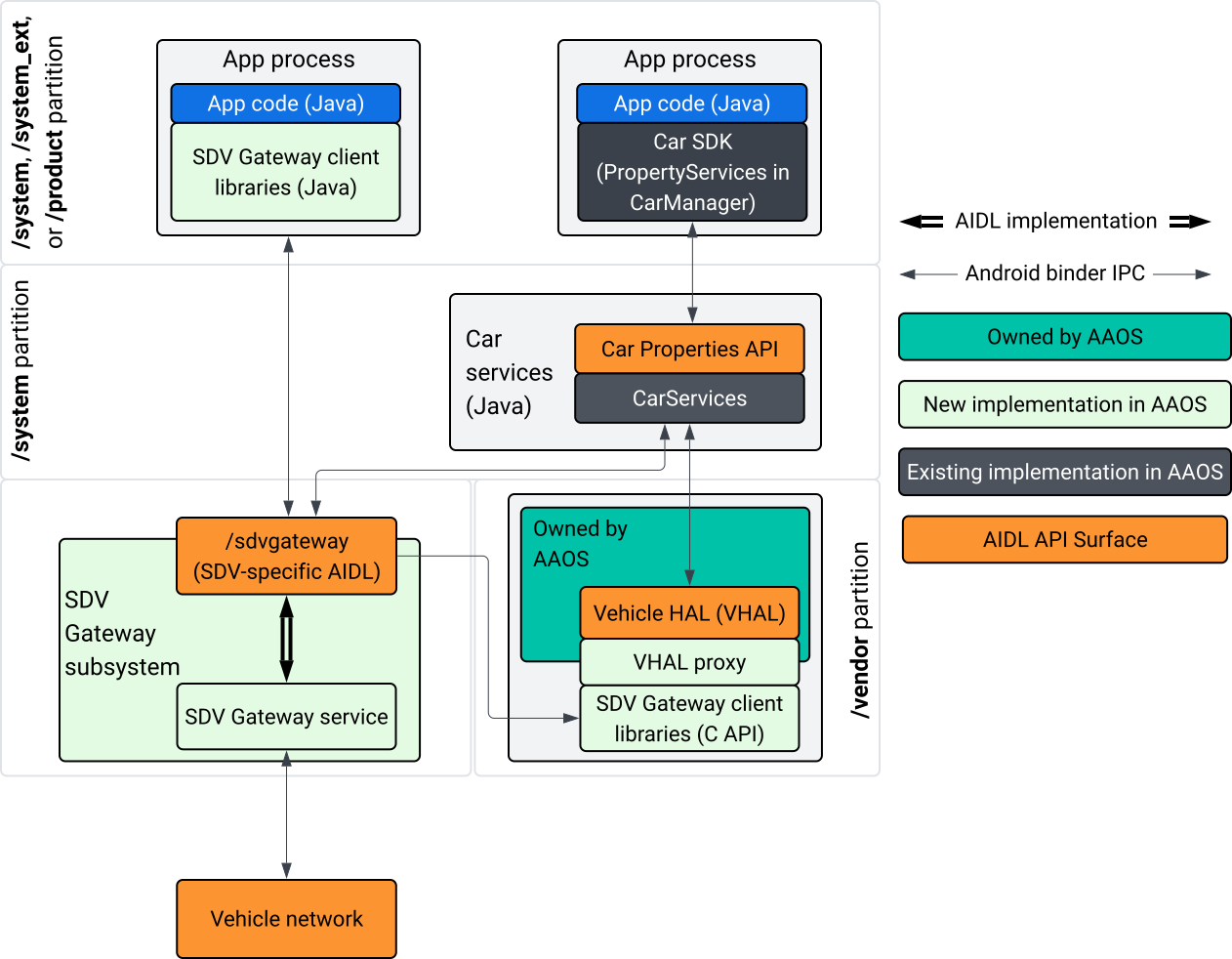
Figura 1: Interacciones con la puerta de enlace de SDV
En este diagrama del sistema, se muestra lo siguiente:
- Las apps interactúan con la puerta de enlace de SDV a través de sus servicios de cliente.
- El SDK de SDV para AAOS te proporciona lo siguiente:
- La API de AIDL de ISdvGateway para la comunicación entre procesos
- Bibliotecas de comunicaciones para la interacción de red
- API de C de conveniencia para la integración de servicios nativos.
- El servicio y el subsistema de la puerta de enlace de SDV implementan la API de AIDL de ISdvGateway.
- El servicio de puerta de enlace de SDV administra lo siguiente:
- Descubrimiento de servicios bidireccional.
- Comunicación con servicios de SDV remotos.
- Lógica empresarial principal
- El subsistema de puerta de enlace del SDV se conecta a la red vehicular.
- Los servicios nativos, incluida la implementación de VHAL, pueden usar la API de AIDL de ISdvGateway directamente o a través de la API de C del SDK.
- El proxy de VHAL sirve como una implementación de VHAL de referencia, que incorpora la integración de asignación de VSIDL.
Modelo de integración para la puerta de enlace de SDV en un servicio nativo de IVI
El modelo de integración se ilustra en la figura 2:
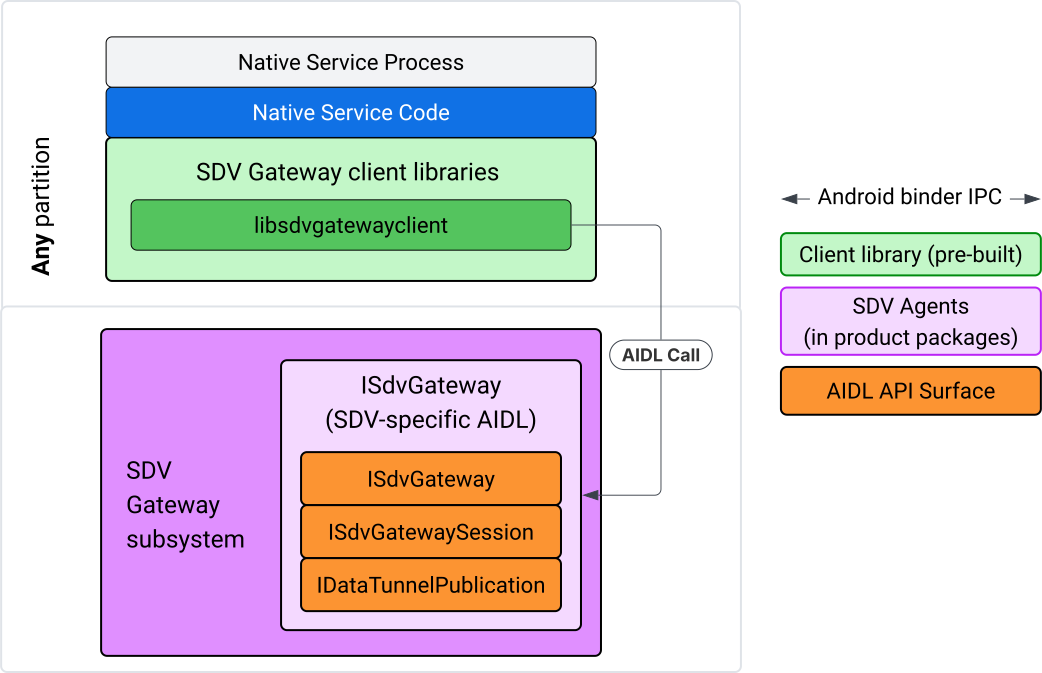
Figura 2: Modelo de integración de la puerta de enlace de SDV.
Usa la puerta de enlace de SDV en un servicio nativo de IVI
En la Figura 3, se ilustra el uso de la puerta de enlace de SDV en IVI:
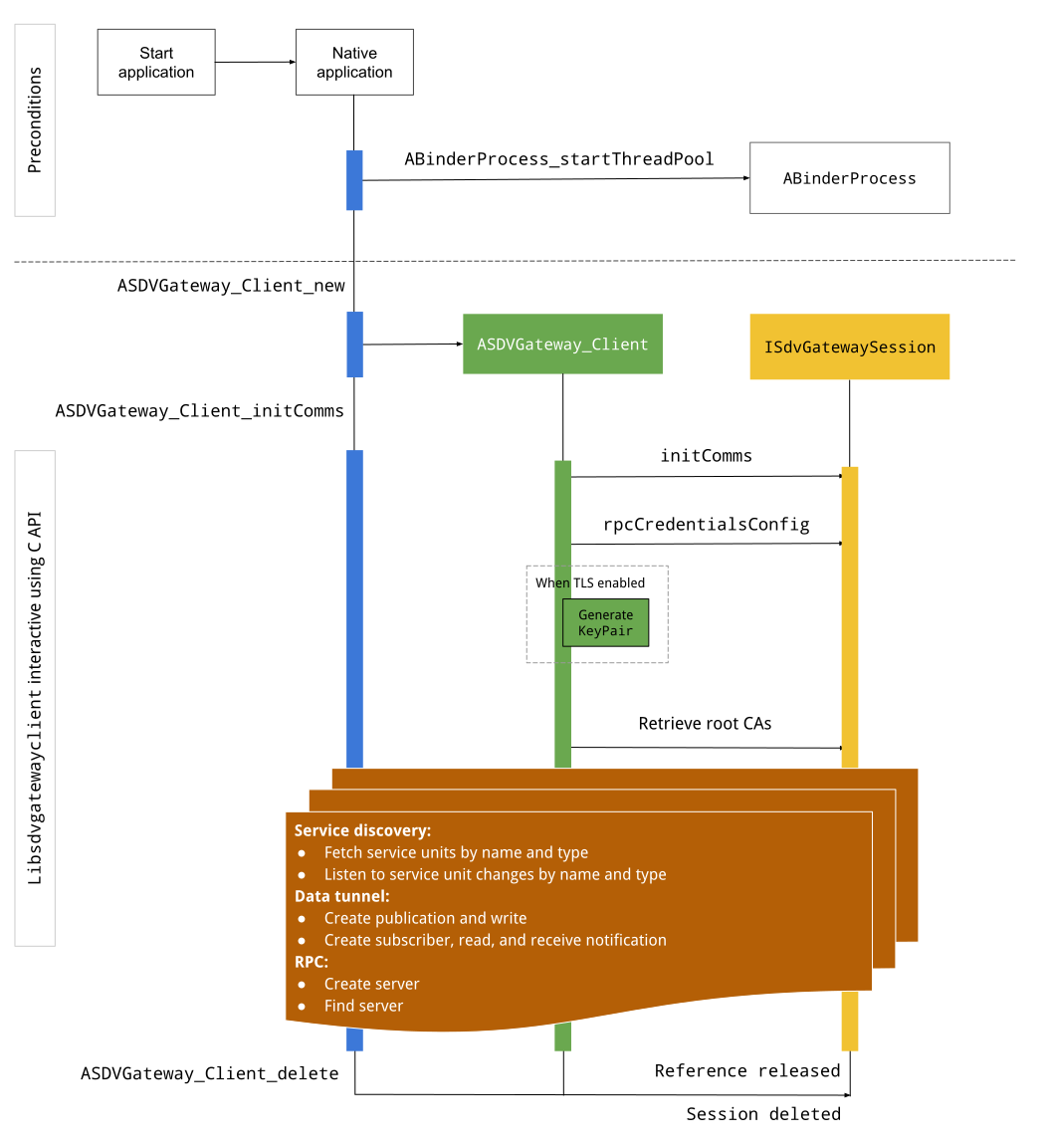
Figura 3: Puerta de enlace de SDV en IVI.
Condiciones previas
Inicia el grupo de subprocesos de Binder:
La biblioteca cliente de SDV Gateway requiere un grupo de subprocesos de Binder iniciado para recibir devoluciones de llamada asíncronas de los servicios de Binder.
La API necesaria para crear un cliente de puerta de enlace de SDV falla cuando no se inicia un grupo de subprocesos de Binder.
Incluye la biblioteca cliente nativa de Gateway
La biblioteca cliente de Native Gateway expone una API de C. Agrega una instancia de libsdvgatewayclient como dependencia para usar la API de C:
cc_binary {
    name: "your_binary_name",
    srcs: ["main.cpp"],
    shared_libs: [
        "libsdvgatewayclient",
    ],
}
Carga el cliente nativo de Gateway
#include "libsdvgatewayclient.h"
Crea una instancia de cliente nativa
ASDVGateway_Client* client;
ASDVGateway_StatusCode_t statusCode = ASDVGateway_Client_new(
     &client, /*outStatus*/nullptr);
Después de que se crea el cliente, este realiza las siguientes acciones:
Contiene el estado de todas las interacciones posteriores con el servicio de puerta de enlace.
Actúa como el contexto de todas las interacciones con otros servicios habilitados para SDV y se pasa como los primeros parámetros a las funciones de la API de C.
Códigos de estado y mensajes de error
La mayoría de las funciones de la API de C tienen esta definición:
ASDVGateway_StatusCode_t ApiFunctionName(..., ASDVGateway_Status_t* outStatus);
Para evaluar el éxito, puedes inspeccionar el código de estado que se muestra, que es del
tipo ASDVGateway_StatusCode_t. También puedes pasar un puntero a una estructura
en la que la función pueda completar el código de estado y un mensaje de error. El puntero se pasa como el último parámetro, llamado outStatus. Un valor nulo significa que no se usa la estructura de salida.
El emisor debe asignar la estructura de estado de la memoria para el mensaje de error. La estructura de estado puede contener el código de estado y un mensaje de error. Hay un ejemplo disponible para recuperar el mensaje de error cuando se crea un cliente nuevo.
Para evaluar el éxito, haz lo siguiente:
Inspecciona el código de estado que se muestra, que es del tipo
ASDVGateway_StatusCode_t.Pasa un puntero a una estructura en la que la función pueda completar el código de estado y un mensaje de error.
- El puntero se pasa como el último parámetro, llamado
outStatus. - Un valor nulo significa que no se usa la estructura de salida.
- El emisor debe asignar la estructura de estado de la memoria para el mensaje de error.
- La estructura de estado puede contener el código de estado y un mensaje de error.
- El puntero se pasa como el último parámetro, llamado
Este es un ejemplo en el que se muestra cómo recuperar el mensaje de error para un cliente nuevo:
#include <iostream>
#include <array>

struct StatusWithErrorMsg : ASDVGateway_Status_t {
    StatusWithErrorMsg() {
        // Ensure the base struct pointers point to our internal buffer
        errorMessage = errorMessageBuffer.data();
        maxErrorMessageSize = errorMessageBuffer.size();

        // Good practice: Zero-initialize the buffer
        errorMessageBuffer.fill(0);
    }

    std::array<char, 256> errorMessageBuffer;
};

// --- Execution ---

ASDVGateway_Client* client = nullptr;
StatusWithErrorMsg status;

// Initialize the client
ASDVGateway_StatusCode_t statusCode = ASDVGateway_Client_new(&client, &status);

// Log Results
std::cout << "Returned statusCode:    " << statusCode << std::endl;
std::cout << "Status Struct Code:     " << status.statusCode << std::endl;
std::cout << "Status Error Message:   " << status.errorMessage << std::endl;
En este ejemplo:
El código de estado que se incluye en la estructura de estado tiene el mismo valor que el código de estado que se muestra.
El mensaje de error se completa solo hasta el límite de caracteres de
maxErrorMessageSize(incluido el carácter de finalización nulo\0). Si no se produce ningún error (el código de estado esOK), el mensaje de error es una cadena vacía.
Comunicaciones de inicialización
Init comms inicializa la comunicación entre la app de llamadas y otras apps con la pila de comunicación de SDV y la puerta de enlace de SDV. Las comunicaciones de inicialización se pueden llamar en ambos contextos:
Después de que se crea el cliente.
Antes de cualquier interacción de túnel de datos, RPC o descubrimiento de servicios
Por ejemplo:
ASDVGateway_InitCommsParams_t params{
.packageName = "android.sdv.samples.gateway.client",
.serviceBundleName = "NativeTestApp",
.serviceInstanceName = "default",
};
// Initialize communications and capture the status code
ASDVGateway_StatusCode_t statusCode = ASDVGateway_Client_initComms(client, ¶ms, &status);
// Recommended check
if (statusCode != ASDVGateway_StatusCode_OK) {
std::cerr << "Failed to init comms: " << status.errorMessage << std::endl;
}
Descubrimiento de servicios
Puedes recibir notificaciones cuando se registran o se cancela el registro de unidades de servicio de un tipo o nombre específicos. La función de devolución de llamada se notifica en un subproceso que pertenece al cliente de la puerta de enlace. Esta devolución de llamada se activa inicialmente con todas las unidades de servicio registradas justo después de la llamada a la API de C. Después de la activación inicial, las notificaciones continúan con actualizaciones hasta que se cancela el registro del objeto de escucha de forma explícita.
class NativeSdvGatewayTestApp {
public:
    static void ServiceUnitChangeListenerCallback(
        const ASDVGateway_ServiceUnitChangeEventType eventType,
        const ASDVGateway_ServiceUnitDefinition* serviceUnitDefinition,
        void* userData
    ) {
        auto* testApp = reinterpret_cast<NativeSdvGatewayTestApp*>(userData);

        if (testApp) {
            // Logic to react when services are registered or unregistered
            // e.g., testApp->handleServiceChange(eventType, serviceUnitDefinition);
        }
    }
};

// --- Listener Registration ---

// Ensure thisApp remains in scope as long as the listener is active
NativeSdvGatewayTestApp* thisApp = get_current_app_context();

ASDVGateway_UnitType_t unitType{
    .sdvPackageName     = "android.sdv.samples.sdv_gateway",
    .serviceBundleName  = "DtPublisher",
    .unitTypeName       = "TirePressure",
};

// Register the listener
ASDVGateway_Client_registerListenerForServiceUnitChangeByType(
    client,
    &unitType,
    NativeSdvGatewayTestApp::ServiceUnitChangeListenerCallback,
    static_cast<void*>(thisApp), // userData
    &listenerHandle,
    &status
);

// --- Cleanup ---

// Unregistering stops all notification to the callback function
ASDVGateway_Client_unregisterListenerForServiceUnitChangeByType(
    client,
    listenerHandle,
    &status
);
Para recuperar las unidades de servicio registradas sin más notificaciones, usa las APIs de
ASDVGateway_Client_fetchServiceUnitsByType y
ASDVGateway_Client_fetchServiceUnitsByName.
class NativeSdvGatewayTestApp {
public:
    /**
     * Callback triggered for each service unit found that matches the requested type.
     */
    static void FetchServiceUnitsCallback(
        const ASDVGateway_ServiceUnitDefinition* serviceUnitDefinition,
        void* userData
    ) {
        auto* app = reinterpret_cast<NativeSdvGatewayTestApp*>(userData);

        if (serviceUnitDefinition) {
            // The service unit is registered with service discovery.
            // Example: processServiceUnit(serviceUnitDefinition);
        }
    }
};

// --- Execution ---

ASDVGateway_UnitType_t unitType{
    .sdvPackageName     = "android.sdv.samples.sdv_gateway",
    .serviceBundleName  = "DtPublisher",
    .unitTypeName       = "TirePressure",
};

// Context used to differentiate between various fetchServiceUnits calls
void* userData = static_cast<void*>(thisApp);

ASDVGateway_Client_fetchServiceUnitsByType(
    client,
    &unitType,
    NativeSdvGatewayTestApp::FetchServiceUnitsCallback,
    userData,
    &status
);
La devolución de llamada se activa de forma síncrona en el subproceso del emisor durante la llamada a la API de ASDVGateway_Client_fetchServiceUnitsByType. Usa
ASDVGateway_Client_fetchServiceUnitsByName para obtener las unidades de servicio registradas
por nombre en lugar de por tipo de unidad:
ASDVGateway_StatusCode_t ASDVGateway_Client_fetchServiceUnitsByName(
    // [in]  Opaque pointer to a client object.
    const ASDVGateway_Client* client,

    // [in]  Pointer to a structure containing the package name,
    //       service bundle name, and service unit name.
    const ASDVGateway_UnitNameDiscoveryArgs_t* unitName,

    // [in]  Callback function to be called for each service unit
    //       definition registered. Called synchronously in the
    //       caller's thread before the fetch completes.
    ASDVGateway_FetchServiceUnitsCallback callback,

    // [in]  Optional value passed back as a parameter of the callback.
    void* userData,

    // [out] Optional pointer to status structure for result
    //       codes and error messages.
    ASDVGateway_Status_t* outStatus
);
Flujo de RPC
La biblioteca cliente de Gateway controla la configuración de la seguridad de la capa de transporte (TLS) para la comunicación con otras apps habilitadas para SDV. Específicamente, recupera la configuración de TLS necesaria para la comunicación. A continuación, se indica cómo se determina el uso de TLS:
TLS se usa cuando el modo de inicio de SDV es
LOCKED.La comunicación no segura se usa cuando el modo de inicio de SDV es
UNLOCKED. Cuando se usa TLS, la biblioteca cliente de la puerta de enlace genera un par de claves que solo conoce el proceso de la app. El cliente recupera las credenciales de RPC para crear un servidor de RPC o un canal de cliente de RPC. La RPC usa una VLAN de SDV-RPC dedicada. La biblioteca cliente de Gateway llama a android_setprocnetwork para cambiar la red predeterminada del proceso a la VLAN de SDV-RPC durante o después de la llamada aASDVGateway_Client_initComms.
Disponibilidad de RPC
Un cliente configurado para iniciarse en el inicio anticipado puede iniciarse antes de que la VLAN de SDV-RPC esté disponible. Verifica que la RPC esté disponible antes de intentar crear cualquier socket de servidor o cliente de RPC:
// Check if the RPC (Remote Procedure Call) service is available
bool isRpcAvailable = ASDVGateway_Client_isRpcAvailable(client);

if (isRpcAvailable) {
    // Proceed with RPC calls
} else {
    // Handle the case where RPC is not yet ready or available
}
o
// Check if the process is correctly bound to the SDV RPC Network Interface/VLAN
bool isRpcNetworkBound = ASDVGateway_Client_isProcessBoundToSdvRpcNetworkInterface(client);

if (!isRpcNetworkBound) {
    // Usually implies the process isn't running on the correct network interface
    // or the VLAN configuration is missing.
    std::cerr << "Warning: Process is not bound to the SDV RPC VLAN." << std::endl;
}
Configura un objeto de escucha para los eventos del cliente con
ASDVGateway_Client_setClientNotificationCallback para recibir notificaciones cuando cambie el estado de disponibilidad
de la RPC.
Se prefiere ASDVGateway_Client_isProcessBoundToSdvRpcNetworkInterface si la app cambia la red del proceso, ya que verifica que la RPC esté disponible y que el proceso esté vinculado a la VLAN de SDV-RPC.
Cambia la red predeterminada del proceso
Es posible que debas cambiar de la VLAN de SDV-RPC como la red predeterminada del proceso
para abrir sockets para las conexiones vinculadas a Internet. Llama a
ASDVGateway_Client_unbindProcessFromSdvRpcNetworkInterface y
ASDVGateway_Client_bindProcessToSdvRpcNetworkInterface para desvincular y volver a vincular
el proceso a la VLAN de SDV-RPC. Las dos llamadas actúan como interruptores globales,
que cambian la interfaz de red a la que están vinculados los sockets para todos los subprocesos del
proceso.
// 1. Unbind: Sockets return to the "default" network interface (e.g., wlan0, eth0)
ASDVGateway_StatusCode_t unbindStatus =
    ASDVGateway_Client_unbindProcessFromSdvRpcNetworkInterface(client, &status);

// 2. Bind: Sockets are now bound to the dedicated SDV-RPC VLAN
ASDVGateway_StatusCode_t bindStatus =
    ASDVGateway_Client_bindProcessToSdvRpcNetworkInterface(client, &status);

// Validation
if (bindStatus == ASDVGateway_StatusCode_OK) {
    // Sockets are successfully bound to the SDV-RPC VLAN
}
Notificaciones de RPC
Configura el objeto de escucha del cliente para recibir notificaciones sobre los cambios en la disponibilidad de RPC y las actualizaciones de los certificados raíz que debe aceptar un servidor de RPC:
class NativeSdvGatewayTestApp {
public:
    static void ClientNotificationCallback(
        ASDVGateway_ClientNotificationType_t notificationType,
        void* userData
    ) {
        auto* testApp = reinterpret_cast<NativeSdvGatewayTestApp*>(userData);
        if (!testApp) return;

        switch (notificationType) {
            case ASDVGateway_ClientNotificationType_RootCertsChanged:
                std::cout << "onClientNotification: Root Certs Changed" << std::endl;
                // Handle certificate rotation logic here
                break;

            case ASDVGateway_ClientNotificationType_RpcAvailabilityChanged:
                std::cout << "onClientNotification: RPC Availability Changed" << std::endl;
                // Handle reconnection or UI updates here
                break;

            default:
                std::cout << "onClientNotification: Received Unknown Notification ("
                          << notificationType << ")" << std::endl;
                break;
        }
    }
};

// --- Registration ---

NativeSdvGatewayTestApp* thisApp = get_current_app_context();

// Register the notification callback to monitor system-level changes
ASDVGateway_StatusCode_t statusCode = ASDVGateway_Client_setClientNotificationCallback(
    client,
    NativeSdvGatewayTestApp::ClientNotificationCallback,
    static_cast<void*>(thisApp), // userData
    &status
);
Flujo del servidor de RPC
Debes usar credenciales para crear el servidor de RPC:
ASDVGateway_RpcCredentials_t* rpcCredentials = nullptr;

// Retrieve the credentials from the client
ASDVGateway_StatusCode_t statusCode = ASDVGateway_Client_rpcCredentials(client, &rpcCredentials, &status);

// Validation: Differentiating between an error and a deliberate "insecure mode"
if (status.statusCode != ASDVGateway_StatusCode_OK) {
    std::cerr << "Error retrieving credentials: " << status.errorMessage << std::endl;
    return;
}

// Logic for choosing Security Credentials
if (rpcCredentials == nullptr) {
    // If the call succeeded but credentials are null, the system expects insecure communication
    std::cout << "Configuring for Insecure Mode" << std::endl;
} else {
    std::cout << "Configuring for Secure Mode:" << std::endl;
    std::cout << "  Private Key: " << (rpcCredentials->privateKeyPem ? "Present" : "Missing") << std::endl;
    std::cout << "  RootCerts:   " << rpcCredentials->rootCertsPem << std::endl;
    std::cout << "  CertChain:   " << rpcCredentials->certChainPem << std::endl;
    std::cout << "  SAN:         " << rpcCredentials->subjectAlternativeName << std::endl;
}

// --- Cleanup ---

// Release the memory once the RPC server/client is initialized
if (rpcCredentials != nullptr) {
    ASDVGateway_Client_deleteRpcCredentials(client, rpcCredentials);
}
Cuando hayas creado el servidor RPC y se conozca su puerto de escucha, registra el servidor RPC para que pueda descubrir otras apps:
ASDVGateway_RegisterRpcServerParams_t params{
.serviceUnitName = "android-sdv-samples-sunroof-sunroof",
.unitType = ASDVGateway_UnitType_t{
.sdvPackageName = "android.sdv.samples.sunroof",
.serviceBundleName = "SunroofServer",
.unitTypeName = "Sunroof",
},
.listeningPort = listeningPort,
.serverUnitMetadata = ASDVGateway_ServerUnitMetadata_t{
.version = 1,
},
};
// Register the RPC server with the SDV Gateway
ASDVGateway_StatusCode_t statusCode = ASDVGateway_Client_registerRpcServer(
client,
¶ms,
&status
);
// Basic error handling
if (statusCode != ASDVGateway_StatusCode_OK) {
std::cerr << "Failed to register RPC server: " << status.errorMessage << std::endl;
}
Cuando el sistema actualiza los certificados raíz en el entorno de ejecución (por ejemplo, durante los cambios de estado de la VM), los servidores RPC deben actualizar su lista de certificados aceptados:
Establece un objeto de escucha para los eventos de cliente con
ASDVGateway_Client_setClientNotificationCallbackpara recibir notificaciones cuando se actualicen los certificados raíz.Llama a
ASDVGateway_Client_rpcCredentialspara obtener los certificados raíz actualizados.
Flujo del cliente de RPC
Este es el flujo para el cliente de RPC:
ASDVGateway_FindRpcServerByNameParams_t params{
.packageName = "android.sdv.samples.cluster",
.serviceBundleName = "ClusterServer",
.serviceUnitName = "android-sdv-samples-cluster-cluster",
};
ASDVGateway_SocketAddress_t socketAddress;
ASDVGateway_RpcCredentials_t* rpcCredentials = nullptr;
// Perform the lookup to find the server's location and security requirements
ASDVGateway_StatusCode_t statusCode = ASDVGateway_Client_findRpcServerByName(
mClient,
¶ms,
&socketAddress,
&rpcCredentials,
&status
);
// Mandatory check: Distinguish between system errors and intentional "Insecure Mode"
if (status.statusCode != ASDVGateway_StatusCode_OK) {
std::cerr << "Failed to find RPC server: " << status.errorMessage << std::endl;
return;
}
// Logic for establishing the RPC channel
if (rpcCredentials == nullptr) {
std::cout << "Connecting via Insecure Mode to "
<< socketAddress.address << ":" << socketAddress.port << std::endl;
} else {
std::cout << "Connecting via Secure Mode to "
<< socketAddress.address << ":" << socketAddress.port << std::endl;
std::cout << " RootCerts: " << rpcCredentials->rootCertsPem << std::endl;
std::cout << " SAN: " << rpcCredentials->subjectAlternativeName << std::endl;
// Note: privateKeyPem and certChainPem are typically used if the client
// needs to perform mutual TLS (mTLS).
}
// Cleanup: Release the credential memory once the RPC channel is established
if (rpcCredentials != nullptr) {
ASDVGateway_Client_deleteRpcCredentials(client, rpcCredentials);
}
Crea un publicador y publica mensajes
La API de ASDVGateway_Client_createPublication se usa para registrar una unidad de servicio del publicador en la puerta de enlace de SDV a través de su interfaz de AIDL y crear una cola de mensajes rápida (FMQ) en el proceso de la app. Binder solo participa en la configuración de la FMQ, pero no cuando se escriben mensajes. Luego, se usa la API de ASDVGateway_Client_publishMessages
para publicar mensajes en la publicación creada. Esto implica escribir en la FMQ de la publicación y notificar que se escribieron los mensajes.
ASDVGateway_CreatePublicationParams_t params{
.serviceUnitName = "mirror-position-adjust-impl-1",
.unitType = ASDVGateway_UnitType_t{
.sdvPackageName = "android.sdv.samples.sdv_gateway",
.serviceBundleName = "DtPublisher",
.unitTypeName = "MirrorPositionAdjust",
},
.publisherUnitMetadata = ASDVGateway_PublisherUnitMetadata_t{
.version = 1,
.messageSizeBytes = 64,
.messageCount = 16,
},
};
ASDVGateway_PublicationMetadata_t metadata;
// 1. Create the Publication (allocates resources on the gateway)
ASDVGateway_StatusCode_t createStatus = ASDVGateway_Client_createPublication(
client,
¶ms,
&metadata,
&status
);
if (status.statusCode != ASDVGateway_StatusCode_OK) {
std::cerr << "Failed to create publication: " << status.errorMessage << std::endl;
return;
}
// 2. Publish Messages
// Note: serializedMessage should contain your encoded protobuf data
std::vector<uint8_t> serializedMessage;
ASDVGateway_Client_publishMessages(
client,
serializedMessage.data(),
serializedMessage.size(),
metadata.publicationId,
&status
);
Crea un suscriptor con un objeto de escucha de notificaciones
Para suscribirte a una publicación y recibir notificaciones de Data Tunnel (como
la disponibilidad de mensajes), usa la API de
ASDVGateway_Client_subscribeToPublicationByName. Esta API también configura la FMQ para leer los mensajes publicados. Puedes
configurar una devolución de llamada de notificación durante el proceso de suscripción o
después.
#include <map>
#include <memory>
#include <iostream>

class NativeSdvGatewayTestApp {
public:
    struct SubscriptionContext {
        int32_t subscriptionId;
        std::string topicName;
        // Add other context-specific data here (e.g., counters, buffers)
    };

    /**
     * Callback triggered when new data is published to a subscribed topic.
     */
    static void SubscriptionNotificationCallback(
        const ASDVGateway_SubscriptionNotificationData_t* notification,
        void* userData
    ) {
        // The SDV Gateway client passes back the userData pointer.
        // We ensure validity by managing the lifecycle of SubscriptionContext
        // within the mSubscriptions map.
        auto* ctx = reinterpret_cast<SubscriptionContext*>(userData);

        if (ctx && notification) {
            // React to data being available for the subscription.
            // Example: handleIncomingData(notification->data, notification->size);
            std::cout << "Notification received for sub ID: " << ctx->subscriptionId << std::endl;
        }
    }

private:
    // Maps subscription handles/IDs to their respective contexts
    std::map<int32_t, std::unique_ptr<SubscriptionContext>> mSubscriptions;
};

// --- Usage ---
NativeSdvGatewayTestApp app;
Cuando te suscribes, puedes especificar opciones adicionales junto con el nombre de la unidad de servicio del publicador. Estas opciones te permiten recuperar el mensaje publicado más recientemente antes de suscribirte y definir el intervalo de tiempo mínimo entre las notificaciones.
ASDVGateway_SubscribeToPublicationByNameParams_t params{
.sdvVmName = "vm1",
.packageName = "test.package.impl.name",
.serviceBundleName = "TestBundleImpl",
.serviceUnitName = "GrpcServerImpl",
};
ASDVGateway_Subscriber_Options_t options{
// Ensure we receive the most recent message immediately upon subscribing
.flags = ASDVGATEWAY_SUBSCRIBER_OPTIONS_FLAG_FETCHLASTMESSAGE,
.minIntervalMs = 0, // No rate limiting; receive updates as they happen
};
// 1. Prepare the context for the callback
auto subCtx = std::make_unique<SubscriptionContext>();
ASDVGateway_PublicationMetadata_t metadata{};
// 2. Perform the subscription
ASDVGateway_StatusCode_t statusCode = ASDVGateway_Client_subscribeToPublicationByName(
client,
¶ms,
&options,
NativeSdvGatewayTestApp::SubscriptionNotificationCallback,
static_cast<void*>(subCtx.get()), // Pass the raw pointer as userData
&metadata,
&status
);
// 3. Validation and Lifecycle Management
if (status.statusCode != ASDVGateway_StatusCode_OK) {
// Error handling: subCtx will be automatically deleted here
std::cerr << "Subscription failed: " << status.errorMessage << std::endl;
return;
}
// Store the context using the publicationId as the key.
// Once moved, the map owns the lifetime of subCtx.
app.mSubscriptions.emplace(metadata.publicationId, std::move(subCtx));
Usa la API de ASDVGateway_Client_readAvailableMessages para leer mensajes de la
publicación:
uint32_t messagesAvailable = 0;

// 1. Check how many messages are waiting in the queue
ASDVGateway_StatusCode_t availStatus = ASDVGateway_Client_availableToRead(
    client,
    metadata.publicationId,
    &messagesAvailable,
    &status
);

if (status.statusCode != ASDVGateway_StatusCode_OK) {
    // Error handling for availability check
    return;
}

if (messagesAvailable == 0) {
    // No messages available for this publication at this time
    return;
}

// 2. Prepare the buffer
// metadata.messageSizeBytes was provided during the publication/subscription setup
std::vector<uint8_t> bytesForMessages;
bytesForMessages.resize(metadata.messageSizeBytes * messagesAvailable);

// 3. Read the messages from the Gateway into your local buffer
uint32_t actualMessageCount = 0; // Filled by the SDK with the number of messages read
ASDVGateway_StatusCode_t readStatus = ASDVGateway_Client_readAvailableMessages(
    client,
    metadata.publicationId,
    bytesForMessages.data(),
    bytesForMessages.size(),
    &actualMessageCount,
    &status
);

if (status.statusCode == ASDVGateway_StatusCode_OK) {
    // Successfully read 'actualMessageCount' messages
    // Process bytesForMessages...
}
Para configurar la devolución de llamada después de suscribirte, usa la API de ASDVGateway_Client_setNotificationCallbackForPublicationId:
ASDVGateway_StatusCode_t ASDVGateway_Client_setNotificationCallbackForPublicationId(
    // [in]  Opaque pointer to the client object.
    const ASDVGateway_Client* client,

    // [in]  Identifies the specific publication to monitor.
    const int32_t publicationId,

    // [in]  Function pointer triggered when new data is available
    //       for the specified publication.
    ASDVGateway_SubscriptionNotificationCallback notificationCallback,

    // [in]  Optional user-defined context passed back to the callback.
    void* notificationCallbackUserData,

    // [out] Optional pointer to a status structure for result codes
    //       and error messages.
    ASDVGateway_Status_t* outStatus
);
Configura el servicio de inicialización
Primero, sigue las instrucciones de Identidad para servicios nativos para asignar una identidad de servicio al servicio a través de su ID de Android (AID).
Supongamos que tu servicio se llama native_sdv_gateway_client_service, el ejecutable se encuentra en la partición /vendor en /vendor/bin/native_sdv_gateway_client_service y usas vendor_gateway_client como el ID de Android (AID) para ejecutar el servicio.
Con esa configuración, puedes definir el siguiente servicio de inicio:
service native_sdv_gateway_client_service /vendor/bin/native_sdv_gateway_client_service
    class core
    user vendor_gateway_client
    group inet
    disabled
    oneshot
En esta configuración, se usan los siguientes parámetros:
vendor_gateway_clientes el AID creado o seleccionado para el servicio.group inetes necesario para que los clientes de la puerta de enlace de SDV usen la interfaz de red para comunicarse entre las VMs de SDV. Se pueden agregar otros grupos cuando sea necesario.- En este ejemplo, se usan
disabledyoneshot. Es posible que debas ajustar las opciones de servicio para tu servicio. Inicia el servicio después desdv_gateway.
Crea reglas de SELinux para el servicio
Para usar las APIs de SDV Gateway, necesitas las siguientes reglas de SELinux para el servicio:
# Define the domain for the service
type native_sdv_gateway_client_service, domain;

# Define the executable file type on the vendor partition
type native_sdv_gateway_client_service_exec, exec_type, file_type, vendor_file_type;

# Macro to transition from 'init' to this service's domain upon execution
init_daemon_domain(native_sdv_gateway_client_service)

# Macro to grant the necessary permissions to communicate with the SDV Gateway
sdv_gateway_client_domain(native_sdv_gateway_client_service)
En las reglas de SELinux, haz lo siguiente:
init_daemon_domainpermite iniciar el servicio desdeinit.sdv_gateway_client_domainproporciona todos los permisos de SELinux necesarios para interactuar con la puerta de enlace de SDV. La siguiente línea otorga estas reglas al ejecutable:/vendor/bin/native_sdv_gateway_client_service u:object_r:native_sdv_gateway_client_service_exec:s0
Muestra de código
Para obtener más información sobre cómo ejecutar la muestra de código nativo que indica cómo se documentan las APIs de C, consulta system/software_defined_vehicle/samples/sdv_gateway/NativeSdvGatewayTestApp/README.md.
Puerta de enlace de SDV en la app de Java para IVI
El modelo de interacción para una puerta de enlace de SDV en IVI se ilustra en este diagrama:
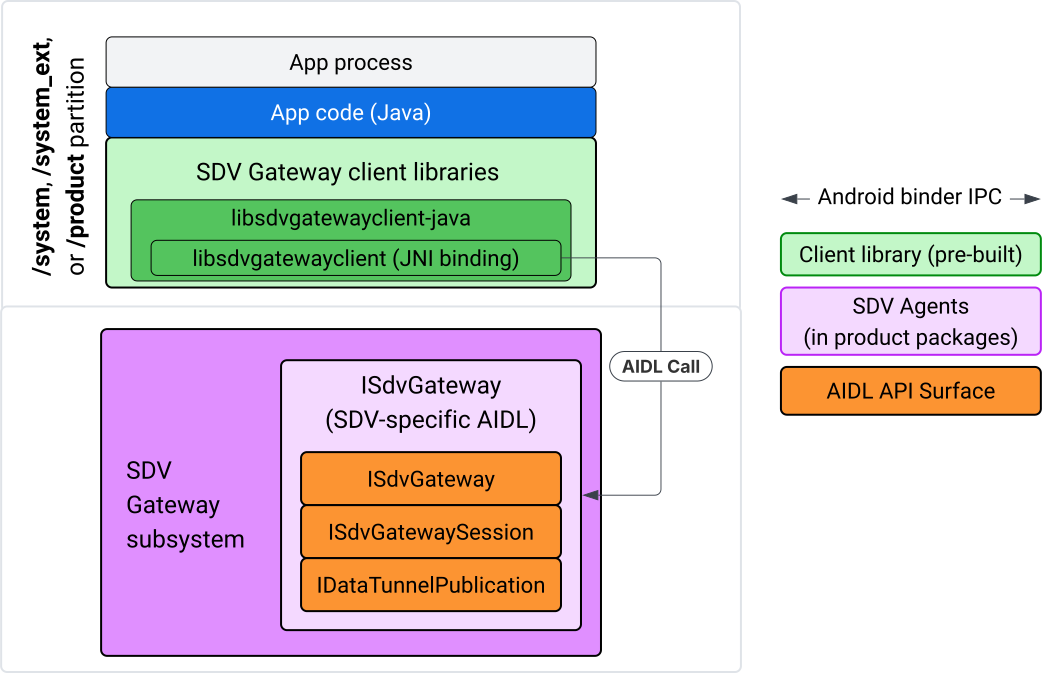
Figura 4: Puerta de enlace de SDV en la app de Java para IVI
Específicamente, el modelo hace lo siguiente:
- Envía todas las llamadas a la capa de JNI.
- Une las APIs de Java y C.
- Define las interacciones de AIDL con
ISdvGateway:- Comunicaciones de inicialización
- Busca o crea el servidor de RPC
- Crea el tema de Pub/Sub
- Realiza interacciones de túnel de datos de descubrimiento de servicios
- Recibir notificaciones (por ejemplo, datos disponibles)
- Lee y escribe mensajes (FMQ para pub/sub) para la creación de pares de claves y certificados para TLS
Incluye las bibliotecas cliente de Gateway
La biblioteca de Java y el wrapper de JNI para la API de C de libsdvgatewayclient se instalan en un APEX en el destino de IVI. Agrega una dependencia de tiempo de compilación al stub de la biblioteca de Java, la biblioteca de Java que se debe usar en el tiempo de ejecución y el APEX requerido que contiene la biblioteca de Java.
android_app {
    name: "YourAppName",
    // ...
    static_libs: [
        "libsdvgatewayclient-java",
    ],
    libs: [
        "libsdvgatewayclient-java-sdk.stubs",
    ],
    uses_libs: [
        "libsdvgatewayclient-java-sdk",
    ],
    required: [
        "com.sdv.google.gateway.client",
    ],
    // ...
}
En el caso de una app independiente compilada fuera del árbol de SDV, el proceso es similar:
Copia el JAR de stub de la biblioteca de Java generado y el JAR de compatibilidad para RPC en la carpeta libs de la app. Para obtener más información, consulta
system/software_defined_vehicle/sdv_gateway/libsdvgatewayclient_apex/README.md.Agrega el JAR de stubs como una dependencia de solo compilación. Por ejemplo, actualiza las configuraciones de Gradle para que dependan de los stubs agregando una entrada
compileOnlya la seccióndependencies:dependencies { // The library supporting functions for SDK RPC. // Statically linked into the app APK. implementation(files("libs/libsdvgatewayclient-java.jar")) // Stub of the SDV-Gateway client library. // Used only for compilation; the real implementation is provided // by the com.sdv.google.gateway.client APEX at runtime. compileOnly(files("libs/libsdvgatewayclient-java-sdk.jar")) }Agrega la biblioteca de Java a la sección de la app del archivo
AndroidManifest.xml.<manifest xmlns:android="http://schemas.android.com/apk/res/android"> <application> <!-- Declares that this app requires the SDV Gateway client library. The 'android:required="true"' attribute ensures the app won't install/run if the library is missing from the system. --> <uses-library android:name="libsdvgatewayclient-java-sdk" android:required="true" /> </application> </manifest>
Carga bibliotecas
Crea un objeto SdvGatewayClient (proporcionado por la biblioteca cliente):
import google.sdv.gateway.client.SdvGatewayClient;

// --- Inside your Activity, Service, or ViewModel ---

// Initialize the SDV Gateway Client
SdvGatewayClient gatewayClient = new SdvGatewayClient();
Comunicaciones de inicialización
Llama a initComms() con un nombre de app como el nombre del paquete de servicios:
// Define a unique name for your service bundle (usually constant)
private static final String SERVICE_BUNDLE_NAME = "MySdvServiceBundle";

// ... inside an Activity or Service context ...

try {
    // Initialize communications with the SDV Gateway
    // context.getPackageName() provides "android.sdv.samples.gateway.client" or similar
    gatewayClient.initComms(context.getPackageName(), SERVICE_BUNDLE_NAME);

    Log.i("SDV_GATEWAY", "Communications initialized successfully");
} catch (Exception e) {
    // Unlike the C API which uses status codes,
    // the Java SDK often throws exceptions for initialization failures.
    Log.e("SDV_GATEWAY", "Failed to initialize communications", e);
}
Descubrimiento de servicios
La API de Java contiene métodos para lo siguiente:
Recibe notificaciones cuando se registren o cancelen el registro de unidades de servicio con un tipo de unidad específico (o, como alternativa, que coincidan con un nombre específico).
Enumera las unidades de servicio actuales con un tipo de unidad específico (o, como alternativa, coincide con un nombre de tipo de unidad de servicio específico). Para recibir notificaciones de los cambios en la unidad de servicio, crea un objeto de escucha:
import google.sdv.gateway.client.ServiceUnitChangeListener;
import google.sdv.gateway.client.ServiceUnitChangeEventType;
import google.sdv.gateway.client.ServiceUnitDefinition;

// --- Implementation ---

ServiceUnitChangeListener listener = new ServiceUnitChangeListener() {
    @Override
    public void onServiceUnitChanged(
        ServiceUnitChangeEventType eventType,
        ServiceUnitDefinition serviceUnitDefinition
    ) {
        // This is triggered when services matching your criteria
        // are registered or unregistered on the vehicle network.
        if (eventType == ServiceUnitChangeEventType.REGISTERED) {
            // Handle new service discovery
        } else if (eventType == ServiceUnitChangeEventType.UNREGISTERED) {
            // Handle service removal
        }
    }
};
El método addListenerForServiceUnitChangeByName de Java notifica al objeto de escucha:
// 1. Register the listener for a specific service unit by name
AutoCloseable handle = gatewayClient.addListenerForServiceUnitChangeByName(
    new UnitNameDiscoveryArgs(
        "",                                   // sdvVmName (empty for local/auto-discovery)
        "android.sdv.samples.cluster",        // sdvPackageName
        "ClusterServer",                      // serviceBundleName
        "android-sdv-samples-cluster-cluster" // serviceUnitName
    ),
    listener
);

// --- Later in the application lifecycle ---

// 2. To stop receiving notifications and clean up resources, close the handle.
try {
    if (handle != null) {
        handle.close();
    }
} catch (Exception e) {
    Log.e("SDV_GATEWAY", "Error while closing the listener handle", e);
}
Como alternativa, usa el método addListenerForServiceUnitChangeByType de Java para
notificar al objeto de escucha cuando se registren o cancelen el registro de los servicios con el tipo de unidad
especificado:
// 1. Register a listener based on the Service Unit Type
AutoCloseable handle = gatewayClient.addListenerForServiceUnitChangeByType(
    new UnitType(
        "com.android.testapp.sdvcarmonitor", // sdvPackageName
        "SunroofRpcServer",                  // serviceBundleName
        "Sunroof"                            // unitTypeName
    ),
    listener
);

// --- Execution Loop / Lifecycle ---

// 2. To stop receiving notifications and clean up memory, close the handle.
// This effectively unregisters the listener from the SDV Gateway.
try {
    if (handle != null) {
        handle.close();
    }
} catch (Exception e) {
    Log.e("SDV_GATEWAY", "Failed to close the service unit listener handle", e);
}
En el caso de addListenerForServiceUnitChangeByName y
addListenerForServiceUnitChangeByType, después de agregarse, el objeto de escucha
recibe notificaciones de todas las unidades de servicio registradas. Para obtener solo las unidades de servicio registradas
por nombre o tipo, usa las APIs de Java
listServiceUnitsByName y listServiceUnitsByType:
import google.sdv.gateway.client.ServiceUnitDefinition;
import google.sdv.gateway.client.UnitNameDiscoveryArgs;
import google.sdv.gateway.client.UnitType;

// --- 1. Synchronous Lookup by Specific Name ---
ServiceUnitDefinition[] definitionsByName = gatewayClient.listServiceUnitsByName(
    new UnitNameDiscoveryArgs(
        "",                                   // sdvVmName
        "android.sdv.samples.cluster",        // sdvPackageName
        "ClusterServer",                      // serviceBundleName
        "android-sdv-samples-cluster-cluster" // serviceUnitName
    )
);

// --- 2. Synchronous Lookup by Service Type ---
ServiceUnitDefinition[] definitionsByType = gatewayClient.listServiceUnitsByType(
    new UnitType(
        "com.android.testapp.sdvcarmonitor", // sdvPackageName
        "SunroofRpcServer",                  // serviceBundleName
        "Sunroof"                            // unitTypeName
    )
);

// Example processing
if (definitionsByType.length > 0) {
    ServiceUnitDefinition firstSunroof = definitionsByType[0];
    // Proceed to connect...
}
Flujo del servidor de RPC
Los clientes de la puerta de enlace de SDV dentro de los sistemas de IVI usan la llamada de procedimiento remoto de Google (gRPC)
para comunicarse con los servicios de SDV. Estas interacciones se basan en definiciones de proto del catálogo de VSIDL, que son coherentes o similares a las que se usan en SDV Core. Para las apps de Java, gRPC-Java es la implementación elegida. Se proporciona una definición de proto de servidor de muestra, sunroof.proto, para un servidor de apps.
service Sunroof {
    /**
     * Retrieves the current state of the sunroof (e.g., position, tilt, status).
     *
     * @param .google.protobuf.Empty - No input parameters required.
     * @return SunroofStateResponse - The current telemetry data for the sunroof.
     */
    rpc GetSunroofState(.google.protobuf.Empty) returns (SunroofStateResponse) {}
}
Vincula con la biblioteca de proto correspondiente y define el servicio:
import com.android.sdv.sdvgrpclibrary.SunroofGrpc;
import com.android.sdv.sdvgrpclibrary.SunroofStateResponse; // Assuming this is the generated class
import com.google.protobuf.Empty;
import io.grpc.stub.StreamObserver;

/**
 * Implementation of the Sunroof gRPC service.
 * This class handles the logic for the RPCs defined in your .proto file.
 */
static class SunroofGrpcImpl extends SunroofGrpc.SunroofImplBase {

    @Override
    public void getSunroofState(Empty request, StreamObserver<SunroofStateResponse> responseObserver) {
        // 1. Fetch current sunroof data (e.g., from a Hardware Abstraction Layer)
        int currentPosition = 50; // Example value: 50% open

        // 2. Build the Protobuf response message
        SunroofStateResponse response = SunroofStateResponse.newBuilder()
                .setPercentageOpen(currentPosition)
                .build();

        // 3. Send the response to the client using the observer
        responseObserver.onNext(response);

        // 4. Close the stream to signal that the RPC is finished
        responseObserver.onCompleted();
    }
}
Registra el servidor de gRPC con credenciales de canal seguras y no seguras:
// 1. Define the type signature for the service
UnitType unitType = new UnitType(
    "com.android.testapp.sdvcarmonitor", // sdvPackageName
    "SunroofRpcServer",                  // serviceBundleName
    "Sunroof"                            // typeName (Unit Type)
);

// 2. Register the RPC server with the Gateway
// The gateway creates a mapping between the ServiceUnitName and your implementation.
server = gatewayClient.registerRpcServer(
    "SunroofRpcServerImpl-1",                       // serviceUnitName (Unique instance name)
    unitType,                                       // unitType defined earlier
    "SUNROOF_GRPC_SERVER_VALUE_HOLDER".getBytes(),  // appMetadataValueHolder (Static discovery data)
    1,                                              // appMetadataVersion
    new SunroofGrpcImpl()                           // The actual gRPC service implementation
);
De forma interna, la biblioteca cliente crea el objeto de servidor de gRPC,
SdvGatewayClient.java, y también controla las actualizaciones de los certificados raíz:
// 1. Initialize credentials (Insecure for dev, TLS for production)
ServerCredentials serverCredentials = InsecureServerCredentials.create();

// 2. Build and start the OkHttp-based gRPC server
final int bindAnyPort = 0;
final Server server = OkHttpServerBuilder
    .forPort(bindAnyPort, serverCredentials)
    .addService(gRpcServerImplementation) // Your SunroofGrpcImpl
    .build()
    .start();

// The assigned port can now be retrieved using server.getPort()
int actualPort = server.getPort();

// 3. Prepare the JNI data structure
// This object mirrors the ASDVGateway_ServiceUnitDefinition_t C struct
JniServiceUnitDefinition definition = new JniServiceUnitDefinition();

// Fill the RPC service definition params (Port, Name, Type, etc.)
definition.setPort(actualPort);
definition.setServiceUnitName("SunroofRpcServerImpl-1");

// 4. Perform the cross-language call
// This jumps from Java -> JNI -> ASDVGateway_Client_registerRpcServer (C API)
mJniClient.nativeRegisterRpcServer(definition);
Flujo del cliente de RPC
En esta muestra de código, se proporciona la definición de proto del servidor (tpms.proto) para el
servidor al que se conecta la app como cliente:
/**
 * The TPMS service provides real-time pressure and temperature
 * data for all tires on the vehicle.
 */
service Tpms {
    /**
     * Returns the full state of all monitored tires.
     */
    rpc GetTpmsState(.google.protobuf.Empty) returns (TpmsStateResponse) {}

    /**
     * A filtered query that returns only the tires
     * below the recommended pressure threshold.
     */
    rpc GetLowTires(.google.protobuf.Empty) returns (LowTiresResponse) {}
}
Vincula con la biblioteca de protos correspondiente:
import com.android.sdv.sdvgrpclibrary.TpmsGrpc;
import io.grpc.ManagedChannel;

// --- Inside your Client Application ---

// 1. Request a ManagedChannel from the Gateway for a specific service unit
ManagedChannel managedChannel = gatewayClient.connectToRpcServerByName(
    "",                                     // sdvVmName (empty for local/auto-lookup)
    "android.sdv.samples.cluster",          // packageName
    "ClusterServer",                        // serviceBundleName
    "android-sdv-samples-cluster-cluster"  // serviceUnitName
);

// 2. Use the channel to create a gRPC stub (e.g., for the TPMS service)
TpmsGrpc.TpmsBlockingStub tpmsStub = TpmsGrpc.newBlockingStub(managedChannel);

// 3. Now you can call RPC methods directly
// TpmsStateResponse response = tpmsStub.getTpmsState(Empty.getDefaultInstance());
De forma interna, se llama a la API de ASDVGateway_Client_findRpcServerByName para encontrar
el servidor de RPC. Si se encuentra el servidor de RPC, el canal administrado se crea en
modo no seguro o se designa para usar la configuración de TLS, de manera similar al flujo del servidor de RPC, según la configuración del descubrimiento de servicios. La app crea
los resguardos con el objeto ManagedChannel y llama a los métodos del servidor:
import com.android.sdv.sdvgrpclibrary.TpmsGrpc;
import com.android.sdv.sdvgrpclibrary.TpmsStateResponse;
import com.google.protobuf.Empty;
import io.grpc.stub.MetadataUtils;

// 1. Create a "Blocking Stub" from the existing ManagedChannel.
// We apply an interceptor to attach mandatory metadata (headers)
// required by the SDV Gateway for authorization.
TpmsGrpc.TpmsBlockingStub tpmsStub = TpmsGrpc.newBlockingStub(managedChannel)
    .withInterceptors(MetadataUtils.newAttachHeadersInterceptor(mMetadata));

// 2. Execute the RPC call.
// Because this is a "BlockingStub," the thread will wait here until
// the vehicle service responds or times out.
TpmsStateResponse tpmsStateResponse = tpmsStub.getTpmsState(Empty.getDefaultInstance());

// 3. Extract the domain-specific state object from the Protobuf response.
// 'newState' can now be used to update your UI or application logic.
newState = tpmsStateResponse.getTpmsState();
Cambia la red predeterminada del proceso
Es posible que debas cambiar de la VLAN de SDV-RPC como la red predeterminada del proceso
para abrir sockets para las conexiones vinculadas a Internet. Llama a
unbindProcessFromSdvRpcNetworkInterface y
bindProcessToSdvRpcNetworkInterface para desvincular y volver a vincular el proceso a la
VLAN de SDV-RPC. Las dos llamadas actúan como interruptores globales, ya que cambian la interfaz de red a la que están vinculados los sockets para todos los subprocesos del proceso.
// 1. Redirect all socket traffic from this process to the SDV-RPC VLAN.
// This call is required for making RPC calls or hosting RPC services for SDV.
gatewayClient.bindProcessToSdvRpcNetworkInterface();

// --- Process is now communicating over the SDV-RPC interface ---

// 2. Revert the process network binding back to the "default" interface.
// This allows the app to access internet resources again.
gatewayClient.unbindProcessFromSdvRpcNetworkInterface();
Crea un publicador y publica mensajes
// 1. Define the interface and type for the publication
UnitType unitType = new UnitType(
    "android.sdv.samples.tires.interface", // sdvPackageName
    "TirePressurePublisherInterface",      // serviceBundleName
    "TirePressure"                         // typeName
);

// 2. Configure the Publisher's buffer and message constraints
PublisherUnitMetadata publisherUnitMetadata = new PublisherUnitMetadata(
    1,   // version
    64,  // message size in bytes (fixed size for performance)
    128  // max message count (buffer depth)
);

// 3. Create the Publication instance through the Gateway
Publisher tirePublisher = gatewayClient.createPublication(
    "tire-pressure-service-unit-name",
    unitType,
    publisherUnitMetadata
);

// 4. Prepare and publish a message
// In a real app, you would encode your sensor data into this byte array
byte[] msg = new byte[publisherUnitMetadata.messageSizeBytes];

// ... fill msg with data ...

tirePublisher.publish(msg);
De forma interna, las APIs de Java createPublication y de publicación dependen de las APIs nativas de ASDVGateway_Client_createPublication y ASDVGateway_Client_readAvailableMessages. Para obtener información detallada sobre la API de C, consulta Usa la puerta de enlace de SDV en un servicio nativo de IVI. El objeto Publisher proporciona un contexto para escribir mensajes y administrar el ciclo de vida de la publicación.
Crea un suscriptor con un objeto de escucha de notificaciones
La API de Java permite que se pase un objeto de escucha como parámetro al método de suscripción a la publicación y devuelve un objeto Subscription.
Listenerrecibe una notificación cuando hay datos disponibles para la publicación a la que se suscribió.Subscriptionactúa como un objeto de contexto y se puede usar para leer mensajes y cerrar la suscripción.
// 1. Define the Listener to handle incoming data notifications
SubscriptionNotificationListener listener = new SubscriptionNotificationListener() {
    @Override
    public void onSubscriptionNotification(
        Subscription subscription,
        SubscriptionNotificationType notificationType
    ) {
        // Only process if the notification indicates new data is ready
        if (notificationType != SubscriptionNotificationType.DataAvailable) {
            return;
        }

        // Read the message from the subscription buffer
        byte[] content = subscription.readMessage();

        // Note: This callback often runs on a background thread provided by the SDK.
        // If you need to update the UI, use a Handler or View.post().
        processTireData(content);
    }
};

// 2. Subscribe to the publication by its unique name
Subscription tireSubscription = gatewayClient.subscribeToPublicationByName(
    "",                                  // sdvVmName (empty for auto-lookup)
    "android.sdv.samples.dt_publisher",  // packageName
    "SdvGatewayDtPublisher",             // serviceBundleName
    "tire",                              // serviceUnitName
    listener
);

// 3. Read Messages
// You can poll or register callbacks for new messages.
// When polling the message, call this method in a loop.
// When registering callbacks, call this method to get the message payload.
byte[] manualContent = tireSubscription.readMessage();
Muestra de código
Las devoluciones de llamada de los objetos de escucha se invocan en un solo subproceso que administra el cliente para
minimizar el procesamiento dentro de los objetos de escucha y evitar demoras en la recepción de
notificaciones de otras suscripciones. La capa de Java aprovecha una API de C para
la administración de suscripciones, el manejo de notificaciones y la recuperación de mensajes. Para ver una demostración del uso de la API, consulta el ejemplo de app de Java que se proporciona en el archivo binario en system/software_defined_vehicle/samples/sdv_gateway/README.md.
Permisos necesarios
No se necesitan permisos especiales para llamar a la API del cliente de la puerta de enlace de SDV, pero debes aplicar las reglas de SELinux adecuadas para tus apps.
- Para las suscripciones y publicaciones de túneles de datos, no necesitas ningún permiso.
- Para la RPC de SDV, necesitas los siguientes permisos:
android.permission.INTERNETandroid.permission.CONNECTIVITY_USE_RESTRICTED_NETWORKS
Para android.permission.CONNECTIVITY_USE_RESTRICTED_NETWORKS, también necesitas un archivo de lista de entidades permitidas en etc/permissions en la misma partición que tu app. Por ejemplo, para SdvCarMonitorTestApp (nombre del paquete com.android.testapp.sdvcarmonitor), el archivo se ve de la siguiente manera:
<?xml version="1.0" encoding="utf-8"?>

<permissions>
    <privapp-permissions package="com.android.testapp.sdvcarmonitor">
        <permission name="android.permission.CONNECTIVITY_USE_RESTRICTED_NETWORKS"/>
    </privapp-permissions>
</permissions>
Reglas de SELinux
Para usar las APIs de SDV Gateway, las apps de Java requieren los mismos permisos que los servicios nativos. Otorga estos permisos con la macro de SELinux sdv_gateway_client_domain():
sdv_gateway_client_domain(my_oem_sdv_gateway_client_app)
El OEM define el dominio my_oem_sdv_gateway_client_app para las apps de Java que pueden usar la puerta de enlace de SDV. Usa la puerta de enlace de SDV solo desde apps del sistema y con privilegios.
Ubicaciones de código
Obtén el código fuente de la puerta de enlace de SDV en
system/software_defined_vehicle/sdv_gateway/. Puedes obtener muestras de SDV Gateway
para lo siguiente:
- API de C para clientes:
system/software_defined_vehicle/samples/sdv_gateway/NativeSdvGatewayTestApp/ - API de Java del cliente:
system/software_defined_vehicle/samples/sdv_gateway/SdvCarMonitorTestApp/