

Orchestrator คือตัวแทน SDV ในเครื่องที่ทำงานบนเครื่องเสมือน (VM) แต่ละเครื่อง และมีกลไกในการควบคุมเวลาที่ควรสร้าง เริ่ม หยุด หรือทำลายชุดบริการ โดยทำผ่านการกำหนดค่าการจัดระเบียบ ซึ่งคุณกำหนดชุดกฎที่กำหนดเวลาและวิธี การดำเนินการกับอินสแตนซ์ของแพ็กเกจบริการ กฎเหล่านี้อิงตาม โหมดรถยนต์ โหมดพลังงาน และโหมดที่กำหนดเอง
คุณกำหนดค่า Orchestrator ได้ใน configuration APEXes หรือผ่านการกำหนดค่าต่อ VM ระบบการกำหนดค่าแบบกระจายนี้ช่วยให้สามารถอัปเดตส่วนต่างๆ ของ แต่ละแพ็กเกจบริการได้อย่างอิสระผ่านรีจิสทรีแพ็กเกจบริการ ดังที่แสดงไว้ที่นี่
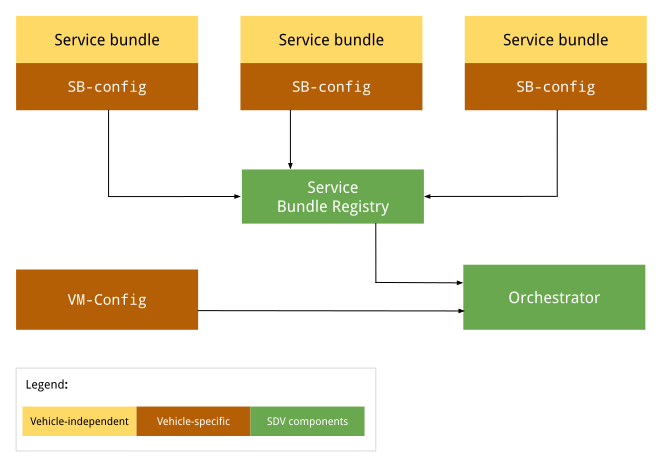
รูปที่ 1 แผนภาพการกำหนดค่า Orchestrator
การกำหนดค่าที่ไม่ขึ้นอยู่กับยานพาหนะจะไม่เปลี่ยนแปลงตาม OEM หรือยานพาหนะ การกำหนดค่าจะยังคงเหมือนเดิมในยานพาหนะทั้งหมดของ OEM แต่ละราย การกำหนดค่าเฉพาะยานพาหนะอาจแตกต่างกันในยานพาหนะที่ต่างกันโดย OEM ที่ต่างกัน แม้ว่าการกำหนดค่าอาจเหมือนกันทั้งหมดสำหรับยานพาหนะทั้งหมดที่ผลิตโดย OEM ที่เฉพาะเจาะจง
APEX การกำหนดค่า
ในเวลาที่รันไทม์ Orchestrator จะไปที่รีจิสทรีของชุดบริการเพื่อดึงข้อมูล การจัดการเป็นกลุ่ม SDV สำหรับชุดบริการแต่ละชุด จากนั้นจะโหลดและแยกวิเคราะห์ การกำหนดค่าแต่ละรายการ ดูข้อมูลเพิ่มเติมได้ที่ข้อมูลเมตาของการจัดการเป็นกลุ่ม
การกำหนดค่าต่อ VM
เมื่อ Orchestrator เริ่มทำงาน ระบบจะโหลดและแยกวิเคราะห์การกำหนดค่า VM (หากมี) เส้นทางแบบเต็มไปยังไฟล์การกำหนดค่านี้ระบุผ่านพร็อพเพอร์ตี้ของระบบ persist.sdv.orchestrator_config_path และ ro.boot.sdv.orchestrator_config_path
ระบบจะกำหนดเส้นทางไฟล์การกำหนดค่า VM เมื่อบูตตามลำดับชั้นต่อไปนี้
ระบบจะตรวจสอบพร็อพเพอร์ตี้
persist.sdv.orchestrator_config_pathหากมีค่า ระบบจะใช้เส้นทางนั้น ค่านี้จะยังคงอยู่เมื่อรีบูตหรือ ตั้งค่าที่รันไทม์หาก
persist.sdv.orchestrator_config_pathว่างเปล่า ระบบจะตรวจสอบพร็อพเพอร์ตี้ro.boot.sdv.orchestrator_config_pathหากพร็อพเพอร์ตี้ro.boot.sdvมีค่า ระบบจะคัดลอกเส้นทางนั้นไปยังพร็อพเพอร์ตี้ persist และใช้ สำหรับการบูตปัจจุบันและการบูตในอนาคตทั้งหมด (เว้นแต่จะมีการลบล้าง)
persist.sdv.orchestrator_config_path
persist.sdv.orchestrator_config_path เป็นพร็อพเพอร์ตี้หลักที่ใช้โดยตัวแทน SDV
Orchestrator เพื่อรับเส้นทางไปยังไฟล์การกำหนดค่า ซึ่งเป็น
พร็อพเพอร์ตี้แบบถาวร หมายความว่าค่าของพร็อพเพอร์ตี้นี้จะได้รับการบันทึกเมื่อรีบูตอุปกรณ์ คุณสามารถ
เปลี่ยนค่าในขณะรันไทม์ ซึ่งมีประโยชน์สำหรับการทดสอบหรือสถานการณ์ที่เฉพาะเจาะจง
(เช่น การทดสอบแบบครบวงจร)
คุณตั้งค่าได้ในเวลาเรียกใช้โดยใช้คำสั่ง setprop และในเวลาบิลด์
โดยใช้ไฟล์ Makefile (มีนามสกุล .mk) หรือไฟล์สคริปต์ทรัพยากรที่มี
นามสกุล .rc
ตั้งค่าพร็อพเพอร์ตี้ที่รันไทม์
การตั้งค่าพร็อพเพอร์ตี้ในขณะรันไทม์มีประโยชน์สำหรับการทดสอบหรือการเปลี่ยนแปลงชั่วคราว เนื่องจากระบบจะบันทึกค่าไว้เมื่อรีบูต
adb root
adb shell setprop persist.sdv.orchestrator_config_path {$path_to_file}.textproto
ตั้งค่าพร็อพเพอร์ตี้ในเวลาบิลด์
หากต้องการตั้งค่าพร็อพเพอร์ตี้นี้เป็นส่วนหนึ่งของการกำหนดค่าบิลด์ของอุปกรณ์ ให้เพิ่มบรรทัดลงใน Makefile ของผลิตภัณฑ์หรือบอร์ด ซึ่งเหมาะอย่างยิ่งสำหรับการตั้งค่าเริ่มต้น สำหรับรูปภาพอุปกรณ์ใหม่
# Add this line to a product's or device's .mk file
PRODUCT_PROPERTY_OVERRIDES += persist.sdv.orchestrator_config_path={$path_to_file}.textproto
นอกจากนี้ คุณยังตั้งค่าพร็อพเพอร์ตี้นี้ภายในไฟล์สคริปต์ทรัพยากรได้ด้วย
# Add this line to an .rc file
on {$property}
    setprop persist.sdv.orchestrator_config_path {$path_to_file}.textproto
ro.boot.sdv.orchestrator_config_path
ro.boot.sdv.orchestrator_config_path เป็นพร็อพเพอร์ตี้แบบอ่านอย่างเดียวในเวลาบูตที่ใช้เพื่อระบุค่าเริ่มต้นสำหรับพร็อพเพอร์ตี้ persist.sdv.orchestrator_config_path หาก persist.sdv.orchestrator_config_path ว่างเปล่าเมื่อระบบ
บูต ระบบจะคัดลอกค่าของ ro.boot.sdv.orchestrator_config_path ไปยัง เมื่อตั้งค่า
persist.sdv.orchestrator_config_pathแล้ว ระบบจะไม่เขียนทับด้วย
พร็อพเพอร์ตี้นี้ในการบูตครั้งต่อๆ ไป
คุณตั้งค่า ro.boot.sdv.orchestrator_config_path ได้โดยใช้ bootconfig หรือ
บรรทัดคำสั่งของเคอร์เนล
รูปแบบไฟล์
กำหนดค่าการจัดการเป็นกลุ่มในรูปแบบ .textproto (เช่น ในข้อความที่มีโครงสร้าง) เพื่อให้โหลดการกำหนดค่าใหม่ได้ในขณะรันไทม์
ไวยากรณ์การกำหนดค่า
ส่วนนี้จะอธิบายไวยากรณ์การกำหนดค่า
แพ็กเกจบริการ
ต้องกำหนดแพ็กเกจบริการแต่ละรายการด้วยการกำหนดค่าแพ็กเกจบริการ ซึ่งจะระบุแพ็กเกจภายใน Orchestrator และใช้เพื่อจัดการวงจรของอินสแตนซ์แพ็กเกจ การกำหนดค่าแพ็กเกจบริการจะกำหนดสิ่งต่อไปนี้
InstanceToGroupMappingช่วยให้คุณรวมอินสแตนซ์ของแพ็กเกจบริการ ไว้ในกลุ่มเพื่อสร้างการอ้างอิงระหว่างอินสแตนซ์ของแพ็กเกจบริการ เดียวกันได้InstancesStatesกำหนดสถานะต่างๆ สำหรับอินสแตนซ์ของแพ็กเกจบริการInstancesStateConfigurationกำหนดสถานะ (จากInstancesStates) ที่ต้องตั้งค่าอินสแตนซ์ของแพ็กเกจบริการหากเงื่อนไขประเมินเป็นtrueServiceBundleConfigมีข้อมูลเกี่ยวกับแพ็กเกจบริการที่เฉพาะเจาะจง และอินสแตนซ์ของแพ็กเกจ โดยมีInstanceToGroupMappingและInstancesStateConfigurationที่เกี่ยวข้องสำหรับแพ็กเกจCustomModesกำหนดรายการโหมดที่กำหนดเองที่อนุญาตให้เผยแพร่ชุดCustomModesใช้เพื่อป้องกันไม่ให้แพ็กเกจที่ไม่ได้รับอนุญาตแก้ไขค่าของโหมดที่กำหนดเอง ฟิลด์นี้ไม่บังคับ เนื่องจากอาจไม่มีการเผยแพร่แพ็กเกจบริการไปยังโหมดที่กำหนดเอง ดูข้อมูลเพิ่มเติมได้ที่โหมด ที่กำหนดเอง
การกำหนดค่ากลุ่มผลิตภัณฑ์ที่จำเป็น
การกำหนดค่า Bundle จะมีแอตทริบิวต์ต่อไปนี้อย่างน้อย
service_bundle_config {
    package_name: "package_name"
    service_bundle_name: "service_bundle_name"

    instance: "instance_1"
    instance: "instance_n"
}
การประกาศนี้จะกำหนดอินสแตนซ์ของชุดบริการ n ด้วย FQIN ที่เกี่ยวข้อง
vm_name.package_name.service_bundle_name.instance_1
…
vm_name.package_name.service_bundle_name.instance_n
ไม่ได้ประกาศชื่อ VM อย่างชัดเจนในการกำหนดค่า เนื่องจากมีการกำหนดค่าต่อ VM ชื่อ VM จึงเป็นชื่อของ VM ที่มีการทำให้ไฟล์การกำหนดค่าใช้งานได้ และเป็นชื่อที่ Agent การจัดการเป็นกลุ่มทราบอยู่แล้วเสมอ
กำหนดค่าอินสแตนซ์
การประกาศอินสแตนซ์ของแพ็กเกจบริการจะไม่มีผล ต้องกำหนดค่าอินสแตนซ์เพื่อให้ Orchestrator ดำเนินการได้ ตัวอย่างเช่น Orchestrator ต้อง ทราบว่าอินสแตนซ์ควรทำงานภายใต้เงื่อนไขใด (หรือสถานะของ VM หรือยานพาหนะ) หากต้องการกำหนดค่าอินสแตนซ์ คุณควรกำหนดสถานะการกำหนดค่า ผ่านรายการต่อไปนี้
conditionคือนิพจน์ในสถานะ VM หรือยานพาหนะที่ควร ประเมินinstances_statesคือชุดสถานะต่ออินสแตนซ์ที่ควรใช้หากเงื่อนไขประเมินเป็นtrue
ดูข้อมูลเพิ่มเติมได้ที่สภาพสินค้า
service_bundle_config {
    package_name: "oem.package"
    service_bundle_name: "OemApplication"

    instance: "adaptive_light"
    instance: "reserve_light"

    state {
        condition {
            power_state: "ON"
        }

        instances_states {
            started: "adaptive_light"
            created: "reserve_light"
        }
    }
}
การเชื่อมโยงอินสแตนซ์กับกลุ่ม
นอกจากนี้ คุณยังกำหนดค่าอินสแตนซ์บริการได้โดยรวมไว้ในกลุ่มบริการ ที่ระดับการกำหนดค่าชุดบริการ คุณสามารถเพิ่มอินสแตนซ์ลงในกลุ่มได้ จากนั้นคุณจะ กำหนดค่ากลุ่มที่ระดับการกำหนดค่า VM ได้ ดูข้อมูลเพิ่มเติมได้ที่ส่วนถัดไปและแพ็กเกจบริการ
service_bundle_config {
    package_name: "oem.package"
    service_bundle_name: "OemApplication"

    instance: "fog_front_light"
    instance: "fog_rear_light"
    instance: "turn_signal_light"
    instance: "light_flasher_display"

    # Declare that fog_light contains fog_front_light and fog_rear_light.
    group_mapping {
        group: "fog_light"
        instance: "fog_front_light"
        instance: "fog_rear_light"
    }

    # Declare that flasher_light contains turn_signal_light and light_flasher_display.
    group_mapping {
        group: "flasher_light"
        instance: "turn_signal_light"
        instance: "light_flasher_display"
    }
}
สคีมา Proto
ตัวอย่างสคีมา Proto มีดังนี้
// Service bundle configuration.
//
// Defines service bundle data, its instances and configuration for instances
// states depending on the state of the system
message ServiceBundleConfig {
  // Required. Name of the service bundle.
  string service_bundle_name = 1;

  // Required. Package name of the service bundle.
  string package_name = 2;

  // Required. Service instances.
  repeated string instance = 3;

  // Configuration for instances states depending on the state of the system.
  repeated InstancesStateConfiguration state = 4;

  // Mapping of groups to their member service instances.
  repeated InstanceToGroupMapping group_mapping = 5;

  // Custom modes that this service bundle is allowed to set.
  repeated string custom_mode = 6;

  // Defines the retry policies for specific instances.
  // If multiple mappings target the same instance, the one with the highest `max_retries`
  // value takes precedence. This applies across all configuration files.
  repeated InstanceToRetryMapping retry_mapping = 7;
}

// Mapping of instances to their retry configuration.
message InstanceToRetryMapping {
  // Required.
  //
  // Name of the instances for which the given retry configuration is applied.
  repeated string instance = 1;

  // Required.
  //
  // The configuration that defines the restart and retry strategy for the instances.
  RetryConfiguration retry_config = 2;

  // Configuration for retry and restart.
  // This configuration is applied after a failure on a transition or after the bundle instance
  // has crashed. Upon a successful operation, the retry counter are reset to max_retries. This
  // configuration can be applied to any service bundle, not only the monitored ones. If the
  // configuration is not provided or none of the optional fields are filled, the default behavior
  // stated is applied (the value from `ro.boot.sdv.orchestrator.recovery.max_retries`
  // or zero if not set).
  message RetryConfiguration {
    // The number of times a retry/restart operation can be performed.
    // Defines the number of times the Orchestrator retries a transition
    // after a transient failure or after a bundle crash notification.
    // This applies to creating, starting and destroying operations.
    // The retry count resets to max_retries after a successful operation.
    // If not set, the default configured value in the
    // `ro.boot.sdv.orchestrator.recovery.max_retries` is used, or-if not set-
    // it fallbacks to zero.
    optional uint32 max_retries = 1;
  }
}

// Mapping of groups to their member service instances.
message InstanceToGroupMapping {
  // Required. Names of groups to which members are added.
  //
  // Group behavior is defined in VM configuration.
  repeated string group = 1;

  // Required. Names of instances to be included in the groups.
  //
  // Can reference only instance defined in the same config file.
  repeated string instance = 2;
}

// Describes the state the service instances should be in after the state is executed.
//
// If there is no valid configuration for the instance in the specific system state, such instance is transitioned to the "destroyed" state.
//
// For the GroupsStates definition to be useful, at least one item should be present in any of the fields.
message InstancesStates {
  // Names of the instances that must be in a "created" state.
  repeated string created = 1;

  // Names of the instances that must be in a "started" state, overrides "created" state.
  repeated string started = 2;

  // Names of the instances that must not run, overrides all other states.
  repeated string destroyed = 3;
}

// Configuration for instances states depending on the state of the system.
message InstancesStateConfiguration {
  // Condition for the system state under which the related instances states should be executed by Orchestrator.
  //
  // If omitted, the related instances states are always executed.
  Condition condition = 1;

  // Required. States of service bundle instances to be executed by Orchestrator if the condition is true.
  InstancesStates instances_states = 2;
}
การกำหนดค่าระดับ VM
การกำหนดค่า VM ช่วยให้กำหนดการแมปกลุ่มและ การกำหนดค่าสำหรับกลุ่มได้ โดยใช้เพื่อสร้างรูปแบบทรัพยากร Dependency ระหว่างชุดบริการที่ระดับ VM ซึ่งจะช่วยให้มีความยืดหยุ่นในการแก้ไขสถานะของชุดบริการหลายชุดพร้อมกัน ระบบจะเปลี่ยนอินสแตนซ์ทั้งหมดของกลุ่ม เป็นสถานะที่ระบุ
Orchestrator ไม่รับประกันลำดับการดำเนินการการเปลี่ยนแปลงสถานะ Orchestrator จะเลื่อนระดับอินสแตนซ์แต่ละรายการให้อยู่ในสถานะที่กำหนด
ระบบจะประกาศกลุ่มโดยนัยด้วยการใช้groupชื่อในส่วนการกำหนดค่าใดก็ได้ เช่น การแมปอินสแตนซ์กับกลุ่ม การแมปกลุ่มกับกลุ่ม
และสถานะการกำหนดค่ากลุ่ม
การเชื่อมโยงกลุ่มกับกลุ่ม
กลุ่มสามารถมีกลุ่มอื่นได้ การประกาศว่า group_1 มี subgroup_2 จะเป็นการเพิ่มอินสแตนซ์บริการทั้งหมดจาก subgroup_2 ไปยัง group_1
เช่น
# Declare that body contains fog_light and flasher_light.
group_mapping {
    group: "body"
    subgroup: "fog_light"
    subgroup: "flasher_light"
}
กำหนดค่ากลุ่ม
การประกาศกลุ่มจะไม่มีผล หากต้องการให้ Orchestrator ดำเนินการ กลุ่มต้องได้รับการกำหนดค่า ตัวอย่างเช่น ต้องแจ้ง Orchestrator ว่ากลุ่มควรทำงานภายใต้ เงื่อนไขหรือสถานะใดของ VM หรือยานพาหนะ
คุณกำหนดค่ากลุ่มได้ในลักษณะเดียวกับอินสแตนซ์บริการ นั่นคือโดย
ใช้สถานะการกำหนดค่า ความแตกต่างเพียงอย่างเดียวคือการใช้ groups_states
แทน instances_states ในไวยากรณ์ ดังนี้
state {
    condition {
        power_state: "ON"
    }

    groups_states {
        started: "Body"
        started: "Adas"
    }
}
สคีมา Proto
ตัวอย่างสคีมา Proto มีดังนี้
// VM configuration.
//
// Defines group-to-group mappings and configuration for groups
// states depending on the state of the system.
//
// Configurations of service bundles can also be defined in VM configuration (as well as in a separate configuration file).
message VmConfig {
  // Group to member groups mapping.
  repeated GroupToGroupMapping group_mapping = 1;

  // Configuration of group states.
  repeated GroupsStateConfiguration state = 2;

  // Required. We also allow to configure individual service bundles in the VM config, to simplify development and migration from the monolithic configuration.
  repeated ServiceBundleConfig service_bundle_config = 3;
}

// Mapping of groups to their member groups.
message GroupToGroupMapping {
  // Required. Names of groups to which members are added.
  repeated string group = 1;

  // Required. Names of member groups to be included in the groups.
  repeated string subgroup = 2;
}

// Describes the state the service instance groups should be in after the state is executed.
//
// If group configuration is valid in a specific system state, the configured state is applied to
// all group members. After that, the normal service instance configuration rules still apply:
// - "destroyed" > "started" > "created" precedence
// - not configured means the instance should be moved to the default state
//
// For the GroupsStates definition to be useful, at least one item should be present in any of the fields.
message GroupsStates {
  // Names of the groups that must be in a "created" state.
  repeated string created = 1;

  // Names of the groups that must be in a "started" state, overrides "created" state.
  repeated string started = 2;

  // Names of the groups that must not run, overrides all other states.
  repeated string destroyed = 3;
}

// Configuration for group states depending on the state of the system.
message GroupsStateConfiguration {
  // Condition for the system state under which the related group states should be executed by  Orchestrator.
  //
  // If omitted, the related groups states are always executed.
  Condition condition = 1;

  // Required. States of service bundle groups to be executed by Orchestrator if the condition  is true.
  GroupsStates groups_states = 2;
}
สถานะการกำหนดค่า
สถานะการกำหนดค่า (สถานะ) จะกำหนดเมื่ออินสแตนซ์หรือกลุ่มบริการ
เริ่ม หยุด หรือทำลาย และประกอบด้วย conditions และ
instances_states (การกำหนดค่าแพ็กเกจ) และ groups_states (การกำหนดค่า VM)
เงื่อนไข
เงื่อนไขช่วยให้โมเดลมีเงื่อนไขบูลีนซึ่งเมื่อประเมินเป็น
true ระบบจะใช้สถานะอินสแตนซ์ที่กำหนด เงื่อนไขมีลักษณะดังนี้
นิพจน์บูลีนที่ซับซ้อนโดยพลการ (สร้างขึ้นด้วยนิพจน์
andหรือnotนิพจน์) ตามสัญญาณที่รองรับ เช่น พลังงาน ยานพาหนะ และโหมด ที่กำหนดเอง(ไม่บังคับ) สถานะการกำหนดค่าที่ไม่มีเงื่อนไขจะทำงานอยู่เสมอ ซึ่งหมายความว่าสถานะดังกล่าวจะ ประเมินเป็น
true
สถานะอินสแตนซ์และสถานะกลุ่ม
instances_states และ groups_states มีลักษณะเหล่านี้
ระบุสถานะที่ตัวแทนการจัด Orchestration ต้องใช้เพื่อนำไปใช้กับอินสแตนซ์หรือกลุ่มที่ระบุ โดยพิจารณาจากสถานะที่
activeเมื่อใช้สถานะกับกลุ่ม สถานะจะมีผลกับอินสแตนซ์ของแพ็กเกจบริการแต่ละรายการในกลุ่ม ไม่มีการกำหนดลำดับเวลาที่นำอินสแตนซ์ ไปสู่สถานะ
รัฐที่รองรับมีดังนี้
startedหลังจากเรียกใช้Service::on_startcreatedหลังจากเรียกใช้
Service::newแต่ก่อนเรียกใช้Service::on_startหรือ
หลังจากเรียกใช้
Service::on_stopแต่ก่อนเรียกใช้Service::drop
destroyedหลังจากที่Service::dropโทร
ชุดกฎ
สถานะการกำหนดค่าอาจเป็นใช้งานอยู่หรือไม่ได้ใช้งาน ขึ้นอยู่กับ เงื่อนไข โดยคุณสามารถมีสถานะหลายรายการที่ใช้งานอยู่ได้ทุกเมื่อ เมื่อเอเจนต์การจัดการเป็นกลุ่มได้รับการอัปเดตสัญญาณ ระบบจะประเมินสถานะการกำหนดค่าทั้งหมด ก่อนที่จะแก้ไขวงจรของแพ็กเกจบริการ สถานะของอินสแตนซ์บริการจะได้รับการประเมินตามกฎต่อไปนี้
เมื่อไม่มีสถานะที่ใช้งานอยู่ใดๆ ที่ใช้กับอินสแตนซ์บริการ ระบบจะทำลายอินสแตนซ์นั้น
เมื่อมีสถานะที่ใช้งานอยู่อย่างน้อย 1 รายการ ระบบจะใช้ลำดับความสำคัญต่อไปนี้
destroyedมีความสำคัญเหนือกว่าstartedมีลำดับความสำคัญก่อนcreated
สคีมา Proto
ตัวอย่างสคีมา Proto มีดังนี้
// A root boolean condition.
message Condition {
  // Required.
  oneof root {
    // VPM power state condition.
    string power_state = 1;
    // VPM vehicle state condition.
    string vehicle_state = 2;
    // Custom mode state condition.
    CustomState custom_state = 3;
    // Negation of a nested condition.
    Condition not = 4;
    // Logical 'and' between conditions grouped in expression.
    Expression and = 5;
    // Logical 'or' between conditions grouped in expression.
    Expression or = 6;
  }
}

// Representation of Custom state condition.
//
// Custom mode(s) are defined by the OEM and are not standardized by the platform, in contrast with
// VPM modes (i.e. power and vehicle mode).
message CustomState {
  // Custom mode being checked.
  string mode = 1;
  // State of the custom mode.
  string state = 2;
}

// A set of conditions united under an 'and' or 'or' expression.
//
// Evaluation type ('and' or 'or') depends on the field in [Condition]/[Expression], where the
// expression is being used.
//
// At least one value in at least one of the fields is required.
message Expression {
  // VPM power state condition.
  repeated string power_state = 1;
  // VPM vehicle state condition.
  repeated string vehicle_state = 2;
  // Custom mode state condition.
  repeated CustomState custom_state = 3;
  // Negation of a nested condition.
  repeated Condition not = 4;
  // Logical 'and' between conditions grouped in expression.
  repeated Expression and = 5;
  // Logical 'or' between conditions grouped in expression.
  repeated Expression or = 6;
}
กลยุทธ์การกู้คืนหลังเกิดข้อขัดข้องและการรีสตาร์ท
Orchestrator มีกลไกที่แข็งแกร่งในการจัดการข้อขัดข้องของ Service Bundle และความล้มเหลวในการเปลี่ยนวงจร เนื่องจาก Orchestrator มีมุมมองแบบองค์รวมของสถานะบริการและจัดการการเปลี่ยนโหมด จึงเป็นคอมโพเนนต์ที่เหมาะสมที่สุดในการใช้กลยุทธ์การรีสตาร์ทและการลองใหม่ Lifecycle Manager (LM) รายงานข้อขัดข้องของชุดบริการไปยัง Orchestrator ผ่านการแจ้งเตือนการสิ้นสุดของ Binder เพื่อหลีกเลี่ยงการเรียก Binder ที่ไม่จำเป็นไปยัง LM, Orchestrator จะแคชสถานะล่าสุดของแต่ละ Bundle (ไม่ว่าจะสำเร็จหรือไม่) และจะไม่ ใช้การเปลี่ยนอีกครั้งหากสถานะที่ทราบล่าสุดเหมือนกับสถานะใหม่ที่ขอ
ลองกำหนดค่าใหม่
คุณสามารถกำหนดกลยุทธ์การรีสตาร์ทและการลองใหม่ต่ออินสแตนซ์ในการกำหนดค่า Orchestrator
โดยใช้ retry_mapping หากไม่ได้ตั้งค่า max_retries ในการกำหนดค่า ระบบจะใช้ค่าเริ่มต้นจากพร็อพเพอร์ตี้ของระบบ ro.boot.sdv.orchestrator.recovery.max_retries หากไม่ได้ตั้งค่าพร็อพเพอร์ตี้นี้ ค่าจะกลับไปเป็น 0
max_retries: กำหนดจำนวนครั้งที่ Orchestrator ลองเปลี่ยนสถานะอีกครั้งหลังจากได้รับการแจ้งเตือนว่าเกิดข้อผิดพลาดชั่วคราวหรือเกิดข้อขัดข้องกับแพ็กเกจ ตัวนับการลองใหม่จะรีเซ็ตเป็นค่าmax_retriesหลังจาก การดำเนินการสำเร็จหรือเมื่อมีการประมวลผลโหมดใหม่ หากการแมปหลายรายการกำหนดเป้าหมายอินสแตนซ์เดียวกัน การแมปที่มีmax_retriesสูงสุดจะมีลำดับความสำคัญสูงกว่า
ตัวอย่างการกำหนดค่า
service_bundle_config {
  package_name: "oem.package"
  service_bundle_name: "OemApplication"
  instance: "fog_front_light"
  instance: "fog_rear_light"

  # Defines the restart configuration mapping for specific instances.
  retry_mapping {
    instance: "fog_front_light"
    instance: "fog_rear_light"
    retry_config {
      max_retries: 3
    }
  }
}
ลักษณะการกู้คืน
ตรรกะการรีสตาร์ทและการลองใหม่ของ Orchestrator จะจัดการสถานการณ์ที่ล้มเหลวหลายอย่างอย่างราบรื่น ดังนี้
- การขัดข้องในการทำงานปกติ: หากชุดบริการขัดข้องขณะทำงาน Orchestrator จะใช้กลยุทธ์การรีสตาร์ทและพยายามนำชุดบริการ กลับสู่สถานะที่ขอครั้งล่าสุดตามจำนวนการลองใหม่ที่เหลือ
- แอปขัดข้องระหว่างการเปลี่ยนโหมด: หากแอปขัดข้องขณะบังคับใช้โหมดใหม่ ระบบจะจัดคิวคำขอรีสตาร์ทและประมวลผลในภายหลัง เมื่อประมวลผลคำขอแล้ว Orchestrator จะตรวจสอบสถานะล่าสุดของอินสแตนซ์ และจะใช้การรีสตาร์ทเฉพาะในกรณีที่อินสแตนซ์ไม่ได้อยู่ในสถานะที่ขอครั้งล่าสุด (จากการเปลี่ยนโหมดครั้งล่าสุด)
- โหมดใหม่ระหว่างการกู้คืน: หาก Orchestrator ได้รับคำขอให้ เปลี่ยนไปใช้โหมดใหม่ขณะที่กำลังรีสตาร์ทแพ็กเกจ (หรืออยู่ใน คิวของอินสแตนซ์ที่จะรีสตาร์ท) ระบบจะยกเลิกการกู้คืนที่กำลังดำเนินการอยู่ การเปลี่ยนโหมดใหม่ จะเข้ามาแทนที่ และระบบจะรีเซ็ตตัวนับการลองใหม่เพื่อให้ ชุดความพยายามใหม่สำหรับสถานะเป้าหมายใหม่
Orchestrator จะแยกความแตกต่างระหว่างข้อผิดพลาดประเภทต่างๆ ที่ Lifecycle Manager แสดงเพื่อกำหนดกลยุทธ์การลองใหม่ ดังนี้
- ข้อผิดพลาดชั่วคราว (
SERVICE_NOT_FOUND,OPERATION_FAILED,INTERNAL_ERROR): Orchestrator จะลองดำเนินการอีกครั้งโดยไม่ต้อง ดำเนินการล้างข้อมูลพิเศษใดๆ - ข้อผิดพลาดแบบต่อเนื่อง (
VALUE_CORRUPTED,INVALID_ARGUMENT): Orchestrator สันนิษฐานว่า Service Bundle อาจอยู่ในสถานะที่เสียหายและ พยายามหยุดอินสแตนซ์ของบริการก่อนที่จะลองดำเนินการอีกครั้งเพื่อให้ มั่นใจได้ว่ามีการรีสตาร์ทที่สะอาด - ข้อผิดพลาดถาวร (
PERMISSION_DENIED): ระบบจะไม่ลองดำเนินการอีกครั้ง และ จะถือว่าแพ็กเกจอยู่ในสถานะที่กู้คืนไม่ได้
หาก Lifecycle Manager ขัดข้อง กระบวนการของแพ็กเกจบริการทั้งหมดจะหายไป เนื่องจากไม่ทราบสถานะที่แท้จริง Orchestrator จึงทำให้แต่ละอินสแตนซ์ไม่ถูกต้องและใช้กลยุทธ์การรีสตาร์ทพร้อมการลองใหม่ที่เหลือเพื่อนำแต่ละอินสแตนซ์ไปสู่สถานะที่ขอครั้งล่าสุด
เพื่อป้องกันไม่ให้เกิดลูปการกู้คืนที่ไม่สิ้นสุดสำหรับแพ็กเกจที่ขัดข้องหรือล้มเหลวซ้ำๆ
ระบบจะรีเซ็ตตัวนับการลองใหม่เป็น max_retries ก็ต่อเมื่อการดำเนินการวงจร
สำเร็จ หรือเมื่อมีการขอเปลี่ยนโหมดใหม่ หากแพ็กเกจลองใหม่จนหมดเนื่องจากล้มเหลวติดต่อกัน (เช่น การเปลี่ยนสถานะล้มเหลวตามด้วยข้อขัดข้อง) ระบบจะไม่รีสตาร์ทแพ็กเกจจนกว่าจะรีเซ็ตตัวนับการลองใหม่
การรายงานสถานะไปยัง Health Monitor
Orchestrator จะแสดงอินเทอร์เฟซ Binder ภายในที่ Health Monitor (HM) ลงทะเบียนไว้ ซึ่งช่วยให้รับข้อมูลอัปเดตอย่างต่อเนื่องเกี่ยวกับสถานะของ แพ็กเกจบริการทั้งหมดได้ Orchestrator จะรายงานทั้ง 2 อย่างต่อไปนี้ผ่านอินเทอร์เฟซนี้
- สถานะวงจร: สถานะที่ต้องการของอินสแตนซ์ตามการกำหนดค่าปัจจุบันและโหมดที่ใช้งานอยู่ (เช่น เริ่ม สร้าง หรือทำลาย)
- สถานะการกู้คืน: สถานะของการเข้าถึงสถานะวงจรที่ต้องการ ซึ่งบ่งชี้ว่าอินสแตนซ์พร้อมใช้งาน กำลังลองอีกครั้งหลังจาก เกิดข้อผิดพลาด หรือกู้คืนไม่สำเร็จหลังจากลองอีกครั้งทั้งหมดแล้ว
ระบบจะรายงานข้อมูลนี้สําหรับอินสแตนซ์ทั้งหมด รวมถึงอินสแตนซ์ที่ไม่ได้ ลงทะเบียนเพื่อรับการตรวจสอบการเต้นของหัวใจ HM ใช้ข้อมูลนี้เพื่อใช้ API ในการรายงานสถานะของ VM ดูข้อมูลเพิ่มเติมได้ในการตรวจวัดสุขภาพ
ตัวอย่าง
ส่วนนี้จะแสดงตัวอย่างการกำหนดค่าสถานะที่มีเงื่อนไข
ตัวอย่างบริการพื้นฐาน
- ไม่มีเงื่อนไข จึงใช้งานได้เสมอ
- เริ่มอินสแตนซ์บริการเดียว
state {
  # Note: This state has no condition, hence its actions are valid throughout the lifetime of the program
  instances_states { started: "ServiceBundleName" }
}
ตัวอย่างแอป HVAC
เงื่อนไข: ใช้งานได้เมื่อ
custom_state != occupancy.OCCUPANCY_EMPTY ||
custom_state == preheat.PREHEAT_ON
ประกาศอินสแตนซ์บริการหลายรายการที่เกี่ยวข้องกับ HVAC เป็น
started
state {
  condition {
    or {
      # I.e. when the vehicle is occupied (for example, by _DRIVER / _NON_DRIVER / _PET)
      not {
        custom_state {
          mode: "occupancy"
          state: "OCCUPANCY_EMPTY"
        }
      }
      custom_state {
        mode: "preheat"
        state: "PREHEAT_ON"
      }
    }
  }

  # HVAC-related services
  instances_states {
    started: "HvacTemperatureCommand"
    started: "TempSensorDriverZone"
    started: "TempSensorPassengerZone"
    started: "RefrigerantLoop"
  }
}
ตัวอย่างการประหยัดพลังงาน
เงื่อนไข: ใช้งานได้เมื่อ
custom_state == system_power.SYSTEM_POWER_LOW &&
custom_state == range_ext.RANGE_EXT_ON
สถานะนี้ถือเป็นสถานะประหยัดพลังงาน
ประกาศอินสแตนซ์บริการที่เกี่ยวข้องกับ HVAC เป็น
destroyedในตัวอย่างนี้ เมื่อโหมด
SYSTEM_POWER_LOWและRANGE_EXT_ONทำงานอยู่ แอป HVAC จะทำงานโดยไม่มีอินสแตนซ์บริการRefrigerantLoopstate { condition { and { custom_state { mode: "system_power" state: "SYSTEM_POWER_LOW" } custom_state { mode: "range_ext" state: "RANGE_EXT_ON" } } } # Disable services with high power consumption instances_states { destroyed: "RefrigerantLoop" } }
ตัวอย่างชีวิตบนเรือ
เงื่อนไข: ใช้งานได้หาก
power_state == ON && vehicle_state == LIFE_ON_BOARDสถานะนี้สามารถมองได้ว่ามีคนอยู่ในรถและรถเปิดเครื่องอยู่
ประกาศว่าเซ็นเซอร์อุณหภูมิทำงานอยู่
เมื่อมีคนอยู่ในรถ ระบบจะตรวจสอบรายการต่างๆ เช่น อุณหภูมิ เพื่อความปลอดภัย
state {
  condition {
    and {
      power_state: "ON"
      vehicle_state: "LIFE_ON_BOARD"
    }
  }

  # Temperature monitoring services
  instances_states {
    started: "TempSensorDriverZone"
    started: "TempSensorPassengerZone"
  }
}
ตัวอย่าง
ส่วนนี้จะแสดงตัวอย่างแบบเต็มซึ่งมีข้อมูลต่อไปนี้
การกำหนดค่าโปรโตคอลระดับแพ็กเกจบริการที่แนะนำแพ็กเกจบริการที่มี อินสแตนซ์ 2 รายการ โดยแต่ละรายการเป็นส่วนหนึ่งของกลุ่ม
การกำหนดค่าโปรโตคอลระดับ VM ที่แนะนำตรรกะในการโต้ตอบกับกลุ่ม ตามโหมด
การกำหนดค่าระดับแพ็กเกจบริการ
# proto-file: //system/software_defined_vehicle/orchestration/distributed_config/src/protos/service_bundle_config.proto
# proto-message: ServiceBundleConfig

package_name: "oem.package"
service_bundle_name: "OemApplication"
instance: "fog_front_light"
instance: "fog_rear_light"
instance: "turn_signal_light"
custom_mode: "FOG"
custom_mode: "TURN"

group_mapping {
    group: "fog_light"
    instance: "fog_front_light"
    instance: "fog_rear_light"
}

group_mapping {
    group: "flasher_light"
    instance: "turn_signal_light"
}

state {
    condition {
        power_state: "ON"
    }

    instances_states {
        created: "turn_signal_light"
        destroyed: "fog_front_light"
        destroyed: "fog_rear_light"
    }
}
การกำหนดค่าระดับ VM
# proto-file: //system/software_defined_vehicle/orchestration/distributed_config/src/protos/vm_config.proto
# proto-message: VmConfig

group_mapping {
    group: "lights"
    subgroup: "fog_light"
    subgroup: "flasher_light"
}

state {
    condition {
        custom_state {
            mode: "FOG"
            state: "ON"
        }
    }
    groups_states {
        started: "fog_light"
    }
}

state {
    condition {
        custom_state {
            mode: "TURN"
            state: "RIGHT"
        }
    }
    groups_states {
        started: "flasher_light"
    }
}

state {
    condition {
        vehicle_state: "SUSPEND_TO_RAM_ENTER"
    }
    groups_states {
        created: "lights"
    }
}
กำหนดค่าการทำงานแบบคู่ขนานของการจัดการแพ็กเกจ
ro.boot.sdv.max_bundles_management_threadsพร็อพเพอร์ตี้ของระบบเป็นพารามิเตอร์การปรับแต่งที่สำคัญสำหรับการควบคุมประสิทธิภาพและการใช้ทรัพยากรในระหว่างการดำเนินการวงจรการใช้งานของ Service Bundle โดยจะกำหนดระดับการทำงานแบบคู่ขนานสูงสุด
สำหรับการทำธุรกรรมของแพ็กเกจบริการ และส่งผลโดยตรงต่อบริการหลัก 2 อย่าง ได้แก่
เครื่องมือจัดระเบียบ: บริการนี้จะอ่านพร็อพเพอร์ตี้เพื่อพิจารณาว่า Orchestrator สามารถโทรไปยัง Lifecycle Manager ได้พร้อมกันกี่ครั้ง (เช่น
startService,stopService) ซึ่งเป็นสิ่งสำคัญอย่างยิ่งสำหรับ ประสิทธิภาพระหว่างการบูตและการเปลี่ยนโหมด ซึ่งอาจมีหลายแพ็กเกจ เปลี่ยนสถานะพร้อมกันLifecycle Manager: บริการนี้ใช้ค่าของพร็อพเพอร์ตี้เพื่อคำนวณขนาดของ Binder Thread Pool ซึ่งมีหน้าที่จัดการคำขอขาเข้าทั้งหมด ซึ่งจะช่วยให้ LM มีเธรดเพียงพอที่จะจัดการคำขอพร้อมกันจาก Orchestrator
หากไม่ได้ตั้งค่าพร็อพเพอร์ตี้นี้ ทั้ง 2 บริการจะมีค่าเริ่มต้นเป็น 12
วิธีการกำหนดค่า
คุณตั้งค่าพร็อพเพอร์ตี้ในไฟล์ BoardConfig.mk ของอุปกรณ์ได้โดยเพิ่มลงในตัวแปร BOARD_BOOTCONFIG ซึ่งจะช่วยให้มั่นใจได้ว่าระบบจะใช้ค่าทุกครั้งที่
อุปกรณ์เริ่มระบบ
BOARD_BOOTCONFIG += \
    androidboot.sdv.max_bundles_management_threads=8
หากต้องการเปลี่ยนค่าสำหรับอุปกรณ์ ให้แก้ไขบรรทัดนี้ในไฟล์ BoardConfig.mk ที่เหมาะสม แล้วสร้างใหม่
การเพิ่มประสิทธิภาพเวลาเปิดเครื่อง
ro.sdv.orchestrator.state.ready เป็นwrite-onceพร็อพเพอร์ตี้บูลีนที่
เป็นส่วนหนึ่งของกลยุทธ์การเพิ่มประสิทธิภาพเวลาบูต ซึ่งแสดงว่า
Orchestration agent ได้เริ่มต้นเสร็จสมบูรณ์แล้วและพร้อมเริ่ม
จัดการวงจรของ Service Bundle วัตถุประสงค์หลักคือการจัดลำดับความสำคัญ
ของการเริ่มต้น Orchestrator และชุดบริการที่มีการจัดการโดยการควบคุม
ลำดับการเริ่มต้นของ Agent SDV อื่นๆ
- ตั้งค่าโดย: เอเจนต์การจัดระเบียบ
- เวลา: 1 ครั้งในระหว่างลำดับการเริ่มต้นระบบ
- การใช้งาน: ระบบ init ใช้พร็อพเพอร์ตี้นี้เพื่อควบคุมลำดับการเริ่มต้น ของเอเจนต์ SDV ส่วนใหญ่ (ตัวจัดการการอัปเดต, ผู้ให้บริการ VSIDL, เครื่องมือตรวจสอบสถานะ, การค้นพบบริการ, อุโมงค์ข้อมูล, RPC, VPM และการวัดและส่งข้อมูล) การเริ่ม Orchestrator ก่อนและให้ Agent อื่นๆ รอพร็อพเพอร์ตี้นี้จะช่วยให้ระบบมั่นใจได้ว่า Orchestrator จะเริ่มงานสำคัญในการเริ่มต้นชุดบริการได้โดยไม่ต้องแย่งชิงทรัพยากรของระบบ
ประสิทธิภาพ
ในระหว่างการบูตระบบ การเริ่มต้นเอเจนต์ทั้งหมดพร้อมกันอาจทำให้เกิดการแย่งชิงทรัพยากร ซึ่งจะทำให้กระบวนการบูตโดยรวมช้าลง เพื่อลดปัญหานี้ เราจึงบังคับใช้ ลำดับการเริ่มต้นทำงานตามลำดับโดยใช้พร็อพเพอร์ตี้ของระบบ
- รีจิสทรีแพ็กเกจบริการ: เริ่มโหลดข้อมูลเมตาของแพ็กเกจบริการทั้งหมดก่อน
- Lifecycle Manager และ Orchestrator: เอเจนต์หลักเหล่านี้จะเริ่มทำงานทันทีที่รีจิสทรีพร้อมใช้งาน การเริ่มต้นก่อนเวลาเป็นสิ่งสำคัญเนื่องจากช่วยให้ Orchestrator เริ่มประเมินการกำหนดค่าและเตรียมพร้อมที่จะเริ่ม Service Bundle ได้ทันที
- Agent SDV อื่นๆ: เริ่มหลังจากที่ Orchestrator พร้อมใช้งานแล้วเท่านั้น
ลำดับที่ควบคุมนี้ช่วยให้มั่นใจได้ว่า Orchestrator จะมีสิทธิ์ใช้ทรัพยากรของระบบเพื่อเริ่มชุดบริการก่อนใคร ซึ่งจะส่งผลให้การเริ่มต้นระบบเร็วขึ้น มีความแน่นอนมากขึ้น และมีประสิทธิภาพมากขึ้น
โหมดที่ Orchestrator ใช้
เอเจนต์การจัดระเบียบจะรักษาการสมัครใช้บริการที่ใช้งานอยู่สำหรับโหมดรถยนต์และโหมดพลังงาน
ที่ VPM ส่ง เมื่อสร้างการเชื่อมต่อเริ่มต้นระหว่าง Orchestrator กับระบบการจัดการยานพาหนะและพลังงาน (VPM) แล้ว Orchestrator จะตั้งค่าพร็อพเพอร์ตี้ระบบบูลีนต่อไปนี้เป็น true
sdv.orchestrator.bootup.power_mode.readysdv.orchestrator.bootup.vehicle_mode.ready
โดยใช้ไฟล์การกำหนดค่าเป็นข้อมูลอ้างอิง เอเจนต์การจัดระเบียบจะคำนวณชุดของแพ็กเกจบริการแบบไดนามิก ซึ่งควรอยู่ในสถานะทำงานตามค่าปัจจุบันของโหมดที่ได้รับ จากนั้น Orchestrator จะสื่อสาร กับเครื่องมือจัดการวงจร โดยออกคำสั่งต่างๆ เพื่อให้สถานะจริง ของแพ็กเกจบริการสอดคล้องกับสถานะเป้าหมายที่คำนวณแล้ว
สถานะยานพาหนะและสถานะพลังงาน
เอเจนต์โหมดรถและการจัดการพลังงาน (VPM) ช่วยให้คอมโพเนนต์ SDV ทราบสถานะปัจจุบันของรถ เช่น โหมดการทำงาน (เช่น จอดหรือขับ) และสถานะพลังงาน (เช่น เปิดและระงับ) Orchestrator จะประเมินค่าเหล่านี้เพื่อกำหนดว่าควรเรียกใช้ชุดบริการใด โดยอิงตามการกำหนดค่า Orchestrator ดูข้อมูลเพิ่มเติมได้ที่การจัดการยานพาหนะและพลังงาน
โหมดที่กำหนดเอง
เนื่องจากมีโหมดการเดินทางหลายโหมด เราจึงไม่สามารถสร้างแบบจำลองโหมดการเดินทางทั้งหมดได้ OEM แต่ละรายมี ความต้องการที่แตกต่างกัน และการกำหนดโหมดของยานพาหนะให้เป็นมาตรฐานไม่สามารถตอบโจทย์กรณีการใช้งานของ OEM ทั้งหมดได้ ด้วยเหตุนี้ เราจึงรองรับโหมดเฉพาะของ OEM ซึ่งเรียกว่าโหมดที่กำหนดเอง โหมดเหล่านี้ ไม่ได้ขยายโหมดรถยนต์และโหมดพลังงานที่มีอยู่ แต่จะช่วยให้คุณ กำหนดโหมดใหม่ได้
ฟังก์ชันการทำงาน
ขอบเขตส่วนกลาง: โหมดที่กำหนดเองเป็นแบบส่วนกลาง โดยจะมีผลกับ VM ทั้งหมดที่ Orchestrator จัดการในลักษณะเดียวกัน
องค์ประกอบ: การเปลี่ยนโหมดที่กำหนดเองแต่ละครั้งประกอบด้วย 2 องค์ประกอบ ดังนี้
ชื่อ: ตัวระบุที่ไม่ซ้ำกันซึ่ง OEM เลือกเพื่อแสดงโหมดที่กำหนดเอง
ค่า: สถานะปัจจุบันของโหมดที่กำหนดเอง ซึ่งอาจเป็น
UNDEFINEDเมื่อไม่ได้ตั้งค่าใดๆ
บทบาทผู้ประสานงาน: ผู้ประสานงานจะทำหน้าที่เป็นผู้รับค่าโหมดที่กำหนดเองแบบพาสซีฟ
บทบาทของแพ็กเกจบริการ: แพ็กเกจบริการแต่ละรายการมีโหมดที่กำหนดเองได้หลายโหมด และสามารถเผยแพร่ค่าใหม่ไปยังโหมดใดก็ได้ แพ็กเกจบริการหลายรายการสามารถมีโหมดที่กำหนดเองเดียวกันได้ ซึ่งหมายความว่าโหมดที่กำหนดเองจะรับค่าใหม่จากแหล่งที่มาต่างๆ ได้
ความรับผิดชอบในการตรวจสอบ: OEM มีหน้าที่ตรวจสอบว่าการเปลี่ยนสถานะถูกต้อง Orchestrator จะยอมรับค่าใหม่
ลักษณะโดยประมาณ
จำนวนโดยประมาณ: โหมดพลังงานและยานพาหนะจะจัดการวงจรของแพ็กเกจบริการส่วนใหญ่ โดยโหมดที่กำหนดเองจะมีบทบาทเสริม เราคาดว่า โหมดที่กำหนดเองจะมีจำนวนหลักสิบ ไม่ใช่ หลักร้อย
กำหนดเวลาโดยประมาณ: ระบบจะไม่ส่งโหมดเป็นระยะๆ แต่โหมดจะ อิงตามเหตุการณ์ โดยจะทริกเกอร์จากการดำเนินการที่เฉพาะเจาะจง เช่น การเปิดประตู การเริ่มลำดับการจอดรถ การเริ่มรอบการชาร์จ และเหตุการณ์อื่นๆ ที่คล้ายกัน ซึ่งมีความสำคัญตามที่ OEM กำหนด
การออกแบบโหมดที่กำหนดเองช่วยให้คุณกำหนดและจัดการโหมดที่เฉพาะเจาะจงได้อย่างยืดหยุ่น ในขณะที่ช่วยให้ Orchestrator ไม่ขึ้นอยู่กับตรรกะของเครื่องสถานะพื้นฐาน
โหมดที่รองรับ
เพื่อให้มั่นใจว่าแพ็กเกจบริการจะเผยแพร่เฉพาะในโหมดที่กำหนดเองที่ตนเป็นเจ้าของ แต่ละแพ็กเกจต้อง ประกาศรายการโหมดที่กำหนดเองที่เป็นเจ้าของอย่างชัดเจนภายใน Orchestrator configuration ซึ่งพร้อมใช้งานใน VM ท้องถิ่นที่มีรีจิสทรีแพ็กเกจบริการ ระบบจะทิ้งความพยายามในการเผยแพร่ไปยังโหมดที่กำหนดเองที่ไม่ได้ประกาศ
หากต้องการประกาศโหมดที่กำหนดเองซึ่งชุดบริการได้รับอนุญาตให้เผยแพร่ (จึงเป็นเจ้าของ) ให้ขยายservice_bundle_configสคีมาโปรโตคอลด้วยรายการต่อไปนี้
// Service bundle configuration.
//
// Defines service bundle metadata, its instances, and configuration for instances
// lifecycle states depending on the state of the vehicle.
message ServiceBundleConfig {
      [...]

    // The list of custom modes that this service bundle publishes.
    repeated string custom_mode = 5;
}
กำหนดค่าแพ็กเกจตามโหมด
การกำหนดค่า Orchestrator proto ที่มีอยู่ (คอมโพเนนต์ Condition) รองรับการจัดการแพ็กเกจบริการตามโหมดที่กำหนดเอง ดังนี้
message Condition {
  oneof root {
    string power_state = 1;
    string vehicle_state = 2;
    CustomState custom_state = 3;
    Condition not = 4;
    Expression and = 5;
    Expression or = 6;
  }
}

message CustomState {
  // Custom mode being checked.
  string mode = 1;
  // State of the custom mode.
  string state = 2;
}
ตัวอย่าง Proto
ตัวอย่างต่อไปนี้แสดงวิธีกำหนดค่าอินสแตนซ์ของแพ็กเกจบริการให้เริ่มทำงานตามสถานะ TURN และ FOG
service_bundle_config {
package_name: "oem.package"
service_bundle_name: "OemApplication"
instance: "flasher_light"
// Service bundle is allowed to set values for the TURN mode
custom_mode: "TURN"
// Service bundle is allowed to set values for the FOG mode
custom_mode: "FOG"

state {
    condition {
        custom_state {
            mode: "TURN"
            state: "LEFT"
        }
    }
    instances_states {
        started: "flasher_light"
    }
}

state {
    condition {
        custom_state {
            mode: "FOG"
            state: "ON"
        }
    }
    // Group assumed to be defined containing all FOG lights instances.
    groups_states {
        started: "fog_lights"
    }
}

}
ตั้งค่าโหมดที่กำหนดเองใหม่
กระบวนการตั้งค่าโหมดที่กำหนดเองใหม่จะเริ่มต้นด้วยแพ็กเกจบริการ
ซึ่งจะสื่อสารค่าที่ต้องการไปยัง Orchestrator ในเครื่องที่ทำงานบน
VM เดียวกัน จากนั้น Orchestrator จะยืนยันว่าชุดบริการมีสิทธิ์ที่จำเป็นในการเผยแพร่ไปยังโหมดที่กำหนดเองที่ระบุ โดยอ้างอิงการกำหนดค่าที่กำหนดไว้ใน .textproto เพื่อพิจารณาว่าจะส่งต่อค่าไปยัง VM อื่นๆ หรือไม่
เมื่อเผยแพร่แล้ว Orchestrator แต่ละตัวจะตรวจสอบ
การกำหนดค่าเพื่อค้นหารายการแพ็กเกจบริการที่ควรเปลี่ยนสถานะ
RPC
Orchestrator แต่ละตัวที่ทำงานใน VM แต่ละตัวจะสร้างเซิร์ฟเวอร์ RPC เพื่อรอรับค่าโหมดที่กำหนดเองใหม่ ชุดบริการแต่ละชุดที่ต้องการอัปเดตโหมดที่กำหนดเองต้อง สร้างไคลเอ็นต์ RPC ไปยังเซิร์ฟเวอร์ ระบบจะบังคับใช้ ACL เพื่อป้องกันไม่ให้ แพ็กเกจที่ไม่ได้รับอนุญาตเชื่อมต่อกับเซิร์ฟเวอร์
คำจำกัดความของ Proto สำหรับการตั้งค่าใหม่ผ่าน RPC มีลักษณะดังนี้ ตัวอย่าง:
syntax = "proto3";

import "google/protobuf/timestamp.proto";

package com.sdv.google.Orchestrator;

// Representation of the request used by service bundles to update a custom mode.
// Service bundles are permitted to update only the custom modes specifically designated
// for them within the Orchestrator configuration.
message SetCustomStateRequest {
  // Required.
  // The name of the custom mode.
  // The mode string can not be longer than 56 characters and can only contain
  // letters, numbers, dashes, dots and underscores: [a-zA-Z0-9_-.].
  // No other special character nor spaces should be present in the mode.
  string mode = 1;

  // Required.
  // The new value for the custom mode.
  // The value string can not be longer than 56 characters and can only contain
  // letters, numbers, dashes, dots and underscores: [a-zA-Z0-9_-.].
  // No other special character nor spaces should be present in the value.
  string value = 2;

  // Required.
  // The timestamp in which the new custom mode value was set. This is used to
  // prevent race conditions whenever different service bundles in different
  // VMs want to set a new value for the same custom mode.
  // We use this timestamp to order the requests and we promise eventual
  // consistency: while temporary inconsistencies may occur, the system will
  // eventually converges to the correct state.
  .google.protobuf.Timestamp timestamp = 3;
}

// Representation of the set custom state response.
message SetCustomStateResponse {}

// Orchestrator interface for service bundles that update the value of a
// custom mode.
// When a new value is received, it is propagated to Orchestrators running on
// other VMs.
service CustomStateService {
  // Updates the value for the custom mode.
  // Returns the error:
  // - PermissionDenied: the service is not authorized to update the custom mode.
  // - InvalidArgument: the provided mode and/or value are not valid.
  rpc SetCustomState(SetCustomStateRequest) returns (SetCustomStateResponse) {};
}
การยกเลิกการเปลี่ยนพลังงาน
Orchestrator อนุญาตให้ยกเลิกการเปลี่ยนสถานะการจ่ายไฟที่กำลังดำเนินการผ่านSHUTDOWN_CANCELLEDโหมดพลังงาน (ส่งโดย VPM ไปยัง Orchestrator)
ลองดูตัวอย่างการกำหนดค่า Orchestrator ต่อไปนี้
state {
    condition {
        power_state: "SUSPEND_TO_RAM_ENTER"
    }
    instances_states {
        started: "instance-1"
        started: "instance-2"
        started: "instance-3"
    }
}
เมื่อได้รับSHUTDOWN_CANCELLEDโหมดหนึ่งๆ สถานการณ์หลัก 2 สถานการณ์จะกำหนดลักษณะการทำงานของ
Orchestrator ในทั้ง 2 กรณี ระบบจะต่อท้ายคิวด้วยSHUTDOWN_CANCELLEDโหมดประหยัดพลังงาน จากนั้นระบบจะเรียกใช้ SHUTDOWN_CANCELLED หลังจากที่ใช้
องค์ประกอบที่อยู่ในคิวแล้ว
สถานการณ์ที่ 1: โหมดที่กำลังดำเนินการอยู่เป็นโหมดพลังงาน
หาก Orchestrator กำลังดำเนินการอัปเดตโหมดพลังงาน ระบบจะขอให้ยกเลิก โหมดที่กำลังดำเนินการ แม้ว่า Lifecycle Manager จะไม่รองรับการยกเลิกการเปลี่ยนผ่านที่กำลังดำเนินการโดยค่าเริ่มต้น แต่ออเคสเตรเตอร์จะตรวจสอบว่าไม่มีการเริ่มคำขอแพ็กเกจบริการใหม่
ตัวอย่าง: หาก instance-1 จากการกำหนดค่าในตัวอย่างก่อนหน้ากำลัง
เริ่มทำงานเมื่อได้รับโหมด SHUTDOWN_CANCELLED
instance-1 จะเริ่มทำงานจนเสร็จ อย่างไรก็ตาม instance-2 และ instance-3 จะไม่
เปลี่ยนไปเป็นสถานะเริ่มต้น
สถานการณ์ที่ 2: มีโหมดพลังงานในคิวการประมวลผล
ในกรณีที่ Orchestrator กำลังประมวลผลการอัปเดตโหมดที่ไม่ใช่โหมดเปิดเครื่อง และมีคำขอเปิดเครื่องในคิวของโหมดที่จะดำเนินการ ระบบจะนำการเปลี่ยนโหมดเปิดเครื่องออกจากคิว ซึ่งจะป้องกันไม่ให้มีการดำเนินการ
ตัวอย่าง: หากใช้การกำหนดค่าในตัวอย่างก่อนหน้าและ Orchestrator กำลังดำเนินการอัปเดตที่ไม่เกี่ยวข้องกับพลังงาน (เช่น การอัปเดตยานพาหนะ) และ SUSPEND_TO_RAM_ENTER อยู่ในคิว การรับ SHUTDOWN_CANCELLED จะส่งผลให้ไม่มีการเริ่มอินสแตนซ์ใดเลย (instance-1, instance-2, instance-3)
ตัวอย่างการใช้งาน
แคตตาล็อกสำหรับไคลเอ็นต์ที่ต้องการใช้โค้ด Middleware ที่สร้างขึ้นเพื่อสร้างไคลเอ็นต์ไปยังเซิร์ฟเวอร์ RPC อาจมีลักษณะดังตัวอย่างนี้
# proto-file: //system/software_defined_vehicle/vsidl/language/src/protos/sdv/vsidl/v1/syntax.proto
# proto-message: VsidlEntry

package: "package_name"

service_bundle {
    name: "service_bundle_name"

    client {
        service: "com.android.sdv.orchestrator.CustomStateService"
    }
}
เมื่อสร้างโค้ด คุณต้องเพิ่มทรัพยากร Dependency ลงในแคตตาล็อก Orchestrator ดังนี้
--dependency-catalog-path orchestration/engine/stable/vsidl/*
โค้ดไคลเอ็นต์สําหรับส่งค่าใหม่มีลักษณะดังนี้
let fqin = ServiceFqin::builder()
        .sdv_vm_name("vm_name")
        .sdv_package_name("package_name")
        .service_bundle_name("service_bundle_name")
        .service_instance_name("instance_name")
        .build()
        .unwrap();
let context_ref = ContextRef::create(fqin);
let comms = Arc::new(SdvComms { context: context_ref });
// service_bundle_name is the bundle generated with middleware code that defines
// the RPC client to "com.android.sdv.orchestrator.CustomStateService".
let client = service_bundle_name::new(comms).await.unwrap();
let rpc_client = client
        .create_rpc_client::<Client>(
            UnitName::builder()
                .vm_name(comms.context.get_self_fqin().get_sdv_vm_name())
                .package_name("com.android.sdv.orchestrator")
                .bundle_name("OrchestratorServiceBundle")
                .service_unit_name(Client::DEFAULT_UNIT_NAME)
                .build()
                .unwrap(),
            ClientOptions::default(),
        )
        .await;
let client = Arc::new(rpc_client.unwrap());
let request = SetCustomStateRequest {
mode: custom_mode_name,
value: custom_mode_value,
timestamp: MessageField::some(Timestamp::now()),
..Default::default()
};
let result = client.SetCustomState(&request).await;
// Process result
เครื่องมือแก้ไขข้อบกพร่อง
เอเจนต์ Orchestrator รองรับเครื่องมือ dumpsys คุณเรียกใช้ได้โดย เรียกใช้คำสั่งต่อไปนี้ในอินสแตนซ์ SDV ที่ทำงานอยู่
adb shell dumpsys com.google.sdv.ISdvAgent/orch
ใช้เครื่องมือนี้เพื่อแก้ไขข้อบกพร่องและรับข้อมูลเชิงลึกเกี่ยวกับสถานะภายในของ Orchestrator Agent โดยการทำเช่นนี้จะแสดงสิ่งต่อไปนี้
- สถานะโหมดปัจจุบัน: ดูโหมดรถยนต์ พลังงาน และโหมดที่กำหนดเองที่ใช้งานอยู่
- ผู้เผยแพร่โฆษณาในโหมดที่กำหนดเอง: ระบุบริการที่สามารถเผยแพร่โหมดที่กำหนดเอง (และโหมดที่จะเผยแพร่)
- สถานะที่จำเป็นต่อบริการ: ดูสถานะของแต่ละแพ็กเกจบริการตาม เงื่อนไขที่กำหนดไว้ล่วงหน้าและโหมดปัจจุบัน ซึ่งจะช่วยวิเคราะห์สาเหตุที่ บริการอาจไม่อยู่ในสถานะที่คาดไว้
- สถานะการบังคับใช้โหมด: ดูภาพรวมที่ชัดเจนของโหมดที่บังคับใช้ซึ่งอยู่ระหว่างดำเนินการ หรือโหมดที่บังคับใช้ล่าสุดหากไม่มีโหมดใดอยู่ระหว่างดำเนินการ
- คิวการบังคับใช้โหมด: ดูโหมดที่รอการบังคับใช้
เช่น
AGENT NAME: SDV Agent dump - Orchestrator
AGENT FQIN: instance1:com.android.sdv.orchestrator.OrchestratorServiceBundle/default
AGENT STATE: See orchestrator state below.
----------------
----------------
INTERNAL STATE REPORTERS:

*NAME: Configuration state
*REPORT:
Active modes:
MODE                          VALUE                         TIMESTAMP (scs, ns)
Power                         POWER_OFF_EXIT                -
Vehicle                       VEHICLE_ON                    -
Custom("CHARGING")            ON                            1750757590 (scs) 466507459 (ns)
Custom("TIRE_PRESSURE")       front-left                    1750757570 (scs) 554522995 (ns)

Modes allowed to publish by bundle (FQIN: modes):
com.android.sdv.sample.orchestration/CustomModeControlBundle: CHARGING, TIRE_PRESSURE

Requested state for instances:
STATE          FQIN
Started        com.android.sdv.sample.orchestration/CustomModeControlBundle/always-started-instance
Started        com.android.sdv.sample.orchestration/OrchestratedServiceBundle/my-instance
Started        com.sdv.oem.sample.diagnostics/DiagnosticsSampleWithDataItem/instance
Started        com.sdv.oem.sample.diagnostics/DiagnosticsSampleWithEvent/instance
Started        com.sdv.oem.user_preferences/UserPreferencesServiceBundle/default
----------------
*NAME: Engine state
*REPORT:
Last mode enforced was Custom("CHARGING") with value "ON"

Next modes to process: []
----------------
หากต้องการดูข้อมูลเพิ่มเติมเกี่ยวกับแพ็กเกจบริการแต่ละรายการที่ Orchestrator จัดการ ให้ใช้ dumpsys ที่มีอยู่จาก Lifecycle Manager ดังนี้
dumpsys google.sdv.lifecycle.ILifecycleManager/default
การดำเนินการนี้จะให้ข้อมูลโดยละเอียดเกี่ยวกับสถานะวงจรของบริการแต่ละรายการ การรวมเอาต์พุต dumpsys ของ Orchestrator กับเอาต์พุตจาก Lifecycle Manager จะแสดงภาพรวมที่สมบูรณ์ของวงจรการใช้งานชุดบริการใน VM