

Orchestrator 是在本機執行的 SDV 代理程式,可提供機制來控制服務套件的建立、啟動、停止或毀損時間。這是透過自動化調度管理設定完成,您可以在其中定義一組規則,決定何時以及如何對服務套件執行個體執行動作。這些規則會根據車輛、電源和自訂模式而定。
您可以在設定 APEX 中或透過每個 VM 的設定設定 Orchestrator。這個分散式設定系統可讓您透過服務套件登錄檔,獨立更新每個服務套件的部分內容,如圖所示。
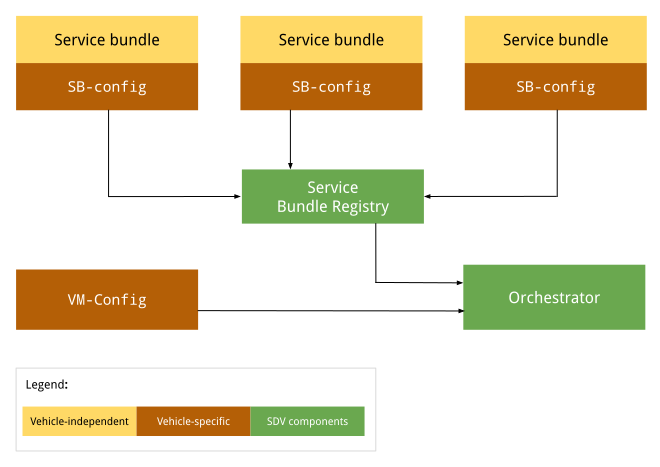
圖 1. 自動調度管理工具設定圖。
與車輛無關的設定不會因 OEM 或車輛而異。每個原始設備製造商 (OEM) 的所有車輛都採用相同的設定。不同車輛的特定車輛設定可能有所不同,但特定 OEM 製造的所有車輛設定可能相同。
設定 APEX
在執行階段,Orchestrator 會前往服務套件登錄檔,擷取每個服務套件的 SDV 調度管理,並載入及剖析每個設定。詳情請參閱「協調中繼資料」。
每個 VM 的設定
Orchestrator 啟動時,會載入並剖析 VM 設定 (如有)。這個設定檔的絕對路徑是透過系統屬性 persist.sdv.orchestrator_config_path 和 ro.boot.sdv.orchestrator_config_path 指定。
系統會在啟動時,根據下列階層決定 VM 設定檔路徑:
系統會檢查
persist.sdv.orchestrator_config_path屬性。如有值,系統會使用該路徑。這個值會在重新啟動時保留,或在執行階段設定。如果
persist.sdv.orchestrator_config_path為空白,系統會檢查ro.boot.sdv.orchestrator_config_path屬性。如果ro.boot.sdv屬性有值,該路徑會複製到 persist 屬性,並用於目前的開機和所有日後的開機 (除非遭到覆寫)。
persist.sdv.orchestrator_config_path
persist.sdv.orchestrator_config_path 是 SDV Orchestrator 代理程式用來取得設定檔路徑的主要屬性。這是持續性屬性,也就是說,即使裝置重新啟動,其值也會儲存。您可以在執行階段變更值,這對於測試或特定情境 (例如端對端測試) 很有用。
您可以使用 setprop 指令在執行階段設定值,並在建構時間使用 makefile (副檔名為 .mk) 或資源指令碼檔案 (副檔名為 .rc) 設定值。
在執行階段設定屬性
在執行階段設定屬性有助於測試或進行暫時性變更,因為系統會在重新啟動時儲存該值:
adb root
adb shell setprop persist.sdv.orchestrator_config_path {$path_to_file}.textproto
在建構時間設定屬性
如要將這項屬性設為裝置建構設定的一部分,請在產品或主機板的 Makefile 中新增一行。非常適合為新的裝置圖片設定預設值。
# Add this line to a product's or device's .mk file
PRODUCT_PROPERTY_OVERRIDES += persist.sdv.orchestrator_config_path={$path_to_file}.textproto
您也可以在資源指令碼檔案中設定這項屬性:
# Add this line to an .rc file
on {$property}
    setprop persist.sdv.orchestrator_config_path {$path_to_file}.textproto
ro.boot.sdv.orchestrator_config_path
ro.boot.sdv.orchestrator_config_path 是開機時的唯讀屬性,用於提供 persist.sdv.orchestrator_config_path 屬性的初始值。如果系統啟動時 persist.sdv.orchestrator_config_path 為空白,系統會將 ro.boot.sdv.orchestrator_config_path 的值複製到 persist.sdv.orchestrator_config_path。設定後persist.sdv.orchestrator_config_path,後續啟動時不會覆寫這個屬性。
您可以使用 bootconfig 或核心指令列設定 ro.boot.sdv.orchestrator_config_path。
檔案格式
以 .textproto 格式 (例如結構化文字) 定義協調設定,以便在執行階段載入新設定。
設定語法
本節說明設定語法。
服務套裝組合
每個服務套件都必須使用服務套件設定定義,這項設定會識別 Orchestrator 內的套件,並用於處理套件例項的生命週期。服務組合設定會定義:
InstanceToGroupMapping可讓您在群組中加入服務套件的執行個體,在相同服務套件的執行個體之間建立依附元件。InstancesStates定義服務套件例項的不同狀態。InstancesStateConfiguration定義服務套裝組合執行個體必須設定的狀態 (來自InstancesStates),前提是條件評估結果為true。ServiceBundleConfig包含特定服務套裝組合及其執行個體的相關資訊。其中包含套件的相應InstanceToGroupMapping和InstancesStateConfiguration。CustomModes定義了允許套件發布的自訂模式清單。CustomModes可防止未經授權的套件修改自訂模式的值。這個欄位為選填,因為服務套裝組合可能不會發布至任何自訂模式。詳情請參閱「自訂模式」。
必要套裝組合設定
至少,套裝組合設定會提供下列屬性:
service_bundle_config {
    package_name: "package_name"
    service_bundle_name: "service_bundle_name"

    instance: "instance_1"
    instance: "instance_n"
}
這項宣告會定義 n 服務套件執行個體,並提供對應的 FQIN:
vm_name.package_name.service_bundle_name.instance_1
…
vm_name.package_name.service_bundle_name.instance_n
設定中未明確宣告 VM 名稱。由於設定是針對每個 VM 定義,因此 VM 名稱一律是設定檔部署的 VM 名稱,且編排代理程式已知道該名稱。
設定執行個體
宣告服務套裝組合執行個體不會產生任何影響。執行個體必須經過設定,才能由 Orchestrator 執行。舉例來說,Orchestrator 必須瞭解執行個體應在哪些條件 (或 VM/車輛狀態) 下執行。如要設定執行個體,請透過下列方式定義設定狀態:
condition是 VM 或車輛狀態的運算式,應進行評估。instances_states是每個執行個體的一組狀態,如果條件評估結果為true,就應套用這些狀態。
詳情請參閱「條件」。
service_bundle_config {
    package_name: "oem.package"
    service_bundle_name: "OemApplication"

    instance: "adaptive_light"
    instance: "reserve_light"

    state {
        condition {
            power_state: "ON"
        }

        instances_states {
            started: "adaptive_light"
            created: "reserve_light"
        }
    }
}
執行個體到群組的對應
您也可以將服務執行個體納入服務群組,藉此設定服務執行個體。在服務套件設定層級,您可以將執行個體新增至群組。然後在 VM 設定層級設定群組。詳情請參閱下一節和「服務組合」。
service_bundle_config {
    package_name: "oem.package"
    service_bundle_name: "OemApplication"

    instance: "fog_front_light"
    instance: "fog_rear_light"
    instance: "turn_signal_light"
    instance: "light_flasher_display"

    # Declare that fog_light contains fog_front_light and fog_rear_light.
    group_mapping {
        group: "fog_light"
        instance: "fog_front_light"
        instance: "fog_rear_light"
    }

    # Declare that flasher_light contains turn_signal_light and light_flasher_display.
    group_mapping {
        group: "flasher_light"
        instance: "turn_signal_light"
        instance: "light_flasher_display"
    }
}
Proto 架構
以下是 proto 結構定義範例:
// Service bundle configuration.
//
// Defines service bundle data, its instances and configuration for instances
// states depending on the state of the system
message ServiceBundleConfig {
  // Required. Name of the service bundle.
  string service_bundle_name = 1;

  // Required. Package name of the service bundle.
  string package_name = 2;

  // Required. Service instances.
  repeated string instance = 3;

  // Configuration for instances states depending on the state of the system.
  repeated InstancesStateConfiguration state = 4;

  // Mapping of groups to their member service instances.
  repeated InstanceToGroupMapping group_mapping = 5;

  // Custom modes that this service bundle is allowed to set.
  repeated string custom_mode = 6;

  // Defines the retry policies for specific instances.
  // If multiple mappings target the same instance, the one with the highest `max_retries`
  // value takes precedence. This applies across all configuration files.
  repeated InstanceToRetryMapping retry_mapping = 7;
}

// Mapping of instances to their retry configuration.
message InstanceToRetryMapping {
  // Required.
  //
  // Name of the instances for which the given retry configuration is applied.
  repeated string instance = 1;

  // Required.
  //
  // The configuration that defines the restart and retry strategy for the instances.
  RetryConfiguration retry_config = 2;

  // Configuration for retry and restart.
  // This configuration is applied after a failure on a transition or after the bundle instance
  // has crashed. Upon a successful operation, the retry counter are reset to max_retries. This
  // configuration can be applied to any service bundle, not only the monitored ones. If the
  // configuration is not provided or none of the optional fields are filled, the default behavior
  // stated is applied (the value from `ro.boot.sdv.orchestrator.recovery.max_retries`
  // or zero if not set).
  message RetryConfiguration {
    // The number of times a retry/restart operation can be performed.
    // Defines the number of times the Orchestrator retries a transition
    // after a transient failure or after a bundle crash notification.
    // This applies to creating, starting and destroying operations.
    // The retry count resets to max_retries after a successful operation.
    // If not set, the default configured value in the
    // `ro.boot.sdv.orchestrator.recovery.max_retries` is used, or-if not set-
    // it fallbacks to zero.
    optional uint32 max_retries = 1;
  }
}

// Mapping of groups to their member service instances.
message InstanceToGroupMapping {
  // Required. Names of groups to which members are added.
  //
  // Group behavior is defined in VM configuration.
  repeated string group = 1;

  // Required. Names of instances to be included in the groups.
  //
  // Can reference only instance defined in the same config file.
  repeated string instance = 2;
}

// Describes the state the service instances should be in after the state is executed.
//
// If there is no valid configuration for the instance in the specific system state, such instance is transitioned to the "destroyed" state.
//
// For the GroupsStates definition to be useful, at least one item should be present in any of the fields.
message InstancesStates {
  // Names of the instances that must be in a "created" state.
  repeated string created = 1;

  // Names of the instances that must be in a "started" state, overrides "created" state.
  repeated string started = 2;

  // Names of the instances that must not run, overrides all other states.
  repeated string destroyed = 3;
}

// Configuration for instances states depending on the state of the system.
message InstancesStateConfiguration {
  // Condition for the system state under which the related instances states should be executed by Orchestrator.
  //
  // If omitted, the related instances states are always executed.
  Condition condition = 1;

  // Required. States of service bundle instances to be executed by Orchestrator if the condition is true.
  InstancesStates instances_states = 2;
}
VM 層級設定
VM 設定可定義群組對應和群組設定。這項功能可用於在 VM 層級建立服務套件之間的依附元件模型,因此可彈性地同時修改多個服務套件的狀態。群組的所有執行個體都會進入指定狀態。
Orchestrator 無法保證狀態變更的執行順序。Orchestrator 會將每個執行個體升級至指定狀態。
在任何設定部分使用 group 名稱,即可隱含宣告群組。例如執行個體對應群組、群組對應群組,以及群組設定狀態。
群組對群組對應
群組可以包含其他群組。藉由宣告 group_1 包含 subgroup_2,我們實際上會將 subgroup_2 中的所有服務執行個體新增至 group_1。
例如:
# Declare that body contains fog_light and flasher_light.
group_mapping {
    group: "body"
    subgroup: "fog_light"
    subgroup: "flasher_light"
}
設定群組
宣告群組不會產生任何影響。如要由自動化調度管理工具執行,必須先設定群組。舉例來說,Orchestrator 必須知道群組應在 VM 或車輛的哪些條件或狀態下執行。
您可以透過設定狀態,以類似於服務執行個體的方式設定群組。唯一的差別是語法中使用了 groups_states,而非 instances_states:
state {
    condition {
        power_state: "ON"
    }

    groups_states {
        started: "Body"
        started: "Adas"
    }
}
Proto 架構
以下是 proto 結構定義範例:
// VM configuration.
//
// Defines group-to-group mappings and configuration for groups
// states depending on the state of the system.
//
// Configurations of service bundles can also be defined in VM configuration (as well as in a separate configuration file).
message VmConfig {
  // Group to member groups mapping.
  repeated GroupToGroupMapping group_mapping = 1;

  // Configuration of group states.
  repeated GroupsStateConfiguration state = 2;

  // Required. We also allow to configure individual service bundles in the VM config, to simplify development and migration from the monolithic configuration.
  repeated ServiceBundleConfig service_bundle_config = 3;
}

// Mapping of groups to their member groups.
message GroupToGroupMapping {
  // Required. Names of groups to which members are added.
  repeated string group = 1;

  // Required. Names of member groups to be included in the groups.
  repeated string subgroup = 2;
}

// Describes the state the service instance groups should be in after the state is executed.
//
// If group configuration is valid in a specific system state, the configured state is applied to
// all group members. After that, the normal service instance configuration rules still apply:
// - "destroyed" > "started" > "created" precedence
// - not configured means the instance should be moved to the default state
//
// For the GroupsStates definition to be useful, at least one item should be present in any of the fields.
message GroupsStates {
  // Names of the groups that must be in a "created" state.
  repeated string created = 1;

  // Names of the groups that must be in a "started" state, overrides "created" state.
  repeated string started = 2;

  // Names of the groups that must not run, overrides all other states.
  repeated string destroyed = 3;
}

// Configuration for group states depending on the state of the system.
message GroupsStateConfiguration {
  // Condition for the system state under which the related group states should be executed by  Orchestrator.
  //
  // If omitted, the related groups states are always executed.
  Condition condition = 1;

  // Required. States of service bundle groups to be executed by Orchestrator if the condition  is true.
  GroupsStates groups_states = 2;
}
設定狀態
設定狀態 (狀態) 會定義服務執行個體或群組的啟動、停止或毀損時間,並包含 conditions 和 instances_states (套件設定) 和 groups_states (VM 設定)。
條件
條件可讓模型在布林條件下,評估為 true 時套用定義的例項狀態。條件具有下列特徵:
根據支援的信號 (例如電源、車輛和自訂模式) 形成的任意複雜布林運算式 (以
and或not運算式組成)。(選用) 沒有條件的設定狀態一律為有效狀態,也就是說,系統會評估為
true
執行個體狀態和群組狀態
instances_states 和 groups_states 具有這些特徵。
根據狀態為
active,決定編排代理程式需要哪些狀態,才能套用至指定執行個體或群組將狀態套用至群組時,該狀態會套用至群組中的每個服務套裝組合執行個體。系統不會規定執行個體進入該狀態的順序。
支援的州包括:
呼叫
Service::on_start後的started。created在呼叫
Service::new之後,但在呼叫Service::on_start之前。或
在呼叫
Service::on_stop之後,但在呼叫Service::drop之前。
呼叫
Service::drop後的destroyed。
規則集
視條件而定,設定狀態可以是「有效」或「無效」。您可以隨時啟用多個狀態。當編排代理程式收到信號更新時,系統會先評估所有設定狀態,再修改服務套件的生命週期。系統會根據下列規則評估服務執行個體狀態:
如果沒有任何有效狀態適用於服務例項,系統就會將其終止。
如果套用一或多個有效狀態,系統會依下列優先順序處理:
destroyed的優先順序最高。started的優先順序高於created。
Proto 架構
以下是 proto 結構定義範例:
// A root boolean condition.
message Condition {
  // Required.
  oneof root {
    // VPM power state condition.
    string power_state = 1;
    // VPM vehicle state condition.
    string vehicle_state = 2;
    // Custom mode state condition.
    CustomState custom_state = 3;
    // Negation of a nested condition.
    Condition not = 4;
    // Logical 'and' between conditions grouped in expression.
    Expression and = 5;
    // Logical 'or' between conditions grouped in expression.
    Expression or = 6;
  }
}

// Representation of Custom state condition.
//
// Custom mode(s) are defined by the OEM and are not standardized by the platform, in contrast with
// VPM modes (i.e. power and vehicle mode).
message CustomState {
  // Custom mode being checked.
  string mode = 1;
  // State of the custom mode.
  string state = 2;
}

// A set of conditions united under an 'and' or 'or' expression.
//
// Evaluation type ('and' or 'or') depends on the field in [Condition]/[Expression], where the
// expression is being used.
//
// At least one value in at least one of the fields is required.
message Expression {
  // VPM power state condition.
  repeated string power_state = 1;
  // VPM vehicle state condition.
  repeated string vehicle_state = 2;
  // Custom mode state condition.
  repeated CustomState custom_state = 3;
  // Negation of a nested condition.
  repeated Condition not = 4;
  // Logical 'and' between conditions grouped in expression.
  repeated Expression and = 5;
  // Logical 'or' between conditions grouped in expression.
  repeated Expression or = 6;
}
當機復原和重新啟動策略
Orchestrator 提供完善的機制,可處理服務套件當機和生命週期轉換失敗的問題。由於 Orchestrator 可全面掌握服務狀態,並管理模式轉換作業,因此最適合執行重新啟動和重試策略。生命週期管理工具 (LM) 會透過繫結器終止通知,向自動調度管理工具回報服務套件當機情形。為避免對 LM 進行不必要的繫結機制呼叫,Orchestrator 會快取每個套件的最後狀態 (無論是否成功),且如果最後已知狀態與新要求狀態相同,就不會重新套用轉移。
重試設定
您可以使用 retry_mapping,在 Orchestrator 設定中為每個執行個體定義重新啟動和重試策略。如果未在設定中設定 max_retries,系統會從 ro.boot.sdv.orchestrator.recovery.max_retries 系統屬性取得預設值。如未設定這項屬性,值會回溯為 0。
max_retries:定義自動化調度管理工具在發生暫時性失敗或收到套件當機通知後,重試轉換的次數。作業成功或處理新模式後,重試計數器會重設為max_retries的值。如果多個對應項目指定相同執行個體,系統會優先採用max_retries最高的對應項目。
設定範例
service_bundle_config {
  package_name: "oem.package"
  service_bundle_name: "OemApplication"
  instance: "fog_front_light"
  instance: "fog_rear_light"

  # Defines the restart configuration mapping for specific instances.
  retry_mapping {
    instance: "fog_front_light"
    instance: "fog_rear_light"
    retry_config {
      max_retries: 3
    }
  }
}
復原行為
Orchestrator 的重新啟動和重試邏輯可妥善管理多種失敗情況:
- 正常運作時發生當機:如果服務套件在執行時當機,Orchestrator 會套用重新啟動策略,並根據剩餘的重試次數,嘗試將套件恢復至上次要求的狀態。
- 模式轉換期間發生當機:如果強制執行新模式時發生當機,系統會將重新啟動要求加入佇列,稍後再處理。要求處理完畢後,Orchestrator 會檢查執行個體的最後狀態,並僅在執行個體並非處於最後要求狀態 (來自最後模式轉換) 時套用重新啟動。
- 復原期間的新模式:如果 Orchestrator 在重新啟動套件時收到轉換至新模式的要求 (或在要重新啟動的執行個體佇列中),就會取消進行中的復原作業。新的模式轉換會接管作業,並重設重試計數器,以便為新的目標狀態進行一組新的嘗試。
Orchestrator 會區分 Lifecycle Manager 傳回的不同錯誤類型,以判斷重試策略:
- 暫時性錯誤 (
SERVICE_NOT_FOUND、OPERATION_FAILED、INTERNAL_ERROR):自動調度管理工具會重試作業,不會採取任何特殊清除動作。 - 持續性錯誤 (
VALUE_CORRUPTED、INVALID_ARGUMENT):Orchestrator 會假設服務套件可能處於損毀狀態,並嘗試終止服務例項,然後重試作業,確保重新啟動時不會有任何問題。 - 永久錯誤 (
PERMISSION_DENIED):系統不會重試作業,且會將套件視為處於無法復原的狀態。
如果生命週期管理員當機,所有服務套件程序都會遺失。由於實際狀態不明,Orchestrator 會使每個例項失效,並套用剩餘重試次數的重新啟動策略,將每個例項帶到上次要求的狀態。
為避免套件反覆異常終止或失敗,導致無限循環復原,只有在生命週期作業成功,或要求新的模式轉換時,重試計數器才會重設為 max_retries。如果連續發生失敗 (例如轉移失敗後發生當機),導致套件用盡重試次數,系統會等到重試計數器重設後,才會重新啟動套件。
向健康狀態監控工具回報狀態
自動調度管理工具會公開內部繫結機制介面,健康狀態監控器 (HM) 會註冊至該介面,以便持續接收所有服務套件的狀態更新。透過這個介面,自動化調度管理工具會主動回報以下兩項資訊:
- 生命週期狀態:根據目前的設定和有效模式 (例如已啟動、已建立或已刪除),執行個體的預期狀態。
- 復原狀態:達到預期生命週期狀態的狀態,指出執行個體是否正常運作、目前是否在失敗後重試,或是在所有重試次數用盡後復原失敗。
這項資訊會針對所有執行個體回報,包括未註冊要接受心跳監控的執行個體。HM 會使用這項資訊實作其 API,以回報 VM 的狀態。詳情請參閱「Health monitoring」。
範例
本節提供範例,說明如何設定具有條件的狀態。
基本服務範例
- 沒有條件,因此一律啟用。
- 啟動單一服務執行個體。
state {
  # Note: This state has no condition, hence its actions are valid throughout the lifetime of the program
  instances_states { started: "ServiceBundleName" }
}
空調應用程式範例
條件:在
custom_state != occupancy.OCCUPANCY_EMPTY || custom_state == preheat.PREHEAT_ON時啟用。將多個與空調相關的服務例項宣告為
started。
state {
  condition {
    or {
      # I.e. when the vehicle is occupied (for example, by _DRIVER / _NON_DRIVER / _PET)
      not {
        custom_state {
          mode: "occupancy"
          state: "OCCUPANCY_EMPTY"
        }
      }
      custom_state {
        mode: "preheat"
        state: "PREHEAT_ON"
      }
    }
  }

  # HVAC-related services
  instances_states {
    started: "HvacTemperatureCommand"
    started: "TempSensorDriverZone"
    started: "TempSensorPassengerZone"
    started: "RefrigerantLoop"
  }
}
省電範例
條件:在
custom_state == system_power.SYSTEM_POWER_LOW && custom_state == range_ext.RANGE_EXT_ON時啟用。這種狀態可視為省電狀態。
將一個與 HVAC 相關的服務執行個體宣告為
destroyed。在本例中,當
SYSTEM_POWER_LOW和RANGE_EXT_ON模式處於啟用狀態時,HVAC 應用程式會執行,但不會執行RefrigerantLoop服務例項:state { condition { and { custom_state { mode: "system_power" state: "SYSTEM_POWER_LOW" } custom_state { mode: "range_ext" state: "RANGE_EXT_ON" } } } # Disable services with high power consumption instances_states { destroyed: "RefrigerantLoop" } }
機上生活範例
條件:如果
power_state == ON && vehicle_state == LIFE_ON_BOARD,則為有效。這個狀態可以視為車上有人且車輛已啟動。
宣告溫度感應器正在運作。
車內有人時,系統會監控溫度等項目,確保安全。
state {
  condition {
    and {
      power_state: "ON"
      vehicle_state: "LIFE_ON_BOARD"
    }
  }

  # Temperature monitoring services
  instances_states {
    started: "TempSensorDriverZone"
    started: "TempSensorPassengerZone"
  }
}
範例
本節提供完整範例,包含:
服務套件層級的 Proto 設定,其中導入了兩個例項的服務套件,每個例項都是群組的一部分
VM 層級的 proto 設定,可根據模式導入與群組互動的邏輯
服務套裝組合層級設定
# proto-file: //system/software_defined_vehicle/orchestration/distributed_config/src/protos/service_bundle_config.proto
# proto-message: ServiceBundleConfig

package_name: "oem.package"
service_bundle_name: "OemApplication"
instance: "fog_front_light"
instance: "fog_rear_light"
instance: "turn_signal_light"
custom_mode: "FOG"
custom_mode: "TURN"

group_mapping {
    group: "fog_light"
    instance: "fog_front_light"
    instance: "fog_rear_light"
}

group_mapping {
    group: "flasher_light"
    instance: "turn_signal_light"
}

state {
    condition {
        power_state: "ON"
    }

    instances_states {
        created: "turn_signal_light"
        destroyed: "fog_front_light"
        destroyed: "fog_rear_light"
    }
}
VM 層級設定
# proto-file: //system/software_defined_vehicle/orchestration/distributed_config/src/protos/vm_config.proto
# proto-message: VmConfig

group_mapping {
    group: "lights"
    subgroup: "fog_light"
    subgroup: "flasher_light"
}

state {
    condition {
        custom_state {
            mode: "FOG"
            state: "ON"
        }
    }
    groups_states {
        started: "fog_light"
    }
}

state {
    condition {
        custom_state {
            mode: "TURN"
            state: "RIGHT"
        }
    }
    groups_states {
        started: "flasher_light"
    }
}

state {
    condition {
        vehicle_state: "SUSPEND_TO_RAM_ENTER"
    }
    groups_states {
        created: "lights"
    }
}
設定套裝組合管理平行處理
ro.boot.sdv.max_bundles_management_threads 系統屬性是重要的調整參數,可控制服務套件生命週期作業期間的效能和資源耗用量。這項設定會定義服務套裝組合交易的平行處理數量上限,並直接影響兩項核心服務:
協調引擎:這項服務會讀取屬性,判斷協調器可對生命週期管理員發出的並行呼叫次數 (例如
startService、stopService)。如果許多套件可能會同時變更狀態,這對於啟動和模式轉換期間的效能至關重要。生命週期管理工具:這項服務會使用屬性的值來計算 Binder 執行緒集區的大小,負責處理所有傳入的要求。這可確保 LM 有足夠的執行緒來處理 Orchestrator 的並行要求。
如果未設定這項屬性,這兩項服務的預設值都是 12。
設定方法
如要在裝置的 BoardConfig.mk 檔案中設定屬性,請將屬性新增至 BOARD_BOOTCONFIG 變數。這樣可確保每次裝置啟動時都會套用該值。
BOARD_BOOTCONFIG += \
    androidboot.sdv.max_bundles_management_threads=8
如要變更裝置的值,請在適當的 BoardConfig.mk 檔案中修改這一行,然後重建。
啟動時間最佳化
ro.sdv.orchestrator.state.ready 是 write-once 布林值屬性,屬於開機時效能最佳化策略。這表示 Orchestration 代理程式已完成初始化,準備開始管理服務套件的生命週期。主要目的是控管其他 SDV 代理程式的啟動順序,優先啟動自動調度管理工具及其代管服務套件。
- 設定者:自動化調度管理代理。
- 時間:開機程序期間一次。
- 用途:初始化系統會使用這項屬性,控管大多數 SDV 代理程式的啟動順序 (更新管理員、VSIDL 提供者、健康監控、服務探索、資料通道、RPC、VPM 和遙測)。提早啟動自動調度管理工具,並讓其他代理等待這項屬性,系統就能確保自動調度管理工具可以開始啟動服務套件的重要工作,而不必爭用系統資源。
效能
在系統啟動期間,同時啟動所有代理程式可能會導致資源爭用,進而拖慢整體啟動程序。為緩解這個問題,系統會使用系統屬性強制執行依序啟動順序:
- 服務套裝組合登錄:首先載入所有服務套裝組合中繼資料。
- 生命週期管理工具和自動化調度管理工具:這些核心代理程式會在登錄檔準備就緒後立即啟動。提早啟動至關重要,因為 Orchestrator 可以開始評估設定,並準備立即啟動服務套裝組合。
- 其他 SDV 代理:只有在自動調度管理工具準備就緒後,才能啟動。
這個受控序列可確保 Orchestrator 優先使用系統資源,盡早啟動服務套件,進而加快系統啟動速度、提高確定性及效率。
Orchestrator 消耗的模式
自動調度管理代理會主動訂閱 VPM 傳輸的車輛和電源模式。在 Orchestrator 與車輛和電源管理 (VPM) 系統之間建立初始連線後,Orchestrator 會將下列布林系統屬性設為 true:
sdv.orchestrator.bootup.power_mode.readysdv.orchestrator.bootup.vehicle_mode.ready
以設定檔做為參照,協調代理程式會根據收到的模式目前值,動態計算應處於執行狀態的服務套件組合。然後,Orchestrator 會與生命週期管理員通訊,發出不同指令,使服務套件的實際狀態與計算出的目標狀態一致。
車輛和電源狀態
車輛模式和電源管理 (VPM) 代理程式可讓 SDV 元件瞭解車輛的目前狀態,例如運作模式 (例如停車或行駛) 和電源狀態 (例如開啟和暫停)。Orchestrator 會評估這些值,根據 Orchestrator 設定定義應執行的服務套裝組合。詳情請參閱「車輛和電源管理」。
自訂模式
由於車輛模式數量眾多,我們無法為所有模式建立模型。每家原始設備製造商 (OEM) 的需求不同,標準化車輛模式無法滿足所有 OEM 用途。因此我們支援 OEM 專屬模式,也就是自訂模式。這些模式不會擴充現有的車輛和電源模式。而是提供定義新模式的方法。
功能:
全域範圍:自訂模式為全域模式,適用於 Orchestrator 管理的所有 VM。
組成:每項自訂模式變更都包含兩個元素:
名稱:OEM 選取的專屬 ID,代表自訂模式。
值:自訂模式的目前狀態,如果未設定任何值,則為
UNDEFINED。
協調器角色:協調器會被動接收自訂模式值。
服務套裝組合角色:每個服務套裝組合可擁有多個自訂模式,並可將新值發布至任何模式。多個服務套裝組合可以擁有相同的自訂模式,也就是說,自訂模式可以從不同來源接收新值。
驗證責任:OEM 負責確保狀態轉換有效。Orchestrator 會接受任何新值。
預估特徵:
預估計數:電力和車輛模式會管理大多數服務套裝組合的生命週期,自訂模式則扮演輔助角色。我們預期自訂模式的數量級為數十個,而非數百個。
預估時間:模式不會定期傳送。模式是由事件觸發,例如開門、啟動停車程序、開始充電週期,以及其他 OEM 定義的重要事件。
自訂模式設計可彈性定義及管理特定模式,同時讓 Orchestrator 保持與基礎狀態機邏輯無關。
支援的模式
為確保服務套件只會發布至所擁有的自訂模式,每個服務套件都必須在 Orchestrator 設定中明確宣告所擁有的自訂模式清單,這份清單位於本機 VM,並附有服務套件登錄檔。系統會捨棄嘗試發布至未宣告自訂模式的內容。
如要宣告服務套件可發布 (因此擁有) 的自訂模式,請使用下列項目擴充 service_bundle_config proto 架構:
// Service bundle configuration.
//
// Defines service bundle metadata, its instances, and configuration for instances
// lifecycle states depending on the state of the vehicle.
message ServiceBundleConfig {
      [...]

    // The list of custom modes that this service bundle publishes.
    repeated string custom_mode = 5;
}
根據模式設定組合
現有的 Orchestrator proto 設定 (Condition 元件) 支援根據自訂模式操控服務套裝組合:
message Condition {
  oneof root {
    string power_state = 1;
    string vehicle_state = 2;
    CustomState custom_state = 3;
    Condition not = 4;
    Expression and = 5;
    Expression or = 6;
  }
}

message CustomState {
  // Custom mode being checked.
  string mode = 1;
  // State of the custom mode.
  string state = 2;
}
Proto 範例
以下範例說明如何設定服務套件的例項,根據 TURN 和 FOG 狀態啟動:
service_bundle_config {
package_name: "oem.package"
service_bundle_name: "OemApplication"
instance: "flasher_light"
// Service bundle is allowed to set values for the TURN mode
custom_mode: "TURN"
// Service bundle is allowed to set values for the FOG mode
custom_mode: "FOG"

state {
    condition {
        custom_state {
            mode: "TURN"
            state: "LEFT"
        }
    }
    instances_states {
        started: "flasher_light"
    }
}

state {
    condition {
        custom_state {
            mode: "FOG"
            state: "ON"
        }
    }
    // Group assumed to be defined containing all FOG lights instances.
    groups_states {
        started: "fog_lights"
    }
}

}
設定新的自訂模式
設定新自訂模式值的程序會從服務套件開始,該套件會將所需值傳達給在同一部 VM 上執行的本機 Orchestrator。然後,Orchestrator 會參照 .textproto 中定義的設定,驗證服務套件是否具備發布至指定自訂模式所需的權限,以判斷是否應將值傳播至其他 VM。傳播完成後,每個 Orchestrator 都會檢查自己的設定,找出應變更狀態的服務套裝組合清單。
RPC
在每個 VM 上執行的每個 Orchestrator 都會建立 RPC 伺服器,以監聽新的自訂模式值。如要更新自訂模式,每個服務套件都必須建立伺服器的 RPC 用戶端。系統會強制執行存取控制清單,防止未經授權的套件連線至伺服器。
透過 RPC 設定新值的 proto 定義如下例所示:
syntax = "proto3";

import "google/protobuf/timestamp.proto";

package com.sdv.google.Orchestrator;

// Representation of the request used by service bundles to update a custom mode.
// Service bundles are permitted to update only the custom modes specifically designated
// for them within the Orchestrator configuration.
message SetCustomStateRequest {
  // Required.
  // The name of the custom mode.
  // The mode string can not be longer than 56 characters and can only contain
  // letters, numbers, dashes, dots and underscores: [a-zA-Z0-9_-.].
  // No other special character nor spaces should be present in the mode.
  string mode = 1;

  // Required.
  // The new value for the custom mode.
  // The value string can not be longer than 56 characters and can only contain
  // letters, numbers, dashes, dots and underscores: [a-zA-Z0-9_-.].
  // No other special character nor spaces should be present in the value.
  string value = 2;

  // Required.
  // The timestamp in which the new custom mode value was set. This is used to
  // prevent race conditions whenever different service bundles in different
  // VMs want to set a new value for the same custom mode.
  // We use this timestamp to order the requests and we promise eventual
  // consistency: while temporary inconsistencies may occur, the system will
  // eventually converges to the correct state.
  .google.protobuf.Timestamp timestamp = 3;
}

// Representation of the set custom state response.
message SetCustomStateResponse {}

// Orchestrator interface for service bundles that update the value of a
// custom mode.
// When a new value is received, it is propagated to Orchestrators running on
// other VMs.
service CustomStateService {
  // Updates the value for the custom mode.
  // Returns the error:
  // - PermissionDenied: the service is not authorized to update the custom mode.
  // - InvalidArgument: the provided mode and/or value are not valid.
  rpc SetCustomState(SetCustomStateRequest) returns (SetCustomStateResponse) {};
}
取消電源轉換
Orchestrator 可透過 SHUTDOWN_CANCELLED 電源模式 (由 VPM 傳送至 Orchestrator) 取消進行中的電源轉換。
以 Orchestrator 的下列設定為例:
state {
    condition {
        power_state: "SUSPEND_TO_RAM_ENTER"
    }
    instances_states {
        started: "instance-1"
        started: "instance-2"
        started: "instance-3"
    }
}
收到 SHUTDOWN_CANCELLED 模式時,有兩種主要情境會決定 Orchestrator 的行為。在這兩種情況下,SHUTDOWN_CANCELLED 電源模式都會附加到佇列結尾。然後在佇列元素用盡後執行 SHUTDOWN_CANCELLED。
情境 1:目前進行中的模式是電源模式
如果 Orchestrator 正在執行電源模式更新,系統會要求取消進行中的模式。雖然生命週期管理工具本身不支援取消進行中的轉換作業,但 Orchestrator 會驗證是否未啟動任何新的服務套裝組合要求。
舉例來說,如果收到 SHUTDOWN_CANCELLED 模式時,先前範例中的 instance-1 正在啟動,instance-1 會完成啟動程序。不過,instance-2 和 instance-3 不會繼續轉換為啟動狀態。
情境 2:處理佇列中存在電源模式
如果 Orchestrator 正在處理非電源模式更新,且待執行的模式佇列中有電源要求,系統會從佇列中移除電源轉換。因此無法執行。
範例:使用上一個範例中的設定,如果 Orchestrator 正在處理非電源相關的更新 (例如車輛更新),且 SUSPEND_TO_RAM_ENTER 位於佇列中,則收到 SHUTDOWN_CANCELLED 會導致任何執行個體 (instance-1、instance-2、instance-3) 都不會啟動。
導入範例
如果用戶端想使用中介軟體產生的程式碼,為 RPC 伺服器建立用戶端,目錄可能如下所示:
# proto-file: //system/software_defined_vehicle/vsidl/language/src/protos/sdv/vsidl/v1/syntax.proto
# proto-message: VsidlEntry

package: "package_name"

service_bundle {
    name: "service_bundle_name"

    client {
        service: "com.android.sdv.orchestrator.CustomStateService"
    }
}
產生程式碼時,您必須將依附元件新增至 Orchestrator 目錄:
--dependency-catalog-path orchestration/engine/stable/vsidl/*
傳送新值的用戶端程式碼如下所示:
let fqin = ServiceFqin::builder()
        .sdv_vm_name("vm_name")
        .sdv_package_name("package_name")
        .service_bundle_name("service_bundle_name")
        .service_instance_name("instance_name")
        .build()
        .unwrap();
let context_ref = ContextRef::create(fqin);
let comms = Arc::new(SdvComms { context: context_ref });
// service_bundle_name is the bundle generated with middleware code that defines
// the RPC client to "com.android.sdv.orchestrator.CustomStateService".
let client = service_bundle_name::new(comms).await.unwrap();
let rpc_client = client
        .create_rpc_client::<Client>(
            UnitName::builder()
                .vm_name(comms.context.get_self_fqin().get_sdv_vm_name())
                .package_name("com.android.sdv.orchestrator")
                .bundle_name("OrchestratorServiceBundle")
                .service_unit_name(Client::DEFAULT_UNIT_NAME)
                .build()
                .unwrap(),
            ClientOptions::default(),
        )
        .await;
let client = Arc::new(rpc_client.unwrap());
let request = SetCustomStateRequest {
mode: custom_mode_name,
value: custom_mode_value,
timestamp: MessageField::some(Timestamp::now()),
..Default::default()
};
let result = client.SetCustomState(&request).await;
// Process result
偵錯工具
Orchestrator 代理程式支援 dumpsys 工具。如要叫用這項工具,請在執行中的 SDV 執行個體上執行下列指令:
adb shell dumpsys com.google.sdv.ISdvAgent/orch
使用這項工具偵錯,並深入瞭解 Orchestrator 代理程式的內部狀態。這麼做會顯示:
- 目前模式狀態:查看啟用的車輛、電源和自訂模式。
- 自訂模式發布商:找出可發布自訂模式的服務 (以及可發布的模式)。
- 各項服務的必要狀態:根據預先定義的條件和目前模式,瞭解各項服務套裝組合的狀態。這有助於診斷服務未處於預期狀態的原因。
- 模式強制執行狀態:清楚瞭解目前強制執行模式的進度,或上次強制執行的模式 (如果沒有正在進行的模式)。
- 模式強制執行佇列:查看等待強制執行的模式。
例如:
AGENT NAME: SDV Agent dump - Orchestrator
AGENT FQIN: instance1:com.android.sdv.orchestrator.OrchestratorServiceBundle/default
AGENT STATE: See orchestrator state below.
----------------
----------------
INTERNAL STATE REPORTERS:

*NAME: Configuration state
*REPORT:
Active modes:
MODE                          VALUE                         TIMESTAMP (scs, ns)
Power                         POWER_OFF_EXIT                -
Vehicle                       VEHICLE_ON                    -
Custom("CHARGING")            ON                            1750757590 (scs) 466507459 (ns)
Custom("TIRE_PRESSURE")       front-left                    1750757570 (scs) 554522995 (ns)

Modes allowed to publish by bundle (FQIN: modes):
com.android.sdv.sample.orchestration/CustomModeControlBundle: CHARGING, TIRE_PRESSURE

Requested state for instances:
STATE          FQIN
Started        com.android.sdv.sample.orchestration/CustomModeControlBundle/always-started-instance
Started        com.android.sdv.sample.orchestration/OrchestratedServiceBundle/my-instance
Started        com.sdv.oem.sample.diagnostics/DiagnosticsSampleWithDataItem/instance
Started        com.sdv.oem.sample.diagnostics/DiagnosticsSampleWithEvent/instance
Started        com.sdv.oem.user_preferences/UserPreferencesServiceBundle/default
----------------
*NAME: Engine state
*REPORT:
Last mode enforced was Custom("CHARGING") with value "ON"

Next modes to process: []
----------------
如要進一步瞭解 Orchestrator 管理的個別服務組合,請使用 Lifecycle Manager 的現有 dumpsys,方法如下:
dumpsys google.sdv.lifecycle.ILifecycleManager/default
這樣做可提供每個服務生命週期狀態的詳細資訊。將 Orchestrator dumpsys 輸出內容與 Lifecycle Manager 的輸出內容合併,即可完整瞭解 VM 中的服務套件生命週期。