

更新管理工具會為 VM 執行更新。更新管理工具會與系統整合商提供的用戶端協調。用戶端會提供更新酬載,並協調整體車輛更新。更新程序包含下列步驟:
- READY:沒有正在進行的更新。
- PREPARE:更新管理員會將更新寫入磁碟,但不會啟用。
- ACTIVATE:更新管理員會啟用已準備好的更新,以便在重新啟動後生效。
- COMMIT:更新管理工具會永久套用更新。

圖 1. 更新管理工具的高階作業。
更新管理工具支援系統更新和服務套件更新,本頁將說明這兩者。
系統更新
Android 作業系統使用兩組稱為「插槽」的分區,一次只能啟用一個插槽。系統更新會將一組新的分區寫入非使用中槽位,並在下次重新啟動時切換使用中槽位。如要進一步瞭解建構系統更新,請參閱「A/B 系統更新」。
服務套裝組合更新
在 AAOS SDV 中,服務套裝組合會將服務封裝在 APEX 中。服務套件更新會在暫時工作階段中暫存新的 APEX 檔案。系統重新啟動後,會啟用這些更新後的套件。參考 sdv_core_cf 建構作業包含 com.android.sdv.sample.update_manager.client APEX 中的 sdv_update_manager_client 範例工具 (來自 system/software_defined_vehicle/samples/update_manager/client,在 sdv_core_perf_cf 上省略),因此您可以在開發期間透過 adb 暫存、啟用、檢查、復原及提交服務套件 APEX 更新。即使 --help 列印舊版 [NON-FUNCTIONAL] 文字,commit 和 rollback 仍可正常運作,且如果 rollback 在重新啟動後記錄 Unexpected update state: ACTIVATE_POST_REBOOT_COMPLETE,請使用 status 驗證已完成復原轉換。詳情請參閱「服務套件更新」和「開發期間快速更新服務套件」。
狀態機器
用戶端的要求和系統服務的事件會驅動 Update Manager 狀態機器。更新管理工具具備復原能力,即使發生意外重新啟動或當機,也能復原狀態並繼續更新程序。
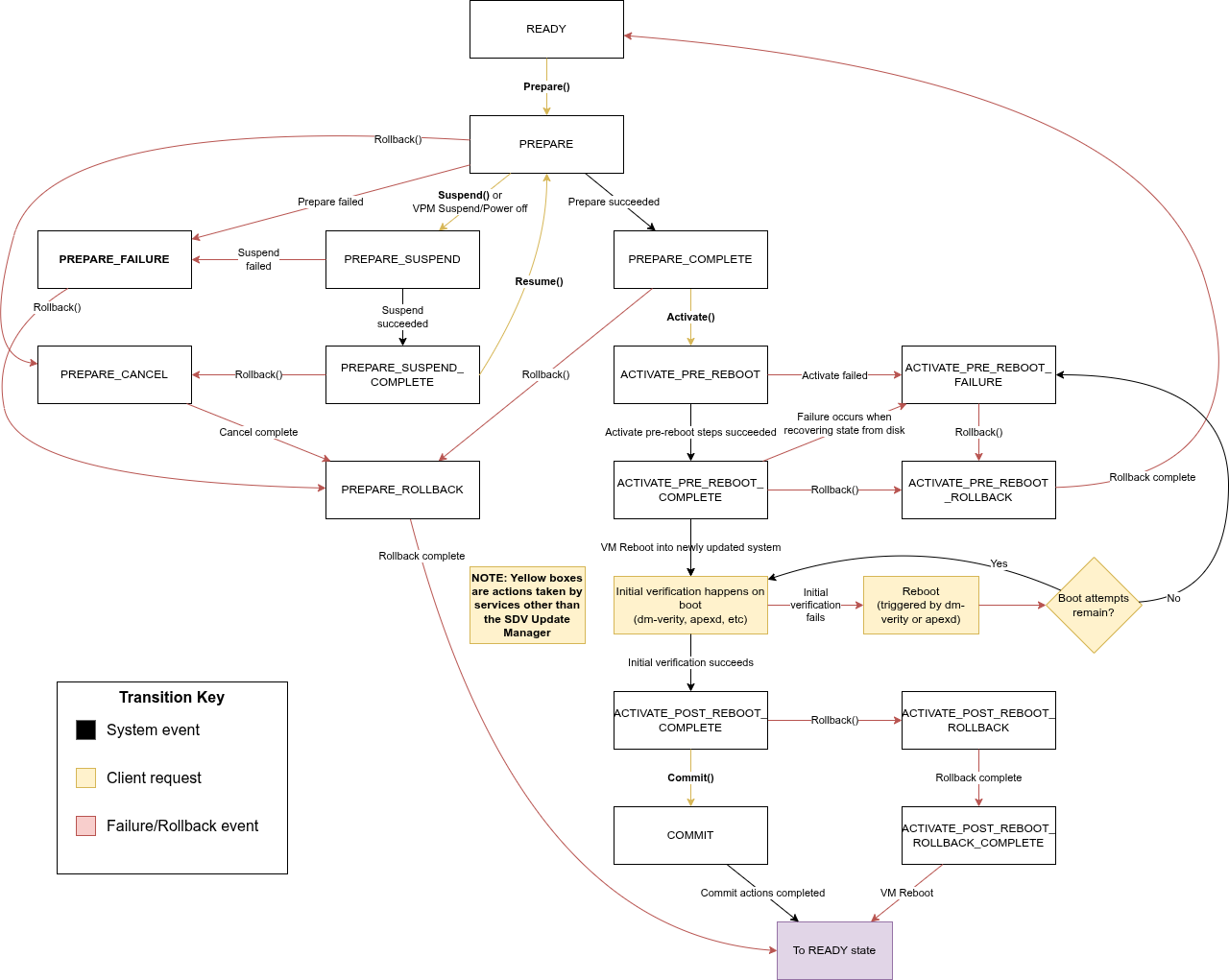
圖 2. 更新管理員狀態機器。
API
更新管理工具提供 API,可透過狀態機器驅動更新程序。API 使用 VSIDL,支援位於任何支援 SDV Comms 的 VM 中的用戶端,並提供要求失敗通知。
安全性與存取權
系統會使用授權政策限制 API 存取權。只有授權用戶端可以呼叫 Update Manager。
最新動態
由於更新作業可能需要長時間執行,因此更新管理工具會提供非同步狀態更新。用戶端必須訂閱狀態更新,才能監控狀態。
管理訂閱
訂閱:用戶端呼叫
SubscribeToStatusUpdates()方法,訂閱狀態更新:rpc SubscribeToStatusUpdates(SubscribeToStatusUpdatesRequest) returns (SubscribeToStatusUpdatesResponse) {} message SubscribeToStatusUpdatesRequest {} message SubscribeToStatusUpdatesResponse {}呼叫
SubscribeToStatusUpdates()之前,用戶端必須啟動實作UpdateManagerListenerService的 RPC 介面。取消訂閱:用戶端可以呼叫
UnsubscribeFromStatusUpdates(),停止接收狀態更新:rpc UnsubscribeFromStatusUpdates(UnsubscribeFromStatusUpdatesRequest) returns (UnsubscribeFromStatusUpdatesResponse) {} message UnsubscribeFromStatusUpdatesRequest {} message UnsubscribeFromStatusUpdatesResponse {}
UpdateManagerListenerService
在 UpdateManagerService 上呼叫 SubscribeToStatusUpdates() 的用戶端必須實作下列服務,才能接收狀態更新:
service UpdateManagerListenerService {
  /* Called when there is a status update from the Update Manager. */
  rpc OnStatusUpdate(OnStatusUpdateRequest) returns (OnStatusUpdateResponse) {}
}

message OnStatusUpdateRequest {
  oneof status_update {
    UpdateManagerStatus update_manager_status = 1;
    UpdateProgress update_progress = 2;
  }
}

message OnStatusUpdateResponse {}
OnStatusUpdateRequest 會使用 status_update 欄位傳送兩種可能訊息之一:
UpdateManagerStatus:在更新管理工具狀態變更時傳送。UpdateProgress:在PREPARE和ACTIVATE_PRE_REBOOT狀態期間傳送,用於指出更新進度,因為程序可能需要大量時間。
狀態和錯誤訊息
狀態訊息包含狀態和任何失敗的詳細資料:
UpdateManagerStatus:回報更新作業目前的階段,以及失敗原因:message UpdateManagerStatus { /* The current state of the update */ UpdateState update_state = 1; /* The reason for the failure, if the update failed */ FailureReason failure_reason = 2; } enum UpdateState { /* The Update Manager is ready to accept a new update. */ READY = 0; /* An update is being prepared. */ PREPARE = 1; /* The update failed during the prepare step. Roll back the update to start a * new update. */ PREPARE_FAILURE = 2; /* The update was prepared successfully. */ PREPARE_COMPLETE = 3; /* A rollback has started from the prepare step. When complete, transitions * to READY. */ PREPARE_ROLLBACK = 4; /* The prepared update is being activated. */ ACTIVATE_PRE_REBOOT = 5; /* The update failed during the activate step before the reboot. Roll back the * update to start a new update. */ ACTIVATE_PRE_REBOOT_FAILURE = 6; /* The update was activated successfully. Reboot to complete activation. */ ACTIVATE_PRE_REBOOT_COMPLETE = 7; /* A rollback has started from the activate pre-reboot step. When complete, * transitions to READY. */ ACTIVATE_PRE_REBOOT_ROLLBACK = 8; /* An update was successfully activated after the reboot. The update needs to * be committed or rolled back to be completed. */ ACTIVATE_POST_REBOOT_COMPLETE = 9; /* A rollback has started from the activate post-reboot step. */ ACTIVATE_POST_REBOOT_ROLLBACK = 10; /* The rollback was completed successfully. Reboot to complete the * rollback. */ ACTIVATE_POST_REBOOT_ROLLBACK_COMPLETE = 11; /* The update is being committed. When complete, transitions to READY */ COMMIT = 12; /* The prepare request is being cancelled */ PREPARE_CANCEL = 13; /* The system update has started suspending */ PREPARE_SUSPEND = 14; /* The system update has finished suspending */ PREPARE_SUSPEND_COMPLETE = 15; } message FailureReason { /* The original error that triggered the failure */ ErrorCode error_code = 1; /* Binder error message for most ErrorCodes. */ string error_message = 2; } enum ErrorCode { Unspecified = 0; /* Error from UpdateEngine service */ UpdateEngineError = 1; // Error from the ApexService ApexServiceError = 2; // Error from the BootControlService BootControlServiceError = 3; // Error from the VoldService VoldServiceError = 4; }UpdateProgress:在系統更新期間,回報更新引擎的目前狀態:message UpdateProgress { /* Matches the enum UpdateStatus from the UpdateEngine service. */ int32 status_code = 1; /* A value ranging from 0.0 to 1.0, 1.0 representing the process is complete. */ float percentage = 2; }
立即取得狀態
您隨時可以呼叫 GetStatus(),擷取目前的狀態和酬載。SystemUpdatePayload 和 ServiceBundleUpdatePayload 訊息的說明請參閱「準備」。
rpc GetStatus(GetStatusRequest) returns (GetStatusResponse) {}

message GetStatusRequest {}

message GetStatusResponse {
  /* The status of the Update Manager */
  UpdateManagerStatus update_manager_status = 1;
  /* The current update payload, if one has been set through the Prepare() request */
  oneof payload {
    SystemUpdatePayload system_update_payload = 2;
    ServiceBundleUpdatePayload service_bundle_update_payload = 3;
  }
}
準備
Prepare 要求會透過暫存酬載啟動更新程序,但系統會等待啟用更新:
rpc Prepare(PrepareRequest) returns (PrepareResponse) {}

message PrepareRequest {
  oneof payload {
    SystemUpdatePayload system_update_payload = 1;
    ServiceBundleUpdatePayload service_bundle_update_payload = 2;
  }
}

message PrepareResponse {}
如果要求有效,狀態會轉換為 PREPARE,且更新管理員會啟動更新。
酬載類型會決定更新類型。
系統更新酬載
系統更新會使用 SystemUpdatePayload 資料,因此需要無線更新 (OTA) 映像檔的路徑。其他參數會從圖片剖析,但您可以指定這些參數,覆寫剖析的值。
message SystemUpdatePayload {
  /* Absolute path to the update image (e.g., /updates/ota_update.zip) */
  string payload = 1;

  /* Offset (in bytes) into the payload where the payload binary starts. */
  optional int64 payload_offset = 2;

  /* The amount of data (in bytes) to read from "payload" as the update payload. */
  optional int64 payload_size = 3;

  /* The header key value pairs to apply with the payload. */
  map<string, string> header_key_value_pairs = 4;
}
更新管理工具會處理 OTA 映像檔 (由用戶端在 /data/ota_package 目錄中提供),執行安裝後步驟,但不會切換使用中的啟動槽。接著,系統會根據成功或失敗,轉換為 PREPARE_COMPLETE 狀態或 PREPARE_FAILURE 狀態。
系統更新暫停
只有系統更新可以暫停更新程序。這項要求僅在 PREPARE 狀態下有效。
暫停:暫停更新,狀態會轉換為
PREPARE_SUSPEND。rpc Suspend(SuspendRequest) returns (SuspendResponse) {} message SuspendRequest {} message SuspendResponse {}成功時,狀態會轉換為
PREPARE_SUSPEND_COMPLETE。如果失敗,狀態會轉換為PREPARE_FAILURE。繼續:繼續執行暫停的更新作業。這項設定僅在
PREPARE_SUSPEND_COMPLETE狀態下有效。rpc Resume(ResumeRequest) returns (ResumeResponse) {} message ResumeRequest {} message ResumeResponse {}狀態會轉換回
PREPARE狀態。
服務套裝組合更新酬載
服務套件更新會使用 ServiceBundleUpdatePayload,其中包含 APEX 檔案的路徑,並設定啟用嘗試次數限制。
message ServiceBundleUpdatePayload {
  /* Absolute path to an .apex file. Multiple .apex files can be included. */
  repeated string apex_path = 1;

  /* Number of boots to attempt activation before aborting. Must be > 0. */
  int32 boot_attempts = 2;
}
更新管理工具會驗證 APEX 檔案是否已正確簽署,並在工作階段中暫存這些檔案。成功時,狀態會轉換為 PREPARE_COMPLETE。如果失敗,狀態會轉換為 PREPARE_FAILURE。
啟用
Activate 要求會在下次重新啟動時啟用準備好的更新。
rpc Activate(ActivateRequest) returns (ActivateResponse) {}

message ActivateRequest {}

message ActivateResponse {}
重新啟動前
啟用更新時,更新管理工具會轉換至 ACTIVATE_PRE_REBOOT 狀態。更新管理工具也會建立使用者資料檢查點,並在系統重新啟動時生效。
啟用動作會因更新類型而異:
- 系統更新:系統會執行安裝後步驟,並設定啟動槽,以便在下次重新啟動時切換。
- 服務套件更新:系統會將暫存的 APEX 工作階段標示為可啟用。
如果系統成功啟用更新,狀態會轉換為 ACTIVATE_PRE_REBOOT_COMPLETE,表示 VM 已準備好重新啟動。否則,狀態會轉換為 ACTIVATE_PRE_REBOOT_FAILURE。
重新啟動後
重新啟動後,系統會以檢查點模式啟動。在這個模式下,系統不會將使用者資料分區的任何變更提交至永久儲存空間。如果系統未成功提交更新,則會將這些變更還原為初始狀態。
啟動限制
在下列任一情況下,系統會還原使用者資料分區的變更:
- 用戶端傳送明確的
Rollback()要求,並重新啟動系統。 - 系統啟動次數過多,但用戶端未呼叫
Commit()或Rollback()。每種更新類型的啟動次數限制如下:- 系統更新:由
BootControl實作設定。舉例來說,Cuttlefish 裝置使用的實作預設限制為七次啟動。 - 服務套裝組合更新:用戶端提供的
ServiceBundleUpdatePayload的boot_attempts欄位會在提出Prepare()要求時設定此值。
- 系統更新:由
驗證
接著,系統會驗證更新:
- 系統更新:dm-verity 會檢查更新後的版位是否損毀。
- 服務套件更新:
apexd會檢查每個 APEX 的簽章,並將 APEX 的映像檔掛接至檔案系統。
如果驗證成功,狀態會轉換為 ACTIVATE_POST_REBOOT_COMPLETE。更新管理工具會等待 Commit() 或 Rollback()。
如果驗證失敗,系統會重新啟動。當系統達到啟動限制時,系統會還原為原始狀態:
- 系統更新:系統會還原至原始版位。
- 服務套件更新:系統會捨棄更新後的 APEX,並重新啟用原始 APEX。
如果任何更新類型的驗證失敗,狀態會在還原原始狀態後轉換為 ACTIVATE_PRE_REBOOT_FAILURE。
復原
Rollback 要求會開始將系統還原至更新前的狀態。
rpc Rollback(RollbackRequest) returns (RollbackResponse) {}

message RollbackRequest {}

message RollbackResponse {}
您可以在多種狀態下提出 Rollback() 要求。系統會根據初始狀態採取不同動作,並進入不同狀態:
| 發出復原作業時的狀態 | 狀態轉換 | 系統動作 |
|---|---|---|
(僅限系統更新) PREPARE,PREPARE_SUSPEND_COMPLETE |
→「PREPARE_CANCEL」→「PREPARE_ROLLBACK」→「READY」 |
系統更新:取消系統更新。 |
PREPARE_FAILURE,PREPARE_COMPLETE |
→ PREPARE_ROLLBACK → READY |
系統更新:取消系統更新。 服務套件更新:取消分階段 APEX 工作階段。 |
ACTIVATE_PRE_REBOOT_COMPLETE,ACTIVATE_PRE_REBOOT_FAILURE |
→ ACTIVATE_PRE_REBOOT_ROLLBACK → READY |
停用使用者資料檢查點。 系統更新:取消啟動槽切換。 服務套件更新:移除暫存 APEX。 |
ACTIVATE_POST_REBOOT_COMPLETE |
→
ACTIVATE_POST_REBOOT_ROLLBACK → ACTIVATE_POST_REBOOT_ROLLBACK_COMPLETE |
停用使用者資料檢查點。 系統更新:切換回原本的啟動槽。 服務套件更新:還原有效的 APEX 工作階段。 必須重新啟動,復原作業才會生效,之後狀態會轉換為 READY。
|
修訂版本
這項要求表示更新已成功完成,且所有變更都會永久套用。
rpc Commit(CommitRequest) returns (CommitResponse) {}

message CommitRequest {}

message CommitResponse {}
執行修訂動作時,狀態會轉換為 COMMIT:
- 系統更新:更新管理員會將啟動標示為成功,防止日後復原,並在後續啟動時選取這個運作槽。
- 服務套件更新:更新管理員會將暫存的 APEX 工作階段標示為成功,關閉更新工作階段,並永久啟用套件。
系統提交更新後,更新管理工具會提交使用者資料檢查點。系統會將本次啟動期間寫入的所有新使用者資料,提交至永久儲存空間。更新管理員會轉換回 READY,表示更新已完成。
解除安裝 APEX
UninstallApex 要求會移除 /data 版本的服務套裝組合。您可以在任何狀態下呼叫 UninstallApex,但 VM 必須重新啟動,解除安裝才會生效。因此,請避免在更新期間呼叫 UninstallApex。UninstallApex 不會移除預先安裝的 APEX、抹除 APEX 資料,或移除未啟用的 APEX 版本。
rpc UninstallApex(UninstallApexRequest) returns (UninstallApexResponse) {}

message UninstallApexRequest {
  message ApexInfo {
    string module_name = 1;
    int64 version_code = 2;
  }
  repeated ApexInfo apexes = 1;
}

message UninstallApexResponse {}