

ATrace 會使用外部 Crate tracing_android_trace 執行 HAR 的效能追蹤。
啟用 HAR 的追蹤功能
如要為參照 harry-app 啟用效能追蹤,請啟用 Cargo 功能 harry-app-platform-specific/tracing-android。
# crates/reference/harry-app/Cargo.toml

harry-sdv = ["harry-app-platform-specific/tracing-android", ...]
在 HAR 中新增自訂追蹤記錄
    let custom_trace = tracing::info_span!("custom_trace_span").entered()
    // code here will be traced
    drop(custom_trace)
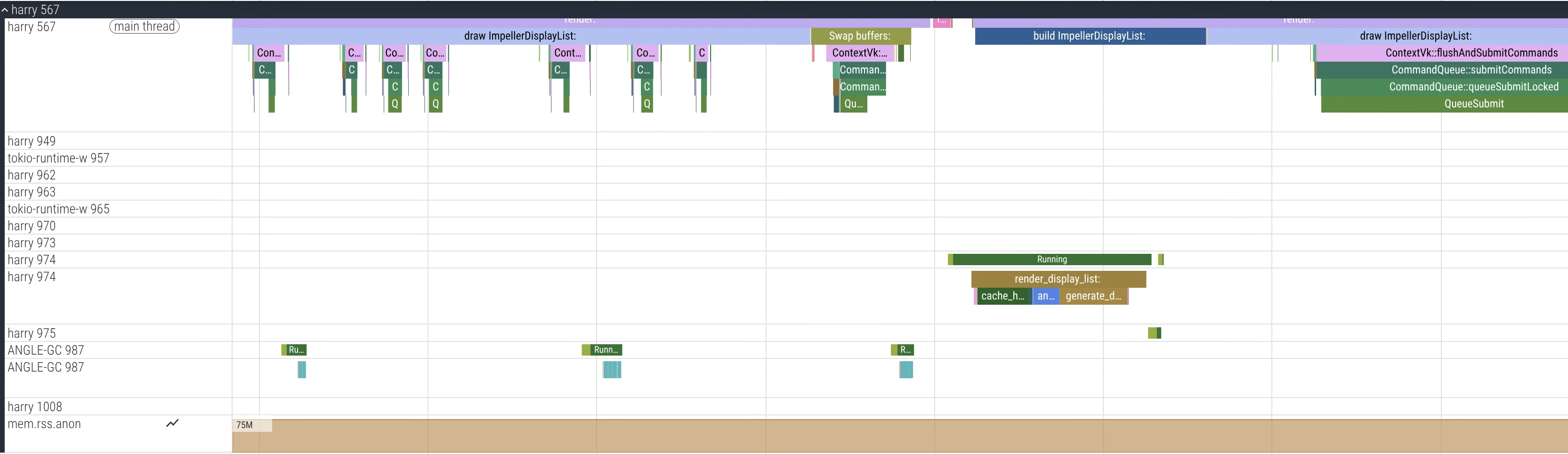
圖 1. Perfetto UI 顯示 harry 程序 (HAR) 的追蹤記錄範例
DriverUI 的效能追蹤
DriverUI 使用 Android 系統追蹤,不需要額外設定。
在 DriverUI 中新增自訂追蹤記錄
您可以使用開發人員指南,將自訂事件新增至 Kotlin 程式碼。
收集追蹤記錄
建議使用 Torq 收集 AAOS 上的追蹤記錄。
使用 Torq
Torq 是一種 CLI 工具,可收集 AAOS 和 SDV 的效能追蹤記錄。
複製 Torq 存放區。
按照存放區中的操作說明建構並執行:
export ANDROID_SERIAL=<your_device_serial>
# Collect a 7 second trace
torq -d 7000
收集兩個 VM 的統一效能追蹤記錄
由於 Display Safety 會在兩個 VM 上執行,同時從兩個 VM 收集追蹤記錄有助於找出問題。
- Torq 支援透過 Perfetto 的
traced_relay取得統一追蹤記錄。 - 如要擷取統一追蹤記錄,請先找出兩個 VM 的 cid:
# Get the cid for SDV Media VM. For example: 3
adb -s <sdv_media_vm_serial> shell getprop ro.sdv.vsock_local_cid

# Get the cid for SDV IVI VM. For example: 4
adb -s <sdv_ivi_vm_serial> shell getprop ro.sdv.vsock_local_cid
在本範例中,請使用 SDV-Media VM (cid=3) 做為中繼。
# Configure your VMs for unified tracing
torq vm configure --primary <sdv_ivi_vm_serial> --primary-cid 4 --secondary <sdv_media_vm_serial>
# Collect a 7 second trace from the SDV IVI VM, it will now collect a unified trace
torq --serial <sdv_ivi_vm_serial> -d 7000
例如:

圖 2. Perfetto UI 顯示範例統一追蹤記錄,其中包含兩個 VM 的程序:harry (HAR) 和 com.android.car.driverui (DriverUI)。
收集開機追蹤記錄
如要收集啟動追蹤記錄以分析啟動效能,請務必啟用幾個標記。
為啟動追蹤記錄設定 SDV 專用的持續性標記。
export ANDROID_SERIAL=<your_device_serial>
adb root
adb shell setprop persist.debug.sdv.boottrace 1
adb shell setprop persist.debug.perfetto.boottrace 1
設定核心指令列參數
androidboot.fastboot.boottrace=enabled。
# For Cuttlefish, set when creating CVD
cvd create -extra_kernel_cmdline=androidboot.fastboot.boottrace=enabled
使用record_android_trace
請完成下列步驟:
# Set your adb device serial
export ANDROID_SERIAL=<your_device_serial>
# Run record_android_trace from the Android repo
cd /<your_repo_path>
build/envsetup.sh

$ANDROID_BUILD_TOP/external/perfetto/tools/record_android_trace --config $ANDROID_BUILD_TOP/system/software_defined_vehicle/core_services/samples/tracing/config/trace_cfg.pbtx