

Araç içi bilgi-eğlence (IVI) sistemlerindeki Yazılım Tanımlı Araç (SDV) Ağ Geçidi, IVI sistemleri ile uzaktan SDV hizmetleri arasındaki iletişimi kolaylaştırır. Ağ geçidi, özgün donanım üreticisi (OEM) Java uygulamalarının ve yerel hizmetlerin (ör. araç donanım soyutlama katmanı (VHAL)) SDV hizmetleriyle etkileşim kurmasına olanak tanır. Ağ geçidi; hizmet kaydı, keşif ve uzak prosedür çağrıları (RPC'ler) dahil olmak üzere yerleşik iletişim yöntemlerini kullanır.
Bu ağ geçidi, özellik bilgileri için SDV Veri Tüneli'ni kullanarak VHAL referans uygulamasını etkinleştirme gibi belirli AAOS SDV proje gereksinimlerini karşılar. Ayrıca IVI'daki Java ve Kotlin Android uygulamalarının SDV Comms yığınını kullanmasına, hizmet olarak kaydolmasına, diğer SDV hizmetlerini bulmasına ve bunlarla iletişim kurmasına olanak tanır.
SDV Gateway kod konumları ve örnek SDV Gateway istemcileri için Kod konumları bölümüne bakın.
SDV Gateway entegrasyon modelleri
Bu bölümde, IVI'deki SDV Gateway mimarisi açıklanmakta ve yerel C veya C++ hizmetlerinin ağ geçidi istemci kitaplığıyla nasıl entegre edildiği gösterilmektedir.
SDV-IVI iletişimini IVI mimarisindeki SDV ağ geçidi üzerinden kullanma
SDV Ağ Geçidi; Java uygulamaları, yerel hizmetler, SDV Comms yığını ve araç ağıyla etkileşim kurar. Şekil 1'de bu etkileşimler gösterilmektedir:
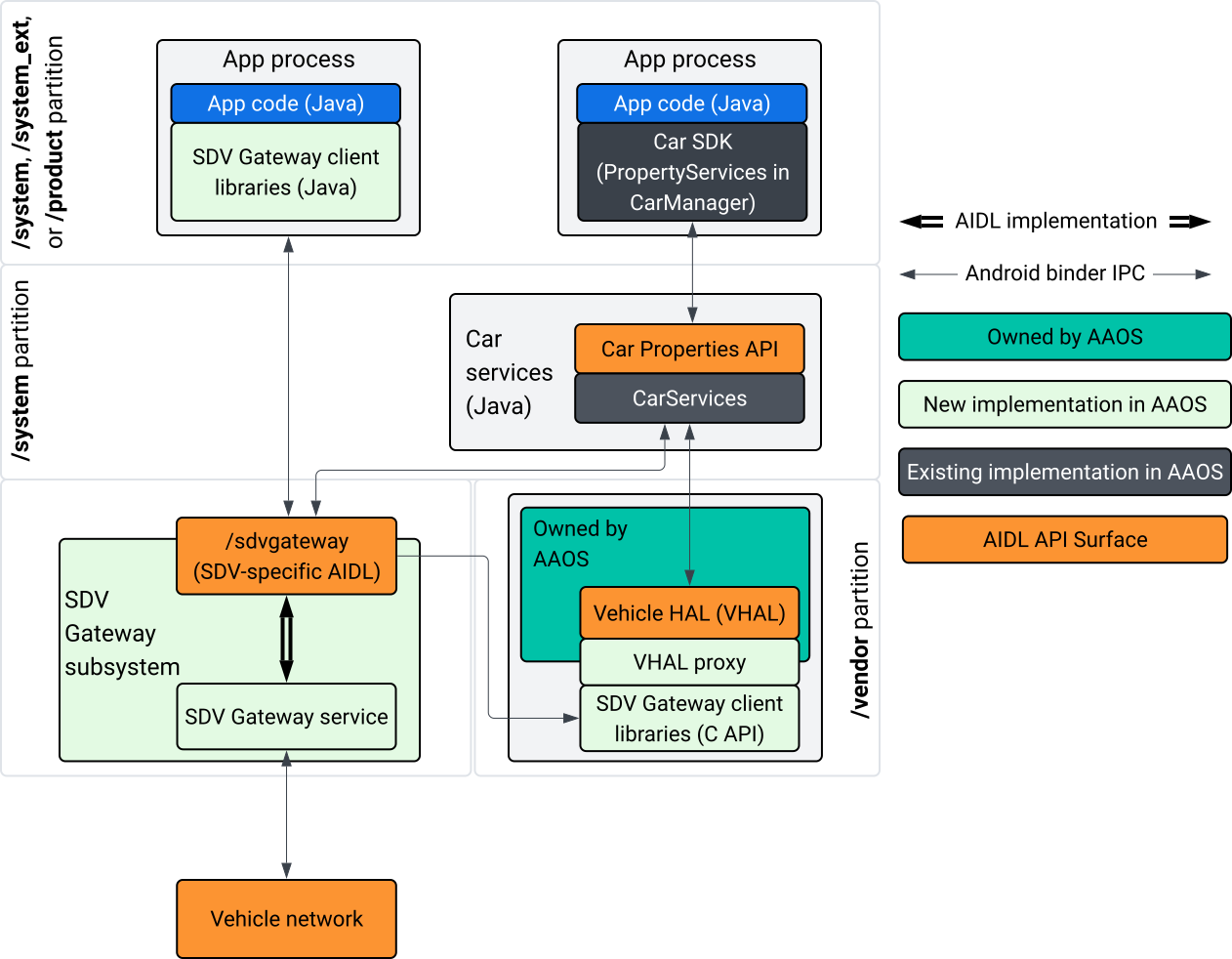
Şekil 1. SDV Gateway etkileşimleri.
Bu sistem diyagramında:
- Uygulamalar, SDV Gateway ile istemci hizmetleri aracılığıyla etkileşim kurar.
- AAOS SDV SDK'sı size şunları sağlar:
- İşlemler arası iletişim için ISdvGateway AIDL API.
- Ağ etkileşimi için iletişim kitaplıkları.
- Yerel hizmet entegrasyonu için kullanışlı C API'si.
- ISdvGateway AIDL API, SDV Ağ Geçidi hizmeti ve alt sistemi tarafından uygulanır.
- SDV Gateway hizmeti şunları yönetir:
- Çift yönlü hizmet keşfi.
- Uzak SDV hizmetleriyle iletişim.
- Temel iş mantığı.
- SDV Gateway alt sistemi, araç ağına bağlanır.
- VHAL uygulaması da dahil olmak üzere yerel hizmetler, ISdvGateway AIDL API'yi doğrudan veya SDK'nın C API'si aracılığıyla kullanabilir.
- VHAL proxy'si, VSIDL eşleme entegrasyonunu içeren referans bir VHAL uygulaması olarak kullanılır.
IVI yerel hizmetinde SDV Gateway için entegrasyon modeli
Entegrasyon modeli Şekil 2'de gösterilmiştir:
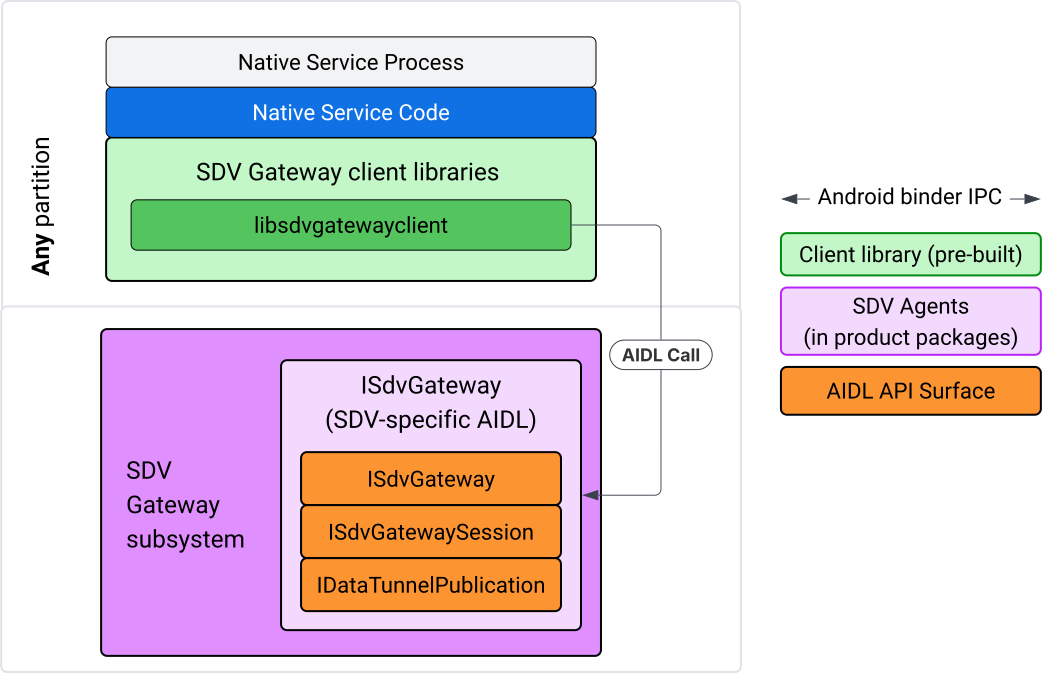
Şekil 2. SDV Gateway entegrasyon modeli.
SDV Gateway'i yerel bir IVI hizmetinde kullanma
Şekil 3'te, IVI'da SDV Gateway'in kullanımı gösterilmektedir:
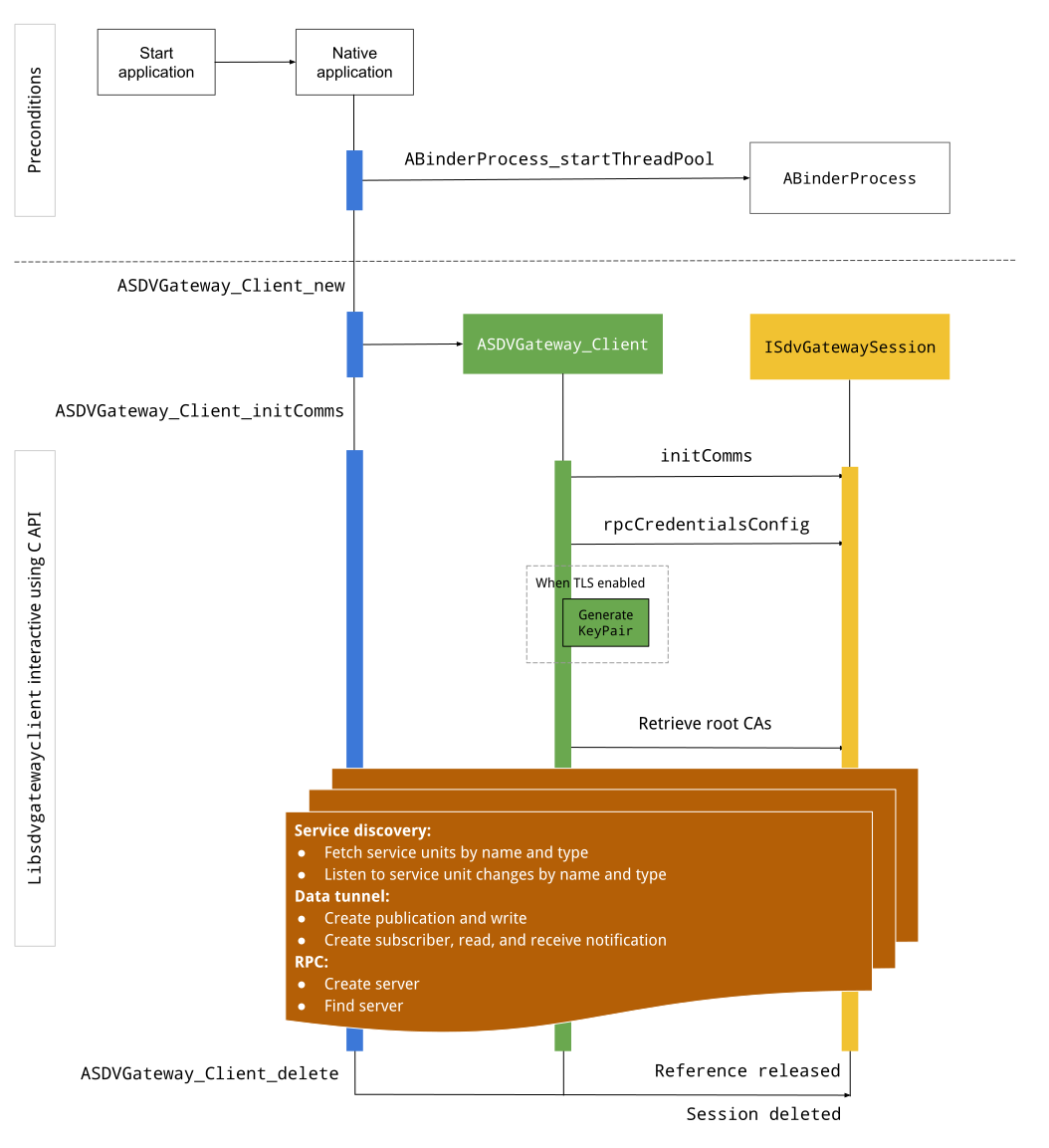
Şekil 3. IVI'da SDV Gateway.
Ön koşullar
Binder iş parçacığı havuzunu başlatın:
SDV Gateway istemci kitaplığı, Binder hizmetlerinden eşzamansız geri çağırmalar almak için başlatılmış bir Binder iş parçacığı havuzu gerektirir.
SDV Gateway istemcisi oluşturmak için gereken API, Binder iş parçacığı havuzu başlatılmadığında başarısız olur.
Yerel Gateway istemci kitaplığını dahil etme
Yerel Ağ Geçidi İstemci kitaplığı, bir C API'si sunar. C API'yi kullanmak için bağımlılık olarak bir libsdvgatewayclient örneği ekleyin:
cc_binary {
    name: "your_binary_name",
    srcs: ["main.cpp"],
    shared_libs: [
        "libsdvgatewayclient",
    ],
}
Yerel Gateway istemcisini yükleme
#include "libsdvgatewayclient.h"
Yerel istemci örneği oluşturma
ASDVGateway_Client* client;
ASDVGateway_StatusCode_t statusCode = ASDVGateway_Client_new(
     &client, /*outStatus*/nullptr);
İstemci oluşturulduktan sonra:
Ağ geçidi hizmetiyle sonraki tüm etkileşimlerin durumunu tutar.
SDV özellikli diğer hizmetlerle yapılan tüm etkileşimlerin bağlamı olarak işlev görür ve C API işlevlerine ilk parametre olarak iletilir.
Durum kodları ve hata mesajları
Çoğu C API işlevi şu tanıma sahiptir:
ASDVGateway_StatusCode_t ApiFunctionName(..., ASDVGateway_Status_t* outStatus);
Başarıyı değerlendirmek için döndürülen durum kodunu inceleyebilirsiniz. Bu kod, ASDVGateway_StatusCode_t türündedir. Ayrıca, işlevin durum kodunu ve hata mesajını doldurabileceği bir yapıya işaretçi de iletebilirsiniz. İşaretçi, outStatus adlı son parametre olarak iletilir. Boş değer, çıkış yapısının
kullanılmadığı anlamına gelir.
Arayan, hata mesajı için bellek durumu yapısını tahsis etmelidir. Durum yapısı, hem durum kodunu hem de hata mesajını içerebilir. Yeni bir istemci oluştururken hata mesajını alma örneği mevcuttur.
Başarıyı değerlendirmek için:
Döndürülen durum kodunu inceleyin. Bu kod,
ASDVGateway_StatusCode_ttüründedir.İşlevin durum kodunu ve hata mesajını doldurabileceği bir yapıya işaretçi iletin.
- İşaretçi,
outStatusadlı son parametre olarak iletilir. - Boş değer, çıkış yapısının kullanılmadığı anlamına gelir.
- Arayan, hata mesajı için bellek durumu yapısını tahsis etmelidir.
- Durum yapısı, durum kodunu ve hata mesajını içerebilir.
- İşaretçi,
Aşağıda, yeni bir istemci için hata mesajının nasıl alınacağını gösteren bir örnek verilmiştir:
#include <iostream>
#include <array>

struct StatusWithErrorMsg : ASDVGateway_Status_t {
    StatusWithErrorMsg() {
        // Ensure the base struct pointers point to our internal buffer
        errorMessage = errorMessageBuffer.data();
        maxErrorMessageSize = errorMessageBuffer.size();

        // Good practice: Zero-initialize the buffer
        errorMessageBuffer.fill(0);
    }

    std::array<char, 256> errorMessageBuffer;
};

// --- Execution ---

ASDVGateway_Client* client = nullptr;
StatusWithErrorMsg status;

// Initialize the client
ASDVGateway_StatusCode_t statusCode = ASDVGateway_Client_new(&client, &status);

// Log Results
std::cout << "Returned statusCode:    " << statusCode << std::endl;
std::cout << "Status Struct Code:     " << status.statusCode << std::endl;
std::cout << "Status Error Message:   " << status.errorMessage << std::endl;
Bu örnekte:
Durum yapısında yer alan durum kodu, döndürülen durum koduyla aynı değere sahiptir.
Hata mesajı yalnızca
maxErrorMessageSizekarakter sınırına kadar doldurulur (boş sonlandırma karakteri\0dahil). Herhangi bir hata oluşmazsa (durum koduOKise) hata mesajı boş bir dizedir.
İlk iletişim
Init comms, SDV Comm Stack ve SDV Gateway'i kullanarak arayan uygulama ile diğer uygulamalar arasındaki iletişimi başlatır. Init comms, bu bağlamların her ikisinde de çağrılabilir:
İstemci oluşturulduktan sonra.
Veri tüneli, RPC veya hizmet keşfi etkileşimlerinden önce.
Örneğin:
ASDVGateway_InitCommsParams_t params{
.packageName = "android.sdv.samples.gateway.client",
.serviceBundleName = "NativeTestApp",
.serviceInstanceName = "default",
};
// Initialize communications and capture the status code
ASDVGateway_StatusCode_t statusCode = ASDVGateway_Client_initComms(client, ¶ms, &status);
// Recommended check
if (statusCode != ASDVGateway_StatusCode_OK) {
std::cerr << "Failed to init comms: " << status.errorMessage << std::endl;
}
Hizmet keşfi
Belirli bir tür veya ada sahip hizmet birimleri kaydedildiğinde ya da kaydı silindiğinde bildirim alabilirsiniz. Geri çağırma işlevi, ağ geçidi istemcisinin sahip olduğu bir mesaj dizisinde bildirilir. Bu geri çağırma, başlangıçta C API çağrısından hemen sonra kayıtlı tüm hizmet birimleriyle tetiklenir. İlk tetikleyiciden sonra, dinleyici açıkça kaydı iptal edilene kadar bildirimler güncellemelerle devam eder.
class NativeSdvGatewayTestApp {
public:
    static void ServiceUnitChangeListenerCallback(
        const ASDVGateway_ServiceUnitChangeEventType eventType,
        const ASDVGateway_ServiceUnitDefinition* serviceUnitDefinition,
        void* userData
    ) {
        auto* testApp = reinterpret_cast<NativeSdvGatewayTestApp*>(userData);

        if (testApp) {
            // Logic to react when services are registered or unregistered
            // e.g., testApp->handleServiceChange(eventType, serviceUnitDefinition);
        }
    }
};

// --- Listener Registration ---

// Ensure thisApp remains in scope as long as the listener is active
NativeSdvGatewayTestApp* thisApp = get_current_app_context();

ASDVGateway_UnitType_t unitType{
    .sdvPackageName     = "android.sdv.samples.sdv_gateway",
    .serviceBundleName  = "DtPublisher",
    .unitTypeName       = "TirePressure",
};

// Register the listener
ASDVGateway_Client_registerListenerForServiceUnitChangeByType(
    client,
    &unitType,
    NativeSdvGatewayTestApp::ServiceUnitChangeListenerCallback,
    static_cast<void*>(thisApp), // userData
    &listenerHandle,
    &status
);

// --- Cleanup ---

// Unregistering stops all notification to the callback function
ASDVGateway_Client_unregisterListenerForServiceUnitChangeByType(
    client,
    listenerHandle,
    &status
);
Kayıtlı hizmet birimlerini başka bildirim almadan almak için ASDVGateway_Client_fetchServiceUnitsByType ve ASDVGateway_Client_fetchServiceUnitsByName API'lerini kullanın.
class NativeSdvGatewayTestApp {
public:
    /**
     * Callback triggered for each service unit found that matches the requested type.
     */
    static void FetchServiceUnitsCallback(
        const ASDVGateway_ServiceUnitDefinition* serviceUnitDefinition,
        void* userData
    ) {
        auto* app = reinterpret_cast<NativeSdvGatewayTestApp*>(userData);

        if (serviceUnitDefinition) {
            // The service unit is registered with service discovery.
            // Example: processServiceUnit(serviceUnitDefinition);
        }
    }
};

// --- Execution ---

ASDVGateway_UnitType_t unitType{
    .sdvPackageName     = "android.sdv.samples.sdv_gateway",
    .serviceBundleName  = "DtPublisher",
    .unitTypeName       = "TirePressure",
};

// Context used to differentiate between various fetchServiceUnits calls
void* userData = static_cast<void*>(thisApp);

ASDVGateway_Client_fetchServiceUnitsByType(
    client,
    &unitType,
    NativeSdvGatewayTestApp::FetchServiceUnitsCallback,
    userData,
    &status
);
Geri çağırma, ASDVGateway_Client_fetchServiceUnitsByType API çağrısı sırasında arayanın iş parçacığında eşzamanlı olarak tetiklenir. Kayıtlı hizmet birimlerini birim türüne göre değil, ada göre almak için
ASDVGateway_Client_fetchServiceUnitsByName kullanın:
ASDVGateway_StatusCode_t ASDVGateway_Client_fetchServiceUnitsByName(
    // [in]  Opaque pointer to a client object.
    const ASDVGateway_Client* client,

    // [in]  Pointer to a structure containing the package name,
    //       service bundle name, and service unit name.
    const ASDVGateway_UnitNameDiscoveryArgs_t* unitName,

    // [in]  Callback function to be called for each service unit
    //       definition registered. Called synchronously in the
    //       caller's thread before the fetch completes.
    ASDVGateway_FetchServiceUnitsCallback callback,

    // [in]  Optional value passed back as a parameter of the callback.
    void* userData,

    // [out] Optional pointer to status structure for result
    //       codes and error messages.
    ASDVGateway_Status_t* outStatus
);
RPC akışı
Ağ geçidi istemci kitaplığı, SDV özellikli diğer uygulamalarla iletişim için Taşıma Katmanı Güvenliği (TLS) ayarlarını yönetir. Özellikle, iletişim için gereken TLS ayarlarını alır. TLS kullanımının nasıl belirlendiği aşağıda açıklanmıştır:
SDV Başlatma Modu
LOCKEDolduğunda TLS kullanılır.SDV Önyükleme Modu
UNLOCKEDolduğunda güvenli olmayan iletişim kullanılır. TLS kullanıldığında Gateway istemci kitaplığı, yalnızca uygulama işlemi tarafından bilinen bir anahtar çifti oluşturur. İstemci, RPC sunucusu veya RPC istemci kanalı oluşturmak için RPC kimlik bilgilerini alır. RPC, özel bir SDV-RPC VLAN kullanır. Ağ geçidi istemci kitaplığı,ASDVGateway_Client_initCommsçağrısı sırasında veya sonrasında işlemin varsayılan ağını SDV-RPC VLAN'a geçirmek için android_setprocnetwork'ü çağırır.
RPC kullanılabilirliği
Erken başlatma sırasında başlatılacak şekilde yapılandırılmış bir istemci, SDV-RPC VLAN kullanılabilir olmadan önce başlatılabilir. RPC sunucusu veya RPC istemci yuvası oluşturmaya çalışmadan önce RPC'nin kullanılabilir olup olmadığını kontrol edin:
// Check if the RPC (Remote Procedure Call) service is available
bool isRpcAvailable = ASDVGateway_Client_isRpcAvailable(client);

if (isRpcAvailable) {
    // Proceed with RPC calls
} else {
    // Handle the case where RPC is not yet ready or available
}
veya
// Check if the process is correctly bound to the SDV RPC Network Interface/VLAN
bool isRpcNetworkBound = ASDVGateway_Client_isProcessBoundToSdvRpcNetworkInterface(client);

if (!isRpcNetworkBound) {
    // Usually implies the process isn't running on the correct network interface
    // or the VLAN configuration is missing.
    std::cerr << "Warning: Process is not bound to the SDV RPC VLAN." << std::endl;
}
RPC kullanılabilirlik durumu değiştiğinde bildirim almak için ASDVGateway_Client_setClientNotificationCallback kullanarak istemci etkinlikleri için bir dinleyici ayarlayın.
Uygulama, işlemin ağını değiştirirse ASDVGateway_Client_isProcessBoundToSdvRpcNetworkInterface tercih edilir. Çünkü bu yöntem, hem RPC'nin kullanılabilir olup olmadığını hem de işlemin SDV-RPC VLAN'a bağlı olup olmadığını kontrol eder.
İşlemin varsayılan ağını değiştirme
İnternete bağlı bağlantılar için soket açmak üzere işlemin varsayılan ağı olarak SDV-RPC VLAN'dan geçiş yapmanız gerekebilir. İşlemi SDV-RPC VLAN'a bağlamak ve yeniden bağlamak için ASDVGateway_Client_unbindProcessFromSdvRpcNetworkInterface ve ASDVGateway_Client_bindProcessToSdvRpcNetworkInterface yöntemlerini çağırın. Bu iki çağrı, global anahtarlar gibi çalışır ve soketlerin bağlı olduğu ağ arayüzünü işlemin tüm iş parçacıkları için değiştirir.
// 1. Unbind: Sockets return to the "default" network interface (e.g., wlan0, eth0)
ASDVGateway_StatusCode_t unbindStatus =
    ASDVGateway_Client_unbindProcessFromSdvRpcNetworkInterface(client, &status);

// 2. Bind: Sockets are now bound to the dedicated SDV-RPC VLAN
ASDVGateway_StatusCode_t bindStatus =
    ASDVGateway_Client_bindProcessToSdvRpcNetworkInterface(client, &status);

// Validation
if (bindStatus == ASDVGateway_StatusCode_OK) {
    // Sockets are successfully bound to the SDV-RPC VLAN
}
RPC bildirimleri
İstemci dinleyiciyi, RPC kullanılabilirliğindeki değişiklikler ve bir RPC sunucusu tarafından kabul edilmesi gereken kök sertifikalardaki güncellemelerle ilgili bildirimleri alacak şekilde ayarlayın:
class NativeSdvGatewayTestApp {
public:
    static void ClientNotificationCallback(
        ASDVGateway_ClientNotificationType_t notificationType,
        void* userData
    ) {
        auto* testApp = reinterpret_cast<NativeSdvGatewayTestApp*>(userData);
        if (!testApp) return;

        switch (notificationType) {
            case ASDVGateway_ClientNotificationType_RootCertsChanged:
                std::cout << "onClientNotification: Root Certs Changed" << std::endl;
                // Handle certificate rotation logic here
                break;

            case ASDVGateway_ClientNotificationType_RpcAvailabilityChanged:
                std::cout << "onClientNotification: RPC Availability Changed" << std::endl;
                // Handle reconnection or UI updates here
                break;

            default:
                std::cout << "onClientNotification: Received Unknown Notification ("
                          << notificationType << ")" << std::endl;
                break;
        }
    }
};

// --- Registration ---

NativeSdvGatewayTestApp* thisApp = get_current_app_context();

// Register the notification callback to monitor system-level changes
ASDVGateway_StatusCode_t statusCode = ASDVGateway_Client_setClientNotificationCallback(
    client,
    NativeSdvGatewayTestApp::ClientNotificationCallback,
    static_cast<void*>(thisApp), // userData
    &status
);
RPC sunucusu akışı
RPC sunucusunu oluşturmak için kimlik bilgilerini kullanmanız gerekir:
ASDVGateway_RpcCredentials_t* rpcCredentials = nullptr;

// Retrieve the credentials from the client
ASDVGateway_StatusCode_t statusCode = ASDVGateway_Client_rpcCredentials(client, &rpcCredentials, &status);

// Validation: Differentiating between an error and a deliberate "insecure mode"
if (status.statusCode != ASDVGateway_StatusCode_OK) {
    std::cerr << "Error retrieving credentials: " << status.errorMessage << std::endl;
    return;
}

// Logic for choosing Security Credentials
if (rpcCredentials == nullptr) {
    // If the call succeeded but credentials are null, the system expects insecure communication
    std::cout << "Configuring for Insecure Mode" << std::endl;
} else {
    std::cout << "Configuring for Secure Mode:" << std::endl;
    std::cout << "  Private Key: " << (rpcCredentials->privateKeyPem ? "Present" : "Missing") << std::endl;
    std::cout << "  RootCerts:   " << rpcCredentials->rootCertsPem << std::endl;
    std::cout << "  CertChain:   " << rpcCredentials->certChainPem << std::endl;
    std::cout << "  SAN:         " << rpcCredentials->subjectAlternativeName << std::endl;
}

// --- Cleanup ---

// Release the memory once the RPC server/client is initialized
if (rpcCredentials != nullptr) {
    ASDVGateway_Client_deleteRpcCredentials(client, rpcCredentials);
}
RPC sunucusunu oluşturduktan ve dinleme bağlantı noktasını öğrendikten sonra, diğer uygulamaları keşfedebilmesi için RPC sunucusunu kaydedin:
ASDVGateway_RegisterRpcServerParams_t params{
.serviceUnitName = "android-sdv-samples-sunroof-sunroof",
.unitType = ASDVGateway_UnitType_t{
.sdvPackageName = "android.sdv.samples.sunroof",
.serviceBundleName = "SunroofServer",
.unitTypeName = "Sunroof",
},
.listeningPort = listeningPort,
.serverUnitMetadata = ASDVGateway_ServerUnitMetadata_t{
.version = 1,
},
};
// Register the RPC server with the SDV Gateway
ASDVGateway_StatusCode_t statusCode = ASDVGateway_Client_registerRpcServer(
client,
¶ms,
&status
);
// Basic error handling
if (statusCode != ASDVGateway_StatusCode_OK) {
std::cerr << "Failed to register RPC server: " << status.errorMessage << std::endl;
}
Sistem, çalışma zamanında kök sertifikaları güncellediğinde (örneğin, sanal makine durum değişiklikleri sırasında) RPC sunucuları, kabul edilen sertifika listelerini yenilemelidir:
Kök sertifikalar güncellendiğinde bildirim almak için
ASDVGateway_Client_setClientNotificationCallbackkullanarak istemci etkinlikleri için bir dinleyici ayarlayın.Güncellenmiş kök sertifikaları almak için
ASDVGateway_Client_rpcCredentialsyöntemini çağırın.
RPC istemci akışı
RPC istemcisinin akışı şu şekildedir:
ASDVGateway_FindRpcServerByNameParams_t params{
.packageName = "android.sdv.samples.cluster",
.serviceBundleName = "ClusterServer",
.serviceUnitName = "android-sdv-samples-cluster-cluster",
};
ASDVGateway_SocketAddress_t socketAddress;
ASDVGateway_RpcCredentials_t* rpcCredentials = nullptr;
// Perform the lookup to find the server's location and security requirements
ASDVGateway_StatusCode_t statusCode = ASDVGateway_Client_findRpcServerByName(
mClient,
¶ms,
&socketAddress,
&rpcCredentials,
&status
);
// Mandatory check: Distinguish between system errors and intentional "Insecure Mode"
if (status.statusCode != ASDVGateway_StatusCode_OK) {
std::cerr << "Failed to find RPC server: " << status.errorMessage << std::endl;
return;
}
// Logic for establishing the RPC channel
if (rpcCredentials == nullptr) {
std::cout << "Connecting via Insecure Mode to "
<< socketAddress.address << ":" << socketAddress.port << std::endl;
} else {
std::cout << "Connecting via Secure Mode to "
<< socketAddress.address << ":" << socketAddress.port << std::endl;
std::cout << " RootCerts: " << rpcCredentials->rootCertsPem << std::endl;
std::cout << " SAN: " << rpcCredentials->subjectAlternativeName << std::endl;
// Note: privateKeyPem and certChainPem are typically used if the client
// needs to perform mutual TLS (mTLS).
}
// Cleanup: Release the credential memory once the RPC channel is established
if (rpcCredentials != nullptr) {
ASDVGateway_Client_deleteRpcCredentials(client, rpcCredentials);
}
Yayıncı oluşturma ve mesaj yayınlama
ASDVGateway_Client_createPublication API'si, AIDL arayüzü aracılığıyla bir yayıncı hizmet birimini SDV Gateway'e kaydetmek ve uygulama sürecinde bir Hızlı Mesaj Sırası (FMQ) oluşturmak için kullanılır. Binder yalnızca FMQ'yu ayarlamak için kullanılır, mesaj yazarken kullanılmaz. Ardından, oluşturulan yayında mesaj yayınlamak için ASDVGateway_Client_publishMessages API'si kullanılır. Bu işlem, yayının FMQ'suna yazmayı ve mesajların yazıldığını bildirmeyi içerir.
ASDVGateway_CreatePublicationParams_t params{
.serviceUnitName = "mirror-position-adjust-impl-1",
.unitType = ASDVGateway_UnitType_t{
.sdvPackageName = "android.sdv.samples.sdv_gateway",
.serviceBundleName = "DtPublisher",
.unitTypeName = "MirrorPositionAdjust",
},
.publisherUnitMetadata = ASDVGateway_PublisherUnitMetadata_t{
.version = 1,
.messageSizeBytes = 64,
.messageCount = 16,
},
};
ASDVGateway_PublicationMetadata_t metadata;
// 1. Create the Publication (allocates resources on the gateway)
ASDVGateway_StatusCode_t createStatus = ASDVGateway_Client_createPublication(
client,
¶ms,
&metadata,
&status
);
if (status.statusCode != ASDVGateway_StatusCode_OK) {
std::cerr << "Failed to create publication: " << status.errorMessage << std::endl;
return;
}
// 2. Publish Messages
// Note: serializedMessage should contain your encoded protobuf data
std::vector<uint8_t> serializedMessage;
ASDVGateway_Client_publishMessages(
client,
serializedMessage.data(),
serializedMessage.size(),
metadata.publicationId,
&status
);
Bildirim dinleyici ile abone oluşturma
Bir yayına abone olmak ve Veri Tüneli bildirimlerini (ör. mesaj kullanılabilirliği) almak için ASDVGateway_Client_subscribeToPublicationByName API'sini kullanın. Bu API, yayınlanan mesajları okumak için FMQ'yu da ayarlar. Bildirim geri çağırma işlevini abonelik işlemi sırasında veya sonrasında yapılandırabilirsiniz.
#include <map>
#include <memory>
#include <iostream>

class NativeSdvGatewayTestApp {
public:
    struct SubscriptionContext {
        int32_t subscriptionId;
        std::string topicName;
        // Add other context-specific data here (e.g., counters, buffers)
    };

    /**
     * Callback triggered when new data is published to a subscribed topic.
     */
    static void SubscriptionNotificationCallback(
        const ASDVGateway_SubscriptionNotificationData_t* notification,
        void* userData
    ) {
        // The SDV Gateway client passes back the userData pointer.
        // We ensure validity by managing the lifecycle of SubscriptionContext
        // within the mSubscriptions map.
        auto* ctx = reinterpret_cast<SubscriptionContext*>(userData);

        if (ctx && notification) {
            // React to data being available for the subscription.
            // Example: handleIncomingData(notification->data, notification->size);
            std::cout << "Notification received for sub ID: " << ctx->subscriptionId << std::endl;
        }
    }

private:
    // Maps subscription handles/IDs to their respective contexts
    std::map<int32_t, std::unique_ptr<SubscriptionContext>> mSubscriptions;
};

// --- Usage ---
NativeSdvGatewayTestApp app;
Abone olurken yayıncının hizmet birimi adının yanı sıra ek seçenekler de belirtebilirsiniz. Bu seçenekler, abone olmadan önce en son yayınlanan mesajı almanıza ve bildirimler arasındaki minimum zaman aralığını tanımlamanıza olanak tanır.
ASDVGateway_SubscribeToPublicationByNameParams_t params{
.sdvVmName = "vm1",
.packageName = "test.package.impl.name",
.serviceBundleName = "TestBundleImpl",
.serviceUnitName = "GrpcServerImpl",
};
ASDVGateway_Subscriber_Options_t options{
// Ensure we receive the most recent message immediately upon subscribing
.flags = ASDVGATEWAY_SUBSCRIBER_OPTIONS_FLAG_FETCHLASTMESSAGE,
.minIntervalMs = 0, // No rate limiting; receive updates as they happen
};
// 1. Prepare the context for the callback
auto subCtx = std::make_unique<SubscriptionContext>();
ASDVGateway_PublicationMetadata_t metadata{};
// 2. Perform the subscription
ASDVGateway_StatusCode_t statusCode = ASDVGateway_Client_subscribeToPublicationByName(
client,
¶ms,
&options,
NativeSdvGatewayTestApp::SubscriptionNotificationCallback,
static_cast<void*>(subCtx.get()), // Pass the raw pointer as userData
&metadata,
&status
);
// 3. Validation and Lifecycle Management
if (status.statusCode != ASDVGateway_StatusCode_OK) {
// Error handling: subCtx will be automatically deleted here
std::cerr << "Subscription failed: " << status.errorMessage << std::endl;
return;
}
// Store the context using the publicationId as the key.
// Once moved, the map owns the lifetime of subCtx.
app.mSubscriptions.emplace(metadata.publicationId, std::move(subCtx));
Yayındaki mesajları okumak için ASDVGateway_Client_readAvailableMessages API'yi kullanın:
uint32_t messagesAvailable = 0;

// 1. Check how many messages are waiting in the queue
ASDVGateway_StatusCode_t availStatus = ASDVGateway_Client_availableToRead(
    client,
    metadata.publicationId,
    &messagesAvailable,
    &status
);

if (status.statusCode != ASDVGateway_StatusCode_OK) {
    // Error handling for availability check
    return;
}

if (messagesAvailable == 0) {
    // No messages available for this publication at this time
    return;
}

// 2. Prepare the buffer
// metadata.messageSizeBytes was provided during the publication/subscription setup
std::vector<uint8_t> bytesForMessages;
bytesForMessages.resize(metadata.messageSizeBytes * messagesAvailable);

// 3. Read the messages from the Gateway into your local buffer
uint32_t actualMessageCount = 0; // Filled by the SDK with the number of messages read
ASDVGateway_StatusCode_t readStatus = ASDVGateway_Client_readAvailableMessages(
    client,
    metadata.publicationId,
    bytesForMessages.data(),
    bytesForMessages.size(),
    &actualMessageCount,
    &status
);

if (status.statusCode == ASDVGateway_StatusCode_OK) {
    // Successfully read 'actualMessageCount' messages
    // Process bytesForMessages...
}
Abone olduktan sonra geri çağırmayı ayarlamak için ASDVGateway_Client_setNotificationCallbackForPublicationId API'sini kullanın:
ASDVGateway_StatusCode_t ASDVGateway_Client_setNotificationCallbackForPublicationId(
    // [in]  Opaque pointer to the client object.
    const ASDVGateway_Client* client,

    // [in]  Identifies the specific publication to monitor.
    const int32_t publicationId,

    // [in]  Function pointer triggered when new data is available
    //       for the specified publication.
    ASDVGateway_SubscriptionNotificationCallback notificationCallback,

    // [in]  Optional user-defined context passed back to the callback.
    void* notificationCallbackUserData,

    // [out] Optional pointer to a status structure for result codes
    //       and error messages.
    ASDVGateway_Status_t* outStatus
);
Başlatma hizmetini ayarlama
Öncelikle, hizmete Android kimliği (AID) aracılığıyla bir hizmet kimliği atamak için Yerel hizmetler için kimlik bölümündeki adımları uygulayın.
Hizmetinizin adının native_sdv_gateway_client_service olduğunu, yürütülebilir dosyanın /vendor/bin/native_sdv_gateway_client_service konumundaki /vendor bölümünde bulunduğunu ve hizmeti çalıştırmak için Android kimliği (AID) olarak vendor_gateway_client kullandığınızı varsayalım.
Bu kurulumla aşağıdaki init hizmetini tanımlayabilirsiniz:
service native_sdv_gateway_client_service /vendor/bin/native_sdv_gateway_client_service
    class core
    user vendor_gateway_client
    group inet
    disabled
    oneshot
Bu yapılandırmada aşağıdaki parametreler kullanılır:
vendor_gateway_client, hizmet için oluşturulan veya seçilen AID'dir.- SDV sanal makineleri arasında iletişim kurmak için ağ arayüzünü kullanan SDV ağ geçidi istemcilerinde
group inetgereklidir. Gerektiğinde başka gruplar da eklenebilir. - Bu örnekte
disabledveoneshotkullanılmıştır. Hizmetiniz için hizmet seçeneklerini ayarlamanız gerekebilir. Hizmetisdv_gatewaytarihinden sonra başlatın.
Hizmet için SELinux kuralları oluşturma
SDV Gateway API'lerini kullanmak için hizmetle ilgili aşağıdaki SELinux kurallarına uymanız gerekir:
# Define the domain for the service
type native_sdv_gateway_client_service, domain;

# Define the executable file type on the vendor partition
type native_sdv_gateway_client_service_exec, exec_type, file_type, vendor_file_type;

# Macro to transition from 'init' to this service's domain upon execution
init_daemon_domain(native_sdv_gateway_client_service)

# Macro to grant the necessary permissions to communicate with the SDV Gateway
sdv_gateway_client_domain(native_sdv_gateway_client_service)
SELinux kurallarında:
init_daemon_domain, hizmetininitüzerinden başlatılmasına olanak tanır.sdv_gateway_client_domain, SDV Gateway ile etkileşim kurmak için gereken tüm SELinux izinlerini sağlar. Aşağıdaki satır, yürütülebilir dosyaya bu kuralları verir:/vendor/bin/native_sdv_gateway_client_service u:object_r:native_sdv_gateway_client_service_exec:s0
Kod örneği
C API'lerinin nasıl belgelendiğini gösteren yerel kod örneğini çalıştırma hakkında daha fazla bilgi edinmek için system/software_defined_vehicle/samples/sdv_gateway/NativeSdvGatewayTestApp/README.md adresini ziyaret edin.
IVI Java uygulamasında SDV Gateway
IVI'da SDV Ağ Geçidi'nin etkileşim modeli bu diyagramda gösterilmiştir:
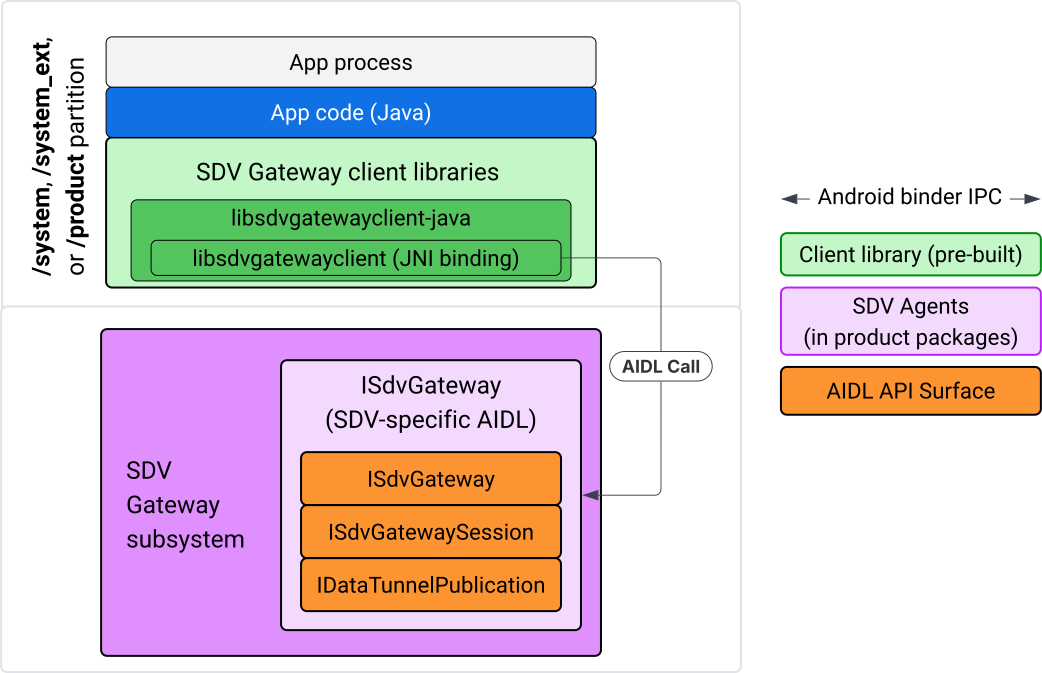
Şekil 4. IVI Java uygulamasında SDV Gateway.
Model özellikle:
- Tüm çağrıları JNI katmanına gönderir.
- Java ve C API'yi birleştirir.
ISdvGatewayile AIDL etkileşimlerini tanımlar:- İlk iletişim
- RPC sunucusunu bulma veya oluşturma
- Pub/Sub oluşturma
- Hizmet keşfi veri tüneli etkileşimlerini gerçekleştirme
- Bildirim alma (ör. veriler kullanılabilir)
- Anahtar çifti oluşturma ve TLS sertifikaları için mesaj okuma ve yazma (pub/sub için FMQ)
Ağ geçidi istemci kitaplıklarını dahil etme
libsdvgatewayclient C API'si için Java kitaplığı ve JNI sarmalayıcısı, IVI hedefindeki bir APEX'e yüklenir. Java kitaplığı taslağına, çalışma zamanında kullanılması gereken Java kitaplığına ve Java kitaplığını içeren gerekli APEX'e derleme zamanı bağımlılığı ekleyin.
android_app {
    name: "YourAppName",
    // ...
    static_libs: [
        "libsdvgatewayclient-java",
    ],
    libs: [
        "libsdvgatewayclient-java-sdk.stubs",
    ],
    uses_libs: [
        "libsdvgatewayclient-java-sdk",
    ],
    required: [
        "com.sdv.google.gateway.client",
    ],
    // ...
}
SDV ağacının dışında oluşturulan paketlenmemiş uygulamalarda da süreç benzerdir:
Oluşturulan Java kitaplığı taslak JAR'ını ve RPC için destekleyici JAR'ı uygulama kitaplıkları klasörüne kopyalayın. Ayrıntılı bilgi için
system/software_defined_vehicle/sdv_gateway/libsdvgatewayclient_apex/README.mdbaşlıklı makaleyi inceleyin.Taslak JAR'ı yalnızca derleme bağımlılığı olarak ekleyin. Örneğin, Gradle yapılandırmalarını,
dependenciesbölümüne bircompileOnlygirişi ekleyerek taslaklara bağlı olacak şekilde güncelleyin:dependencies { // The library supporting functions for SDK RPC. // Statically linked into the app APK. implementation(files("libs/libsdvgatewayclient-java.jar")) // Stub of the SDV-Gateway client library. // Used only for compilation; the real implementation is provided // by the com.sdv.google.gateway.client APEX at runtime. compileOnly(files("libs/libsdvgatewayclient-java-sdk.jar")) }Java kitaplığını
AndroidManifest.xmldosyasının uygulama bölümüne ekleyin.<manifest xmlns:android="http://schemas.android.com/apk/res/android"> <application> <!-- Declares that this app requires the SDV Gateway client library. The 'android:required="true"' attribute ensures the app won't install/run if the library is missing from the system. --> <uses-library android:name="libsdvgatewayclient-java-sdk" android:required="true" /> </application> </manifest>
Kitaplıkları yükleme
SdvGatewayClient nesnesi oluşturun (istemci kitaplığı tarafından sağlanır):
import google.sdv.gateway.client.SdvGatewayClient;

// --- Inside your Activity, Service, or ViewModel ---

// Initialize the SDV Gateway Client
SdvGatewayClient gatewayClient = new SdvGatewayClient();
İlk iletişim
Hizmet paketi adı olarak bir uygulama adı kullanarak initComms() çağrısı yapın:
// Define a unique name for your service bundle (usually constant)
private static final String SERVICE_BUNDLE_NAME = "MySdvServiceBundle";

// ... inside an Activity or Service context ...

try {
    // Initialize communications with the SDV Gateway
    // context.getPackageName() provides "android.sdv.samples.gateway.client" or similar
    gatewayClient.initComms(context.getPackageName(), SERVICE_BUNDLE_NAME);

    Log.i("SDV_GATEWAY", "Communications initialized successfully");
} catch (Exception e) {
    // Unlike the C API which uses status codes,
    // the Java SDK often throws exceptions for initialization failures.
    Log.e("SDV_GATEWAY", "Failed to initialize communications", e);
}
Hizmet keşfi
Java API'si aşağıdaki işlemleri gerçekleştiren yöntemler içerir:
Belirli bir birim türüne sahip (veya alternatif olarak belirli bir adla eşleşen) hizmet birimleri kaydedildiğinde ya da kaydı iptal edildiğinde bildirim alın.
Belirli bir birim türüne sahip mevcut hizmet birimlerini listeleyin (veya alternatif olarak belirli bir hizmet birimi türü adıyla eşleştirin). Hizmet birimi değişiklikleriyle ilgili bildirim almak için bir dinleyici oluşturun:
import google.sdv.gateway.client.ServiceUnitChangeListener;
import google.sdv.gateway.client.ServiceUnitChangeEventType;
import google.sdv.gateway.client.ServiceUnitDefinition;

// --- Implementation ---

ServiceUnitChangeListener listener = new ServiceUnitChangeListener() {
    @Override
    public void onServiceUnitChanged(
        ServiceUnitChangeEventType eventType,
        ServiceUnitDefinition serviceUnitDefinition
    ) {
        // This is triggered when services matching your criteria
        // are registered or unregistered on the vehicle network.
        if (eventType == ServiceUnitChangeEventType.REGISTERED) {
            // Handle new service discovery
        } else if (eventType == ServiceUnitChangeEventType.UNREGISTERED) {
            // Handle service removal
        }
    }
};
addListenerForServiceUnitChangeByName Java yöntemi, dinleyiciyi bilgilendirir:
// 1. Register the listener for a specific service unit by name
AutoCloseable handle = gatewayClient.addListenerForServiceUnitChangeByName(
    new UnitNameDiscoveryArgs(
        "",                                   // sdvVmName (empty for local/auto-discovery)
        "android.sdv.samples.cluster",        // sdvPackageName
        "ClusterServer",                      // serviceBundleName
        "android-sdv-samples-cluster-cluster" // serviceUnitName
    ),
    listener
);

// --- Later in the application lifecycle ---

// 2. To stop receiving notifications and clean up resources, close the handle.
try {
    if (handle != null) {
        handle.close();
    }
} catch (Exception e) {
    Log.e("SDV_GATEWAY", "Error while closing the listener handle", e);
}
Alternatif olarak, belirtilen birim türüne sahip hizmetler kaydedildiğinde veya kaydı silindiğinde dinleyiciyi bilgilendirmek için addListenerForServiceUnitChangeByType Java yöntemini kullanın:
// 1. Register a listener based on the Service Unit Type
AutoCloseable handle = gatewayClient.addListenerForServiceUnitChangeByType(
    new UnitType(
        "com.android.testapp.sdvcarmonitor", // sdvPackageName
        "SunroofRpcServer",                  // serviceBundleName
        "Sunroof"                            // unitTypeName
    ),
    listener
);

// --- Execution Loop / Lifecycle ---

// 2. To stop receiving notifications and clean up memory, close the handle.
// This effectively unregisters the listener from the SDV Gateway.
try {
    if (handle != null) {
        handle.close();
    }
} catch (Exception e) {
    Log.e("SDV_GATEWAY", "Failed to close the service unit listener handle", e);
}
addListenerForServiceUnitChangeByName ve addListenerForServiceUnitChangeByType için dinleyici, eklendikten sonra tüm kayıtlı hizmet birimleri hakkında bilgilendirilir. Yalnızca kayıtlı hizmet birimlerini ada veya türe göre almak için listServiceUnitsByName ve listServiceUnitsByType Java API'lerini kullanın:
import google.sdv.gateway.client.ServiceUnitDefinition;
import google.sdv.gateway.client.UnitNameDiscoveryArgs;
import google.sdv.gateway.client.UnitType;

// --- 1. Synchronous Lookup by Specific Name ---
ServiceUnitDefinition[] definitionsByName = gatewayClient.listServiceUnitsByName(
    new UnitNameDiscoveryArgs(
        "",                                   // sdvVmName
        "android.sdv.samples.cluster",        // sdvPackageName
        "ClusterServer",                      // serviceBundleName
        "android-sdv-samples-cluster-cluster" // serviceUnitName
    )
);

// --- 2. Synchronous Lookup by Service Type ---
ServiceUnitDefinition[] definitionsByType = gatewayClient.listServiceUnitsByType(
    new UnitType(
        "com.android.testapp.sdvcarmonitor", // sdvPackageName
        "SunroofRpcServer",                  // serviceBundleName
        "Sunroof"                            // unitTypeName
    )
);

// Example processing
if (definitionsByType.length > 0) {
    ServiceUnitDefinition firstSunroof = definitionsByType[0];
    // Proceed to connect...
}
RPC sunucusu akışı
IVI sistemlerindeki SDV Gateway istemcileri, SDV hizmetleriyle iletişim kurmak için Google uzak prosedür çağrısını (gRPC) kullanır. Bu etkileşimler, VSIDL kataloğundaki proto tanımlarını kullanır. Bu tanımlar, SDV Core'da kullanılanlarla tutarlı veya benzerdir. Java uygulamaları için gRPC-Java tercih edilen uygulamadır. Uygulama sunucusu için örnek bir sunucu proto tanımı (sunroof.proto) sağlanır.
service Sunroof {
    /**
     * Retrieves the current state of the sunroof (e.g., position, tilt, status).
     *
     * @param .google.protobuf.Empty - No input parameters required.
     * @return SunroofStateResponse - The current telemetry data for the sunroof.
     */
    rpc GetSunroofState(.google.protobuf.Empty) returns (SunroofStateResponse) {}
}
İlgili proto kitaplığına bağlayın ve hizmeti tanımlayın:
import com.android.sdv.sdvgrpclibrary.SunroofGrpc;
import com.android.sdv.sdvgrpclibrary.SunroofStateResponse; // Assuming this is the generated class
import com.google.protobuf.Empty;
import io.grpc.stub.StreamObserver;

/**
 * Implementation of the Sunroof gRPC service.
 * This class handles the logic for the RPCs defined in your .proto file.
 */
static class SunroofGrpcImpl extends SunroofGrpc.SunroofImplBase {

    @Override
    public void getSunroofState(Empty request, StreamObserver<SunroofStateResponse> responseObserver) {
        // 1. Fetch current sunroof data (e.g., from a Hardware Abstraction Layer)
        int currentPosition = 50; // Example value: 50% open

        // 2. Build the Protobuf response message
        SunroofStateResponse response = SunroofStateResponse.newBuilder()
                .setPercentageOpen(currentPosition)
                .build();

        // 3. Send the response to the client using the observer
        responseObserver.onNext(response);

        // 4. Close the stream to signal that the RPC is finished
        responseObserver.onCompleted();
    }
}
gRPC sunucusunu güvenli ve güvenli olmayan kanal kimlik bilgileriyle kaydetme:
// 1. Define the type signature for the service
UnitType unitType = new UnitType(
    "com.android.testapp.sdvcarmonitor", // sdvPackageName
    "SunroofRpcServer",                  // serviceBundleName
    "Sunroof"                            // typeName (Unit Type)
);

// 2. Register the RPC server with the Gateway
// The gateway creates a mapping between the ServiceUnitName and your implementation.
server = gatewayClient.registerRpcServer(
    "SunroofRpcServerImpl-1",                       // serviceUnitName (Unique instance name)
    unitType,                                       // unitType defined earlier
    "SUNROOF_GRPC_SERVER_VALUE_HOLDER".getBytes(),  // appMetadataValueHolder (Static discovery data)
    1,                                              // appMetadataVersion
    new SunroofGrpcImpl()                           // The actual gRPC service implementation
);
İstemci kitaplığı, dahili olarak gRPC sunucu nesnesini (SdvGatewayClient.java) oluşturur ve kök sertifikaların güncellemelerini de yönetir:
// 1. Initialize credentials (Insecure for dev, TLS for production)
ServerCredentials serverCredentials = InsecureServerCredentials.create();

// 2. Build and start the OkHttp-based gRPC server
final int bindAnyPort = 0;
final Server server = OkHttpServerBuilder
    .forPort(bindAnyPort, serverCredentials)
    .addService(gRpcServerImplementation) // Your SunroofGrpcImpl
    .build()
    .start();

// The assigned port can now be retrieved using server.getPort()
int actualPort = server.getPort();

// 3. Prepare the JNI data structure
// This object mirrors the ASDVGateway_ServiceUnitDefinition_t C struct
JniServiceUnitDefinition definition = new JniServiceUnitDefinition();

// Fill the RPC service definition params (Port, Name, Type, etc.)
definition.setPort(actualPort);
definition.setServiceUnitName("SunroofRpcServerImpl-1");

// 4. Perform the cross-language call
// This jumps from Java -> JNI -> ASDVGateway_Client_registerRpcServer (C API)
mJniClient.nativeRegisterRpcServer(definition);
RPC istemci akışı
Bu kod örneği, uygulamanın istemci olarak bağlandığı sunucu için sunucu proto tanımını (tpms.proto) sağlar:
/**
 * The TPMS service provides real-time pressure and temperature
 * data for all tires on the vehicle.
 */
service Tpms {
    /**
     * Returns the full state of all monitored tires.
     */
    rpc GetTpmsState(.google.protobuf.Empty) returns (TpmsStateResponse) {}

    /**
     * A filtered query that returns only the tires
     * below the recommended pressure threshold.
     */
    rpc GetLowTires(.google.protobuf.Empty) returns (LowTiresResponse) {}
}
İlgili proto kitaplığına bağlayın:
import com.android.sdv.sdvgrpclibrary.TpmsGrpc;
import io.grpc.ManagedChannel;

// --- Inside your Client Application ---

// 1. Request a ManagedChannel from the Gateway for a specific service unit
ManagedChannel managedChannel = gatewayClient.connectToRpcServerByName(
    "",                                     // sdvVmName (empty for local/auto-lookup)
    "android.sdv.samples.cluster",          // packageName
    "ClusterServer",                        // serviceBundleName
    "android-sdv-samples-cluster-cluster"  // serviceUnitName
);

// 2. Use the channel to create a gRPC stub (e.g., for the TPMS service)
TpmsGrpc.TpmsBlockingStub tpmsStub = TpmsGrpc.newBlockingStub(managedChannel);

// 3. Now you can call RPC methods directly
// TpmsStateResponse response = tpmsStub.getTpmsState(Empty.getDefaultInstance());
Dahili olarak, RPC sunucusunu bulmak için ASDVGateway_Client_findRpcServerByName API'si çağrılır. RPC sunucusu bulunursa yönetilen kanal, hizmet keşfi yapılandırmasına bağlı olarak RPC sunucusu akışına benzer şekilde güvenli olmayan modda oluşturulur veya TLS yapılandırmasını kullanacak şekilde ayarlanır. Uygulama, ManagedChannel nesnesiyle taslakları oluşturur ve sunucu yöntemlerini çağırır:
import com.android.sdv.sdvgrpclibrary.TpmsGrpc;
import com.android.sdv.sdvgrpclibrary.TpmsStateResponse;
import com.google.protobuf.Empty;
import io.grpc.stub.MetadataUtils;

// 1. Create a "Blocking Stub" from the existing ManagedChannel.
// We apply an interceptor to attach mandatory metadata (headers)
// required by the SDV Gateway for authorization.
TpmsGrpc.TpmsBlockingStub tpmsStub = TpmsGrpc.newBlockingStub(managedChannel)
    .withInterceptors(MetadataUtils.newAttachHeadersInterceptor(mMetadata));

// 2. Execute the RPC call.
// Because this is a "BlockingStub," the thread will wait here until
// the vehicle service responds or times out.
TpmsStateResponse tpmsStateResponse = tpmsStub.getTpmsState(Empty.getDefaultInstance());

// 3. Extract the domain-specific state object from the Protobuf response.
// 'newState' can now be used to update your UI or application logic.
newState = tpmsStateResponse.getTpmsState();
İşlemin varsayılan ağını değiştirme
İnternete bağlı bağlantılar için soket açmak üzere işlemin varsayılan ağı olarak SDV-RPC VLAN'dan geçiş yapmanız gerekebilir. İşlemin SDV-RPC VLAN ile bağlantısını kaldırmak ve yeniden bağlamak için unbindProcessFromSdvRpcNetworkInterface ve bindProcessToSdvRpcNetworkInterface işlevlerini çağırın. Bu iki çağrı, global anahtar görevi görerek soketlerin bağlı olduğu ağ arayüzünü işlemin tüm iş parçacıkları için değiştirir.
// 1. Redirect all socket traffic from this process to the SDV-RPC VLAN.
// This call is required for making RPC calls or hosting RPC services for SDV.
gatewayClient.bindProcessToSdvRpcNetworkInterface();

// --- Process is now communicating over the SDV-RPC interface ---

// 2. Revert the process network binding back to the "default" interface.
// This allows the app to access internet resources again.
gatewayClient.unbindProcessFromSdvRpcNetworkInterface();
Yayıncı oluşturma ve mesaj yayınlama
// 1. Define the interface and type for the publication
UnitType unitType = new UnitType(
    "android.sdv.samples.tires.interface", // sdvPackageName
    "TirePressurePublisherInterface",      // serviceBundleName
    "TirePressure"                         // typeName
);

// 2. Configure the Publisher's buffer and message constraints
PublisherUnitMetadata publisherUnitMetadata = new PublisherUnitMetadata(
    1,   // version
    64,  // message size in bytes (fixed size for performance)
    128  // max message count (buffer depth)
);

// 3. Create the Publication instance through the Gateway
Publisher tirePublisher = gatewayClient.createPublication(
    "tire-pressure-service-unit-name",
    unitType,
    publisherUnitMetadata
);

// 4. Prepare and publish a message
// In a real app, you would encode your sensor data into this byte array
byte[] msg = new byte[publisherUnitMetadata.messageSizeBytes];

// ... fill msg with data ...

tirePublisher.publish(msg);
Dahili olarak Java createPublication ve yayınlama API'leri, yerel ASDVGateway_Client_createPublication ve ASDVGateway_Client_readAvailableMessages API'lerini kullanır. C API hakkında ayrıntılı bilgi için SDV Gateway'i yerel IVI hizmetinde kullanma başlıklı makaleyi inceleyin. Publisher nesnesi, mesaj yazmak ve yayının yaşam döngüsünü yönetmek için bir bağlam sağlar.
Bildirim dinleyici ile abone oluşturma
Java API, bir dinleyicinin yayına abone olma yöntemine parametre olarak iletilmesine olanak tanır ve bir Subscription nesnesi döndürür.
Abone olunan yayın için veri mevcut olduğunda
Listenerbilgilendirilir.Subscription, bağlam nesnesi olarak işlev görür ve mesajları okumak ve aboneliği kapatmak için kullanılabilir.
// 1. Define the Listener to handle incoming data notifications
SubscriptionNotificationListener listener = new SubscriptionNotificationListener() {
    @Override
    public void onSubscriptionNotification(
        Subscription subscription,
        SubscriptionNotificationType notificationType
    ) {
        // Only process if the notification indicates new data is ready
        if (notificationType != SubscriptionNotificationType.DataAvailable) {
            return;
        }

        // Read the message from the subscription buffer
        byte[] content = subscription.readMessage();

        // Note: This callback often runs on a background thread provided by the SDK.
        // If you need to update the UI, use a Handler or View.post().
        processTireData(content);
    }
};

// 2. Subscribe to the publication by its unique name
Subscription tireSubscription = gatewayClient.subscribeToPublicationByName(
    "",                                  // sdvVmName (empty for auto-lookup)
    "android.sdv.samples.dt_publisher",  // packageName
    "SdvGatewayDtPublisher",             // serviceBundleName
    "tire",                              // serviceUnitName
    listener
);

// 3. Read Messages
// You can poll or register callbacks for new messages.
// When polling the message, call this method in a loop.
// When registering callbacks, call this method to get the message payload.
byte[] manualContent = tireSubscription.readMessage();
Kod örneği
Dinleyici geri çağırmaları, diğer aboneliklerle ilgili bildirimlerin alınmasında gecikmeleri önlemek için dinleyicilerdeki işlemleri en aza indirmek amacıyla istemci tarafından yönetilen tek bir iş parçacığında çağrılır. Java katmanı; abonelik yönetimi, bildirim işleme ve mesaj alma için bir C API'si kullanır. API kullanımının gösterimi için system/software_defined_vehicle/samples/sdv_gateway/README.md adresindeki ikili program dosyasında sağlanan Java uygulaması örneğine bakın.
Gerekli izinler
SDV Gateway istemci API'sini çağırmak için özel izinler gerekmez ancak uygulamalarınız için uygun SELinux kurallarını uygulamanız gerekir.
- Veri tüneli abonelikleri ve yayınları için herhangi bir izne ihtiyacınız yoktur.
- SDV RPC için aşağıdaki izinlere ihtiyacınız vardır:
android.permission.INTERNETandroid.permission.CONNECTIVITY_USE_RESTRICTED_NETWORKS
android.permission.CONNECTIVITY_USE_RESTRICTED_NETWORKS için uygulamanızla aynı bölümde etc/permissions altında bir izin verilenler listesi dosyası da gerekir. Örneğin, SdvCarMonitorTestApp (paket adı com.android.testapp.sdvcarmonitor) için dosya şu şekilde görünür:
<?xml version="1.0" encoding="utf-8"?>

<permissions>
    <privapp-permissions package="com.android.testapp.sdvcarmonitor">
        <permission name="android.permission.CONNECTIVITY_USE_RESTRICTED_NETWORKS"/>
    </privapp-permissions>
</permissions>
SELinux kuralları
Java uygulamalarının SDV Gateway API'lerini kullanabilmesi için yerel hizmetlerle aynı izinlere sahip olması gerekir. sdv_gateway_client_domain() SELinux makrosunu kullanarak bu izinleri verin:
sdv_gateway_client_domain(my_oem_sdv_gateway_client_app)
OEM, SDV Gateway'i kullanmasına izin verilen Java uygulamaları için my_oem_sdv_gateway_client_app alanını tanımlar. SDV Gateway'i yalnızca sistem uygulamalarından ve ayrıcalıklı uygulamalardan kullanın.
Kod konumları
SDV Gateway'in kaynak kodunu system/software_defined_vehicle/sdv_gateway/ adresinden edinin. SDV Gateway örneklerini şu dillerde
alabilirsiniz:
- İstemci C API'si:
system/software_defined_vehicle/samples/sdv_gateway/NativeSdvGatewayTestApp/ - İstemci Java API'si:
system/software_defined_vehicle/samples/sdv_gateway/SdvCarMonitorTestApp/