

ارکستراتور یک عامل SDV محلی است که روی هر ماشین مجازی (VM) اجرا میشود و مکانیزمی را برای کنترل زمان ایجاد، شروع، توقف یا از بین رفتن بستههای سرویس فراهم میکند. این کار از طریق پیکربندی ارکستراسیون انجام میشود که در آن مجموعهای از قوانین را تعریف میکنید که تعیین میکنند چه زمانی و چگونه اقدامات روی نمونههای بسته سرویس انجام شوند. این قوانین بر اساس وسیله نقلیه، برق و حالتهای سفارشی هستند.
شما میتوانید Orchestrator را در پیکربندی APEXها یا از طریق پیکربندیهای هر ماشین مجازی پیکربندی کنید. این سیستم پیکربندی توزیعشده به بخشهایی از هر بسته سرویس اجازه میدهد تا بهطور مستقل از طریق رجیستری بسته سرویس، همانطور که در اینجا نشان داده شده است، بهروزرسانی شوند.
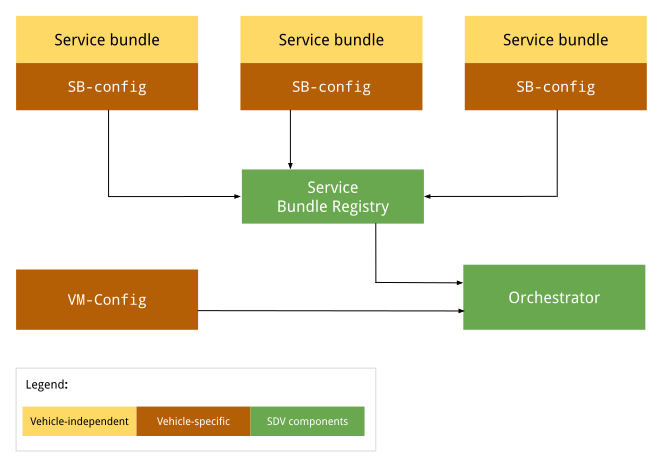
شکل ۱. نمودار پیکربندی هماهنگکننده.
پیکربندیهای مستقل از خودرو بسته به سازنده اصلی (OEM) یا خودرو تغییر نمیکنند. این پیکربندی در تمام خودروهای هر سازنده اصلی (OEM) یکسان باقی میماند. پیکربندیهای خاص خودرو میتوانند در خودروهای مختلف توسط سازندگان اصلی (OEM) متفاوت باشند، اگرچه پیکربندی میتواند برای تمام خودروهای ساخته شده توسط یک سازنده اصلی (OEM) خاص یکسان باشد.
پیکربندی APEXها
در زمان اجرا، Orchestrator به رجیستری بستههای سرویس میرود تا یک SDV Orchestration برای هر بسته سرویس دریافت کند، هر پیکربندی را بارگذاری و تجزیه کند. برای کسب اطلاعات بیشتر، به متادیتای Orchestration مراجعه کنید.
پیکربندی به ازای هر ماشین مجازی
وقتی Orchestrator شروع به کار میکند، پیکربندی ماشین مجازی (در صورت وجود) را بارگذاری و تجزیه میکند. مسیر مطلق این فایل پیکربندی از طریق ویژگیهای سیستمی persist.sdv.orchestrator_config_path و ro.boot.sdv.orchestrator_config_path مشخص میشود.
سیستم مسیر فایل پیکربندی ماشین مجازی را در هنگام بوت بر اساس سلسله مراتب زیر تعیین میکند:
سیستم ویژگی
persist.sdv.orchestrator_config_pathرا بررسی میکند. اگر مقداری داشته باشد، از آن مسیر استفاده میشود. این مقدار در طول راهاندازی مجدد سیستم حفظ میشود یا در زمان اجرا تنظیم میشود.اگر
persist.sdv.orchestrator_config_pathخالی باشد، سیستم سپس ویژگیro.boot.sdv.orchestrator_config_pathرا بررسی میکند. اگر ویژگیro.boot.sdvمقداری داشته باشد، آن مسیر در ویژگی persist کپی میشود و برای بوت فعلی و تمام بوتهای آینده (مگر اینکه لغو شود) استفاده میشود.
persist.sdv.orchestrator_config_path
persist.sdv.orchestrator_config_path ویژگی اصلی مورد استفاده توسط عامل SDV Orchestrator برای دریافت مسیر فایل پیکربندی آن است. این یک ویژگی پایدار است، به این معنی که مقدار آن در طول راهاندازی مجدد دستگاه ذخیره میشود. میتوانید مقدار را در زمان اجرا تغییر دهید، که برای آزمایش یا سناریوهای خاص (به عنوان مثال، آزمایشهای سرتاسری) مفید است.
شما میتوانید مقدار را در زمان اجرا با استفاده از دستور setprop و در زمان ساخت با استفاده از یک makefile (با پسوند .mk ) یا یک فایل اسکریپت منبع، با پسوند .rc تنظیم کنید.
تنظیم ویژگی در زمان اجرا
تنظیم ویژگی در زمان اجرا برای آزمایش یا ایجاد تغییرات موقت مفید است، زیرا مقدار در طول راهاندازی مجدد سیستم ذخیره میشود:
adb root
adb shell setprop persist.sdv.orchestrator_config_path {$path_to_file}.textproto
تنظیم ویژگی در زمان ساخت
برای تنظیم این ویژگی به عنوان بخشی از پیکربندی ساخت دستگاه خود، یک خط به فایل ساخت محصول یا برد خود اضافه کنید. این برای تنظیم مقدار پیشفرض برای یک تصویر دستگاه جدید ایدهآل است.
# Add this line to a product's or device's .mk file
PRODUCT_PROPERTY_OVERRIDES += persist.sdv.orchestrator_config_path={$path_to_file}.textproto
همچنین میتوانید این ویژگی را درون یک فایل اسکریپت منبع تنظیم کنید:
# Add this line to an .rc file
on {$property}
    setprop persist.sdv.orchestrator_config_path {$path_to_file}.textproto
مسیر پیکربندی ro.boot.sdv.orchestrator_config
ro.boot.sdv.orchestrator_config_path یک ویژگی فقط خواندنی زمان بوت است که برای ارائه مقدار اولیه برای ویژگی persist.sdv.orchestrator_config_path استفاده میشود. اگر persist.sdv.orchestrator_config_path هنگام بوت شدن سیستم خالی باشد، مقدار ro.boot.sdv.orchestrator_config_path در آن کپی میشود. پس از تنظیم persist.sdv.orchestrator_config_path ، در بوتهای بعدی توسط این ویژگی بازنویسی نمیشود.
شما میتوانید ro.boot.sdv.orchestrator_config_path با استفاده از bootconfig یا cmdline کرنل تنظیم کنید.
فرمت فایل
پیکربندی ارکستراسیون را در قالب .textproto (مثلاً به صورت متن ساختاریافته) تعریف کنید تا پیکربندیهای جدید بتوانند در زمان اجرا بارگیری شوند.
نحو پیکربندی
این بخش سینتکس پیکربندی را شرح میدهد.
بستههای خدماتی
هر بسته سرویس باید با پیکربندی بسته سرویس تعریف شود، که بسته را در Orchestrator شناسایی میکند و برای مدیریت چرخه حیات نمونه بسته استفاده میشود. پیکربندی بسته سرویس موارد زیر را تعریف میکند:
InstanceToGroupMappingبه شما امکان میدهد نمونهای از بسته سرویس را در یک گروه قرار دهید تا وابستگیهایی بین نمونههای یک بسته سرویس مشابه ایجاد شود.InstancesStatesحالتهای مختلف را برای نمونه بسته سرویس تعریف میکند.InstancesStateConfigurationوضعیتی (ازInstancesStates) را تعریف میکند که اگر شرط بهtrueارزیابی شود، یک نمونه بسته سرویس باید روی آن تنظیم شود.ServiceBundleConfigحاوی اطلاعاتی در مورد بسته سرویس خاص و نمونههای آن است. این بسته شاملInstanceToGroupMappingوInstancesStateConfigurationمربوط به آن بسته است.CustomModesفهرستی از حالتهای سفارشی را تعریف میکند که بسته نرمافزاری مجاز به انتشار آنهاست.CustomModesبرای جلوگیری از تغییر مقدار یک حالت سفارشی توسط یک بسته نرمافزاری غیرمجاز استفاده میشود. این فیلد اختیاری است، زیرا بسته نرمافزاری سرویس ممکن است در هیچ حالت سفارشی منتشر نشود. برای کسب اطلاعات بیشتر، به حالتهای سفارشی مراجعه کنید.
پیکربندی بسته نرم افزاری مورد نیاز
حداقل، پیکربندی بسته نرمافزاری این ویژگیها را ارائه میدهد:
service_bundle_config {
    package_name: "package_name"
    service_bundle_name: "service_bundle_name"

    instance: "instance_1"
    instance: "instance_n"
}
این اعلان، n نمونه بسته سرویس را با FQIN های مربوطه تعریف میکند:
vm_name.package_name.service_bundle_name.instance_1
…
vm_name.package_name.service_bundle_name.instance_n
نام ماشین مجازی به طور صریح در پیکربندی اعلام نشده است. از آنجایی که پیکربندی برای هر ماشین مجازی تعریف میشود، نام ماشین مجازی همیشه نام ماشین مجازی است که فایل پیکربندی در آن مستقر شده و از قبل برای عامل هماهنگسازی شناخته شده است.
پیکربندی نمونهها
اعلام نمونههای بسته سرویس هیچ تاثیری ندارد. برای اجرا توسط Orchestrator، نمونهها باید پیکربندی شوند. به عنوان مثال، Orchestrator باید از شرایط (یا وضعیت ماشین مجازی یا وسیله نقلیه) که یک نمونه باید اجرا شود، مطلع شود. برای پیکربندی نمونهها، وضعیتهای پیکربندی باید از طریق موارد زیر تعریف شوند:
condition، عبارتی روی ماشین مجازی یا وضعیت خودرو است که باید ارزیابی شود.instances_statesمجموعهای از حالتها به ازای هر نمونه است که در صورتtrueشرط، باید اعمال شوند.
برای کسب اطلاعات بیشتر، به بخش شرایط مراجعه کنید.
service_bundle_config {
    package_name: "oem.package"
    service_bundle_name: "OemApplication"

    instance: "adaptive_light"
    instance: "reserve_light"

    state {
        condition {
            power_state: "ON"
        }

        instances_states {
            started: "adaptive_light"
            created: "reserve_light"
        }
    }
}
نگاشت نمونه به گروه
همچنین میتوانید نمونههای سرویس را با گنجاندن آنها در گروههای سرویس پیکربندی کنید. در سطح پیکربندی بسته سرویس، میتوانید نمونههایی را به گروهها اضافه کنید. سپس میتوانید گروهها را در سطح پیکربندی ماشین مجازی پیکربندی کنید. برای کسب اطلاعات بیشتر، به بخش بعدی و بستههای سرویس مراجعه کنید.
service_bundle_config {
    package_name: "oem.package"
    service_bundle_name: "OemApplication"

    instance: "fog_front_light"
    instance: "fog_rear_light"
    instance: "turn_signal_light"
    instance: "light_flasher_display"

    # Declare that fog_light contains fog_front_light and fog_rear_light.
    group_mapping {
        group: "fog_light"
        instance: "fog_front_light"
        instance: "fog_rear_light"
    }

    # Declare that flasher_light contains turn_signal_light and light_flasher_display.
    group_mapping {
        group: "flasher_light"
        instance: "turn_signal_light"
        instance: "light_flasher_display"
    }
}
طرحواره اولیه
در اینجا یک نمونه طرح اولیه آورده شده است:
// Service bundle configuration.
//
// Defines service bundle data, its instances and configuration for instances
// states depending on the state of the system
message ServiceBundleConfig {
  // Required. Name of the service bundle.
  string service_bundle_name = 1;

  // Required. Package name of the service bundle.
  string package_name = 2;

  // Required. Service instances.
  repeated string instance = 3;

  // Configuration for instances states depending on the state of the system.
  repeated InstancesStateConfiguration state = 4;

  // Mapping of groups to their member service instances.
  repeated InstanceToGroupMapping group_mapping = 5;

  // Custom modes that this service bundle is allowed to set.
  repeated string custom_mode = 6;

  // Defines the retry policies for specific instances.
  // If multiple mappings target the same instance, the one with the highest `max_retries`
  // value takes precedence. This applies across all configuration files.
  repeated InstanceToRetryMapping retry_mapping = 7;
}

// Mapping of instances to their retry configuration.
message InstanceToRetryMapping {
  // Required.
  //
  // Name of the instances for which the given retry configuration is applied.
  repeated string instance = 1;

  // Required.
  //
  // The configuration that defines the restart and retry strategy for the instances.
  RetryConfiguration retry_config = 2;

  // Configuration for retry and restart.
  // This configuration is applied after a failure on a transition or after the bundle instance
  // has crashed. Upon a successful operation, the retry counter are reset to max_retries. This
  // configuration can be applied to any service bundle, not only the monitored ones. If the
  // configuration is not provided or none of the optional fields are filled, the default behavior
  // stated is applied (the value from `ro.boot.sdv.orchestrator.recovery.max_retries`
  // or zero if not set).
  message RetryConfiguration {
    // The number of times a retry/restart operation can be performed.
    // Defines the number of times the Orchestrator retries a transition
    // after a transient failure or after a bundle crash notification.
    // This applies to creating, starting and destroying operations.
    // The retry count resets to max_retries after a successful operation.
    // If not set, the default configured value in the
    // `ro.boot.sdv.orchestrator.recovery.max_retries` is used, or-if not set-
    // it fallbacks to zero.
    optional uint32 max_retries = 1;
  }
}

// Mapping of groups to their member service instances.
message InstanceToGroupMapping {
  // Required. Names of groups to which members are added.
  //
  // Group behavior is defined in VM configuration.
  repeated string group = 1;

  // Required. Names of instances to be included in the groups.
  //
  // Can reference only instance defined in the same config file.
  repeated string instance = 2;
}

// Describes the state the service instances should be in after the state is executed.
//
// If there is no valid configuration for the instance in the specific system state, such instance is transitioned to the "destroyed" state.
//
// For the GroupsStates definition to be useful, at least one item should be present in any of the fields.
message InstancesStates {
  // Names of the instances that must be in a "created" state.
  repeated string created = 1;

  // Names of the instances that must be in a "started" state, overrides "created" state.
  repeated string started = 2;

  // Names of the instances that must not run, overrides all other states.
  repeated string destroyed = 3;
}

// Configuration for instances states depending on the state of the system.
message InstancesStateConfiguration {
  // Condition for the system state under which the related instances states should be executed by Orchestrator.
  //
  // If omitted, the related instances states are always executed.
  Condition condition = 1;

  // Required. States of service bundle instances to be executed by Orchestrator if the condition is true.
  InstancesStates instances_states = 2;
}
پیکربندی سطح ماشین مجازی
پیکربندی ماشین مجازی امکان تعریف نگاشتهای گروهی و پیکربندی گروهها را فراهم میکند. این پیکربندی برای مدلسازی وابستگیهای بین بستههای سرویس در سطح ماشین مجازی استفاده میشود و در نتیجه انعطافپذیری لازم برای تغییر وضعیت چندین بسته سرویس را به طور همزمان فراهم میکند. تمام نمونههای یک گروه به وضعیت مشخص شده آورده میشوند.
ارکستراتور ترتیب اجرای تغییر وضعیت را تضمین نمیکند. ارکستراتور هر نمونه را به وضعیت داده شده ارتقا میدهد.
گروهها به طور ضمنی با استفاده از نام group در هر یک از بخشهای پیکربندی تعریف میشوند. برای مثال، نگاشت نمونه به گروه، نگاشت گروه به گروه و وضعیت پیکربندی گروه.
نگاشت گروه به گروه
گروهها میتوانند شامل گروههای دیگری باشند. با اعلام اینکه group_1 شامل subgroup_2 است، ما عملاً تمام نمونههای سرویس را از subgroup_2 به group_1 اضافه میکنیم.
برای مثال:
# Declare that body contains fog_light and flasher_light.
group_mapping {
    group: "body"
    subgroup: "fog_light"
    subgroup: "flasher_light"
}
پیکربندی یک گروه
اعلام یک گروه هیچ تاثیری ندارد. برای اینکه گروهها توسط Orchestrator اجرا شوند، باید پیکربندی شوند. به عنوان مثال، Orchestrator باید مطلع شود که گروهها تحت چه شرایط یا وضعیتی از ماشین مجازی یا وسیله نقلیه باید اجرا شوند.
شما میتوانید گروهها را به روشی مشابه نمونههای سرویس پیکربندی کنید، یعنی با استفاده از حالتهای پیکربندی. تنها تفاوت، استفاده از groups_states به جای instances_states در سینتکس است:
state {
    condition {
        power_state: "ON"
    }

    groups_states {
        started: "Body"
        started: "Adas"
    }
}
طرحواره اولیه
در اینجا یک نمونه طرح اولیه آورده شده است:
// VM configuration.
//
// Defines group-to-group mappings and configuration for groups
// states depending on the state of the system.
//
// Configurations of service bundles can also be defined in VM configuration (as well as in a separate configuration file).
message VmConfig {
  // Group to member groups mapping.
  repeated GroupToGroupMapping group_mapping = 1;

  // Configuration of group states.
  repeated GroupsStateConfiguration state = 2;

  // Required. We also allow to configure individual service bundles in the VM config, to simplify development and migration from the monolithic configuration.
  repeated ServiceBundleConfig service_bundle_config = 3;
}

// Mapping of groups to their member groups.
message GroupToGroupMapping {
  // Required. Names of groups to which members are added.
  repeated string group = 1;

  // Required. Names of member groups to be included in the groups.
  repeated string subgroup = 2;
}

// Describes the state the service instance groups should be in after the state is executed.
//
// If group configuration is valid in a specific system state, the configured state is applied to
// all group members. After that, the normal service instance configuration rules still apply:
// - "destroyed" > "started" > "created" precedence
// - not configured means the instance should be moved to the default state
//
// For the GroupsStates definition to be useful, at least one item should be present in any of the fields.
message GroupsStates {
  // Names of the groups that must be in a "created" state.
  repeated string created = 1;

  // Names of the groups that must be in a "started" state, overrides "created" state.
  repeated string started = 2;

  // Names of the groups that must not run, overrides all other states.
  repeated string destroyed = 3;
}

// Configuration for group states depending on the state of the system.
message GroupsStateConfiguration {
  // Condition for the system state under which the related group states should be executed by  Orchestrator.
  //
  // If omitted, the related groups states are always executed.
  Condition condition = 1;

  // Required. States of service bundle groups to be executed by Orchestrator if the condition  is true.
  GroupsStates groups_states = 2;
}
حالتهای پیکربندی
وضعیتهای پیکربندی (states) زمان شروع، توقف یا از بین رفتن یک نمونه یا گروه سرویس را تعریف میکنند و شامل conditions و instances_states ) (پیکربندی بسته) و وضعیتهای گروه ( groups_states ) (پیکربندی ماشین مجازی) میشوند.
شرایط
شرطها به مدل اجازه میدهند یک شرط بولی داشته باشد که تحت آن، وقتی مقدار آن true ، حالت نمونه تعریفشده اعمال میشود. یک شرط دارای این ویژگیها است:
عبارت بولی دلخواه پیچیده (که با عبارات
andیاnotتشکیل شده است) بر اساس سیگنالهای پشتیبانی شده مانند قدرت، وسیله نقلیه و حالت سفارشی.(اختیاری) وضعیت پیکربندی بدون شرط همیشه فعال است، به این معنی که مقدار آن
trueاست.
حالتهای نمونه و حالتهای گروه
instances_states و groups_states این ویژگیها را دارند.
با توجه به
activeحالت، تعیین کنید که عامل هماهنگسازی برای اعمال روی نمونهها یا گروههای داده شده به کدام حالتها نیاز دارد.هنگام اعمال یک وضعیت به گروه، آن وضعیت به هر نمونه از بسته سرویس در گروه اعمال میشود. هیچ ترتیبی برای زمان ورود نمونهها به وضعیت اعمال نمیشود.
ایالتهای پشتیبانیشده عبارتند از:
پس از فراخوانی
Service::on_startstartedمیشود.createdبعد از اینکه
Service::newفراخوانی شود، اما قبل از اینکهService::on_startفراخوانی شود.یا
بعد از اینکه
Service::on_stopفراخوانی میشود، اما قبل از اینکهService::dropفراخوانی شود.
پس از
destroyedService::dropاز بین میرود.
مجموعه قوانین
وضعیت پیکربندی میتواند بسته به شرایط، فعال یا غیرفعال باشد. چندین وضعیت میتوانند در هر زمانی فعال باشند. هنگامی که یک عامل هماهنگکننده، بهروزرسانی سیگنال را دریافت میکند، تمام وضعیتهای پیکربندی قبل از اصلاح چرخه عمر بستههای سرویس ارزیابی میشوند. وضعیتهای نمونه سرویس طبق این قوانین ارزیابی میشوند:
وقتی هیچ یک از حالتهای فعال به نمونه سرویس اعمال نشود، آن سرویس از بین میرود.
وقتی یک یا چند حالت فعال اعمال میشود، این اولویت اعمال میشود:
-
destroyedاولویت مطلق دارد. -
startedبرcreatedاولویت دارد.
-
طرحواره اولیه
در اینجا یک نمونه طرح اولیه آورده شده است:
// A root boolean condition.
message Condition {
  // Required.
  oneof root {
    // VPM power state condition.
    string power_state = 1;
    // VPM vehicle state condition.
    string vehicle_state = 2;
    // Custom mode state condition.
    CustomState custom_state = 3;
    // Negation of a nested condition.
    Condition not = 4;
    // Logical 'and' between conditions grouped in expression.
    Expression and = 5;
    // Logical 'or' between conditions grouped in expression.
    Expression or = 6;
  }
}

// Representation of Custom state condition.
//
// Custom mode(s) are defined by the OEM and are not standardized by the platform, in contrast with
// VPM modes (i.e. power and vehicle mode).
message CustomState {
  // Custom mode being checked.
  string mode = 1;
  // State of the custom mode.
  string state = 2;
}

// A set of conditions united under an 'and' or 'or' expression.
//
// Evaluation type ('and' or 'or') depends on the field in [Condition]/[Expression], where the
// expression is being used.
//
// At least one value in at least one of the fields is required.
message Expression {
  // VPM power state condition.
  repeated string power_state = 1;
  // VPM vehicle state condition.
  repeated string vehicle_state = 2;
  // Custom mode state condition.
  repeated CustomState custom_state = 3;
  // Negation of a nested condition.
  repeated Condition not = 4;
  // Logical 'and' between conditions grouped in expression.
  repeated Expression and = 5;
  // Logical 'or' between conditions grouped in expression.
  repeated Expression or = 6;
}
استراتژی بازیابی از خرابی و راهاندازی مجدد
Orchestrator مکانیزمی قوی برای مدیریت خرابیهای بسته سرویس و شکستهای انتقال چرخه عمر ارائه میدهد. از آنجا که Orchestrator دیدی جامع از وضعیتهای سرویس دارد و انتقالهای حالت را مدیریت میکند، مناسبترین مؤلفه برای اجرای استراتژی راهاندازی مجدد و تلاش مجدد است. مدیر چرخه حیات (LM) خرابیهای بسته سرویس را از طریق اعلانهای مرگ binder به Orchestrator گزارش میدهد. برای جلوگیری از فراخوانیهای غیرضروری binder به LM، Orchestrator آخرین وضعیت هر بسته (چه موفق و چه ناموفق) را ذخیره میکند و اگر آخرین وضعیت شناخته شده با وضعیت درخواستی جدید یکسان باشد، انتقالها را دوباره اعمال نمیکند.
پیکربندی را دوباره امتحان کنید
شما میتوانید استراتژی راهاندازی مجدد و تلاش مجدد را برای هر نمونه در پیکربندی Orchestrator خود با استفاده از retry_mapping تعریف کنید. اگر max_retries در پیکربندی تنظیم نشده باشد، مقدار پیشفرض از ویژگی سیستم ro.boot.sdv.orchestrator.recovery.max_retries گرفته میشود. اگر این ویژگی تنظیم نشده باشد، مقدار به 0 تغییر میکند.
-
max_retries: تعداد دفعاتی را که Orchestrator پس از یک خطای گذرا یا اعلان خرابی بسته، یک انتقال را دوباره امتحان میکند، تعریف میکند. شمارندهی تلاش مجدد پس از یک عملیات موفقیتآمیز یا هنگامی که یک حالت جدید پردازش میشود، به مقدارmax_retriesبازنشانی میشود. اگر چندین نگاشت، یک نمونه را هدف قرار دهند، نگاشتی با بالاترینmax_retriesاولویت دارد.
نمونه پیکربندی
service_bundle_config {
  package_name: "oem.package"
  service_bundle_name: "OemApplication"
  instance: "fog_front_light"
  instance: "fog_rear_light"

  # Defines the restart configuration mapping for specific instances.
  retry_mapping {
    instance: "fog_front_light"
    instance: "fog_rear_light"
    retry_config {
      max_retries: 3
    }
  }
}
رفتار بهبودی
منطق راهاندازی مجدد و تلاش مجدد Orchestrator به طرز ماهرانهای چندین سناریوی شکست را مدیریت میکند:
- خرابی عملکرد عادی : اگر یک بسته سرویس هنگام اجرا دچار خرابی شود، Orchestrator استراتژی راهاندازی مجدد را اعمال میکند و تلاش میکند تا بسته را بر اساس تلاشهای مجدد باقی مانده به آخرین حالت درخواستی خود بازگرداند.
- خرابی در حین انتقال حالت : اگر یک بسته نرمافزاری هنگام اعمال حالت جدید دچار خرابی شود، درخواست راهاندازی مجدد در صف انتظار قرار گرفته و بعداً پردازش میشود. پس از پردازش درخواست، Orchestrator بررسی میکند که آخرین وضعیت برای نمونه کدام بوده است و فقط در صورتی که نمونه در آخرین وضعیت درخواستی (از آخرین انتقال حالت) نباشد، راهاندازی مجدد را اعمال میکند.
- حالت جدید در حین بازیابی : اگر Orchestrator درخواستی برای انتقال به حالت جدید در حین راهاندازی مجدد یک بسته نرمافزاری (یا در صف نمونههایی برای راهاندازی مجدد) دریافت کند، بازیابی در حال انجام را لغو میکند. انتقال به حالت جدید آغاز میشود و شمارنده تلاش مجدد بازنشانی میشود تا امکان مجموعهای جدید از تلاشها برای حالت هدف جدید فراهم شود.
هماهنگکننده (Orchestrator) بین انواع مختلف خطا که توسط مدیر چرخه حیات (Lifecycle Manager) برگردانده میشود، تمایز قائل میشود تا استراتژی تلاش مجدد را تعیین کند:
- خطاهای گذرا (
SERVICE_NOT_FOUND،OPERATION_FAILED،INTERNAL_ERROR): ارکستراتور بدون انجام هیچ اقدام پاکسازی خاصی، عملیات را دوباره امتحان میکند. - خطاهای مداوم (
VALUE_CORRUPTED،INVALID_ARGUMENT): ارکستراتور فرض میکند که بسته سرویس ممکن است در وضعیت خراب باشد و قبل از تلاش مجدد برای اطمینان از راهاندازی مجدد کامل، سعی میکند نمونه سرویس را از بین ببرد. - خطاهای دائمی (
PERMISSION_DENIED): عملیات دوباره انجام نمیشود و بسته در حالت غیرقابل بازیابی در نظر گرفته میشود.
اگر مدیر چرخه حیات از کار بیفتد، تمام فرآیندهای بسته سرویس از بین میروند. از آنجا که وضعیت واقعی ناشناخته است، ارکستر هر نمونه را نامعتبر میکند و یک استراتژی راهاندازی مجدد با تلاشهای مجدد باقیمانده اعمال میکند تا هر نمونه را به آخرین وضعیت درخواستی برساند.
برای جلوگیری از حلقههای بازیابی بینهایت برای بستههایی که مرتباً خراب میشوند یا از کار میافتند، شمارندهی تلاش مجدد فقط پس از موفقیت یک عملیات چرخهی عمر یا زمانی که انتقال به حالت جدید درخواست میشود، به max_retries بازنشانی میشود. اگر یک بسته به دلیل خرابیهای متوالی (به عنوان مثال، خرابی انتقال و به دنبال آن خرابی) تلاشهای مجدد خود را تمام کند، تا زمانی که شمارندهی تلاش مجدد بازنشانی نشود، مجدداً راهاندازی نمیشود.
گزارش ایالت به ناظر سلامت
ارکستراتور یک رابط اتصال داخلی را در معرض نمایش قرار میدهد که مانیتور سلامت (HM) آن را ثبت میکند و به آن امکان میدهد بهروزرسانیهای مداوم در مورد وضعیت همه بستههای سرویس را دریافت کند. از طریق این رابط، ارکستراتور به طور فعال هر دو مورد زیر را گزارش میدهد:
- وضعیت چرخه حیات: وضعیت مورد نظر نمونه بر اساس پیکربندی فعلی و حالتهای فعال (مانند شروع شده، ایجاد شده یا از بین رفته).
- وضعیت بازیابی: وضعیت رسیدن به وضعیت چرخه عمر مورد نظر، که نشان میدهد آیا نمونه عملیاتی است، در حال حاضر پس از یک شکست در حال تلاش مجدد است، یا پس از اتمام تمام تلاشهای مجدد، در بازیابی ناموفق بوده است.
این اطلاعات برای همه موارد، از جمله مواردی که برای نظارت بر ضربان قلب ثبت نشدهاند، گزارش میشود. HM از این اطلاعات برای پیادهسازی APIهای خود جهت گزارش وضعیت ماشین مجازی استفاده میکند. میتوانید اطلاعات بیشتر را در بخش نظارت بر سلامت (Health monitoring) بیابید.
مثالها
این بخش مثالهایی برای پیکربندی حالتها با شرطها ارائه میدهد.
نمونه خدمات پایه
- هیچ شرطی ندارد و بنابراین همیشه فعال است.
- یک نمونه سرویس واحد را شروع میکند.
state {
  # Note: This state has no condition, hence its actions are valid throughout the lifetime of the program
  instances_states { started: "ServiceBundleName" }
}
نمونه برنامه HVAC
وضعیت: فعال زمانی که
custom_state != occupancy.OCCUPANCY_EMPTY || custom_state == preheat.PREHEAT_ON.چندین نمونه سرویس مرتبط با HVAC را به محض
startedاعلام میکند.
state {
  condition {
    or {
      # I.e. when the vehicle is occupied (for example, by _DRIVER / _NON_DRIVER / _PET)
      not {
        custom_state {
          mode: "occupancy"
          state: "OCCUPANCY_EMPTY"
        }
      }
      custom_state {
        mode: "preheat"
        state: "PREHEAT_ON"
      }
    }
  }

  # HVAC-related services
  instances_states {
    started: "HvacTemperatureCommand"
    started: "TempSensorDriverZone"
    started: "TempSensorPassengerZone"
    started: "RefrigerantLoop"
  }
}
نمونه صرفهجویی در مصرف برق
وضعیت: فعال زمانی که
custom_state == system_power.SYSTEM_POWER_LOW && custom_state == range_ext.RANGE_EXT_ON.این حالت را میتوان به عنوان حالت صرفهجویی در مصرف برق در نظر گرفت.
یک نمونه سرویس مرتبط با HVAC را به عنوان
destroyedاعلام میکند.در این مثال، وقتی حالتهای
SYSTEM_POWER_LOWوRANGE_EXT_ONفعال هستند، برنامه HVAC بدون نمونه سرویسRefrigerantLoopاجرا میشود:state { condition { and { custom_state { mode: "system_power" state: "SYSTEM_POWER_LOW" } custom_state { mode: "range_ext" state: "RANGE_EXT_ON" } } } # Disable services with high power consumption instances_states { destroyed: "RefrigerantLoop" } }
نمونه زنده روی عرشه
وضعیت: اگر
power_state == ON && vehicle_state == LIFE_ON_BOARDفعال میشود.این حالت را میتوان به این صورت در نظر گرفت که شخصی در ماشین است و ماشین روشن است .
سنسورهای دما را در حال اجرا اعلام میکند.
وقتی کسی در ماشین است، مواردی مانند دما به دلایل ایمنی کنترل میشوند.
state {
  condition {
    and {
      power_state: "ON"
      vehicle_state: "LIFE_ON_BOARD"
    }
  }

  # Temperature monitoring services
  instances_states {
    started: "TempSensorDriverZone"
    started: "TempSensorPassengerZone"
  }
}
مثالها
این بخش مثالهای کاملی را ارائه میدهد که شامل موارد زیر است:
یک پیکربندی اولیه در سطح بسته سرویس که یک بسته سرویس با دو نمونه را معرفی میکند که هر کدام بخشی از یک گروه هستند.
پیکربندی اولیه در سطح ماشین مجازی که منطقی را برای تعامل با گروهها بر اساس حالتها معرفی میکند
پیکربندی سطح بسته خدمات
# proto-file: //system/software_defined_vehicle/orchestration/distributed_config/src/protos/service_bundle_config.proto
# proto-message: ServiceBundleConfig

package_name: "oem.package"
service_bundle_name: "OemApplication"
instance: "fog_front_light"
instance: "fog_rear_light"
instance: "turn_signal_light"
custom_mode: "FOG"
custom_mode: "TURN"

group_mapping {
    group: "fog_light"
    instance: "fog_front_light"
    instance: "fog_rear_light"
}

group_mapping {
    group: "flasher_light"
    instance: "turn_signal_light"
}

state {
    condition {
        power_state: "ON"
    }

    instances_states {
        created: "turn_signal_light"
        destroyed: "fog_front_light"
        destroyed: "fog_rear_light"
    }
}
پیکربندی سطح ماشین مجازی
# proto-file: //system/software_defined_vehicle/orchestration/distributed_config/src/protos/vm_config.proto
# proto-message: VmConfig

group_mapping {
    group: "lights"
    subgroup: "fog_light"
    subgroup: "flasher_light"
}

state {
    condition {
        custom_state {
            mode: "FOG"
            state: "ON"
        }
    }
    groups_states {
        started: "fog_light"
    }
}

state {
    condition {
        custom_state {
            mode: "TURN"
            state: "RIGHT"
        }
    }
    groups_states {
        started: "flasher_light"
    }
}

state {
    condition {
        vehicle_state: "SUSPEND_TO_RAM_ENTER"
    }
    groups_states {
        created: "lights"
    }
}
پیکربندی موازیسازی مدیریت بستههای نرمافزاری
ویژگی سیستمی ro.boot.sdv.max_bundles_management_threads یک پارامتر تنظیم کلیدی برای کنترل عملکرد و مصرف منابع در طول عملیات چرخه عمر بستههای سرویس است. این ویژگی حداکثر سطح موازیسازی را برای تراکنشهای بستههای سرویس تعریف میکند و مستقیماً بر دو سرویس اصلی تأثیر میگذارد:
موتور ارکستراسیون: این سرویس، ویژگی را میخواند تا مشخص کند که ارکستراتور چند فراخوانی همزمان (مثلاً
startService،stopService) میتواند به مدیر چرخه حیات انجام دهد. این امر برای عملکرد در هنگام بوت شدن و انتقال حالتها که در آن بسیاری از بستهها ممکن است به طور همزمان حالت خود را تغییر دهند، بسیار مهم است.مدیر چرخه حیات: این سرویس از مقدار ویژگی برای محاسبه اندازه مخزن نخهای Binder خود استفاده میکند که مسئول رسیدگی به تمام درخواستهای ورودی است. این تضمین میکند که LM نخهای کافی برای رسیدگی به درخواستهای همزمان از Orchestrator دارد.
اگر این ویژگی تنظیم نشده باشد، هر دو سرویس به طور پیشفرض روی مقدار 12 تنظیم میشوند.
روش پیکربندی
شما میتوانید این ویژگی را در فایل BoardConfig.mk دستگاه خود با اضافه کردن آن به متغیر BOARD_BOOTCONFIG تنظیم کنید. این کار تضمین میکند که مقدار هر بار که دستگاه بوت میشود، اعمال میشود.
BOARD_BOOTCONFIG += \
    androidboot.sdv.max_bundles_management_threads=8
برای تغییر مقدار دستگاه خود، این خط را در فایل BoardConfig.mk مربوطه تغییر داده و آن را دوباره بسازید.
بهینهسازی زمان بوت
ro.sdv.orchestrator.state.ready یک ویژگی بولیِ write-once » است که بخشی از استراتژی بهینهسازی عملکرد زمان بوت است. این ویژگی نشان میدهد که عامل Orchestration مقداردهی اولیه خود را تکمیل کرده و آماده شروع مدیریت چرخه عمر بستههای خدماتی است. هدف اصلی آن اولویتبندی راهاندازی Orchestrator و بستههای خدماتی مدیریتشده آن با کنترل توالی راهاندازی سایر عاملهای SDV است.
- تنظیم شده توسط: نماینده ارکستراسیون.
- چه زمانی: یک بار در طول فرآیند بوت شدن سیستم.
- کاربرد: این ویژگی توسط سیستم init برای کنترل توالی راهاندازی اکثر عوامل SDV (مدیر بهروزرسانیها، ارائهدهنده VSIDL، مانیتور سلامت، کشف سرویس، تونل داده، RPC، VPM و تلهمتری) استفاده میشود. با شروع زودهنگام Orchestrator و منتظر گذاشتن سایر عوامل برای این ویژگی، سیستم تضمین میکند که Orchestrator میتواند وظیفه حیاتی خود یعنی شروع بستههای خدماتی را بدون رقابت برای منابع سیستم آغاز کند.
عملکرد
در طول بوت سیستم، شروع همزمان همه عاملها میتواند منجر به رقابت در منابع شود و روند کلی بوت را کند کند. برای کاهش این مشکل، یک ترتیب راهاندازی متوالی با استفاده از ویژگیهای سیستم اعمال میشود:
- رجیستری بستههای سرویس: ابتدا برای بارگذاری تمام فرادادههای بسته سرویس شروع به کار میکند.
- مدیر چرخه حیات و هماهنگکننده: این عوامل اصلی به محض آماده شدن رجیستری شروع به کار میکنند. این شروع زودهنگام بسیار مهم است زیرا به هماهنگکننده اجازه میدهد تا ارزیابی پیکربندی خود را آغاز کرده و بلافاصله برای شروع بستههای خدماتی آماده شود.
- سایر عوامل SDV: فقط پس از آماده شدن Orchestrator شروع کنید.
این توالی کنترلشده تضمین میکند که Orchestrator در استفاده از منابع سیستم برای شروع بستههای سرویس در اولین لحظه ممکن، اولویت دارد و منجر به راهاندازی سریعتر، قطعیتر و کارآمدتر سیستم میشود.
حالتهای مصرفشده توسط ارکستراتور
عامل هماهنگسازی، اشتراک فعالی را در حالتهای خودرو و توان ارسالی توسط VPM حفظ میکند. پس از برقراری اتصال اولیه بین هماهنگکننده و سیستم مدیریت خودرو و توان (VPM)، هماهنگکننده ویژگیهای سیستم بولی زیر را روی true تنظیم میکند:
sdv.orchestrator.bootup.power_mode.readysdv.orchestrator.bootup.vehicle_mode.ready
با استفاده از یک فایل پیکربندی به عنوان مرجع، عامل هماهنگسازی به صورت پویا مجموعه بستههای خدماتی را که باید در حالت اجرا باشند، بر اساس مقادیر فعلی حالتهای دریافتی محاسبه میکند. سپس هماهنگکننده با مدیر چرخه عمر ارتباط برقرار میکند و دستورات مختلفی را برای همسو کردن وضعیت واقعی بستههای خدماتی با وضعیت هدف محاسبه شده صادر میکند.
وضعیت خودرو و قدرت
عامل مدیریت حالت خودرو و توان (VPM) به اجزای SDV این امکان را میدهد که از وضعیت فعلی خودرو، مانند حالت عملیاتی (مثلاً در حالت پارک یا رانندگی) و وضعیت توان (مثلاً روشن و معلق) مطلع شوند. هماهنگکننده (Orchestrator) این مقادیر را ارزیابی میکند تا مشخص کند کدام بستههای خدماتی باید بر اساس پیکربندی هماهنگکننده اجرا شوند. برای کسب اطلاعات بیشتر، به بخش مدیریت خودرو و توان مراجعه کنید.
حالتهای سفارشی
با توجه به تعداد حالتهای خودرو، نمیتوانیم همه آنها را مدلسازی کنیم. هر تولیدکننده اصلی تجهیزات (OEM) نیازهای متفاوتی دارد و استانداردسازی حالتهای خودرو نمیتواند همه موارد استفاده تولیدکننده اصلی تجهیزات (OEM) را پوشش دهد. در نتیجه، ما از حالتهای خاص تولیدکننده اصلی تجهیزات (OEM) که به عنوان حالتهای سفارشی شناخته میشوند، پشتیبانی میکنیم. این حالتها حالتهای خودرو و قدرت موجود را گسترش نمیدهند. در عوض، آنها راهی برای تعریف حالتهای جدید فراهم میکنند.
عملکرد:
دامنه سراسری: حالتهای سفارشی سراسری هستند و به طور یکنواخت در تمام ماشینهای مجازی مدیریت شده توسط Orchestrator اعمال میشوند.
ترکیب: هر تغییر حالت سفارشی از دو عنصر تشکیل شده است:
نام: شناسه منحصر به فردی که توسط تولیدکننده اصلی تجهیزات (OEM) برای نمایش حالت سفارشی انتخاب شده است.
مقدار: وضعیت فعلی برای حالت سفارشی، که در صورت عدم تنظیم مقدار، میتواند
UNDEFINEDباشد.
نقش هماهنگکننده: هماهنگکننده به عنوان یک گیرنده غیرفعال مقادیر حالت سفارشی عمل میکند.
نقش بسته سرویس: هر بسته سرویس میتواند چندین حالت سفارشی داشته باشد و میتواند مقادیر جدیدی را به هر کدام منتشر کند. چندین بسته سرویس میتوانند یک حالت سفارشی یکسان داشته باشند، به این معنی که یک حالت سفارشی میتواند مقادیر جدیدی را از منابع مختلف دریافت کند.
مسئولیت اعتبارسنجی: تولیدکنندگان اصلی تجهیزات (OEM) مسئول تضمین انتقال وضعیت معتبر هستند. هماهنگکننده (Orchestrator) هر مقدار جدیدی را میپذیرد.
ویژگیهای تخمینی:
تعداد تخمینی: حالتهای قدرت و خودرو، چرخه عمر اکثر بستههای خدماتی را مدیریت میکنند و حالتهای سفارشی نقش تکمیلی دارند. ما انتظار داریم که تعداد حالتهای سفارشی به دهها و نه صدها مورد برسد.
زمانبندی تخمینی: حالتها به صورت دورهای ارسال نمیشوند. در عوض، حالتها رویدادمحور هستند و توسط اقدامات خاصی مانند باز کردن در، شروع توالی پارکینگ، شروع چرخه شارژ و سایر رویدادهای مشابه با اهمیت تعریف شده توسط OEM فعال میشوند.
طراحی حالت سفارشی، انعطافپذیری لازم برای تعریف و مدیریت حالتهای خاص را فراهم میکند، در حالی که به Orchestrator اجازه میدهد تا نسبت به منطق ماشین حالت زیربنایی بیتفاوت باقی بماند.
حالتهای پشتیبانیشده
برای اطمینان از اینکه بستههای سرویس فقط در حالتهای سفارشی که خودشان دارند منتشر میشوند، هر کدام باید فهرست حالتهای سفارشی متعلق به خود را به صراحت در پیکربندی Orchestrator خود اعلام کنند، که در ماشین مجازی محلی با رجیستری بسته سرویس موجود است. تلاش برای انتشار در یک حالت سفارشی اعلام نشده رد میشود.
برای اعلام حالتهای سفارشی که یک بسته سرویس مجاز به انتشار آنهاست (و از این رو مالک آن است)، طرحواره اولیه service_bundle_config با موارد زیر گسترش مییابد:
// Service bundle configuration.
//
// Defines service bundle metadata, its instances, and configuration for instances
// lifecycle states depending on the state of the vehicle.
message ServiceBundleConfig {
      [...]

    // The list of custom modes that this service bundle publishes.
    repeated string custom_mode = 5;
}
پیکربندی بستهها بر اساس حالتها
پیکربندی اولیه Orchestrator موجود (کامپوننت Condition ) از دستکاری بستههای سرویس بر اساس حالتهای سفارشی پشتیبانی میکند:
message Condition {
  oneof root {
    string power_state = 1;
    string vehicle_state = 2;
    CustomState custom_state = 3;
    Condition not = 4;
    Expression and = 5;
    Expression or = 6;
  }
}

message CustomState {
  // Custom mode being checked.
  string mode = 1;
  // State of the custom mode.
  string state = 2;
}
نمونه اولیه
مثال زیر نحوه پیکربندی نمونههایی از یک بسته سرویس را برای شروع بر اساس وضعیت TURN و FOG نشان میدهد:
service_bundle_config {
package_name: "oem.package"
service_bundle_name: "OemApplication"
instance: "flasher_light"
// Service bundle is allowed to set values for the TURN mode
custom_mode: "TURN"
// Service bundle is allowed to set values for the FOG mode
custom_mode: "FOG"

state {
    condition {
        custom_state {
            mode: "TURN"
            state: "LEFT"
        }
    }
    instances_states {
        started: "flasher_light"
    }
}

state {
    condition {
        custom_state {
            mode: "FOG"
            state: "ON"
        }
    }
    // Group assumed to be defined containing all FOG lights instances.
    groups_states {
        started: "fog_lights"
    }
}

}
حالتهای سفارشی جدید را تنظیم کنید
فرآیند تنظیم یک مقدار حالت سفارشی جدید با بسته سرویس آغاز میشود، که مقدار مورد نظر را به Orchestrator محلی که روی همان ماشین مجازی اجرا میشود، ارسال میکند. سپس Orchestrator تأیید میکند که بسته سرویس مجوزهای لازم برای انتشار در حالت سفارشی مشخص شده را دارد و با ارجاع به پیکربندی تعریف شده در .textproto ، تعیین میکند که آیا باید مقدار را به سایر ماشینهای مجازی منتشر کند یا خیر. پس از انتشار، هر Orchestrator پیکربندی خود را بررسی میکند تا لیستی از بستههای سرویس را که وضعیت آنها باید تغییر کند، پیدا کند.
آر پی سی
هر Orchestrator که روی هر ماشین مجازی اجرا میشود، یک سرور RPC ایجاد میکند تا به مقادیر حالت سفارشی جدید گوش دهد. هر بسته سرویس که میخواهد یک حالت سفارشی را بهروزرسانی کند، باید یک کلاینت RPC برای سرور ایجاد کند. ACLها برای جلوگیری از اتصال بستههای غیرمجاز به سرور اعمال میشوند.
تعریف اولیه برای تنظیم یک مقدار جدید از طریق RPC مانند این مثال است:
syntax = "proto3";

import "google/protobuf/timestamp.proto";

package com.sdv.google.Orchestrator;

// Representation of the request used by service bundles to update a custom mode.
// Service bundles are permitted to update only the custom modes specifically designated
// for them within the Orchestrator configuration.
message SetCustomStateRequest {
  // Required.
  // The name of the custom mode.
  // The mode string can not be longer than 56 characters and can only contain
  // letters, numbers, dashes, dots and underscores: [a-zA-Z0-9_-.].
  // No other special character nor spaces should be present in the mode.
  string mode = 1;

  // Required.
  // The new value for the custom mode.
  // The value string can not be longer than 56 characters and can only contain
  // letters, numbers, dashes, dots and underscores: [a-zA-Z0-9_-.].
  // No other special character nor spaces should be present in the value.
  string value = 2;

  // Required.
  // The timestamp in which the new custom mode value was set. This is used to
  // prevent race conditions whenever different service bundles in different
  // VMs want to set a new value for the same custom mode.
  // We use this timestamp to order the requests and we promise eventual
  // consistency: while temporary inconsistencies may occur, the system will
  // eventually converges to the correct state.
  .google.protobuf.Timestamp timestamp = 3;
}

// Representation of the set custom state response.
message SetCustomStateResponse {}

// Orchestrator interface for service bundles that update the value of a
// custom mode.
// When a new value is received, it is propagated to Orchestrators running on
// other VMs.
service CustomStateService {
  // Updates the value for the custom mode.
  // Returns the error:
  // - PermissionDenied: the service is not authorized to update the custom mode.
  // - InvalidArgument: the provided mode and/or value are not valid.
  rpc SetCustomState(SetCustomStateRequest) returns (SetCustomStateResponse) {};
}
لغو انتقال قدرت
ارکستراتور (Orchestrator) از طریق حالت برق SHUTDOWN_CANCELLED (که توسط VPM به ارکستراتور ارسال میشود) امکان لغو انتقالهای برق جاری را فراهم میکند.
به عنوان مثال، پیکربندی Orchestrator زیر را در نظر بگیرید:
state {
    condition {
        power_state: "SUSPEND_TO_RAM_ENTER"
    }
    instances_states {
        started: "instance-1"
        started: "instance-2"
        started: "instance-3"
    }
}
وقتی حالت SHUTDOWN_CANCELLED دریافت میشود، دو سناریوی اصلی رفتار Orchestrator را تعیین میکنند. در هر دو مورد، حالت قدرت SHUTDOWN_CANCELLED به انتهای صف اضافه میشود. سپس SHUTDOWN_CANCELLED پس از مصرف عناصر صف اجرا میشود.
سناریو ۱: حالت فعلی در حال انجام، حالت مصرف برق است
اگر Orchestrator در حال اجرای بهروزرسانی حالت power باشد، درخواست لغو حالت in-progress (در حال انجام) میشود. در حالی که Lifecycle Manager ذاتاً از لغو انتقال in-progress پشتیبانی نمیکند، Orchestrator تأیید میکند که هیچ درخواست بسته سرویس جدیدی آغاز نشده باشد.
مثال: اگر instance-1 از پیکربندی مثال قبلی در حال شروع به کار باشد، زمانی که حالت SHUTDOWN_CANCELLED دریافت میشود، instance-1 راهاندازی خود را تکمیل میکند. با این حال، instance-2 و instance-3 به حالت شروع شده منتقل نمیشوند.
سناریو ۲: یک حالت مصرف برق در صف پردازش وجود دارد
در حالتی که Orchestrator در حال پردازش بهروزرسانی حالت غیربرق است و درخواست برق در صف حالتهایی که باید اجرا شوند وجود دارد، انتقال برق از صف حذف میشود. این امر مانع از اجرای آن میشود.
مثال: با استفاده از پیکربندی مثال قبلی، اگر Orchestrator روی یک بهروزرسانی غیرمرتبط با برق (مانند بهروزرسانی خودرو) کار کند و SUSPEND_TO_RAM_ENTER در صف باشد، دریافت SHUTDOWN_CANCELLED منجر به شروع نشدن هیچ یک از نمونهها ( instance-1 ، instance-2 ، instance-3 ) نمیشود.
نمونه پیادهسازی
کاتالوگ برای کلاینتی که میخواهد از کد تولید شده توسط میانافزار برای ایجاد یک کلاینت به سرور RPC استفاده کند، میتواند مانند این مثال باشد:
# proto-file: //system/software_defined_vehicle/vsidl/language/src/protos/sdv/vsidl/v1/syntax.proto
# proto-message: VsidlEntry

package: "package_name"

service_bundle {
    name: "service_bundle_name"

    client {
        service: "com.android.sdv.orchestrator.CustomStateService"
    }
}
هنگام تولید کد، باید وابستگی را به کاتالوگ Orchestrator اضافه کنید:
--dependency-catalog-path orchestration/engine/stable/vsidl/*
کد کلاینت برای ارسال یک مقدار جدید به صورت زیر است:
let fqin = ServiceFqin::builder()
        .sdv_vm_name("vm_name")
        .sdv_package_name("package_name")
        .service_bundle_name("service_bundle_name")
        .service_instance_name("instance_name")
        .build()
        .unwrap();
let context_ref = ContextRef::create(fqin);
let comms = Arc::new(SdvComms { context: context_ref });
// service_bundle_name is the bundle generated with middleware code that defines
// the RPC client to "com.android.sdv.orchestrator.CustomStateService".
let client = service_bundle_name::new(comms).await.unwrap();
let rpc_client = client
        .create_rpc_client::<Client>(
            UnitName::builder()
                .vm_name(comms.context.get_self_fqin().get_sdv_vm_name())
                .package_name("com.android.sdv.orchestrator")
                .bundle_name("OrchestratorServiceBundle")
                .service_unit_name(Client::DEFAULT_UNIT_NAME)
                .build()
                .unwrap(),
            ClientOptions::default(),
        )
        .await;
let client = Arc::new(rpc_client.unwrap());
let request = SetCustomStateRequest {
mode: custom_mode_name,
value: custom_mode_value,
timestamp: MessageField::some(Timestamp::now()),
..Default::default()
};
let result = client.SetCustomState(&request).await;
// Process result
ابزارهای اشکالزدایی
عامل Orchestrator از ابزار dumpsys پشتیبانی میکند. میتوانید با اجرای دستور زیر روی یک نمونه SDV در حال اجرا، آن را فراخوانی کنید:
adb shell dumpsys com.google.sdv.ISdvAgent/orch
از این ابزار برای اشکالزدایی و کسب بینش در مورد وضعیت داخلی عامل Orchestrator استفاده کنید. انجام این کار موارد زیر را نمایش میدهد:
- وضعیت حالتهای فعلی: وضعیت فعال خودرو، قدرت و حالتهای سفارشی را مشاهده کنید.
- ناشران حالت سفارشی: مشخص کنید کدام سرویسها میتوانند حالتهای سفارشی را منتشر کنند (و به کدام حالتها).
- وضعیت مورد نیاز برای هر سرویس: وضعیت هر بسته سرویس را بر اساس شرایط از پیش تعریف شده و حالتهای فعلی بررسی کنید. این به تشخیص اینکه چرا یک سرویس ممکن است در وضعیت مورد انتظار نباشد، کمک میکند.
- وضعیت اجرای حالت: تصویر واضحی از حالت اجرایی در حال اجرا یا آخرین حالت اجرایی در صورت عدم وجود حالت در حال اجرا، دریافت کنید.
- صف اجرای حالت: مشاهده حالتهای منتظر اجرا.
برای مثال:
AGENT NAME: SDV Agent dump - Orchestrator
AGENT FQIN: instance1:com.android.sdv.orchestrator.OrchestratorServiceBundle/default
AGENT STATE: See orchestrator state below.
----------------
----------------
INTERNAL STATE REPORTERS:

*NAME: Configuration state
*REPORT:
Active modes:
MODE                          VALUE                         TIMESTAMP (scs, ns)
Power                         POWER_OFF_EXIT                -
Vehicle                       VEHICLE_ON                    -
Custom("CHARGING")            ON                            1750757590 (scs) 466507459 (ns)
Custom("TIRE_PRESSURE")       front-left                    1750757570 (scs) 554522995 (ns)

Modes allowed to publish by bundle (FQIN: modes):
com.android.sdv.sample.orchestration/CustomModeControlBundle: CHARGING, TIRE_PRESSURE

Requested state for instances:
STATE          FQIN
Started        com.android.sdv.sample.orchestration/CustomModeControlBundle/always-started-instance
Started        com.android.sdv.sample.orchestration/OrchestratedServiceBundle/my-instance
Started        com.sdv.oem.sample.diagnostics/DiagnosticsSampleWithDataItem/instance
Started        com.sdv.oem.sample.diagnostics/DiagnosticsSampleWithEvent/instance
Started        com.sdv.oem.user_preferences/UserPreferencesServiceBundle/default
----------------
*NAME: Engine state
*REPORT:
Last mode enforced was Custom("CHARGING") with value "ON"

Next modes to process: []
----------------
برای کسب اطلاعات بیشتر در مورد بستههای خدماتی جداگانه که توسط Orchestrator مدیریت میشوند، از dumpsys موجود در Lifecycle Manager به شرح زیر استفاده کنید:
dumpsys google.sdv.lifecycle.ILifecycleManager/default
انجام این کار اطلاعات دقیقی در مورد وضعیت چرخه حیات هر سرویس ارائه میدهد. با ترکیب خروجی Orchestrator dumpsys با خروجی Lifecycle Manager، تصویر کاملی از چرخه حیات بستههای سرویس در ماشین مجازی ارائه میشود.
،ارکستراتور یک عامل SDV محلی است که روی هر ماشین مجازی (VM) اجرا میشود و مکانیزمی را برای کنترل زمان ایجاد، شروع، توقف یا از بین رفتن بستههای سرویس فراهم میکند. این کار از طریق پیکربندی ارکستراسیون انجام میشود که در آن مجموعهای از قوانین را تعریف میکنید که تعیین میکنند چه زمانی و چگونه اقدامات روی نمونههای بسته سرویس انجام شوند. این قوانین بر اساس وسیله نقلیه، برق و حالتهای سفارشی هستند.
شما میتوانید Orchestrator را در پیکربندی APEXها یا از طریق پیکربندیهای هر ماشین مجازی پیکربندی کنید. این سیستم پیکربندی توزیعشده به بخشهایی از هر بسته سرویس اجازه میدهد تا بهطور مستقل از طریق رجیستری بسته سرویس، همانطور که در اینجا نشان داده شده است، بهروزرسانی شوند.
شکل ۱. نمودار پیکربندی هماهنگکننده.
پیکربندیهای مستقل از خودرو بسته به سازنده اصلی (OEM) یا خودرو تغییر نمیکنند. این پیکربندی در تمام خودروهای هر سازنده اصلی (OEM) یکسان باقی میماند. پیکربندیهای خاص خودرو میتوانند در خودروهای مختلف توسط سازندگان اصلی (OEM) متفاوت باشند، اگرچه پیکربندی میتواند برای تمام خودروهای ساخته شده توسط یک سازنده اصلی (OEM) خاص یکسان باشد.
پیکربندی APEXها
در زمان اجرا، Orchestrator به رجیستری بستههای سرویس میرود تا یک SDV Orchestration برای هر بسته سرویس دریافت کند، هر پیکربندی را بارگذاری و تجزیه کند. برای کسب اطلاعات بیشتر، به متادیتای Orchestration مراجعه کنید.
پیکربندی به ازای هر ماشین مجازی
وقتی Orchestrator شروع به کار میکند، پیکربندی ماشین مجازی (در صورت وجود) را بارگذاری و تجزیه میکند. مسیر مطلق این فایل پیکربندی از طریق ویژگیهای سیستمی persist.sdv.orchestrator_config_path و ro.boot.sdv.orchestrator_config_path مشخص میشود.
سیستم مسیر فایل پیکربندی ماشین مجازی را در هنگام بوت بر اساس سلسله مراتب زیر تعیین میکند:
سیستم ویژگی
persist.sdv.orchestrator_config_pathرا بررسی میکند. اگر مقداری داشته باشد، از آن مسیر استفاده میشود. این مقدار در طول راهاندازی مجدد سیستم حفظ میشود یا در زمان اجرا تنظیم میشود.اگر
persist.sdv.orchestrator_config_pathخالی باشد، سیستم سپس ویژگیro.boot.sdv.orchestrator_config_pathرا بررسی میکند. اگر ویژگیro.boot.sdvمقداری داشته باشد، آن مسیر در ویژگی persist کپی میشود و برای بوت فعلی و تمام بوتهای آینده (مگر اینکه لغو شود) استفاده میشود.
persist.sdv.orchestrator_config_path
persist.sdv.orchestrator_config_path is the primary property used by the SDV Orchestrator agent to get the path to its configuration file. This is a persistent property, meaning its value is saved across device reboots. You can change the value at run time, which is useful for testing or specific scenarios (for example, end-to-end tests).
You can set the value at run time using the setprop command, and at build time using a makefile (with the extension .mk ) or a resource script file, with the extension .rc .
Set the property at run time
Setting the property at run time is useful for testing or making temporary changes, as the value is saved across reboots:
adb root
adb shell setprop persist.sdv.orchestrator_config_path {$path_to_file}.textproto
Set the property at build time
To set this property as part of your device's build configuration, add a line to your product's or board's makefile. This is ideal for setting a default value for a new device image.
# Add this line to a product's or device's .mk file
PRODUCT_PROPERTY_OVERRIDES += persist.sdv.orchestrator_config_path={$path_to_file}.textproto
You can also set this property within a resource script file:
# Add this line to an .rc file
on {$property}
    setprop persist.sdv.orchestrator_config_path {$path_to_file}.textproto
ro.boot.sdv.orchestrator_config_path
ro.boot.sdv.orchestrator_config_path is a boot-time read-only property used to provide an initial value for the persist.sdv.orchestrator_config_path property. If persist.sdv.orchestrator_config_path is empty when the system boots, the value of ro.boot.sdv.orchestrator_config_path is copied to it. Once persist.sdv.orchestrator_config_path has been set, it won't be overwritten by this property on subsequent boots.
You can set ro.boot.sdv.orchestrator_config_path using the bootconfig or the kernel cmdline.
فرمت فایل
Define the orchestration configuration in a .textproto format (for example, in structured text) so that new configurations can be loaded at run time.
Configuration syntax
This section describes the configuration syntax.
Service bundles
Each service bundle must be defined with the Service bundle configuration, which identifies the bundle within the Orchestrator and is used to handle the lifecycle of the bundle instance. The service bundle configuration defines:
InstanceToGroupMappinglets you include an instance of the service bundle in a group to establish dependencies between instances of the same service bundle.InstancesStatesdefines the different states for the service bundle instance.InstancesStateConfigurationdefines the state (fromInstancesStates) that a service bundle instance must be set to if the condition evaluates totrue.ServiceBundleConfigcontains information about the specific service bundle and its instances. It contains, for the bundle, the respectiveInstanceToGroupMappingandInstancesStateConfiguration.CustomModesdefines a list of custom modes the bundle is allowed to publish.CustomModesis used to prevent an unauthorized bundle from modifying the value of a custom mode. This field is optional, as the service bundle might not publish to any custom mode. To learn more, see Custom modes .
Required bundle configuration
At a minimum, the bundle configuration provides these attributes:
service_bundle_config {
    package_name: "package_name"
    service_bundle_name: "service_bundle_name"

    instance: "instance_1"
    instance: "instance_n"
}
This declaration defines n service bundle instances with the respective FQINs:
vm_name.package_name.service_bundle_name.instance_1
…
vm_name.package_name.service_bundle_name.instance_n
The VM name isn't explicitly declared in the configuration. Since the configuration is defined per VM, the VM name is always the name of the VM to which the configuration file is deployed and is already known to the orchestration agent.
Configure instances
Declaring service bundle instances has no effect. To be executed by the Orchestrator, instances must be configured. For example, the Orchestrator must be informed of which conditions (or state of the VM or vehicle) an instance should run. To configure instances, configuration states should be defined through:
conditionis an expression on the VM or vehicle state that should be evaluated.instances_statesis a set of states per instance that should be applied if the condition evaluates totrue.
To learn more, see Conditions .
service_bundle_config {
    package_name: "oem.package"
    service_bundle_name: "OemApplication"

    instance: "adaptive_light"
    instance: "reserve_light"

    state {
        condition {
            power_state: "ON"
        }

        instances_states {
            started: "adaptive_light"
            created: "reserve_light"
        }
    }
}
Instance to group mapping
You can also configure service instances by including them in service groups. At a service bundle config level, you can add instances to groups. You can then configure groups at a VM config level. To learn more, see the next section and Service bundles .
service_bundle_config {
    package_name: "oem.package"
    service_bundle_name: "OemApplication"

    instance: "fog_front_light"
    instance: "fog_rear_light"
    instance: "turn_signal_light"
    instance: "light_flasher_display"

    # Declare that fog_light contains fog_front_light and fog_rear_light.
    group_mapping {
        group: "fog_light"
        instance: "fog_front_light"
        instance: "fog_rear_light"
    }

    # Declare that flasher_light contains turn_signal_light and light_flasher_display.
    group_mapping {
        group: "flasher_light"
        instance: "turn_signal_light"
        instance: "light_flasher_display"
    }
}
Proto schema
Here's a proto scheme sample:
// Service bundle configuration.
//
// Defines service bundle data, its instances and configuration for instances
// states depending on the state of the system
message ServiceBundleConfig {
  // Required. Name of the service bundle.
  string service_bundle_name = 1;

  // Required. Package name of the service bundle.
  string package_name = 2;

  // Required. Service instances.
  repeated string instance = 3;

  // Configuration for instances states depending on the state of the system.
  repeated InstancesStateConfiguration state = 4;

  // Mapping of groups to their member service instances.
  repeated InstanceToGroupMapping group_mapping = 5;

  // Custom modes that this service bundle is allowed to set.
  repeated string custom_mode = 6;

  // Defines the retry policies for specific instances.
  // If multiple mappings target the same instance, the one with the highest `max_retries`
  // value takes precedence. This applies across all configuration files.
  repeated InstanceToRetryMapping retry_mapping = 7;
}

// Mapping of instances to their retry configuration.
message InstanceToRetryMapping {
  // Required.
  //
  // Name of the instances for which the given retry configuration is applied.
  repeated string instance = 1;

  // Required.
  //
  // The configuration that defines the restart and retry strategy for the instances.
  RetryConfiguration retry_config = 2;

  // Configuration for retry and restart.
  // This configuration is applied after a failure on a transition or after the bundle instance
  // has crashed. Upon a successful operation, the retry counter are reset to max_retries. This
  // configuration can be applied to any service bundle, not only the monitored ones. If the
  // configuration is not provided or none of the optional fields are filled, the default behavior
  // stated is applied (the value from `ro.boot.sdv.orchestrator.recovery.max_retries`
  // or zero if not set).
  message RetryConfiguration {
    // The number of times a retry/restart operation can be performed.
    // Defines the number of times the Orchestrator retries a transition
    // after a transient failure or after a bundle crash notification.
    // This applies to creating, starting and destroying operations.
    // The retry count resets to max_retries after a successful operation.
    // If not set, the default configured value in the
    // `ro.boot.sdv.orchestrator.recovery.max_retries` is used, or-if not set-
    // it fallbacks to zero.
    optional uint32 max_retries = 1;
  }
}

// Mapping of groups to their member service instances.
message InstanceToGroupMapping {
  // Required. Names of groups to which members are added.
  //
  // Group behavior is defined in VM configuration.
  repeated string group = 1;

  // Required. Names of instances to be included in the groups.
  //
  // Can reference only instance defined in the same config file.
  repeated string instance = 2;
}

// Describes the state the service instances should be in after the state is executed.
//
// If there is no valid configuration for the instance in the specific system state, such instance is transitioned to the "destroyed" state.
//
// For the GroupsStates definition to be useful, at least one item should be present in any of the fields.
message InstancesStates {
  // Names of the instances that must be in a "created" state.
  repeated string created = 1;

  // Names of the instances that must be in a "started" state, overrides "created" state.
  repeated string started = 2;

  // Names of the instances that must not run, overrides all other states.
  repeated string destroyed = 3;
}

// Configuration for instances states depending on the state of the system.
message InstancesStateConfiguration {
  // Condition for the system state under which the related instances states should be executed by Orchestrator.
  //
  // If omitted, the related instances states are always executed.
  Condition condition = 1;

  // Required. States of service bundle instances to be executed by Orchestrator if the condition is true.
  InstancesStates instances_states = 2;
}
VM-level config
The VM configuration enables the definition of group mappings and the configuration for groups. It's used to model dependencies between service bundles at a VM level, thereby giving flexibility to modify the state of multiple service bundles at the same time. All instances of a group are brought to the specified state.
The Orchestrator doesn't guarantee the order in which the state change is executed. The Orchestrator promotes each instance to be at the given state.
Groups are declared implicitly by using the group name in any of the configuration parts. For example, instance to group mapping, group to group mapping, and group configuration states.
Group to group mapping
Groups can contain other groups. By declaring that group_1 contains subgroup_2 , we effectively add all service instances from subgroup_2 to group_1 .
برای مثال:
# Declare that body contains fog_light and flasher_light.
group_mapping {
    group: "body"
    subgroup: "fog_light"
    subgroup: "flasher_light"
}
Configure a group
Declaring a group has no effect. To be executed by the Orchestrator, groups must be configured. For example, the Orchestrator must be informed under which conditions or state of the VM or vehicle the groups should run.
You can configure groups in a similar way to service instances, that is, by using configuration states. The only difference is the use of groups_states instead of instances_states in the syntax:
state {
    condition {
        power_state: "ON"
    }

    groups_states {
        started: "Body"
        started: "Adas"
    }
}
Proto schema
Here's a sample proto schema:
// VM configuration.
//
// Defines group-to-group mappings and configuration for groups
// states depending on the state of the system.
//
// Configurations of service bundles can also be defined in VM configuration (as well as in a separate configuration file).
message VmConfig {
  // Group to member groups mapping.
  repeated GroupToGroupMapping group_mapping = 1;

  // Configuration of group states.
  repeated GroupsStateConfiguration state = 2;

  // Required. We also allow to configure individual service bundles in the VM config, to simplify development and migration from the monolithic configuration.
  repeated ServiceBundleConfig service_bundle_config = 3;
}

// Mapping of groups to their member groups.
message GroupToGroupMapping {
  // Required. Names of groups to which members are added.
  repeated string group = 1;

  // Required. Names of member groups to be included in the groups.
  repeated string subgroup = 2;
}

// Describes the state the service instance groups should be in after the state is executed.
//
// If group configuration is valid in a specific system state, the configured state is applied to
// all group members. After that, the normal service instance configuration rules still apply:
// - "destroyed" > "started" > "created" precedence
// - not configured means the instance should be moved to the default state
//
// For the GroupsStates definition to be useful, at least one item should be present in any of the fields.
message GroupsStates {
  // Names of the groups that must be in a "created" state.
  repeated string created = 1;

  // Names of the groups that must be in a "started" state, overrides "created" state.
  repeated string started = 2;

  // Names of the groups that must not run, overrides all other states.
  repeated string destroyed = 3;
}

// Configuration for group states depending on the state of the system.
message GroupsStateConfiguration {
  // Condition for the system state under which the related group states should be executed by  Orchestrator.
  //
  // If omitted, the related groups states are always executed.
  Condition condition = 1;

  // Required. States of service bundle groups to be executed by Orchestrator if the condition  is true.
  GroupsStates groups_states = 2;
}
Configuration states
Configuration states (states) define when a service instance or group is started, stopped, or destroyed and consists of conditions and instances_states (bundle config) and groups_states (VM config).
شرایط
Conditions allow the model a boolean condition under which, when evaluated to true , the defined instance state is applied. A condition has these characteristics:
Arbitrarily complex boolean expression (formed with
andornotexpressions) based on supported signals such as power, vehicle, and custom mode.(Optional) Config state without a condition is always active, meaning it evaluates to
true
Instance states and group states
instances_states and groups_states have these characteristics.
Dictate which states are needed by the orchestration agent to apply to the given instances or groups, given that the state is
activeWhen applying a state to the group, the state applies to each service bundle instance in the group. No order is applied as to when instances are brought to the state.
Supported states include:
startedafterService::on_startis called.createdafter
Service::newis called, but beforeService::on_startis called.یا
after
Service::on_stopis called, but beforeService::dropis called.
destroyedafterService::dropis called.
Ruleset
A configuration state can be either active or inactive , depending on the condition. Multiple states can be active at any time. When an orchestration agent receives a signal update, all configuration states are evaluated before modifying the lifecycle of service bundles. Service instance states are evaluated according to these rules:
When none of the active states apply to the service instance, it's destroyed.
When one or more active states apply, this precedence applies:
-
destroyedhas absolute precedence. -
startedhas precedence beforecreated.
-
Proto schema
Here's a sample proto schema:
// A root boolean condition.
message Condition {
  // Required.
  oneof root {
    // VPM power state condition.
    string power_state = 1;
    // VPM vehicle state condition.
    string vehicle_state = 2;
    // Custom mode state condition.
    CustomState custom_state = 3;
    // Negation of a nested condition.
    Condition not = 4;
    // Logical 'and' between conditions grouped in expression.
    Expression and = 5;
    // Logical 'or' between conditions grouped in expression.
    Expression or = 6;
  }
}

// Representation of Custom state condition.
//
// Custom mode(s) are defined by the OEM and are not standardized by the platform, in contrast with
// VPM modes (i.e. power and vehicle mode).
message CustomState {
  // Custom mode being checked.
  string mode = 1;
  // State of the custom mode.
  string state = 2;
}

// A set of conditions united under an 'and' or 'or' expression.
//
// Evaluation type ('and' or 'or') depends on the field in [Condition]/[Expression], where the
// expression is being used.
//
// At least one value in at least one of the fields is required.
message Expression {
  // VPM power state condition.
  repeated string power_state = 1;
  // VPM vehicle state condition.
  repeated string vehicle_state = 2;
  // Custom mode state condition.
  repeated CustomState custom_state = 3;
  // Negation of a nested condition.
  repeated Condition not = 4;
  // Logical 'and' between conditions grouped in expression.
  repeated Expression and = 5;
  // Logical 'or' between conditions grouped in expression.
  repeated Expression or = 6;
}
Crash recovery and restart strategy
The Orchestrator provides a robust mechanism for handling service bundle crashes and lifecycle transition failures. Because the Orchestrator has a holistic view of the service states and manages mode transitions, it's the most suitable component to execute the restart and retry strategy. The Lifecycle Manager (LM) reports service bundle crashes to the Orchestrator through binder death notifications. To avoid unnecessary binder calls to the LM, the Orchestrator caches the last state of each bundle (whether successful or not) and doesn't reapply transitions if the last known state is the same as the new requested one.
Retry configuration
You can define the restart and retry strategy per-instance in your Orchestrator configuration using retry_mapping . If max_retries isn't set in the configuration, the default value is taken from the ro.boot.sdv.orchestrator.recovery.max_retries system property. If this property isn't set, the value fallbacks to 0.
-
max_retries: Defines the number of times the Orchestrator retries a transition after a transient failure or a bundle crash notification. The retry counter resets to the value ofmax_retriesafter a successful operation or when a new mode is processed. If multiple mappings target the same instance, the one with the highestmax_retriestakes precedence.
Configuration sample
service_bundle_config {
  package_name: "oem.package"
  service_bundle_name: "OemApplication"
  instance: "fog_front_light"
  instance: "fog_rear_light"

  # Defines the restart configuration mapping for specific instances.
  retry_mapping {
    instance: "fog_front_light"
    instance: "fog_rear_light"
    retry_config {
      max_retries: 3
    }
  }
}
Recovery behavior
The Orchestrator's restart and retry logic gracefully manages several failure scenarios:
- Normal operation crash : If a service bundle crashes while running, the Orchestrator applies the restart strategy and attempts to bring the bundle back to its last requested state based on retries left.
- Crash during mode transition : If a bundle crashed while enforcing a new mode, the restart request is queued and processed later. Once the request is processed, the Orchestrator checks which was the last state for the instance and only applies the restart if the instance isn't at the last requested state (from the last mode transition).
- New mode during recovery : If the Orchestrator receives a request to transition to a new mode while a bundle is being restarted (or it's in the queue of instances to restart), it cancels the ongoing recovery. The new mode transition takes over, and the retry counter is reset to allow a fresh set of attempts for the new target state.
The Orchestrator distinguishes between different error types returned by the Lifecycle Manager to determine the retry strategy:
- Transient errors (
SERVICE_NOT_FOUND,OPERATION_FAILED,INTERNAL_ERROR): The Orchestrator retries the operation without taking any special cleanup action. - Persistent errors (
VALUE_CORRUPTED,INVALID_ARGUMENT): The Orchestrator assumes the service bundle might be in a corrupted state and attempts to kill the service instance before retrying the operation to ensure a clean restart. - Permanent errors (
PERMISSION_DENIED): The operation isn't retried, and the bundle is considered to be at an unrecoverable state.
If the Lifecycle Manager crashes, all service bundle processes are lost. Because the actual state is unknown, the Orchestrator invalidates each instance and applies a restart strategy with remaining retries to bring each instance to the last requested state.
To prevent infinite recovery loops for bundles that repeatedly crash or fail, the retry counter is only reset to max_retries after a lifecycle operation succeeds, or when a new mode transition is requested. If a bundle exhausts its retries due to consecutive failures (for example, a transition failure followed by a crash), it isn't restarted until the retry counter is reset.
State Reporting to Health Monitor
The Orchestrator exposes an internal binder interface that the Health Monitor (HM) registers to, enabling it to receive continuous updates about the state of all service bundles. Through this interface, the Orchestrator actively reports both:
- Lifecycle state: The intended state of the instance based on current configuration and active modes (such as started, created, or destroyed).
- Recovery state: The status of reaching the intended lifecycle state, indicating if the instance is operational, currently retrying after a failure, or has failed to recover after exhausting all retries.
This information is reported for all instances, including those that haven't registered to be heartbeat-monitored. HM uses this information to implement its APIs to report the state of the VM. You can learn more in Health monitoring .
مثالها
This section presents examples for configuring states with conditions.
Base service sample
- Has no condition and is therefore always active.
- Starts a single service instance.
state {
  # Note: This state has no condition, hence its actions are valid throughout the lifetime of the program
  instances_states { started: "ServiceBundleName" }
}
HVAC app sample
Condition: Active when
custom_state != occupancy.OCCUPANCY_EMPTY || custom_state == preheat.PREHEAT_ON.Declares multiple HVAC-related service instances as
started.
state {
  condition {
    or {
      # I.e. when the vehicle is occupied (for example, by _DRIVER / _NON_DRIVER / _PET)
      not {
        custom_state {
          mode: "occupancy"
          state: "OCCUPANCY_EMPTY"
        }
      }
      custom_state {
        mode: "preheat"
        state: "PREHEAT_ON"
      }
    }
  }

  # HVAC-related services
  instances_states {
    started: "HvacTemperatureCommand"
    started: "TempSensorDriverZone"
    started: "TempSensorPassengerZone"
    started: "RefrigerantLoop"
  }
}
Power saving sample
Condition: Active when
custom_state == system_power.SYSTEM_POWER_LOW && custom_state == range_ext.RANGE_EXT_ON.This state can be viewed as a power savings state.
Declares one HVAC-related service instance as
destroyed.In this example, when
SYSTEM_POWER_LOWandRANGE_EXT_ONmodes are active, the HVAC app runs without theRefrigerantLoopservice instance:state { condition { and { custom_state { mode: "system_power" state: "SYSTEM_POWER_LOW" } custom_state { mode: "range_ext" state: "RANGE_EXT_ON" } } } # Disable services with high power consumption instances_states { destroyed: "RefrigerantLoop" } }
Life onboard sample
Condition: Active if
power_state == ON && vehicle_state == LIFE_ON_BOARD.This state can be viewed as Someone is in the car and the car is powered on .
Declares temperature sensors as running.
When someone is in the car, items such as temperature are monitored for safety reasons.
state {
  condition {
    and {
      power_state: "ON"
      vehicle_state: "LIFE_ON_BOARD"
    }
  }

  # Temperature monitoring services
  instances_states {
    started: "TempSensorDriverZone"
    started: "TempSensorPassengerZone"
  }
}
مثالها
This section presents full examples containing:
A service bundle-level proto configuration introducing a service bundle with two instances, each being one part of a group
A VM-level proto configuration introducing logic to interact with the groups based on modes
Service bundle-level configuration
# proto-file: //system/software_defined_vehicle/orchestration/distributed_config/src/protos/service_bundle_config.proto
# proto-message: ServiceBundleConfig

package_name: "oem.package"
service_bundle_name: "OemApplication"
instance: "fog_front_light"
instance: "fog_rear_light"
instance: "turn_signal_light"
custom_mode: "FOG"
custom_mode: "TURN"

group_mapping {
    group: "fog_light"
    instance: "fog_front_light"
    instance: "fog_rear_light"
}

group_mapping {
    group: "flasher_light"
    instance: "turn_signal_light"
}

state {
    condition {
        power_state: "ON"
    }

    instances_states {
        created: "turn_signal_light"
        destroyed: "fog_front_light"
        destroyed: "fog_rear_light"
    }
}
VM-level configuration
# proto-file: //system/software_defined_vehicle/orchestration/distributed_config/src/protos/vm_config.proto
# proto-message: VmConfig

group_mapping {
    group: "lights"
    subgroup: "fog_light"
    subgroup: "flasher_light"
}

state {
    condition {
        custom_state {
            mode: "FOG"
            state: "ON"
        }
    }
    groups_states {
        started: "fog_light"
    }
}

state {
    condition {
        custom_state {
            mode: "TURN"
            state: "RIGHT"
        }
    }
    groups_states {
        started: "flasher_light"
    }
}

state {
    condition {
        vehicle_state: "SUSPEND_TO_RAM_ENTER"
    }
    groups_states {
        created: "lights"
    }
}
Configure bundle management parallelism
The ro.boot.sdv.max_bundles_management_threads system property is a key tuning parameter for controlling the performance and resource consumption during service bundle lifecycle operations. It defines the maximum level of parallelism for service bundles transactions and directly affects two core services:
Orchestration Engine: This service reads the property to determine how many concurrent calls (for example,
startService,stopService) the Orchestrator can make to the Lifecycle Manager. This is crucial for performance during boot-up and mode transitions where many bundles may change state simultaneously.Lifecycle Manager: This service uses the property's value to calculate the size of its Binder thread pool, which is responsible for handling all incoming requests. This ensures that the LM has enough threads to handle the concurrent requests from the Orchestrator.
If this property isn't set, both services default to a value of 12 .
Configuration method
You can set the property in your device's BoardConfig.mk file by adding it to the BOARD_BOOTCONFIG variable. This ensures the value is applied every time the device boots.
BOARD_BOOTCONFIG += \
    androidboot.sdv.max_bundles_management_threads=8
To change the value for your device, modify this line in the appropriate BoardConfig.mk file and rebuild.
Boot-time optimization
The ro.sdv.orchestrator.state.ready is a write-once boolean property that is part of a boot-time performance optimization strategy. It indicates that the Orchestration agent has completed its initialization and is ready to start managing the lifecycle of service bundles. Its primary purpose is to prioritize the startup of the Orchestrator and its managed service bundles by controlling the startup sequence of other SDV agents.
- Set by: The Orchestration agent.
- When: Once during the boot-up sequence.
- Usage: This property is used by the init system to control the startup sequence of most SDV agents (Updates Manager, VSIDL provider, Health Monitor, Service Discovery, Data Tunnel, RPC, VPM and Telemetry). By starting the Orchestrator early and having other agents wait for this property, the system ensures that the Orchestrator can begin its critical task of starting service bundles without competing for system resources.
عملکرد
During system boot, starting all agents simultaneously can lead to resource contention, slowing down the overall boot process. To mitigate this, a sequential startup order is enforced using system properties:
- Service bundles registry: Starts first to load all service bundle metadata.
- Lifecycle Manager and Orchestrator: These core agents start as soon as the registry is ready. This early start is crucial as it allows the Orchestrator to begin evaluating its configuration and preparing to start service bundles immediately.
- Other SDV agents: Start only after the Orchestrator is ready.
This controlled sequence ensures the Orchestrator has priority to use system resources to start service bundles at the earliest possible moment, leading to a faster, more deterministic, and more efficient system startup.
Modes consumed by the Orchestrator
The orchestration agent maintains an active subscription to vehicle and power modes transmitted by the VPM. Upon initial connection establishment between the Orchestrator and the Vehicle and Power Management (VPM) system, the Orchestrator sets the following boolean system properties to true :
sdv.orchestrator.bootup.power_mode.readysdv.orchestrator.bootup.vehicle_mode.ready
Using a configuration file as a reference, the orchestration agent dynamically computes the set of service bundles that should be in a running state based on the current values of the received modes. The Orchestrator then communicates with the lifecycle manager, issuing different commands to align the actual state of service bundles with the computed target state.
Vehicle and power states
The Vehicle mode and power management (VPM) agent enables SDV components to be informed as to the current state of the vehicle, such as operational mode (for example, in Park or Drive) and power status (for example, On and Suspend). The Orchestrator evaluates these values to define which service bundles should run based on the Orchestrator configuration. To learn more, see Vehicle and power management .
Custom modes
Given how many there are, we can't model all vehicle modes. Each OEM has different needs and standardizing vehicle modes can't address all OEM use cases. As a result, we support OEM-specific modes, known as custom modes . These modes don't extend the existing vehicle and power modes. Instead, they provide a way to define new modes.
Functionality:
Global scope: Custom modes are global, applying uniformly across all VMs managed by the Orchestrator.
Composition: Each custom mode change consists of two elements:
Name: Unique identifier selected by the OEM to represent the custom mode.
Value: The current state for custom mode, which can be
UNDEFINEDwhen no value is set.
Orchestrator role: The Orchestrator acts as a passive receiver of custom mode values.
Service bundle role: Each service bundle can own multiple custom modes and can publish new values to any. Multiple service bundles can own the same custom mode, which means that a custom mode can receive new values from different sources.
Validation responsibility: OEMs are responsible for ensuring valid state transitions. The Orchestrator accepts any new value.
Estimated characteristics:
Estimated count: Power and vehicle modes manage the lifecycle of most service bundles, with custom modes playing a supplemental role. We expect that the order of magnitude of custom modes to be in the dozens and not the hundreds.
Estimated timing: Modes aren't sent periodically. Instead, modes are event driven, triggered by specific actions such as such as opening a door, initiating a parking sequence, starting a charging cycle, and other similar events of OEM-defined significance.
Custom mode design provides the flexibility to define and manage specific modes while allowing the Orchestrator to remain agnostic to the underlying state machine logic.
Supported modes
To ensure that service bundles only publish to custom modes they own, each must explicitly declare the list of owned custom modes within its Orchestrator configuration, which is available-in the local VM with the service bundle registry. Attempts to publish to an undeclared custom mode are discarded.
To declare the custom modes that a service bundle is allowed to publish (hence owns), the service_bundle_config proto schema is extended with the following:
// Service bundle configuration.
//
// Defines service bundle metadata, its instances, and configuration for instances
// lifecycle states depending on the state of the vehicle.
message ServiceBundleConfig {
      [...]

    // The list of custom modes that this service bundle publishes.
    repeated string custom_mode = 5;
}
Configure bundles based on modes
The existing Orchestrator proto configuration (the Condition component) supports the manipulation of service bundles based on custom modes:
message Condition {
  oneof root {
    string power_state = 1;
    string vehicle_state = 2;
    CustomState custom_state = 3;
    Condition not = 4;
    Expression and = 5;
    Expression or = 6;
  }
}

message CustomState {
  // Custom mode being checked.
  string mode = 1;
  // State of the custom mode.
  string state = 2;
}
Proto sample
The following example shows how to configure instances of a service bundle to be started based on a TURN and FOG state:
service_bundle_config {
package_name: "oem.package"
service_bundle_name: "OemApplication"
instance: "flasher_light"
// Service bundle is allowed to set values for the TURN mode
custom_mode: "TURN"
// Service bundle is allowed to set values for the FOG mode
custom_mode: "FOG"

state {
    condition {
        custom_state {
            mode: "TURN"
            state: "LEFT"
        }
    }
    instances_states {
        started: "flasher_light"
    }
}

state {
    condition {
        custom_state {
            mode: "FOG"
            state: "ON"
        }
    }
    // Group assumed to be defined containing all FOG lights instances.
    groups_states {
        started: "fog_lights"
    }
}

}
Set new custom modes
The process of setting a new custom mode value starts with the service bundle, which communicates the desired value to the local Orchestrator running on the same VM. The Orchestrator then verifies that the service bundle has the permissions needed to publish to the specified custom mode, referencing the configuration defined in the .textproto , to determine if it should propagate the value to other VMs. Once propagated, each Orchestrator reviews its configuration to find the list of service bundles for which state should be changed.
آر پی سی
Each Orchestrator running on each VM creates an RPC server to listen for new custom mode values. Each service bundle wanting to update a custom mode must create an RPC client to the server. ACLs are enforced to prevent non-authorized bundles from connecting to the server.
The proto definition for setting a new value through RPC looks like this example:
syntax = "proto3";

import "google/protobuf/timestamp.proto";

package com.sdv.google.Orchestrator;

// Representation of the request used by service bundles to update a custom mode.
// Service bundles are permitted to update only the custom modes specifically designated
// for them within the Orchestrator configuration.
message SetCustomStateRequest {
  // Required.
  // The name of the custom mode.
  // The mode string can not be longer than 56 characters and can only contain
  // letters, numbers, dashes, dots and underscores: [a-zA-Z0-9_-.].
  // No other special character nor spaces should be present in the mode.
  string mode = 1;

  // Required.
  // The new value for the custom mode.
  // The value string can not be longer than 56 characters and can only contain
  // letters, numbers, dashes, dots and underscores: [a-zA-Z0-9_-.].
  // No other special character nor spaces should be present in the value.
  string value = 2;

  // Required.
  // The timestamp in which the new custom mode value was set. This is used to
  // prevent race conditions whenever different service bundles in different
  // VMs want to set a new value for the same custom mode.
  // We use this timestamp to order the requests and we promise eventual
  // consistency: while temporary inconsistencies may occur, the system will
  // eventually converges to the correct state.
  .google.protobuf.Timestamp timestamp = 3;
}

// Representation of the set custom state response.
message SetCustomStateResponse {}

// Orchestrator interface for service bundles that update the value of a
// custom mode.
// When a new value is received, it is propagated to Orchestrators running on
// other VMs.
service CustomStateService {
  // Updates the value for the custom mode.
  // Returns the error:
  // - PermissionDenied: the service is not authorized to update the custom mode.
  // - InvalidArgument: the provided mode and/or value are not valid.
  rpc SetCustomState(SetCustomStateRequest) returns (SetCustomStateResponse) {};
}
Cancellation of power transitions
The Orchestrator allows the cancellation of ongoing power transitions through the SHUTDOWN_CANCELLED power mode (sent by VPM to the Orchestrator).
Consider the following Orchestrator configuration as an example:
state {
    condition {
        power_state: "SUSPEND_TO_RAM_ENTER"
    }
    instances_states {
        started: "instance-1"
        started: "instance-2"
        started: "instance-3"
    }
}
When a SHUTDOWN_CANCELLED mode is received, two primary scenarios dictate the Orchestrator's behavior. In both cases, the SHUTDOWN_CANCELLED power mode is appended to the end of the queue. Then SHUTDOWN_CANCELLED is executed after queued elements have been consumed.
Scenario 1: Current in-progress mode is a power mode
If the Orchestrator is executing a power mode update, then a cancellation of the in-progress mode is requested. While the Lifecycle Manager doesn't inherently support cancelling an in-progress transition, the Orchestrator verifies that no new service bundle requests are initiated.
Example: If instance-1 from the configuration in the previous example is in the process of starting when the SHUTDOWN_CANCELLED mode is received, instance-1 completes its startup. However, instance-2 and instance-3 don't proceed with their transitions to the started state.
Scenario 2: A power mode exists in the processing queue
In the case where the Orchestrator is processing a non-power mode update, and there's a power request in the queue of modes to be executed, the power transition is removed from the queue. This prevents its execution.
Example: Using the configuration in the previous example, if the Orchestrator is working on a non-power related update (such as a vehicle update) and SUSPEND_TO_RAM_ENTER is in the queue, receiving SHUTDOWN_CANCELLED results in none of the instances ( instance-1 , instance-2 , instance-3 ) being started.
Implementation sample
The catalog for a client that wants to use middleware generated code to create a client to the RPC server can look like this example:
# proto-file: //system/software_defined_vehicle/vsidl/language/src/protos/sdv/vsidl/v1/syntax.proto
# proto-message: VsidlEntry

package: "package_name"

service_bundle {
    name: "service_bundle_name"

    client {
        service: "com.android.sdv.orchestrator.CustomStateService"
    }
}
When generating code, you must add the dependency to the Orchestrator catalog:
--dependency-catalog-path orchestration/engine/stable/vsidl/*
The client code to send a new value looks like:
let fqin = ServiceFqin::builder()
        .sdv_vm_name("vm_name")
        .sdv_package_name("package_name")
        .service_bundle_name("service_bundle_name")
        .service_instance_name("instance_name")
        .build()
        .unwrap();
let context_ref = ContextRef::create(fqin);
let comms = Arc::new(SdvComms { context: context_ref });
// service_bundle_name is the bundle generated with middleware code that defines
// the RPC client to "com.android.sdv.orchestrator.CustomStateService".
let client = service_bundle_name::new(comms).await.unwrap();
let rpc_client = client
        .create_rpc_client::<Client>(
            UnitName::builder()
                .vm_name(comms.context.get_self_fqin().get_sdv_vm_name())
                .package_name("com.android.sdv.orchestrator")
                .bundle_name("OrchestratorServiceBundle")
                .service_unit_name(Client::DEFAULT_UNIT_NAME)
                .build()
                .unwrap(),
            ClientOptions::default(),
        )
        .await;
let client = Arc::new(rpc_client.unwrap());
let request = SetCustomStateRequest {
mode: custom_mode_name,
value: custom_mode_value,
timestamp: MessageField::some(Timestamp::now()),
..Default::default()
};
let result = client.SetCustomState(&request).await;
// Process result
Debugging tools
The Orchestrator agent has support for dumpsys tool. You can invoke it by running the following command on a running SDV instance:
adb shell dumpsys com.google.sdv.ISdvAgent/orch
Use this tool to debug and gain insight into the internal state of the Orchestrator agent. Doing so displays:
- Current Modes State: See the active vehicle, power, and custom modes.
- Custom Mode Publishers: Identify which services can publish custom modes (and to which modes).
- Required state per service: Learn the state of each service bundle based on pre-defined conditions and current modes. This helps diagnose why a service might not be in the expected state.
- Mode Enforcement Status: Get a clear picture of an in-progress enforced mode, or the last enforced mode if none is in progress.
- Mode Enforcement Queue: View modes waiting to be enforced.
برای مثال:
AGENT NAME: SDV Agent dump - Orchestrator
AGENT FQIN: instance1:com.android.sdv.orchestrator.OrchestratorServiceBundle/default
AGENT STATE: See orchestrator state below.
----------------
----------------
INTERNAL STATE REPORTERS:

*NAME: Configuration state
*REPORT:
Active modes:
MODE                          VALUE                         TIMESTAMP (scs, ns)
Power                         POWER_OFF_EXIT                -
Vehicle                       VEHICLE_ON                    -
Custom("CHARGING")            ON                            1750757590 (scs) 466507459 (ns)
Custom("TIRE_PRESSURE")       front-left                    1750757570 (scs) 554522995 (ns)

Modes allowed to publish by bundle (FQIN: modes):
com.android.sdv.sample.orchestration/CustomModeControlBundle: CHARGING, TIRE_PRESSURE

Requested state for instances:
STATE          FQIN
Started        com.android.sdv.sample.orchestration/CustomModeControlBundle/always-started-instance
Started        com.android.sdv.sample.orchestration/OrchestratedServiceBundle/my-instance
Started        com.sdv.oem.sample.diagnostics/DiagnosticsSampleWithDataItem/instance
Started        com.sdv.oem.sample.diagnostics/DiagnosticsSampleWithEvent/instance
Started        com.sdv.oem.user_preferences/UserPreferencesServiceBundle/default
----------------
*NAME: Engine state
*REPORT:
Last mode enforced was Custom("CHARGING") with value "ON"

Next modes to process: []
----------------
To learn more about individual service bundles managed by the Orchestrator, use the existing dumpsys from the Lifecycle Manager as follows:
dumpsys google.sdv.lifecycle.ILifecycleManager/default
Doing so provides detailed information about the lifecycle state of each service. By combining Orchestrator dumpsys output with output from Lifecycle Manager presents a complete picture of the service bundles lifecycle in the VM.
،The Orchestrator is a local SDV agent that runs on each virtual machine (VM) and provides a mechanism to control when service bundles should be created, started, stopped, or destroyed. This is done through an orchestration configuration, in which you define a set of rules that determine when and how actions are performed on service bundle instances. These rules are based on vehicle, power, and custom modes.
You can configure the Orchestrator in configuration APEXes or through per VM configurations . This distributed configuration system lets parts of each service bundle be updated independently through the Service Bundle Registry, as illustrated here.
Figure 1. Orchestrator configuration diagram.
Vehicle-independent configurations don't change depending on OEM or vehicle. The configuration remains the same on all vehicles of each OEM. Vehicle-specific configurations can differ on different vehicles by different OEMs though configuration could be the same for all vehicles made by a specific OEM.
Configuration APEXes
At run time, the Orchestrator goes to the service bundle registry to fetch an SDV orchestration for each service bundle, loading and parsing each configuration. To learn more, refer to Orchestration metadata .
Per VM configuration
When the Orchestrator starts, it loads and parses the VM configuration (if present). The absolute path to this configuration file is specified through the system properties persist.sdv.orchestrator_config_path and ro.boot.sdv.orchestrator_config_path .
The system determines the VM configuration file path at boot based on the following hierarchy:
The system checks the
persist.sdv.orchestrator_config_pathproperty. If it has a value, that path is used. This value is persisted across reboots or set at run time.If
persist.sdv.orchestrator_config_pathis empty, the system then checks thero.boot.sdv.orchestrator_config_pathproperty. If thero.boot.sdvproperty has a value, that path is copied to the persist property and used for the current boot and all future boots (unless it's overridden).
persist.sdv.orchestrator_config_path
persist.sdv.orchestrator_config_path is the primary property used by the SDV Orchestrator agent to get the path to its configuration file. This is a persistent property, meaning its value is saved across device reboots. You can change the value at run time, which is useful for testing or specific scenarios (for example, end-to-end tests).
You can set the value at run time using the setprop command, and at build time using a makefile (with the extension .mk ) or a resource script file, with the extension .rc .
Set the property at run time
Setting the property at run time is useful for testing or making temporary changes, as the value is saved across reboots:
adb root
adb shell setprop persist.sdv.orchestrator_config_path {$path_to_file}.textproto
Set the property at build time
To set this property as part of your device's build configuration, add a line to your product's or board's makefile. This is ideal for setting a default value for a new device image.
# Add this line to a product's or device's .mk file
PRODUCT_PROPERTY_OVERRIDES += persist.sdv.orchestrator_config_path={$path_to_file}.textproto
You can also set this property within a resource script file:
# Add this line to an .rc file
on {$property}
    setprop persist.sdv.orchestrator_config_path {$path_to_file}.textproto
ro.boot.sdv.orchestrator_config_path
ro.boot.sdv.orchestrator_config_path is a boot-time read-only property used to provide an initial value for the persist.sdv.orchestrator_config_path property. If persist.sdv.orchestrator_config_path is empty when the system boots, the value of ro.boot.sdv.orchestrator_config_path is copied to it. Once persist.sdv.orchestrator_config_path has been set, it won't be overwritten by this property on subsequent boots.
You can set ro.boot.sdv.orchestrator_config_path using the bootconfig or the kernel cmdline.
فرمت فایل
Define the orchestration configuration in a .textproto format (for example, in structured text) so that new configurations can be loaded at run time.
Configuration syntax
This section describes the configuration syntax.
Service bundles
Each service bundle must be defined with the Service bundle configuration, which identifies the bundle within the Orchestrator and is used to handle the lifecycle of the bundle instance. The service bundle configuration defines:
InstanceToGroupMappinglets you include an instance of the service bundle in a group to establish dependencies between instances of the same service bundle.InstancesStatesdefines the different states for the service bundle instance.InstancesStateConfigurationdefines the state (fromInstancesStates) that a service bundle instance must be set to if the condition evaluates totrue.ServiceBundleConfigcontains information about the specific service bundle and its instances. It contains, for the bundle, the respectiveInstanceToGroupMappingandInstancesStateConfiguration.CustomModesdefines a list of custom modes the bundle is allowed to publish.CustomModesis used to prevent an unauthorized bundle from modifying the value of a custom mode. This field is optional, as the service bundle might not publish to any custom mode. To learn more, see Custom modes .
Required bundle configuration
At a minimum, the bundle configuration provides these attributes:
service_bundle_config {
    package_name: "package_name"
    service_bundle_name: "service_bundle_name"

    instance: "instance_1"
    instance: "instance_n"
}
This declaration defines n service bundle instances with the respective FQINs:
vm_name.package_name.service_bundle_name.instance_1
…
vm_name.package_name.service_bundle_name.instance_n
The VM name isn't explicitly declared in the configuration. Since the configuration is defined per VM, the VM name is always the name of the VM to which the configuration file is deployed and is already known to the orchestration agent.
Configure instances
Declaring service bundle instances has no effect. To be executed by the Orchestrator, instances must be configured. For example, the Orchestrator must be informed of which conditions (or state of the VM or vehicle) an instance should run. To configure instances, configuration states should be defined through:
conditionis an expression on the VM or vehicle state that should be evaluated.instances_statesis a set of states per instance that should be applied if the condition evaluates totrue.
To learn more, see Conditions .
service_bundle_config {
    package_name: "oem.package"
    service_bundle_name: "OemApplication"

    instance: "adaptive_light"
    instance: "reserve_light"

    state {
        condition {
            power_state: "ON"
        }

        instances_states {
            started: "adaptive_light"
            created: "reserve_light"
        }
    }
}
Instance to group mapping
You can also configure service instances by including them in service groups. At a service bundle config level, you can add instances to groups. You can then configure groups at a VM config level. To learn more, see the next section and Service bundles .
service_bundle_config {
    package_name: "oem.package"
    service_bundle_name: "OemApplication"

    instance: "fog_front_light"
    instance: "fog_rear_light"
    instance: "turn_signal_light"
    instance: "light_flasher_display"

    # Declare that fog_light contains fog_front_light and fog_rear_light.
    group_mapping {
        group: "fog_light"
        instance: "fog_front_light"
        instance: "fog_rear_light"
    }

    # Declare that flasher_light contains turn_signal_light and light_flasher_display.
    group_mapping {
        group: "flasher_light"
        instance: "turn_signal_light"
        instance: "light_flasher_display"
    }
}
Proto schema
Here's a proto scheme sample:
// Service bundle configuration.
//
// Defines service bundle data, its instances and configuration for instances
// states depending on the state of the system
message ServiceBundleConfig {
  // Required. Name of the service bundle.
  string service_bundle_name = 1;

  // Required. Package name of the service bundle.
  string package_name = 2;

  // Required. Service instances.
  repeated string instance = 3;

  // Configuration for instances states depending on the state of the system.
  repeated InstancesStateConfiguration state = 4;

  // Mapping of groups to their member service instances.
  repeated InstanceToGroupMapping group_mapping = 5;

  // Custom modes that this service bundle is allowed to set.
  repeated string custom_mode = 6;

  // Defines the retry policies for specific instances.
  // If multiple mappings target the same instance, the one with the highest `max_retries`
  // value takes precedence. This applies across all configuration files.
  repeated InstanceToRetryMapping retry_mapping = 7;
}

// Mapping of instances to their retry configuration.
message InstanceToRetryMapping {
  // Required.
  //
  // Name of the instances for which the given retry configuration is applied.
  repeated string instance = 1;

  // Required.
  //
  // The configuration that defines the restart and retry strategy for the instances.
  RetryConfiguration retry_config = 2;

  // Configuration for retry and restart.
  // This configuration is applied after a failure on a transition or after the bundle instance
  // has crashed. Upon a successful operation, the retry counter are reset to max_retries. This
  // configuration can be applied to any service bundle, not only the monitored ones. If the
  // configuration is not provided or none of the optional fields are filled, the default behavior
  // stated is applied (the value from `ro.boot.sdv.orchestrator.recovery.max_retries`
  // or zero if not set).
  message RetryConfiguration {
    // The number of times a retry/restart operation can be performed.
    // Defines the number of times the Orchestrator retries a transition
    // after a transient failure or after a bundle crash notification.
    // This applies to creating, starting and destroying operations.
    // The retry count resets to max_retries after a successful operation.
    // If not set, the default configured value in the
    // `ro.boot.sdv.orchestrator.recovery.max_retries` is used, or-if not set-
    // it fallbacks to zero.
    optional uint32 max_retries = 1;
  }
}

// Mapping of groups to their member service instances.
message InstanceToGroupMapping {
  // Required. Names of groups to which members are added.
  //
  // Group behavior is defined in VM configuration.
  repeated string group = 1;

  // Required. Names of instances to be included in the groups.
  //
  // Can reference only instance defined in the same config file.
  repeated string instance = 2;
}

// Describes the state the service instances should be in after the state is executed.
//
// If there is no valid configuration for the instance in the specific system state, such instance is transitioned to the "destroyed" state.
//
// For the GroupsStates definition to be useful, at least one item should be present in any of the fields.
message InstancesStates {
  // Names of the instances that must be in a "created" state.
  repeated string created = 1;

  // Names of the instances that must be in a "started" state, overrides "created" state.
  repeated string started = 2;

  // Names of the instances that must not run, overrides all other states.
  repeated string destroyed = 3;
}

// Configuration for instances states depending on the state of the system.
message InstancesStateConfiguration {
  // Condition for the system state under which the related instances states should be executed by Orchestrator.
  //
  // If omitted, the related instances states are always executed.
  Condition condition = 1;

  // Required. States of service bundle instances to be executed by Orchestrator if the condition is true.
  InstancesStates instances_states = 2;
}
VM-level config
The VM configuration enables the definition of group mappings and the configuration for groups. It's used to model dependencies between service bundles at a VM level, thereby giving flexibility to modify the state of multiple service bundles at the same time. All instances of a group are brought to the specified state.
The Orchestrator doesn't guarantee the order in which the state change is executed. The Orchestrator promotes each instance to be at the given state.
Groups are declared implicitly by using the group name in any of the configuration parts. For example, instance to group mapping, group to group mapping, and group configuration states.
Group to group mapping
Groups can contain other groups. By declaring that group_1 contains subgroup_2 , we effectively add all service instances from subgroup_2 to group_1 .
برای مثال:
# Declare that body contains fog_light and flasher_light.
group_mapping {
    group: "body"
    subgroup: "fog_light"
    subgroup: "flasher_light"
}
Configure a group
Declaring a group has no effect. To be executed by the Orchestrator, groups must be configured. For example, the Orchestrator must be informed under which conditions or state of the VM or vehicle the groups should run.
You can configure groups in a similar way to service instances, that is, by using configuration states. The only difference is the use of groups_states instead of instances_states in the syntax:
state {
    condition {
        power_state: "ON"
    }

    groups_states {
        started: "Body"
        started: "Adas"
    }
}
Proto schema
Here's a sample proto schema:
// VM configuration.
//
// Defines group-to-group mappings and configuration for groups
// states depending on the state of the system.
//
// Configurations of service bundles can also be defined in VM configuration (as well as in a separate configuration file).
message VmConfig {
  // Group to member groups mapping.
  repeated GroupToGroupMapping group_mapping = 1;

  // Configuration of group states.
  repeated GroupsStateConfiguration state = 2;

  // Required. We also allow to configure individual service bundles in the VM config, to simplify development and migration from the monolithic configuration.
  repeated ServiceBundleConfig service_bundle_config = 3;
}

// Mapping of groups to their member groups.
message GroupToGroupMapping {
  // Required. Names of groups to which members are added.
  repeated string group = 1;

  // Required. Names of member groups to be included in the groups.
  repeated string subgroup = 2;
}

// Describes the state the service instance groups should be in after the state is executed.
//
// If group configuration is valid in a specific system state, the configured state is applied to
// all group members. After that, the normal service instance configuration rules still apply:
// - "destroyed" > "started" > "created" precedence
// - not configured means the instance should be moved to the default state
//
// For the GroupsStates definition to be useful, at least one item should be present in any of the fields.
message GroupsStates {
  // Names of the groups that must be in a "created" state.
  repeated string created = 1;

  // Names of the groups that must be in a "started" state, overrides "created" state.
  repeated string started = 2;

  // Names of the groups that must not run, overrides all other states.
  repeated string destroyed = 3;
}

// Configuration for group states depending on the state of the system.
message GroupsStateConfiguration {
  // Condition for the system state under which the related group states should be executed by  Orchestrator.
  //
  // If omitted, the related groups states are always executed.
  Condition condition = 1;

  // Required. States of service bundle groups to be executed by Orchestrator if the condition  is true.
  GroupsStates groups_states = 2;
}
Configuration states
Configuration states (states) define when a service instance or group is started, stopped, or destroyed and consists of conditions and instances_states (bundle config) and groups_states (VM config).
شرایط
Conditions allow the model a boolean condition under which, when evaluated to true , the defined instance state is applied. A condition has these characteristics:
Arbitrarily complex boolean expression (formed with
andornotexpressions) based on supported signals such as power, vehicle, and custom mode.(Optional) Config state without a condition is always active, meaning it evaluates to
true
Instance states and group states
instances_states and groups_states have these characteristics.
Dictate which states are needed by the orchestration agent to apply to the given instances or groups, given that the state is
activeWhen applying a state to the group, the state applies to each service bundle instance in the group. No order is applied as to when instances are brought to the state.
Supported states include:
startedafterService::on_startis called.createdafter
Service::newis called, but beforeService::on_startis called.یا
after
Service::on_stopis called, but beforeService::dropis called.
destroyedafterService::dropis called.
Ruleset
A configuration state can be either active or inactive , depending on the condition. Multiple states can be active at any time. When an orchestration agent receives a signal update, all configuration states are evaluated before modifying the lifecycle of service bundles. Service instance states are evaluated according to these rules:
When none of the active states apply to the service instance, it's destroyed.
When one or more active states apply, this precedence applies:
-
destroyedhas absolute precedence. -
startedhas precedence beforecreated.
-
Proto schema
Here's a sample proto schema:
// A root boolean condition.
message Condition {
  // Required.
  oneof root {
    // VPM power state condition.
    string power_state = 1;
    // VPM vehicle state condition.
    string vehicle_state = 2;
    // Custom mode state condition.
    CustomState custom_state = 3;
    // Negation of a nested condition.
    Condition not = 4;
    // Logical 'and' between conditions grouped in expression.
    Expression and = 5;
    // Logical 'or' between conditions grouped in expression.
    Expression or = 6;
  }
}

// Representation of Custom state condition.
//
// Custom mode(s) are defined by the OEM and are not standardized by the platform, in contrast with
// VPM modes (i.e. power and vehicle mode).
message CustomState {
  // Custom mode being checked.
  string mode = 1;
  // State of the custom mode.
  string state = 2;
}

// A set of conditions united under an 'and' or 'or' expression.
//
// Evaluation type ('and' or 'or') depends on the field in [Condition]/[Expression], where the
// expression is being used.
//
// At least one value in at least one of the fields is required.
message Expression {
  // VPM power state condition.
  repeated string power_state = 1;
  // VPM vehicle state condition.
  repeated string vehicle_state = 2;
  // Custom mode state condition.
  repeated CustomState custom_state = 3;
  // Negation of a nested condition.
  repeated Condition not = 4;
  // Logical 'and' between conditions grouped in expression.
  repeated Expression and = 5;
  // Logical 'or' between conditions grouped in expression.
  repeated Expression or = 6;
}
Crash recovery and restart strategy
The Orchestrator provides a robust mechanism for handling service bundle crashes and lifecycle transition failures. Because the Orchestrator has a holistic view of the service states and manages mode transitions, it's the most suitable component to execute the restart and retry strategy. The Lifecycle Manager (LM) reports service bundle crashes to the Orchestrator through binder death notifications. To avoid unnecessary binder calls to the LM, the Orchestrator caches the last state of each bundle (whether successful or not) and doesn't reapply transitions if the last known state is the same as the new requested one.
Retry configuration
You can define the restart and retry strategy per-instance in your Orchestrator configuration using retry_mapping . If max_retries isn't set in the configuration, the default value is taken from the ro.boot.sdv.orchestrator.recovery.max_retries system property. If this property isn't set, the value fallbacks to 0.
-
max_retries: Defines the number of times the Orchestrator retries a transition after a transient failure or a bundle crash notification. The retry counter resets to the value ofmax_retriesafter a successful operation or when a new mode is processed. If multiple mappings target the same instance, the one with the highestmax_retriestakes precedence.
Configuration sample
service_bundle_config {
  package_name: "oem.package"
  service_bundle_name: "OemApplication"
  instance: "fog_front_light"
  instance: "fog_rear_light"

  # Defines the restart configuration mapping for specific instances.
  retry_mapping {
    instance: "fog_front_light"
    instance: "fog_rear_light"
    retry_config {
      max_retries: 3
    }
  }
}
Recovery behavior
The Orchestrator's restart and retry logic gracefully manages several failure scenarios:
- Normal operation crash : If a service bundle crashes while running, the Orchestrator applies the restart strategy and attempts to bring the bundle back to its last requested state based on retries left.
- Crash during mode transition : If a bundle crashed while enforcing a new mode, the restart request is queued and processed later. Once the request is processed, the Orchestrator checks which was the last state for the instance and only applies the restart if the instance isn't at the last requested state (from the last mode transition).
- New mode during recovery : If the Orchestrator receives a request to transition to a new mode while a bundle is being restarted (or it's in the queue of instances to restart), it cancels the ongoing recovery. The new mode transition takes over, and the retry counter is reset to allow a fresh set of attempts for the new target state.
The Orchestrator distinguishes between different error types returned by the Lifecycle Manager to determine the retry strategy:
- Transient errors (
SERVICE_NOT_FOUND,OPERATION_FAILED,INTERNAL_ERROR): The Orchestrator retries the operation without taking any special cleanup action. - Persistent errors (
VALUE_CORRUPTED,INVALID_ARGUMENT): The Orchestrator assumes the service bundle might be in a corrupted state and attempts to kill the service instance before retrying the operation to ensure a clean restart. - Permanent errors (
PERMISSION_DENIED): The operation isn't retried, and the bundle is considered to be at an unrecoverable state.
If the Lifecycle Manager crashes, all service bundle processes are lost. Because the actual state is unknown, the Orchestrator invalidates each instance and applies a restart strategy with remaining retries to bring each instance to the last requested state.
To prevent infinite recovery loops for bundles that repeatedly crash or fail, the retry counter is only reset to max_retries after a lifecycle operation succeeds, or when a new mode transition is requested. If a bundle exhausts its retries due to consecutive failures (for example, a transition failure followed by a crash), it isn't restarted until the retry counter is reset.
State Reporting to Health Monitor
The Orchestrator exposes an internal binder interface that the Health Monitor (HM) registers to, enabling it to receive continuous updates about the state of all service bundles. Through this interface, the Orchestrator actively reports both:
- Lifecycle state: The intended state of the instance based on current configuration and active modes (such as started, created, or destroyed).
- Recovery state: The status of reaching the intended lifecycle state, indicating if the instance is operational, currently retrying after a failure, or has failed to recover after exhausting all retries.
This information is reported for all instances, including those that haven't registered to be heartbeat-monitored. HM uses this information to implement its APIs to report the state of the VM. You can learn more in Health monitoring .
مثالها
This section presents examples for configuring states with conditions.
Base service sample
- Has no condition and is therefore always active.
- Starts a single service instance.
state {
  # Note: This state has no condition, hence its actions are valid throughout the lifetime of the program
  instances_states { started: "ServiceBundleName" }
}
HVAC app sample
Condition: Active when
custom_state != occupancy.OCCUPANCY_EMPTY || custom_state == preheat.PREHEAT_ON.Declares multiple HVAC-related service instances as
started.
state {
  condition {
    or {
      # I.e. when the vehicle is occupied (for example, by _DRIVER / _NON_DRIVER / _PET)
      not {
        custom_state {
          mode: "occupancy"
          state: "OCCUPANCY_EMPTY"
        }
      }
      custom_state {
        mode: "preheat"
        state: "PREHEAT_ON"
      }
    }
  }

  # HVAC-related services
  instances_states {
    started: "HvacTemperatureCommand"
    started: "TempSensorDriverZone"
    started: "TempSensorPassengerZone"
    started: "RefrigerantLoop"
  }
}
Power saving sample
Condition: Active when
custom_state == system_power.SYSTEM_POWER_LOW && custom_state == range_ext.RANGE_EXT_ON.This state can be viewed as a power savings state.
Declares one HVAC-related service instance as
destroyed.In this example, when
SYSTEM_POWER_LOWandRANGE_EXT_ONmodes are active, the HVAC app runs without theRefrigerantLoopservice instance:state { condition { and { custom_state { mode: "system_power" state: "SYSTEM_POWER_LOW" } custom_state { mode: "range_ext" state: "RANGE_EXT_ON" } } } # Disable services with high power consumption instances_states { destroyed: "RefrigerantLoop" } }
Life onboard sample
Condition: Active if
power_state == ON && vehicle_state == LIFE_ON_BOARD.This state can be viewed as Someone is in the car and the car is powered on .
Declares temperature sensors as running.
When someone is in the car, items such as temperature are monitored for safety reasons.
state {
  condition {
    and {
      power_state: "ON"
      vehicle_state: "LIFE_ON_BOARD"
    }
  }

  # Temperature monitoring services
  instances_states {
    started: "TempSensorDriverZone"
    started: "TempSensorPassengerZone"
  }
}
مثالها
This section presents full examples containing:
A service bundle-level proto configuration introducing a service bundle with two instances, each being one part of a group
A VM-level proto configuration introducing logic to interact with the groups based on modes
Service bundle-level configuration
# proto-file: //system/software_defined_vehicle/orchestration/distributed_config/src/protos/service_bundle_config.proto
# proto-message: ServiceBundleConfig

package_name: "oem.package"
service_bundle_name: "OemApplication"
instance: "fog_front_light"
instance: "fog_rear_light"
instance: "turn_signal_light"
custom_mode: "FOG"
custom_mode: "TURN"

group_mapping {
    group: "fog_light"
    instance: "fog_front_light"
    instance: "fog_rear_light"
}

group_mapping {
    group: "flasher_light"
    instance: "turn_signal_light"
}

state {
    condition {
        power_state: "ON"
    }

    instances_states {
        created: "turn_signal_light"
        destroyed: "fog_front_light"
        destroyed: "fog_rear_light"
    }
}
VM-level configuration
# proto-file: //system/software_defined_vehicle/orchestration/distributed_config/src/protos/vm_config.proto
# proto-message: VmConfig

group_mapping {
    group: "lights"
    subgroup: "fog_light"
    subgroup: "flasher_light"
}

state {
    condition {
        custom_state {
            mode: "FOG"
            state: "ON"
        }
    }
    groups_states {
        started: "fog_light"
    }
}

state {
    condition {
        custom_state {
            mode: "TURN"
            state: "RIGHT"
        }
    }
    groups_states {
        started: "flasher_light"
    }
}

state {
    condition {
        vehicle_state: "SUSPEND_TO_RAM_ENTER"
    }
    groups_states {
        created: "lights"
    }
}
Configure bundle management parallelism
The ro.boot.sdv.max_bundles_management_threads system property is a key tuning parameter for controlling the performance and resource consumption during service bundle lifecycle operations. It defines the maximum level of parallelism for service bundles transactions and directly affects two core services:
Orchestration Engine: This service reads the property to determine how many concurrent calls (for example,
startService,stopService) the Orchestrator can make to the Lifecycle Manager. This is crucial for performance during boot-up and mode transitions where many bundles may change state simultaneously.Lifecycle Manager: This service uses the property's value to calculate the size of its Binder thread pool, which is responsible for handling all incoming requests. This ensures that the LM has enough threads to handle the concurrent requests from the Orchestrator.
If this property isn't set, both services default to a value of 12 .
Configuration method
You can set the property in your device's BoardConfig.mk file by adding it to the BOARD_BOOTCONFIG variable. This ensures the value is applied every time the device boots.
BOARD_BOOTCONFIG += \
    androidboot.sdv.max_bundles_management_threads=8
To change the value for your device, modify this line in the appropriate BoardConfig.mk file and rebuild.
Boot-time optimization
The ro.sdv.orchestrator.state.ready is a write-once boolean property that is part of a boot-time performance optimization strategy. It indicates that the Orchestration agent has completed its initialization and is ready to start managing the lifecycle of service bundles. Its primary purpose is to prioritize the startup of the Orchestrator and its managed service bundles by controlling the startup sequence of other SDV agents.
- Set by: The Orchestration agent.
- When: Once during the boot-up sequence.
- Usage: This property is used by the init system to control the startup sequence of most SDV agents (Updates Manager, VSIDL provider, Health Monitor, Service Discovery, Data Tunnel, RPC, VPM and Telemetry). By starting the Orchestrator early and having other agents wait for this property, the system ensures that the Orchestrator can begin its critical task of starting service bundles without competing for system resources.
عملکرد
During system boot, starting all agents simultaneously can lead to resource contention, slowing down the overall boot process. To mitigate this, a sequential startup order is enforced using system properties:
- Service bundles registry: Starts first to load all service bundle metadata.
- Lifecycle Manager and Orchestrator: These core agents start as soon as the registry is ready. This early start is crucial as it allows the Orchestrator to begin evaluating its configuration and preparing to start service bundles immediately.
- Other SDV agents: Start only after the Orchestrator is ready.
This controlled sequence ensures the Orchestrator has priority to use system resources to start service bundles at the earliest possible moment, leading to a faster, more deterministic, and more efficient system startup.
Modes consumed by the Orchestrator
The orchestration agent maintains an active subscription to vehicle and power modes transmitted by the VPM. Upon initial connection establishment between the Orchestrator and the Vehicle and Power Management (VPM) system, the Orchestrator sets the following boolean system properties to true :
sdv.orchestrator.bootup.power_mode.readysdv.orchestrator.bootup.vehicle_mode.ready
Using a configuration file as a reference, the orchestration agent dynamically computes the set of service bundles that should be in a running state based on the current values of the received modes. The Orchestrator then communicates with the lifecycle manager, issuing different commands to align the actual state of service bundles with the computed target state.
Vehicle and power states
The Vehicle mode and power management (VPM) agent enables SDV components to be informed as to the current state of the vehicle, such as operational mode (for example, in Park or Drive) and power status (for example, On and Suspend). The Orchestrator evaluates these values to define which service bundles should run based on the Orchestrator configuration. To learn more, see Vehicle and power management .
Custom modes
Given how many there are, we can't model all vehicle modes. Each OEM has different needs and standardizing vehicle modes can't address all OEM use cases. As a result, we support OEM-specific modes, known as custom modes . These modes don't extend the existing vehicle and power modes. Instead, they provide a way to define new modes.
Functionality:
Global scope: Custom modes are global, applying uniformly across all VMs managed by the Orchestrator.
Composition: Each custom mode change consists of two elements:
Name: Unique identifier selected by the OEM to represent the custom mode.
Value: The current state for custom mode, which can be
UNDEFINEDwhen no value is set.
Orchestrator role: The Orchestrator acts as a passive receiver of custom mode values.
Service bundle role: Each service bundle can own multiple custom modes and can publish new values to any. Multiple service bundles can own the same custom mode, which means that a custom mode can receive new values from different sources.
Validation responsibility: OEMs are responsible for ensuring valid state transitions. The Orchestrator accepts any new value.
Estimated characteristics:
Estimated count: Power and vehicle modes manage the lifecycle of most service bundles, with custom modes playing a supplemental role. We expect that the order of magnitude of custom modes to be in the dozens and not the hundreds.
Estimated timing: Modes aren't sent periodically. Instead, modes are event driven, triggered by specific actions such as such as opening a door, initiating a parking sequence, starting a charging cycle, and other similar events of OEM-defined significance.
Custom mode design provides the flexibility to define and manage specific modes while allowing the Orchestrator to remain agnostic to the underlying state machine logic.
Supported modes
To ensure that service bundles only publish to custom modes they own, each must explicitly declare the list of owned custom modes within its Orchestrator configuration, which is available-in the local VM with the service bundle registry. Attempts to publish to an undeclared custom mode are discarded.
To declare the custom modes that a service bundle is allowed to publish (hence owns), the service_bundle_config proto schema is extended with the following:
// Service bundle configuration.
//
// Defines service bundle metadata, its instances, and configuration for instances
// lifecycle states depending on the state of the vehicle.
message ServiceBundleConfig {
      [...]

    // The list of custom modes that this service bundle publishes.
    repeated string custom_mode = 5;
}
Configure bundles based on modes
The existing Orchestrator proto configuration (the Condition component) supports the manipulation of service bundles based on custom modes:
message Condition {
  oneof root {
    string power_state = 1;
    string vehicle_state = 2;
    CustomState custom_state = 3;
    Condition not = 4;
    Expression and = 5;
    Expression or = 6;
  }
}

message CustomState {
  // Custom mode being checked.
  string mode = 1;
  // State of the custom mode.
  string state = 2;
}
Proto sample
The following example shows how to configure instances of a service bundle to be started based on a TURN and FOG state:
service_bundle_config {
package_name: "oem.package"
service_bundle_name: "OemApplication"
instance: "flasher_light"
// Service bundle is allowed to set values for the TURN mode
custom_mode: "TURN"
// Service bundle is allowed to set values for the FOG mode
custom_mode: "FOG"

state {
    condition {
        custom_state {
            mode: "TURN"
            state: "LEFT"
        }
    }
    instances_states {
        started: "flasher_light"
    }
}

state {
    condition {
        custom_state {
            mode: "FOG"
            state: "ON"
        }
    }
    // Group assumed to be defined containing all FOG lights instances.
    groups_states {
        started: "fog_lights"
    }
}

}
Set new custom modes
The process of setting a new custom mode value starts with the service bundle, which communicates the desired value to the local Orchestrator running on the same VM. The Orchestrator then verifies that the service bundle has the permissions needed to publish to the specified custom mode, referencing the configuration defined in the .textproto , to determine if it should propagate the value to other VMs. Once propagated, each Orchestrator reviews its configuration to find the list of service bundles for which state should be changed.
آر پی سی
Each Orchestrator running on each VM creates an RPC server to listen for new custom mode values. Each service bundle wanting to update a custom mode must create an RPC client to the server. ACLs are enforced to prevent non-authorized bundles from connecting to the server.
The proto definition for setting a new value through RPC looks like this example:
syntax = "proto3";

import "google/protobuf/timestamp.proto";

package com.sdv.google.Orchestrator;

// Representation of the request used by service bundles to update a custom mode.
// Service bundles are permitted to update only the custom modes specifically designated
// for them within the Orchestrator configuration.
message SetCustomStateRequest {
  // Required.
  // The name of the custom mode.
  // The mode string can not be longer than 56 characters and can only contain
  // letters, numbers, dashes, dots and underscores: [a-zA-Z0-9_-.].
  // No other special character nor spaces should be present in the mode.
  string mode = 1;

  // Required.
  // The new value for the custom mode.
  // The value string can not be longer than 56 characters and can only contain
  // letters, numbers, dashes, dots and underscores: [a-zA-Z0-9_-.].
  // No other special character nor spaces should be present in the value.
  string value = 2;

  // Required.
  // The timestamp in which the new custom mode value was set. This is used to
  // prevent race conditions whenever different service bundles in different
  // VMs want to set a new value for the same custom mode.
  // We use this timestamp to order the requests and we promise eventual
  // consistency: while temporary inconsistencies may occur, the system will
  // eventually converges to the correct state.
  .google.protobuf.Timestamp timestamp = 3;
}

// Representation of the set custom state response.
message SetCustomStateResponse {}

// Orchestrator interface for service bundles that update the value of a
// custom mode.
// When a new value is received, it is propagated to Orchestrators running on
// other VMs.
service CustomStateService {
  // Updates the value for the custom mode.
  // Returns the error:
  // - PermissionDenied: the service is not authorized to update the custom mode.
  // - InvalidArgument: the provided mode and/or value are not valid.
  rpc SetCustomState(SetCustomStateRequest) returns (SetCustomStateResponse) {};
}
Cancellation of power transitions
The Orchestrator allows the cancellation of ongoing power transitions through the SHUTDOWN_CANCELLED power mode (sent by VPM to the Orchestrator).
Consider the following Orchestrator configuration as an example:
state {
    condition {
        power_state: "SUSPEND_TO_RAM_ENTER"
    }
    instances_states {
        started: "instance-1"
        started: "instance-2"
        started: "instance-3"
    }
}
When a SHUTDOWN_CANCELLED mode is received, two primary scenarios dictate the Orchestrator's behavior. In both cases, the SHUTDOWN_CANCELLED power mode is appended to the end of the queue. Then SHUTDOWN_CANCELLED is executed after queued elements have been consumed.
Scenario 1: Current in-progress mode is a power mode
If the Orchestrator is executing a power mode update, then a cancellation of the in-progress mode is requested. While the Lifecycle Manager doesn't inherently support cancelling an in-progress transition, the Orchestrator verifies that no new service bundle requests are initiated.
Example: If instance-1 from the configuration in the previous example is in the process of starting when the SHUTDOWN_CANCELLED mode is received, instance-1 completes its startup. However, instance-2 and instance-3 don't proceed with their transitions to the started state.
Scenario 2: A power mode exists in the processing queue
In the case where the Orchestrator is processing a non-power mode update, and there's a power request in the queue of modes to be executed, the power transition is removed from the queue. This prevents its execution.
Example: Using the configuration in the previous example, if the Orchestrator is working on a non-power related update (such as a vehicle update) and SUSPEND_TO_RAM_ENTER is in the queue, receiving SHUTDOWN_CANCELLED results in none of the instances ( instance-1 , instance-2 , instance-3 ) being started.
Implementation sample
The catalog for a client that wants to use middleware generated code to create a client to the RPC server can look like this example:
# proto-file: //system/software_defined_vehicle/vsidl/language/src/protos/sdv/vsidl/v1/syntax.proto
# proto-message: VsidlEntry

package: "package_name"

service_bundle {
    name: "service_bundle_name"

    client {
        service: "com.android.sdv.orchestrator.CustomStateService"
    }
}
When generating code, you must add the dependency to the Orchestrator catalog:
--dependency-catalog-path orchestration/engine/stable/vsidl/*
The client code to send a new value looks like:
let fqin = ServiceFqin::builder()
        .sdv_vm_name("vm_name")
        .sdv_package_name("package_name")
        .service_bundle_name("service_bundle_name")
        .service_instance_name("instance_name")
        .build()
        .unwrap();
let context_ref = ContextRef::create(fqin);
let comms = Arc::new(SdvComms { context: context_ref });
// service_bundle_name is the bundle generated with middleware code that defines
// the RPC client to "com.android.sdv.orchestrator.CustomStateService".
let client = service_bundle_name::new(comms).await.unwrap();
let rpc_client = client
        .create_rpc_client::<Client>(
            UnitName::builder()
                .vm_name(comms.context.get_self_fqin().get_sdv_vm_name())
                .package_name("com.android.sdv.orchestrator")
                .bundle_name("OrchestratorServiceBundle")
                .service_unit_name(Client::DEFAULT_UNIT_NAME)
                .build()
                .unwrap(),
            ClientOptions::default(),
        )
        .await;
let client = Arc::new(rpc_client.unwrap());
let request = SetCustomStateRequest {
mode: custom_mode_name,
value: custom_mode_value,
timestamp: MessageField::some(Timestamp::now()),
..Default::default()
};
let result = client.SetCustomState(&request).await;
// Process result
Debugging tools
The Orchestrator agent has support for dumpsys tool. You can invoke it by running the following command on a running SDV instance:
adb shell dumpsys com.google.sdv.ISdvAgent/orch
Use this tool to debug and gain insight into the internal state of the Orchestrator agent. Doing so displays:
- Current Modes State: See the active vehicle, power, and custom modes.
- Custom Mode Publishers: Identify which services can publish custom modes (and to which modes).
- Required state per service: Learn the state of each service bundle based on pre-defined conditions and current modes. This helps diagnose why a service might not be in the expected state.
- Mode Enforcement Status: Get a clear picture of an in-progress enforced mode, or the last enforced mode if none is in progress.
- Mode Enforcement Queue: View modes waiting to be enforced.
برای مثال:
AGENT NAME: SDV Agent dump - Orchestrator
AGENT FQIN: instance1:com.android.sdv.orchestrator.OrchestratorServiceBundle/default
AGENT STATE: See orchestrator state below.
----------------
----------------
INTERNAL STATE REPORTERS:

*NAME: Configuration state
*REPORT:
Active modes:
MODE                          VALUE                         TIMESTAMP (scs, ns)
Power                         POWER_OFF_EXIT                -
Vehicle                       VEHICLE_ON                    -
Custom("CHARGING")            ON                            1750757590 (scs) 466507459 (ns)
Custom("TIRE_PRESSURE")       front-left                    1750757570 (scs) 554522995 (ns)

Modes allowed to publish by bundle (FQIN: modes):
com.android.sdv.sample.orchestration/CustomModeControlBundle: CHARGING, TIRE_PRESSURE

Requested state for instances:
STATE          FQIN
Started        com.android.sdv.sample.orchestration/CustomModeControlBundle/always-started-instance
Started        com.android.sdv.sample.orchestration/OrchestratedServiceBundle/my-instance
Started        com.sdv.oem.sample.diagnostics/DiagnosticsSampleWithDataItem/instance
Started        com.sdv.oem.sample.diagnostics/DiagnosticsSampleWithEvent/instance
Started        com.sdv.oem.user_preferences/UserPreferencesServiceBundle/default
----------------
*NAME: Engine state
*REPORT:
Last mode enforced was Custom("CHARGING") with value "ON"

Next modes to process: []
----------------
To learn more about individual service bundles managed by the Orchestrator, use the existing dumpsys from the Lifecycle Manager as follows:
dumpsys google.sdv.lifecycle.ILifecycleManager/default
Doing so provides detailed information about the lifecycle state of each service. By combining Orchestrator dumpsys output with output from Lifecycle Manager presents a complete picture of the service bundles lifecycle in the VM.
،The Orchestrator is a local SDV agent that runs on each virtual machine (VM) and provides a mechanism to control when service bundles should be created, started, stopped, or destroyed. This is done through an orchestration configuration, in which you define a set of rules that determine when and how actions are performed on service bundle instances. These rules are based on vehicle, power, and custom modes.
You can configure the Orchestrator in configuration APEXes or through per VM configurations . This distributed configuration system lets parts of each service bundle be updated independently through the Service Bundle Registry, as illustrated here.
Figure 1. Orchestrator configuration diagram.
Vehicle-independent configurations don't change depending on OEM or vehicle. The configuration remains the same on all vehicles of each OEM. Vehicle-specific configurations can differ on different vehicles by different OEMs though configuration could be the same for all vehicles made by a specific OEM.
Configuration APEXes
At run time, the Orchestrator goes to the service bundle registry to fetch an SDV orchestration for each service bundle, loading and parsing each configuration. To learn more, refer to Orchestration metadata .
Per VM configuration
When the Orchestrator starts, it loads and parses the VM configuration (if present). The absolute path to this configuration file is specified through the system properties persist.sdv.orchestrator_config_path and ro.boot.sdv.orchestrator_config_path .
The system determines the VM configuration file path at boot based on the following hierarchy:
The system checks the
persist.sdv.orchestrator_config_pathproperty. If it has a value, that path is used. This value is persisted across reboots or set at run time.If
persist.sdv.orchestrator_config_pathis empty, the system then checks thero.boot.sdv.orchestrator_config_pathproperty. If thero.boot.sdvproperty has a value, that path is copied to the persist property and used for the current boot and all future boots (unless it's overridden).
persist.sdv.orchestrator_config_path
persist.sdv.orchestrator_config_path is the primary property used by the SDV Orchestrator agent to get the path to its configuration file. This is a persistent property, meaning its value is saved across device reboots. You can change the value at run time, which is useful for testing or specific scenarios (for example, end-to-end tests).
You can set the value at run time using the setprop command, and at build time using a makefile (with the extension .mk ) or a resource script file, with the extension .rc .
Set the property at run time
Setting the property at run time is useful for testing or making temporary changes, as the value is saved across reboots:
adb root
adb shell setprop persist.sdv.orchestrator_config_path {$path_to_file}.textproto
Set the property at build time
To set this property as part of your device's build configuration, add a line to your product's or board's makefile. This is ideal for setting a default value for a new device image.
# Add this line to a product's or device's .mk file
PRODUCT_PROPERTY_OVERRIDES += persist.sdv.orchestrator_config_path={$path_to_file}.textproto
You can also set this property within a resource script file:
# Add this line to an .rc file
on {$property}
    setprop persist.sdv.orchestrator_config_path {$path_to_file}.textproto
ro.boot.sdv.orchestrator_config_path
ro.boot.sdv.orchestrator_config_path is a boot-time read-only property used to provide an initial value for the persist.sdv.orchestrator_config_path property. If persist.sdv.orchestrator_config_path is empty when the system boots, the value of ro.boot.sdv.orchestrator_config_path is copied to it. Once persist.sdv.orchestrator_config_path has been set, it won't be overwritten by this property on subsequent boots.
You can set ro.boot.sdv.orchestrator_config_path using the bootconfig or the kernel cmdline.
فرمت فایل
Define the orchestration configuration in a .textproto format (for example, in structured text) so that new configurations can be loaded at run time.
Configuration syntax
This section describes the configuration syntax.
Service bundles
Each service bundle must be defined with the Service bundle configuration, which identifies the bundle within the Orchestrator and is used to handle the lifecycle of the bundle instance. The service bundle configuration defines:
InstanceToGroupMappinglets you include an instance of the service bundle in a group to establish dependencies between instances of the same service bundle.InstancesStatesdefines the different states for the service bundle instance.InstancesStateConfigurationdefines the state (fromInstancesStates) that a service bundle instance must be set to if the condition evaluates totrue.ServiceBundleConfigcontains information about the specific service bundle and its instances. It contains, for the bundle, the respectiveInstanceToGroupMappingandInstancesStateConfiguration.CustomModesdefines a list of custom modes the bundle is allowed to publish.CustomModesis used to prevent an unauthorized bundle from modifying the value of a custom mode. This field is optional, as the service bundle might not publish to any custom mode. To learn more, see Custom modes .
Required bundle configuration
At a minimum, the bundle configuration provides these attributes:
service_bundle_config {
    package_name: "package_name"
    service_bundle_name: "service_bundle_name"

    instance: "instance_1"
    instance: "instance_n"
}
This declaration defines n service bundle instances with the respective FQINs:
vm_name.package_name.service_bundle_name.instance_1
…
vm_name.package_name.service_bundle_name.instance_n
The VM name isn't explicitly declared in the configuration. Since the configuration is defined per VM, the VM name is always the name of the VM to which the configuration file is deployed and is already known to the orchestration agent.
Configure instances
Declaring service bundle instances has no effect. To be executed by the Orchestrator, instances must be configured. For example, the Orchestrator must be informed of which conditions (or state of the VM or vehicle) an instance should run. To configure instances, configuration states should be defined through:
conditionis an expression on the VM or vehicle state that should be evaluated.instances_statesis a set of states per instance that should be applied if the condition evaluates totrue.
To learn more, see Conditions .
service_bundle_config {
    package_name: "oem.package"
    service_bundle_name: "OemApplication"

    instance: "adaptive_light"
    instance: "reserve_light"

    state {
        condition {
            power_state: "ON"
        }

        instances_states {
            started: "adaptive_light"
            created: "reserve_light"
        }
    }
}
Instance to group mapping
You can also configure service instances by including them in service groups. At a service bundle config level, you can add instances to groups. You can then configure groups at a VM config level. To learn more, see the next section and Service bundles .
service_bundle_config {
    package_name: "oem.package"
    service_bundle_name: "OemApplication"

    instance: "fog_front_light"
    instance: "fog_rear_light"
    instance: "turn_signal_light"
    instance: "light_flasher_display"

    # Declare that fog_light contains fog_front_light and fog_rear_light.
    group_mapping {
        group: "fog_light"
        instance: "fog_front_light"
        instance: "fog_rear_light"
    }

    # Declare that flasher_light contains turn_signal_light and light_flasher_display.
    group_mapping {
        group: "flasher_light"
        instance: "turn_signal_light"
        instance: "light_flasher_display"
    }
}
Proto schema
Here's a proto scheme sample:
// Service bundle configuration.
//
// Defines service bundle data, its instances and configuration for instances
// states depending on the state of the system
message ServiceBundleConfig {
  // Required. Name of the service bundle.
  string service_bundle_name = 1;

  // Required. Package name of the service bundle.
  string package_name = 2;

  // Required. Service instances.
  repeated string instance = 3;

  // Configuration for instances states depending on the state of the system.
  repeated InstancesStateConfiguration state = 4;

  // Mapping of groups to their member service instances.
  repeated InstanceToGroupMapping group_mapping = 5;

  // Custom modes that this service bundle is allowed to set.
  repeated string custom_mode = 6;

  // Defines the retry policies for specific instances.
  // If multiple mappings target the same instance, the one with the highest `max_retries`
  // value takes precedence. This applies across all configuration files.
  repeated InstanceToRetryMapping retry_mapping = 7;
}

// Mapping of instances to their retry configuration.
message InstanceToRetryMapping {
  // Required.
  //
  // Name of the instances for which the given retry configuration is applied.
  repeated string instance = 1;

  // Required.
  //
  // The configuration that defines the restart and retry strategy for the instances.
  RetryConfiguration retry_config = 2;

  // Configuration for retry and restart.
  // This configuration is applied after a failure on a transition or after the bundle instance
  // has crashed. Upon a successful operation, the retry counter are reset to max_retries. This
  // configuration can be applied to any service bundle, not only the monitored ones. If the
  // configuration is not provided or none of the optional fields are filled, the default behavior
  // stated is applied (the value from `ro.boot.sdv.orchestrator.recovery.max_retries`
  // or zero if not set).
  message RetryConfiguration {
    // The number of times a retry/restart operation can be performed.
    // Defines the number of times the Orchestrator retries a transition
    // after a transient failure or after a bundle crash notification.
    // This applies to creating, starting and destroying operations.
    // The retry count resets to max_retries after a successful operation.
    // If not set, the default configured value in the
    // `ro.boot.sdv.orchestrator.recovery.max_retries` is used, or-if not set-
    // it fallbacks to zero.
    optional uint32 max_retries = 1;
  }
}

// Mapping of groups to their member service instances.
message InstanceToGroupMapping {
  // Required. Names of groups to which members are added.
  //
  // Group behavior is defined in VM configuration.
  repeated string group = 1;

  // Required. Names of instances to be included in the groups.
  //
  // Can reference only instance defined in the same config file.
  repeated string instance = 2;
}

// Describes the state the service instances should be in after the state is executed.
//
// If there is no valid configuration for the instance in the specific system state, such instance is transitioned to the "destroyed" state.
//
// For the GroupsStates definition to be useful, at least one item should be present in any of the fields.
message InstancesStates {
  // Names of the instances that must be in a "created" state.
  repeated string created = 1;

  // Names of the instances that must be in a "started" state, overrides "created" state.
  repeated string started = 2;

  // Names of the instances that must not run, overrides all other states.
  repeated string destroyed = 3;
}

// Configuration for instances states depending on the state of the system.
message InstancesStateConfiguration {
  // Condition for the system state under which the related instances states should be executed by Orchestrator.
  //
  // If omitted, the related instances states are always executed.
  Condition condition = 1;

  // Required. States of service bundle instances to be executed by Orchestrator if the condition is true.
  InstancesStates instances_states = 2;
}
VM-level config
The VM configuration enables the definition of group mappings and the configuration for groups. It's used to model dependencies between service bundles at a VM level, thereby giving flexibility to modify the state of multiple service bundles at the same time. All instances of a group are brought to the specified state.
The Orchestrator doesn't guarantee the order in which the state change is executed. The Orchestrator promotes each instance to be at the given state.
Groups are declared implicitly by using the group name in any of the configuration parts. For example, instance to group mapping, group to group mapping, and group configuration states.
Group to group mapping
Groups can contain other groups. By declaring that group_1 contains subgroup_2 , we effectively add all service instances from subgroup_2 to group_1 .
برای مثال:
# Declare that body contains fog_light and flasher_light.
group_mapping {
    group: "body"
    subgroup: "fog_light"
    subgroup: "flasher_light"
}
Configure a group
Declaring a group has no effect. To be executed by the Orchestrator, groups must be configured. For example, the Orchestrator must be informed under which conditions or state of the VM or vehicle the groups should run.
You can configure groups in a similar way to service instances, that is, by using configuration states. The only difference is the use of groups_states instead of instances_states in the syntax:
state {
    condition {
        power_state: "ON"
    }

    groups_states {
        started: "Body"
        started: "Adas"
    }
}
Proto schema
Here's a sample proto schema:
// VM configuration.
//
// Defines group-to-group mappings and configuration for groups
// states depending on the state of the system.
//
// Configurations of service bundles can also be defined in VM configuration (as well as in a separate configuration file).
message VmConfig {
  // Group to member groups mapping.
  repeated GroupToGroupMapping group_mapping = 1;

  // Configuration of group states.
  repeated GroupsStateConfiguration state = 2;

  // Required. We also allow to configure individual service bundles in the VM config, to simplify development and migration from the monolithic configuration.
  repeated ServiceBundleConfig service_bundle_config = 3;
}

// Mapping of groups to their member groups.
message GroupToGroupMapping {
  // Required. Names of groups to which members are added.
  repeated string group = 1;

  // Required. Names of member groups to be included in the groups.
  repeated string subgroup = 2;
}

// Describes the state the service instance groups should be in after the state is executed.
//
// If group configuration is valid in a specific system state, the configured state is applied to
// all group members. After that, the normal service instance configuration rules still apply:
// - "destroyed" > "started" > "created" precedence
// - not configured means the instance should be moved to the default state
//
// For the GroupsStates definition to be useful, at least one item should be present in any of the fields.
message GroupsStates {
  // Names of the groups that must be in a "created" state.
  repeated string created = 1;

  // Names of the groups that must be in a "started" state, overrides "created" state.
  repeated string started = 2;

  // Names of the groups that must not run, overrides all other states.
  repeated string destroyed = 3;
}

// Configuration for group states depending on the state of the system.
message GroupsStateConfiguration {
  // Condition for the system state under which the related group states should be executed by  Orchestrator.
  //
  // If omitted, the related groups states are always executed.
  Condition condition = 1;

  // Required. States of service bundle groups to be executed by Orchestrator if the condition  is true.
  GroupsStates groups_states = 2;
}
Configuration states
Configuration states (states) define when a service instance or group is started, stopped, or destroyed and consists of conditions and instances_states (bundle config) and groups_states (VM config).
شرایط
Conditions allow the model a boolean condition under which, when evaluated to true , the defined instance state is applied. A condition has these characteristics:
Arbitrarily complex boolean expression (formed with
andornotexpressions) based on supported signals such as power, vehicle, and custom mode.(Optional) Config state without a condition is always active, meaning it evaluates to
true
Instance states and group states
instances_states and groups_states have these characteristics.
Dictate which states are needed by the orchestration agent to apply to the given instances or groups, given that the state is
activeWhen applying a state to the group, the state applies to each service bundle instance in the group. No order is applied as to when instances are brought to the state.
Supported states include:
startedafterService::on_startis called.createdafter
Service::newis called, but beforeService::on_startis called.یا
after
Service::on_stopis called, but beforeService::dropis called.
destroyedafterService::dropis called.
Ruleset
A configuration state can be either active or inactive , depending on the condition. Multiple states can be active at any time. When an orchestration agent receives a signal update, all configuration states are evaluated before modifying the lifecycle of service bundles. Service instance states are evaluated according to these rules:
When none of the active states apply to the service instance, it's destroyed.
When one or more active states apply, this precedence applies:
-
destroyedhas absolute precedence. -
startedhas precedence beforecreated.
-
Proto schema
Here's a sample proto schema:
// A root boolean condition.
message Condition {
  // Required.
  oneof root {
    // VPM power state condition.
    string power_state = 1;
    // VPM vehicle state condition.
    string vehicle_state = 2;
    // Custom mode state condition.
    CustomState custom_state = 3;
    // Negation of a nested condition.
    Condition not = 4;
    // Logical 'and' between conditions grouped in expression.
    Expression and = 5;
    // Logical 'or' between conditions grouped in expression.
    Expression or = 6;
  }
}

// Representation of Custom state condition.
//
// Custom mode(s) are defined by the OEM and are not standardized by the platform, in contrast with
// VPM modes (i.e. power and vehicle mode).
message CustomState {
  // Custom mode being checked.
  string mode = 1;
  // State of the custom mode.
  string state = 2;
}

// A set of conditions united under an 'and' or 'or' expression.
//
// Evaluation type ('and' or 'or') depends on the field in [Condition]/[Expression], where the
// expression is being used.
//
// At least one value in at least one of the fields is required.
message Expression {
  // VPM power state condition.
  repeated string power_state = 1;
  // VPM vehicle state condition.
  repeated string vehicle_state = 2;
  // Custom mode state condition.
  repeated CustomState custom_state = 3;
  // Negation of a nested condition.
  repeated Condition not = 4;
  // Logical 'and' between conditions grouped in expression.
  repeated Expression and = 5;
  // Logical 'or' between conditions grouped in expression.
  repeated Expression or = 6;
}
Crash recovery and restart strategy
The Orchestrator provides a robust mechanism for handling service bundle crashes and lifecycle transition failures. Because the Orchestrator has a holistic view of the service states and manages mode transitions, it's the most suitable component to execute the restart and retry strategy. The Lifecycle Manager (LM) reports service bundle crashes to the Orchestrator through binder death notifications. To avoid unnecessary binder calls to the LM, the Orchestrator caches the last state of each bundle (whether successful or not) and doesn't reapply transitions if the last known state is the same as the new requested one.
Retry configuration
You can define the restart and retry strategy per-instance in your Orchestrator configuration using retry_mapping . If max_retries isn't set in the configuration, the default value is taken from the ro.boot.sdv.orchestrator.recovery.max_retries system property. If this property isn't set, the value fallbacks to 0.
-
max_retries: Defines the number of times the Orchestrator retries a transition after a transient failure or a bundle crash notification. The retry counter resets to the value ofmax_retriesafter a successful operation or when a new mode is processed. If multiple mappings target the same instance, the one with the highestmax_retriestakes precedence.
Configuration sample
service_bundle_config {
  package_name: "oem.package"
  service_bundle_name: "OemApplication"
  instance: "fog_front_light"
  instance: "fog_rear_light"

  # Defines the restart configuration mapping for specific instances.
  retry_mapping {
    instance: "fog_front_light"
    instance: "fog_rear_light"
    retry_config {
      max_retries: 3
    }
  }
}
Recovery behavior
The Orchestrator's restart and retry logic gracefully manages several failure scenarios:
- Normal operation crash : If a service bundle crashes while running, the Orchestrator applies the restart strategy and attempts to bring the bundle back to its last requested state based on retries left.
- Crash during mode transition : If a bundle crashed while enforcing a new mode, the restart request is queued and processed later. Once the request is processed, the Orchestrator checks which was the last state for the instance and only applies the restart if the instance isn't at the last requested state (from the last mode transition).
- New mode during recovery : If the Orchestrator receives a request to transition to a new mode while a bundle is being restarted (or it's in the queue of instances to restart), it cancels the ongoing recovery. The new mode transition takes over, and the retry counter is reset to allow a fresh set of attempts for the new target state.
The Orchestrator distinguishes between different error types returned by the Lifecycle Manager to determine the retry strategy:
- Transient errors (
SERVICE_NOT_FOUND,OPERATION_FAILED,INTERNAL_ERROR): The Orchestrator retries the operation without taking any special cleanup action. - Persistent errors (
VALUE_CORRUPTED,INVALID_ARGUMENT): The Orchestrator assumes the service bundle might be in a corrupted state and attempts to kill the service instance before retrying the operation to ensure a clean restart. - Permanent errors (
PERMISSION_DENIED): The operation isn't retried, and the bundle is considered to be at an unrecoverable state.
If the Lifecycle Manager crashes, all service bundle processes are lost. Because the actual state is unknown, the Orchestrator invalidates each instance and applies a restart strategy with remaining retries to bring each instance to the last requested state.
To prevent infinite recovery loops for bundles that repeatedly crash or fail, the retry counter is only reset to max_retries after a lifecycle operation succeeds, or when a new mode transition is requested. If a bundle exhausts its retries due to consecutive failures (for example, a transition failure followed by a crash), it isn't restarted until the retry counter is reset.
State Reporting to Health Monitor
The Orchestrator exposes an internal binder interface that the Health Monitor (HM) registers to, enabling it to receive continuous updates about the state of all service bundles. Through this interface, the Orchestrator actively reports both:
- Lifecycle state: The intended state of the instance based on current configuration and active modes (such as started, created, or destroyed).
- Recovery state: The status of reaching the intended lifecycle state, indicating if the instance is operational, currently retrying after a failure, or has failed to recover after exhausting all retries.
This information is reported for all instances, including those that haven't registered to be heartbeat-monitored. HM uses this information to implement its APIs to report the state of the VM. You can learn more in Health monitoring .
مثالها
This section presents examples for configuring states with conditions.
Base service sample
- Has no condition and is therefore always active.
- Starts a single service instance.
state {
  # Note: This state has no condition, hence its actions are valid throughout the lifetime of the program
  instances_states { started: "ServiceBundleName" }
}
HVAC app sample
Condition: Active when
custom_state != occupancy.OCCUPANCY_EMPTY || custom_state == preheat.PREHEAT_ON.Declares multiple HVAC-related service instances as
started.
state {
  condition {
    or {
      # I.e. when the vehicle is occupied (for example, by _DRIVER / _NON_DRIVER / _PET)
      not {
        custom_state {
          mode: "occupancy"
          state: "OCCUPANCY_EMPTY"
        }
      }
      custom_state {
        mode: "preheat"
        state: "PREHEAT_ON"
      }
    }
  }

  # HVAC-related services
  instances_states {
    started: "HvacTemperatureCommand"
    started: "TempSensorDriverZone"
    started: "TempSensorPassengerZone"
    started: "RefrigerantLoop"
  }
}
Power saving sample
Condition: Active when
custom_state == system_power.SYSTEM_POWER_LOW && custom_state == range_ext.RANGE_EXT_ON.This state can be viewed as a power savings state.
Declares one HVAC-related service instance as
destroyed.In this example, when
SYSTEM_POWER_LOWandRANGE_EXT_ONmodes are active, the HVAC app runs without theRefrigerantLoopservice instance:state { condition { and { custom_state { mode: "system_power" state: "SYSTEM_POWER_LOW" } custom_state { mode: "range_ext" state: "RANGE_EXT_ON" } } } # Disable services with high power consumption instances_states { destroyed: "RefrigerantLoop" } }
Life onboard sample
Condition: Active if
power_state == ON && vehicle_state == LIFE_ON_BOARD.This state can be viewed as Someone is in the car and the car is powered on .
Declares temperature sensors as running.
When someone is in the car, items such as temperature are monitored for safety reasons.
state {
  condition {
    and {
      power_state: "ON"
      vehicle_state: "LIFE_ON_BOARD"
    }
  }

  # Temperature monitoring services
  instances_states {
    started: "TempSensorDriverZone"
    started: "TempSensorPassengerZone"
  }
}
مثالها
This section presents full examples containing:
A service bundle-level proto configuration introducing a service bundle with two instances, each being one part of a group
A VM-level proto configuration introducing logic to interact with the groups based on modes
Service bundle-level configuration
# proto-file: //system/software_defined_vehicle/orchestration/distributed_config/src/protos/service_bundle_config.proto
# proto-message: ServiceBundleConfig

package_name: "oem.package"
service_bundle_name: "OemApplication"
instance: "fog_front_light"
instance: "fog_rear_light"
instance: "turn_signal_light"
custom_mode: "FOG"
custom_mode: "TURN"

group_mapping {
    group: "fog_light"
    instance: "fog_front_light"
    instance: "fog_rear_light"
}

group_mapping {
    group: "flasher_light"
    instance: "turn_signal_light"
}

state {
    condition {
        power_state: "ON"
    }

    instances_states {
        created: "turn_signal_light"
        destroyed: "fog_front_light"
        destroyed: "fog_rear_light"
    }
}
VM-level configuration
# proto-file: //system/software_defined_vehicle/orchestration/distributed_config/src/protos/vm_config.proto
# proto-message: VmConfig

group_mapping {
    group: "lights"
    subgroup: "fog_light"
    subgroup: "flasher_light"
}

state {
    condition {
        custom_state {
            mode: "FOG"
            state: "ON"
        }
    }
    groups_states {
        started: "fog_light"
    }
}

state {
    condition {
        custom_state {
            mode: "TURN"
            state: "RIGHT"
        }
    }
    groups_states {
        started: "flasher_light"
    }
}

state {
    condition {
        vehicle_state: "SUSPEND_TO_RAM_ENTER"
    }
    groups_states {
        created: "lights"
    }
}
Configure bundle management parallelism
The ro.boot.sdv.max_bundles_management_threads system property is a key tuning parameter for controlling the performance and resource consumption during service bundle lifecycle operations. It defines the maximum level of parallelism for service bundles transactions and directly affects two core services:
Orchestration Engine: This service reads the property to determine how many concurrent calls (for example,
startService,stopService) the Orchestrator can make to the Lifecycle Manager. This is crucial for performance during boot-up and mode transitions where many bundles may change state simultaneously.Lifecycle Manager: This service uses the property's value to calculate the size of its Binder thread pool, which is responsible for handling all incoming requests. This ensures that the LM has enough threads to handle the concurrent requests from the Orchestrator.
If this property isn't set, both services default to a value of 12 .
Configuration method
You can set the property in your device's BoardConfig.mk file by adding it to the BOARD_BOOTCONFIG variable. This ensures the value is applied every time the device boots.
BOARD_BOOTCONFIG += \
    androidboot.sdv.max_bundles_management_threads=8
To change the value for your device, modify this line in the appropriate BoardConfig.mk file and rebuild.
Boot-time optimization
The ro.sdv.orchestrator.state.ready is a write-once boolean property that is part of a boot-time performance optimization strategy. It indicates that the Orchestration agent has completed its initialization and is ready to start managing the lifecycle of service bundles. Its primary purpose is to prioritize the startup of the Orchestrator and its managed service bundles by controlling the startup sequence of other SDV agents.
- Set by: The Orchestration agent.
- When: Once during the boot-up sequence.
- Usage: This property is used by the init system to control the startup sequence of most SDV agents (Updates Manager, VSIDL provider, Health Monitor, Service Discovery, Data Tunnel, RPC, VPM and Telemetry). By starting the Orchestrator early and having other agents wait for this property, the system ensures that the Orchestrator can begin its critical task of starting service bundles without competing for system resources.
عملکرد
During system boot, starting all agents simultaneously can lead to resource contention, slowing down the overall boot process. To mitigate this, a sequential startup order is enforced using system properties:
- Service bundles registry: Starts first to load all service bundle metadata.
- Lifecycle Manager and Orchestrator: These core agents start as soon as the registry is ready. This early start is crucial as it allows the Orchestrator to begin evaluating its configuration and preparing to start service bundles immediately.
- Other SDV agents: Start only after the Orchestrator is ready.
This controlled sequence ensures the Orchestrator has priority to use system resources to start service bundles at the earliest possible moment, leading to a faster, more deterministic, and more efficient system startup.
Modes consumed by the Orchestrator
The orchestration agent maintains an active subscription to vehicle and power modes transmitted by the VPM. Upon initial connection establishment between the Orchestrator and the Vehicle and Power Management (VPM) system, the Orchestrator sets the following boolean system properties to true :
sdv.orchestrator.bootup.power_mode.readysdv.orchestrator.bootup.vehicle_mode.ready
Using a configuration file as a reference, the orchestration agent dynamically computes the set of service bundles that should be in a running state based on the current values of the received modes. The Orchestrator then communicates with the lifecycle manager, issuing different commands to align the actual state of service bundles with the computed target state.
Vehicle and power states
The Vehicle mode and power management (VPM) agent enables SDV components to be informed as to the current state of the vehicle, such as operational mode (for example, in Park or Drive) and power status (for example, On and Suspend). The Orchestrator evaluates these values to define which service bundles should run based on the Orchestrator configuration. To learn more, see Vehicle and power management .
Custom modes
Given how many there are, we can't model all vehicle modes. Each OEM has different needs and standardizing vehicle modes can't address all OEM use cases. As a result, we support OEM-specific modes, known as custom modes . These modes don't extend the existing vehicle and power modes. Instead, they provide a way to define new modes.
Functionality:
Global scope: Custom modes are global, applying uniformly across all VMs managed by the Orchestrator.
Composition: Each custom mode change consists of two elements:
Name: Unique identifier selected by the OEM to represent the custom mode.
Value: The current state for custom mode, which can be
UNDEFINEDwhen no value is set.
Orchestrator role: The Orchestrator acts as a passive receiver of custom mode values.
Service bundle role: Each service bundle can own multiple custom modes and can publish new values to any. Multiple service bundles can own the same custom mode, which means that a custom mode can receive new values from different sources.
Validation responsibility: OEMs are responsible for ensuring valid state transitions. The Orchestrator accepts any new value.
Estimated characteristics:
Estimated count: Power and vehicle modes manage the lifecycle of most service bundles, with custom modes playing a supplemental role. We expect that the order of magnitude of custom modes to be in the dozens and not the hundreds.
Estimated timing: Modes aren't sent periodically. Instead, modes are event driven, triggered by specific actions such as such as opening a door, initiating a parking sequence, starting a charging cycle, and other similar events of OEM-defined significance.
Custom mode design provides the flexibility to define and manage specific modes while allowing the Orchestrator to remain agnostic to the underlying state machine logic.
Supported modes
To ensure that service bundles only publish to custom modes they own, each must explicitly declare the list of owned custom modes within its Orchestrator configuration, which is available-in the local VM with the service bundle registry. Attempts to publish to an undeclared custom mode are discarded.
To declare the custom modes that a service bundle is allowed to publish (hence owns), the service_bundle_config proto schema is extended with the following:
// Service bundle configuration.
//
// Defines service bundle metadata, its instances, and configuration for instances
// lifecycle states depending on the state of the vehicle.
message ServiceBundleConfig {
      [...]

    // The list of custom modes that this service bundle publishes.
    repeated string custom_mode = 5;
}
Configure bundles based on modes
The existing Orchestrator proto configuration (the Condition component) supports the manipulation of service bundles based on custom modes:
message Condition {
  oneof root {
    string power_state = 1;
    string vehicle_state = 2;
    CustomState custom_state = 3;
    Condition not = 4;
    Expression and = 5;
    Expression or = 6;
  }
}

message CustomState {
  // Custom mode being checked.
  string mode = 1;
  // State of the custom mode.
  string state = 2;
}
Proto sample
The following example shows how to configure instances of a service bundle to be started based on a TURN and FOG state:
service_bundle_config {
package_name: "oem.package"
service_bundle_name: "OemApplication"
instance: "flasher_light"
// Service bundle is allowed to set values for the TURN mode
custom_mode: "TURN"
// Service bundle is allowed to set values for the FOG mode
custom_mode: "FOG"

state {
    condition {
        custom_state {
            mode: "TURN"
            state: "LEFT"
        }
    }
    instances_states {
        started: "flasher_light"
    }
}

state {
    condition {
        custom_state {
            mode: "FOG"
            state: "ON"
        }
    }
    // Group assumed to be defined containing all FOG lights instances.
    groups_states {
        started: "fog_lights"
    }
}

}
Set new custom modes
The process of setting a new custom mode value starts with the service bundle, which communicates the desired value to the local Orchestrator running on the same VM. The Orchestrator then verifies that the service bundle has the permissions needed to publish to the specified custom mode, referencing the configuration defined in the .textproto , to determine if it should propagate the value to other VMs. Once propagated, each Orchestrator reviews its configuration to find the list of service bundles for which state should be changed.
آر پی سی
Each Orchestrator running on each VM creates an RPC server to listen for new custom mode values. Each service bundle wanting to update a custom mode must create an RPC client to the server. ACLs are enforced to prevent non-authorized bundles from connecting to the server.
The proto definition for setting a new value through RPC looks like this example:
syntax = "proto3";

import "google/protobuf/timestamp.proto";

package com.sdv.google.Orchestrator;

// Representation of the request used by service bundles to update a custom mode.
// Service bundles are permitted to update only the custom modes specifically designated
// for them within the Orchestrator configuration.
message SetCustomStateRequest {
  // Required.
  // The name of the custom mode.
  // The mode string can not be longer than 56 characters and can only contain
  // letters, numbers, dashes, dots and underscores: [a-zA-Z0-9_-.].
  // No other special character nor spaces should be present in the mode.
  string mode = 1;

  // Required.
  // The new value for the custom mode.
  // The value string can not be longer than 56 characters and can only contain
  // letters, numbers, dashes, dots and underscores: [a-zA-Z0-9_-.].
  // No other special character nor spaces should be present in the value.
  string value = 2;

  // Required.
  // The timestamp in which the new custom mode value was set. This is used to
  // prevent race conditions whenever different service bundles in different
  // VMs want to set a new value for the same custom mode.
  // We use this timestamp to order the requests and we promise eventual
  // consistency: while temporary inconsistencies may occur, the system will
  // eventually converges to the correct state.
  .google.protobuf.Timestamp timestamp = 3;
}

// Representation of the set custom state response.
message SetCustomStateResponse {}

// Orchestrator interface for service bundles that update the value of a
// custom mode.
// When a new value is received, it is propagated to Orchestrators running on
// other VMs.
service CustomStateService {
  // Updates the value for the custom mode.
  // Returns the error:
  // - PermissionDenied: the service is not authorized to update the custom mode.
  // - InvalidArgument: the provided mode and/or value are not valid.
  rpc SetCustomState(SetCustomStateRequest) returns (SetCustomStateResponse) {};
}
Cancellation of power transitions
The Orchestrator allows the cancellation of ongoing power transitions through the SHUTDOWN_CANCELLED power mode (sent by VPM to the Orchestrator).
Consider the following Orchestrator configuration as an example:
state {
    condition {
        power_state: "SUSPEND_TO_RAM_ENTER"
    }
    instances_states {
        started: "instance-1"
        started: "instance-2"
        started: "instance-3"
    }
}
When a SHUTDOWN_CANCELLED mode is received, two primary scenarios dictate the Orchestrator's behavior. In both cases, the SHUTDOWN_CANCELLED power mode is appended to the end of the queue. Then SHUTDOWN_CANCELLED is executed after queued elements have been consumed.
Scenario 1: Current in-progress mode is a power mode
If the Orchestrator is executing a power mode update, then a cancellation of the in-progress mode is requested. While the Lifecycle Manager doesn't inherently support cancelling an in-progress transition, the Orchestrator verifies that no new service bundle requests are initiated.
Example: If instance-1 from the configuration in the previous example is in the process of starting when the SHUTDOWN_CANCELLED mode is received, instance-1 completes its startup. However, instance-2 and instance-3 don't proceed with their transitions to the started state.
Scenario 2: A power mode exists in the processing queue
In the case where the Orchestrator is processing a non-power mode update, and there's a power request in the queue of modes to be executed, the power transition is removed from the queue. This prevents its execution.
Example: Using the configuration in the previous example, if the Orchestrator is working on a non-power related update (such as a vehicle update) and SUSPEND_TO_RAM_ENTER is in the queue, receiving SHUTDOWN_CANCELLED results in none of the instances ( instance-1 , instance-2 , instance-3 ) being started.
Implementation sample
The catalog for a client that wants to use middleware generated code to create a client to the RPC server can look like this example:
# proto-file: //system/software_defined_vehicle/vsidl/language/src/protos/sdv/vsidl/v1/syntax.proto
# proto-message: VsidlEntry

package: "package_name"

service_bundle {
    name: "service_bundle_name"

    client {
        service: "com.android.sdv.orchestrator.CustomStateService"
    }
}
When generating code, you must add the dependency to the Orchestrator catalog:
--dependency-catalog-path orchestration/engine/stable/vsidl/*
The client code to send a new value looks like:
let fqin = ServiceFqin::builder()
        .sdv_vm_name("vm_name")
        .sdv_package_name("package_name")
        .service_bundle_name("service_bundle_name")
        .service_instance_name("instance_name")
        .build()
        .unwrap();
let context_ref = ContextRef::create(fqin);
let comms = Arc::new(SdvComms { context: context_ref });
// service_bundle_name is the bundle generated with middleware code that defines
// the RPC client to "com.android.sdv.orchestrator.CustomStateService".
let client = service_bundle_name::new(comms).await.unwrap();
let rpc_client = client
        .create_rpc_client::<Client>(
            UnitName::builder()
                .vm_name(comms.context.get_self_fqin().get_sdv_vm_name())
                .package_name("com.android.sdv.orchestrator")
                .bundle_name("OrchestratorServiceBundle")
                .service_unit_name(Client::DEFAULT_UNIT_NAME)
                .build()
                .unwrap(),
            ClientOptions::default(),
        )
        .await;
let client = Arc::new(rpc_client.unwrap());
let request = SetCustomStateRequest {
mode: custom_mode_name,
value: custom_mode_value,
timestamp: MessageField::some(Timestamp::now()),
..Default::default()
};
let result = client.SetCustomState(&request).await;
// Process result
Debugging tools
The Orchestrator agent has support for dumpsys tool. You can invoke it by running the following command on a running SDV instance:
adb shell dumpsys com.google.sdv.ISdvAgent/orch
Use this tool to debug and gain insight into the internal state of the Orchestrator agent. Doing so displays:
- Current Modes State: See the active vehicle, power, and custom modes.
- Custom Mode Publishers: Identify which services can publish custom modes (and to which modes).
- Required state per service: Learn the state of each service bundle based on pre-defined conditions and current modes. This helps diagnose why a service might not be in the expected state.
- Mode Enforcement Status: Get a clear picture of an in-progress enforced mode, or the last enforced mode if none is in progress.
- Mode Enforcement Queue: View modes waiting to be enforced.
برای مثال:
AGENT NAME: SDV Agent dump - Orchestrator
AGENT FQIN: instance1:com.android.sdv.orchestrator.OrchestratorServiceBundle/default
AGENT STATE: See orchestrator state below.
----------------
----------------
INTERNAL STATE REPORTERS:

*NAME: Configuration state
*REPORT:
Active modes:
MODE                          VALUE                         TIMESTAMP (scs, ns)
Power                         POWER_OFF_EXIT                -
Vehicle                       VEHICLE_ON                    -
Custom("CHARGING")            ON                            1750757590 (scs) 466507459 (ns)
Custom("TIRE_PRESSURE")       front-left                    1750757570 (scs) 554522995 (ns)

Modes allowed to publish by bundle (FQIN: modes):
com.android.sdv.sample.orchestration/CustomModeControlBundle: CHARGING, TIRE_PRESSURE

Requested state for instances:
STATE          FQIN
Started        com.android.sdv.sample.orchestration/CustomModeControlBundle/always-started-instance
Started        com.android.sdv.sample.orchestration/OrchestratedServiceBundle/my-instance
Started        com.sdv.oem.sample.diagnostics/DiagnosticsSampleWithDataItem/instance
Started        com.sdv.oem.sample.diagnostics/DiagnosticsSampleWithEvent/instance
Started        com.sdv.oem.user_preferences/UserPreferencesServiceBundle/default
----------------
*NAME: Engine state
*REPORT:
Last mode enforced was Custom("CHARGING") with value "ON"

Next modes to process: []
----------------
To learn more about individual service bundles managed by the Orchestrator, use the existing dumpsys from the Lifecycle Manager as follows:
dumpsys google.sdv.lifecycle.ILifecycleManager/default
Doing so provides detailed information about the lifecycle state of each service. By combining Orchestrator dumpsys output with output from Lifecycle Manager presents a complete picture of the service bundles lifecycle in the VM.