

ATrace thực hiện việc theo dõi hiệu suất cho HAR bằng cách sử dụng thùng bên ngoài
tracing_android_trace.
Bật tính năng theo dõi cho HAR
Để bật tính năng theo dõi hiệu suất cho tham chiếu harry-app, hãy bật
tính năng Cargo harry-app-platform-specific/tracing-android.
# crates/reference/harry-app/Cargo.toml

harry-sdv = ["harry-app-platform-specific/tracing-android", ...]
Thêm dấu vết tuỳ chỉnh vào HAR
- Để thêm
spantuỳ chỉnh, hãy sử dụng khoảng thời gian từ thùng theo dõi.
    let custom_trace = tracing::info_span!("custom_trace_span").entered()
    // code here will be traced
    drop(custom_trace)
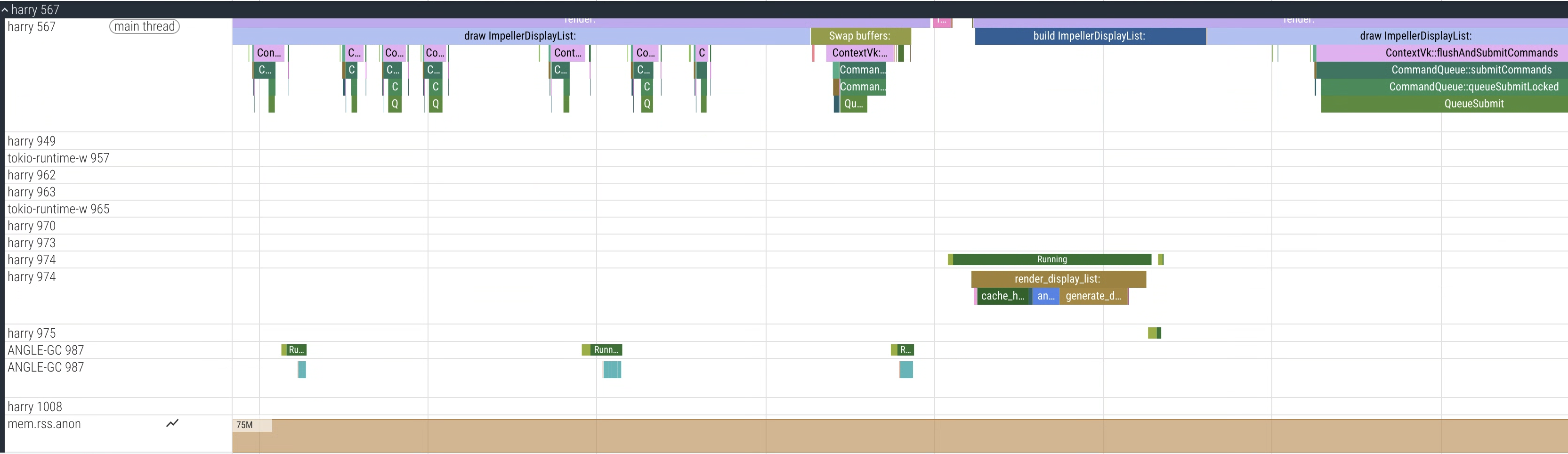
Hình 1. Giao diện người dùng Perfetto cho thấy dấu vết mẫu từ quy trình harry (HAR)
Theo dõi hiệu suất cho DriverUI
DriverUI sử dụng tính năng theo dõi hệ thống Android; bạn không cần phải thiết lập gì thêm.
Thêm dấu vết tuỳ chỉnh vào DriverUI
Bạn có thể thêm sự kiện tuỳ chỉnh vào mã Kotlin bằng Hướng dẫn dành cho nhà phát triển.
Thu thập dấu vết
Bạn nên dùng Torq để thu thập dấu vết trên AAOS.
Sử dụng Torq
Torq là một công cụ CLI dùng để thu thập dấu vết hiệu suất trên AAOS và SDV.
Sao chép kho lưu trữ Torq.
Làm theo hướng dẫn trong kho lưu trữ để tạo rồi chạy:
export ANDROID_SERIAL=<your_device_serial>
# Collect a 7 second trace
torq -d 7000
Thu thập dấu vết hiệu suất hợp nhất trên cả hai máy ảo
Vì tính năng An toàn màn hình chạy trên hai máy ảo, nên việc thu thập dấu vết từ cả hai máy ảo cùng lúc sẽ giúp xác định vấn đề.
- Torq hỗ trợ dấu vết hợp nhất thông qua
traced_relaycủa Perfetto. - Để ghi lại dấu vết hợp nhất, trước tiên, hãy xác định cid cho cả hai máy ảo:
# Get the cid for SDV Media VM. For example: 3
adb -s <sdv_media_vm_serial> shell getprop ro.sdv.vsock_local_cid

# Get the cid for SDV IVI VM. For example: 4
adb -s <sdv_ivi_vm_serial> shell getprop ro.sdv.vsock_local_cid
Trong ví dụ này, hãy dùng máy ảo SDV-Media (cid=3) làm rơ-le.
# Configure your VMs for unified tracing
torq vm configure --primary <sdv_ivi_vm_serial> --primary-cid 4 --secondary <sdv_media_vm_serial>
# Collect a 7 second trace from the SDV IVI VM, it will now collect a unified trace
torq --serial <sdv_ivi_vm_serial> -d 7000
Ví dụ:

Hình 2. Giao diện người dùng Perfetto cho thấy Dấu vết hợp nhất mẫu với cả hai quy trình từ cả hai máy ảo: harry (HAR) và com.android.car.driverui (DriverUI).
Thu thập dấu vết khởi động
Để thu thập dấu vết khởi động nhằm phân tích hiệu suất khởi động, bạn phải bật một số cờ.
Đặt cờ duy trì dành riêng cho SDV cho dấu vết khởi động.
export ANDROID_SERIAL=<your_device_serial>
adb root
adb shell setprop persist.debug.sdv.boottrace 1
adb shell setprop persist.debug.perfetto.boottrace 1
Đặt tham số cmdline của kernel
androidboot.fastboot.boottrace=enabled.
# For Cuttlefish, set when creating CVD
cvd create -extra_kernel_cmdline=androidboot.fastboot.boottrace=enabled
Sử dụng record_android_trace
Hãy thực hiện như sau:
# Set your adb device serial
export ANDROID_SERIAL=<your_device_serial>
# Run record_android_trace from the Android repo
cd /<your_repo_path>
build/envsetup.sh

$ANDROID_BUILD_TOP/external/perfetto/tools/record_android_trace --config $ANDROID_BUILD_TOP/system/software_defined_vehicle/core_services/samples/tracing/config/trace_cfg.pbtx