
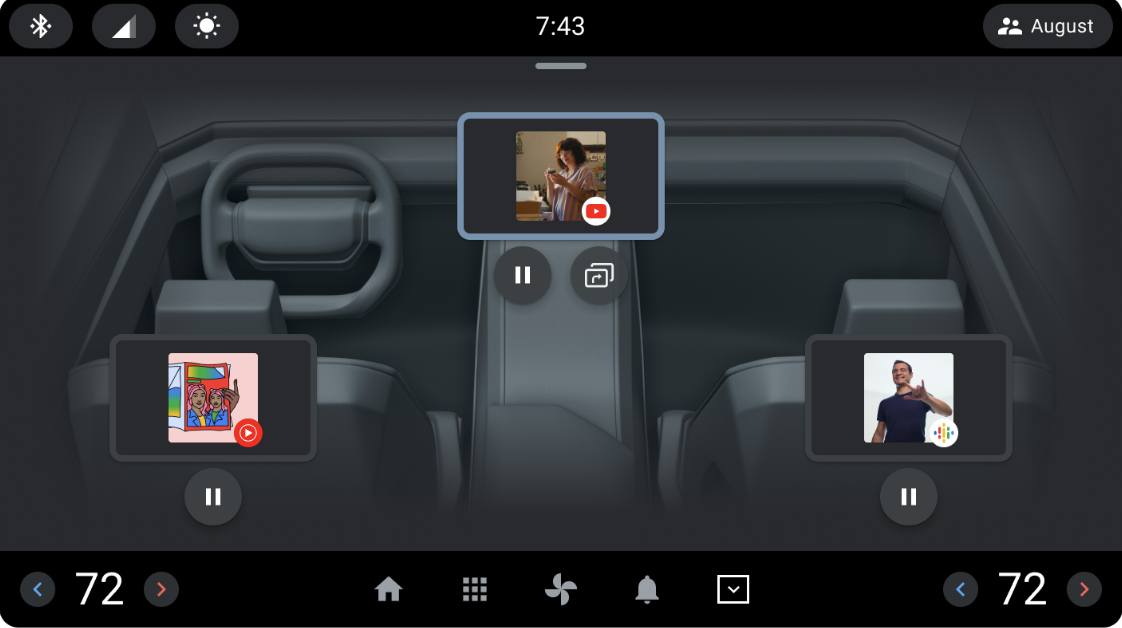
You can use the Control Center reference app to consolidate multi-display user journeys related to other occupant zones in a vehicle. For example, you can:
- View what others in the car are watching and listening to.
- Share audio to car speakers.
- Co-watch a video with other displays.
When a vehicle configuration includes one or more secondary displays, such as a rear passenger in a rear seat, use the reference app to enhance the user experience.
Android supports multiple concurrent users running on a single instance of the Android Automotive OS (AAOS). To learn more, see Android Automotive multi-user on multiple displays.
You can tailor the Control Center reference app to suit the capabilities and configuration of your intended vehicle.
Terminology
These terms are used throughout this page.
MediaBrowseService and is integrated with
automotive. For more information, see Media apps for cars overview.
This also includes any app that implements MediaSession.Features
This section describes the features provided in Control Center.
Playback control
These playback control capabilities are provided to drivers and passengers:
- View the playing media item of another occupant zone (for example, a song), including title, album art, duration, description, and progress.
- Play and pause media.
- Control the playback state of a remote display.
Audio control
Depending on role, Control Center provides these audio controls:
As a passenger:
- Opt to play your audio over one of your connected audio output sources.
- Ask the driver to play your audio over the main cabin speakers.
As a driver:
- Accept or decline a notification request from a passenger to play audio over the main cabin speakers.
As a passenger or driver:
- Assign a passenger to the cabin speakers or to a different audio output source.
Display input lock
As a driver or passenger, you can allow or disallow touches to the display of another passenger.
Display power state
As a passenger, change the power state of your display.
As the driver or another passenger, change the power state of another passenger's display.
Co-watch
As a driver or passenger:
- Start a co-watching journey by sharing a playing
MediaSessionapp with other displays. - Accept or decline a notification request to co-watch with a requestor.