
This section provides technical details specific to the Control Center reference app.
Control Center is an unbundled, privileged, system signed app that requires a
minimum SDK version of 35 (Android V (API level 35)). The app is installed in
system/priv-app to use System APIs. To read media information, the app must
be platform-signed. You can update the app Over-the-Air (OTA).
Background service
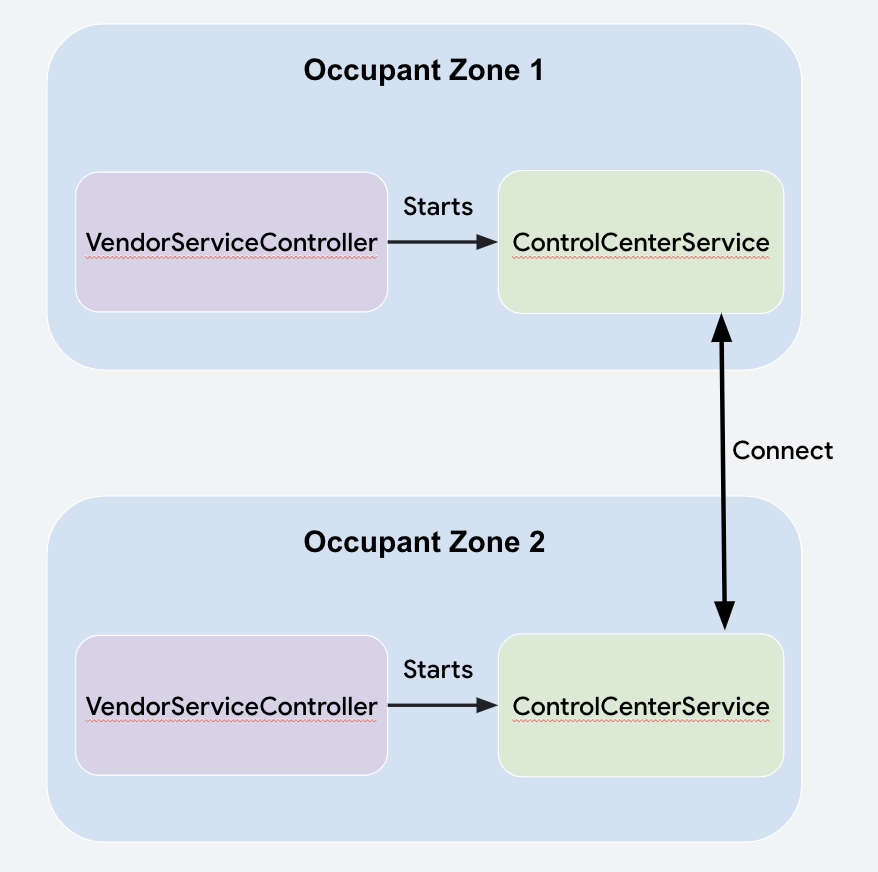
The Control Center app relies on a background service for its functionality.
Control Center Service is started on the user-post-unlocked state in the
user lifecycle by Vendor ServiceController. Control Center must always be
active and communicating in the background—the app can't rely on the app being
opened by the user.
Control Center Service connects to and communicates with other instances of
itself in other occupant zones by using the Communication API. Reading the
integration guide is essential to understanding how the Control Center instances
on each user establish connections and send and receive data.
Communication
Once connected, the Control Center Service communicates with protobuf
objects that convey information. To pass the protobuf to another occupant zone
with the Communication APIs, the protobuf is converted to a byte array,
a payload object is created, and the Payload is sent through
CarOccupantConnectionManager#sendPayload.
message ControlCenterPayload {
    required Type messageType = 1;
    // ...
    enum Type {
       MEDIA_STATUS = 0;
       MEDIA_COMMAND = 1;
       INPUT_LOCK_COMMAND = 2;
       INPUT_LOCK_SUCCESSFUL = 3;
       CANCEL_AUDIO_REQUEST = 4;
       MIRRORING_REQUEST_RECEIVER_DECISION = 5;
       MIRRORING_SESSION_ENDED = 6;
    }
}

private fun parsePayload(
    senderZone: OccupantZoneInfo,
    payload: Payload
) {
     val parsedPayload =
         ControlCenterPayload.parseFrom(payload.bytes)
             when (parsedPayload.messageType) {
                 ControlCenterPayload.Type.MEDIA_STATUS -> {
                     // logic here
                 }
             }
             //…
}
Data
Information about occupant zones is stored in the Control Center in the form of
OccupantZoneData objects. Changes to the local OccupantZoneData are sent to
other Control Center instances through the Comms API.
When the received Payload is parsed, the parsed data is passed to the local
OccupantZoneStateRepository which, in turn, notifies views of the change. Most
data is passed between classes with Kotlin flows on Android.
Handle cabin speaker audio requests
So that the driver can always receive requests for passengers to play audio
over cabin speakers, when created, the driver's Control Center Service
registers the Primary ZoneMedia Audio RequestCallback.
The callback is notified of calls to
CarAudioManager#requestMediaAudioOnPrimaryZone. The driver's
Control Center Service handles requests by creating a heads-up notification
(HUN) that can be accepted or declined through
CarAudioManager#allowMediaAudioOnPrimaryZone(boolean).
Co-watch a video with other screens
Co-watching works due to the Task Mirroring APIs in CarActivityManager. The
TaskMirroringManager searches first for the playing MediaSession app's
package in CarActivityManager#getVisibleTasks and then creates a
VirtualDisplay and moves the visible task to this display through
CarActivityManager#moveRootTaskToDisplay.
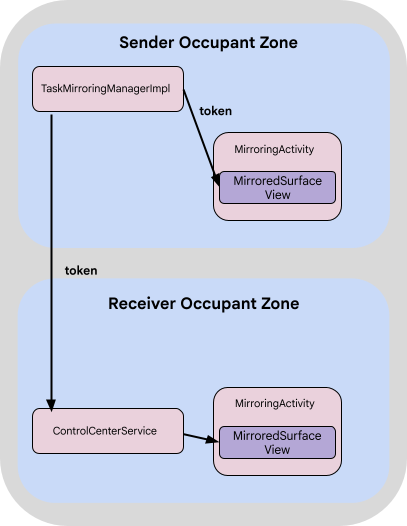
This returns an IBinder token that MirroredSurfaceView can use in a
layout to display the task through MirroredSurfaceView#mirrorSurface.
The Communication API Payload object passed the token to other occupant zones.
Each Control Center instance in those occupant zones launches a
Mirroring activity and uses that token to populate the MirroredSurfaceView.
Task mirroring APIs
Control Center uses these task mirroring APIs:
CarActivityManager#getVisibleTasks(int displayId)<ActivityManager.RunningTaskInfo> called for the sender display.CarActivityManager#moveRootTaskToDisplay(int virtualDisplayId)CarActivityManager#createTaskMirroringToken(int taskId)IBinder token and should be called after the
task is moved to the virtual display.MirroredSurfaceView#mirrorSurface(IBinder token)Limitations of task mirroring in Control Center
The Control Center only supports task mirroring for MediaSession apps.
However, the API can mirror any task. The virtual display is made with the
dimensions of the sender display. If the receiver's display uses different
resolutions and dimensions, the virtual display appears in the center of the
screen.
Surface visible tasks
Control Center extends the chassis Theme.CarUi.NoToolbar to be a translucent
window. This means that when Control Center is opened over a task, the task
is returned in CarActivityManager#getVisibleTasks, which allows the task to
be mirrored.
Receive mirroring information
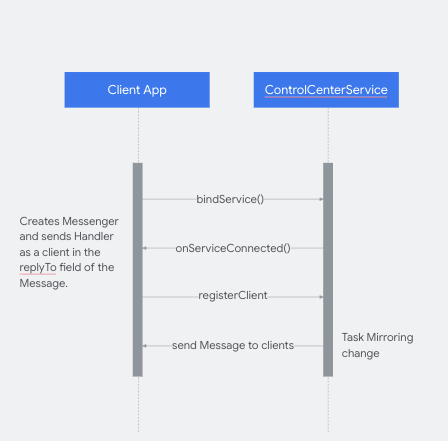
The Control Center notifies other apps of mirroring sessions. To receive
updates, apps must bind to the Control Center Service and send a Handler
class as a client, that receives and handles Messages from the Control
Center Service.
Client apps can receive the package name of the mirrored app and launch an
intent URI for the activity in Control Center hosting the mirrored app with
these keys:
_config_msg_mirroring_pkg_name_key__config_msg_mirroring_redirect_uri_key_
These configs must exist in the client app resources and in Control Center resources.
Debug Control Center
The Logger class handles Control Center logs, which can be configured to
force logs.
class Logger(cls: Class<*>) {

   companion object {
       private const val FORCE_LOGS = false
   }

   private val tag: String

   init {
       tag = cls.simpleName
   }

   fun v(message: String) {
       if (Log.isLoggable(tag, Log.VERBOSE) || FORCE_LOGS) {
           Log.v(tag, message)
       }
   }
...
System app and updatability
Because Control Center is a system app and platform-signed due to the use of signature-only permissions, Control Center must be preinstalled on the device and can be updated OTA only, similar to the Car Media App.
Build Control Center from source
To get the Control Center source code, see Integrate unbundled apps.
User privacy with multi-displays
Control Center lets all car passengers view media information on all displays. Google recommends you insert a non-blocking privacy notice to notify users. Google recommends you do this at the system level, when you sign in to a display.