

Biometrics offer a more convenient, but potentially less secure way of confirming your identity with a device. Under the tiered authentication model, primary authentication (that as, knowledge-factor based modalities such as PIN, pattern, and password) provides the highest level of security. Biometrics are in the secondary tier of authentication, offering a balance of convenience and security. The Android CDD defines three classes of biometric strength: Class 3 (formerly Strong), Class 2 (formerly Weak), and Class 1 (formerly Convenience). Each class has a set of prerequisites, privileges, and constraints - please see the CDD above for more details. All three classes are allowed to integrate with lockscreen, but only Strong and Weak authenticators are allowed to integrate with the android.hardware.biometrics APIs. This table describes each authenticator and the functionality they support.
| Authenticator | Lockscreen | BiometricPrompt Integration | Keystore (time-based key) | Keystore (operation-based key) |
|---|---|---|---|---|
| BIOMETRIC_STRONG (Class 3) | হ্যাঁ | হ্যাঁ | হ্যাঁ | হ্যাঁ |
| BIOMETRIC_WEAK (Class 2) | হ্যাঁ | হ্যাঁ | না | না |
| BIOMETRIC_CONVENIENCE (Class 1) | হ্যাঁ | না | না | না |
| DEVICE_CREDENTIAL | হ্যাঁ | হ্যাঁ | হ্যাঁ | হ্যাঁ |
The Android framework includes support for face and fingerprint biometric authentication. Android can be customized to support other biometric modalities (such as Iris). However, biometric integration will depend on biometric security, not modality. For more details on biometric security specifications, see Measuring Biometric Unlock Security .
Source
অ্যান্ড্রয়েড ১২
- Introduces the BiometricManager.Strings API, which provides localized strings for apps that use BiometricPrompt for authentication. These strings are intended to be device-aware and provide more specificity about which authentication type(s) may be used.
- আন্ডার-ডিসপ্লে ফিঙ্গারপ্রিন্ট সেন্সর (UDFPS) সাপোর্ট অন্তর্ভুক্ত।
অ্যান্ড্রয়েড ১১
- BiometricManager.Authenticators ইন্টারফেসটি চালু করা হয়েছে, যা এমন কিছু কনস্ট্যান্ট প্রদান করে যা ব্যবহার করে ডেভেলপাররা তাদের অ্যাপে গৃহীত অথেনটিকেশনের ধরন নির্দিষ্ট করতে পারেন।
-
ACTION_BIOMETRIC_ENROLLইন্টেন্ট অ্যাকশনটি যোগ করা হয়েছে, যা ব্যবহার করে ডেভেলপাররা ব্যবহারকারীকে তাদের অ্যাপের প্রয়োজনীয়তা পূরণ করে এমন একটি অথেনটিকেশন পদ্ধতি এনরোল করার জন্য নির্দেশ দিতে পারেন। - Adds the
AuthenticationResult #getAuthenticationType ()method , which developers can use to check whether the user authenticated using a biometric credential or a device credential. - BiometricPrompt ক্লাসের মধ্যে অথ-পার-ইউজ কী-গুলির জন্য অতিরিক্ত সমর্থন প্রদান করে।
অ্যান্ড্রয়েড ১০
-
BiometricManagerক্লাসটি চালু করা হয়েছে, যা ব্যবহার করে ডেভেলপাররা বায়োমেট্রিক প্রমাণীকরণের প্রাপ্যতা সম্পর্কে জানতে পারবেন। -
BiometricPromptএর জন্য ফিঙ্গারপ্রিন্ট এবং ফেস অথেন্টিকেশন ইন্টিগ্রেশন অন্তর্ভুক্ত।
Android 9
- শুধুমাত্র
BiometricPromptএর জন্য ফিঙ্গারপ্রিন্ট ইন্টিগ্রেশন অন্তর্ভুক্ত। - FingerprintManager ক্লাসটি অপ্রচলিত ঘোষণা করা হলো। আপনার বান্ডেল করা এবং সিস্টেম অ্যাপগুলো যদি এই ক্লাসটি ব্যবহার করে থাকে, তবে সেগুলোকে আপডেট করে এর পরিবর্তে
BiometricPromptএবংBiometricManagerব্যবহার করুন। -
BiometricPromptBoundKeysTestব্যবহার করেBiometricPromptপরীক্ষা করার জন্যFingerprintManagerCTS ভেরিফায়ার টেস্টগুলো আপডেট করা হয়েছে।
বাস্তবায়ন
To ensure that users and developers have a seamless biometric experience, integrate your biometric stack with BiometricPrompt , BiometricManager , and ACTION_BIOMETRIC_ENROLL APIs. Devices with biometric sensors must adhere to these strength requirements .In addition, all implementations must pass the CtsBiometricsTestCases CTS module.
To integrate your biometric stack with the ACTION_BIOMETRIC_ENROLL API:
- Modify the BiometricEnrollActivity to present your enrollment flow. Note that your biometric can be presented only if it meets the requested strength. If your device supports more than one, this action should present a list the user can choose from.
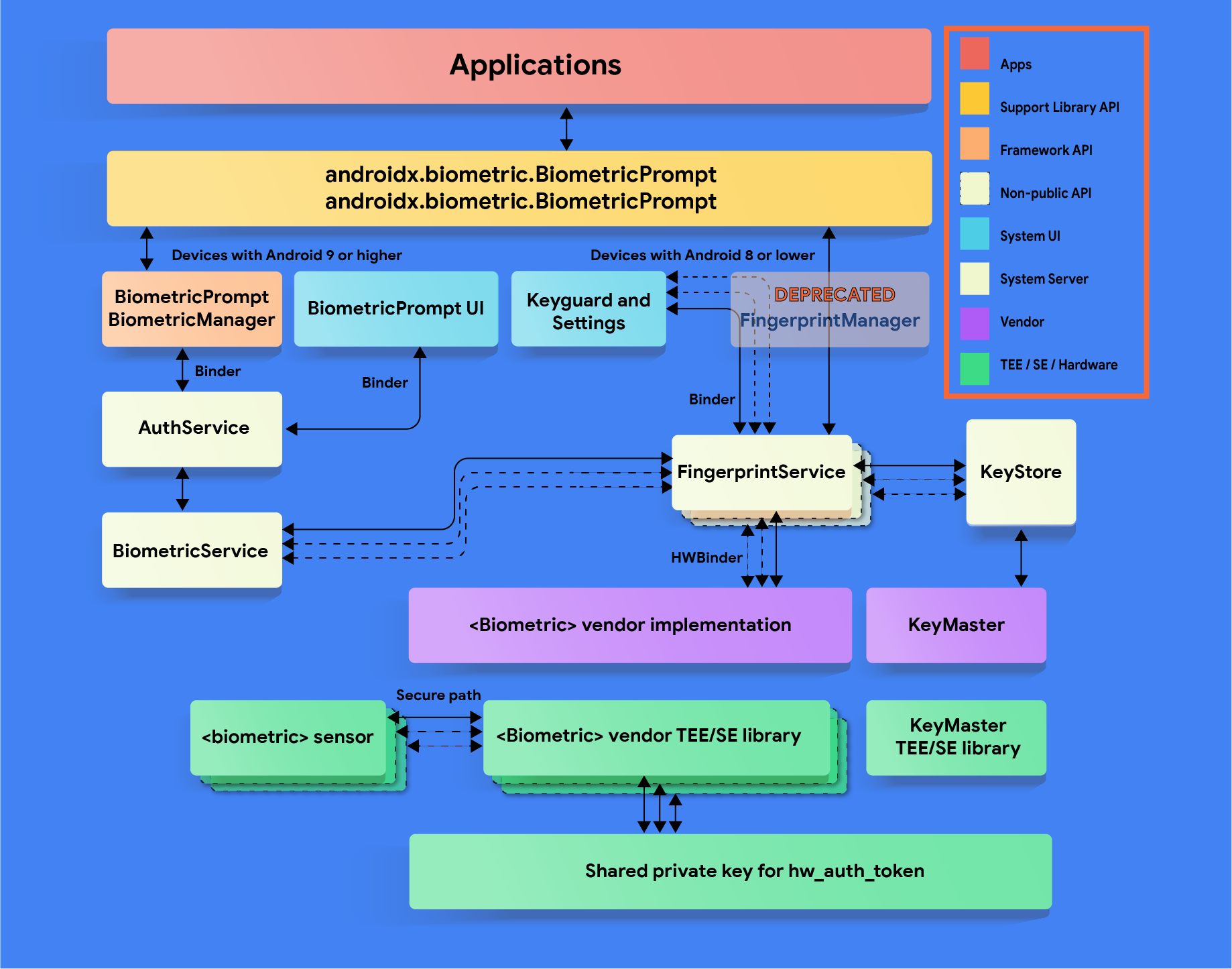
HAL implementation guidelines
বায়োমেট্রিক ডেটা যাতে ফাঁস না হয় এবং ব্যবহারকারীকে ডিভাইস থেকে সরিয়ে দেওয়ার সময় তা মুছে যায় , তা নিশ্চিত করতে এই বায়োমেট্রিক HAL নির্দেশিকাগুলো অনুসরণ করুন:
- Make sure that raw biometric data or derivatives (such as templates) are never accessible from outside the secure isolated environment (such as the TEE or Secure Element). All stored data must be encrypted with a device-specific key known only to the Trusted Execution Environment (TEE). If the hardware supports it, limit hardware access to the secure isolated environment and protect it with an SELinux policy. Make the communication channel (for example, SPI, I2C) accessible only to the secure isolated environment with an explicit SELinux policy on all device files.
- Biometric acquisition, enrollment, and recognition must occur inside the secure isolated environment to prevent data breaches and other attacks. This requirement only applies to Class 3 (formerly Strong) and Class 2 (formerly Weak) biometrics.
- To protect against replay attacks, sign biometric templates with a private, device-specific key. For Advanced Encryption Standard (AES), at a minimum sign a template with the absolute file-system path, group, and biometric ID such that template files are inoperable on another device or for anyone other than the user that enrolled them on the same device. For example, prevent copying biometric data from a different user on the same device or from another device.
- If you need to store data outside of the TEE, use the file-system path provided by the
setActiveUser() HIDL methodor provide another way to erase all user template data when the user is removed. The reason is to protect leaking of user data. Devices that don't use this path must clean up after the user is removed. It's required by CDD that biometric data and derivative files be stored encrypted - especially if not in TEE If this is infeasible due to the storage requirements of the secure isolated environment, add hooks to ensure removal of the data when the user is removed or the device is wiped. See LockSettingsService.removeBiometricsForUser()
কাস্টমাইজেশন
If your device supports multiple biometrics, the user should be able to specify a default in settings. Your BiometricPrompt implementation should prefer the Class 3 (formerly Strong) biometric as the default unless the user explicitly overrides it, then a warning message needs to be displayed explaining the risks associated with the biometric (for example, A photo of you may unlock your device )
Device-specific authentication strings
Starting in Android 12, contextual authentication strings are made available to developers through the BiometricManager.Strings API. You may customize the resource values returned by this API to implement device-specific strings. If you do, ensure that any new strings are translated for all locales that the device supports. Additionally, make sure the following properties are preserved:
পদ্ধতি | String purpose | Authentication type(s) to include | যদি বায়োমেট্রিক এবং স্ক্রিন লক উভয়ই সম্ভব হয় |
|---|---|---|---|
getButtonLabel() | Label for a button that triggers BiometricPrompt | Enrolled types only (if possible) that satisfy authenticator requirements | শুধুমাত্র বায়োমেট্রিক স্ট্রিং ব্যবহার করুন (যেমন, "আঙুলের ছাপ ব্যবহার করুন") |
getPromptMessage() | প্রমাণীকরণের সময় বায়োমেট্রিক প্রম্পটে প্রদর্শিত বার্তা | শুধুমাত্র নথিভুক্ত প্রকারগুলি (যদি সম্ভব হয়) যা প্রমাণীকরণকারীর প্রয়োজনীয়তা পূরণ করে | সম্মিলিত বায়োমেট্রিক এবং স্ক্রিন লক স্ট্রিং ব্যবহার করুন (যেমন "চালিয়ে যাওয়ার জন্য আপনার আঙুলের ছাপ বা পিন ব্যবহার করুন") |
getSettingName() | এমন একটি সেটিংয়ের নাম যা প্রমাণীকরণের জন্য বায়োমেট্রিকপ্রম্পট সক্ষম করে। | ডিভাইস দ্বারা সমর্থিত সকল প্রকার (এমনকি নথিভুক্ত না থাকলেও) যা প্রমাণীকরণকারীর প্রয়োজনীয়তা পূরণ করে। | সম্মিলিত বায়োমেট্রিক এবং স্ক্রিন লক স্ট্রিং ব্যবহার করুন (যেমন, "ফিঙ্গারপ্রিন্ট বা স্ক্রিন লক ব্যবহার করুন") |
For example, consider a device that has a Class 2 face sensor with an enrolled face , an enrolled PIN, and a Class 3 fingerprint sensor with no enrolled fingerprints . The following table provides sample strings for each combination of allowed authenticators and invoked BiometricManager.Strings method:
Allowed authenticators | getButtonLabel() | getPromptMessage() | getSettingName() |
|---|---|---|---|
Class 3 biometric ( BIOMETRIC_STRONG ) | "Use fingerprint" (শুধুমাত্র আঙুলের ছাপই প্রমাণীকরণের শর্ত পূরণ করে) | "Use your fingerprint to continue" (শুধুমাত্র আঙুলের ছাপই প্রমাণীকরণের শর্ত পূরণ করে) | "Use fingerprint" (Only fingerprint satisfies authenticator requirements) |
Class 2 biometric ( BIOMETRIC_WEAK ) | "Use face" (মুখমণ্ডল ও আঙুলের ছাপ উভয়ই শর্ত পূরণ করে; শুধুমাত্র মুখমণ্ডল নথিভুক্ত করা হয়) | "Use your face to continue" (মুখমণ্ডল ও আঙুলের ছাপ উভয়ই শর্ত পূরণ করে; শুধুমাত্র মুখমণ্ডল নথিভুক্ত করা হয়) | "Use face or fingerprint" (মুখ এবং আঙুলের ছাপ উভয়ই প্রয়োজন মেটায়; ডিভাইসটি উভয়ই সমর্থন করে) |
Screen lock ( DEVICE_CREDENTIAL ) | "Use PIN" (যেকোনো স্ক্রিন লকই শর্ত পূরণ করে; পিন নথিভুক্ত করা হয়েছে) | "Enter your PIN to continue" (Any screen lock satisfies requirements; PIN is enrolled) | "Use screen lock" (Any screen lock satisfies requirements) |
Class 3 biometric OR screen lock | "Use PIN" (ফিঙ্গারপ্রিন্ট এবং যেকোনো স্ক্রিন লক শর্ত পূরণ করে; শুধুমাত্র পিন নথিভুক্ত করা হয়েছে) | "Enter your PIN to continue" (ফিঙ্গারপ্রিন্ট এবং যেকোনো স্ক্রিন লক শর্ত পূরণ করে; শুধুমাত্র পিন নথিভুক্ত করা হয়েছে) | "Use fingerprint or screen lock" (ফিঙ্গারপ্রিন্ট এবং যেকোনো স্ক্রিন লক শর্ত পূরণ করে) |
Class 2 biometric OR screen lock | "Use face" (মুখ, আঙুলের ছাপ এবং যেকোনো স্ক্রিন লক শর্ত পূরণ করে; মুখ নথিভুক্ত করা হয়েছে এবং এটি পিনকে বাতিল করে দেয়) | "Use your face or PIN to continue" (Face, fingerprint, and any screen lock satisfy requirements; face and PIN are enrolled) | "Use biometrics or screen lock" (মুখ, আঙুলের ছাপ এবং যেকোনো স্ক্রিন লক শর্ত পূরণ করে) |
বৈধতা
আপনার বায়োমেট্রিক বাস্তবায়নকে অবশ্যই নিম্নলিখিত পরীক্ষাগুলিতে উত্তীর্ণ হতে হবে:
- CTS BiometricManager
- CTS বায়োমেট্রিকপ্রম্পট (যাচাইকারীর উপর নির্ভর করে যৌক্তিকতা ও গভীর পরীক্ষা)
- CtsVerifier বায়োমেট্রিক টেস্ট সেকশন : ডিভাইসটি যে যে মোডালিটি সাপোর্ট করে, তার প্রত্যেকটিতে আলাদাভাবে পাস করতে হবে।
এছাড়াও, যদি আপনার ডিভাইসটি AOSP HIDL ( fingerprint@2.1 , fingerprint@2.2 , face1.0 ) যুক্ত কোনো বায়োমেট্রিক সমর্থন করে, তবে এটিকে অবশ্যই এর প্রাসঙ্গিক VTS পরীক্ষা ( fingerprint , face ) পাস করতে হবে।