

Car Messenger มีฟังก์ชันการรับส่งข้อความที่ออกแบบมาสำหรับอุปกรณ์ยานยนต์ โดยผู้ใช้จะเริ่มใช้ Car Messenger จาก Launcher เช่นเดียวกับแอปอื่นๆ ในรถยนต์
มีอะไรใหม่ใน Car Messenger
แอป Car Messenger ใหม่ช่วยให้ผู้ขับขี่ทำสิ่งต่อไปนี้ได้
- รับประสบการณ์การรับส่งข้อความโดยเฉพาะ
- เปิด Car Messenger จาก Launcher
- เรียกดูข้อความที่ได้รับก่อนและระหว่างขับรถ
- ฟังและตอบกลับข้อความ
- ปิดเสียงการแจ้งเตือนข้อความ
- เริ่มการสนทนาใหม่
คำศัพท์
เราใช้คำศัพท์ต่อไปนี้ในหน้านี้
สิทธิประโยชน์ของแอปที่แยกออกมา
แอปที่แยกออกมา เช่น Car Messenger มีข้อดีดังนี้
- ใช้เฉพาะเมธอดสาธารณะ (ไม่มีการพึ่งพาแพลตฟอร์มใน API ที่ซ่อนอยู่)
- พัฒนาแอปนอกแพลตฟอร์ม Android
- เปิดตัวแอปได้บ่อยขึ้น (สำหรับฟีเจอร์ใหม่และปัญหาที่ได้รับการแก้ไข)
- อัปเดตแอปผ่าน Google Play
ดูข้อมูลเพิ่มเติมเกี่ยวกับแอปที่แยกออกมา
รายละเอียดทางเทคนิค
ส่วนนี้จะอธิบายสถาปัตยกรรมของ Car Messenger ดูข้อมูลเพิ่มเติมได้ที่ ผสานรวมกับ CarVoiceInteractionSession
สถาปัตยกรรมที่อิงตามโทรคมนาคม
เมื่อจับคู่ผ่านบลูทูธ ระบบจะซิงค์ข้อมูลจากฐานข้อมูลโทรคมนาคมของโทรศัพท์ ไปยังฐานข้อมูลโทรคมนาคมของรถยนต์ เมื่อบลูทูธตัดการเชื่อมต่อ ระบบจะลบข้อมูลที่ซิงค์ออกจากฐานข้อมูลโทรคมนาคมของรถยนต์
ความสามารถนี้เปิดตัวใน Android 12 สิทธิประโยชน์หลักๆ ได้แก่
- ดึงข้อความของผู้ใช้จำนวนมากจากฐานข้อมูลได้
- รองรับข้อความจากการขับรถครั้งก่อนๆ
- ใช้สถาปัตยกรรมและ API ที่คล้ายกันสำหรับการจัดเก็บและดึงข้อมูล SMS ในโทรศัพท์ Android
- แยกออกมาจากแพลตฟอร์ม Android อย่างสมบูรณ์
ขั้นตอนการทำงานมีดังนี้
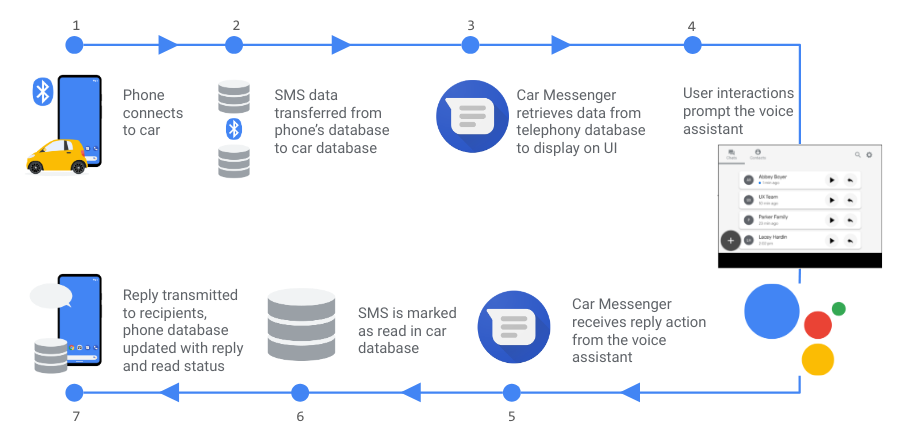 รูปที่ 1 โฟลว์ข้อมูลที่อิงตามโทรคมนาคม
ขั้นตอนการทำงานที่แสดงในรูปแบบข้อความ
 1. Phone connects to car.
    |
    --> 2. SMS data transferred from phone's database to car database.
          |
          --> 3. Car Messenger retrieves data from telephony database to display on UI.
                  |
                  --> 4. User interactions prompt the voice assistant.
                  |
          <-- 5. Car Messenger receives reply action from the voice assistant.
          |
    <-- 6. SMS is marked as read in car database.
    |
 7. Reply transmitted to recipients, phone database updated with reply and read status.
สิ่งที่เราทำกับข้อมูลมีดังนี้
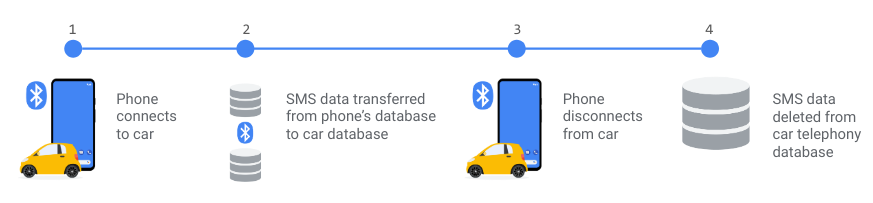 รูปที่ 2 การจัดการข้อมูลของ Car Messenger
ขั้นตอนการทำงานที่แสดงในรูปแบบข้อความ
 1. Phone connects to car.
    |
    --> 2. SMS data transferred from phone's database to car database.
          |
          --> 3. Phone disconnects from car.
                  |
                  --> 4. SMS data deleted from car telephony database.
- เมื่อเชื่อมต่อ ระบบจะโอนข้อมูลจากโทรศัพท์ไปยังรถยนต์โดยใช้บลูทูธ MAP
- เมื่อยกเลิกการเชื่อมต่อ ระบบจะลบข้อมูลของโทรศัพท์เครื่องนั้นออกจากฐานข้อมูลของรถยนต์
ดาวน์โหลด Car Messenger
ดาวน์โหลดคอมมิตล่าสุดของ Car Messenger จาก Google Git
API การโต้ตอบด้วยเสียง
Car Messenger ใช้ CarVoiceInteractionSession API เพื่อผสานรวมกับ Assistant ซึ่งเราจะอธิบายองค์ประกอบเหล่านี้ในส่วนต่อไปนี้
โมเดล PendingIntent
API เหล่านี้ใช้ PendingIntent เพื่อส่งคำค้นหาที่แก้ไขแล้วของ Assistant กลับไปยัง
Car Messenger
ลำดับเหตุการณ์มีดังนี้
Car Messenger เปิดใช้ Assistant โดยเรียก
activity.showAssist(Bundle args)โดย args จะมีการดำเนินการ API และพารามิเตอร์ที่จำเป็น ซึ่งมี Intent รอดำเนินการ หากจำเป็นAssistant ดึงข้อมูลจากผู้ใช้หากจำเป็น และรวมข้อมูลดังกล่าวเข้ากับ Intent รอดำเนินการ
Assistant ส่ง Intent กลับไปยัง Car Messenger
Car Messenger แก้ไข การดำเนินการ API
การดำเนินการ API ทำเครื่องหมายว่าอ่านแล้ว
เมื่อ Assistant อ่านข้อความ ระบบจะส่ง PendingIntent ไปยัง Car
Messenger พร้อมการดำเนินการ VOICE_ACTION_READ_NOTIFICATION หรือ
VOICE_ACTION_READ_CONVERSATION เพื่อทำเครื่องหมายข้อความว่าอ่านแล้ว
การดำเนินการ API ตอบกลับโดยตรง
เมื่อ Assistant ตอบกลับข้อความ ระบบจะส่ง PendingIntent ไปยัง Car
Messenger พร้อมการดำเนินการ VOICE_ACTION_REPLY_NOTIFICATION และ
VOICE_ACTION_REPLY_CONVERSATION เพื่อตอบกลับการสนทนา
การดำเนินการ API ส่ง SMS โดยตรง
ระบบจะส่ง Bundle ที่มีการดำเนินการ VOICE_ACTION_SEND_SMS จาก Car Messenger ไปยัง
Assistant
โค้ดตัวอย่าง
/**
 *   KEY_PHONE_NUMBER - Recipient’s phone number. If this and the recipients name are not
 *   provided by the application, assistant must do contact disambiguation but is not required
 *   to add the name to the PendingIntent.
 *
 *   KEY_RECIPIENT_NAME - Recipient’s name. If this and the recipient phone number are not
 *   provided by the application, assistant must do contact disambiguation but is not required
 *   to add the name to the PendingIntent.
 *
 *   KEY_RECIPIENT_UID - Recipient’s UID in the ContactProvider database. Optionally provided
 *   by the application. Not required to be sent back by the assistant.
 *
 *   KEY_DEVICE_NAME - Friendly name of the device in which to send the message from. If not
 *   provided by the application, assistant must do device disambiguation but is not required
 *   to add it to PendingIntent. In V1 this is required to be sent by the application.
 *
 *   KEY_DEVICE_ADDRESS - Bluetooth device address of the device in which to send the message
 *   from. If not provided by the application, assistant must do device disambiguation and add
 *   this to the PendingIntent. In V1 this is required to be sent by the application.
 *
 *   KEY_SEND_PENDING_INTENT - @NotNull Will always be provided by the application. The
 *   application must preload the pending intent with any KEYs it provides the assistant that
 *   is also needed to send the message. (I.e if the application passes in the
 *   KEY_PHONE_NUMBER in the Bundle, the assistant can assume the application has already put
 *   this in the PendingIntent and may not re-add it to the PendingIntent).
 *
 */
public static final String KEY_PHONE_NUMBER = “KEY_PHONE_NUMBER”;
public static final String KEY_RECIPIENT_NAME = “KEY_RECIPIENT_NAME”;
public static final String KEY_RECIPIENT_UID = “KEY_RECIPIENT_UID”;
public static final String KEY_DEVICE_NAME = “KEY_DEVICE_NAME”;
public static final String KEY_DEVICE_ADDRESS = “KEY_DEVICE_NAME”;
public static final String KEY_SEND_PENDING_INTENT =”KEY_SEND_PENDING_INTENT”;
รูปภาพนี้แสดงการเขียนข้อความเมื่อเลือกผู้รับ
 รูปที่ 3 หน้า "รายชื่อติดต่อ" ในแอปแป้นโทรศัพท์
รูปภาพนี้แสดงการเขียนข้อความเมื่อไม่ได้เลือกผู้รับโดยใช้ ข้อความใหม่:
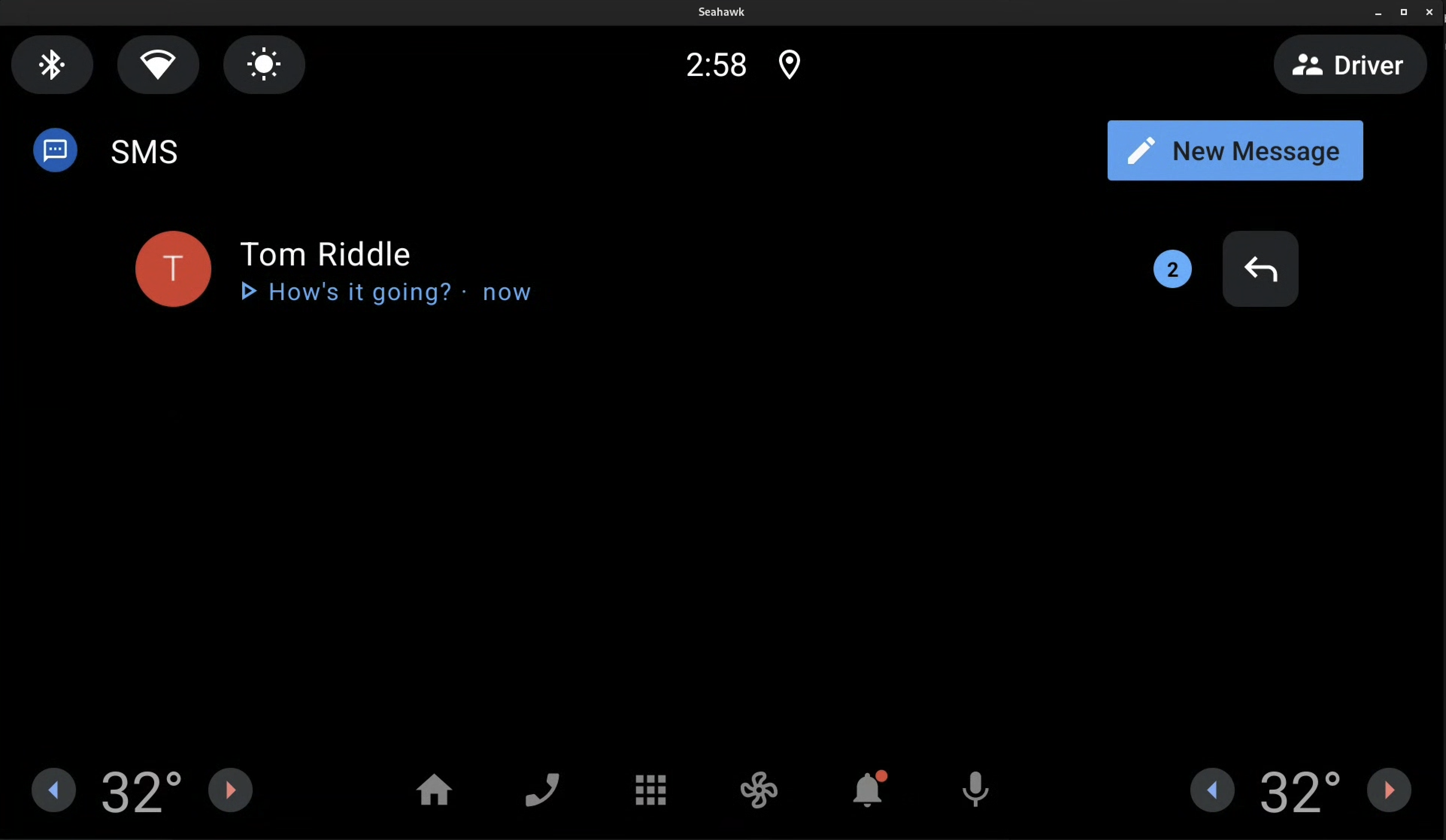 รูปที่ 4 ปุ่ม "ข้อความใหม่" ในแอป Messenger
ผสานรวมการดำเนินการส่ง SMS โดยตรง
ตัวอย่างต่อไปนี้แสดงการผสานรวม ตัวอย่าง ของแอปแป้นโทรศัพท์ VOICE_ACTION_SEND_SMS ซึ่งมีพารามิเตอร์ที่ไม่บังคับ
    /**
     * Build the {@link Bundle} to pass to assistant to send a sms.
     */
    public Bundle buildDirectSendBundle(String number, String name, String uid,
                                        BluetoothDevice device) {
        Bundle bundle = new Bundle();
        bundle.putString(CarVoiceInteractionSession.KEY_ACTION, VOICE_ACTION_SEND_SMS);
        // start optional parameters
        bundle.putString(CarVoiceInteractionSession.KEY_PHONE_NUMBER, number);
        bundle.putString(CarVoiceInteractionSession.KEY_RECIPIENT_NAME, name);
        bundle.putString(CarVoiceInteractionSession.KEY_RECIPIENT_UID, uid);
        // end optional parameters
        bundle.putString(CarVoiceInteractionSession.KEY_DEVICE_ADDRESS, device.getAddress());
        bundle.putString(CarVoiceInteractionSession.KEY_DEVICE_NAME,
                DialerUtils.getDeviceName(mContext, device));
        Intent intent = new Intent(mContext, MessagingService.class)
                .setAction(ACTION_DIRECT_SEND)
                .setClass(mContext, MessagingService.class);

        int requestCode = ACTION_DIRECT_SEND.hashCode();
        PendingIntent pendingIntent = PendingIntent.getForegroundService(
                mContext, requestCode, intent,
                PendingIntent.FLAG_ONE_SHOT | PendingIntent.FLAG_IMMUTABLE);

        bundle.putParcelable(KEY_SEND_PENDING_INTENT, pendingIntent);
        return bundle;
    }
การปรับปรุง TTR และการตอบกลับโดยตรง
ตอนนี้ API ที่อัปเดตแล้วใช้คลาส Conversation ที่หลากหลาย
ซึ่งช่วยให้ดำเนินการได้นอกขอบเขตการแจ้งเตือนและขยายความสามารถ
ภายในบริบทของแอป โดยจะแทนที่ข้อกำหนดก่อนหน้านี้ที่ต้องใช้คลาส
StatusBarNotification
แก้ไขข้อบกพร่องของ Car Messenger
ดูข้อมูลเพิ่มเติมเกี่ยวกับการแก้ไขข้อบกพร่องของ Car Messenger ได้ในส่วนต่อไปนี้
แก้ไขข้อบกพร่องของการเชื่อมต่อบลูทูธ
เรียกใช้คำสั่ง
dumpsysadb shell dumpsys bluetooth_manager- ค้นหา
MapClientServiceในเอาต์พุตจากคำสั่ง dumpsys
Profile: MapClientService mCurrentDevice: 99:99 (Pixel XL) name=Mce state=Connected- ค้นหา
ยืนยันว่าอุปกรณ์ที่ถูกต้องแสดงอยู่ เช่น
 รูปที่ 5 รายการอุปกรณ์
หากไม่พบอุปกรณ์ ให้ทำอย่างใดอย่างหนึ่ง ต่อไปนี้
- เชื่อมต่อบลูทูธอีกครั้ง
หรือ
- ในการตั้งค่าบลูทูธ ให้ตรวจสอบว่าข้อความ SMS เปิดอยู่
หรือ
- ในโทรศัพท์ ให้ตรวจสอบว่าได้รับสิทธิ์การเข้าถึงข้อความ แล้ว
แก้ไขข้อบกพร่องของฐานข้อมูลบลูทูธ
Car Messenger สร้างขึ้นบนฐานข้อมูลโทรคมนาคม หากต้องการตรวจสอบว่าบลูทูธกำลังป้อนข้อมูลลงในฐานข้อมูลดังกล่าวหรือไม่ คุณสามารถใช้คำสั่งในตารางได้
| งาน | คำสั่ง |
|---|---|
| การสนทนา | adb shell content query --uri content://mms-sms/conversations?simple=true |
| ข้อความ SMS เท่านั้น | adb shell content query --uri content://sms |
| ข้อความ MMS/SMS | adb shell content query --uri content://mms-sms/conversations |
| ข้อความ MMS เท่านั้น | adb shell content query --uri content://mms |
| กล่องจดหมาย MMS เท่านั้น | adb shell content query --uri content://mms/conversations/inbox |
| ข้อความ SMS ที่ส่งแล้วเท่านั้น | adb shell content query --uri content://sms/sent |
| กล่องจดหมาย SMS เท่านั้น | adb shell content query --uri content://sms/conversations/inbox |
| ส่วนที่ 1 ของข้อความ MMS (แทนที่ 1 ด้วยรหัสของ MMS) |
adb shell content query --uri content://mms/part/1 |
แก้ไขข้อบกพร่องของ Car Messenger และคำค้นหาของผู้ช่วยแบบเสียง
ระบบจะพิมพ์บันทึกโดยค่าเริ่มต้นหากรูปภาพบิลด์เป็น eng หรือ userdebug
หากต้องการเปิดใช้การบันทึกสำหรับ Car Messenger ให้ทำดังนี้
เรียกใช้สำหรับแท็กที่เกี่ยวข้อง
adb shell setprop log.tag.<TAG> DEBUGเปิดใช้การบันทึกสำหรับ Assistant ที่โหลดไว้ล่วงหน้า
สำหรับข้อบกพร่องที่ทำซ้ำได้ง่าย ให้พิจารณาใช้เบรกพอยต์กับ Android Studio