

本節提供 Control Center 參考應用程式的專屬技術詳細資料。
「控制中心」是未綁定的系統簽署應用程式,需要最低 SDK 版本 35 (Android V (API 級別 35))。應用程式會安裝在 system/priv-app,以便使用 System APIs。應用程式必須經過平台簽署,才能讀取媒體資訊。你可以透過無線更新 (OTA) 更新應用程式。
背景服務
「控制中心」應用程式的功能需要背景服務才能運作。
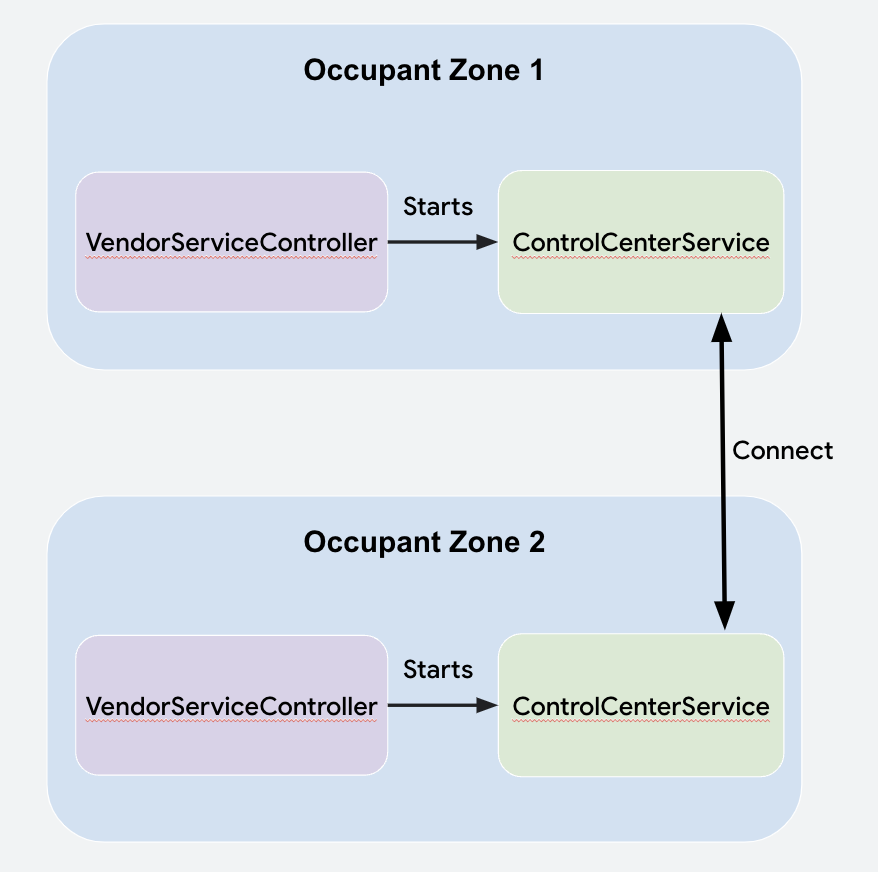
Control Center Service會在使用者生命週期的 user-post-unlocked 狀態中啟動 Vendor ServiceController。控制中心必須一律處於啟用狀態,並在背景中通訊,應用程式不能仰賴使用者開啟應用程式。
Control Center Service 會使用 Communication API 連線至其他乘客區域的自身執行個體,並與其通訊。請務必閱讀整合指南,瞭解各個使用者的控制中心執行個體如何建立連線,以及傳送和接收資料。
通訊
連線後,Control Center Service 會與傳達資訊的 protobuf 物件通訊。如要將 protobuf 傳遞至其他住戶區域 (Communication APIs),protobuf 會轉換為 byte array,並建立 payload object,然後透過 CarOccupantConnectionManager#sendPayload 傳送 Payload。
message ControlCenterPayload {
    required Type messageType = 1;
    // ...
    enum Type {
       MEDIA_STATUS = 0;
       MEDIA_COMMAND = 1;
       INPUT_LOCK_COMMAND = 2;
       INPUT_LOCK_SUCCESSFUL = 3;
       CANCEL_AUDIO_REQUEST = 4;
       MIRRORING_REQUEST_RECEIVER_DECISION = 5;
       MIRRORING_SESSION_ENDED = 6;
    }
}

private fun parsePayload(
    senderZone: OccupantZoneInfo,
    payload: Payload
) {
     val parsedPayload =
         ControlCenterPayload.parseFrom(payload.bytes)
             when (parsedPayload.messageType) {
                 ControlCenterPayload.Type.MEDIA_STATUS -> {
                     // logic here
                 }
             }
             //…
}
資料
居住者區域的相關資訊會以 OccupantZoneData 物件的形式儲存在控制中心。對本機「OccupantZoneData」所做的變更會透過「Comms API」傳送至其他控制中心執行個體。
剖析收到的 Payload 時,剖析的資料會傳遞至本機 OccupantZoneStateRepository,後者會通知檢視區塊變更。大多數資料會透過類別間的 Kotlin flows on Android 傳遞。
處理車內音響音訊要求
為確保駕駛人隨時能收到乘客透過車廂喇叭播放音訊的要求,建立 Control Center Service 時,駕駛人的 會註冊 Primary ZoneMedia Audio RequestCallback。
回呼會收到對 CarAudioManager#requestMediaAudioOnPrimaryZone 的呼叫通知。驅動程式會建立抬頭通知 (HUN),藉此Control Center Service處理要求,使用者可透過 CarAudioManager#allowMediaAudioOnPrimaryZone(boolean) 接受或拒絕通知。
透過其他螢幕共同觀看影片
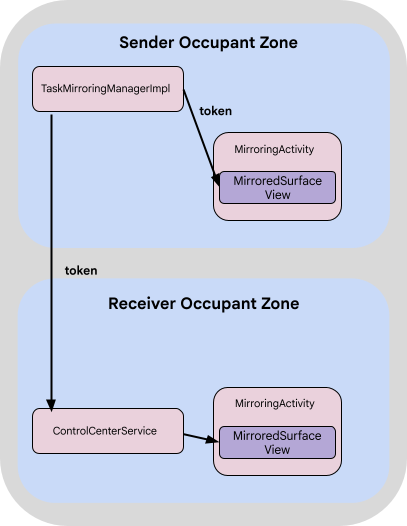
共同觀看功能之所以能運作,是因為 CarActivityManager 中有 Task Mirroring APIs。TaskMirroringManager 會先在 CarActivityManager#getVisibleTasks 中搜尋正在播放的 MediaSession 應用程式套件,然後建立 VirtualDisplay,並透過 CarActivityManager#moveRootTaskToDisplay 將可見工作移至這個螢幕。
這會傳回 IBinder 權杖,MirroredSurfaceView 可在版面配置中使用該權杖,透過 MirroredSurfaceView#mirrorSurface 顯示工作。Communication API Payload 物件已將權杖傳遞至其他居住者區域。
這些住戶區域中的每個控制中心執行個體都會啟動 Mirroring activity,並使用該權杖填入 MirroredSurfaceView。
工作鏡像 API
控制中心使用下列工作鏡像 API:
CarActivityManager#getVisibleTasks(int displayId)<ActivityManager.RunningTaskInfo>撥打電話給寄件者顯示器。CarActivityManager#moveRootTaskToDisplay(int virtualDisplayId)CarActivityManager#createTaskMirroringToken(int taskId)IBinder 權杖,且應在工作移至虛擬螢幕後呼叫。MirroredSurfaceView#mirrorSurface(IBinder token)控制中心的工作鏡像限制
控制中心僅支援 MediaSession 應用程式的任務鏡像功能。
不過,API 可以反映任何工作。虛擬螢幕的尺寸與傳送者螢幕相同。如果接收端的螢幕使用不同的解析度和尺寸,虛擬螢幕會顯示在畫面中央。
顯示可見的任務
控制中心會將底盤延伸為半透明視窗 Theme.CarUi.NoToolbar。也就是說,當「控制中心」在工作上開啟時,工作會以 CarActivityManager#getVisibleTasks 傳回,因此可以鏡像輸出。
接收鏡像資訊
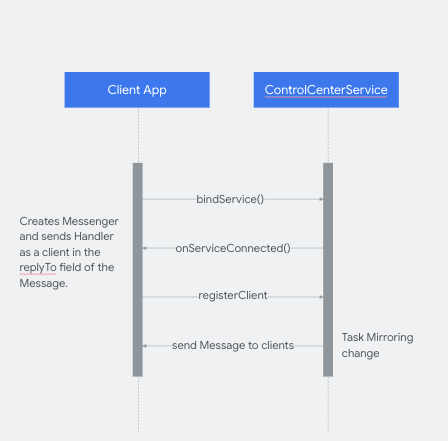
控制中心會將鏡像工作階段通知其他應用程式。如要接收更新,應用程式必須繫結至 Control Center Service,並傳送 Handler 類別做為用戶端,接收及處理來自 Control
Center Service 的 Messages。
用戶端應用程式可以接收鏡像應用程式的套件名稱,並使用下列鍵啟動 intent URI,在「控制中心」中啟動鏡像應用程式的活動:
_config_msg_mirroring_pkg_name_key__config_msg_mirroring_redirect_uri_key_
這些設定必須存在於用戶端應用程式資源和控制中心資源中。
偵錯控制中心
Logger 類別會處理控制中心記錄,可設定為強制記錄。
class Logger(cls: Class<*>) {

   companion object {
       private const val FORCE_LOGS = false
   }

   private val tag: String

   init {
       tag = cls.simpleName
   }

   fun v(message: String) {
       if (Log.isLoggable(tag, Log.VERBOSE) || FORCE_LOGS) {
           Log.v(tag, message)
       }
   }
...
系統應用程式和更新能力
由於「控制中心」是系統應用程式,且因使用僅限簽章的權限而經過平台簽署,因此必須預先安裝在裝置上,且只能透過 OTA 更新,與 Car Media App 類似。
從來源建構控制中心
如要取得控制中心原始碼,請參閱「整合未綁定的應用程式」。
使用多螢幕時的隱私權
所有車輛乘客都能透過控制中心,在所有螢幕上查看媒體資訊。 Google 建議您插入非封鎖式隱私權聲明,告知使用者相關資訊。Google 建議您在登入螢幕時,於系統層級執行這項操作。