

隨著 Android 轉向持續發布和每季公告,成為風險控管安全更新的一部分,OEM 可能會想在發布之間修正漏洞,而不是等待整個季度。透過補充安全性修補程式 XML 功能,原始設備製造商 (OEM) 可以提供標準化 XML 檔案,回報已修補的 CVE,這些 CVE 超出聲明的安全性修補程式等級 (SPL),因此 OEM 可因持續修補而獲得積分。
高階流程
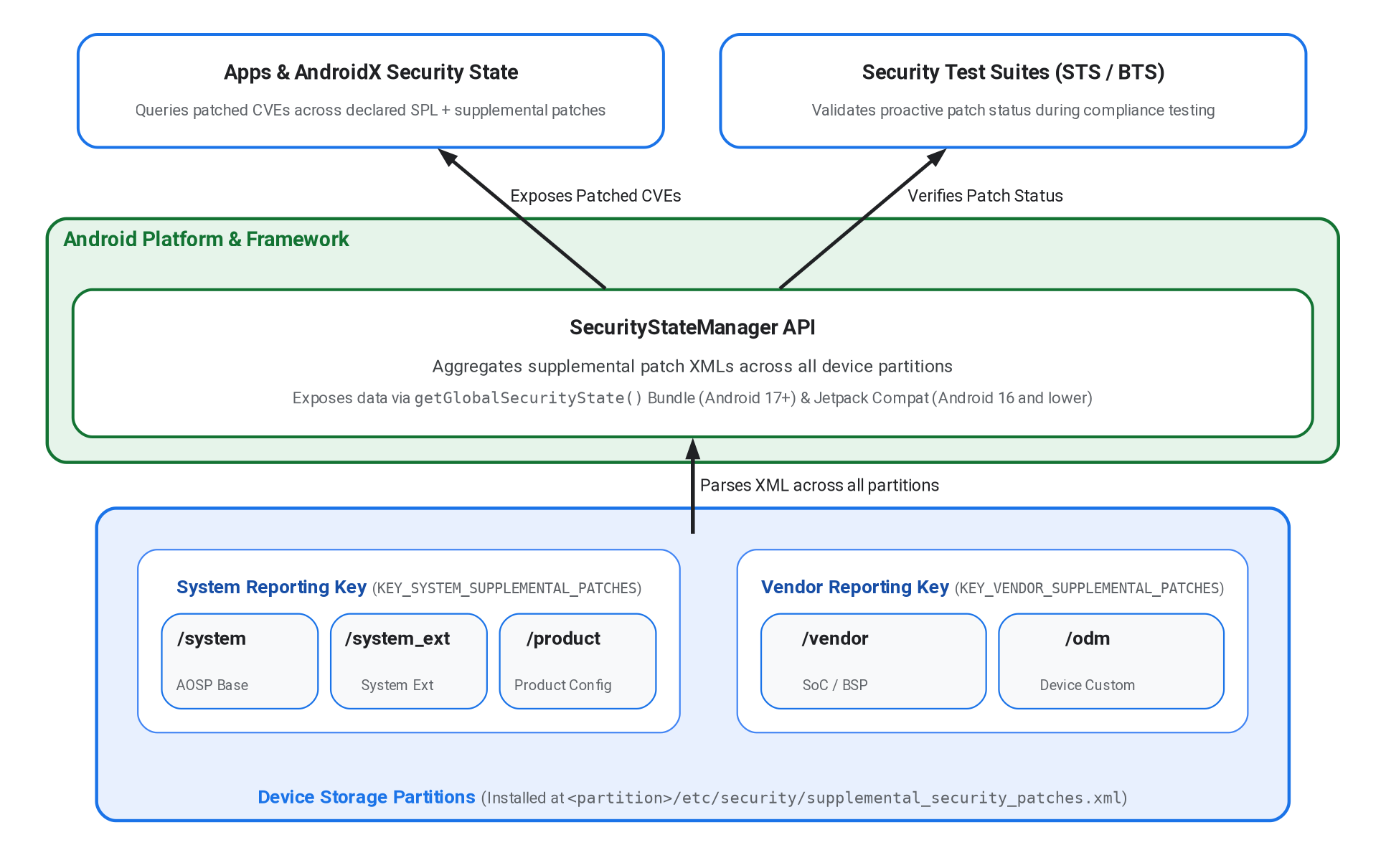
圖 1. 補充安全修補程式架構和資料流程。
原始設備製造商 (OEM) 可將 XML 檔案放在多個裝置分割區 (/system、/vendor 或 /product),確保架構和硬體專屬元件的安全修補程式都已納入考量。XML 檔案應安裝在相應分區的 /etc/security/supplemental_security_patches.xml 中。
這個平台會彙整這些裝置分割區的 CVE 資料,並在平台 API 和 Jetpack 程式庫中公開這些資料。詳情請參閱「平台 API Android 17 以上版本」和「回溯移植到較舊的 Android 版本」。
以下範例顯示安裝在 Android 裝置上的補充安全性修補程式 XML 檔案:
<?xml version="1.0" encoding="utf-8"?>
<security-patches xmlns="http://schemas.android.com/security/patches/1.0">
    <patch><id>CVE-2026-12345</id></patch>
</security-patches>
平台 API (Android 17 以上版本)
如果是 Android 17 (API 級別 37) 以上版本,平台會使用 SecurityStateManager 從所有支援的分割區位置剖析補充修補程式,並使用 KEY_SYSTEM_SUPPLEMENTAL_PATCHES 和 KEY_VENDOR_SUPPLEMENTAL_PATCHES 金鑰,在 getGlobalSecurityState 傳回的 Bundle 中公開這些修補程式。
系統服務 SecurityStateManagerService 會將分割區 XML 檔案匯總到下列兩個傘狀報表儲存區:
KEY_SYSTEM_SUPPLEMENTAL_PATCHES:從/system、/system_ext和/product分區路徑匯總修補程式。KEY_VENDOR_SUPPLEMENTAL_PATCHES:匯總/vendor和/odm分區路徑的修補程式。
回溯移植到較舊的 Android 版本
Android 16 以下版本不支援平台 API。而是由 Jetpack androidx.security:security-state 程式庫 (SecurityStateManagerCompat) 使用 XmlPullParser 手動讀取 XML 檔案。如要允許 untrusted_app 網域讀取 Android 16 以下版本的檔案,原始設備製造商必須在安裝 XML 檔案的所有分割區路徑中,實作下列 SELinux 變更:
file_contexts:
/(system|vendor|product|system_ext|odm)/etc/security/supplemental_security_patches\.xml u:object_r:supplemental_security_patches:s0
supplemental_security_patches.te:
allow untrusted_app supplemental_security_patches:file { getattr open read };
建構規則和結構定義驗證
如要將補充修補程式 XML 檔案安裝至 /vendor/etc/security/、/system/etc/security/ 或 /product/etc/security/,請在 Android.bp 中新增 prebuilt_etc 規則。由於 SecurityStateManagerService 預期裝置上的檔案名稱為 supplemental_security_patches.xml,因此使用特定分割區的模組名稱時,請使用 filename 屬性:
// For vendor partition (/vendor/etc/security/supplemental_security_patches.xml)
prebuilt_etc {
    name: "vendor_supplemental_security_patches.xml",
    src: "supplemental_security_patches.xml",
    filename: "supplemental_security_patches.xml",
    sub_dir: "security",
    vendor: true,
}
// For system partition (/system/etc/security/supplemental_security_patches.xml)
prebuilt_etc {
    name: "system_supplemental_security_patches.xml",
    src: "supplemental_security_patches.xml",
    filename: "supplemental_security_patches.xml",
    sub_dir: "security",
}
// For product partition (/product/etc/security/supplemental_security_patches.xml)
prebuilt_etc {
    name: "product_supplemental_security_patches.xml",
    src: "supplemental_security_patches.xml",
    filename: "supplemental_security_patches.xml",
    sub_dir: "security",
    product_specific: true,
}
Android 開放原始碼計畫 (AOSP) 會在 supplemental_security_patches.xsd 中加入 XSD 架構,並在建構程序中使用 Android.bp 中的 xsdc 建構規則,驗證 XML 檔案格式:
xsdc {
    name: "supplemental_security_patches_xsd",
    srcs: ["supplemental_security_patches/supplemental_security_patches.xsd"],
    package_name: "android.security.patches", // Java package name for generated code
}
您也可以使用 xmllint,在本機依據 XSD 架構驗證 XML 檔案:
xmllint --schema frameworks/base/services/core/xsd/supplemental_security_patches/supplemental_security_patches.xsd --noout supplemental_security_patches.xml
測試和套件整合
安全性測試套件 (STS) 和韌體分析 (BTS) 會使用 supplemental_security_patches.xml 檔案中的資料,針對 XML 檔案中的安全漏洞擴大修補程式分析範圍。因此,除了反映裝置的安全性狀態,正確整合這個檔案還能讓原始設備製造商 (OEM) 主動分析裝置 SPL 以上修補的安全性弱點,不必等待每季正式發布的 SPL。