

หน่วยงานกำกับดูแลของรัฐบาลได้กำหนดข้อกำหนดหลายประการเพื่อให้แน่ใจว่า การมองเห็นด้านหลังโดยอ้อมให้ข้อมูลเพียงพอในการบังคับควบคุมยานพาหนะอย่างแม่นยำ และทันท่วงที ซึ่งส่งผลต่อการรับรู้สภาพแวดล้อมของคนขับ
สำหรับระบบการมองเห็นด้านหลังที่อิงตามระบบตรวจสอบด้วยกล้อง (CMS) หน่วยงานความปลอดภัยการจราจรทางหลวงแห่งชาติ (NHTSA) กำหนดให้คุณต้องปฏิบัติตามข้อกำหนดเหล่านี้ (S6.6.2.3 อ้างอิงจาก UNECE46)
S5.5.3 เวลาตอบสนอง รูปภาพจากกระจกมองหลังที่เป็นไปตามข้อกำหนดของ S5.5.1 (ขอบเขตการมองเห็น) และ S5.5.2 (ขนาด) เมื่อทดสอบตาม S14.2 จะแสดงภายใน 2.0 วินาทีหลังจากเริ่มเหตุการณ์ถอยหลัง
S5.5.4 เวลาที่ใช้ในร้าน รูปภาพจากกล้องมองหลังที่เป็นไปตามข้อกำหนดของ S5.5.1 และ S5.5.2 จะไม่แสดงหลังจากเหตุการณ์การถอยสิ้นสุดลง
S5.5.5 การปิดใช้งาน ภาพจากกระจกมองหลังที่ตรงตามข้อกำหนดของ S5.5.1 และ S5.5.2 จะยังคงปรากฏในระหว่างเหตุการณ์ถอยหลังจนกว่าผู้ขับจะ แก้ไขมุมมอง หรือตัวเลือกทิศทางของรถจะเปลี่ยนจากตำแหน่งถอยหลัง
S6.6.2.3.3.5 อาร์ติแฟกต์ คู่มือการใช้งานของผู้ปฏิบัติงานควรระบุถึงอาร์ติแฟกต์ที่อาจเกิดขึ้น และผลกระทบต่อการบดบังบางส่วนของขอบเขตการมองเห็น และของออบเจ็กต์ ซึ่งอาจทำให้ผู้ขับขี่ต้องตื่นตัว และใส่ใจเป็นพิเศษ
S6.2.2.3.4.1 อัตราเฟรม การเคลื่อนไหวของวัตถุที่อยู่หน้ากล้อง จะแสดงผลได้อย่างราบรื่น อัตราเฟรมขั้นต่ำของระบบคืออย่างน้อย 30 Hz (เทียบเท่ากับ 30 FPS) ในสภาพแสงน้อยหรือขณะเลี้ยว ที่ความเร็วต่ำ อัตราเฟรมขั้นต่ำของระบบจะอยู่ที่ 15 Hz เป็นอย่างน้อย
S6.2.2.3.4.2 เวลาในการสร้างภาพ เวลาในการสร้างภาพของจอภาพน้อยกว่า 55 มิลลิวินาทีที่อุณหภูมิ 22 องศาเซลเซียส ± 5 องศาเซลเซียส
S6.2.2.3.4.3 เวลาในการตอบสนองของระบบ ระบบจอภาพของกล้อง (CMS) มีเวลาในการตอบสนองที่สั้นเพียงพอที่จะแสดงทิวทัศน์ในเวลาเดียวกัน เวลาในการตอบสนองต่ำกว่า 200 มิลลิวินาทีที่อุณหภูมิ 22 องศาเซลเซียส ± 5 องศาเซลเซียส
เราได้เปิดตัว Extended View System (EVS) ของ Android Automotive OS (AAOS) เพื่อให้เป็นไปตามข้อกำหนดเหล่านี้ใน AAOS ที่ไม่มีการปรับแต่ง เราได้เปิดตัวบริการที่คล้ายกันสำหรับระบบเสมือนจริงในอุปกรณ์ AAOS ที่มีตัวแสดงผลที่มีความพร้อมใช้งานสูง (HAR) ซึ่งแสดงให้เห็นถึงการปฏิบัติตามข้อกำหนดเหล่านี้ด้วย
ไปป์ไลน์การแสดงตัวอย่างจากกล้อง
5 ขั้นตอนนี้ประกอบกันเป็นไปป์ไลน์การแสดงตัวอย่างจากกล้อง

รูปที่ 1 ขั้นตอนของไปป์ไลน์การแสดงตัวอย่างจากกล้อง
การบล็อกบริการกล้องหมายถึงแพลตฟอร์มบริการกล้องและเลเยอร์การแยกข้อมูล ที่ช่วยให้แอปเข้าถึงและใช้กล้องที่พร้อมใช้งานได้ ฟังก์ชัน Display Service จะแสดงข้อมูลภาพต่อผู้ใช้ แอปจะใช้เส้นทางของผู้ใช้เป้าหมาย กับบริการกล้องและบริการแสดงผล
เส้นทางของผู้ใช้หลักในการมองเห็นด้านหลังมีดังนี้
ผู้ขับขี่วางตัวเลือกทิศทาง (เกียร์) ในตำแหน่งถอยหลังเพื่อทริกเกอร์ เหตุการณ์ถอยหลัง
ระบบจะออกอากาศกิจกรรมที่อยู่เบื้องหลัง แอปจะได้รับการออกอากาศและ เริ่มต้นบล็อกข้อมูลจากกล้อง (บริการกล้อง) และตัวแสดงผล (บริการแสดงผล)
บล็อกอินพุตของกล้องจะเริ่มต้นแพลตฟอร์มบริการกล้องและส่งคืนแฮนเดิลบริการไปยังแอป
ตัวแสดงผลจะเริ่มต้นหน้าต่างมุมมองสำหรับข้อมูลจากกล้องจากขั้นตอนที่ 4
แอปขอให้บล็อกอินพุตของกล้องเริ่มส่งบัฟเฟอร์เฟรมและ เหตุการณ์
แอปจะจัดคิวบัฟเฟอร์เฟรมที่ส่งผ่านการเรียกกลับ (แบบอะซิงโครนัส) บล็อกอินพุตของกล้องเป็นเจ้าของบัฟเฟอร์เฟรม ดังนั้นแอปจึงแก้ไขบัฟเฟอร์เฟรมไม่ได้
แอปจะนำบัฟเฟอร์เฟรมออกจากคิว (หากคิวไม่ว่าง) และสร้างมุมมองของผู้ใช้ ผู้ใช้สามารถทำสำเนาเพื่อแก้ไขเนื้อหาได้
แอปส่งบัฟเฟอร์ไปยังโปรแกรมแสดงผล
ตัวแสดงผลจะวาดเนื้อหาของบัฟเฟอร์ที่ได้รับบนจอแสดงผล
หากเหตุการณ์ที่สำรองข้อมูลยังคงดำเนินการอยู่ ให้ไปที่ขั้นตอนที่ 7 เมื่อเหตุการณ์การสำรองข้อมูลเสร็จสมบูรณ์ แอปจะขอให้บล็อกอินพุตของกล้องหยุดส่งบัฟเฟอร์เฟรมและเหตุการณ์หลังจากซ่อนมุมมองจากผู้ใช้
แอปจะปิดกล้องและปล่อยตัวแสดงผลหรือไม่ก็ได้
รูปที่ 1 แสดงขั้นตอน รูปภาพนี้ใช้องค์ประกอบจาก API ของไลบรารี QNX Camera เพื่อใช้แพลตฟอร์มบริการกล้อง
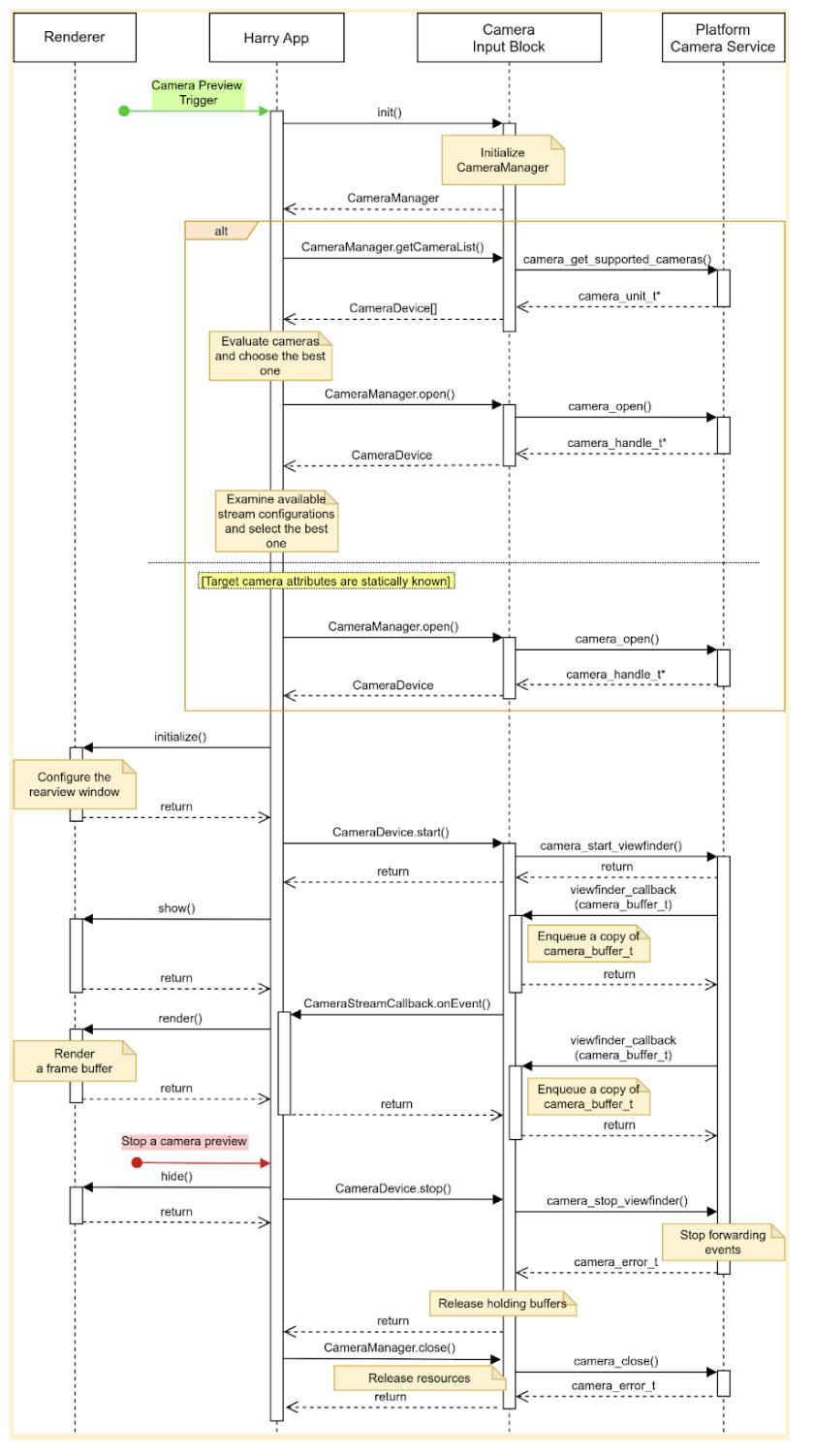
รูปที่ 2 เส้นทางของผู้ใช้หลักของ HAR
บล็อกข้อมูลจากกล้องประกาศอินเทอร์เฟซ 3 รายการ ได้แก่
CameraManagerประกาศเมธอดเพื่อจัดการอุปกรณ์กล้อง เช่น แอปใช้อินเทอร์เฟซนี้เพื่อเปิด (จอง) อุปกรณ์กล้องเป้าหมายCameraDeviceประกาศเมธอดเพื่อควบคุมอุปกรณ์กล้อง เช่น การเริ่มหรือหยุดสตรีมข้อมูลCameraStreamListenerประกาศเมธอดเดียวเพื่อรับเหตุการณ์ต่างๆ จากกล้องเป้าหมาย
การออกแบบ
ส่วนนี้จะอธิบายรายละเอียดการออกแบบระบบ
ประสบการณ์ของผู้ใช้
คนขับสามารถดูตัวอย่างกล้องหลังบนจอแสดงผลแผงหน้าปัดได้เมื่อ เข้าเกียร์ถอย จอแสดงผลจะหยุดแสดงตัวอย่างกล้องเมื่อ ผู้ขับขี่เปลี่ยนเกียร์จากถอยหลัง
คุณเปิดใช้เส้นทางของผู้ใช้เพิ่มเติมได้ เช่น ผู้ขับสามารถดูตัวอย่าง พื้นที่ที่มองไม่เห็นในกระจกเมื่อเปิดสัญญาณไฟเลี้ยว
เริ่มการแสดงตัวอย่างจากกล้อง
เมื่อใช้กล้อง แอปจะแสดงรายการและประเมินกล้องที่มีอยู่เพื่อค้นหากล้องที่ดีที่สุดสำหรับวัตถุประสงค์ที่ต้องการ ตัวอย่างเช่น สำหรับทัศนวิสัยด้านหลัง แอปจะค้นหากล้องที่แสดงด้านหลังของยานพาหนะจากรายการกล้องที่พร้อมใช้งาน
แอปจะประเมินโดยการตรวจสอบลักษณะของกล้องแต่ละตัว เช่น ตำแหน่ง ทิศทางของเลนส์ อัตราเฟรม ความละเอียดเอาต์พุต และรูปแบบ เอาต์พุต หากกล้องหลายตัวมีลักษณะที่จำเป็นเหมือนกัน แอปอาจตรวจสอบลักษณะเพิ่มเติม เช่น มุมมองและระยะโฟกัส
รูปภาพนี้แสดงลำดับการเริ่มต้นตัวอย่างกล้องที่มีการกำหนดค่ากล้องแบบคงที่
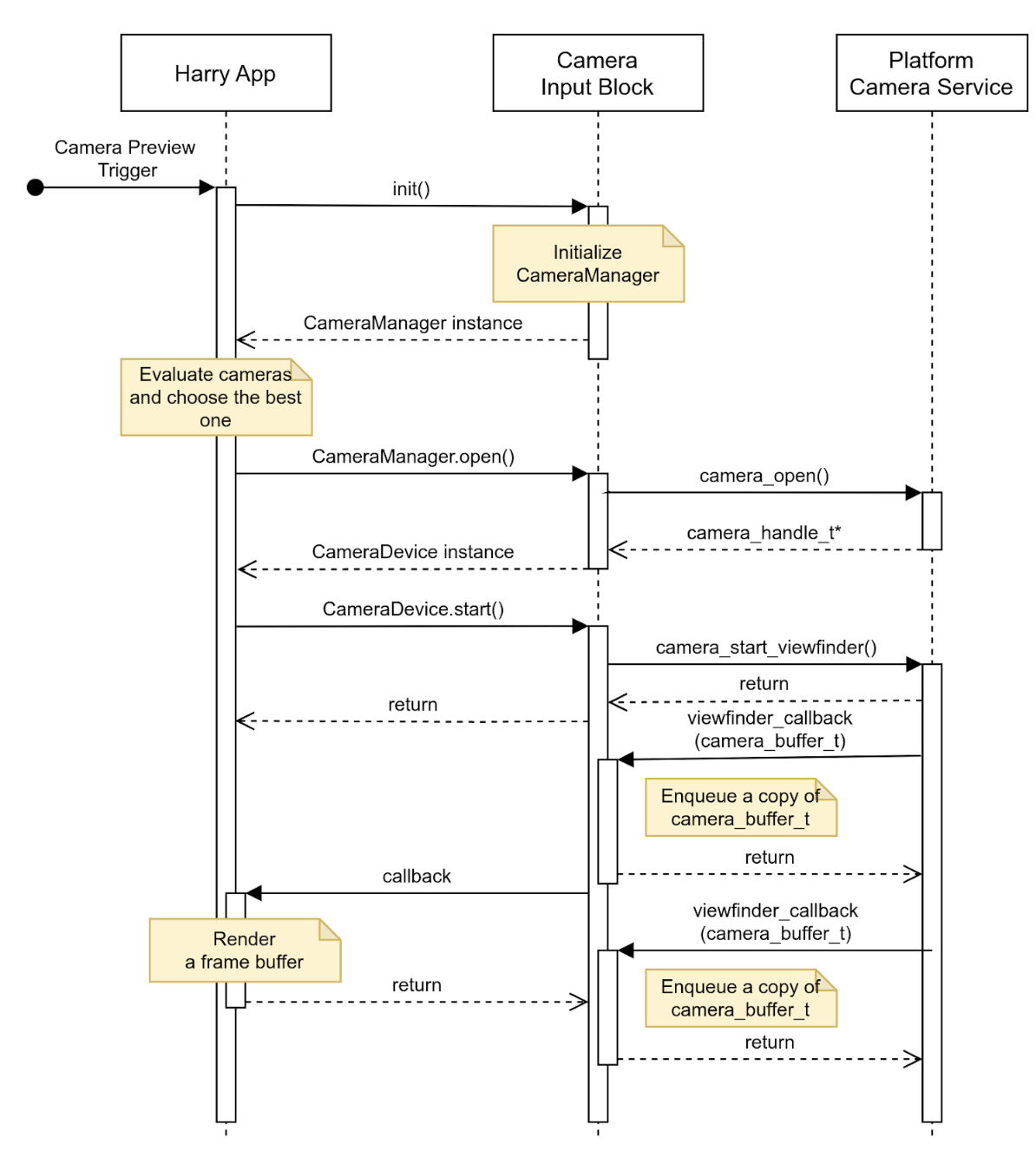
รูปที่ 3 เริ่มแสดงตัวอย่างกล้องด้วยการกำหนดค่ากล้องแบบคงที่
หยุดการแสดงตัวอย่างจากกล้อง
แอปจะหยุดแสดงภาพด้านหลังเมื่อเหตุการณ์การถอยสิ้นสุดลง เพื่อไม่ให้แสดงหน้าจอว่างหรือภาพนิ่ง แอปจะซ่อนมุมมองจากผู้ใช้ก่อน แล้วจึงขอให้บล็อกข้อมูลจากกล้องหยุดส่งเหตุการณ์
รูปภาพนี้แสดงลำดับการหยุดสตรีมข้อมูลจากกล้องเป้าหมาย อุปกรณ์
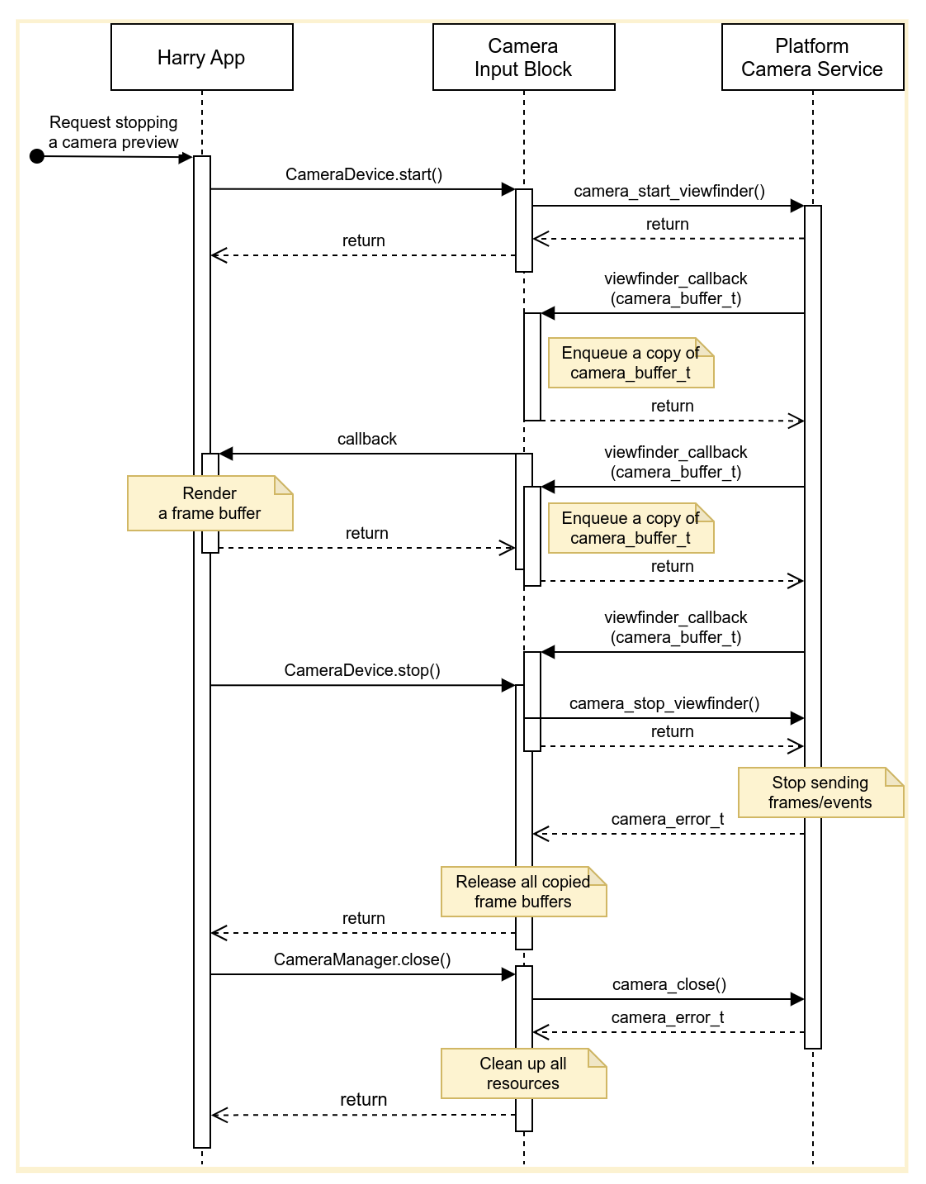
รูปที่ 4 หยุดสตรีมข้อมูลจากอุปกรณ์กล้องเป้าหมาย
ข้อผิดพลาด
อุปกรณ์กล้องอาจหยุดส่งบัฟเฟอร์เฟรมใหม่โดยไม่คาดคิด หากต้องการตรวจจับเหตุการณ์ดังกล่าว บล็อกอินพุตของกล้องอาจใช้ตัวจับเวลาที่จะหมดเวลาเมื่อเฟรมใหม่มาถึง และส่งการแจ้งเตือนเมื่อตัวจับเวลาหมดเวลา
เมื่อแอปได้รับการแจ้งเตือน แอปจะแจ้งให้ผู้ใช้ทราบว่าตัวอย่างกล้อง ไม่ได้แสดงภาพสดอีกต่อไป และพยายามกู้คืนตัวอย่างกล้องโดยการปิด อุปกรณ์กล้องแล้วเปิดอีกครั้ง รูปที่ 5 แสดงวิธีที่แอปจัดการการหมดเวลา
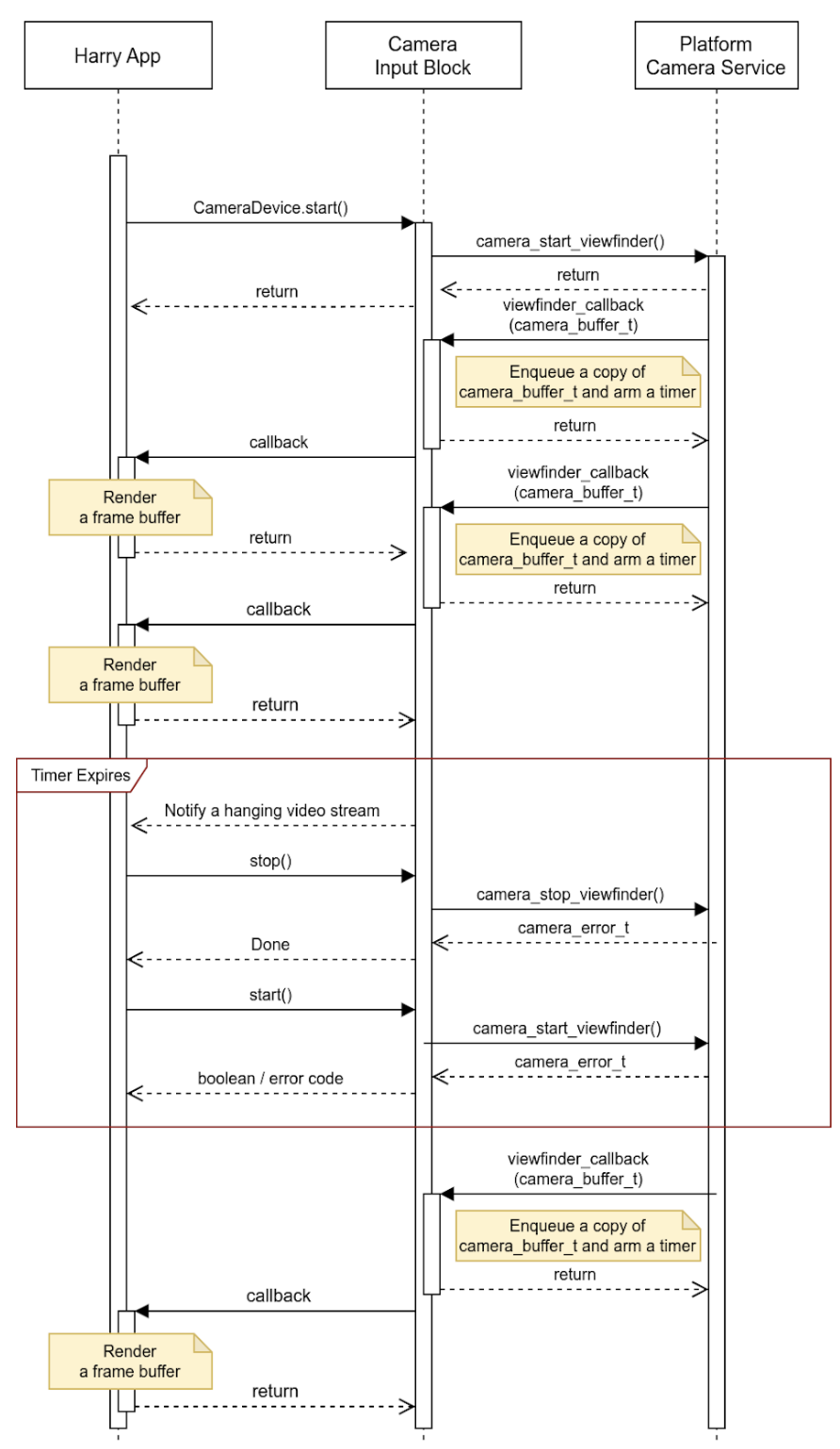
รูปที่ 5 การจัดการการหมดเวลา (สตรีมข้อมูลค้าง)
ข้อมูลจากกล้องสามารถรายงานเหตุการณ์อื่นๆ นอกเหนือจากสตรีมข้อมูลที่ค้างอยู่ และฝังรายละเอียดเพิ่มเติมในบัฟเฟอร์ OEM สามารถใช้ข้อมูลเมตาของเหตุการณ์นี้เพื่อจัดการ เหตุการณ์ในแพลตฟอร์มของตนได้
กิจกรรม
แอปที่ทำงานบนโฮสต์และจัดการจอแสดงผลแผงหน้าปัดจะใช้ API ผ่าน HAR (บล็อกสีน้ำเงินในแผนภาพด้านล่าง)
แผนภาพระบบแสดงในรูปที่ 5
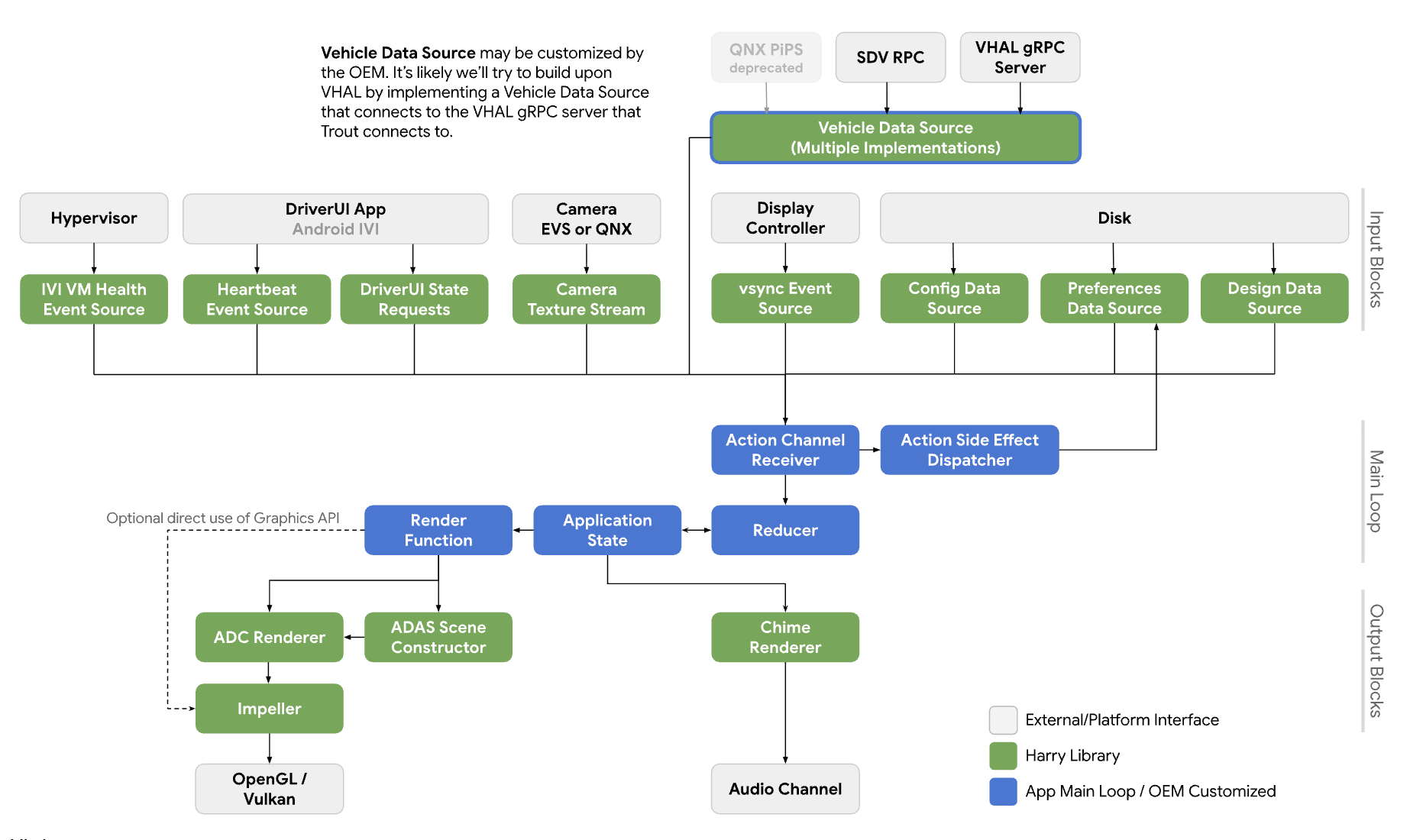
รูปที่ 6 แผนภาพระบบ
บริการ
คาดว่าการเรียก API จะทำงานในบริบทของกระบวนการเรียก
API
API ใหม่นี้มีไว้สำหรับแอปที่จัดการตัวอย่างกล้องบนจอแสดงผลแผงหน้าปัดผ่าน HAR เท่านั้น API พร้อมใช้งานผ่านเลเยอร์การแยกแพลตฟอร์มและลิงก์แบบไดนามิก
อินเทอร์เฟซ CameraInputBlock ประกาศเมธอดเพื่อเริ่มต้นฟังก์ชันการทำงานของกล้องและรับเครื่องมือจัดการบล็อกอินพุต แอปใช้อินสแตนซ์ CameraManager ที่ส่งคืนเพื่อจัดการอุปกรณ์กล้อง
// This class represents a camera input block for the application that manages the
// instrument cluster display with Harry.
public class CameraInputBlock : public InputBlock {
    public:
        // Clean up the resources.
        virtual ~CameraInputBlock();

        // A method inherited from InputBlock class. This method initializes
        // CameraInputBlock instance; e.g. checking the platform camera service
        // is live.
        //
        // @return CAMERA_EPERM if the platform camera service is not
        //                      available.
        //         CAMERA_OK otherwise.
        virtual CameraError init() override;

        // A method inherited from InputBlock class. This method release all
        // resources held by this CameraInputBlock instance.
        virtual void release() override;

        // This method returns a CameraManager instance. The caller uses
        // this instance to manage camera devices.
        //
        // @param out If this method is successful, this points to a valid
        //            CameraManager instance.
        // @return CAMERA_EACCESS when we fail to create CameraManager instance
        //         to return.
        //         CAMERA_OK otherwise.
        virtual CameraError getCameraManager(
            std::shared_ptr<CameraManager>* out) = 0;

    private:
        // Handle to manage camera devices.
        std::shared_ptr<CameraManager> mMgr;

        // Handle to manage camera devices that have been opened by clients.
        std::set<CameraDevice> mCameras;
};
คลาส CameraManager ประกาศเมธอดเพื่อเปิด (หรือเป็นเจ้าของ) กล้องและปล่อย
เมื่อแอปใช้กล้องนั้นเสร็จแล้ว แอปสามารถเปิดกล้องได้มากกว่า 1 ตัวและใช้สตรีมของกล้องเหล่านั้นเพื่อสร้างมุมมองที่กว้างขึ้นหรือประสบการณ์แบบหลายมุมมอง
// This pure virtual class declares methods to manage camera devices.
public class CameraManager {
    public:
        // This method returns a list of CameraDescriptor objects representing
        // available cameras.
        //
        // @param out A list of CameraDescriptor instances. This list may be
        //            empty if the platform camera service does not list any
        //            camera.
        // @return CAMERA_EACCESS if we failed to build a camera list.
        //         CAMERA_OK otherwise.
        virtual CameraError getCameraList(
            std::vector<CameraDescriptor>* out) = 0;

        // Open a camera device associated with a given string identifier.
        //
        // @param ID A string identifier of a camera device to request.
        // @param out A pointer to CameraDevice shared pointer object. This
        //            is null when we fail to open a target device.
        // @return CAMERA_ENODEV if no camera is associated with a given id.
        //         CAMERA_EACCESS if it fails to open a target device.
        //         CAMERA_OK otherwise.
        virtual CameraError open(
            std::string ID, std::shared_ptr<CameraDevice>* out) = 0;

        // Close a camera device associated with a given string identifier.
        // This method is assumed to be always successful.
        //
        // @param id A string identifier of a camera device to close.
        virtual void close(std::string id) = 0;
};
หากแอปตรวจไม่พบว่าควรใช้กล้องใด แอปจะเลือกกล้องที่ทำงานได้ดีที่สุดในบริบทนั้น
CameraManager::getCameraList() จะแสดงรายการของอินสแตนซ์
CameraDescriptor ซึ่งระบุลักษณะของกล้องแต่ละตัว
คลาส CameraDevice แสดงถึงอุปกรณ์กล้องตัวเดียวและประกาศเมธอด
เพื่อเริ่มและหยุดสตรีมข้อมูล หากไม่ทราบลักษณะของกล้องแบบคงที่
ไคลเอ็นต์จะรับลักษณะดังกล่าวจากตัวอธิบายและแยกวิเคราะห์
ตัวอย่างเช่น ไคลเอ็นต์สามารถรับรายการการกำหนดค่าสตรีมที่อุปกรณ์กล้องเป้าหมาย เสนอจากข้อมูลเมตา และเลือกรายการที่มีแอตทริบิวต์ดีที่สุด (เช่น อัตราเฟรม ความละเอียด และรูปแบบเอาต์พุต)
// This class represents a single camera device.
public class CameraDevice {
    public:
        // Start a data stream that attributes are matching to given
        // configuration best.
        // If a selected configuration is not given (null), a data stream is
        // initiated in its default configuration and return.
        //
        // @param configuration Selected attributes of the imagery data stream.
        // @param listener An object to listen to an active data stream.
        // @param effective Actual attributes of started data stream.
        // @return CAMERA_EINVAL if a listener object is invalid.
        //         CAMERA_EIO if we failed to start a video stream.
        //         CAMERA_OK otherwise.
        virtual CameraError start(
                std::shared_ptr<CameraStreamConfiguration>& configuration,
                std::shared_ptr<CameraStreamListener>& listener,
                std::shared_ptr<CameraStreamConfiguration>* effective) = 0;

        // Stop a data stream.
        virtual void stop() = 0;

        // Get a camera descriptor.
        //
        // @param desc A set of attributes that defines this camera device.
        // @return CAMERA_ENODATA if a descriptor is not available.
        //         CAMERA_OK otherwise.
        CameraError getDescriptor(std::shared_ptr<CameraDescriptor>* desc) = 0;

        // Return a consumed buffer to the camera device. A client of active
        // stream must return a frame buffer explicitly by calling this method.
        virtual void doneWithFrame(std::shared_ptr<FrameBuffer>& buffer) = 0;

    private:
        // Describe this camera device.
        CameraDescriptor mDescriptor;

        // A weak reference to a listening client.
        std::weak_ptr<CameraStreamListener> mClient;
};

// This class declares attributes that characterize a camera device.
public class CameraDescriptor {
    public:
        // Unique std::string object to identify a single camera device.
        std::string mId;

        // A set of stream configurations this camera device is capable of. A
        // camera must have at least one stream configuration.
        std::set<CameraStreamConfiguration> mConfigurations;

        // Are more attributes needed to exist, such as locations, lens
        // facing directions, and intrinsic/extrinsic parameters?
};

// This class declares attributes that characterize an imagery data stream.
public class CameraStreamConfiguration {
    public:
        // Width of output of this stream in pixels.
        unsigned int mWidthInPixels;

        // Height of output of this stream in pixels.
        unsigned int mHeightInPixels;

        // An average number of frames per second.
        double mFrameRate;

        // A format of this stream's output. A client could calculate a
        // byte-per-pixel (bpp) from this.
        CameraColorFormat mFormat;
};

// This class represents a listener/callback object to listen to frames and
// events.
public class CameraStreamListener {
    public:
        // A listener method to receive various stream events including a new
        // frame buffer.
        //
        // @param event CameraStreamEvent object that represents a single event
        //              such as an arrival of a new frame buffer, camera stream
        //              is terminated, and so forth.
        virtual void onEvent(std::shared_ptr<CameraStreamEvent>* event) = 0;
};
CameraDevice::start() รับอาร์กิวเมนต์ 3 รายการ ได้แก่
การกำหนดค่าสตรีมที่ผู้โทรเลือก
Listener เพื่อรับเหตุการณ์สตรีม
เคล็ดลับในการกำหนดค่าสตรีมที่มีประสิทธิภาพ เราขอแนะนำอย่างยิ่งให้ ผู้โทรตรวจสอบค่านี้เพื่อจัดการบัฟเฟอร์เฟรมที่เข้ามาตามที่ต้องการ
เมื่อ CameraDevice::start() เริ่มสตรีมข้อมูลด้วยแพลตฟอร์ม Camera Service
จะเก็บการอ้างอิงแบบอ่อนไปยังออบเจ็กต์ Listener ของผู้เรียกเพื่อตรวจหา
การสิ้นสุดที่ไม่คาดคิดของผู้เรียก
เมื่อไคลเอ็นต์ใช้เฟรมบัฟเฟอร์เสร็จแล้ว ไคลเอ็นต์ต้องแจ้งให้อุปกรณ์กล้องทราบว่าไม่จำเป็นต้องใช้เฟรมบัฟเฟอร์อีกต่อไปโดยเรียกใช้เมธอด CameraDevice::doneWithFrame()
เมื่อสตรีมเริ่มต้น ไคลเอ็นต์จะได้รับข้อความเหตุการณ์ ข้อความที่พบบ่อยคือ
เฟรมบัฟเฟอร์ใหม่ ไคลเอ็นต์จะได้รับkNewFrameBuffer event ที่มีข้อมูลภาพพร้อมกับข้อมูลเมตาของเฟรม
บัฟเฟอร์ผ่านฟังก์ชัน Callback ที่ลงทะเบียนไว้ StreamEventType ประกาศประเภทเพิ่มเติมเพื่อจัดการสตรีมอื่นๆ
เช่น สตรีมข้อมูลที่หยุดหรือค้าง
// This class lists events possibly occurring while a data stream is active.
enum class CameraStreamEventType {
    // A delivery of a new frame buffer.
    kNewFrameBuffer,
    // A data stream has been stopped.
    kStreamStopped,
    // No new frame buffer arrives for a while.
    kStreamHang,
    // Add more.
    ...
};

// This class represents a single instance of StreamEventType.
public class CameraStreamEvent {
    public:
        // Return a type of this event.
        //
        // @return CameraStreamEventType enum value.
        CameraStreamEventType getType() { return mType; }

        // Return a pointer to data associated with this event.
        //
        // @return A shared pointer object of the buffer that contains data for
        //         this event.
        std::shared_ptr<void> getData() { return mData; }

    private:
        // Describe a type of this event.
        CameraStreamEventType mType;

        // A pointer to the data buffer.
        std::shared_ptr<void> mData;
};

// This class inherits StreamEvent class and has additional fields to represent
// the frame buffer.
public class FrameBufferEvent : public CameraStreamEvent {
    public:
        // Return an identifier of this frame buffer.
        //
        // @return A unique integer value to identify this frame buffer.
        int getBufferID() { return mBufferID; }

        // Give access to frame buffer metadata.
        //
        // @return A shared pointer to the buffer that contains data besides
        //         the imagery data.
        std::shared_ptr<void> getMetadata() { return mMetadata; }

    private:
        // Unique integer to identify this buffer.
        int mBufferID;

        // A pointer to metadata of this frame buffer.
        std::shared_ptr<void> mMetadata;
};
ตัวอย่างนี้แสดงการใช้งานอินเทอร์เฟซ CameraInputBlock และ
แอป
CameraError getCameraManager(std::shared_ptr<CameraManager>* out) {
    // During an instantiation, CameraManager will retrieve a list of camera
    // devices from the platform camera service and identify their attributes.
    *out = std::make_shared<CameraManager>();
    return CAMERA_OK;
}

// This method returns a list of CameraDescriptor objects representing available
// cameras.
CameraError CameraManager::getCameraList(std::vector<CameraDescriptor>* out) {
    if (mCameraList.size() < 1) {
        // Query a list of cameras and get their attributes.
    }
    *out = mCameraList;
    return CAMERA_OK;
}

// Open a camera device associated with a given string identifier.
CameraError CameraManager::open(std::string id, std::shared_ptr<CameraDevice>* out) {
    if (!mCameraList.contains(id)) {
        // We cannot identify any camera with a given value.
        return CAMERA_NODEV;
    }

    // During a construction, CameraDevice will obtain a handle of a target
    // camera device from the platform camera service.
    std::shared_ptr<CameraDevice> h = std::make_shared<CameraDevice>(id);
    if (!h) {
        // We fail to open a camera device.
        return CAMERA_EACCESS;
    }

    *out = h;
    return CAMERA_OK;
}

// Close a camera device associated with a given string identifier. This method
// is assumed to be always successful.
void CameraManager::close(std::string id) {
    if (!mCameraList.contains(id)) {
        // We ignore calls with unknown identifiers.
        return;
    }

    // mCameraList.remove() returns an object removed from the list.
    std::shared_ptr<CameraDevice> device = mCameraList.remove(id);

    // Ensure a device stops streaming.
    device->stop();
}

// Start a data stream that attributes are matching to given configuration
// best.
// If a selected configuration is not given (null), a data stream will be
// initiated in its default configuration and return.
CameraError CameraDevice::start(
        std::shared_ptr<CameraStreamConfiguration>& configuration,
        std::shared_ptr<CameraStreamListener>& listener,
        std::shared_ptr<CameraStreamConfiguration>* effective) {
    if (!listener) {
        return CAMERA_EINVAL;
    }

    // selectStreamConfiguration examines this camera's stream configurations
    // and returns the one closest to the selected configuration.
    CameraStreamConfiguration config = selectStreamConfiguration(configuration);

    // mDevice refers to the camera handle for the platform camera service. We
    // may need to translate CameraStreamConfiguration for the platform service.
    mDevice->configure(
        configuration.mWidth, configuration.mHeight, configuration.mFormat);

    // Start a data stream with a callback object.
    if (!mDevice->startStream(mCallback)) {
        // We failed to start a data stream.
        return CAMERA_EIO;
    }

    return CAMERA_OK;
}

// Stop a data stream.
void CameraDevice::stop() {
    if (!mDevice) {
        // Nothing to do if we don't have a valid camera handle for the
        // platform camera service.
        return;
    }

    mDevice->stopStream();
}

// Get a camera descriptor.
CameraError CameraDevice::getDescriptor(std::shared_ptr<CameraDescriptor>* desc) {
    if (!mDescriptor) {
        return CAMERA_ENODATA;
    }

    *desc = *mDescriptor;
    return CAMERA_OK;
}

// Return a consumed buffer to the camera device. A client of active stream
// must return a frame buffer explicitly by calling this method.
void CameraDevice::doneWithFrame(std::shared_ptr<FrameBuffer>& buffer) {
    if (!mBufferRecords.contains(buffer.getId())) {
        // Ignore a call with unknown frame buffer.
        return;
    }

    // Simply remove from the record.
    (void)mBufferRecords.remove(buffer.getId());
}

// This method handles gear-shift events.
void Application::handleGearShift(GearSelection selection) {
    switch (selection) {
        case GEAR_SELECTION_REVERSE:
            // Upon the reverse gear selection, we are going to start a video
            // stream and show its preview on the instrument cluster display.
            (void)startStream(mCameraInputBlock);

            // FIXME: Exact method to control the camera preview window on the
            // instrument display is to be determined.
            show(mRearVisibilityWindow);
            break;

        default:
            // Upon all other gear selection, we are going to stop a video
            // stream (if it's running) and hide the preview.
            stopStream(mCameraInputBlock);

            // FIXME: Exact method to control the camera preview window on the
            // instrument display is to be determined.
            hide(mRearVisibilityWindow);
            break;
    }
}

bool Application::startStream(std::shared_ptr<CameraInputBlock> handle) {
    return handle->start(std::bind(&Application::handleStreamCallback, this);
}

void Application::stopStream(std::shared_ptr<CameraInputBlock> handle) {
    handle->stop();
}

// This method handles a stream callback.
void Application::handleStreamCallback(StreamEvent& event) {
    switch (event.getType()) {
        case StreamEventType::kNewFrameBuffer:
            // Handle a new frame buffer. We may just enqueue it for the
            // future or forward to CameraInputBlock client.
            break;

        case StreamEventType::kStreamStopped:
            // Handle as an incident if this event is not expected.
            break;

        // More cases to be added.
    }
}

void Application::handleNewFrameBuffer(StreamEvent& event) {
    // Enqueue a new frame buffer for the further processing. A buffer
    // must be returned explicitly by calling
    // CameraDevice.doneWithFrame(FrameBuffer&) method.
}

void Application::handleStreamEvent(StreamEvent& event) {
    // Handle a received stream event except a new frame buffer's
    // arrival; e.g. a video stream is terminated unexpectedly.
}
ประสิทธิภาพ
การมองเห็นด้านหลังเป็นไปตามกฎระเบียบของรัฐบาล
| ค่า | กฎระเบียบ |
|---|---|
| ระยะเวลาการตอบกลับ | CFR 571.111 S5.5.3 |
| อัตราเฟรม | UNECE R46 6.2.2.3.4 |
| เวลาในการสร้างภาพ | UNECE R46 6.2.2.3.4.2 |
| เวลาในการตอบสนองของระบบ | UNECE R46 6.2.2.3.4.3 |
ความเป็นส่วนตัว
ในส่วนของความเป็นส่วนตัว
API ไม่ได้กำหนดให้มีการติดตั้งใช้งานเพื่อรวบรวม บันทึก หรือจัดเก็บข้อมูลส่วนบุคคลที่ระบุตัวบุคคลนั้นได้ (PII) อย่างไรก็ตาม เนื่องจากข้อมูลภาพที่บันทึกไว้ (หรือข้อมูลเมตาที่เกี่ยวข้อง) อาจมี PII แอปที่ใช้ API จึงต้องได้รับความยินยอมอย่างชัดแจ้งจากผู้ใช้
ผู้ใช้ไม่สามารถควบคุมอุปกรณ์กล้องเพื่อดูตัวอย่างบนจอแสดงผลแผงหน้าปัดได้เนื่องจากกล้องมีบทบาทสำคัญด้านความปลอดภัย OEM จะได้รับ ความยินยอมจากผู้ใช้ในระหว่างการตั้งค่าหรือจากไดรเวอร์
API นี้ไม่รองรับไคลเอ็นต์กล้องในเบื้องหลัง ดังนั้น ตัวบ่งชี้ความเป็นส่วนตัว ซึ่งจะแจ้งให้ผู้ใช้ทราบว่าอุปกรณ์กล้องกำลังบันทึกข้อมูลจึงอยู่นอกขอบเขต