
A respin is the process of remerging, rebuilding, retesting, and recertifying a binary after a public release of the GKI kernel.
Before requesting a respin, note the following guidelines.
Eligibility and lifecycle
- Timing: You can request respins only on release branches after an initial public release of a quarterly build has been launched. Request respin requests for vendor-hooks or other features only for a given release branch for a maximum of six months after the initial public release.
- Security and LTS: After six months, branches are eligible for respin only for security patches cited in an Android Security Bulletin (ASB) or critical bug fixes.
- Deprecation: When the LTS requirements, defined by the Android
Security Bulletin (ASB), cause the branch to be noncompliant, the branch is
deprecated. Respin requests for deprecated branches aren't accepted.
- The deprecation date for a given GKI release branch is included in the quarterly GKI release build notes under Releases. For example, the September 2025 release is supported for respins until March 2027. This date reflects the LTS 2.0 kernel version lifetime of 18 months for releases starting in September 2025 (releases prior to September 2025 had a 12-month lifetime).
- Scope: Request respins only for urgent bug fixes, symbol list updates, or to apply a patch to fix an existing feature.
Patch submission standards
To meet the Expected Standard Resolution Time (ESRT) for respin request processing, all patches submitted to a release branch must adhere to the following technical rules.
Source of truth and cherry-picks
- Development branch first: All patches going into the quarterly release
branch must already be merged into the main GKI development branch. For
example, if a patch is required for a respin of
android15-6.6-2025-08, it must already be merged intoandroid15-6.6. - Clean cherry-pick: You must cherry-pick patches directly from the
development branch. Don't cherry-pick from other release branches (for example,
don't pick from
2025-08to2025-09), as this can result in author or commit information that is inconsistent with the version in the development branch. Patches with inconsistent information won't be accepted. - Preserve metadata: Preserve the original commit metadata (for example,
author, original timestamp). Use
git cherry-pick -xto preserve the metadata.
Commit chain
- Sequential chain: If the respin request involves multiple patches, upload them as a single, sequential chain of commits.
- ABI and KMI placement: If a multiple-patch respin includes kernel module interface (KMI) and application binary interface (ABI) updates (for example, symbol list changes or XML/STG file updates), place these commits at the very end of the commit chain.
- Rebasing: If you edit a parent commit in the chain, you must rebase all child patches on top of the latest revision of its parent patch to avoid build failures.
- Conflict resolution: Verify that no conflict markers are present in any patch.
- Build verification: The entire commit chain must build successfully.
Required tags
Progress on the respin request is blocked without the following tags in the commit message:
Change-Id: Must be identical to theChange-Idof the development branch change.- Exception: If the patch was merged into the development branch as part of an
LTS update, it should be a cherry-pick of the LTS version and formatted as an
UPSTREAMpatch. See How do I submit patches to Android Common Kernels.
- Exception: If the patch was merged into the development branch as part of an
LTS update, it should be a cherry-pick of the LTS version and formatted as an
Bug(existing): ExistingBug: XYZtags from the original development branch commit must not be removed.Bug(respin): You must add a newBug: XYZtag, where XYZ corresponds to the Bug ID associated with the current respin request.- Update the
UPSTREAMcommit tag if necessary: When cherry-picking a CL from the development branch to the release branch, and the CL is tagged asUPSTREAM, consider the following scenarios:- If the CL applies cleanly to the release branch, you don't need to take any additional action.
- If the CL doesn't apply cleanly, fix the conflicts,
update the tag to
BACKPORT, and document what was done as part of the conflict resolution, see Requirements for backports from mainline Linux.
Priority and ESRT
Assign a priority (urgency) to the respin request to help the GKI team prioritize. This priority helps the GKI team to better assist partners in a timely manner.
- For critical or time-sensitive requests, mark priority as P0.
- For P0 and P1 requests, you must also justify the urgency.
The following table provides a mapping of bug priority and time to resolution (ESRT):
| Priority | ESRT |
|---|---|
| P0 | 2 business days |
| P1 | 5 business days |
| P2 | 10 business days |
| P3 | 15 business days |
SLA policies
- Submit a separate respin request for each release branch.
- If you have changes to a respin request that is marked as fixed, submit a new respin request. Don't reopen the request to add additional changelists (CLs).
- If a respin request requires your response, and you don't respond within three business days, the priority is downgraded by one level, for example, P0 is downgraded to P1.
- If you don't respond for two weeks, the bug is marked as Won't Fix (Obsolete).
Submit a respin request
The following diagram shows the respin process. The process begins when the OEM partner (you) submits the respin request.
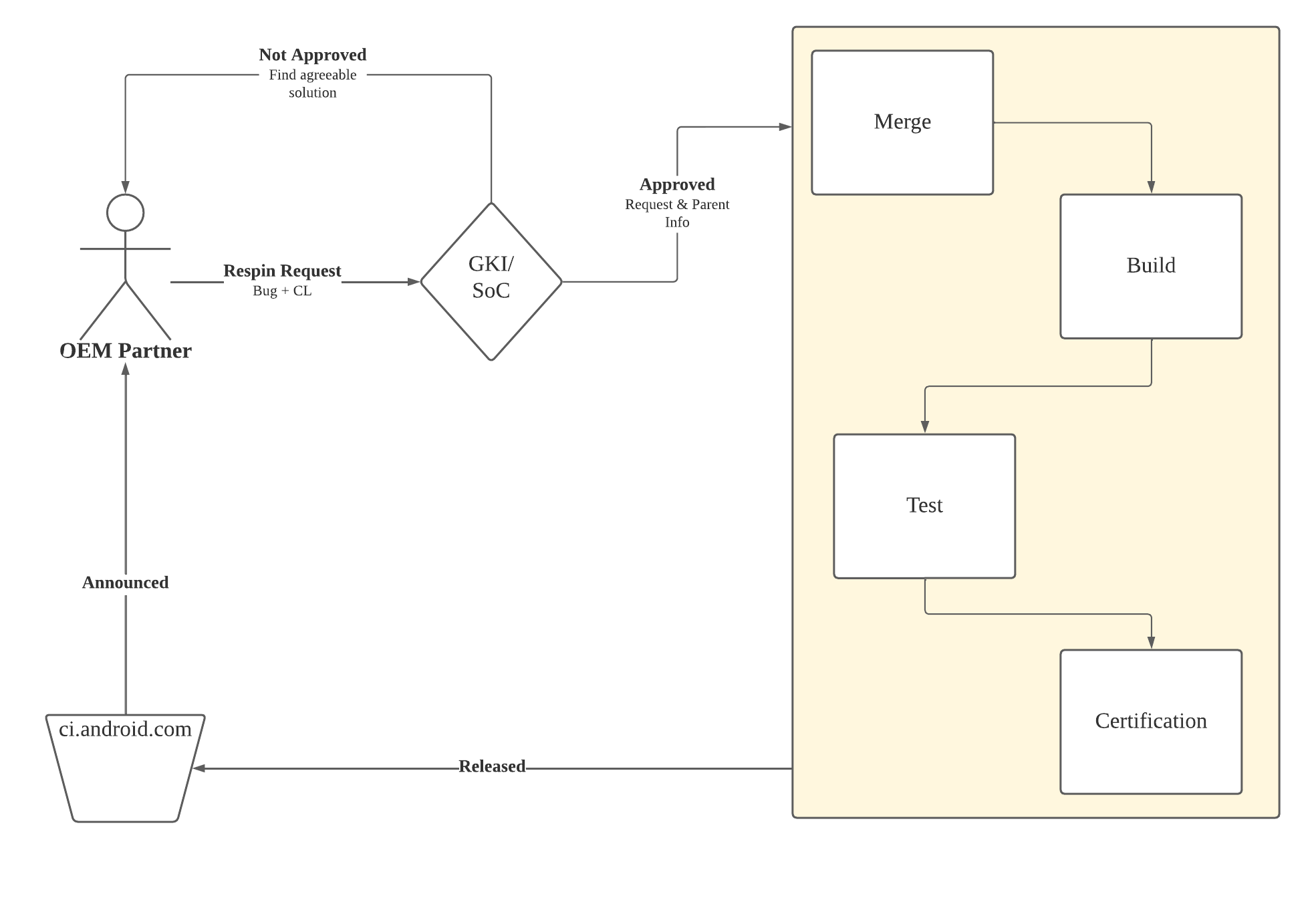 Figure 1.Emergency respin process.
To submit a respin request:
Fill out the GKI respin request form and reach out to your Google point of contact immediately.
- This form creates a GKI respin request bug.
Prepare your patches:
- Verify the patch is merged into the GKI development branch.
- Apply the patch to the appropriate GKI release branch.
- Amend the cherry-picked patch to include a
Bug: XYZtag citing the respin request ID.
Example: To cherry-pick a CL from
android16-6.12toandroid16-6.12-2025-12:# 1. Checkout the target release branch git checkout android16-6.12-2025-12 # 2. Fetch the upstream development branch (Source of Truth) git fetch aosp android16-6.12 # 3. Cherry-pick the commit (Preserving metadata) git cherry-pick -x <commit_hash> # 4. Update the commit message to include the Respin Bug ID # (Do not remove existing Bug IDs or change the Change-Id)Submit the bug. The following occurs after you submit the request:
Review Process after a submission occurs:
- The Google GKI team reviews the request and approves it or assigns it back to you if more information is needed.
- After a fix is agreed upon, the Google GKI team code reviews the change. The ESRT timer is active during this review. However, if the patch is rejected or requires rework, the ESRT timer resets.
- The GKI team merges, builds, tests for regression, and certifies the change.
Release:
- The binary is released to ci.android.com.
- The ESRT timeframe ends and the Google GKI team marks the request as fixed and references the respin build.
- The respin build is also posted on the Generic Kernel Image (GKI) release builds page.