

অ্যান্ড্রয়েড ৯ ডিভাইসে বিভিন্ন ধরণের ডিসপ্লে কাটআউট যুক্ত করার সুবিধা যোগ করেছে। ডিসপ্লে কাটআউটের মাধ্যমে ডিভাইসের সামনের দিকে গুরুত্বপূর্ণ সেন্সরগুলোর জন্য জায়গা রেখেই একটি ইমারসিভ, এজ-টু-এজ অভিজ্ঞতা তৈরি করা যায়।
চিত্র ১. উপরের মাঝখানের ডিসপ্লে কাটআউট
অ্যান্ড্রয়েড ৯ নিম্নলিখিত ধরণের কাটআউট সমর্থন করে:
- উপরের কেন্দ্র: উপরের প্রান্তের মাঝখানে কাটা অংশ
- উপরের অংশ কেন্দ্রচ্যুত: কাটআউটটি কোণায় বা কেন্দ্র থেকে সামান্য সরে থাকতে পারে।
- নীচে: নীচে কাটা অংশ
- দ্বৈত: উপরে একটি এবং নীচে একটি কাটআউট
উদাহরণ এবং উৎস
PhoneWindowManager.java- তে থাকা নিম্নলিখিত উইন্ডো ম্যানেজার কোডটি দেখায় যে, যখন LAYOUT_IN_DISPLAY_CUTOUT_MODE_ALWAYS সেট করা থাকে না, তখন কীভাবে ডিসপ্লে ফ্রেমগুলিকে সেফ এরিয়ার মধ্যে ইনসেট করা হয়।
// Ensure that windows with a DEFAULT or NEVER display cutout mode are laid out in
// the cutout safe zone.
if (cutoutMode != LAYOUT_IN_DISPLAY_CUTOUT_MODE_ALWAYS) {
    final Rect displayCutoutSafeExceptMaybeBars = mTmpDisplayCutoutSafeExceptMaybeBarsRect;
    displayCutoutSafeExceptMaybeBars.set(displayFrames.mDisplayCutoutSafe);
    if (layoutInScreen && layoutInsetDecor && !requestedFullscreen
            && cutoutMode == LAYOUT_IN_DISPLAY_CUTOUT_MODE_DEFAULT) {
        // At the top we have the status bar, so apps that are
        // LAYOUT_IN_SCREEN | LAYOUT_INSET_DECOR but not FULLSCREEN
        // already expect that there's an inset there and we don't need to exclude
        // the window from that area.
        displayCutoutSafeExceptMaybeBars.top = Integer.MIN_VALUE;
    }
    if (layoutInScreen && layoutInsetDecor && !requestedHideNavigation
            && cutoutMode == LAYOUT_IN_DISPLAY_CUTOUT_MODE_DEFAULT) {
        // Same for the navigation bar.
        switch (mNavigationBarPosition) {
            case NAV_BAR_BOTTOM:
                displayCutoutSafeExceptMaybeBars.bottom = Integer.MAX_VALUE;
                break;
            case NAV_BAR_RIGHT:
                displayCutoutSafeExceptMaybeBars.right = Integer.MAX_VALUE;
                break;
            case NAV_BAR_LEFT:
                displayCutoutSafeExceptMaybeBars.left = Integer.MIN_VALUE;
                break;
        }
    }
    if (type == TYPE_INPUT_METHOD && mNavigationBarPosition == NAV_BAR_BOTTOM) {
        // The IME can always extend under the bottom cutout if the navbar is there.
        displayCutoutSafeExceptMaybeBars.bottom = Integer.MAX_VALUE;
    }
    // Windows that are attached to a parent and laid out in said parent already avoid
    // the cutout according to that parent and don't need to be further constrained.
    // Floating IN_SCREEN windows get what they ask for and lay out in the full screen.
    // They will later be cropped or shifted using the displayFrame in WindowState,
    // which prevents overlap with the DisplayCutout.
    if (!attachedInParent && !floatingInScreenWindow) {
        mTmpRect.set(pf);
        pf.intersectUnchecked(displayCutoutSafeExceptMaybeBars);
        parentFrameWasClippedByDisplayCutout |= !mTmpRect.equals(pf);
    }
    // Make sure that NO_LIMITS windows clipped to the display don't extend under the
    // cutout.
    df.intersectUnchecked(displayCutoutSafeExceptMaybeBars);
}
সিস্টেমইউআই কাটআউট এলাকায় রেন্ডার হয় এবং এটি কোথায় ড্র করতে পারবে তা নির্ধারণ করতে হয়। PhoneStatusBarView.java এমন একটি ভিউ-এর উদাহরণ দেয় যা নির্ধারণ করে ডিসপ্লে কাটআউটটি কোথায়, এর আকার কত এবং নেভ বার থেকে ভেতরের দিকে আসা অংশটি কাটআউট এলাকাটি এড়িয়ে যায় কি না।
onApplyWindowInsets() ওভাররাইড করার মাধ্যমে, একটি ভিউ কাটআউটটি কোথায় আছে তা নির্ধারণ করতে পারে এবং সেই অনুযায়ী তার লেআউট আপডেট করতে পারে।
@Override
    public WindowInsets onApplyWindowInsets(WindowInsets insets) {
        if (updateOrientationAndCutout(mLastOrientation)) {
            updateLayoutForCutout();
            requestLayout();
        }
        return super.onApplyWindowInsets(insets);
    }
এই পদ্ধতিগুলোতে বর্ণনা করা হয়েছে যে স্ট্যাটাস বারে কাটআউটগুলো সব ক্ষেত্রে (অর্থাৎ উপরের কেন্দ্রে, উপরের অকেন্দ্রীভূত, নীচে, এবং সমস্ত ঘূর্ণনে দ্বৈত-কাটআউট) কীভাবে পরিচালনা করা হয়।
প্রয়োজনীয়তা
কাটআউটের কারণে অ্যাপগুলো যাতে নেতিবাচকভাবে প্রভাবিত না হয়, তা নিশ্চিত করতে আপনাকে অবশ্যই নিম্নলিখিত বিষয়গুলো নিশ্চিত করতে হবে:
- পোর্ট্রেট মোডে স্ট্যাটাস বারটি অন্তত কাটআউটের উচ্চতা পর্যন্ত বিস্তৃত থাকে।
- ফুলস্ক্রিন এবং ল্যান্ডস্কেপ মোডে কাটআউট এলাকাটি অবশ্যই লেটারবক্সড হতে হবে।
আপনার ডিভাইসের প্রতিটি ছোট প্রান্তে (উপরে এবং নীচে) সর্বাধিক একটি করে কাটআউট থাকতে পারে।
আরও তথ্যের জন্য সিডিডি দেখুন।
বাস্তবায়ন
আপনার ডিভাইসে ডিসপ্লে কাটআউট প্রয়োগ করতে, আপনাকে সিস্টেম UI-এর জন্য নিম্নলিখিত মানগুলি কনফিগার করতে হবে।
| মূল্য | বর্ণনা |
|---|---|
quick_qs_offset_height | কুইক সেটিংস প্যানেলের জন্য উপরের মার্জিন নির্ধারণ করে। প্যানেলের উপরের অংশে ঘড়ি এবং ব্যাটারি প্রদর্শিত হয়। ভ্যালুস-ল্যান্ডে, এটিকে |
quick_qs_total_height | নোটিফিকেশন শেড প্রসারিত থাকা অবস্থায় কুইক-কুইক সেটিংস প্যানেলের (সংকুচিত কুইক সেটিংস প্যানেল) মোট উচ্চতা, যার মধ্যে ঘড়িযুক্ত প্যানেলের উপরের স্থানও অন্তর্ভুক্ত। কুইক সেটিংসের বিন্যাসের কারণে, কুইক-কুইক সেটিংস প্যানেলের মোট উচ্চতা (অফসেট সহ) স্থিরভাবে জানা আবশ্যক, তাই এই মানটিকে একই ডেল্টা |
status_bar_height_portrait | ফ্রেমওয়ার্কের দৃষ্টিকোণ থেকে স্ট্যাটাস বারের পূর্বনির্ধারিত উচ্চতা। বেশিরভাগ ডিভাইসে, এটি ডিফল্টভাবে ২৪ডিপি (24dp) থাকে। যখন কোনো কাটআউট থাকে, তখন এই মানটিকে কাটআউটের উচ্চতায় সেট করুন। চাইলে এটি কাটআউটের চেয়ে লম্বাও হতে পারে। |
status_bar_height_landscape | ল্যান্ডস্কেপ মোডে স্ট্যাটাস বারের উচ্চতা। কাটআউট শুধুমাত্র ডিভাইসের ছোট প্রান্তগুলিতে সমর্থিত, তাই স্ট্যাটাস বারের উচ্চতা সর্বদা অপরিবর্তিত থাকবে। যে ডিভাইসে কোনো কাটআউট নেই, সেখানে এটি |
config_mainBuiltInDisplayCutout | কাটআউটের আকৃতি নির্ধারণকারী পাথ। এটি একটি স্ট্রিং যা বিভিন্ন ডিভাইসকে লক্ষ্য করে কোনো আকৃতি অনুকরণ করার জন্য পাথে |
config_fillMainBuiltinDisplayCutout | একটি বুলিয়ান মান যা নির্ধারণ করে যে সফটওয়্যারে কাটআউট পাথটি (উপরে সংজ্ঞায়িত) আঁকা হবে কিনা। এটি একটি কাটআউট অনুকরণ করতে, অথবা অ্যান্টি-অ্যালিয়াসিং অর্জনের জন্য একটি ভৌত কাটআউট পূরণ করতে ব্যবহার করা যেতে পারে। সত্য হলে, |
ডিফল্ট সংজ্ঞাগুলোর জন্য এই dimens ফাইলগুলো দেখুন:
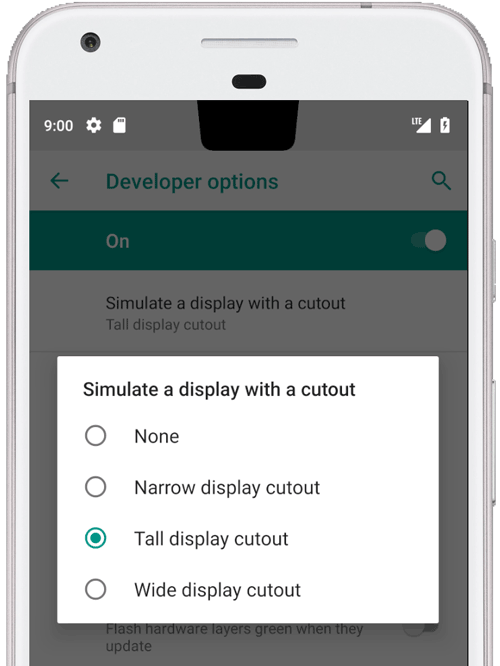
অনুকৃত কাটআউটের জন্য উদাহরণ ওভারলে:
<resources xmlns:xliff="urn:oasis:names:tc:xliff:document:1.2">

    <!-- The bounding path of the cutout region of the main built-in display.
         Must either be empty if there is no cutout region, or a string that is parsable by
         {@link android.util.PathParser}.

         The path is assumed to be specified in display coordinates with pixel units and in
         the display's native orientation, with the origin of the coordinate system at the
         center top of the display.

         To facilitate writing device-independent emulation overlays, the marker `@dp` can be
         appended after the path string to interpret coordinates in dp instead of px units.
         Note that a physical cutout should be configured in pixels for the best results.
         -->
    <string translatable="false" name="config_mainBuiltInDisplayCutout">
        M 0,0
        L -48, 0
        L -44.3940446283, 36.0595537175
        C -43.5582133885, 44.4178661152 -39.6, 48.0 -31.2, 48.0
        L 31.2, 48.0
        C 39.6, 48.0 43.5582133885, 44.4178661152 44.3940446283, 36.0595537175
        L 48, 0
        Z
        @dp
    </string>

    <!-- Whether the display cutout region of the main built-in display should be forced to
         black in software (to avoid aliasing or emulate a cutout that is not physically existent).
     -->
    <bool name="config_fillMainBuiltInDisplayCutout">true</bool>

    <!-- Height of the status bar -->
    <dimen name="status_bar_height_portrait">48dp</dimen>
    <dimen name="status_bar_height_landscape">28dp</dimen>
    <!-- Height of area above QQS where battery/time go (equal to status bar height if > 48dp) -->
    <dimen name="quick_qs_offset_height">48dp</dimen>
    <!-- Total height of QQS (quick_qs_offset_height + 128) -->
    <dimen name="quick_qs_total_height">176dp</dimen>

</resources>
বৈধতা
আপনার ডিসপ্লে কাটআউটের বাস্তবায়ন যাচাই করতে, tests/framework/base/windowmanager/src/android/server/wm- এ থাকা CTS টেস্টগুলো চালান।