

ตัวแยกประเภทข้อความใช้เทคนิคแมชชีนเลิร์นนิงเพื่อช่วยนักพัฒนาซอฟต์แวร์ ในการแยกประเภทข้อความ
ตัวแยกประเภทข้อความที่เผยแพร่ใน Android 11
Android 11 ขอแนะนำการติดตั้งใช้งานเริ่มต้นที่อัปเดตได้
ของบริการตัวแยกประเภทข้อความใน
โมดูล ExtServices ในอุปกรณ์ที่ใช้ Android 11
ขึ้นไป เมธอด
getTextClassifier()
จะแสดงผลการติดตั้งใช้งานเริ่มต้นนี้ในโมดูล ExtServices
เราขอแนะนำให้ผู้ผลิตอุปกรณ์ใช้การติดตั้งใช้งาน TextClassifierService นี้ เนื่องจากสามารถอัปเดตผ่านการอัปเดต OTA ของ Mainline ได้
นอกจากนี้ Android 11 ยังนำการติดตั้งใช้งานเริ่มต้นของตัวแยกประเภทข้อความในเครื่องออกด้วย
ซึ่งก่อนหน้านี้ได้เปิดตัวใน
Android 8.1 ด้วยเหตุนี้
getLocalTextClassifier()
จึงแสดงผลตัวแยกประเภทข้อความ NO_OP คุณควรใช้เมธอด
getDefaultTextClassifierImplementation()
แทนการติดตั้งใช้งานในเครื่อง
สำหรับผู้ผลิตอุปกรณ์ที่อาจต้องการใช้อัลกอริทึมการแยกประเภทข้อความของตนเอง สามารถติดตั้งใช้งานบริการตัวแยกประเภทข้อความที่กำหนดเองได้โดยระบุ config_defaultTextClassifierPackage ในไฟล์ config.xml หากไม่ได้ระบุการกำหนดค่านี้ ระบบจะใช้การติดตั้งใช้งานเริ่มต้นของระบบ การติดตั้งใช้งานที่กำหนดเองสามารถรับอินสแตนซ์ของการติดตั้งใช้งานเริ่มต้นได้โดยเรียกใช้
TextClassifierService.getDefaultTextClassifierImplementation(Context)
ดูข้อมูลเพิ่มเติมได้ที่
Implementing a custom text classifier service
การทดสอบ
หากต้องการตรวจสอบการติดตั้งใช้งานบริการตัวแยกประเภทข้อความ ให้ใช้
การทดสอบชุดเครื่องมือทดสอบความเข้ากันได้ (CTS) ใน
platform/cts/tests/tests/textclassifier/
การปรับปรุงตัวแยกประเภทข้อความที่เผยแพร่ใน Android 10
Android 10 ขอแนะนำ 2 เมธอดใน
TextClassifier API:
suggestConversationActions
และ
detectLanguage
เมธอด suggestConversationActions จะสร้างการตอบกลับและการดำเนินการที่แนะนำจากบทสนทนาที่กำหนด ส่วนเมธอด detectLanguage จะตรวจหาภาษาของข้อความ
ไฟล์โมเดลสำหรับเมธอดเหล่านี้แสดงอยู่ด้านล่างและดูได้ใน
external/libtextclassifier/models/
suggestionConversationActions:actions_suggestions.universal.modeldetectLanguage:lang_id.model
หากต้องการเผยแพร่อุปกรณ์ที่มีไฟล์โมเดลล่าสุดในค่าเริ่มต้น ให้ทำดังนี้
ดึงไฟล์โมเดลล่าสุด
external/libtextclassifier/models/update.sh
- เปลี่ยนชื่อไฟล์ที่ดาวน์โหลดเพื่อแทนที่ไฟล์ที่มีอยู่
- ตรวจสอบการตั้งค่า
adb shell dumpsys textclassification
นี่คือตัวอย่างเอาต์พุตของคำสั่งดังกล่าว
TextClassifierImpl:
  Annotator model file(s):
    ModelFile { path=/etc/textclassifier/textclassifier.universal.model name=textclassifier.universal.model version=608 locales=und }
    ModelFile { path=/etc/textclassifier/textclassifier.en.model name=textclassifier.en.model version=608 locales=en }
  LangID model file(s):
    ModelFile { path=/etc/textclassifier/lang_id.model name=lang_id.model version=0 locales=und }
  Actions model file(s):
    ModelFile { path=/etc/textclassifier/actions_suggestions.universal.model name=actions_suggestions.universal.model version=0 locales=und }
การปรับปรุงตัวแยกประเภทข้อความที่เผยแพร่ใน Android 9
Android 9 ขยายเฟรมเวิร์กการแยกประเภทข้อความ ที่เปิดตัวใน Android 8.1 ด้วยบริการตัวแยกประเภทข้อความ ใหม่ บริการตัวแยกประเภทข้อความเป็นวิธีที่แนะนำสำหรับ OEM ในการให้การสนับสนุนระบบการแยกประเภทข้อความ บริการตัวแยกประเภทข้อความสามารถเป็นส่วนหนึ่งของ APK ระบบใดก็ได้และสามารถอัปเดตได้เมื่อจำเป็น
Android 9 มีการติดตั้งใช้งานบริการตัวแยกประเภทข้อความเริ่มต้น
(
TextClassifierImpl) ซึ่งจะใช้เว้นแต่คุณจะแทนที่ด้วยการติดตั้งใช้งานบริการตัวแยกประเภทข้อความที่กำหนดเอง
ติดตั้งใช้งานบริการตัวแยกประเภทข้อความที่กำหนดเอง
ส่วนต่อไปนี้จะอธิบายวิธีติดตั้งใช้งานบริการตัวแยกประเภทข้อความที่กำหนดเองซึ่งคุณพัฒนาขึ้น
ขยาย android.service.textclassifier.TextClassifierService
public final class TextClassifierServiceImpl
        extends TextClassifierService {

    // Returns TextClassifierImpl.
    private final TextClassifier tc = getLocalTextClassifier();

    @Override
    public void onSuggestSelection(
            @Nullable TextClassificationSessionId sessionId,
            @NonNull TextSelection.Request request,
            @NonNull CancellationSignal cancellationSignal,
            @NonNull Callback<TextSelection> callback) {
        CompletableFuture.supplyAsync(
                () -> tc.suggestSelection(request))
                .thenAccept(r -> callback.onSuccess(r));
    }

    @Override
    public void onClassifyText(
            @Nullable TextClassificationSessionId sessionId,
		@NonNull TextClassification.Request request,
		@NonNull CancellationSignal cancellationSignal,
		@NonNull Callback<TextClassification> callback) {
        ...
    }

    @Override
    public void onGenerateLinks(
            @Nullable TextClassificationSessionId sessionId,
            @NonNull TextLinks.Request request,
            @NonNull CancellationSignal cancellationSignal,
            @NonNull Callback<TextLinks> callback) {
        ...
    }
    ...
}
กำหนดบริการในไฟล์ Manifest ของ Android
[AndroidManifest.xml]
<service android:name=".TextClassifierServiceImpl"
  android:permission="android.permission.BIND_TEXTCLASSIFIER_SERVICE">
    <intent-filter>
      <action android:name=
        "android.service.textclassifier.TextClassifierService"/>
    </intent-filter>
</service>
โปรดทราบว่าบริการต้องขอสิทธิ์ android.permission.BIND_TEXTCLASSIFIER_SERVICE และต้องระบุการดำเนินการ Intent android.service.textclassifier.TextClassifierService
ตั้งค่าบริการตัวแยกประเภทข้อความเริ่มต้นของระบบในการวางซ้อนการกำหนดค่า
[config.xml]
<string name="config_defaultTextClassifierPackage" translatable="false">com.example.textclassifierservice</string>
สร้างบริการตัวแยกประเภทข้อความลงในอิมเมจระบบ
บริการตัวแยกประเภทข้อความที่กำหนดเองสามารถเป็น APK แบบสแตนด์อโลนที่สร้างลงในอิมเมจระบบหรือเป็นส่วนหนึ่งของ APK ระบบอื่น ระบบจะใช้ PackageManager.MATCH_SYSTEM_ONLY เพื่อแก้ปัญหาบริการ
การทดสอบ
เรียกใช้การทดสอบใน android.view.textclassifier.cts
การเปลี่ยนแปลงอื่นๆ ในการแยกประเภทข้อความใน Android 9
โปรดดู Inspecting installed language modules
ไฟล์โมเดลของ Android 9 เข้ากันไม่ได้กับไฟล์โมเดลของ Android 8.x
ไฟล์โมเดลของ Android 9 มีรูปแบบการตั้งชื่อเป็น texclassifier.[language-code].model (เช่น textclassifier.en.model) แทนที่จะเป็น textclassifier.smartselection.en.model ใน Android 8.x
รับไฟล์โมเดลการแยกประเภทข้อความล่าสุด
หากต้องการรับโมเดลที่อัปเดตล่าสุด คุณสามารถเรียกใช้สคริปต์ต่อไปนี้ ซึ่งจะอัปเดตโมเดล TextClassifier ในแผนผังแหล่งที่มา
external/libtextclassifier/native/models/update.sh
ตัวแยกประเภทข้อความที่เผยแพร่ใน Android 8.1
Android 8.1 เปิดตัว TextClassfier API เพื่อติดตั้งใช้งานการแยกประเภทข้อความ
TextClassificationManager tcm =
    context.getSystemService(TextClassificationManager.class);
TextClassifier classifier = tcm.getTextClassifier();
TextSelection selection = classifier.suggestSelection(...);
TextClassification classification = classifier.classifyText(...);
นักพัฒนาซอฟต์แวร์สามารถตั้งค่าตัวแยกประเภทข้อความที่กำหนดเองได้โดยใช้โค้ดต่อไปนี้
tcm.setTextClassifier(customTextClassifier);
แต่หากนักพัฒนาแอปตั้งค่าตัวแยกประเภทข้อความเป็น null ระบบจะแสดงผลตัวแยกประเภทข้อความเริ่มต้นสำหรับ getTextClassifier()
โปรดดู android.view.textclassifier.TextClassifierImpl
TextView และ WebView ใช้ TextClassifier สำหรับฟีเจอร์การเลือกอัจฉริยะและการแชร์ข้อความอัจฉริยะ
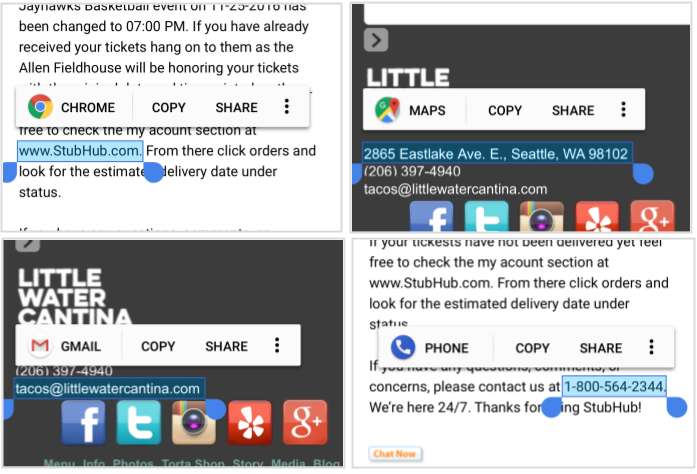
รูปที่ 1 การใช้งาน TextClassifier
โมเดลโครงข่ายประสาทเทียมของ TextClassifier
โครงการโอเพนซอร์ส Android (AOSP) มีโมเดลโครงข่ายระบบประสาทเทียมจำนวนมากสำหรับการแยกประเภทข้อความ ไฟล์โมเดลแต่ละไฟล์ได้รับการฝึกสำหรับภาษาเดียว คุณสามารถติดตั้งโมเดลต่างๆ ได้ตามต้องการ โมเดลจะกำหนดไว้ในไฟล์ต่อไปนี้
external/libtextclassifier/Android.mk
ติดตั้งโมเดลภาษาในอุปกรณ์ไว้ล่วงหน้า
คุณสามารถระบุชุดโมเดลภาษาและติดตั้งลงในอุปกรณ์ได้โดยใช้โค้ดต่อไปนี้
# -----------------------
# Smart Selection bundles
# -----------------------

include $(CLEAR_VARS)
LOCAL_MODULE           := textclassifier.smartselection.bundle1
LOCAL_REQUIRED_MODULES := textclassifier.smartselection.en.model
LOCAL_REQUIRED_MODULES += textclassifier.smartselection.es.model
LOCAL_REQUIRED_MODULES += textclassifier.smartselection.de.model
LOCAL_REQUIRED_MODULES += textclassifier.smartselection.fr.model
include $(BUILD_STATIC_LIBRARY)
เช่น ใน device/google/marlin/device-common.mk
# TextClassifier smart selection model files
PRODUCT_PACKAGES += \
    textclassifier.smartselection.bundle1
ตรวจสอบโมดูลภาษาที่ติดตั้ง
ใช้ ADB เพื่อแสดงรายการไฟล์ในไดเรกทอรีโดยใช้โค้ดต่อไปนี้
$ adb shell ls -l /etc/textclassifier
-rw-r--r-- 1 root root ... textclassifier.smartselection.de.model
-rw-r--r-- 1 root root ... textclassifier.smartselection.en.model
-rw-r--r-- 1 root root ... textclassifier.smartselection.es.model
-rw-r--r-- 1 root root ... textclassifier.smartselection.fr.model
การอัปเดตโมเดล
โมเดลสามารถอัปเดตได้โดยการรวมโมเดลใหม่ไว้ในการอัปเดตอิมเมจระบบ หรือแบบไดนามิกโดยให้คอมโพเนนต์ระบบทริกเกอร์การอัปเดตผ่าน Intent API ACTION_UPDATE_SMART_SELECTION ของระบบ การออกอากาศ Intent API ของระบบนี้จะช่วยให้เฟรมเวิร์กอัปเดตโมเดลภาษาของภาษาที่ตั้งค่าไว้ในปัจจุบันได้ โมเดลเองจะมีภาษาที่รองรับและหมายเลขเวอร์ชันเพื่อให้ระบบใช้โมเดลที่เหมาะสมล่าสุด
ดังนั้นคุณจึงไม่จำเป็นต้องโหลดโมเดลล่วงหน้าสำหรับทุกภาษา เนื่องจากสามารถเพิ่มได้ในภายหลัง หากไม่พบไฟล์โมเดลสำหรับภาษาที่ระบุ การแยกประเภทข้อความจะแสดงผลค่า no-op
การทดสอบชุดเครื่องมือทดสอบความเข้ากันได้
การทดสอบชุดเครื่องมือทดสอบความเข้ากันได้ (CTS) ของ Android ที่เกี่ยวข้องจะอยู่ในไฟล์ต่อไปนี้
cts/tests/tests/view/src/android/view/textclassifier/cts/TextClassificationManagerTest.java
cts/tests/tests/widget/src/android/widget/cts/TextViewTest.java
testSmartSelectiontestSmartSelection_dragSelectiontestSmartSelection_resetSelection