

হোস্ট কন্ট্রোলার ইন্টারফেস (HCI) ব্লুটুথ কন্ট্রোলারের সাথে যোগাযোগের জন্য ব্যবহৃত হয়।
এই ডকুমেন্টে ব্লুটুথ (BT) এবং ব্লুটুথ লো এনার্জি (BLE) HCI-এর প্রয়োজনীয়তার একটি তালিকা প্রদান করা হয়েছে। এর উদ্দেশ্য হলো, হোস্ট বিটি স্ট্যাক ভেন্ডর এবং বিটি কন্ট্রোলার ভেন্ডররা যেন নিচে বর্ণিত ফিচার সেটটি ব্যবহার করার জন্য এই প্ল্যাটফর্মের প্রয়োজনীয়তাগুলো মেনে চলে।
এই নথিতে ব্লুটুথ কোর ৫.২ স্পেসিফিকেশনকে "স্পেক" হিসাবে উল্লেখ করা হয়েছে। ব্লুটুথ কোর ৫.২ স্পেসিফিকেশনটি অন্যান্য গৃহীত নথিপত্রের সাথে ব্লুটুথ এসআইজি (Bluetooth SIG) ওয়েবসাইটে পাওয়া যায়।
সাধারণ নকশার সংক্ষিপ্ত বিবরণ
চিপের ক্ষমতা এবং কনফিগারেশন
একটি উন্মুক্ত প্ল্যাটফর্ম হিসেবে অ্যান্ড্রয়েডের চারপাশে সফটওয়্যার রিলিজ, ওইএম, ভেন্ডর এবং প্ল্যাটফর্ম ও চিপের সক্ষমতার এক জটিল জাল রয়েছে।
পরিবর্তনশীল প্রেক্ষাপট এবং মাইগ্রেশন পরিচালনা করার জন্য, এই নথিতে এমন একটি ডিজাইন দর্শন বর্ণনা করা হয়েছে যা বিটি কন্ট্রোলারদেরকে তাদের সক্ষমতা (স্ট্যান্ডার্ড ব্লুটুথ কোর ৫.২ স্পেসিফিকেশনের বাইরে) প্রকাশ করার সুযোগ দেয়। এরপর হোস্ট বিটি স্ট্যাক কোন ফিচারগুলো সক্রিয় করতে হবে তা নির্ধারণ করার জন্য এই সক্ষমতাগুলো ব্যবহার করতে পারে।
উন্মুক্ত মান সমর্থন করুন
অ্যান্ড্রয়েডের অন্যতম একটি লক্ষ্য হলো ব্লুটুথ স্পেসিফিকেশনে অনুমোদনের পর উন্মুক্ত স্ট্যান্ডার্ডগুলোকে সমর্থন করা। যদি ভবিষ্যতে কোনো ব্লুটুথ স্পেসিফিকেশনে নিচে বর্ণিত কোনো ফিচার স্ট্যান্ডার্ড HCI পদ্ধতির অন্তর্ভুক্ত হয়, তবে আমরা সেই পদ্ধতিটিকেই ডিফল্ট করার দিকে ঝুঁকব।
বিক্রেতা-নির্দিষ্ট ক্ষমতা
বিক্রেতা-নির্দিষ্ট কমান্ড: LE_Get_Vendor_Capabilities_Command
অপকোড কমান্ড ফিল্ড (OCF): 0x153
| কমান্ড প্যারামিটার | আকার | উদ্দেশ্য |
|---|---|---|
| না | খালি কমান্ড প্যারামিটার তালিকা |
এই কমান্ডের জন্য একটি 'কমান্ড কমপ্লিট' ইভেন্ট তৈরি হবে।
| রিটার্ন প্যারামিটার | আকার | উদ্দেশ্য |
|---|---|---|
Status | ১ অক্টেট | কমান্ড সম্পূর্ণ অবস্থা |
max_advt_instances(অপ্রচলিত) | ১ অক্টেট | সমর্থিত বিজ্ঞাপনের সংখ্যা। v0.98-এর পর থেকে সংরক্ষিত। গুগল ফিচার স্পেক v0.98 এবং তার পরবর্তী সংস্করণগুলিতে এই প্যারামিটারটি বাতিল করা হয়েছে এবং এর পরিবর্তে বিটি স্পেক সংস্করণ 5.0 এবং তার পরবর্তী সংস্করণগুলিতে উপলব্ধ এলই এক্সটেন্ডেড অ্যাডভার্টাইজিং (LE Extended Advertising) ব্যবহার করা হচ্ছে। |
offloaded_resolution_of_private-address(অপ্রচলিত) | ১ অক্টেট | আরপিএ-এর বিটি চিপ সক্ষমতা। যদি কোনো চিপ দ্বারা সমর্থিত হয়, তবে হোস্টের মাধ্যমে এটিকে সক্রিয় করার প্রয়োজন হয়। ০ = অক্ষম ১ = সক্ষম v0.98-এর পর থেকে সংরক্ষিত। গুগল ফিচার স্পেক v0.98 এবং তার পরবর্তী সংস্করণগুলিতে এই প্যারামিটারটি বাতিল করা হয়েছে এবং এর পরিবর্তে বিটি স্পেক সংস্করণ 4.2 এবং তার পরবর্তী সংস্করণগুলিতে উপলব্ধ প্রাইভেসি ফিচারটি ব্যবহার করা হচ্ছে। |
total_scan_results_storage | ২ অক্টেট | স্ক্যান ফলাফলের জন্য বাইটে স্টোরেজ |
max_irk_list_sz | ১ অক্টেট | ফার্মওয়্যারে সমর্থিত IRK এন্ট্রির সংখ্যা |
filtering_support | ১ অক্টেট | কন্ট্রোলারে ফিল্টারিংয়ের জন্য সমর্থন ০ = সমর্থিত নয় ১ = সমর্থিত |
max_filter | ১ অক্টেট | সমর্থিত ফিল্টারের সংখ্যা |
activity_energy_info_support | ১ অক্টেট | কার্যকলাপ এবং শক্তি সম্পর্কিত তথ্য প্রতিবেদন করা সমর্থন করে। ০ = অক্ষম ১ = সক্ষম |
version_supported | ২ অক্টেট | গুগল ফিচার স্পেকের সমর্থিত সংস্করণ নির্দিষ্ট করে। byte[0] = প্রধান সংখ্যা byte[1] = ক্ষুদ্রতম সংখ্যা v1.06 বাইট[0] = 0x01 বাইট[1] = 0x06 নিম্নলিখিত সংস্করণগুলিতে নতুন বৈশিষ্ট্য যুক্ত করা হয়েছে: v1.06:
|
total_num_of_advt_tracked | ২ অক্টেট | OnLost / OnFound উদ্দেশ্যে ট্র্যাক করা বিজ্ঞাপনদাতাদের মোট সংখ্যা |
extended_scan_support | ১ অক্টেট | বর্ধিত স্ক্যান উইন্ডো এবং ব্যবধান সমর্থন করে |
debug_logging_supported | ১ অক্টেট | কন্ট্রোলার থেকে বাইনারি ডিবাগ তথ্য লগ করা সমর্থন করে। |
LE_address_generation_offloading_support(অপ্রচলিত) | ১ অক্টেট | ০ = সমর্থিত নয় ১ = সমর্থিত v0.98-এর পর থেকে সংরক্ষিত। গুগল ফিচার স্পেক v0.98 এবং তার পরবর্তী সংস্করণগুলিতে এই প্যারামিটারটি বাতিল করা হয়েছে এবং এর পরিবর্তে বিটি স্পেক সংস্করণ 4.2 এবং তার পরবর্তী সংস্করণগুলিতে উপলব্ধ প্রাইভেসি ফিচারটি ব্যবহার করা হচ্ছে। |
A2DP_source_offload_capability_mask | ৪ অক্টেট | সমর্থিত কোডেক প্রকারের জন্য বিট মাস্ক বিট ০ - এসবিসি বিট ১ - এএসি বিট ২ - এপিটিএক্স বিট ৩ - এপিটিএক্স এইচডি বিট ৪ - এলডিএসি বিট ৫ - ওপাস বিট ৬-৩১ সংরক্ষিত |
bluetooth_quality_report_support | ১ অক্টেট | ব্লুটুথ কোয়ালিটি ইভেন্টের রিপোর্টিং সমর্থন করে ০ = অক্ষম ১ = সক্ষম |
dynamic_audio_buffer_support | ৪ অক্টেট | ব্লুটুথ কন্ট্রোলারে ডায়নামিক অডিও বাফার সমর্থন করে সমর্থিত কোডেক প্রকারের জন্য বিট মাস্ক বিট ০ - এসবিসি বিট ১ - এএসি বিট ২ - এপিটিএক্স বিট ৩ - এপিটিএক্স এইচডি বিট ৪ - এলডিএসি বিট ৫ - ওপাস বিট ৬-৩১ সংরক্ষিত |
a2dp_offload_v2_support | ১ অক্টেট | ব্লুটুথ কন্ট্রোলারে A2DP অফলোড v2 কমান্ড সমর্থন করে (দেখুন: A2DP অফলোড শুরু করুন , A2DP অফলোড বন্ধ করুন )। ০ = সমর্থিত নয় ১ = সমর্থিত |
iso_link_feedback_support | ১ অক্টেট | ISO লিঙ্ক ফিডব্যাক ইভেন্ট সমর্থন করে ০ = সমর্থিত নয় ১ = সমর্থিত |
sniff_offload_support | ১ অক্টেট | ব্লুটুথ কন্ট্রোলারে স্নিফ অফলোড কমান্ড সমর্থন করে। ০ = সমর্থিত নয় ১ = সমর্থিত |
big_set_channel_map_classification_support | ২ অক্টেট | LE ব্রডকাস্ট চ্যানেল ম্যাপ ক্লাসিফিকেশন ফিচারের সাব-অপকোড সমর্থন করে। বিট ০ - সাব-অপকোড 0x01 সমর্থন করে (LE ACL সংযোগ হ্যান্ডেল দ্বারা BIG চ্যানেল ম্যাপ সেট করুন) বিট ১-১৫ - সংরক্ষিত বিটের মান: ০ ০ = সমর্থিত নয় ১ = সমর্থিত |
vendor_connection_handle_min | ২ অক্টেট | ACL প্যাকেটের মাধ্যমে প্রাপ্ত HCI ভেন্ডর ইভেন্টগুলির জন্য ভেন্ডর সংযোগ হ্যান্ডেলগুলির সর্বনিম্ন মান রিপোর্ট করুন। ACL ডেটা প্যাকেটের মাধ্যমে ভেন্ডর ইভেন্ট রিপোর্টিংয়ের জন্য সমর্থনের অভাব বোঝাতে হ্যান্ডেল ০ ব্যবহার করা হয়। |
vendor_connection_handle_max | ২ অক্টেট | ACL প্যাকেটের মাধ্যমে প্রাপ্ত HCI ভেন্ডর ইভেন্টগুলির জন্য ভেন্ডর সংযোগ হ্যান্ডেলগুলির সর্বোচ্চ মান রিপোর্ট করুন। ACL ডেটা প্যাকেটের মাধ্যমে ভেন্ডর ইভেন্ট রিপোর্টিংয়ের জন্য সমর্থনের অভাব বোঝাতে হ্যান্ডেল ০ ব্যবহার করা হয়। |
connection_proximity_threshold_support | ১ অক্টেট | চিপটি সংযোগ নৈকট্য থ্রেশহোল্ড সমর্থন করে কিনা ০ = সমর্থিত নয় ১ = সমর্থিত |
ব্যাচ স্ক্যানের ফলাফল
ডিজাইনের একটি লক্ষ্য হলো ব্লুটুথ এলই স্ক্যান রেসপন্স ইভেন্ট নোটিফিকেশনগুলো হোস্টে পাঠানোর পদ্ধতি উন্নত করা, যাতে হোস্টে শক্তি সাশ্রয় করা যায়।
কন্ট্রোলার কর্তৃক হোস্ট অ্যাপ প্রসেসরকে স্ক্যান ফলাফলের জন্য অবহিত করার হার কমিয়ে আনার মাধ্যমে, হোস্ট অ্যাপ প্রসেসর আরও বেশি সময় ধরে নিষ্ক্রিয়/স্লিপ অবস্থায় থাকতে পারে। এতে হোস্টে বিদ্যুৎ খরচ কমে। LE_Get_Vendor_Capabilities_Command এর রিটার্ন প্যারামিটার total_scan_results_storage স্ক্যান ফলাফল সংরক্ষণের জন্য চিপের সক্ষমতা নির্দেশ করে।
এই ফিচারটি ব্লুটুথ কন্ট্রোলারের LE স্ক্যান রেজাল্টস স্টোরেজ ফ্যাসিলিটির ব্যবস্থাপনা এবং কনফিগারেশনের উপর আলোকপাত করে। এই স্টোরেজটি কন্ট্রোলার দ্বারা প্রাপ্ত অ্যাডভার্টাইজমেন্ট ডেটা, স্ক্যান ডেটা এবং মেটাডেটাকে সাময়িকভাবে ব্যাচ করে পরবর্তীতে হোস্টে পাঠানোর জন্য ব্যবহৃত হয়।
ফার্মওয়্যার দুই ধরনের ব্যাচিং সমর্থন করবে, যেগুলো একই সাথে চালু করা যাবে:
- সংক্ষিপ্ত। এতে নিম্নলিখিত তথ্য উপাদানগুলো রয়েছে: {MAC, TX Power, RSSI, Timestamp}
- সম্পূর্ণ। এতে নিম্নলিখিত তথ্য উপাদানগুলো রয়েছে: {MAC, TX Power, RSSI, Timestamp, Adv Data, Scan Response}
LE_Batch_Scan_Command
OCF: 0x156
| কমান্ড প্যারামিটার | আকার | উদ্দেশ্য |
|---|---|---|
Batch_Scan_opcode | ১ অক্টেট | 0x1 - গ্রাহক-নির্দিষ্ট বৈশিষ্ট্য সক্রিয় করুন 0x2 - ব্যাচ স্ক্যান স্টোরেজ প্যারামিটার সেট করুন 0x3 - ব্যাচ স্ক্যান প্যারামিটার সেট করুন 0x4 - ব্যাচ স্ক্যান ফলাফলের প্যারামিটার পড়ুন |
এই কমান্ডের জন্য একটি ‘কমান্ড কমপ্লিট’ ইভেন্ট তৈরি হবে। গ্রাহক-নির্দিষ্ট ফিচারটি সক্রিয় করলে স্ক্যান শুরু হয় না।
| রিটার্ন প্যারামিটার | আকার | উদ্দেশ্য |
|---|---|---|
Status | ১ অক্টেট | কমান্ড সম্পূর্ণ অবস্থা |
Batch_Scan_opcode | ১ অক্টেট | 0x1 - গ্রাহক-নির্দিষ্ট বৈশিষ্ট্য সক্রিয় করুন 0x2 - ব্যাচ স্ক্যান স্টোরেজ প্যারামিটার সেট করুন 0x3 - ব্যাচ স্ক্যান প্যারামিটার সেট করুন 0x4 - ব্যাচ স্ক্যান ফলাফলের প্যারামিটার পড়ুন |
LE_Batch_Scan_Command: গ্রাহক-নির্দিষ্ট বৈশিষ্ট্য সক্রিয় করুন
সাব ওসিএফ: 0x01
| সাবকমান্ড প্যারামিটার | আকার | উদ্দেশ্য |
|---|---|---|
enable_customer_specific_feature_set | ১ অক্টেট | 0x01 - ব্যাচ স্ক্যান বৈশিষ্ট্য সক্রিয় করুন 0x00 - ব্যাচ স্ক্যান বৈশিষ্ট্য নিষ্ক্রিয় করুন |
এই কমান্ডের জন্য একটি 'কমান্ড কমপ্লিট' ইভেন্ট তৈরি হবে।
| রিটার্ন প্যারামিটার | আকার | উদ্দেশ্য |
|---|---|---|
Status | ১ অক্টেট | কমান্ড সম্পূর্ণ অবস্থা |
Batch_Scan_opcode | ১ অক্টেট | 0x1 - গ্রাহক-নির্দিষ্ট বৈশিষ্ট্য সক্রিয় করুন 0x2 - ব্যাচ স্ক্যান স্টোরেজ প্যারামিটার সেট করুন 0x3 - ব্যাচ স্ক্যান প্যারামিটার সেট করুন 0x4 - ব্যাচ স্ক্যান ফলাফলের প্যারামিটার পড়ুন |
LE_Batch_Scan_Command: ব্যাচ স্ক্যান স্টোরেজ প্যারামিটার সাবকমান্ড সেট করুন
সাব ওসিএফ: 0x02
| সাবকমান্ড প্যারামিটার | আকার | উদ্দেশ্য |
|---|---|---|
Batch_Scan_Full_Max | ১ অক্টেট | সম্পূর্ণ স্টাইলের জন্য বরাদ্দকৃত সর্বাধিক স্টোরেজ স্পেস (শতাংশে) [পরিসর: ০-১০০] |
Batch_Scan_Truncated_Max | ১ অক্টেট | সংক্ষিপ্ত শৈলীর জন্য বরাদ্দকৃত সর্বাধিক স্টোরেজ স্পেস (শতাংশে) [পরিসর: ০-১০০] |
Batch_Scan_Notify_Threshold | ১ অক্টেট | প্রতিটি স্টোরেজ পুলের জন্য নোটিফিকেশন লেভেল (শতাংশে) সেট আপ করুন। [পরিসর: ০-১০০] ০-তে সেট করলে নোটিফিকেশন নিষ্ক্রিয় হয়ে যাবে। ভেন্ডর-নির্দিষ্ট HCI ইভেন্ট তৈরি হয় (স্টোরেজ থ্রেশহোল্ড ব্রীচ সাবইভেন্ট)। |
এই কমান্ডের জন্য একটি 'কমান্ড কমপ্লিট' ইভেন্ট তৈরি হবে।
| রিটার্ন প্যারামিটার | আকার | উদ্দেশ্য |
|---|---|---|
Status | ১ অক্টেট | কমান্ড সম্পূর্ণ অবস্থা |
Batch_scan_opcode | ১ অক্টেট | 0x02 [ব্যাচ স্ক্যান প্যারামিটার সেট করুন] |
LE_Batch_Scan_Command: ব্যাচ স্ক্যান প্যারামিটার সাবকমান্ড সেট করুন
উপ OCF: 0x03
| সাবকমান্ড প্যারামিটার | আকার | উদ্দেশ্য |
|---|---|---|
Batch_Scan_Mode | ১ অক্টেট | 0x00 – ব্যাচ স্ক্যান নিষ্ক্রিয় করা হয়েছে 0x01 – সংক্ষিপ্ত মোড সক্রিয় করা হয়েছে 0x02 – পূর্ণ মোড সক্রিয় করা হয়েছে 0x03 – সংক্ষিপ্ত এবং পূর্ণ মোড সক্রিয় করা হয়েছে |
Duty_cycle_scan_window | ৪ অক্টেট | ব্যাচ স্ক্যান স্ক্যানের সময় (স্লটের সংখ্যা) |
Duty_cyle_scan_interval | ৪ অক্টেট | ব্যাচ স্ক্যান ব্যবধানের সময়কাল (স্লটের সংখ্যা) |
own_address_type | ১ অক্টেট | 0x00 - পাবলিক ডিভাইস অ্যাড্রেস 0x01 - র্যান্ডম ডিভাইস অ্যাড্রেস |
Batch_scan_Discard_Rule | ১ অক্টেট | ০ - সবচেয়ে পুরোনো বিজ্ঞাপনটি বাতিল করুন ১ - সবচেয়ে দুর্বল আরএসএসআই (RSSI) যুক্ত বিজ্ঞাপনটি বাতিল করুন। |
এই সাবকমান্ডটি ব্যাচ স্ক্যানিং শুরু করবে, যদি এটি সক্রিয় করা থাকে। ট্রাঙ্কেটেড স্ক্যানিং-এ, ফলাফলগুলি সংক্ষিপ্ত আকারে সংরক্ষণ করা হয়, যেখানে ট্রাঙ্কেটেড স্টাইলের জন্য অনন্য কী হলো { BD_ADDR, scan_interval}। এর মানে হলো, প্রতিটি স্ক্যান ইন্টারভালের জন্য শুধুমাত্র একটি BD_ADDR will । ট্রাঙ্কেটেড মোডের জন্য যে রেকর্ডটি রাখতে হবে তা হলো: { BD_ADDR , Tx Power, RSSI, Timestamp}।
যখন ফুল মোড চালু করা হয়, তখন সক্রিয় স্ক্যানিং ব্যবহৃত হবে এবং স্ক্যান রেসপন্স রেকর্ড করা হবে। স্ক্যান ইন্টারভ্যাল নির্বিশেষে, ফুল স্টাইলের ইউনিক কী হলো {MAC, Ad packet}। ফুল মোডের জন্য যে রেকর্ডটি রাখতে হবে তা হলো { BD_ADDR , Tx Power, RSSI, Timestamp, Ad packet, Scan Response}। ফুল স্টাইলে, একই AD প্যাকেট বিভিন্ন স্ক্যান ইন্টারভ্যালে একাধিকবার দেখা গেলেও, তা শুধুমাত্র একবার রেকর্ড করা হয়। তবে, ট্রাঙ্কেটেড মোডে, বিভিন্ন স্ক্যান ইন্টারভ্যালে BA_ADDR এর দৃশ্যমানতাই বিবেচ্য (প্রতি স্ক্যান ইন্টারভ্যালে একবার)। RSSI হলো একটি স্ক্যান ইন্টারভ্যালের মধ্যে একটি ইউনিক অ্যাডভার্টাইজমেন্টের সমস্ত ডুপ্লিকেটের গড় মান।
এই কমান্ডের জন্য একটি 'কমান্ড কমপ্লিট' ইভেন্ট তৈরি হবে।
| রিটার্ন প্যারামিটার | আকার | উদ্দেশ্য |
|---|---|---|
Status | ১ অক্টেট | কমান্ড সম্পূর্ণ অবস্থা |
Batch_scan_opcode | ১ অক্টেট | 0x03 [ব্যাচ স্ক্যান প্যারামিটার সেট করুন] |
LE_Batch_Scan_Command: ব্যাচ স্ক্যানের ফলাফল পড়ার সাবকমান্ড
সাব ওসিএফ: 0x04
| সাবকমান্ড প্যারামিটার | আকার | উদ্দেশ্য |
|---|---|---|
Batch_Scan_Data_read | ১ অক্টেট | 0x01 - সংক্ষিপ্ত মোড ডেটা 0x02 - পূর্ণ মোড ডেটা |
এই কমান্ডের জন্য একটি ‘কমান্ড কমপ্লিট’ ইভেন্ট তৈরি হবে। যখন হোস্ট এই কমান্ডটি জারি করে, তখন কন্ট্রোলারের সমস্ত ফলাফল একটি ‘কমান্ড কমপ্লিট’ ইভেন্টের মধ্যে নাও ধরতে পারে। হোস্ট এই কমান্ডটি জারি করতে থাকবে যতক্ষণ না ‘কমান্ড কমপ্লিট’ ইভেন্টের সংশ্লিষ্ট ফলাফলে রেকর্ডের সংখ্যা ০ দেখায়, যা নির্দেশ করে যে কন্ট্রোলারের কাছে হোস্টকে জানানোর মতো আর কোনো রেকর্ড নেই। প্রতিটি ‘কমান্ড কমপ্লিট’ ইভেন্টে শুধুমাত্র এক ধরনের ডেটার (সম্পূর্ণ বা সংক্ষিপ্ত) একাধিক রেকর্ড থাকতে পারে।
কন্ট্রোলার এবং হোস্টের সময় রেফারেন্স সিঙ্ক্রোনাইজড নয়। টাইমস্ট্যাম্পের একক হলো ৫০ মিলিসেকেন্ড। হোস্ট কখন Read_Batch_Scan_Results_Sub_cmd কমান্ডটি দেয়, তার উপর ভিত্তি করে টাইমস্ট্যাম্পের মান নির্ধারিত হয়। যদি ফার্মওয়্যারে কোনো কমান্ড আসার সময় T_c হয়, তাহলে ফার্মওয়্যারে টাইমস্ট্যাম্পটি নেওয়ার প্রকৃত সময় হবে T_fw । রিপোর্টিং সময় হবে: ( T_c - T_fw )। T_c এবং T_fw ফার্মওয়্যারের টাইম ডোমেইনে থাকে। এর ফলে হোস্ট গণনা করতে পারে যে ঘটনাটি কতক্ষণ আগে ঘটেছে।
| রিটার্ন প্যারামিটার | আকার | উদ্দেশ্য |
|---|---|---|
Status | ১ অক্টেট | কমান্ড সম্পূর্ণ অবস্থা |
Batch_scan_opcode | ১ অক্টেট | 0x03 [ব্যাচ স্ক্যান প্যারামিটার সেট করুন] |
Batch_Scan_data_read | ১ অক্টেট | ফর্ম্যাট শনাক্ত করে (সংক্ষিপ্ত বা সম্পূর্ণ) |
num_of_records | ১ অক্টেট | Batch_Scan_data_read এর রেকর্ডের সংখ্যা |
format_of_data | পরিবর্তনশীল | সংক্ষিপ্ত মোড: ঠিকানা[0]: ৬ অক্টেট ঠিকানার_ধরন[0]: ১ অক্টেট Tx_Pwr[0]: ১ অক্টেট RSSI[0] : ১ অক্টেট টাইমস্ট্যাম্প[0]: ২ অক্টেট [উপরোক্ত বিন্যাসে একাধিক রেকর্ড ( num_of_records )]পূর্ণ মোড: ঠিকানা[0]: ৬ অক্টেট ঠিকানার_ধরন[0]: ১ অক্টেট Tx_Pwr[0]: ১ অক্টেট RSSI[0]: ১ অক্টেট টাইমস্ট্যাম্প[0]: ২ অক্টেট Adv packet_len[0]: 1 octet Adv_packet[0]: Adv_packet_len অক্টেট Scan_data_resp_len[0]: 1 অক্টেট Scan_data_resp[0]: Scan_data_resp octets[উপরের বিন্যাস অনুযায়ী একাধিক রেকর্ড ( num_of_records )] |
বিজ্ঞাপন প্যাকেটের বিষয়বস্তু ফিল্টার
কন্ট্রোলারে অ্যাডভারটাইজিং প্যাকেট কন্টেন্ট ফিল্টার (APCF) চালু/বন্ধ/সেটআপ করতে এটি ব্যবহার করুন। APCF কন্ট্রোলারের অ্যাডভারটাইজিং রিপোর্ট ফিল্টার করে, কিন্তু পিরিয়ডিক অ্যাডভারটাইজিং ফিল্টার করে না।
LE_APCF_কমান্ড
OCF: 0x157
| কমান্ড প্যারামিটার | আকার | উদ্দেশ্য |
|---|---|---|
APCF_opcode | ১ অক্টেট | 0x00 - APCF সক্রিয় করুন 0x01 - APCF ফিল্টারিং প্যারামিটার সেট করুন 0x02 - APCF সম্প্রচারকের ঠিকানা 0x03 - APCF পরিষেবা UUID 0x04 - APCF পরিষেবা অনুরোধ UUID 0x05 - APCF স্থানীয় নাম 0x06 - APCF প্রস্তুতকারকের ডেটা 0x07 - APCF পরিষেবা ডেটা 0x08 - APCF পরিবহন আবিষ্কার পরিষেবা 0x09 - APCF AD টাইপ ফিল্টার 0x10 ~ 0xAF - ভবিষ্যৎ ব্যবহারের জন্য সংরক্ষিত 0xB0 ~ 0xDF - বিক্রেতার জন্য সংরক্ষিত 0xE0 ~ 0xFE - ভবিষ্যৎ ব্যবহারের জন্য সংরক্ষিত 0xFF - APCF রিড বর্ধিত বৈশিষ্ট্য |
এই কমান্ডের জন্য একটি 'কমান্ড কমপ্লিট' ইভেন্ট তৈরি হবে।
| রিটার্ন প্যারামিটার | আকার | উদ্দেশ্য |
|---|---|---|
Status | ১ অক্টেট | ফেরতের অবস্থা |
APCF_opcode | ১ অক্টেট | 0x00 - APCF সক্রিয় করুন 0x01 - APCF ফিল্টারিং প্যারামিটার সেট করুন 0x02 - APCF সম্প্রচারকের ঠিকানা 0x03 - APCF পরিষেবা UUID 0x04 - APCF পরিষেবা অনুরোধ UUID 0x05 - APCF স্থানীয় নাম 0x06 - APCF প্রস্তুতকারকের ডেটা 0x07 - APCF পরিষেবা ডেটা 0x08 - APCF পরিবহন আবিষ্কার পরিষেবা 0x09 - APCF AD টাইপ ফিল্টার 0x10 ~ 0xAF - ভবিষ্যৎ ব্যবহারের জন্য সংরক্ষিত 0xB0 ~ 0xDF - বিক্রেতার জন্য সংরক্ষিত 0xE0 ~ 0xFE - ভবিষ্যৎ ব্যবহারের জন্য সংরক্ষিত 0xFF - APCF রিড বর্ধিত বৈশিষ্ট্য |
LE_APCF_Command: Enable_sub_cmd
সাব ওসিএফ: 0x00
| সাবকমান্ড প্যারামিটার | আকার | উদ্দেশ্য |
|---|---|---|
APCF_enable | ১ অক্টেট | 0x01 - APCF বৈশিষ্ট্য সক্রিয় করুন 0x00 - APCF বৈশিষ্ট্য নিষ্ক্রিয় করুন |
এই কমান্ডের জন্য একটি 'কমান্ড কমপ্লিট' ইভেন্ট তৈরি হবে।
| রিটার্ন প্যারামিটার | আকার | উদ্দেশ্য |
|---|---|---|
Status | ১ অক্টেট | কমান্ড সম্পূর্ণ অবস্থা |
APCF_opcode | ১ অক্টেট | 0x0 - APCF সক্রিয় করুন |
APCF_Enable | ১ অক্টেট | APCF_enable এর মাধ্যমে সক্ষম/অক্ষম করা হয়। |
LE_APCF_Command: set_filtering_parameters_sub_cmd
এই সাবকমান্ডটি অন-চিপ ফিল্টারিংয়ের জন্য ফিল্টার স্পেসিফিকেশন যোগ বা মুছে ফেলতে অথবা ফিল্টার তালিকা পরিষ্কার করতে ব্যবহৃত হয়।
সাব ওসিএফ: 0x01
| সাবকমান্ড প্যারামিটার | আকার | উদ্দেশ্য |
|---|---|---|
APCF_Action | ১ অক্টেট | 0x00 - যোগ করুন 0x01 - মুছে ফেলুন 0x02 - পরিষ্কার ডিলিট করলে নির্দিষ্ট ফিল্টারটির সাথে অন্যান্য টেবিলের সংশ্লিষ্ট ফিচার এন্ট্রিগুলোও মুছে যাবে। ক্লিয়ার অন্যান্য টেবিলের সমস্ত ফিল্টার এবং সংশ্লিষ্ট এন্ট্রি মুছে ফেলবে। |
APCF_Filter_Index | ১ অক্টেট | ফিল্টার সূচক (0, max_filter-1 ) |
APCF_Feature_Selection | ২ অক্টেট | নির্বাচিত বৈশিষ্ট্যগুলির জন্য বিট মাস্ক: বিট ০: ব্রডকাস্ট অ্যাড্রেস ফিল্টার সক্রিয় করতে সেট করুন বিট ১: সার্ভিস ডেটা চেঞ্জ ফিল্টার সক্রিয় করতে সেট করুন। বিট ২: সার্ভিস UUID চেক সক্রিয় করতে সেট করুন বিট ৩: সার্ভিস সলিসিটেশন UUID চেক সক্রিয় করতে সেট করুন। বিট ৪: স্থানীয় নাম যাচাই সক্রিয় করতে সেট করুন বিট ৫: প্রস্তুতকারকের ডেটা যাচাই সক্রিয় করতে সেট করুন। বিট ৬: সার্ভিস ডেটা চেক সক্রিয় করতে সেট করুন বিট ৭: ট্রান্সপোর্ট ডিসকভারি সার্ভিস চেক সক্রিয় করতে সেট করুন বিট ৮: AD টাইপ চেক সক্রিয় করতে সেট করুন |
APCF_List_Logic_Type | ২ অক্টেট | APCF_Feature_Selection এ নির্দিষ্ট করা প্রতিটি ফিচার সিলেকশনের (প্রতি-বিট পজিশন) জন্য লজিক অপারেশন।শুধুমাত্র ফিচারটি সক্রিয় করা থাকলেই বৈধ। বিট অবস্থানের মান: ০: অথবা ১: এবং "AND" লজিক নির্বাচন করা হলে, একটি ADV প্যাকেট ফিল্টারটি কেবল তখনই অতিক্রম করবে, যদি তাতে তালিকার সমস্ত এন্ট্রি অন্তর্ভুক্ত থাকে। "OR" লজিক নির্বাচন করা হলে, একটি ADV প্যাকেটে তালিকার যেকোনো একটি এন্ট্রি থাকলে সেটি ফিল্টারটি অতিক্রম করবে। |
APCF_Filter_Logic_Type | ১ অক্টেট | 0x00: অথবা 0x01: এবং দ্রষ্টব্য: APCF_Feature_Selection এর প্রথম তিনটি ফিল্ডের জন্য লজিক টাইপ প্রযোজ্য নয়, যা সর্বদা "AND" লজিক। এগুলি শুধুমাত্র APCF_Feature_Selection এর (বিট ৩ - বিট ৬) চারটি ফিল্ডের জন্য প্রযোজ্য। |
rssi_high_thresh | ১ অক্টেট | [dBm-এ] বিজ্ঞাপনদাতাকে তখনই দেখা গেছে বলে গণ্য করা হবে, যখন সিগন্যালটি RSSI উচ্চ থ্রেশহোল্ডের চেয়ে বেশি হবে। অন্যথায়, ফার্মওয়্যারটিকে এমনভাবে কাজ করতে হবে যেন এটি বিজ্ঞাপনদাতাকে কখনও দেখেইনি। |
delivery_mode | ১ অক্টেট | 0x00 - immediate0x01 - on_found0x02 - batched |
onfound_timeout | ২ অক্টেট | শুধুমাত্র delivery_mode on_found হলেই বৈধ।[মিলিসেকেন্ডে] রিপোর্ট করার আগে ফার্মওয়্যারের কিছুক্ষণ থেকে অতিরিক্ত বিজ্ঞাপন সংগ্রহ করার সময়। |
onfound_timeout_cnt | ১ অক্টেট | শুধুমাত্র delivery_mode on_found হলেই বৈধ।[গণনা] যদি onFound অবস্থায় থাকা কোনো অ্যাডভার্টাইজমেন্ট onfound_timeout সময়কাল ধরে ফার্মওয়্যারে থেকে যায়, তবে এটি কয়েকটি অ্যাডভার্টাইজমেন্ট সংগ্রহ করে এবং তার সংখ্যা পরীক্ষা করা হয়। যদি সংখ্যাটি onfound_timeout_cnt অতিক্রম করে, তবে এর ঠিক পরেই সেটিকে OnFound রিপোর্ট করা হয়। |
rssi_low_thresh | ১ অক্টেট | শুধুমাত্র delivery_mode on_found হলেই বৈধ।[dBm-এ] যদি প্রাপ্ত প্যাকেটের RSSI, RSSI-এর নিম্নসীমার উপরে না থাকে, তবে বিজ্ঞাপনদাতার প্যাকেটটি দেখা যায়নি বলে গণ্য করা হয়। |
onlost_timeout | ২ অক্টেট | শুধুমাত্র delivery_mode on_found হলেই বৈধ।[মিলিসেকেন্ডে] কোনো বিজ্ঞাপন খুঁজে পাওয়ার পর যদি lost_timeout সময়কাল ধরে একটানা দেখা না যায়, তবে সেটিকে অবিলম্বে হারিয়ে গেছে বলে রিপোর্ট করা হবে। |
num_of_tracking_entries | ২ অক্টেট | শুধুমাত্র delivery_mode on_found হলেই বৈধ।[গণনা] প্রতিটি ফিল্টারের জন্য ট্র্যাক করার মোট বিজ্ঞাপনদাতার সংখ্যা। |
RSSI-এর ঋণাত্মক মান প্রকাশ করার জন্য অবশ্যই 2's complement ব্যবহার করতে হবে।
বিভিন্ন ফিল্টার সংমিশ্রণ পরিচালনা করার জন্য, হোস্ট সকল ব্রডকাস্টার অ্যাড্রেসের জন্য APCF_Application_Address_type কে 0x02-তে সেট করে একাধিক ফিল্টার কনফিগার করতে সক্ষম হবে।
ফিল্টারিং, ব্যাচিং এবং রিপোর্টিং হলো পরস্পর সম্পর্কিত ধারণা। প্রতিটি অ্যাডভার্টাইজমেন্ট এবং সংশ্লিষ্ট স্ক্যান রেসপন্সকে একের পর এক সমস্ত ফিল্টারের মধ্য দিয়ে যেতে হবে। সুতরাং, ফলাফলস্বরূপ গৃহীত পদক্ষেপগুলো ( delivery_mode ) ফিল্টারিংয়ের সাথে ঘনিষ্ঠভাবে জড়িত। ডেলিভারি মোডগুলো হলো: report_immediately , batch , এবং onFound । OnLost ভ্যালুটি OnFound সাথে এই অর্থে সম্পর্কিত যে, হারিয়ে গেলে এটি OnFound পরে আসবে।
এই প্রক্রিয়াকরণ প্রবাহটি ধারণাগত মডেলটিকে চিত্রিত করে:
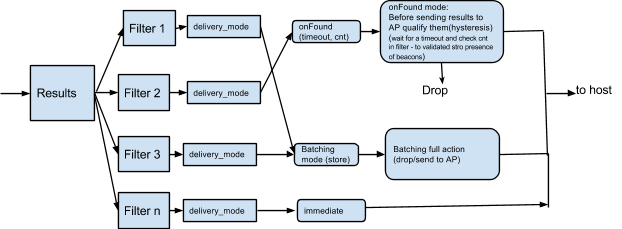
যখন একটি অ্যাডভার্টাইজমেন্ট (বা স্ক্যান রেসপন্স) ফ্রেম পাওয়া যায়, তখন তা ক্রমানুসারে সমস্ত ফিল্টারে প্রয়োগ করা হয়। এমনটা হতে পারে যে, একটি অ্যাডভার্টাইজমেন্ট একটি ফিল্টারের উপর ভিত্তি করে তাৎক্ষণিক রিপোর্টিং ঘটাতে পারে এবং ভিন্ন কোনো ফিল্টারের কার্যকলাপের কারণে সেটির ব্যাচিং হতে পারে।
RSSI লেভেল থ্রেশহোল্ড (উচ্চ এবং নিম্ন) এই ক্ষমতা দেয় যে, কন্ট্রোলার একটি বৈধ প্যাকেট গ্রহণ করলেও ফ্রেমটি কখন ফিল্টার প্রক্রিয়াকরণের জন্য দৃশ্যমান হবে তা নিয়ন্ত্রণ করা যায়। ডেলিভারি মোড 'ইমিডিয়েট' বা 'ব্যাচড'-এ সেট করা থাকলে, পরবর্তী কন্ট্রোলার প্রক্রিয়াকরণের জন্য একটি ফ্রেমের RSSI বিবেচনা করা হয়। বিভিন্ন অ্যাপের জন্য ভিন্ন ভিন্ন রিপোর্টিং এবং ব্যাচিং আচরণের প্রয়োজন হয়। এটি একাধিক অ্যাপকে ফার্মওয়্যারে একই সাথে ফলাফলের সরাসরি রিপোর্টিং এবং/অথবা ব্যাচিং করার সুযোগ দেয়। একটি উদাহরণ হলো এমন একটি পরিস্থিতি যখন একটি অ্যাপ থেকে একটি ব্যাচ স্ক্যান সক্রিয় থাকে এবং পরে অন্য একটি অ্যাপ থেকে একটি সাধারণ LE স্ক্যান চালু করা হয়। ব্যাচ স্ক্যান চালু করার আগে, ফ্রেমওয়ার্ক/অ্যাপটি উপযুক্ত ফিল্টার সেট করে। পরে, যখন দ্বিতীয় অ্যাপটি একটি সাধারণ স্ক্যান চালু করে, তখন পূর্ববর্তী ব্যাচিং চলতে থাকে। তবে, সাধারণ স্ক্যানের কারণে, এটি ধারণাগতভাবে LE স্ক্যান কমান্ডের সাথে একটি নাল ফিল্টার (বিদ্যমান সমস্ত ফিল্টারের সাথে) যুক্ত করার অনুরূপ। সক্রিয় থাকাকালীন LE স্ক্যান কমান্ডের প্যারামিটারগুলো অগ্রাধিকার পায়। যখন সাধারণ LE স্ক্যান নিষ্ক্রিয় করা হয়, তখন কন্ট্রোলার পূর্ববর্তী কোনো ব্যাচ স্ক্যানে ফিরে যাবে, যদি তা বিদ্যমান থাকে।
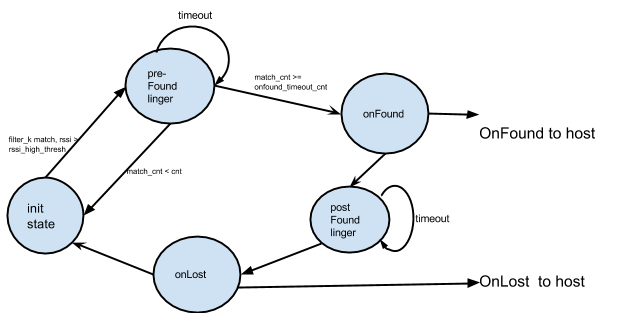
OnFound ডেলিভারি মোডটি কনফিগার করা ফিল্টারগুলোর উপর ভিত্তি করে কাজ করে। যে সংমিশ্রণটি একটি ফিল্টারের ক্রিয়াকে সফল করে, সেটিকে onLost এর জন্য ট্র্যাক করার সত্তা হিসেবে বিবেচনা করা হয়। এর সংশ্লিষ্ট ইভেন্টটি হলো LE Advt ট্র্যাকিং সাব-ইভেন্ট।
কোনো ফিল্টারের জন্য OnFound/OnLost ট্রানজিশনটি (যদি সক্রিয় করা থাকে) দেখতে নিম্নলিখিতের মতো হবে:
এই কমান্ডের জন্য একটি 'কমান্ড কমপ্লিট' ইভেন্ট তৈরি হবে।
| রিটার্ন প্যারামিটার | আকার | উদ্দেশ্য |
|---|---|---|
Status | ১ অক্টেট | কমান্ড সম্পূর্ণ অবস্থা |
APCF_opcode | ১ অক্টেট | 0x01 - APCF ফিল্টারিং প্যারামিটার সেট করুন |
APCF_Action | ১ অক্টেট | ইকো ব্যাক কমান্ডের APCF_Action |
APCF_AvailableSpaces | ১ অক্টেট | ফিল্টার টেবিলে উপলব্ধ এন্ট্রির সংখ্যা |
LE_APCF_Command: broadcast_address_sub_cmd
এই সাবকমান্ডটি কোনো বিজ্ঞাপনদাতার ঠিকানা যোগ বা মুছে ফেলতে, অথবা অন-চিপ ফিল্টারিংয়ের জন্য বিজ্ঞাপনদাতার ঠিকানার তালিকাটি পরিষ্কার করতে ব্যবহৃত হয়।
সাব ওসিএফ: 0x02
| সাবকমান্ড প্যারামিটার | আকার | উদ্দেশ্য |
|---|---|---|
APCF_Action | ১ অক্টেট | 0x00 - যোগ করুন 0x01 - মুছে ফেলুন 0x02 - পরিষ্কার ডিলিট নির্দিষ্ট ফিল্টারে থাকা নির্দিষ্ট ব্রডকাস্টার অ্যাড্রেসটি মুছে দেবে। Clear নির্দিষ্ট ফিল্টারে থাকা সমস্ত ব্রডকাস্টার অ্যাড্রেস মুছে ফেলবে। |
APCF_Filter_Index | ১ অক্টেট | ফিল্টার সূচক (0, max_filter-1 ) |
APCF_Broadcaster_Address | ৬ অক্টেট | ব্রডকাস্টার অ্যাড্রেস তালিকায় যোগ করতে বা মুছে ফেলার জন্য ৬-বাইট ডিভাইস অ্যাড্রেস। |
APCF_Application_Address_type | ১ অক্টেট | 0x00: পাবলিক 0x01: এলোমেলো 0x02: প্রযোজ্য নয় (ঠিকানার ধরণ উপেক্ষা করুন) আইডেন্টিটি অ্যাড্রেস টাইপ (0x02, 0x03) দিয়ে বিজ্ঞাপন রিপোর্ট ফিল্টার করতে। 0x02 এবং 0x03 অ্যাড্রেস টাইপের বিজ্ঞাপন রিপোর্ট পেতে, এই ফিল্ডটি 0x02: NA (অ্যাড্রেস টাইপ উপেক্ষা করুন) এ সেট করুন। |
এই কমান্ডের জন্য একটি 'কমান্ড কমপ্লিট' ইভেন্ট তৈরি হবে।
| রিটার্ন প্যারামিটার | আকার | উদ্দেশ্য |
|---|---|---|
Status | ১ অক্টেট | কমান্ড সম্পূর্ণ অবস্থা |
APCF_opcode | ১ অক্টেট | 0x02 - APCF সম্প্রচারকের ঠিকানা |
APCF_Action | ১ অক্টেট | ইকো ব্যাক কমান্ডের APCF_Action |
APCF_AvailableSpaces | ১ অক্টেট | ব্রডকাস্ট অ্যাড্রেস টেবিলে এখনও কতগুলো বিনামূল্যের এন্ট্রি উপলব্ধ আছে |
LE_APCF_Command: service_uuid_sub_cmd
এই সাবকমান্ডটি একটি সার্ভিস UUID যোগ বা মুছে ফেলতে, অথবা অন-চিপ ফিল্টারিংয়ের জন্য সার্ভিস UUID তালিকাটি পরিষ্কার করতে ব্যবহৃত হয়।
উপ OCF: 0x03
| সাবকমান্ড প্যারামিটার | আকার | উদ্দেশ্য |
|---|---|---|
APCF_Action | ১ অক্টেট | 0x00 - যোগ করুন 0x01 - মুছে ফেলুন 0x02 - পরিষ্কার ডিলিট নির্দিষ্ট ফিল্টারে থাকা নির্দিষ্ট সার্ভিস UUID অ্যাড্রেসটি মুছে ফেলবে। Clear নির্দিষ্ট ফিল্টারে থাকা সমস্ত সার্ভিস UUID মুছে ফেলবে। |
APCF_Filter_Index | ১ অক্টেট | ফিল্টার সূচক (0, max_filter -1) |
APCF_UUID | ২,৪,১৬ অক্টেট | তালিকায় যোগ করতে বা তালিকা থেকে মুছে ফেলার জন্য সার্ভিস UUID (১৬-বিট, ৩২-বিট বা ১২৮-বিট)। |
APCF_UUID_MASK | ২,৪,১৬ অক্টেট | তালিকায় যোগ করার জন্য সার্ভিস UUID মাস্ক (১৬-বিট, ৩২-বিট, বা ১২৮-বিট)। এটির দৈর্ঘ্য APCF_UUID. |
এই কমান্ডের জন্য একটি 'কমান্ড কমপ্লিট' ইভেন্ট তৈরি হবে।
| রিটার্ন প্যারামিটার | আকার | উদ্দেশ্য |
|---|---|---|
Status | ১ অক্টেট | কমান্ড সম্পূর্ণ অবস্থা |
APCF_opcode | ১ অক্টেট | 0x03 - APCF পরিষেবা UUID |
APCF_Action | ১ অক্টেট | ইকো ব্যাক কমান্ডের APCF_Action |
APCF_AvailableSpaces | ১ অক্টেট | সার্ভিস UUID টেবিলে এখনও উপলব্ধ খালি এন্ট্রির সংখ্যা |
LE_APCF_Command: solicitation_uuid_sub_cmd
এই সাবকমান্ডটি একটি সলিসিটেশন UUID যোগ বা মুছে ফেলতে, অথবা অন-চিপ ফিল্টারিংয়ের জন্য সলিসিটেশন UUID তালিকাটি পরিষ্কার করতে ব্যবহৃত হয়।
সাব ওসিএফ: 0x04
| সাবকমান্ড প্যারামিটার | আকার | উদ্দেশ্য |
|---|---|---|
APCF_Action | ১ অক্টেট | 0x00 - যোগ করুন 0x01 - মুছে ফেলুন 0x02 - পরিষ্কার ডিলিট নির্দিষ্ট ফিল্টারে থাকা সলিসিটেশন UUID অ্যাড্রেসটি মুছে দেবে। ক্লিয়ার নির্দিষ্ট ফিল্টারে থাকা সমস্ত সলিসিটেশন UUID মুছে ফেলবে। |
APCF_Filter_Index | ১ অক্টেট | ফিল্টার সূচক (0, max_filter -1) |
APCF_UUID | ২,৪,১৬ অক্টেট | তালিকায় যোগ করতে বা তালিকা থেকে মুছে ফেলার জন্য সলিসিটেশন UUID (১৬-বিট, ৩২-বিট, বা ১২৮-বিট)। |
APCF_UUID_MASK | ২,৪,১৬ অক্টেট | তালিকায় যোগ করার জন্য সলিসিটেশন UUID মাস্ক (১৬-বিট, ৩২-বিট, বা ১২৮-বিট)। এটির দৈর্ঘ্য APCF_UUID এর সমান হতে হবে। |
এই কমান্ডের জন্য একটি 'কমান্ড কমপ্লিট' ইভেন্ট তৈরি হবে।
| রিটার্ন প্যারামিটার | আকার | উদ্দেশ্য |
|---|---|---|
Status | ১ অক্টেট | কমান্ড সম্পূর্ণ অবস্থা |
APCF_opcode | ১ অক্টেট | 0x04 - APCF সলিসিটেশন UUID |
APCF_Action | ১ অক্টেট | ইকো ব্যাক কমান্ডের APCF_Action |
APCF_AvailableSpaces | ১ অক্টেট | সলিসিটেশন UUID টেবিলে এখনও উপলব্ধ বিনামূল্যের এন্ট্রির সংখ্যা |
LE_APCF_Command: local_name_sub_cmd
এই সাবকমান্ডটি একটি লোকাল নেম স্ট্রিং যোগ বা মুছে ফেলতে, অথবা অন-চিপ ফিল্টারিংয়ের জন্য লোকাল নেম স্ট্রিং তালিকাটি খালি করতে ব্যবহৃত হয়।
উপ OCF: 0x05
| সাবকমান্ড প্যারামিটার | আকার | উদ্দেশ্য |
|---|---|---|
APCF_Action | ১ অক্টেট | 0x00 - যোগ করুন 0x01 - মুছে ফেলুন 0x02 - পরিষ্কার ডিলিট নির্দিষ্ট ফিল্টার থেকে নির্দিষ্ট লোকাল নেম স্ট্রিংটি মুছে ফেলবে। Clear নির্দিষ্ট ফিল্টারে থাকা সমস্ত স্থানীয় নামের স্ট্রিং মুছে ফেলবে। |
APCF_Filter_Index | ১ অক্টেট | ফিল্টার সূচক (0, max_filter -1) |
APCF_LocName_Mandata_or_SerData | পরিবর্তনশীল আকার | স্থানীয় নামের জন্য একটি অক্ষর স্ট্রিং। নোট:
|
এই কমান্ডের জন্য একটি 'কমান্ড কমপ্লিট' ইভেন্ট তৈরি হবে।
| রিটার্ন প্যারামিটার | আকার | উদ্দেশ্য |
|---|---|---|
Status | ১ অক্টেট | কমান্ড সম্পূর্ণ অবস্থা |
APCF_opcode | ১ অক্টেট | 0x05 - APCF স্থানীয় নাম |
APCF_Action | ১ অক্টেট | ইকো ব্যাক কমান্ডের APCF_Action |
APCF_AvailableSpaces | ১ অক্টেট | স্থানীয় নামের সারণীতে এখনও কতগুলো বিনামূল্যের এন্ট্রি উপলব্ধ আছে |
LE_APCF_Command: manf_data_sub_cmd
এই সাবকমান্ডটি প্রস্তুতকারকের ডেটা স্ট্রিং যোগ বা মুছে ফেলতে, অথবা অন-চিপ ফিল্টারিংয়ের জন্য প্রস্তুতকারকের ডেটা স্ট্রিং তালিকাটি পরিষ্কার করতে ব্যবহৃত হয়।
উপ OCF: 0x06
| সাবকমান্ড প্যারামিটার | আকার | উদ্দেশ্য |
|---|---|---|
APCF_Action | ১ অক্টেট | 0x00 - যোগ করুন 0x01 - মুছে ফেলুন 0x02 - পরিষ্কার ডিলিট নির্দিষ্ট ফিল্টারে থাকা নির্দিষ্ট প্রস্তুতকারকের ডেটা স্ট্রিংটি মুছে ফেলবে। Clear নির্দিষ্ট ফিল্টারে থাকা প্রস্তুতকারকের সমস্ত ডেটা স্ট্রিং মুছে ফেলবে। |
APCF_Filter_Index | ১ অক্টেট | ফিল্টার সূচক (0, max_filter -1) |
APCF_LocName_Mandata_or_SerData | পরিবর্তনশীল আকার | প্রস্তুতকারকের তথ্যের জন্য একটি অক্ষর স্ট্রিং। নোট:
|
APCF_ManData_Mask | পরিবর্তনশীল আকার | তালিকায় যোগ করার জন্য উৎপাদন ডেটা মাস্ক। এর দৈর্ঘ্য APCF_LocName_or_ManData_or_SerData এর সমান হতে হবে। |
এই কমান্ডের জন্য একটি 'কমান্ড কমপ্লিট' ইভেন্ট তৈরি হবে।
| রিটার্ন প্যারামিটার | আকার | উদ্দেশ্য |
|---|---|---|
Status | ১ অক্টেট | কমান্ড সম্পূর্ণ অবস্থা |
APCF_opcode | ১ অক্টেট | 0x06 - APCF প্রস্তুতকারকের ডেটা |
APCF_Action | ১ অক্টেট | ইকো ব্যাক কমান্ডের APCF_Action |
APCF_AvailableSpaces | ১ অক্টেট | প্রস্তুতকারকের ডেটা টেবিলে এখনও উপলব্ধ বিনামূল্যের এন্ট্রির সংখ্যা |
LE_APCF_Command: service_data_sub_cmd
এই সাবকমান্ডটি একটি সার্ভিস ডেটা স্ট্রিং যোগ বা মুছে ফেলতে, অথবা অন-চিপ ফিল্টারিংয়ের জন্য সার্ভিস ডেটা স্ট্রিং তালিকাটি খালি করতে ব্যবহৃত হয়।
সাব ওসিএফ: 0x07
| সাবকমান্ড প্যারামিটার | আকার | উদ্দেশ্য |
|---|---|---|
APCF_Action | ১ অক্টেট | 0x00 - যোগ করুন 0x01 - মুছে ফেলুন 0x02 - পরিষ্কার ডিলিট নির্দিষ্ট ফিল্টারে থাকা নির্দিষ্ট সার্ভিস ডেটা স্ট্রিংটি মুছে ফেলবে। Clear নির্দিষ্ট ফিল্টারে থাকা সমস্ত সার্ভিস ডেটা স্ট্রিং মুছে ফেলবে। |
APCF_Filter_Index | ১ অক্টেট | ফিল্টার সূচক (0, max_filter -1) |
APCF_LocName_Mandata_or_SerData | পরিবর্তনশীল আকার | পরিষেবা তথ্যের জন্য একটি অক্ষর স্ট্রিং। নোট:
|
APCF_LocName_Mandata_or_SerData_Mask | পরিবর্তনশীল আকার | তালিকায় যোগ করার জন্য সার্ভিস ডেটা মাস্ক। এটির দৈর্ঘ্য APCF_LocName_or_ManData_or_SerData. |
এই কমান্ডের জন্য একটি 'কমান্ড কমপ্লিট' ইভেন্ট তৈরি হবে।
| রিটার্ন প্যারামিটার | আকার | উদ্দেশ্য |
|---|---|---|
Status | ১ অক্টেট | কমান্ড সম্পূর্ণ অবস্থা |
APCF_opcode | ১ অক্টেট | 0x07 - APCF পরিষেবা ডেটা |
APCF_Action | ১ অক্টেট | ইকো ব্যাক কমান্ডের APCF_Action |
APCF_AvailableSpaces | ১ অক্টেট | পরিষেবা তথ্য সারণীর জন্য এখনও কতগুলো বিনামূল্যে এন্ট্রি উপলব্ধ আছে |
LE_APCF_Command: transport_discovery_service_sub_cmd
এই সাবকমান্ডটি একটি ট্রান্সপোর্ট ডিসকভারি সার্ভিস (TDS) ফিল্টার যোগ বা মুছে ফেলতে অথবা অন-চিপ ফিল্টারিংয়ের জন্য TDS ফিল্টার তালিকাটি পরিষ্কার করতে ব্যবহৃত হয়। এই কমান্ডটি সমর্থিত কিনা তা পরীক্ষা করতে read_extended_features_sub_cmd ব্যবহার করুন।
সাব ওসিএফ: 0x08
| সাবকমান্ড প্যারামিটার | আকার | উদ্দেশ্য |
|---|---|---|
APCF_Action | ১ অক্টেট | 0x00 - যোগ করুন 0x01 - মুছে ফেলুন 0x02 - পরিষ্কার ডিলিট নির্দিষ্ট ফিল্টারের মধ্যে থাকা নির্দিষ্ট টিডিএস ফিল্টারটি মুছে ফেলবে। ক্লিয়ার নির্দিষ্ট ফিল্টারের সমস্ত টিডিএস ফিল্টার মুছে ফেলবে। |
APCF_Filter_Index | ১ অক্টেট | ফিল্টার সূচক (0, max_filter -1) |
Org_ID | ১ অক্টেট | ব্লুটুথ এসআইজি দ্বারা সংজ্ঞায়িত সংস্থা আইডি। যখন APCF_Action 0x02 (ক্লিয়ার) হয় তখন উপেক্ষা করুন। |
TDS_Flags | ১ অক্টেট | TDS ফ্ল্যাগগুলো মেলাতে হবে। যখন APCF_Action 0x02 (Clear) হবে, তখন উপেক্ষা করুন। |
TDS_Flags_Mask | ১ অক্টেট | TDS ফ্ল্যাগগুলির জন্য মাস্ক। যখন APCF_Action 0x02 (ক্লিয়ার) হবে, তখন উপেক্ষা করুন। |
Transport_Data_Length | ১ অক্টেট | Transport_Data এর দৈর্ঘ্য। যখন APCF_Action 0x02 (Clear) হয়, তখন এটি উপেক্ষা করুন। |
Transport_Data | পরিবর্তনশীল আকার | Transport_Data_Length উপর ভিত্তি করে এর আকার পরিবর্তনশীল। ট্রান্সপোর্ট ব্লক ডেটা অবশ্যই মিলতে হবে। যখন APCF_Action মান 0x02 (ক্লিয়ার) হবে, তখন এটি উপেক্ষা করুন। |
Transport_Data_Mask_Length | ১ অক্টেট | Transport_Data_Mask এর দৈর্ঘ্য। এই মানটি Transport_Data_Length এর সমান হবে। যখন APCF_Action মান 0x02 (Clear) হবে, তখন এটি উপেক্ষা করুন। |
Transport_Data_Mask | পরিবর্তনশীল আকার | Transport_Data_Mask_Length উপর ভিত্তি করে এর আকার পরিবর্তনশীল। এটি ট্রান্সপোর্ট ব্লক ডেটার জন্য মাস্ক। এর দৈর্ঘ্য Transport_Data এর সমান হওয়া উচিত। যখন APCF_Action মান 0x02 (ক্লিয়ার) হয়, তখন এটি উপেক্ষা করা হয়। |
Meta_Data_Type | ১ অক্টেট | 0x00 - অবৈধ 0x01 - ওয়াই-ফাই ন্যান হ্যাশ APCF_Action মান 0x02 (Clear) হলে উপেক্ষা করুন। |
Meta_Data_Length | ১ অক্টেট | Meta_Data এর দৈর্ঘ্য। যখন APCF_Action 0x02 (Clear) হয়, তখন এটি উপেক্ষা করুন। |
Meta_Data | পরিবর্তনশীল আকার | Meta_Data_Length উপর ভিত্তি করে এর আকার পরিবর্তনশীল। মেটাডেটা অবশ্যই মিলতে হবে। যখন APCF_Action মান 0x02 (Clear) হবে, তখন এটি উপেক্ষা করুন। |
এই কমান্ডের জন্য একটি 'কমান্ড কমপ্লিট' ইভেন্ট তৈরি হবে।
| রিটার্ন প্যারামিটার | আকার | উদ্দেশ্য |
|---|---|---|
Status | ১ অক্টেট | কমান্ড সম্পূর্ণ অবস্থা |
APCF_opcode | ১ অক্টেট | 0x08 - APCF পরিবহন আবিষ্কার পরিষেবা |
APCF_Action | ১ অক্টেট | ইকো ব্যাক কমান্ডের APCF_Action |
APCF_AvailableSpaces | ১ অক্টেট | টিডিএস ফিল্টার টেবিলে এখনও কতগুলো ফ্রি এন্ট্রি উপলব্ধ আছে |
LE_APCF_Command: ad_type_sub_cmd
এই সাবকমান্ডটি একটি AD টাইপ যোগ বা মুছে ফেলতে অথবা অন-চিপ ফিল্টারিংয়ের জন্য AD টাইপ তালিকা পরিষ্কার করতে ব্যবহৃত হয়। এই কমান্ডটি সমর্থিত কিনা তা পরীক্ষা করতে read_extended_features_sub_cmd ব্যবহার করুন।
যখন APCF_AD_DATA_Length মান ০ হয়, তখন AD Data এবং AD Data Mask-এর তুলনা না করে APCF_AD_TYPE ফিল্টার করুন। যদি প্রাপ্ত ADV প্যাকেটের ডেটার দৈর্ঘ্য AD_DATA_LENGTH অতিক্রম করে, তবে AD Data-এর শুধুমাত্র প্রথম AD_DATA_LENGTH বাইট তুলনা করুন এবং বাকি ডেটা উপেক্ষা করুন।
সাব ওসিএফ: 0x09
| সাবকমান্ড প্যারামিটার | আকার | উদ্দেশ্য |
|---|---|---|
APCF_Action | ১ অক্টেট | 0x00 - যোগ করুন 0x01 - মুছে ফেলুন 0x02 - পরিষ্কার ডিলিট নির্দিষ্ট ফিল্টারে থাকা নির্দিষ্ট AD টাইপটি মুছে ফেলবে। ক্লিয়ার নির্দিষ্ট ফিল্টারে থাকা সমস্ত AD টাইপ মুছে ফেলবে। |
APCF_Filter_Index | ১ অক্টেট | ফিল্টার সূচক (0, max_filter -1) |
APCF_AD_TYPE | ১ অক্টেট | তালিকায় যোগ করা বা তালিকা থেকে মুছে ফেলার জন্য AD টাইপ। যখন APCF_Action 0x02 (ক্লিয়ার) হয়, তখন এটি উপেক্ষা করুন। |
APCF_AD_DATA_Length | ১ অক্টেট | 0x00 - এর অর্থ হলো ডেটার বিষয়বস্তু ফিল্টার করা হবে না। যখন APCF_Action 0x02 (Clear) হবে তখন উপেক্ষা করুন। |
APCF_AD_DATA | পরিবর্তনশীল আকার | APCF_AD_DATA_Length উপর ভিত্তি করে পরিবর্তনশীল আকারের।যখন APCF_Action 0x02 (Clear) হবে তখন উপেক্ষা করুন। |
APCF_AD_DATA_MASK | পরিবর্তনশীল আকার | APCF_AD_DATA_Length উপর ভিত্তি করে পরিবর্তনশীল আকারের।যখন APCF_Action 0x02 (Clear) হবে তখন উপেক্ষা করুন।এটির দৈর্ঘ্য APCF_AD_DATA এর সমান হওয়া উচিত। |
এই কমান্ডের জন্য একটি 'কমান্ড কমপ্লিট' ইভেন্ট তৈরি হবে।
| রিটার্ন প্যারামিটার | আকার | উদ্দেশ্য |
|---|---|---|
Status | ১ অক্টেট | কমান্ড সম্পূর্ণ অবস্থা |
APCF_opcode | ১ অক্টেট | 0x09 - APCF AD টাইপ |
APCF_Action | ১ অক্টেট | ইকো ব্যাক কমান্ডের APCF_Action |
APCF_AvailableSpaces | ১ অক্টেট | AD Type টেবিলে এখনও উপলব্ধ বিনামূল্যের এন্ট্রির সংখ্যা |
LE_APCF_Command: read_extended_features_sub_cmd
এই সাবকমান্ডটি বর্ধিত APCF বৈশিষ্ট্যগুলো পড়ার জন্য ব্যবহৃত হয়।
সাব ওসিএফ: 0xFF
| সাবকমান্ড প্যারামিটার | আকার | উদ্দেশ্য |
|---|---|---|
| প্রযোজ্য নয় | খালি কমান্ড প্যারামিটার। |
এই কমান্ডের জন্য একটি 'কমান্ড কমপ্লিট' ইভেন্ট তৈরি হবে।
| রিটার্ন প্যারামিটার | আকার | উদ্দেশ্য |
|---|---|---|
Status | ১ অক্টেট | কমান্ড সম্পূর্ণ অবস্থা |
APCF_opcode | ১ অক্টেট | 0xFF - APCF_Read_Extended_Features |
APCF_extended_features | ২ অক্টেট | বর্ধিত বৈশিষ্ট্যের জন্য বিট মাস্ক সমর্থিত:
বিটের মান
|
কন্ট্রোলার কার্যকলাপ এবং শক্তি তথ্য কমান্ড
এই তথ্যের উদ্দেশ্য হলো, উচ্চতর হোস্ট সিস্টেম ফাংশনগুলো যেন অ্যাপস এবং ফ্রেমওয়ার্কে যা ঘটছে তার সাথে সমন্বয় করে বিটি কন্ট্রোলার ও তার ম্যাক্রো স্টেট সহ সমস্ত কম্পোনেন্টের সামগ্রিক কার্যকলাপ বিশ্লেষণ করতে পারে। এটি করার জন্য, বিটি স্ট্যাক এবং কন্ট্রোলার থেকে নিম্নলিখিত তথ্যগুলোর প্রয়োজন হয়:
- বিটি স্ট্যাক: কন্ট্রোলারের বর্তমান ম্যাক্রো-অপারেশনাল অবস্থার প্রতিবেদন।
- ফার্মওয়্যার: সামগ্রিক কার্যকলাপ এবং শক্তির তথ্য প্রতিবেদন করা।
ব্যবহারকারী পর্যায়ে নির্ধারিত বিটি হোস্ট স্ট্যাক ম্যাক্রো স্টেটসমূহ:
- নিষ্ক্রিয়: [পৃষ্ঠা স্ক্যান, আইন প্রয়োগকারী সংস্থার বিজ্ঞাপন, অনুসন্ধান স্ক্যান, আইন প্রয়োগকারী সংস্থার স্ক্যান]
- স্ক্যান: [পেজিং/অনুসন্ধান/সংযোগ করার চেষ্টা]
- সক্রিয়: [ACL লিঙ্ক চালু, SCO লিঙ্ক চলমান, স্নিফ মোড]
কন্ট্রোলার তার কার্যকালে যে কার্যকলাপগুলোর হিসাব রাখে, সেগুলো হলো ট্রান্সমিশন (Tx) সময়, রিসিভ (Rx) সময়, নিষ্ক্রিয় সময় এবং মোট ব্যবহৃত শক্তি। হোস্ট থেকে তথ্যগুলো পড়ার পর এগুলো মুছে যায়।
LE_Get_Controller_Activity_Energy_Info
এটি বিক্রেতা-নির্দিষ্ট একটি কমান্ড।
OCF: 0x159
| সাবকমান্ড প্যারামিটার | আকার | উদ্দেশ্য |
|---|---|---|
| না | খালি কমান্ড প্যারামিটার |
এই কমান্ডের জন্য একটি 'কমান্ড কমপ্লিট' ইভেন্ট তৈরি হবে।
| রিটার্ন প্যারামিটার | আকার | উদ্দেশ্য |
|---|---|---|
Status | ১ অক্টেট | কমান্ড সম্পূর্ণ অবস্থা |
total_tx_time_ms | ৪ অক্টেট | Tx সম্পাদনে মোট সময় |
total_rx_time_ms | ৪ অক্টেট | Rx সম্পাদনে মোট সময় |
total_idle_time_ms | ৪ অক্টেট | নিষ্ক্রিয় (নন-স্লিপ লো পাওয়ার স্টেট) অবস্থায় মোট সময় |
total_energy_used | ৪ অক্টেট | মোট ব্যবহৃত শক্তি [কারেন্ট (mA), ভোল্টেজ (V) এবং সময় (ms) এর গুণফল] |
LE বর্ধিত সেট স্ক্যান প্যারামিটার কমান্ড
এই কমান্ডটি কন্ট্রোলারে একটি বৃহত্তর স্ক্যান উইন্ডো এবং ইন্টারভাল সক্রিয় করতে ব্যবহার করা যেতে পারে। বিটি কোর ৫.২ স্পেসিফিকেশন অনুসারে, একটি স্ক্যান উইন্ডো এবং ইন্টারভালের সর্বোচ্চ সীমা হলো ১০.২৪ সেকেন্ড, যা অ্যাপগুলোর জন্য ১০.২৪ সেকেন্ডের বেশি স্ক্যান ইন্টারভালকে বাধাগ্রস্ত করে।
মূল সূত্র: বিটি কোর ৫.২ স্পেসিফিকেশন, পৃষ্ঠা ২৪৯৩ (এলই সেট স্ক্যান প্যারামিটারস কমান্ড)
OCF: 0x15A
| কমান্ড প্যারামিটার | আকার | উদ্দেশ্য |
|---|---|---|
LE_Ex_Scan_Type | ১ অক্টেট | 0x00 - নিষ্ক্রিয় স্ক্যানিং। কোনো SCAN_REQ প্যাকেট পাঠানো হবে না (ডিফল্ট)।0x01 - সক্রিয় স্ক্যানিং। SCAN_REQ প্যাকেট পাঠানো হতে পারে। |
LE_Ex_Scan_Interval | ৪ অক্টেট | কন্ট্রোলার তার শেষ LE স্ক্যান শুরু করার সময় থেকে পরবর্তী LE স্ক্যান শুরু করার সময় পর্যন্ত সময়কাল হিসাবে একে সংজ্ঞায়িত করা হয়। পরিসর: 0x0004 থেকে 0x00FFFFFF ডিফল্ট: 0x0010 (১০ মিলিসেকেন্ড) সময় = N * ০.৬২৫ মিলিসেকেন্ড সময়সীমা: ২.৫ মিলিসেকেন্ড থেকে ১০৪৪২.২৫ সেকেন্ড |
LE_Ex_Scan_Window | ৪ অক্টেট | LE স্ক্যানের সময়কাল। LE_Scan_Window অবশ্যই LE_Scan_Interval এর চেয়ে কম বা সমান হতে হবে।পরিসর: 0x0004 থেকে 0xFFFF ডিফল্ট: 0x0010 (১০ মিলিসেকেন্ড) সময় = N * ০.৬২৫ মিলিসেকেন্ড সময়সীমা: ২.৫ মিলিসেকেন্ড থেকে ৪০.৯৫ সেকেন্ড |
Own_Address_Type | ১ অক্টেট | 0x00 - পাবলিক ডিভাইস অ্যাড্রেস (ডিফল্ট) 0x01 - র্যান্ডম ডিভাইস অ্যাড্রেস |
LE_Ex_Scan_Filter_Policy | 0x00 - সকল অ্যাডভার্টাইজমেন্ট প্যাকেট গ্রহণ করুন (ডিফল্ট)। যেসব ডিরেক্টেড অ্যাডভার্টাইজিং প্যাকেট এই ডিভাইসের জন্য অ্যাড্রেস করা হয়নি, সেগুলো উপেক্ষা করা হবে। 0x01 - শুধুমাত্র শ্বেত তালিকাভুক্ত নয় এমন ডিভাইস থেকে আসা বিজ্ঞাপন প্যাকেট উপেক্ষা করুন। এই ডিভাইসের জন্য উদ্দিষ্ট নয় এমন নির্দেশিত বিজ্ঞাপন প্যাকেট উপেক্ষা করা হবে। |
এই কমান্ডের জন্য একটি 'কমান্ড কমপ্লিট' ইভেন্ট তৈরি হবে।
| রিটার্ন প্যারামিটার | আকার | উদ্দেশ্য |
|---|---|---|
Status | ১ অক্টেট | কমান্ড সম্পূর্ণ অবস্থা |
কন্ট্রোলার ডিবাগ তথ্য কমান্ড পান
এই তথ্য উপাদানের উদ্দেশ্য হলো পোস্ট-প্রসেসিং এবং বিশ্লেষণের জন্য একটি হোস্টের মাধ্যমে কন্ট্রোলার ডিবাগ তথ্য বাইনারি আকারে সংগ্রহ করা। এটি ফিল্ডে থাকা সমস্যা ডিবাগ করতে সাহায্য করে এবং ইঞ্জিনিয়ারদের বিশ্লেষণের জন্য তথ্য লগ করার একটি টুলকিট প্রদান করে। একটি কন্ট্রোলার কোনো হোস্টের অনুরোধে ইভেন্টের (কন্ট্রোলার ডিবাগ ইনফো সাবইভেন্ট) মাধ্যমে অথবা কন্ট্রোলারের ইচ্ছানুযায়ী স্বয়ংক্রিয়ভাবে এই তথ্য সরবরাহ করতে পারে। এর উদাহরণমূলক ব্যবহার হতে পারে ফার্মওয়্যারের অবস্থার তথ্য, ক্র্যাশ ডাম্পের তথ্য, লগিং তথ্য ইত্যাদি রিপোর্ট করা।
OCF: 0x15B
| কমান্ড প্যারামিটার | আকার | উদ্দেশ্য |
|---|---|---|
| প্রযোজ্য নয় | খালি কমান্ড প্যারামিটার তালিকা |
এই কমান্ডের জন্য একটি 'কমান্ড কমপ্লিট' ইভেন্ট তৈরি হবে।
| রিটার্ন প্যারামিটার | আকার | উদ্দেশ্য |
|---|---|---|
Status | ১ অক্টেট | কমান্ড সম্পূর্ণ অবস্থা |
A2DP হার্ডওয়্যার অফলোড সমর্থন
A2DP অফলোড ফিচারটি BT কন্ট্রোলারের সাথে সংযুক্ত একটি অডিও প্রসেসরের কাছে A2DP অডিও এনকোডিং প্রক্রিয়াটি অফলোড করা সমর্থন করে। এনকোড করা অডিও ডেটা স্ট্রিমটি BT হোস্টের সম্পৃক্ততা ছাড়াই সরাসরি অডিও প্রসেসর থেকে BT কন্ট্রোলারে চলে যায়। A2DP সেশনের কনফিগারেশন এবং নিয়ন্ত্রণের দায়িত্ব BT হোস্টেরই থাকে। কমান্ডগুলোর দুটি সংস্করণ উপলব্ধ আছে। Sub OCF 0x01-0x02 সহ লিগ্যাসি কমান্ডগুলো শুধুমাত্র ওপেন-সোর্স কোডেক সমর্থন করে। Sub-OCF 0x03-0x04 সহ সংস্করণগুলো কনফিগার করা কোডেকের উপর নির্ভরশীল নয়।
OCF: 0x15D
A2DP অফলোড (লেগ্যাসি) শুরু করুন
সাব ওসিএফ: 0x01
A2DP অফলোড প্রসেস কনফিগার করতে এবং A2DP স্ট্রিম শুরু করতে এই কমান্ডটি ব্যবহার করুন।
| Command parameter | আকার | উদ্দেশ্য |
|---|---|---|
Codec | 4 octets | Specifies Codec type 0x01 - SBC 0x02 - AAC 0x04 - APTX 0x08 - APTX HD 0x10 - LDAC 0x20 - Opus |
Max_Latency | 2 octets | Max Latency Allowed (in ms). A value of zero disables flush. |
SCMS-T_Enable | 2 octets | Octet 0: Flag that enables addition of SCMS-T header.
Octet 1: Value for the SCMS-T header, when it's enabled. |
Sampling_Frequency | 4 octets | 0x01 - 44100 Hz 0x02 - 48000 Hz 0x04 - 88200 Hz 0x08 - 96000 Hz |
Bits_Per_Sample | 1 octet | 0x01 - 16 bits per sample 0x02 - 24 bits per sample 0x04 - 32 bits per sample |
Channel_Mode | 1 octet | 0x01 - Mono 0x02 - Stereo |
Encoded_Audio_Bitrate | 4 octets | The encoded audio bitrate in bits per second second. 0x00000000 - The audio bitrate is not specified / unused. 0x00000001 - 0x00FFFFFF - Encoded audio bitrate in bits per second. 0x01000000 - 0xFFFFFFFF - Reserved. |
Connection_Handle | 2 octets | Connection Handle of A2DP connection being configured |
L2CAP_Channel_ID | 2 octets | L2CAP Channel ID to be used for this A2DP connection |
L2CAP_MTU_Size | 2 octets | Maximum size of L2CAP MTU containing encoded audio packets |
Codec_Information | 32 octets | Codec-specific Information. SBC Codec: Refer to SBC Codec specific information elements in A2DP v1.3. AAC Codec: Refer to AAC Codec specific information elements in A2DP v1.3 LDAC Codec: Octet 0-3: Vendor ID Octet 4-5: Codec ID Octet 6: Bitrate Index: Octet 7: LDAC Channel Mode Octet 8-31: reserved Opus Codec: Octet 0-3: Vendor ID Octet 4-5: Codec ID Octet 6-31: reserved All other codecs: Octet 0-31: reserved |
A Command Complete event will be generated for this command.
| Return parameter | আকার | উদ্দেশ্য |
|---|---|---|
Status | 1 octet | Command Complete status |
Sub_Opcode | 1 octet | 0x01 - Start A2DP offload |
Start A2DP offload
Sub OCF: 0x03
Use this command both to configure the A2DP offload process and to start the A2DP stream.
| Command parameter | আকার | উদ্দেশ্য |
|---|---|---|
Connection Handle | 2 octets | Handle of the active HCI connection |
L2CAP_Channel_ID | 2 octets | Identifier of the L2CAP Channel opened for A2DP streaming |
Data_Path_Direction | 1 octet | 0x00 - Output (AVDTP Source/Merge) 0x01 - Input (AVDTP Sink/Split) |
Peer_MTU | 2 octets | Maximum size of L2CAP packets, negotiated with the peer. |
CP_Enable_SCMS_T | 1 octet | 0x00 - Disable SCMS-T Content Protection Header 0x01 - Enable SCMS-T Content Protection Header |
CP_Header_SCMS_T | 1 octet | When SCMS-T Content Protection Header is enabled ( CP_SCMS_T_Enable set to 0x01), defines the header value that precedes the audio content (refer to A2DP, section 3.2.1-2) as defined by Bluetooth Assigned Numbers, section 6.3.2.Ignored when SCMS-T Content protection isn't enabled. |
Vendor_Specific_Parameters_Length | 1 octet | Length of Vendor Specific Parameters, in the range from 0 to 128. The value 0 is used when no additional parameters are provided. |
Vendor_Specific_Parameters | 0-128 octets | Vendor Specific Parameters provided by the Bluetooth Audio HAL, CodecParameters.vendorSpecificParameters[] . |
A Command Complete event will be generated for this command.
| Return parameter | আকার | উদ্দেশ্য |
|---|---|---|
Status | 1 octet | Command Complete status |
Sub_Opcode | 1 octet | 0x03 - Start A2DP offload |
Stop A2DP offload (legacy)
Sub OCF: 0x02
This command is used to stop the A2DP offload stream.
| Command parameter | আকার | উদ্দেশ্য |
|---|---|---|
| N/A | Empty command parameter list. |
No parameters are defined for this command.
A Command Complete event will be generated for this command.
| Return parameter | আকার | উদ্দেশ্য |
|---|---|---|
Status | 1 octet | Command Complete status |
Sub_Opcode | 1 octet | 0x02 - Stop A2DP offload |
Stop A2DP offload
Sub OCF: 0x04
This command is used to stop the A2DP offload stream.
| Command parameter | আকার | উদ্দেশ্য |
|---|---|---|
Connection Handle | 2 octets | Handle of the active HCI connection |
L2CAP_Channel_ID | 2 octets | Identifier of the L2CAP Channel opened for A2DP streaming |
Data_Path_Direction | 1 octet | 0x00 - Output (AVDTP Source/Merge) 0x01 - Input (AVDTP Sink/Split) |
A Command Complete event will be generated for this command.
| Return parameter | আকার | উদ্দেশ্য |
|---|---|---|
Status | 1 octet | Command Complete status |
Sub_Opcode | 1 octet | 0x04 - Stop A2DP offload |
Bluetooth Quality Report command
The BT Quality Report command feature starts the mechanism in the Bluetooth controller to report Bluetooth Quality events to the host. You can enable four options:
- Quality Monitoring Mode: The controller periodically sends a Link Quality related BQR subevent to the host.
- Approaching LSTO: If no packets are received from the connected BT device for longer than half of the Link Supervision TimeOut (LSTO) value, the controller reports an Approaching LSTO event to the host.
- A2DP Audio Choppy: When the controller detects factors that cause choppy audio, the controller reports an A2DP Audio Choppy event to the host.
- (e)SCO Voice Choppy: When the controller detects factors that cause choppy voice, the controller reports an (e)SCO Voice Choppy event to the host.
- Root Inflammation: This event is sent by the controller to the stack when the HAL or the controller encounters a fatal error and needs to restart Bluetooth.
- LMP/LL message trace: The controller sends the LMP/LL message handshaking with the remote device to the host.
- Bluetooth Multi-profile/Coex scheduling trace: The controller sends its scheduling information on handling multiple Bluetooth profiles and wireless coexistence in the 2.4 Ghz band to the host.
- Controller Debug Information mechanism: When enabled, the controller can autonomously report debug logging information through the Controller debug info subevent to the host.
- LE Audio Choppy: When the controller detects factors that cause choppy audio, the controller reports an LE Audio Choppy event to the host.
- Advance RF Stats mode: The controller reports its RF stats related information to the host, supporting two report use cases:
- Periodic reports
- Event triggers (stream start/stop and link quality event trigger).
- The controller health monitoring mechanism provides the host with health-related information through two types of events: periodic reports and event-triggered reports.
- BQR_Report_Action of Bluetooth Quality Report Command: The host can use this HCI command to get a one time query for quality monitoring mode, energy monitor mode, or an advance RF stats mode.
OCF: 0x15E
| Command parameter | আকার | উদ্দেশ্য |
|---|---|---|
BQR_Report_Action | 1 octet | Action to add / delete reporting of quality event(s) set in BQR_Quality_Event_Mask parameter, or clear all. 0x00 - Add Delete will clear specific quality event(s) reporting. |
BQR_Quality_Event_Mask | 4 octets | Bit masks for the selected quality event reporting. Bit 0: Set to enable quality monitoring mode. |
BQR_Minimum_Report_Interval | 2 octets | Define the minimum time interval of quality event reporting for the selected quality event(s). The controller Firmware should not report the next event within the defined time interval. The interval setting shall be respective and dedicated for the quality event(s) which are being added. Unit: ms |
BQR_Vendor_Specific_Quality_Event_Mask | 4 octets | Bit masks for the selected vendor-specific quality event reporting. This parameter is valid only when bit 15 of BQR_Quality_Event_Mask is set.Bit 0 ~ 31: Reserved. |
BQR_Vendor_Specific_Trace_Mask | 4 octets | Bit masks for the selected vendor-specific trace reporting. This parameter is valid only when bit 31 of BQR_Quality_Event_Mask is set.Bit 0 ~ 31: Reserved. |
Report_interval_multiple | 4 octets | The multiplier for BQR_Minimum_Report_Interval . When this value >= 1, the BQR Report Interval follows the formatBQR Report Interval = BQR_Minimum_Report_Interval x Report_interval_multiple. The controller Firmware must not report the next event within the defined time interval. The interval setting is specifically dedicated for the added quality event(s). Unit: ms BQR_Report_Interval is larger than the ability of the controller, the controller must return the maximum BQR_Report_Interval time on the completion of the command. |
A Command Complete event will be generated for this command.
| Return parameter | আকার | উদ্দেশ্য |
|---|---|---|
Status | 1 octet | Command Complete status |
Current_Quality_Event_Mask | 4 octets | Indicates current bit mask setting. Bit 0: Quality monitoring mode is enabled. Bit 1: Approaching LSTO event reporting is enabled. Bit 2: A2DP Audio Choppy event reporting is enabled. Bit 3: (e)SCO Voice Choppy event reporting is enabled. Bit 4: Root inflammation event reporting is enabled. Bit 5: Energy monitoring mode is enabled. Bit 6: LE audio choppy event reporting is enabled. Bit 7: Connect fail event. Bit 8: Set to enable Advance RF Stats mode event trigger. Bit 9: Set to enable Advance RF Stats periodically report. Bit 10: Set to enabled controller health monitoring mechanism event trigger. Bit 11: Set to enabled controller health monitoring mechanism periodically report. Bit 12 ~ 14: Reserved. Bit 15: Vendor-specific quality event reporting is enabled. Bit 16: LMP/LL message trace is enabled. Bit 17: Bluetooth Multi-link/Coex scheduling trace is enabled. Bit 18: Controller Debug Information mechanism is enabled. Bit 19: Reserved for offload debug information Bit 20: UART History Dump Event trigger Bit 21 ~ 30: Reserved. Bit 31: Vendor-specific trace is enabled. |
Current_Vendor_Specific_Quality_Event_Mask | 4 octets | Indicates current bit mask setting. |
Current_Vendor_Specific_Trace_Mask | 4 octets | Indicates current bit mask setting. |
BQR_Report_interval | 4 octets | Indicates current bit mask setting. |
Current_Vendor_Specific_Trace_Mask | 4 octets | The setting of BQR_Report_interval . It must be the minimum value between BQR_Minimum_Report_Interval * Report_interval_multiple or the maximum support interval of the controller. |
Dynamic audio buffer command
The dynamic audio buffer reduces audio glitching by changing the audio buffer size in the Bluetooth controller based on various scenarios.
OCF: 0x15F
Get audio buffer time capability
Sub OCF: 0x01
Use this command to get the audio buffer time capability from the Bluetooth controller.
| Command parameter | আকার | উদ্দেশ্য |
|---|---|---|
| N/A | Empty Command parameter list |
A Command Complete event will be generated for this command.
| Return parameter | আকার | উদ্দেশ্য |
|---|---|---|
Status | 1 octet | Command Complete status |
Dynamic_Audio_Buffer_opcode | 1 octet | 0x01 - Get audio buffer time |
Audio_Codec_Type_Supported | 4 octets | Bit masks for the supported codec types Bit 0 - SBC Bit 1 - AAC Bit 2 - APTX Bit 3 - APTX HD Bit 4 - LDAC Bit 5-31 are reserved |
Audio_Codec_Buffer_Default_Time_For_Bit_0 | 2 octets | Default buffer time of the Bit 0 codec type specified in Audio_Codec_Type_Supported. This value shall be 0 if the Bit 0 codec type is not supported. Unit: ms |
Audio_Codec_Buffer_Maximum_Time_For_Bit_0 | 2 octets | Maximum buffer time of the Bit 0 codec type specified in Audio_Codec_Type_Supported. This value shall be 0 if the Bit 0 codec type is not supported. Unit: ms |
Audio_Codec_Buffer_Minimum_Time_For_Bit_0 | 2 octets | Minimum buffer time of the Bit 0 codec type specified in Audio_Codec_Type_Supported. This value shall be 0 if the Bit 0 codec type is not supported. Unit: ms |
Audio_Codec_Buffer_Default_Time_For_Bit_1 | 2 octets | Default buffer time of the Bit 1 codec type specified in Audio_Codec_Type_Supported. This value shall be 0 if the Bit 1 codec type is not supported. Unit: ms |
Audio_Codec_Buffer_Maximum_Time_For_Bit_1 | 2 octets | Maximum buffer time of the Bit 1 codec type specified in Audio_Codec_Type_Supported. This value shall be 0 if the Bit 1 codec type is not supported. Unit: ms |
Audio_Codec_Buffer_Minimum_Time_For_Bit_1 | 2 octets | Minimum buffer time of the Bit 1 codec type specified in Audio_Codec_Type_Supported. This value shall be 0 if the Bit 1 codec type is not supported. Unit: ms |
| ...... | ...... | ...... |
Audio_Codec_Buffer_Default_Time_For_Bit_31 | 2 octets | Default buffer time of the Bit 31 codec type specified in Audio_Codec_Type_Supported. This value shall be 0 if the Bit 31 codec type is not supported. Unit: ms |
Audio_Codec_Buffer_Maximum_Time_For_Bit_31 | 2 octets | Maximum buffer time of the Bit 31 codec type specified in Audio_Codec_Type_Supported. This value shall be 0 if the Bit 31 codec type is not supported. Unit: ms |
Audio_Codec_Buffer_Minimum_Time_For_Bit_31 | 2 octets | Minimum buffer time of the Bit 31 codec type specified in Audio_Codec_Type_Supported. This value shall be 0 if the Bit 31 codec type is not supported. Unit: ms |
Set audio buffer time
Sub OCF: 0x02
Use this command to set the audio buffer time to the Bluetooth controller.
| Command parameter | আকার | উদ্দেশ্য |
|---|---|---|
Audio_Codec_Buffer_Time | 2 octets | Requested audio buffer time for the current used codec. Unit: ms |
A Command Complete event will be generated for this command.
| Return parameter | আকার | উদ্দেশ্য |
|---|---|---|
Status | 1 octet | Command Complete status |
Dynamic_Audio_Buffer_opcode | 1 octet | 0x02 - Set audio buffer time |
Audio_Codec_Buffer_Time | 2 octets | Current audio buffer time in the Bluetooth controller. Unit: ms |
Connection proximity threshold (v1.06)
LE_Add_Device_To_Filter_Accept_List_With_Proximity_Threshold_Command
This command can be used to supply the connection proximity threshold (Path Loss and RSSI) when adding a device to the Filter Accept List.
Connection must be attempted only when the signal has a lower path loss value than the Path Loss threshold.
If the TxPower is not available, or No Path Loss filtering is used, then connection must be attempted only when the signal has a higher RSSI value than the specified RSSI threshold.
This command can be used as a substitute for the Bluetooth Standard command LE Add Device To Filter Accept List command .
If this command is called with different threshold values while the device is already in the Filter Accept List, the threshold values must be updated.
Base reference: BT Core 6.2 Specification, 7.8.16 (LE Add Device To Filter Accept List command)
This command shall not be used when:
- any advertising filter policy uses the Filter Accept List and advertising is enabled,
- the scanning filter policy uses the Filter Accept List and scanning is enabled, or
- the initiator filter policy uses the Filter Accept List and an
HCI_LE_Create_ConnectionorHCI_LE_Extended_Create_Connectioncommand is pending.
LE Remove Device From Filter Accept List must remove the device from the Filter Accept List that was added by this command.
Opcode: 0xFD66 (OCF: 0x166)
| Command parameter | আকার | উদ্দেশ্য |
|---|---|---|
Address_Type | 1 octet | 0x00 - Public Device Address 0x01 - Random Device Address 0xFF - Devices sending anonymous advertisements All other values - Reserved for future use |
LE_Device_Address | 6 octets | Public or random address Address shall be ignored when Address_Type is set to 0xFF. |
Connection_Path_Loss_Threshold | 1 octet | Range: 0 to +100, +127 [in dB] Denotes the connection Path Loss threshold to initiate connection to the device when it is discovered (0 to +100). Path Loss value should be lower to initiate connection. A value +127 is used to denote No Path Loss filtering . When the TxPower is not available, or this value is +127, then this command must fall back to the RSSI filtering below. |
Connection_RSSI_Threshold | 1 octet | Range: -127 to +20, +127 [in dBm] Denotes the connection RSSI threshold to initiate connection to the device when it is discovered. (-127 to +20). RSSI value must be higher to initiate connection. The RSSI filtering is a fallback when the TxPower is not available or when the Path Loss threshold is specified to +127. A value +127 is used to denote No RSSI filtering . |
When both Path Loss threshold and RSSI threshold are +127, this command must behave the same as the Bluetooth Standard LE Add Device To Filter Accept List command .
A Command Complete event will be generated for this command.
| Return parameter | আকার | উদ্দেশ্য |
|---|---|---|
Status | 1 octet | Command Complete status |
HCI event (vendor-specific)
Vendor-specific HCI events are required in some cases. Refer to Figure 5.4 on page 1897 of the BT Core 5.2 Specification. Event parameter 0 will always contain the first subevent code, based on which the rest of the HCI event is decoded.
| Event Parameter | আকার | উদ্দেশ্য |
|---|---|---|
HCI_vendor_specific_event_code | 1 octet | 0xFF |
sub_event_code | 1 octet | A subevent code will be 1 octet in size, the byte immediately following Parameter Length in the HCI event packet. |
Storage threshold breach subevent
This event indicates that the storage threshold has been breached.
Subevent code = 0x54
| Subevent Parameter | আকার | উদ্দেশ্য |
|---|---|---|
| কোনোটিই না |
LE multi-advertising state change subevent
This event indicates that an advertising instance has changed its state. At this time, this event is only used to indicate which advertising instance was stopped as a result of a connection.
Subevent code = 0x55
| Subevent parameter | আকার | উদ্দেশ্য |
|---|---|---|
Advertising_instance | 1 octet | Identifies the specific advertising instance Valid values are 0 through max_advt_instances -1 |
State_Change_Reason | 1 octet | 0x00: Connection received |
Connection_handle | 2 octets | Identifies the connection that caused the advt instance to be disabled (0xFFFF if invalid) |
LE advertisement tracking subevent
This event indicates when an advertiser is found or lost.
Sub event code = 0x56
| Subevent Parameter | আকার | উদ্দেশ্য |
|---|---|---|
APCF_Filter_Index | 1 octet | Filter Index (0, max_filter -1) |
Advertiser_State | 1 octet | 0x00: Advertiser found 0x01: Advertiser lost |
Advt_Info_Present | 1 octet | 0x00: Advertiser information ( Advt_Info ) present0x01: Advertiser information ( Advt_Info ) not present |
Advertiser_Address | 6 octets | Public or random address |
Advertiser_Address_Type | 1 octet | 0x00: Public address 0x01: Random address |
Advt_Info | Tx_Pwr[0] : 1 octetRSSI[0] : 1 octetTimestamp[0] : 2 octetsAdv packet_len[0] : 1 octetAdv_packet[0] : Adv_packet_len octetsScan_data_resp_len[0] : 1 octetScan_data_resp[0] : Scan_data_resp octets |
Controller debug info subevent
This event is used by a Controller to provide binary debug information to a host.
Subevent code = 0x57
| Subevent Parameter | আকার | উদ্দেশ্য |
|---|---|---|
debug_block_byte_offset_start | 2 octets | Debug block byte offset from the start |
last_block | 1 octet | 0x00: More debug data present 0x01: Last binary block; no more debug data |
cur_pay_load_sz | 2 octets | Binary block size in a current event |
Debug_Data | পরিবর্তনশীল | Debug data of cur_payload_sz |
LE Broadcast Channel Map Classification (v1.06)
The radio noise level on Bluetooth channels is a critical factor determining the success of packet reception. To optimize transmission reliability, a channel map classification mechanism is essential for identifying channel quality. In a standard LE Audio broadcast source scenario, the source typically lacks knowledge of which devices are actively listening to its broadcast. Consequently, the broadcast source must rely solely on its own assessment of channel quality to determine the BIG channel map. However, a BIG channel map determined solely by the source might not be optimal for every receiver due to varying environmental conditions or the presence of local interference sources near individual receivers. If a broadcast receiver could communicate its channel classification information to the broadcast source, the source could adapt its BIG channel map accordingly. This would significantly enhance the robustness of the broadcast stream transmission and reception against interference.
For instance, in Personal Audio Sharing (PAS) applications, an LE ACL link (acting as broadcast assistants to synchronize with its local broadcast source) is established between the earbuds and the broadcast source. This existing LE ACL connection can be leveraged to provide channel classification information from the earbuds (via LL_CHANNEL_STATUS_IND packets) to the broadcast source. The broadcast source can then utilize this information to refine its BIG channel map.
Therefore, we are defining the LE_BIG_Set_Channel_Map_Classification_Command . This command enables the channel map management in the BIG source to take into account channel classification information received from peripheral devices. This command will allow setting a specific LE ACL connection handle to the controller. Upon receiving this information, the controller will determine its BIG channel map based on the channel classification data associated with the provided LE ACL connections.
Implementing this VSC mandates that the broadcast source considers multiple channel classification sources when constructing the BIG channel map. For example, the controller could identify the intersection of "good" channel classifications reported by the connected remote devices and apply this to the BIG channel map. The specific algorithm for merging these channel classifications is left to the discretion of each controller vendor, allowing for innovation and optimization.
LE_BIG_Set_Channel_Map_Classification_Command
Opcode: 0xFD65 (OCF: 0x165)
| Command parameter | আকার | উদ্দেশ্য |
|---|---|---|
Sub_opcode | 1 octet | 0x01 - Set BIG channel map by LE ACL Connection Handles 0x02-0x0E - Reserved for future use |
Set_BIG_Channel_Action | 1 octet | Action to add or delete BD_ADDR or LE ACL Connection Handles, or clear all. 0x00 - Add 0x01 - Delete 0x02 - Clear 0x03-0xFF - Reserved |
BIG_Handle | 1 octet | Specifies the BIG handle to update with the peripheral's channel classification Range: 0x00 to 0xEF |
cmd_para[] | পরিবর্তনশীল | Variable parameters depend on Set_BIG_Channel_opcode |
LE_BIG_Set_Channel_Map_Classification_Command_by_Conn_Handle
Sub OCF: 0x01
| Command parameter | আকার | উদ্দেশ্য |
|---|---|---|
Sub_opcode | 1 octet | 0x01 - Set BIG channel map by LE ACL Connection Handles 0x02-0x0E - Reserved for future use |
Set_BIG_Channel_Action | 1 octet | Action to add or delete LE ACL Connection Handles, or clear all. 0x00 - Add 0x01 - Delete 0x02 - Clear 0x03-0xFF - Reserved |
BIG_Handle | 1 octet | Specifies the BIG handle to update with the peripheral's channel classification. Range: 0x00 to 0xEF |
Number_of_LE_ACL_Connections | 1 octet | Specifies the number of LE ACL connections to use for updating the BIG channel map. Ignore when Set_BIG_Channel_Action is Clear (0x02) Range: 0x01 to 0xFF |
LE_ACL_Connection_Handles | Variable (Number_of_LE_ACL_Connections * 2 octets) | Variable-sized, based on Number_of_LE_ACL_Connections Ignore when Set_BIG_Channel_Action is Clear (0x02) Connection handle range: 0x0000 to 0x0EFF |
A Command Complete event will be generated for this command.
| Return parameter | আকার | উদ্দেশ্য |
|---|---|---|
Status | 1 octet | Command complete status. Return SUCCESS when all LE ACL conn_handles are added. |
Set_BIG_Channel_opcode | 1 octet | Echo back command's Set_BIG_Channel_opcode |
Set_BIG_Channel_Action | 1 octet | Echo back command's Set_BIG_Channel_Action |
BIG_Handle | 1 octet | Echo back command's BIG_Handle |
Bluetooth Quality Report subevent
This event indicates one of the following: a Bluetooth quality event occurred, the controller uploaded the LMP/LL message trace and Bluetooth Multi-link/Coex scheduling trace, or the controller dumped debug information data.
Subevent code = 0x58 [Quality_Report_Id = 0x01 ~ 0x04, Link Quality related event]
| Subevent Parameter | আকার | উদ্দেশ্য |
|---|---|---|
Quality_Report_Id | 1 octet | 0x01: Quality reporting on the monitoring mode. 0x02: Approaching LSTO. 0x03: A2DP Audio Choppy. 0x04: (e)SCO Voice Choppy. 0x05 ~ 0x06: Reserved. 0x07: LE audio choppy. 0x08: Connect fail. 0x09 ~ 0xFF: Reserved. |
Packet_Types | 1 octet | 0x01: ID 0x02: NULL 0x03: POLL 0x04: FHS 0x05: HV1 0x06: HV2 0x07: HV3 0x08: DV 0x09: EV3 0x0A: EV4 0x0B: EV5 0x0C: 2-EV3 0x0D: 2-EV5 0x0E: 3-EV3 0x0F: 3-EV5 0x10: DM1 0x11: DH1 0x12: DM3 0x13: DH3 0x14: DM5 0x15: DH5 0x16: AUX1 0x17: 2-DH1 0x18: 2-DH3 0x19: 2-DH5 0x1A: 3-DH1 0x1B: 3-DH3 0x1C: 3-DH5 0x1D ~ 0x50: Reserved 0x51: ISO packet 0x52: 1M PHY 0x53: 2M PHY 0x54: Codec PHY S=2 0x55: Codec PHY S=8 0x56 ~ 0xFF: Reserved |
Connection_Handle | 2 octets | ACL/(e)SCO/ISO connection handle. |
Connection_Role | 1 octet | Performing Role for the connection. 0x00: Central 0x01: Peripheral 0x02 ~ 0xFF: Reserved. |
TX_Power_Level | 1 octet | Current transmit power level for the specified Connection_Handle. This value shall be the same as the controller's responding to the HCI_Read_Transmit_Power_Level HCI command. |
RSSI | 1 octet | [in dBm] Received Signal Strength Indication (RSSI) value for the specified Connection_Handle. |
SNR | 1 octet | [in dB] Signal-to-Noise Ratio (SNR) value for the specified Connection_Handle. |
Unused_AFH_Channel_Count | 1 octet | Indicates the number of unused channels in AFH_channel_map. 0x4F ~ 0xFF: Reserved. |
AFH_Select_Unideal_Channel_Count | 1 octet | Indicates the number of the channels which are interfered and have bad quality, but they are still selected for AFH. The minimum number of channels allowed by the Bluetooth specification is 20, so even if all 79 channels are interfered and have bad quality, the controller still needs to choose at least 20 channels for AFH. |
LSTO | 2 octets | Current Link Supervision Timeout Setting. Time = N * 0.625 ms Time Range: 0.625 ms to 40.9 s |
Connection_Piconet_Clock | 4 octets | Piconet Clock for the specified Connection_Handle. This value shall be the same as the controller's responding to HCI_Read_Clock HCI command with parameter "Which_Clock" of 0x01 (Piconet Clock). Unit: N * 0.3125 ms (1 Bluetooth Clock) |
Retransmission_Count | 4 octets | The number of retransmissions since the last event. This count shall be reset after reporting to the host. |
No_RX_Count | 4 octets | No RX count since the last event. The count increases when no packet is received at the scheduled time slot or the received packet is corrupted. This count shall be reset after reporting to the host. |
NAK_Count | 4 octets | NAK (Negative Acknowledge) count since the last event. This count shall be reset after reporting to the host. |
Last_TX_ACK_Timestamp | 4 octets | Timestamp of last TX ACK. It is based on the Bluetooth Clock of the piconet central (CLK). Unit: N * 0.3125 ms (1 Bluetooth Clock) |
Flow_Off_Count | 4 octets | The number of times the controller receives Flow-off (STOP) since the last event. This count shall be reset after reporting to the host. |
Last_Flow_On_Timestamp | 4 octets | Timestamp of last Flow-on (GO). It is based on the Bluetooth Clock of the piconet central (CLK). Unit: N * 0.3125 ms (1 Bluetooth Clock) |
Buffer_Overflow_Bytes | 4 octets | [in Byte] Buffer overflow count since the last event. |
Buffer_Underflow_Bytes | 4 octets | [in Byte] Buffer underflow count since the last event. |
bdaddr | 6 octets | Remote device address |
cal_failed_item_count | 1 octet | The count of calibration failed items |
TX_Total_Packets | 4 octets | The number of packets that are sent out. |
TX_UnAcked_Packets | 4 octets | The number of packets that don't receive an acknowledgment. This count is reset after reporting to the host. |
TX_Flushed_Packets | 4 octets | The number of packets that aren't sent out by its flush point. This count is reset after reporting to the host. |
TX_Last_Subevent_Packets | 4 octets | The number of packets that Link Layer transmits a CIS data PDU in the last subevent of a CIS event. This count is reset after reporting to the host. The value is zero if there's no valid value for the link. |
CRC_Error_Packets | 4 octets | The number of received packages with CRC error since the last event. This count is reset after reporting to the host. |
RX_Duplicate_Packets | 4 octets | The number of duplicate (retransmission) packages received since the last event. This count is reset after reporting to the host. |
RX_Unreceived_Packets | 4 octets | The number of unreceived packets is the same as the parameter of the LE READ ISO Link Quality command (see Bluetooth core Specification Version 5.4). The associated streams are CIS and BIS. When this value is incremented, the Link Layer doesn't receive a specific payload by its flush point (on a CIS) or at the end of the event it is associated with (on a BIS; see Bluetooth core Specification Version 5.4 Vol 6 Part B, Section 4.4.6.6). |
Coex_Info_Mask | 2 octets | Bit 0 - CoexInvolvement: Set to indicate coex activities are suspected to be involved when this report is generated (for example, A2DP Chops and Approaching LSTO). Bit 1 - WL 2G Radio Active: Set to indicate WLAN 2G Radio is active. Bit 2 - WL 2G Connected: Set to indicate WLAN 2G Radio is active and connected. Bit 3 - WL 5G/6G Radio Active: Set to indicate WLAN 5G/6G Radio is active. Bit 4-15 - Reserved |
| Vendor Specific Parameter | (parameter total length - TBD) * octets | For the controller vendor to obtain more vendor specific parameters. |
Subevent code = 0x58 [Quality_Report_Id = 0x05, Root Inflammation event]
This event indicates that Bluetooth HAL or the controller encountered a fatal error and needs Bluetooth stack to record this situation and restart. The controller must send a Root_Inflammation_Event to Bluetooth stack before sending the first fragment of the debug info events in any case.
The Error_Code parameter contains an error code reported from HAL/Controller, 0 if it is a chipset vendor specific error. The Vendor_Specific_Error_Code contains a chipset vendor specific error code from HAL/Controller. It should set as 0 if the parameter Error_Code is not 0. The parameters Error_Code and Vendor_Specific_Error_Code should not both be 0.
| Subevent Parameter | আকার | উদ্দেশ্য |
|---|---|---|
Quality_Report_Id | 1 octet | 0x00 ~ 0x04: Reserved. 0x05: Root inflammation. 0x06 ~ 0xFF: Reserved. |
Error_Code | 1 octet | 0x00: Chipset vendor specific error code is included. 0x01 ~ 0xFF: Controller failure occurred. See Bluetooth Spec [Vol 2] Part D, Error Codes for a list of error codes and descriptions. |
Vendor_Specific_Error_Code | 1 octet | 0x00: No chipset vendor specific error code is included. 0x01 ~ 0xFF: Chipset vendor specific error code. |
| Vendor Specific Parameter | (Parameter Total Length - 4) * octets | For the controller vendor to obtain more vendor specific parameters. |
Subevent code = 0x58 [Quality_Report_Id = 0x06, Energy monitor event]
This event provides a snapshot of the Bluetooth controller's power consumption and operational states over a specific time period. This event helps developers and engineers analyze how the controller manages power, identify which activities consume the most energy, and troubleshoot power-related issues.
The parameters in the report track key metrics, including:
- Average current consumption: The overall current used by the controller.
- Time spent in different states: The total time (in milliseconds) the controller spends in an idle (sleep/low power) state versus an active state (connecting, transmitting, or receiving data).
- State transition counts: The number of times the controller switches between idle and active states.
- Time spent in specific radio states: Separate metrics for time spent transmitting (Tx) and receiving (Rx) for both BR/EDR (Bluetooth Classic) and LE (Bluetooth Low Energy) links.
- Average transmit power levels: The average power (in dBm) used for transmissions on BR/EDR and LE links.
- Detailed chain activity: Reports on time spent with active transmit or receive chains, distinguishing between one-chain and two-chain operations, and between internal (iPA) and external (ePA) power amplifiers.
- Scan activity time: The time the controller spends actively scanning for BR/EDR and LE devices.
By examining these parameters, engineers can gain insight into the controller's power efficiency and optimize its performance.
| Subevent Parameter | আকার | উদ্দেশ্য |
|---|---|---|
Quality_Report_Id | 1 octet | 0x06: Energy Monitoring |
Average_Current_Consumption | 2 octets | [in mA] Average current consumption of all activities consumed by the controller |
Idle_Total_Time (sleep) | 4 octets | [in ms] Total time in the idle (low power states, sleep) state. |
Idle_Sate_Enter_Count | 4 octets | Indicates how many times the controller enters the idle state. |
Active_Total_Time | 4 octets | [in ms] Total time in the active (inquiring, paging, ACL/SCO/eSCO/BIS/CIS traffic, processing any task) state. |
Active_State_Enter_Count | 4 octets | Indicates how many times the controller enters the active states. |
BR_RDR_Tx_Total_Time | 4 octets | [in ms] Total time in the BR/EDR specific Tx(Transmitting for ACL/SCO/eSCO traffic)state. |
BR_RDR_Tx_State_Enter_Count | 4 octets | Indicates how many times the controller enters the BR/EDR specific Tx state. |
BR_RDR_Tx_Average_Power_Level | 1 octets | [in dBm] Average Tx power level of all the BR/EDR link(s) |
BR_RDR_Rx_Total_Time | 4 octets | [in ms] Total time in the BR/EDR specific Rx (Receiving from ACL/SCO/eSCO traffic) state. |
BR_RDR_Rx_State_Enter_Count | 4 octets | [in ms] Indicates how many times the controller enters the BR/EDR specific Rx state. |
LE_Tx_Total_Time | 4 octets | [in ms] Total time in the LE specific Tx (Transmitting for either ACL/BIS/CIS or LE advertising traffic) state. |
LE_Tx_State_Enter_Count | 4 octets | Indicates how many times the controller enters the BR/EDR specific Rx state. |
LE_Tx_Average_Power_Level | 1 octets | [in dBm] Average Tx power level of all the LE link(s). |
LE_Rx_Total_Time | 4 octets | [in ms] Total time in the LE specific Rx (Receiving from either ACL/BIS/CIS or LE scanning traffic) state. |
LE_Rx_State_Enter_Count | 4 octets | [in ms] Indicates how many times the controller enters the LE specific Rx state |
Report_Time_Duration (Total time) | 4 octets | [in ms] The total time duration to collect power related information. |
RX_Active_One_Chain_Time | 4 octets | [in ms] The time duration of RX active in one chain |
RX_Active_Two_Chain_Time | 4 octets | [in ms] The time duration of RX active in two chain |
TX_iPA_Active_One_Chain_Time | 4 octets | [in ms] The time duration of internal TX active in one chain |
TX_iPA_Active_Two_Chain_Time | 4 octets | [in ms] The time duration of internal TX active in two chain |
TX_ePA_Active_One_Chain_Time | 4 octets | [in ms] The time duration of external TX active in one chain |
TX_ePA_Active_Two_Chain_Time | 4 octets | [in ms] The time duration of external TX active in two chain |
BREDR_RX_Active_Scan_total_Time | 4 octets | [in ms] Time period (ms) on BR/EDR scan RX active time |
LE_RX_Active_Scan_total_Time | 4 octets | [in ms] Time period (ms) on LE scan RX active time |
Subevent code = 0x58 [Quality_Report_Id = 0x09~0x0A, Advanced RF stats event]
The Bluetooth Advanced RF (Radio Frequency) Stats event provides detailed performance metrics about the Bluetooth controller's radio behavior. The event can be triggered in two ways:
- By Trigger (0x09): A one-time report is sent in response to a specific command.
- By Monitor (0x0A): The controller periodically sends reports at a specified interval.
The event's parameters are essentially packet counters that track various radio behaviors over a specified time period.
Key metrics and their purpose
- Transmit power statistics: These counters track packets sent using different power configurations, distinguishing between internal (iPA) and external (ePA) power amplifiers and various antenna diversity (Div) or beamforming (BF) modes. This helps determine which power and antenna settings are being used most frequently.
- Received signal strength indicator (RSSI) bins: These parameters categorize received packets based on their signal strength. By providing a count of packets within specific RSSI ranges (eg, less than -90 dBm, -70 to -75 dBm), the report gives a clear picture of the link quality. A high count in the "weak" signal bins (for example, < -90 dBm) indicates a poor connection.
- RSSI delta: This metric measures the difference in signal strength between the two receive antennas (if applicable). Counters track how many packets have an RSSI delta within different ranges. A large delta (eg, >11 dBm) can suggest interference or a physical obstruction, as one antenna is receiving a much stronger signal than the other.
- Antenna switching and re-transmissions: The report counts how often the controller switches between antennas and tracks re-transmitted (ReTX) packets. A high number of re-transmissions often points to a weak or unreliable connection, requiring packets to be resent.
- Channel quality: These parameters provide a high-level summary of the health of different communication channels, categorizing them as "Good," "OK," "Bad," or "Very Bad" based on their RSSI. This gives an immediate overview of the RF environment.
- TX buffer queue: This section monitors the number of packets waiting in the controller's transmit buffer for different link types, such as ACL (Asynchronous Connection-oriented Logical link), LECONN (LE Connection), and LEISOC (LE Isochronous). High buffer counts can indicate a bottleneck or a problem with data flowing from the host to the controller.
| Subevent parameter | আকার | উদ্দেশ্য |
|---|---|---|
Quality_Report_Id | 1 octet | 0x09: Advance RF Stats By Trigger 0x0A: Advance RF Stats By Monitor |
Extension_info | 1 octet | BQR version information. 0x01 for BQRv6 0x02 for BQRv7 |
Report_Time_Period | 4 octets | The time period to collect performance information. Unit: ms |
TX_Power_iPA_BF | 4 octets | Packet counter of iPA BF |
TX_Power_ePA_BF | 4 octets | Packet counter of ePA BF |
TX_Power_iPA_Div | 4 octets | Packet counter of ePA Div |
TX_Power_ePA_Div | 4 octets | Packet counter of ePA Div |
RSSI_chain_50 | 4 octets | Packet counter of RSSI chain > -50 dBm |
RSSI_chain_50_55 | 4 octets | Packet counter of RSSI chain between -50 dBm ~ >-55 dBm |
RSSI_chain_55_60 | 4 octets | Packet counter of RSSI chain between -55 dBm ~ >-60 dBm |
RSSI_chain_60_65 | 4 octets | Packet counter of RSSI chain between -60 dBm ~ >-65 dBm |
RSSI_chain_65_70 | 4 octets | Packet counter of RSSI chain between -65 dBm ~ >-70 dBm |
RSSI_chain_70_75 | 4 octets | Packet counter of RSSI chain between -70 dBm ~ >-75 dBm |
RSSI_chain_75_80 | 4 octets | Packet counter of RSSI chain between -75 dBm ~ >-80 dBm |
RSSI_chain_80_85 | 4 octets | Packet counter of RSSI chain between -80 dBm ~ >-85 dBm |
RSSI_chain_85_90 | 4 octets | Packet counter of RSSI chain between -85 dBm ~ >-90 dBm |
RSSI_chain_90 | 4 octets | Packet counter of RSSI chain < -90 dBm |
RSSI_delta_2 | 4 octets | Packet counter of RSSI delta < 2 dBm |
RSSI_delta_2_5 | 4 octets | Packet counter of RSSI delta between 2 dBm ~ 5 dBm |
RSSI_delta_5_8 | 4 octets | Packet counter of RSSI delta between 5 dBm ~ 8 dBm |
RSSI_delta_8_11 | 4 octets | Packet counter of RSSI delta between 8 dBm ~ 11 dBm |
RSSI_delta_11 | 4 octets | Packet counter of RSSI delta > 11 dBm |
Antenna_Switch_Count | 4 octets | Packet counter of antenna switching event |
ReTX_iPA_BF | 4 octets | Packet counter of ReTX_iPA_BF in the latest time period |
ReTX_ePA_BF | 4 octets | Packet counter of ReTX_ePA_BF in the latest time period |
ReTX_iPA_Div | 4 octets | Packet counter of ReTX_iPA_Div in the latest time period |
ReTX_ePA_Div | 4 octets | Packet counter of ReTX_ePA_Div in the latest time period |
Channel_count_Good | 1 octets | Number of channels whose RSSI falls within Bin-4 (>-50) |
Channel_count_OK | 1 octets | Number of channels whose RSSI falls within Bin-3 (-76~-50) |
Channel_count_Bad | 1 octets | Number of channels whose RSSI falls within Bin-2 (-90~-76) |
Channel_count_VeryBad | 1 octets | Number of channels whose RSSI falls within Bin-1 (<-90) |
TX_buffer_Queue_Count | 4 octets | Counter of buffer queue status-controller TX buffer in the latest time period [0:3] ACL_1 [4:7] ACL_2 [8:11] LECONN_1 [12:15] LECONN_2 [16:19] LEISOC_1 [20:23] LEISOC_2 [24:27] LEBroadcast [28:31] rsvd |
Subevent code = 0x58 [Quality_Report_Id = 0x0B~0x0C, Controller Health Monitoring event]
The Bluetooth Controller Health Monitoring event provides a summary of the controller's operational status. The event can be triggered in two ways:
- By Trigger (0x09): A one-time report is sent in response to a specific command.
- By Monitor (0x0A): The controller periodically sends reports at a specified interval.
The Bluetooth Controller Health Monitoring event is a diagnostic tool that provides a summary of the controller's operational status. This event is part of the Bluetooth Quality Report (BQR) framework and is used for debugging connectivity, power management, and timing issues. It can be sent as a one-time report or periodically to provide continuous monitoring.
Key metrics and their purpose
- HCI Packet Counters: The event tracks the total number of packets sent from the Host to the Controller and vice versa. These counters are essential for debugging issues with the Host Controller Interface (HCI) transport, which is the communication channel between the software stack and the Bluetooth controller chip.
- Packet Lengths: The event reports the length of the last HCI packet sent and received. This helps verify that data is being transmitted correctly and that there are no unexpected size issues.
- Wake-up Signal Counts: The report includes the total number of times the BT_Wake and HOST_Wake pins have been asserted. These physical signals are critical for power management, as they are used to wake the respective entities from low-power states. Monitoring these counts helps debug power-related problems, such as unexpected wake-ups or failures to enter sleep mode.
- Timestamps: The event provides several timestamps, including the time of the last wake-up signal and the last HCI reset. These timestamps help troubleshoot timing-related issues and provide a reference point for when certain events occurred.
- Watchdog Timer: A specific flag indicates if the event was generated as an early warning that the controller's watchdog timer is about to expire. This is a critical alert for potential controller freezes or malfunctions.
- Link Status: The report summarizes the current state of active connections, including the total count of BR/EDR , LE , and CIS (Connected Isochronous Stream) links. It also indicates if any SCO (Synchronous Connection-Oriented) links are active. This information provides a snapshot of the controller's current connection load.
| Subevent parameter | আকার | উদ্দেশ্য |
|---|---|---|
Quality_Report_Id | 1 Octet | 0xB~0xC 0x0B: one-time or event-triggered reports 0x0C: periodic reports. |
Packet_Count_Host_to_Controller | 4 Octets | Total count of packets sent from Host to Controller over HCI transport. This field is employed for the purpose of debugging HCI (for example, UART) issues. Behavior: the counters reset when the controller received HCI reset. |
Packet_Count_Controller_to_Host | 4 Octets | Total count of HCI Event packets sent to Host. This field is employed for the purpose of debugging HCI (eg, UART) issues. Behavior: the counters reset when the controller received HCI reset. |
Last_Packet_Length_Host_to_Controller | 2 Octets | Length of the last HCI packet sent to Host UART. Note: HCI Packet Length max 2 octet (Include HCI, ACL, SCO, ISO) |
Last_Packet_Length_Controller_To_host | 2 Octets | Length of the last HCI packet received from Host UART. Note: HCI Packet Length max 2 octet (Include HCI, ACL, SCO, ISO) |
Total_BT_Wake_Count | 4 Octets | The aggregate tally of BT_Wake pin assertions by the Host entity. This field serves as a diagnostic tool for debugging power-related issues. Behavior: the counters reset when the controller received HCI reset. |
Total_HOST_Wake_Count | 4 Octets | Aggregate calculation of Host_Wake pin assertions initiated by the Controller. This field serves as a diagnostic tool for debugging power-related issues. Behavior: the counters reset when the controller received HCI reset. |
Last_BT_Wake_TimeStamp | 4 Octets | Last Timestamp when Host Asserted BT_Wake Pin.This field is implemented for the purpose of debugging Power issues. |
Last_HOST_Wake_TimeStamp | 4 Octets | The most recent timestamp when the controller asserted the Host_Wake pin. This field is used for debugging power issues. |
Reset_Timestamp | 4 Octets | Timestamp indicating the completion of the most recent HCI Reset. This field is utilized for the express purpose of facilitating the resolution of timing-related issues. It should serve as the initial recording point against which all other items are referenced. |
Current_Timestamp | 4 Octets | The present time when this event is generated. This field is utilized for the purpose of troubleshooting timing discrepancies. It should serve as the trigger recording point that all other elements reference. |
Is_WatchDog_Timer_About_To_Expire | 4 Octets | Flag to denote that this health status event is generated by the controller as an early warning of watch dog expiration. The current timestamp serves to indicate the time of occurrence. |
Coex_Status_Mask | 2 Octets | Bit 0 - Reserved |
Total_Links_BR_EDR_LE_Active | 1 Octet | Total link count of BR/EDR/LE in Active state. |
Total_Links_BR_EDR_Sniff | 1 Octet | Total link count of BR/EDR in Sniff/Idle state. |
Total_Links_CIS | 1 Octet | Total link count of ISO. |
Is_SCO_Active | 1 Octet | Indicator to check if the SCO link is currently activated. |
Subevent code = 0x58 [Quality_Report_Id = 0x11 ~ 0x13, Log Dump related event]
| Subevent Parameter | আকার | উদ্দেশ্য |
|---|---|---|
Quality_Report_Id | 1 octet | 0x00 ~ 0x10: Reserved. 0x11: LMP/LL message trace. 0x12: Bluetooth Multi-link/Coex scheduling trace. 0x13: Controller Debug Information data dump. 0x14 ~ 0xFF: Reserved. |
Connection_Handle | 2 octets | Connection Handle. |
| Vendor Specific Parameter | (Parameter Total Length - 4) * octets | Vendor Specific format of LMP message trace, Bluetooth Multi-link/Coex scheduling trace and Controller Debug Information data dump. |
Subevent code = 0x58 [Quality_Report_Id = 0x16, LEA broadcast source event]
The BIG Handle to Timestamp parameters enable the controller to proactively report broadcast Source information, including the BD_ADDR transmitted over the air and the currently utilized BIG channel map. The parameters from Broadcast ID of Broadcast Receiver Subscribed to RSSI are intended for the Broadcast receiver to report information about the subscribed BIG source. This information must be transmitted from the Broadcast receiver to the BIG source through PAwR, an LE ACL connection, or another applicable methods.
| Subevent Parameter | আকার | উদ্দেশ্য |
|---|---|---|
Quality_Report_Id | 1 octet | 0x16: LEA broadcast source event. |
BIG_Handle | 1 octet | The BIG handle allocated by host. |
Broadcast_Source_BD_ADDR_Type | 1 octet | The BD_ADDR type of broadcast source (BIG handle) sent to the air. |
Broadcast_Source_BD_ADDR | 6 octets | The BD_ADDR of broadcast source (BIG handle) sent to the air. |
BIG_Source_Prefer_Channel_Map | 5 octets | The BIG channel map that is preferred by the controller and is detected by channel classification. |
BIG_Source_Used_Channel_Map | 5 octets | The BIG channel used by the controller. |
BIG_TX_Power | 1 octet | The current TX power used in the Broadcast ID. |
Timestamp | 4 octets | Timestamp (Piconet Clock) for the specified BIG Handle. This value shall be the same as the controller's responding to HCI_Read_Clock HCI command with parameter Which_Clock of 0x01 (Piconet Clock).Unit: N * 0.3125 ms (1 Bluetooth Clock) |
Broadcast_ID_of_Broadcast_Receiver_Subscribed | 3 octets | Indicates the subscribed Broadcast ID of the client device. Invalid Value: 0xFFFFFF |
Broadcast_Receiver_BD_ADDR_Type | 1 octet | The BD_ADDR type of the broadcast receiver. Invalid Value: 0xFF |
Broadcast_Receiver_BD_ADDR | 6 octets | The BD_ADDR of the broadcast receiver. Invalid Value: 0x000000000000 |
Time_Duration | 4 octets | The time duration to collect performance information. Unit: ms. Invalid Value: 0xFFFFFFFF |
BIS_Choppy_count | 4 octets | BIS Choppy count: Choppy count with Time_Duration. Invalid Value: 0xFFFFFFFF |
PER | 4 octets | Packet Error Rate (PER) within Time_Duration. Invalid Value: 0xFFFFFFFF |
No_Sync | 4 octets | Number of times RX is out of sync. Invalid Value: 0xFFFFFFFF |
Receiver_Prefer_Channel_Map | 5 octets | Indicates the channel map of the broadcast receiver. Invalid Value: 0x0000000000 |
Receiver_Tx_Power | 1 octet | Indicates the power level at which a packet containing data is transmitted from the broadcast receiver. Invalid Value: 0xFF |
RSSI | 1 octet | The RSSI of the received packets from the broadcast receiver. Invalid Value: 0x7F |
Reserved | 4 octets | Reserved |
ISO Link Feedback subevent
Sub event code = 0x5C
When activated, this event must be generated during each ISO interval.
সক্রিয়করণ
The activation is performed by selecting the vendorData_Path_ID code 0x19 in the HCI_LE_Setup_ISO_Data_Path standard command. The HCI_Configure_Data_Path command with the Data_Path_ID set to 0x19 and Vendor_Specific_Config_Length set to 0 , must be accepted, even if no action is expected from the controller upon reception of this command.Dispatching time point
The event is emitted from the start of an ISO interval (CIG or BIG anchor point), to the following ISO interval. The controller indicates the delay with the effective start of the ISO interval usingAnchor_Point_Delay .Controller synchronization
At the start of an ISO interval, the controller computes Stream SN by incrementing the current value by the configuredISO_Interval ÷ SDU_Interval ; on the first interval, it's initialized to 0.Then, for each packet in the ISO FIFO, the following applies:
- The controller calculates the wrapping difference SN diff between the two sequence numbers:
SN diff = (SDU SN - Stream SN + 0x10000) mod 0x10000 - When
(SN diff + (FT-1) × ISO_Interval ÷ SDU_Interval) mod 0x10000 <= (FT-1) × ISO_Interval ÷ SDU_Interval:
The packet is in the re-transmission window. It should have been scheduled for transmission at previous intervals and is now available for re-transmission. If this isn't the case (it hasn't been scheduled for transmission), it has been late received . This must be signaled to the host using theIn_Status. Such packets can be discarded or scheduled for transmission; the choice is implementation-defined. - Or when
SN diff < ISO_Interval ÷ SDU_Interval:
The packet is scheduled for transmission from this event until the flush timeout occurs. - Or when
SN diff >= ISO_Interval ÷ SDU_IntervalandSN diff <= Max_Forward_Buffers:
The packet is in the future; it will be transmitted with a subsequent event. As the packets are sent in order, this condition ends the search for packets for this interval.
The buffers used by the host isn't communicated to the controller, but is limited toMax_Forward_Buffers = 16. - Or when none of the above conditions are met:
The packet is discarded, the flush timeout limit is reached, or a malformed packet has been received.
| Subevent parameter | আকার | উদ্দেশ্য |
|---|---|---|
Connection_Handle | 2 octets | Connection handle of the CIS or BIS Range: 0x0000 to 0x0EFF |
Sequence_Number | 2 octets | Sequence number of the stream, managed by the controller. Initialized to 0 when the CIS or BIS is created, and incremented by the number of SDUs by ISO Isochronous interval, defined as ISO_interval ÷ SDU_Interval , at each ISO interval. |
Anchor_Point_Delay | 2 octets | Delay in microseconds between the generation of the event and the effective BIG or CIG anchor point or start of the ISO interval. The effective anchor point timestamp is defined by:Event generation time - Anchor_Point_DelayRange: 0 to ISO interval in microseconds |
In_Status | 2 octets | Controller ISO buffer status At the start of an ISO interval, each bit b i is set when the SDU (Sequence_Number + i) mod 0x10000 is available. When not available, the SDU is identified as Not received from the host .The value i ranges from 0 to ISO_Interval ÷ SDU_Interval - 1 . For other values of i , the bits are set to 0. | Tx_Status | 2 octets | Transmission status, relative to the SDUs with sequence numbers:(Sequence_Number - Flush_Timeout × ISO_Interval ÷ SDU_Interval + i + 0x10000) mod 0x10000Each bit b i is set when all the PDUs of the identified SDU, by its sequence number, have been successfully transmitted, and acknowledged. The value i ranges from 0 to ISO_Interval ÷ SDU_Interval - 1 . For other values of i , the bits are set to 0.On a broadcast group, the transmission is always supposed to be acknowledged. |
Multi-advertiser support
The objectives of multi-advertiser support are the following:
- Ability to support multiple advertisements (
max_advt_instances) - Different transmit powers to allow for a varying range
- Different advertising content
- An individualized response for each advertiser
- Privacy (non-trackable) for each advertiser
- Connectable
To keep this specification close to existing standards, the following vendor-specific commands are provided. They are derived from the Bluetooth Core 4.1 Specification.
LE_Multi_Advt_Command
OCF: 0x154
| Command parameter | আকার | উদ্দেশ্য |
|---|---|---|
Multi_advt_opcode | 1 octet | 0x01 - Set_Advt_Param_Multi_Sub_Cmd0x02 - Set_Advt_Data_Multi_Sub_Cmd0x03 - Set_Scan_Resp_Data_Multi_Sub_Cmd0x04 - Set_Random_Addr_Multi_Sub_Cmd0x05 - Set_Advt_Enable_Multi_Sub_Cmd |
A Command Complete event will be generated for this command.
| Return parameter | আকার | উদ্দেশ্য |
|---|---|---|
Status | 1 octet | Command Complete status |
Multi_advt_opcode | 1 octet | 0x01 - Set_Advt_Param_Multi_Command0x02 - Set_Advt_Data_Multi_Command0x03 - Set_Scan_Resp_Data_Multi_Command0x04 - Set_Random_Addr_Multi_Command0x05 - Set_Advt_Enable_Multi_Command |
LE_Multi_Advt_Command: Set_Advt_Param_Multi_Sub_Cmd
Base reference: Bluetooth Core 4.1 Specification, page 964 (LE Set Advertising Parameter Command)
Sub OCF: 0x01
| Subcommand parameter | আকার | উদ্দেশ্য |
|---|---|---|
Advertising_Interval_Min | Per spec | Per spec |
Advertising_Interval_Max | Per spec | Per spec |
Advertising_Type | Per spec | Per spec |
Own_Address_Type | Per spec | Per spec |
Own_Address | Per spec | Per spec |
Direct_Address_Type | Per spec | Per spec |
Direct_Address | Per spec | Per spec |
Advertising_Channel_Map | Per spec | Per spec |
Adverstising_Filter_Policy | Per spec | Per spec |
Advertising_Instance | 1 octet | Specifies the applicability of the above parameters to an instance |
Tx_power | 1 octet | Transmit_Power Unit - in dBm (signed integer) Range (-70 to +20) |
The Own_Address parameter could be a host-configured address at the time of setting up this multi-advertisement instance. This provides the ability to have a resolvable private address at the time of the transmit of the first beacon. Advertisement on an instance will continue irrespective of the connection. The host BT stack could issue a command to start advertisement on an instance, post connection.
A Command Complete event will be generated for this command as specified in the Bluetooth Core 4.1 Specification, per the above command. The controller will respond with a non-success (invalid parameter) code if the advertising instance or Tx_Power parameters are invalid.
| Return parameter | আকার | উদ্দেশ্য |
|---|---|---|
Status | 1 octet | Command Complete status |
Multi_advt_opcode | 1 octet | 0x01 [ Set_Advt_Param_Multi_Sub_Cmd] |
LE_Multi_Advt_Command: Set_Advt_Data_Multi_Sub_Cmd
Base reference: Bluetooth Core 4.1 Specification, page 969 (LE Set Advertising Data Command)
Sub OCF: 0x02
| Subcommand parameter | আকার | উদ্দেশ্য |
|---|---|---|
Advertising_Data_Length | Per spec | Per spec |
Advertising_Data | Per spec | Per spec |
Advertising_Instance | 1 octet | Specifies the applicability of the above parameters to an instance |
A Command Complete event will be generated for this command as specified in the Bluetooth Core 4.1 Specification, per the above command. The controller will respond with a non-success code if the advertising instance or Tx_Power parameters are invalid.
| Return parameter | আকার | উদ্দেশ্য |
|---|---|---|
Status | 1 octet | Command Complete status |
Multi_advt_opcode | 1 octet | 0x02 [ Set_Advt_Data_Multi_Sub_Cmd] |
LE_Multi_Advt_Command: Set_Scan_Resp_Data_Multi_Sub_Cmd
Base reference: Bluetooth Core 4.1 Specification, page 970 (LE Set Scan Response Data Command)
Sub OCF: 0x03
| Subcommand parameter | আকার | উদ্দেশ্য |
|---|---|---|
Scan_Response_Data_Length | Per spec | Per spec |
Scan_Response_Data | Per spec | Per spec |
Advertising_Instance | 1 octet | Specifies the applicability of the above parameters to an instance |
A Command Complete event will be generated for this command as specified in the Bluetooth Core 4.1 Specification, per the above command. The controller will respond with a non-success code (invalid parameter) if the advertising instance or Tx_Power parameters are invalid.
| Return parameter | আকার | উদ্দেশ্য |
|---|---|---|
Status | 1 octet | Command Complete status |
Multi_advt_opcode | 1 octet | 0x03 [ Set_Scan_Resp_Data_Multi_Sub_Cmd] |
LE_Multi_Advt_Command: Set_Random_Addr_Multi_Sub_Cmd
Base reference: Bluetooth Core 4.1 Specification, page 963 (LE Set Random Address Command)
Sub OCF: 0x04
| Subcommand parameter | আকার | উদ্দেশ্য |
|---|---|---|
| Random Address | Per spec | Per spec |
Advertising_Instance | 1 octet | Specifies the applicability of the above parameters to an instance |
A Command Complete event will be generated for this command.
| Return parameter | আকার | উদ্দেশ্য |
|---|---|---|
Status | 1 octet | Command Complete status |
Multi_advt_opcode | 1 octet | 0x04 [ Set_Random_Addr_Multi_Sub_Cmd] |
LE_Multi_Advt_Command: Set_Advt_Enable_Multi_Sub_Cmd
Base reference: Bluetooth Core 4.1 Specification, page 971 (LE Set Advertise Enable Command in that core specification)
OCF: 0x05
| Subcommand parameter | আকার | উদ্দেশ্য |
|---|---|---|
Advertising_Enable | 1 octet | A value of 1 means enable. Any other value means disable. |
Advertising_Instance | 1 octet | Specifies the applicability of the above parameters to an instance. Instance 0 means a standard HCI instance. |
A Command Complete event will be generated for this command.
| Return parameter | আকার | উদ্দেশ্য |
|---|---|---|
Status | 1 octet | Command Complete status |
Multi_advt_opcode | 1 octet | 0x05 [ Set_Advt_Enable_Multi_Sub_Cmd] |
Offloaded resolution of private address
This feature resolves a private address in the controller firmware or hardware, which provides the following benefits:
- Latency involved with the host in resolving a private address
- Saving power by refraining from waking up the host
LE_Set_RPA_Timeout
OCF: 0x15C
| Command parameter | আকার | উদ্দেশ্য |
|---|---|---|
LE_local_IRK | 16 octet | The local device IRK used to generate the random resolvable address(es). |
tRPA_min | 2 octets | The minimum RPA generation timeout in seconds. The controller must generate new resolvable addresses for any advertising/scanning/connection events on or after this timeout. Valid range: 300-1800 |
tRPA_max | 2 octets | The maximum RPA generation timeout in seconds. The controller must generate new resolvable addresses for any advertising/scanning/connection events on or before this timeout. Valid range: tRPA_min -1800 |
| Return parameter | আকার | উদ্দেশ্য |
|---|---|---|
Status | 1 octet | The status of the command. Suggested HCI status values: 0x00 Success 0x01 Unknown command (if not supported) 0x12 Invalid command parameters (if any parameters are outside the given range) |
LE_RPA_offload_Command
OCF: 0x155
| Command parameter | আকার | উদ্দেশ্য |
|---|---|---|
RPA_offload_opcode | 1 octet | 0x1 - Enable customer specific feature 0x2 - Add IRK to the list 0x3 - Remove IRK from the list 0x4 - Clear IRK list 0x5 - Read IRK list entry |
A Command Complete event will be generated for this command.
| Return parameter | আকার | উদ্দেশ্য |
|---|---|---|
Status | 1 octet | Command Complete status |
Event_RPA_offload_opcode | 1 octet | 0x1 - Enable customer specific feature 0x2 - Add IRK to the list 0x3 - Remove IRK from the list 0x4 - Clear IRK list 0x5 - Read IRK list entry |
LE_RPA_offload: Enable_cust_specific_sub_Command
Sub OCF: 0x01
| Subcommand parameter | আকার | উদ্দেশ্য |
|---|---|---|
enable_customer_specific_feature_set | 1 octet | 0x01 - Enable offloaded RPA feature 0x00 - Disable offloaded RPA feature |
RPA offload is required to be enabled by the host, based on the chip capability. Refer to the LE_Get_Vendor_Capabilities_Command . Each chip can have a varying max_irk_list_sz in the firmware.
A Command Complete event will be generated for this command.
| Return parameter | আকার | উদ্দেশ্য |
|---|---|---|
Status | 1 octet | Command Complete status |
Event_cust_specific_feature_opcode | 1 octet | 0x01 [Enable customer-specific feature] |
LE_RPA_offload: Add_IRK_to_list_sub_Command
Sub OCF: 0x02
| Subcommand parameter | আকার | উদ্দেশ্য |
|---|---|---|
LE_IRK | 16 octets | LE IRK (1st byte LSB) |
Address_Type | 1 octet | 0: Public address 1: Random address |
LE_Device_Address | 6 octets | Public or random address associated to the IRK (1st byte LSB) |
A Command Complete event will be generated for this command.
| Return parameter | আকার | উদ্দেশ্য |
|---|---|---|
Status | 1 octet | Command Complete status |
Event_cust_specific_feature_opcode | 1 octet | 0x02 [Add IRK to the list] |
LE_IrkList_AvailableSpaces | 1 octet | Available IRL list entries after current operation |
LE_RPA_offload: Remove_IRK_to_list_sub_Command
Sub OCF: 0x03
| Subcommand parameter | আকার | উদ্দেশ্য |
|---|---|---|
Address_Type | 1 octet | 0: Public address 1: Random address |
LE_Device_Address | 6 octets | Public or random address that associates to the IRK |
A Command Complete event will be generated for this command.
| Return parameter | আকার | উদ্দেশ্য |
|---|---|---|
Status | 1 octet | Command Complete status |
Event_cust_specific_feature_opcode | 1 octet | 0x03 [Remove IRK from the list] |
LE_IrkList_AvailableSpaces | 1 octet | Available IRL list entries after current operation |
LE_RPA_offload: Clear_IRK_list_sub_Command
Sub OCF: 0x04
| Subcommand parameter | আকার | উদ্দেশ্য |
|---|---|---|
| কোনোটিই না |
A Command Complete event will be generated for this command.
| Return parameter | আকার | উদ্দেশ্য |
|---|---|---|
Status | 1 octet | Command Complete status |
Event_cust_specific_feature_opcode | 1 octet | 0x04 [Clear IRK List] |
LE_IrkList_AvailableSpaces | 1 octet | Available IRL list entries after current operation [ max_irk_list_sz] |
LE_RPA_offload: Read_IRK_list_sub_Command
Sub OCF: 0x05
| Subcommand parameter | আকার | উদ্দেশ্য |
|---|---|---|
LE_read_IRK_list_entry-index | 1 octet | Index of the IRK list [0, max_irk_list_sz-1] |
A Command Complete event will be generated for this command.
| Return parameter | আকার | উদ্দেশ্য |
|---|---|---|
Status | 1 octet | Command Complete status |
Event_cust_specific_feature_opcode | 1 octet | 0x05 [Read IRK List Entry] |
LE_Read_IRK_List_entry | 1 octet | Index of the IRK that the host wants to read back (maximum IRK list size is 32) |
LE_IRK | 16 octets | IRK value |
Address_Type | 1 octet | 0: Public address 1: Random address |
LE_Device_Address | 6 octets | Public or random address associated to the IRK |
LE_Resolved_Private_Address | 6 octets | Current resolved resolvable private address of this IRK |
Sniff Offload
The Sniff Offload feature offloads Sniff mode management from the Bluetooth host stack to the Bluetooth controller. This allows the controller to manage the timing of entering/exiting Sniff mode and applying configurable Sniff and Sniff sub-rating parameters, while the host retains control over parameter selection based on Bluetooth profile activity changes.
Sniff Offload States
This section defines the states within a Bluetooth controller with respect to the Sniff Offload function. Two global states have been defined to identify a Bluetooth controller's status with respect to Sniff Offload enablement. Two connection specific states have been defined to identify a BR/EDR connection's status when the Bluetooth controller is in Sniff Offload Enabled state.
Global States
Two global states have been defined to identify a Bluetooth controller's status with respect to Sniff Offload enablement.
Sniff Offload Disabled State
A Bluetooth controller is considered to be in a 'Sniff Offload Disabled' state by default. It is expected that the Bluetooth controller shall handle the HCI_Sniff_Mode, HCI_Exit_Sniff_Mode and HCI_Sniff_Subrating commands issued from a Bluetooth host. The Bluetooth controller shall also forward the HCI_Mode_Change and HCI_Sniff_Subrating events to a Bluetooth host as per the event mask set by the Bluetooth host.
Sniff Offload Enabled State
A Bluetooth controller is considered to be in a 'Sniff Offload Enabled' state after it has successfully handled a 'WriteSniffOffloadEnable' to enable Sniff Offload. In this state the Bluetooth controller is expected to forward the HCI_Mode_Change and HCI_Sniff_Subrating events to a Bluetooth host as decided by a logical-AND function of the event mask set by the Bluetooth host and the Event Suppression Flags.
Connection Specific States
When a Bluetooth controller is in a 'Sniff Offload Enabled' state, each active ACL can be in one of the two described below states.
Pending-Parameter State
An ACL is considered to be in a 'Pending-Parameters' state when the Bluetooth controller is in 'Sniff Offload Enabled' state, but a 'WriteSniffOffloadParameters' vendor specific command has not been issued at least once by the Bluetooth host for the present ACL.
Control-Started State
An ACL is considered to be in a 'Control-Started'' state when the Bluetooth controller is in 'Sniff Offload Enabled' state, and a 'WriteSniffOffloadParameters' vendor specific command has been issued at least once by the Bluetooth host for the present ACL.
WriteSniffOffloadEnable
OCF: 0x310
| Command parameter | আকার | উদ্দেশ্য |
|---|---|---|
Enable_Sniff_Offload | 1 octet | 0x00 : Disable 0x01 : Enable |
Subrating_Max_Latency | 2 octets | The Maximum Latency parameter shall be used to calculate the maximum sniff subrate that the remote device may use. Default: T*sniff* Latency = N × 0.625 ms (1 Baseband slot) Range: 0x0002 to 0xFFFE Time Range: 1.25 ms to 40.9 s |
Subrating_Min_Remote_Timeout | 2 octets | Minimum sniff mode timeout (T*sniff_mode_timeout*) that the remote device may use Default: 0x0000 Timeout = N × 0.625 ms (1 Baseband slot) Range: 0x0000 to 0xFFFE Time Range: 0 s to 40.9 s |
Subrating_Min_Local_Timeout | 2 octets | Minimum sniff mode timeout (T*sniff_mode_timeout*) that the local device may use. Default: 0x0000 Timeout = N × 0.625 ms (1 Baseband slot) Range: 0x0000 to 0xFFFE Time Range: 0 s to 40.9 s |
Suppress_Mode_Change_Event | 1 octet | 0x00 : The Bluetooth controller shall report the HCI Mode_Change event to the host subject to the configuration set in HCI_Set_Event_Mask command. 0x01 : The Bluetooth controller shall not report the HCI Mode_Change event to the host. |
Suppress_Sniff_Subrating_Event | 1 octet | 0x00 : The Bluetooth controller shall report the HCI Sniff_Subrating event to the host subject to the configuration set in HCI_Set_Event_Mask command. 0x01 : The Bluetooth controller shall not report the HCI Sniff_Subrating event to the host. |
WriteSniffOffloadParameters
OCF: 0x311
| Command parameter | আকার | উদ্দেশ্য |
|---|---|---|
Connection_Handle | 2 octets | 16-bit BR/EDR ACL connection handle. Range: 0x0000 to 0x0EFF |
Sniff_Max_Interval | 2 octets | –Bluetooth SIG Defined range, ordinarily used for entry to Sniff mode. Range: 0x0002 to 0xFFFE; only even values are valid Mandatory Range: 0x0006 to 0x0540 Time = N × 0.625 ms Time Range: 1.25 ms to 40.9 s –Special Cases 0x0000 : Used to select “Push-Active” Sniff-Offload Mode. 0x0001 : Used to select “Prefer-Active” Sniff-Offload Mode. |
Sniff_Min_Interval | 2 octets | Range: 0x0002 to 0xFFFE; only even values are valid Mandatory Range: 0x0006 to 0x0540 Time = N × 0.625 ms Time Range: 1.25 ms to 40.9 s |
Sniff_Attempts | 2 octets | Number of Baseband receive slots for sniff attempt. Length = N × 1.25 ms Range: 0x0001 to 0x7FFF Time Range: 1.25 ms to 40.9 s Mandatory Range for Controller: 1 to T*sniff* ÷ 2 |
Sniff_Timeout | 2 octets | Number of Baseband receive slots for sniff timeout. Length = N × 1.25 ms Range: 0x0000 to 0x7FFF Time Range: 0 ms to 40.9 s Mandatory Range for Controller: 0 to 0x0028 |
Link_Inactivity_Timeout | 2 octets | Timeout value in milliseconds. Link_Inactivity Timer started/reset at every HCI-ACL transaction. At the expiry of this timer, the controller shall initiate entry to Sniff mode. |
Subrating_Max_Latency | 2 octets | The Maximum Latency parameter shall be used to calculate the maximum sniff subrate that the remote device may use. Default: T*sniff* Latency = N × 0.625 ms (1 Baseband slot) Range: 0x0002 to 0xFFFE Time Range: 1.25 ms to 40.9 s |
Subrating_Min_Remote_Timeout | 2 octets | Minimum sniff mode timeout (T*sniff_mode_timeout*) that the remote device may use Default: 0x0000 Timeout = N × 0.625 ms (1 Baseband slot) Range: 0x0000 to 0xFFFE Time Range: 0 s to 40.9 s |
Subrating_Min_Local_Timeout | 2 octets | Minimum sniff mode timeout (T*sniff_mode_timeout*) that the local device may use. Default: 0x0000 Timeout = N × 0.625 ms (1 Baseband slot) Range: 0x0000 to 0xFFFE Time Range: 0 s to 40.9 s |
Allow_Exit_Sniff_On_Rx | 1 octet | Flag to control exit of Sniff mode on receive-direction HCI-ACL transaction. 0x00 : Do not exit sniff on Rx. 0x01 : Exit Sniff on Rx Receive-direction HCI-ACL is defined as ACL packet transmission from controller to host over HCI. |
Allow_Exit_Sniff_On_Tx | 1 octet | Flag to control exit of Sniff mode on transmit-direction HCI-ACL transaction. 0x00 : Do not exit sniff on Tx. 0x01 : Exit Sniff on Tx Transmit-direction HCI-ACL is defined as ACL packet transmission from host to controller over HCI. |